Andrej Karpathy — Mitbegründer von OpenAI, ehemaliger AI-Leiter bei personal knowledge bases: structured, interlinked markdown wikis that an LLM compiles and maintains from raw source documents.
Get the latest on AI, LLMs & developer tools
New MCP servers, model updates, and guides like this one — delivered weekly.
1. What Karpathy Said
On April 3, 2026, Karpathy shared his workflow in a post titled “LLM Knowledge Bases”:
LLM Knowledge Bases
— @karpathy 3. April 2026
The core insight: “A large fraction of my recent token throughput is going less into manipulating code, and more into manipulating knowledge.”
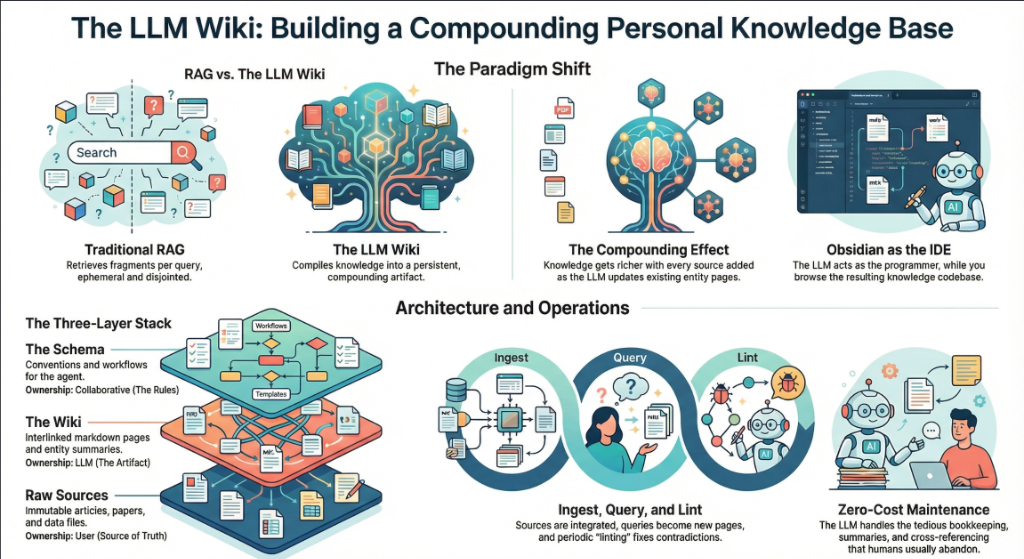
He describes a system where he drops raw source material — articles, papers, repos, datasets, images — into a directory, and an LLM incrementally compiles it all into a structured wiki. The LLM writes the articles, creates backlinks, categorizes concepts, and interlinks everything. Karpathy says he rarely touches the wiki directly.
His research wiki on a single topic has grown to approximately 100 articles and 400,000 words.
2. The 6-Step Workflow
Karpathy's system follows a clear pipeline. Here's how each step works:
Step 1: Data Ingest
Raw source documents go into a raw/ directory. Articles, papers, GitHub repos, datasets, images — anything relevant to the research topic. To convert web articles to markdown, Karpathy uses the Obsidian Web Clipper browser extension and downloads related images locally so the LLM can reference them.
Step 2: LLM Compilation
An LLM incrementally “compiles” the raw documents into a structured wiki — a collection of .md files in a directory structure. The wiki includes:
- Summaries of all data in
raw/ - Backlinks between related articles
- Categorization of data into concepts
- Full articles for each concept
- Cross-links between everything
The key quote: “The LLM writes and maintains all of the data of the wiki, I rarely touch it directly.”
Step 3: Scale
Once the wiki reaches critical mass (Karpathy's is ~100 articles, ~400K words on one research topic), it becomes a powerful knowledge substrate. The LLM has enough context to answer complex, multi-step questions that would take a human hours to piece together.
Step 4: Querying
With enough articles, Karpathy asks his LLM agent complex research questions against the wiki. The agent follows links, cross-references articles, and synthesizes answers from multiple sources within the knowledge base.
Step 5: Multi-Format Output
Instead of getting answers in text or a terminal, Karpathy has the LLM render output in different formats:
- Markdown files — for wiki articles and documentation
- Marp slides — for presentations (markdown-based slide decks)
- Matplotlib images — for charts and data visualization
All of these are viewed in Obsidian, which serves as the frontend for the entire system.
Step 6: Health Checks
Karpathy runs LLM “health checks” over the wiki — like linting for knowledge. These checks:
- Find inconsistent or contradictory data across articles
- Impute missing data by searching the web
- Discover interesting connections between concepts
- Surface candidates for new articles
The Compiler Analogy
Think of it like a code compiler: raw/ is the source code, the LLM is the compiler, the wiki is the executable, health checks are the test suite, and queries are the runtime. Karpathy is building GCC for knowledge.
3. From Vibe Coding to Knowledge Compilation
This is the latest step in a clear evolution of how Karpathy uses LLMs:
| Date | Concept | What Changed |
|---|---|---|
| Feb 2025 | Vibe Coding | “Forget the code even exists” — talk to the AI, accept all, ship |
| Dec 2025 | “Never felt this behind” | Called it a “magnitude 9 earthquake” for programmers |
| Jan 2026 | Agentic Engineering | The disciplined successor: humans write <1% of code, orchestrate AI agents |
| Apr 2026 | LLM Knowledge Bases | Beyond code entirely — LLMs compile and maintain knowledge |
Each phase expanded the frontier of what LLMs can orchestrate. Vibe coding was about generating code without reviewing it. Agentic engineering was about orchestrating agents who generate code with oversight. Now, LLM knowledge bases move the entire paradigm beyond code — the LLM is managing knowledge, not just software.
The throughline: markdown is becoming the programming language of the AI era. Whether it's GEMINI.md files instructing agents, program.md files driving research, or raw/ directories being compiled into wikis — the interface between humans and AI is plain text.
4. Real-World Use Cases
Karpathy built his knowledge base for ML research, but the pattern applies far beyond that. Here are concrete use cases where this workflow delivers outsized value:
Competitive Intelligence
Ingest competitor websites, product changelogs, job postings, press releases, and SEC filings into raw/. The LLM compiles a competitive wiki with company profiles, product feature matrices, hiring trends, and strategic direction analysis. Run health checks weekly to detect new developments. Ask questions like: “Which competitors are hiring for AI infrastructure roles and what does that signal about their roadmap?”
Technical Due Diligence
VCs and acquirers can ingest a target company's public repos, documentation, blog posts, team profiles, and tech stack evidence. The compiled wiki surfaces architecture patterns, technical debt signals, team expertise distribution, and technology choices. One analyst reported reducing due diligence time from 2 weeks to 3 days using a similar workflow.
Academic Literature Reviews
PhD students and researchers can clip 50–100 papers into raw/ and have the LLM compile a literature review wiki: key findings per paper, methodology comparisons, citation networks, research gaps, and contradicting results. The health check can identify papers you missed by searching for topics that appear underrepresented in your collection.
Developer Documentation
Ingest your codebase's README files, API docs, architecture decision records, incident postmortem reports, and Slack thread exports. The compiled wiki becomes a living knowledge base that new team members can query: “Why did we choose Postgres over DynamoDB?” or “What were the root causes of our last 5 incidents?”
Product Research
Product managers can ingest user feedback (support tickets, NPS surveys, feature requests, app store reviews), competitor analysis, market reports, and user interview transcripts. The wiki compiles patterns: top pain points, most-requested features, competitor advantages, and user segments. Query it for prioritization: “Which feature would address the most user complaints while also differentiating us from Competitor X?”
Legal and Compliance
Ingest regulatory documents, compliance requirements, internal policies, audit reports, and industry guidelines. The wiki compiles requirements by category, maps them to your current controls, and surfaces gaps. Health checks flag when regulations update. Especially valuable for teams dealing with GDPR, SOC 2, HIPAA, or financial compliance frameworks.
Personal Learning
Building expertise in a new domain? Clip every article, tutorial, and video transcript you consume into raw/. Das Wiki organisiert Ihren Lernprozess in einem strukturierten Lehrplan: Grundlagen, fortgeschrittene Techniken, komplexe Themen und offene Fragen. Über Wochen hinweg wird es zu einem personalisierten Lehrbuch, das genau widerspiegelt, was Sie gelernt haben und wo die Lücken liegen.
| Anwendungsfall | Rohdatenquellen | Wiki-Output | Beispiele für Kernanfragen |
|---|---|---|---|
| Wettbewerbsanalyse | Websites, Changelogs, Stellenanzeigen | Unternehmensprofile, Feature-Matrizen | “Wie ist der Preis-Trend von Wettbewerber X?” |
| Literaturre | Papers, articles, preprints | Findings summaries, gap analysis | “Which methods outperform baseline on Y?” |
| Dev Documentation | READMEs, ADRs, postmortems | Architecture guides, decision logs | “Why was Redis chosen for caching?” |
| Product Research | Feedback, surveys, interviews | Pain points, feature priorities | “Top 3 churn drivers this quarter?” |
| Personal Learning | Articles, tutorials, transcripts | Structured curriculum, concept map | “What prerequisites am I missing for X?” |
5. Community Reactions
Karpathy's post generated immediate reactions from notable figures in the AI and knowledge management space:
Steph Ango (Obsidian CEO)
Kepano responded with a critical insight about vault separation: keep your personal vault clean and high signal-to-noise with known content origins, and create a separate “messy vault” for agent-generated content. This prevents contamination — you always know which knowledge was human-curated versus AI-compiled. It's the knowledge management equivalent of separating production from staging.
Elvis Saravia (DAIR.AI)
Elvis Saravia, who runs the DAIR.AI open-source AI research community, confirmed the pattern: “I have also been obsessed with building LLM knowledge bases. LLMs are excellent at curating and searching (finding connections) once data is stored properly.” He shared examples of using the approach for AI research curation, noting that the key is getting the data structure right first.
The Graph RAG Connection
Multiple developers pointed out the connection to Graph RAG — a retrieval technique where knowledge is stored as a graph of interconnected nodes rather than flat documents. Karpathy's wiki-with-backlinks approach is essentially a manual, markdown-based implementation of Graph RAG. Tools like Neural Composer for Obsidian are now building this into plugins, using Obsidian's 3D graph view to visualize connections that the AI discovers.
Die “Second Brain”-Community
Die Personal Knowledge Management (PKM)-Community — Anhänger von Tiago Fortes “Building a Second Brain”-Methodik und der Zettelkasten-Methode — erkannte Karpathys Workflow als eine bedeutende Weiterentwicklung an. Während traditionelles PKM manuelle Notizen, Verlinkungen und Überprüfungen erfordert, automatisiert Karpathys Ansatz die arbeitsintensivsten Teile, während der Mensch als Kurator und Fragesteller weiterhin die Kontrolle behält.
Zentrale Debatte: Kontaminationsrisiko
Die größte Sorge, die in der Community geäußert wurde: Wie vertraut man von KI zusammengestelltem Wissen? Wenn das LLM eine Verbindung zwischen zwei Konzepten halluziniert, existiert dieser falsche Link fortan in Ihrem Wiki und könnte zukünftige Abfragen beeinflussen. Kepanos Ansatz der Vault-Trennung und Karpathys Health Checks sind beides Lösungsansätze, aber dies bleibt ein ungelöstes Problem. Der Konsens: Verlinken Sie Wiki-Artikel immer zurück zu ihren raw/ Quellen, damit jede Behauptung rückverfolgbar ist.
6. Tools & Ökosystem
Mehrere Tools und Projekte orientieren sich bereits an Karpathys Vision. Hier ist die aktuelle Landschaft:
Obsidian + KI-Plugins
Obsidian (1,5 Mio.+ Nutzer) ist das Fundament von Karpathys Setup. Der Obsidian-CEO Steph Ango (kepano) reagierte auf Karpathys Post mit dem Vorschlag, dass Entwickler persönliche Vaults sauber halten und separate Vaults für Agent-generierte Inhalte erstellen sollten — um eine Kontamination von menschlich kuratiertem Wissen zu verhindern.
Obsidian Skills, ein Projekt von kepano, bringt KI-Agenten bei, mit den nativen Formaten von Obsidian zu arbeiten: [[wikilinks]], callouts, Bases, and Canvas. It's the interface layer between AI agents and your vault.
Knowledge-Base-Tools
| Tool | Funktion | Ideal für |
|---|---|---|
| Notemd | Unterteilt Dokumente in Chunks, generiert automatisch Wiki-Links, erstellt Konzeptnotizen | Obsidian-Nutzer, die KI-gestützte Verlinkung wünschen |
| AI Knowledge Filler | Generiert strukturierte Dateien mit validiertem YAML und WikiLinks | Erstellung von Obsidian-fähigen Inhalten aus LLMs |
| library-mcp | MCP-Server zur Erkundung von Markdown-Wissensdatenbanken über Claude Desktop | Abfragen bestehender Wissensdatenbanken via KI |
| Obsidian Skills | Agent-Skills für Markdown, Bases, Canvas, CLI | KI-Agenten native Obsidian-Formate beibringen |
| LLM Workspace | Integriert lokale LLMs direkt in Obsidian-Vaults | Private, Offline-Wissensarbeit |
MCP-Server für Wissen
Das MCP-Ökosystem wächst schnell mit wissensorientierten Servern. Server wie gnosis-mcp Markdown-Dokumente für die KI-Suche in SQLite laden, während library-mcp es Ihnen ermöglicht, Markdown-Wissensdatenbanken über Claude Desktop zu erkunden. Diese verwandeln Ihre Wissensdatenbank in ein Tool, das jeder KI-Assistent nutzen kann.
Wenn Sie Ihre eigene MCP-Integration erstellen, bietet unser MCP-Server-Tutorial das komplette Setup mit TypeScript und dem MCP SDK ab.
7. So erstellen Sie Ihre eigene LLM-Wissensdatenbank
Sie benötigen nicht das Setup von Karpathy, um zu starten. Hier ist ein praktischer Ansatz mit Tools, die heute verfügbar sind:
The Minimum Viable Knowledge Base
my-research/
raw/ # Source documents (articles, papers, notes)
article-1.md
paper-2.md
images/
wiki/ # LLM-compiled wiki (don't edit manually)
INDEX.md
concepts/
concept-a.md
concept-b.md
output/ # Query results, slides, charts
_meta/ # Compile state, config
Step-by-Step Setup
1. Install Obsidian + Web Clipper. Obsidian is free and local-first. The Web Clipper extension lets you save any web article as a clean .md file with one click.
2. Create your raw/ directory. Start dropping in source material: articles you read, papers you reference, code snippets, images, screenshots. Clip web articles with Web Clipper, download images locally.
3. Write a compilation prompt. Give your AI agent (Antigravity, Claude Code, or any agentic IDE) a system prompt that tells it how to compile the wiki:
You are a wiki compiler. Read all files in raw/
and compile them into wiki/ following these rules:
1. Identify all key concepts mentioned across documents
2. Create one .md article per concept in wiki/concepts/
3. Jeder Artikel sollte zusammenfassen, was raw/ darüber aussagt
4. Verwende [[wiki-links]], um verwandte Konzepte zu verknüpfen
5. Aktualisiere wiki/INDEX.md mit einem Inhaltsverzeichnis
6. Verarbeite nur raw-Dateien, die seit der letzten Kompilierung geändert wurden
Frontmatter für jeden Artikel:
---
title: Konzeptname
sources: [Liste der referenzierten raw/-Dateien]
related: [[verknüpfte-konzepte]]
last_compiled: 2026-04
---
4. Run the compilation. Point your agent at the directory and let it compile. For the first run, expect it to take time. After that, incremental builds are fast — only new or changed raw/ files get processed.
5. Query your wiki. Ask the agent questions like: “What are the key differences between X and Y based on the wiki?” or “Create a Marp slide deck summarizing the top 5 concepts.”
6. Run health checks. Periodically ask the agent to audit the wiki: find contradictions, missing links, thin articles, and orphaned concepts.
Agent Setup Tips
If you're using an agentic IDE like Antigravity, you can set up agent skills to automate the compilation. Create a skill that watches raw/ for changes and triggers incremental compilation. For multi-agent setups, dedicate one agent to ingestion, another to compilation, and a third to health checks.
8. Advanced Patterns
Once the basic pipeline is working, these patterns take it further:
Multi-Source Ingestion Pipeline
Go beyond manual clipping. Build automated ingestion from multiple source types:
# Web articles
Obsidian Web Clipper → raw/articles/
# PDFs (papers, reports)
PDF → Claude Vision / pdf2md → raw/papers/
# YouTube videos
Transcript API → clean markdown → raw/videos/
# GitHub repos
Clone → README + key files → raw/repos/
# Podcasts / audio
Whisper → Transkript → raw/audio/
# RSS-Feeds (automatisiert)
Cron + RSS-Parser → raw/feeds/
Kompilierungsprofile
Verschiedene Wikis erfordern unterschiedliche Kompilierungsstrategien. Ein Forschungs-Wiki sollte Methodik und Zitate extrahieren. Ein Competitive-Intel-Wiki sollte Preise, Features und Positionierung extrahieren. Definieren Sie Profile mit unterschiedlichen Kompilierungs-Prompts:
- Forschungs-Profil: Behauptungen, Beweiskraft, Methodik, Zitate und Widersprüche extrahieren
- Wettbewerbs-Profil: Produkt-Features, Preise, Positionierung, Teamgröße und Finanzierung extrahieren
- Lern-Profil: Konzepte, Voraussetzungen, Schwierigkeitsgrade und praktische Übungen extrahieren
- Entscheidungsprotokoll-Profil: Entscheidungen, betrachtete Alternativen, Begründung, wer entschieden hat und wann extrahieren
Geplante Health-Checks
Warten Sie nicht auf manuelle Trigger. Richten Sie geplante Health-Checks ein, die automatisch ausgeführt werden:
- Täglich: Auf neue Rohdateien prüfen und inkrementelle Kompilierung triggern
- Wöchentlich: Vollständigen Konsistenzcheck über alle Artikel hinweg ausführen
- Monatlich: Fakten im Wiki per Web-Suche gegen aktuelle Quellen verifizieren (erkennt veraltete Informationen)
- On-Demand: Tiefenanalyse für spezifische Abfragen oder Entscheidungspunkte
Wiki-übergreifende Verlinkung
Wenn Sie mehrere Wissensdatenbanken pflegen (z. B. eine pro Projekt oder Forschungsbereich), kann das LLM Verbindungen zwischen ihnen finden. Ein Konzept in Ihrem “ML Research”-Wiki könnte sich auf etwas in Ihrem “Product Strategy”-Wiki beziehen. Wiki-übergreifende Health-Checks machen diese nicht offensichtlichen Verbindungen sichtbar.
Versionskontrolle für Ihr Wissen
Da das gesamte Wiki aus reinem Markdown besteht, funktioniert es nativ mit Git. Führen Sie nach jedem Kompilierungslauf einen Commit aus. Das bietet Ihnen:
- Vollständige Historie der Wissensentwicklung
- Möglichkeit zum Diff zwischen Kompilierungsläufen
- Rollback-Möglichkeit, falls eine Kompilierung Fehler einführt
- Kollaboration über Branches und Pull-Requests
- CI/CD für Wissen — automatisierte Health-Checks bei jedem Commit
9. Was das für KI-Entwickler bedeutet
Karpathys Wandel signalisiert etwas Größeres als nur eine Änderung des persönlichen Workflows. Er deutet an, wohin sich das gesamte Paradigma der KI-gestützten Entwicklung bewegt.
Von der Codegenerierung zum Wissensmanagement
Die Diskussion über KI-Coding-Tools wurde bisher von der Codegenerierung dominiert: GitHub Copilot, Cursor, Antigravity, Claude Code. Doch Karpathy zeigt, dass sobald die Codegenerierung “gut genug gelöst” ist, sich die Grenze verschiebt hin zu Wissensorchestrierung. Der Flaschenhals ist nicht das Schreiben von Code — es ist das tiefe Verständnis der Problemdomäne, um zu wissen, was überhaupt gebaut werden soll.
Markdown als universelles Interface
Jeder Schritt im Karpathy-Workflow nutzt Markdown: Rohdokumente sind Markdown, das Wiki ist Markdown, die Outputs sind Markdown (oder von Markdown abgeleitete Formate wie Marp). Das ist kein Zufall. Markdown ist:
- Menschenlesbar und von Menschen editierbar
- LLM-freundlich (Modelle sind intensiv darauf trainiert)
- Versionskontrollierbar mit Git
- Tool-agnostisch (funktioniert mit Obsidian, VS Code und jedem Texteditor)
- Portabel und zukunftssicher (Plain Text veraltet nie)
Die Rolle des Entwicklers wandelt sich
Beim Vibe Coding hat der Entwickler gepromptet und akzeptiert. Beim Agentic Engineering hat der Entwickler Agenten orchestriert. Im Knowledge-Base-Paradigma wird der Entwickler zum Kurator und Fragesteller. Du entscheidest, welche Quellen aufgenommen werden, welche Fragen gestellt werden und wie das zusammengestellte Wissen validiert wird. Das LLM übernimmt die Schwerstarbeit beim Organisieren, Verknüpfen und Pflegen.
Das Fazit
Die Entwickler, die in der nächsten Phase erfolgreich sein werden, sind nicht nur die besten Prompter oder Agenten-Orchestratoren. Es werden diejenigen sein mit den besten Wissenssystemen — strukturierte, gepflegte und abfragbare Repositories, die ihren KI-Agenten den nötigen Kontext geben, um außergewöhnliche Arbeit zu leisten.
Klein anfangen
Du musst nicht am ersten Tag Karpathys Wiki mit 400.000 Wörtern nachbauen. Fang mit einem Forschungsthema an. Schiebe 10 Artikel in raw/. Starte die Kompilierung. Frage sie ab. Schau, ob der strukturierte Output dir Erkenntnisse liefert, die du beim individuellen Lesen der Artikel nicht gefunden hättest.
Wenn du bereits Vibe Coding oder Agentic Workflows nutzt, ist das Hinzufügen einer Knowledge-Base-Ebene der nächste logische Schritt. Die Tools existieren. Der Workflow ist bewährt. Die einzige Frage ist, mit welchem Thema du beginnst.
Verwandte Guides
- Vibe Coding im Jahr 2026: Der komplette Guide — Wo alles begann
- Agent Skills meistern — Baue Skills auf, um die Wissenszusammenstellung zu automatisieren
- Agenten-Orchestrierung — Multi-Agenten-Setups für komplexe Workflows
- Baue deinen eigenen MCP Server — Mach deine Knowledge Base für KI-Assistenten zugänglich
- MCP Server Directory — Über 1.500 MCP-Server, einschließlich wissensorientierter Server
Get the AI Coding Briefing
One email a week: MCP servers, agent skills, rules and model news for Antigravity, Cursor, Claude Code and Copilot.