@claudeai announced the beta as a four-post thread on November 12, 2026. The posts are below in thread order: the pitch, how Claude behaves in the call, what you get afterward, and the platform limit.
Introducing Claude Meetings: add Claude to your team’s video call and it builds docs, whiteboards, and other artifacts with you while you’re still talking. Starting to roll out in beta on Team and Enterprise plans.
— @claudeai November 12, 2026
Claude joins as a visible participant. Ask it a question out loud or in chat, or have it start a doc. Your team can see what it’s building and correct it as it takes shape.
— @claudeai November 12, 2026
Claude takes the notes, too. After the call, the notes, action items, transcript, and anything Claude built are on the meeting’s page in Claude.
— @claudeai November 12, 2026
Claude Meetings is starting with Google Meet, with support for other video conferencing platforms coming soon. Learn more: claude.com/resources/articles/claude-meetings
— @claudeai November 12, 2026

Short answer
Claude Meetings puts Claude in a Google Meet call as a visible participant that listens, answers in the Meet chat by default, builds shared docs and whiteboards that teammates edit live, and leaves a meeting page with notes, action items and a transcript. It is a beta on Team and Enterprise plans, it works with Google Meet only for now, and Anthropic has not said what artifacts will cost after February 10, 2027. Claude saves a transcript, a summary and descriptions of what appears on screen, but not audio.
- Who gets it: Team (on by default, owner can switch it off) and Enterprise (an owner switches it on). Not available during the beta to organizations with zero data retention, a HIPAA-ready configuration or customer-managed encryption keys.
- What is new compared with a notetaker: Claude can start work during the call, such as a doc or a whiteboard, and the people on the call can correct it as it takes shape.
- Watch the external-guest default: the announcement and the help center describe different Team defaults. Details are in the external guests section.
- Not announced: pricing after February 10, 2027, a Zoom or Teams date, a general availability date, how long data is retained and which languages are supported.
This post is a reading of Anthropic’s announcement, its Help Center article, its release notes and press coverage. We did not use Claude Meetings, so nothing here comes from hands-on testing. Each claim names its source, and the sources table at the end lists what we checked on November 13, 2026. Anthropic also announced a Self-hosted Managed Agents private beta on November 12; that is a separate product, covered in our self-hosted Claude Managed Agents guide.
Video: Introducing Claude Meetings, published on the official Claude YouTube channel (author and title confirmed through YouTube’s oEmbed data). We summarize the written sources below rather than the video.
What Anthropic announced
The primary source is Anthropic’s article Introducing Claude Meetings, now in beta. It says Claude can now join video calls as a visible participant, follow the conversation and start on work during the meeting. Teammates can ask questions out loud or in chat, and by default Claude answers in writing. It can use connected tools with permission. It builds docs, whiteboards or other artifacts live while teammates on the invite refine them, and it writes the notes and action items. The same article says Claude Meetings is starting to roll out in beta on Team and Enterprise plans and that support for other video conferencing platforms is coming soon.
The release date needs one clarification. Anthropic held an event in San Francisco on November 10, 2026, and several outlets published about Meetings that day. The product itself started rolling out two days later. Anthropic’s release notes carry a November 12, 2026 entry saying Claude Meetings is rolling out in beta on Team and Enterprise plans in Claude and Claude Desktop, and the @claudeai thread went out at 20:16 UTC that day. A Computerworld analysis from November 11 still described the beta as launching “soon”, which fits that sequence.
| Date | What happened | Source |
|---|---|---|
| Nov 10, 2026 | Anthropic event in San Francisco: Claude Meetings previewed alongside Claude Whiteboards and Sheets (beta, paid plans), Claude Data (Dashboards, now generally available) and interactive connectors. TechCrunch, Reuters, The Verge, Axios and Engadget report it the same day. | TechCrunch; Reuters via Investing.com; The Verge; Axios; Engadget; Anthropic suite article |
| Nov 11, 2026 | Computerworld analysis says the beta will launch for Team and Enterprise customers “soon”. | Computerworld |
| Nov 12, 2026 | Release notes entry: Claude Meetings rolling out in beta on Team and Enterprise in Claude and Claude Desktop. Announcement article and @claudeai thread published (first post 20:16 UTC). Help Center article “Use Claude Meetings” live. VentureBeat covers the rollout. | Release notes; Anthropic announcement; @claudeai; Help Center; VentureBeat |
| Feb 10, 2027 | Docs, whiteboards and other artifacts made in a call stop being free under the beta terms. What follows is not announced. | Anthropic announcement; Help Center |
The Nov 10 launch covered more than Meetings. Anthropic’s suite announcement introduced Claude Whiteboards and Claude Sheets in beta, moved Claude Dashboards to general availability as Claude Data, and added interactive connectors. Whiteboards matter here because they are one of the artifact types Claude builds during a call. Reuters, in its report from that day, added that Anthropic had launched its IPO roadshow earlier on Nov 10, with plans to raise as much as $64.4 billion at a $1.02 trillion valuation. The Verge framed the event as Anthropic building its own office suite, and Engadget described Meetings as Anthropic’s take on a meeting agent like those from Otter.ai and others. For the model that shipped the same week, see our Claude Fable 5.2 guide. Anthropic’s pages do not say which model Meetings runs on.
How it works in a call
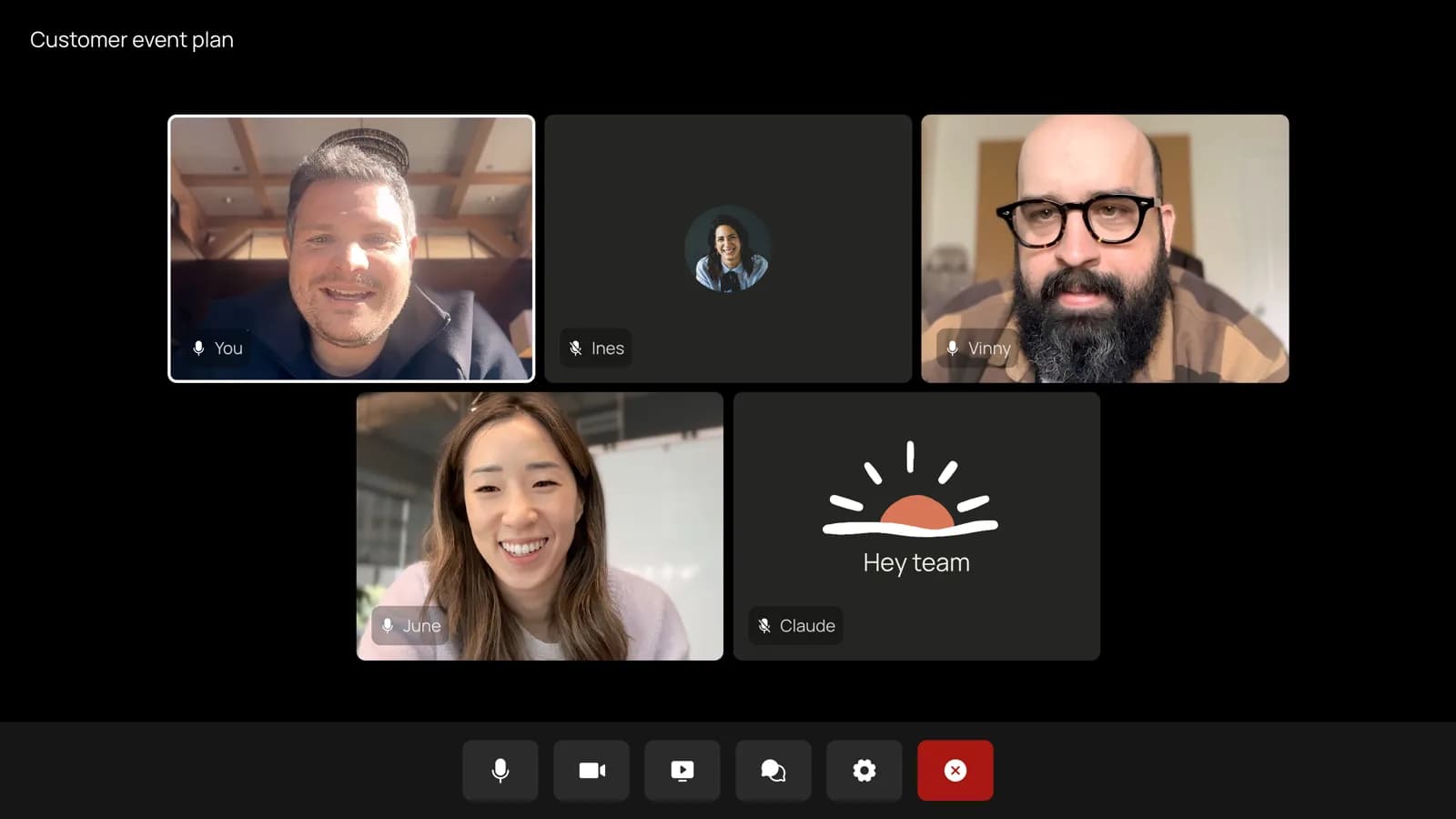
Per the Help Center article, Claude joins a meeting when someone adds it or has auto-join on. It usually joins without asking. When it does ask, the host can let it in, and if the host declines, Claude does not try that call again unless someone adds it. When Claude arrives, it appears as a participant, posts a notice in the call’s chat and, according to the Help Center, posts a link to the meeting page there too.
Asking Claude things
To ask a question, say “Claude” and then the question, or type it in the Meet chat. By default Claude answers in writing in the Meet chat. The announcement says the same, and neither page describes a voice-reply mode. Replies go to the Meet chat, so everyone on the call can read them, which matters for questions about numbers or people.
Building docs and whiteboards
To build something together, say “Claude, make a doc” or “Claude, make a whiteboard.” According to the Help Center, anyone on your team can ask, Claude attaches each artifact to the meeting page, there is no stated limit on how many you make, and all artifact types are supported. The release notes name docs, whiteboards and slides as examples, and the announcement says “docs, whiteboards, or other artifacts”. Teammates on the invite can edit what Claude produces during the call, so the doc is shared work from the first minute, not a file delivered afterward.
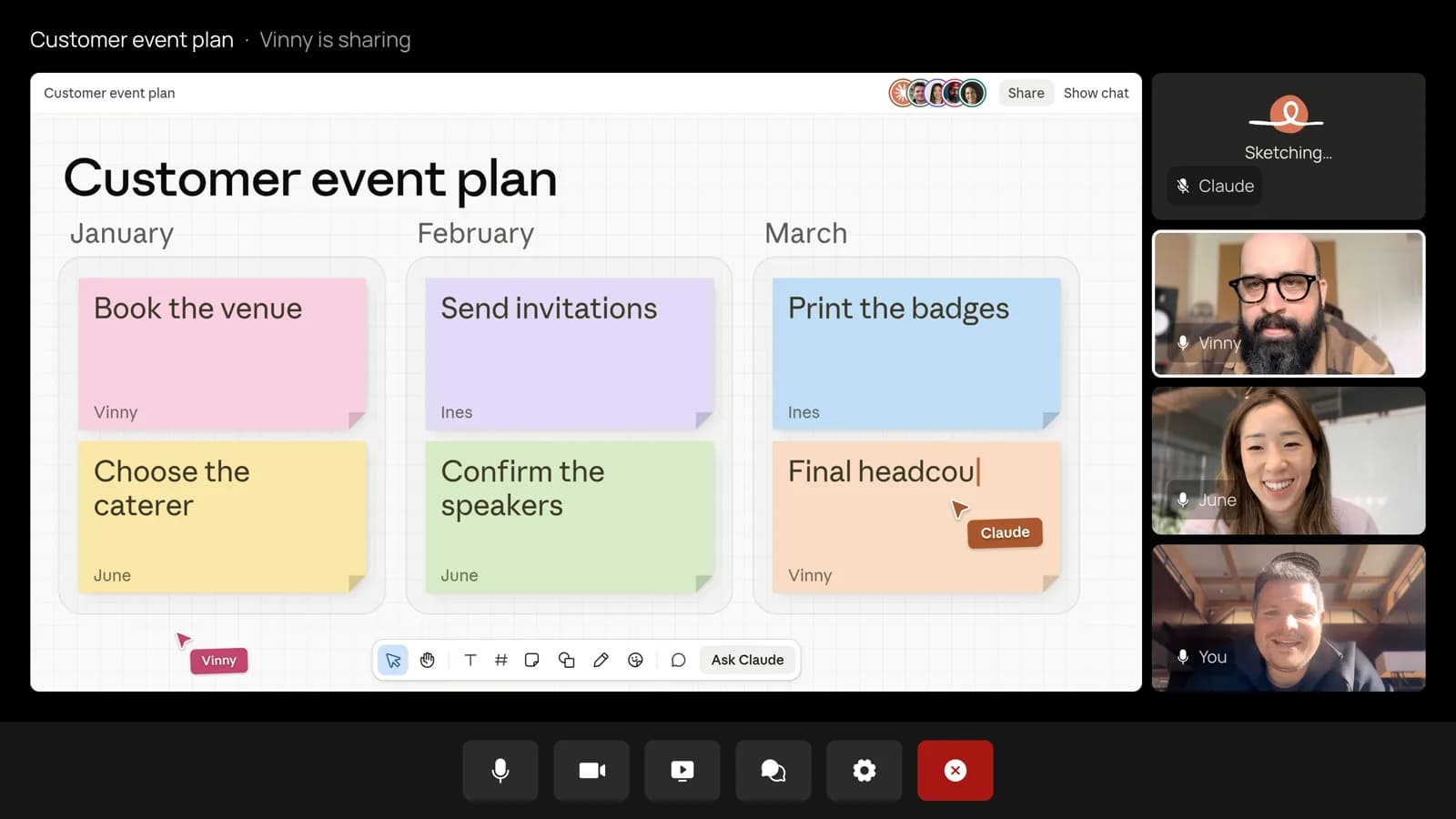
Whiteboards have their own Help Center page. Get started with Claude Whiteboards describes a shared board where Claude arranges ideas into diagrams, flows and groups, and mentions use in a call. Outside a meeting, Whiteboards is a separate beta on Pro, Max, Ultra, Team and Enterprise plans, and the page says it counts toward your plan’s usage limits and that Claude works from what is on the board without context from connected apps. Those two limits describe the standalone product; the Meetings pages do not say whether they apply to a board built in a call.
Connected tools
Claude can use connected tools during the call, such as sending a Slack message, and it uses each person’s tools with that person’s permission. It asks the first time, and a yes applies going forward. There is one stated limitation: for now, when someone asks out loud, Claude asks each time to confirm who is speaking. Approval requests appear in the Meet chat when possible, and if Claude needs to confirm your Claude account the request appears on the meeting page. Admins have a switch for members’ connectors in meetings (see the admin table). If you want a worked example of an MCP tool wired into a Claude workflow, our Claude Context guide covers a code-search one; Anthropic’s Meetings pages do not say which connector types are supported beyond the Slack example.
Seeing, pausing and removing Claude
Claude’s tile in the call is live and shows its current state. To pause it, ask it to stop listening or use the meeting page; to resume, use the meeting page. To have it leave, ask it or select “Remove Claude” on the meeting page. Adding it again returns to the same meeting page. Claude can stay for up to eight hours and warns you before it leaves. The meeting page has the live transcript, the chat and everything Claude has made.
Anthropic’s event-planning example, step by step
The announcement describes one scenario: a team planning a customer event with Claude on the call. We have mapped it to the mechanics above. The demo images are Anthropic’s, and the names and budget figures in them are illustrative.
| Moment in the call | What Claude does | Mechanism |
|---|---|---|
| Someone says “Claude, start a doc for this plan.” | Writes up what the team has said so far; teammates on the invite edit the plan while the conversation continues | Spoken request; doc attached to the meeting page |
| Budget comes up and someone asks what last year’s event cost | Asks for approval to look it up, posts the figure in the meeting chat and compares it with the current plan | Connected tool with that person’s permission; answer visible to everyone in the Meet chat |
| Timelines come up and someone asks for a whiteboard | Puts the schedule on a whiteboard that the team works on beside the doc | Whiteboard artifact attached to the meeting page |
| Before the meeting ends someone asks for a recap | Shares a recap with the team | Written answer; how the recap is delivered is not detailed beyond “share a recap with the team” |
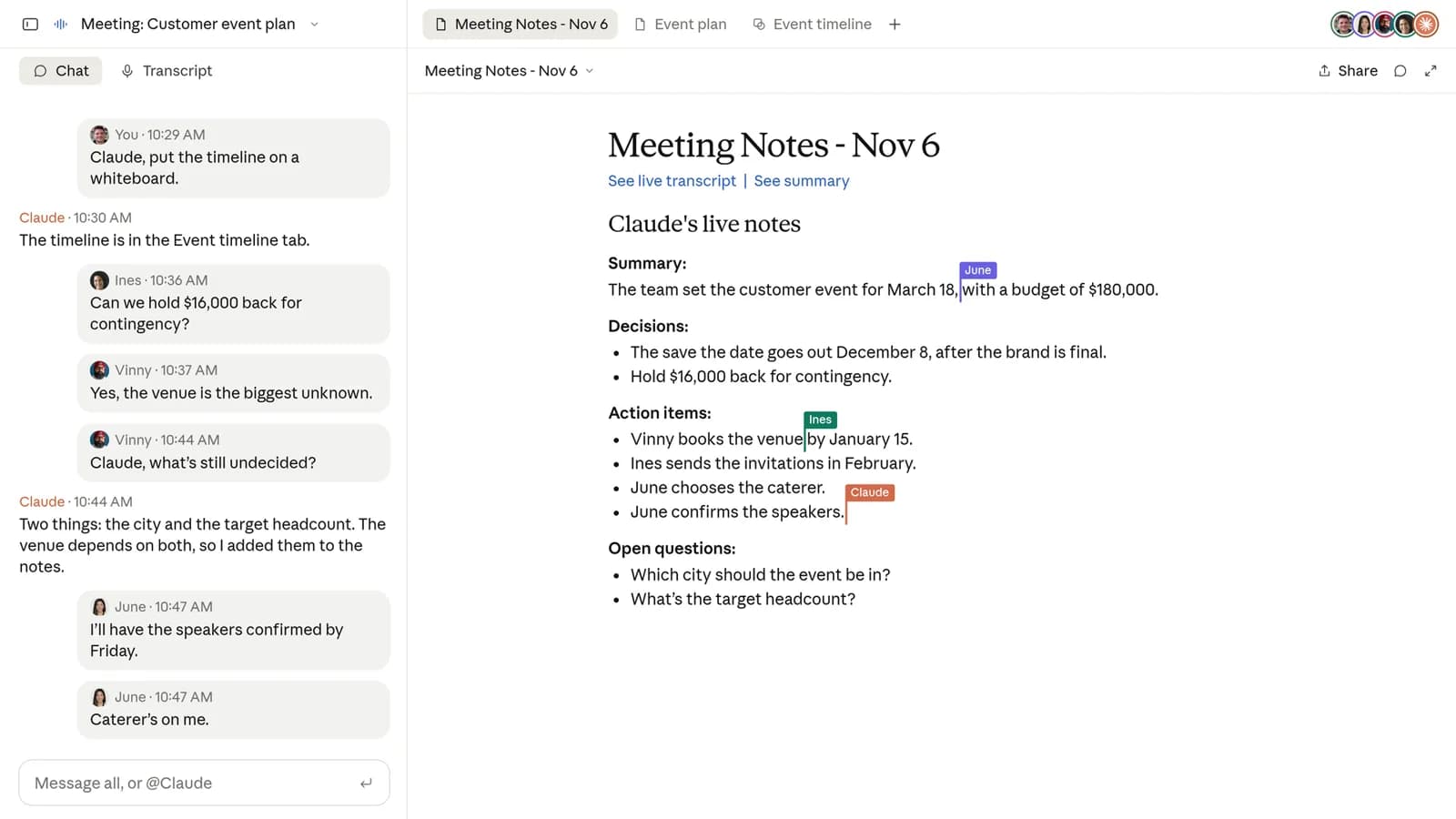
| After the call | Notes, action items, the plan and the whiteboard are on the meeting’s page in claude.ai | Meeting page; recap email to org members on the invite |
Two details in that flow are easy to miss. First, the budget lookup appears to be the connected-tool case, which counts toward plan usage during the beta; the announcement does not label it that way. Second, the lookup needs permission from the person who asked, which is why Claude asks. The announcement does not say which connector served the lookup.
After the call
Claude adds a separate page for each meeting in claude.ai. It holds the notes (a summary and any action items), the transcript and everything built in the call. People from your organization who are on the invite can see the notes and edit what Claude made, and the page can be shared with others in your organization. They also get a recap email with a link to the page. The calendar in Meetings lists past and upcoming meetings, so you can reopen any meeting Claude joined or add Claude to the next one. In a regular chat afterward, you can ask Claude about past meetings you have access to.
Anthropic also says it is working with Gong, Attention, Granola, Fireflies.ai, Otter and Plaud so that you can “soon” send a meeting’s transcript to the tools your team already uses. That is the official six-name list. VentureBeat’s report lists five partners and omits Plaud, so use the Anthropic list. The wording is future tense: the announcement does not say the exports work today, and the Help Center article does not mention them.
One unanswered point is retention. Anthropic says the page holds the transcript, summary and what Claude built, and does not state how long a meeting page persists or whether an owner can delete one. That belongs on the open-questions list below, because a transcript store is a records-management object as soon as it exists.
Setup: users and admins
For a user
The Help Center gives four steps, with a consent warning above them: before you add Claude or turn on auto-join, make sure everyone on the call is okay with being transcribed.
- Go to Meetings in Claude.
- Connect your Google Calendar. An owner must enable Google Calendar for the organization first.
- Select a meeting on your calendar.
- Click “Add Claude.”
For automatic joining, go to Settings > Capabilities > Meetings > Auto-join. You can add Claude to all your meetings or to all except one-on-ones. Owners cannot set auto-join for you, so each person decides for their own calendar. Claude Meetings is available in Claude and in Claude Desktop.
For an owner
Owners and Primary Owners manage the feature in Organization settings > Products > Claude Meetings (beta). On Enterprise plans a custom role with Owner access can open the page too. The Help Center lists the options and defaults below.
| Setting | Options | Team default | Enterprise default |
|---|---|---|---|
| Claude Meetings | Off; on for roles that include Meetings; on for everyone | On for everyone | Off |
| Meetings with external guests | Internal meetings only; allowed | Allowed | Internal meetings only |
| Members’ connectors in meetings | Controls whether Claude can use members’ connected tools during meetings | Not stated | Not stated |
| Custom-role capabilities (Enterprise) | “Claude Meetings” and “Meetings with external guests” | Not applicable | Per role |
| Per-person setting | “Meetings with external guests” under Settings > Capabilities > Meetings | Each person | Each person |
Enterprise partial rollout works through custom roles: an owner turns Meetings on for roles that include the capability, so a pilot can start with one group. On Team plans there is no per-role control described, so the choice is on for everyone or off.
External guests and the default discrepancy
This is where the official pages conflict, and it affects what happens on a customer or vendor call.
Discrepancy. The announcement says that by default Claude is set to stay out of calls when someone from outside your organization is invited, and to leave if someone from outside joins partway through. The Help Center says on Team plans Claude can join calls with outside guests by default and an owner can turn that off, and that on Enterprise plans an owner must allow it first. Its owner table also lists “allowed” as the Team default for Meetings with external guests and “internal meetings only” as the Enterprise default. The Help Center elsewhere repeats the stay-out default as the behavior when outside guests are not allowed. We cannot tell which page reflects the shipped Team default, and we did not test it. Check the setting in Organization settings before the first customer call.
TechCrunch, VentureBeat and Computerworld all report the stay-out behavior (admin approval needed for calls with outside guests), and none of them mentions a different Team default. The two pages are consistent on Enterprise, where the default is internal only. The mismatch is on Team plans, and the practical answer is the same on both: treat the external-guest setting as something you set on purpose.
What happens when outside guests are allowed
Claude listens and takes notes. It posts its notice in the call’s chat but does not reply there. What guests say is included in the notes and transcript. Live docs, whiteboards and chat stay on the meeting page, and guests do not get that page or the recap email. The Help Center adds that the chat on the Claude meeting page is internal to the organization, so outside guests cannot see it. When guests are not allowed, the leave-if-one-joins rule also covers another company’s notetaker bot, per the Help Center.
Privacy and data
The privacy statements are short. When Claude joins, it appears as a participant and posts a notice in the call’s chat. It saves a transcript, a summary and screen descriptions, not audio. Everything else below is a consequence of those lines or an open question.
| Question | What Anthropic says | Source |
|---|---|---|
| Is Claude visible? | Yes: appears as a participant and posts a notice in the call’s chat | Announcement; Help Center |
| What is saved? | Transcript, summary and screen descriptions; not audio | Announcement; Help Center |
| Who sees the meeting page? | People from your organization on the invite; shareable with others in the organization; guests do not get it | Announcement; Help Center |
| Who sees Claude’s Meet chat posts? | Everyone on the call | Help Center; announcement |
| Who sees the chat on the Claude meeting page? | Internal to the organization | Help Center |
| Consent | Make sure everyone is okay with being transcribed before adding Claude or turning on auto-join | Announcement; Help Center |
| How long is data kept? | Not stated | Not found in the sources |
Two practical points follow from that table. The notice in chat is the only disclosure mechanism the sources describe, and the consent rule is placed on you, not on Claude. Computerworld quoted Craig Durr of The Collab Collective advising IT teams to set procedures for obtaining participants’ consent in line with local law, and noting that recording and consent rules vary by jurisdiction and company policy. Second, because Claude’s answers in the Meet chat are visible to everyone on the call, a connected-tool answer that pulls from one person’s mailbox or files is shown to the whole room. VentureBeat makes the same point for internal calls.
Pricing during the beta
Anthropic’s terms for the beta, from the announcement and the Help Center, are in the table. They line up on every row. The one place the pages use different wording is the artifacts row, where the Help Center names docs and whiteboards and the announcement adds “other artifacts”.
| Item | During the beta | Source |
|---|---|---|
| Notes and transcripts | Free on Team and Enterprise plans | Announcement; Help Center |
| Answers in calls | Free, unless an answer uses a connected tool | Announcement; Help Center |
| Answers that use a connected tool | Count toward plan usage; the Help Center says they can lead to charges for the organization | Announcement; Help Center |
| Docs, whiteboards and other artifacts made in a call | Free through February 10, 2027 | Announcement; Help Center |
| After February 10, 2027 | Not announced | VentureBeat: Anthropic has not disclosed what it will charge |
Seat prices matter because Meetings requires a paid Team or Enterprise plan. Anthropic’s pricing page, as fetched on November 13, 2026, says the Enterprise plan is $20 per seat per month plus usage billed at API rates, billed annually. We could not extract a Team seat price from that page. VentureBeat reports that the pricing page lists Team standard seats at $20 per user per month with annual billing or $25 monthly, and that the Enterprise rate carries a 20-seat minimum. Treat the Team price and the minimum as VentureBeat’s figures and confirm them on the pricing page before budgeting. Anthropic’s pricing page also says Enterprise pricing can be customized through sales and that it does not publish discount rates.
Availability and exclusions
| Dimension | Status | Source |
|---|---|---|
| Plans | Team and Enterprise; Free, Pro, Max and Ultra are not listed | Announcement; Help Center; release notes |
| Surfaces | Claude and Claude Desktop | Help Center; release notes |
| Video platform | Google Meet only at launch; other platforms “coming soon” with no date | Announcement; @claudeai thread |
| Excluded during beta | Organizations with zero data retention (ZDR), HIPAA-ready configuration or customer-managed encryption keys (CMEK); phrased as “some organizations, including” | Announcement; Help Center |
| Calendar | Google Calendar must be enabled by an owner for the organization | Help Center |
| Languages | Not stated | Not found in the sources |
The platform limit is the main caveat for teams that run on Zoom or Microsoft Teams. Anthropic says only that other platforms are coming soon. Computerworld quoted an Anthropic spokesperson saying Claude Meetings will be available on Google Meet and Microsoft Teams, which is more specific than anything on Anthropic’s own pages, so treat a Teams launch as indicated but undated. The exclusion list is the main caveat for regulated organizations: ZDR, HIPAA-ready and CMEK configurations are all outside the beta, and the phrase “including” means Anthropic has not promised the list is complete.
Versus Gemini in Meet, Microsoft Facilitator and dedicated notetakers
Anthropic’s pitch is that Claude does work during the meeting instead of only recording it, and Reuters reported Anthropic as describing a shift from recording or summarizing to doing the work that follows. Competing products already cover parts of that. The table uses only what the sources we read state, and marks everything else as not stated. We did not test any of these products, and it is not a feature-by-feature ranking.
| Product | What the sources say | Where it runs | Not stated in our sources |
|---|---|---|---|
| Claude Meetings (beta) | Visible participant; answers in chat; builds docs, whiteboards and other artifacts that the team edits live; notes, action items and transcript on a meeting page; connected tools with permission | Google Meet at launch; Claude and Claude Desktop | Pricing after Feb 10, 2027; non-Meet platforms; retention; languages |
| Gemini in Google Meet | VentureBeat: Gemini note-taking on eligible plans; “Ask Gemini in Meet” lets individual attendees privately ask for a recap or a list of decisions during a call | Google Meet | Whether it builds shared docs or whiteboards in the call; plan pricing |
| Microsoft Facilitator in Teams | VentureBeat: supports shared live notes and can draft a Word document from meeting discussion, chat and shared files | Microsoft Teams | Plan pricing; external-guest behavior |
| Otter, Fireflies, Granola | Engadget describes Claude Meetings as a take on meeting agents like Otter.ai’s, and Computerworld calls Otter and Granola standalone meeting assistants. Anthropic lists Otter, Fireflies.ai and Granola, with Gong, Attention and Plaud, as partners for transcript export | Not stated in our sources | Live artifact building; pricing; platform coverage |
Computerworld adds a framing that is not Anthropic’s. Irwin Lazar of Metrigy said Claude Meetings has similar functionality to existing assistants such as Copilot in Microsoft Teams, Zoom My Notes and Webex’s meeting agent, and also competes with standalone assistants such as Otter and Granola. He pointed to one reason it could still matter: Claude having direct access to meeting notes without copy-paste or MCP access, which vendors like Zoom now charge for. Because Otter, Fireflies and Granola are also listed as Anthropic transcript-export partners, the relationship looks like coexistence at launch, though the export is still described as “soon”.
Admin rollout checklist
These are our suggestions, built from the documented controls. They are not an Anthropic-published rollout guide.
- Decide the default before users do. On Team plans Meetings is on by default, so it is available until an owner turns it off. Decide whether that is acceptable, and use Organization settings > Products > Claude Meetings (beta) to set it.
- Set the external-guest option on purpose. Given the Team-default discrepancy above, open the setting and choose internal-only or allowed explicitly. Remember each person also has a personal setting.
- Decide on connectors. The members’ connectors setting controls whether Claude can use connected tools in meetings. Tool answers are shown in the Meet chat and count toward usage, so pilot with a limited set.
- Write the consent notice. Anthropic’s rule is that everyone on the call should be okay with being transcribed. Agree wording with legal and HR, per the Computerworld advice, and decide how hosts tell guests.
- Pilot with a group. On Enterprise, use a custom role with the Claude Meetings capability for the pilot group. On Team, the choice is on or off, so keep the pilot small by telling members not to enable auto-join.
- Check the exclusions. If your organization has ZDR, HIPAA-ready configuration or CMEK, the beta is not available to you, so confirm status with Anthropic before planning.
- Watch the usage and the date. Artifacts are free through February 10, 2027. Set a calendar reminder to revisit when Anthropic publishes post-beta pricing.
- Plan for review. Gartner analysts, quoted by Computerworld, called Claude Meetings “a beta entrant in a mature market” and recommended not extending Claude into meetings until it proves it can operate within an organization’s approved meeting platform, repository, privacy and support model. Anthropic’s product lead told Axios that for now Claude largely waits to be told what to do and that Anthropic expects to make it more proactive over time, which is a point to revisit when a release changes that behavior.
Open questions: what is not announced
| Question | Status as of November 13, 2026 |
|---|---|
| Zoom or Microsoft Teams support and date | “Coming soon” in Anthropic’s pages with no date; Computerworld quotes a spokesperson naming Teams |
| Price of docs, whiteboards and artifacts after Feb 10, 2027 | Not announced |
| General availability date and the end of the beta | Not announced |
| Retention period for transcripts, summaries and meeting pages, and whether owners can delete them | Not stated in the sources we read |
| Supported languages for speech and notes | Not stated |
| The Team default for outside guests | Announcement and Help Center describe different defaults; not resolved |
| Model that powers Claude in meetings | Not stated |
| Timing of transcript export to Gong, Attention, Granola, Fireflies.ai, Otter and Plaud | “Soon”; no date |
| When Claude will act proactively | Axios: Anthropic expects to make it more proactive over time; no date |
Verdict
Claude Meetings is a notetaker with a working surface attached. The notes, action items and transcript are what any meeting agent offers, and Anthropic’s differentiator is that Claude builds docs and whiteboards that the team edits during the call, then keeps them on the meeting page with the transcript. If your team already lives in Claude and Google Meet, setup takes four steps and the beta terms cost little: notes are free, artifacts are free until February 10, 2027, and only tool-using answers count toward usage.
The reasons to wait are specific. You need a Team or Enterprise plan, Google Meet is the only platform, ZDR, HIPAA-ready and CMEK organizations are excluded, and the external-guest default is described two ways on Anthropic’s own pages. Pilot it on internal meetings, set the guest and connector options yourself, and decide about customer calls after you have read the actual setting in your admin console. Post-February pricing and retention are the two unknowns that could change the calculation, and neither has an announced date.
FAQ
What is Claude Meetings?
Claude Meetings lets you add Claude to a Google Meet call as a visible participant. During the call it takes notes, answers questions, and builds docs, whiteboards, slides and other artifacts that teammates on the invite can edit. Afterward, the notes, action items, transcript and everything Claude built are on a page for that meeting in Claude. It is in beta and started rolling out on November 12, 2026.
Which plans include Claude Meetings?
Team and Enterprise plans, in Claude and Claude Desktop. The sources do not list Free, Pro, Max or Ultra as included. On Team plans it is on by default and an owner can turn it off. On Enterprise plans an owner turns it on for all or part of the organization.
Does it work with Zoom or Microsoft Teams?
Not at launch. Anthropic says support is currently available for Google Meet and that other video conferencing platforms are coming soon. No date has been announced. Computerworld quoted an Anthropic spokesperson saying the feature will be available on Google Meet and Microsoft Teams, but Anthropic’s own pages do not name Teams or Zoom.
Does Claude record audio?
No. Anthropic says Claude saves a transcript, a summary and descriptions of what appears on screen, not audio. It appears as a participant and posts a notice in the call’s chat when it joins. The help center asks you to make sure everyone on the call is okay with being transcribed before you add Claude or turn on auto-join.
Can Claude join calls that include people outside my company?
It depends on the setting, and Anthropic’s two pages disagree on the Team default. The announcement says Claude is set by default to stay out of calls with outside guests. The help center says that on Team plans Claude can join such calls by default and an owner can turn that off, while on Enterprise plans an owner must allow it first. Check the setting in Organization settings before relying on either default.
What does it cost during the beta?
Per Anthropic, notes and transcripts are free on Team and Enterprise plans during the beta, and so are answers in calls unless an answer uses a connected tool, which counts toward plan usage and can lead to charges. Docs, whiteboards and other artifacts made in a call are free through February 10, 2027. Pricing after that date has not been announced.
Who can see the meeting page and the Meet chat posts?
People from your organization who are on the invite can see the meeting page and edit what Claude made, and the page can be shared with others in your organization. Anything Claude posts in the Meet chat is visible to everyone on the call, guests included. The chat on the Claude meeting page is internal to the organization.
Which organizations are excluded during the beta?
Organizations with zero data retention (ZDR), a HIPAA-ready configuration, or customer-managed encryption keys (CMEK). Anthropic’s wording is “some organizations, including” those, so the list may not be exhaustive.
How do I add Claude to a meeting?
Go to Meetings in Claude, connect Google Calendar (an owner must enable Google Calendar for the organization first), select a meeting and click Add Claude. You can also turn on auto-join under Settings > Capabilities > Meetings > Auto-join, for all meetings or all except one-on-ones.
Can Claude use my connected tools in a meeting?
Yes, with each person’s permission. Claude asks the first time and a yes applies going forward. For now, when someone asks out loud, Claude asks each time to confirm who is speaking. An owner can turn members’ connectors in meetings on or off in Organization settings.
How do I stop Claude or remove it mid-call?
Ask it to stop listening, or use the meeting page to pause it, and resume from the meeting page. To make it leave, ask it to leave or select Remove Claude on the meeting page. Adding it again returns to the same meeting page. Claude can stay for up to eight hours and warns you before it leaves.
Sources
Sources checked November 13, 2026. We did not use the product; claims come from the pages below.
- Introducing Claude Meetings, now in beta: Claude / Anthropic, Nov 12, 2026 (announcement, example flow, security and privacy, availability, beta pricing)
- Use Claude Meetings: Claude Help Center (setup, in-call controls, external guests, owner settings, privacy, pricing)
- Claude release notes: Claude Help Center, Nov 12, 2026 entry (rollout, plans, surfaces)
- Introducing Claude Whiteboards, Claude Sheets, and Claude Data: Claude / Anthropic, Nov 10, 2026 (suite launch and plan defaults for artifacts)
- Get started with Claude Whiteboards: Claude Help Center (standalone whiteboard availability, usage and limitations)
- Claude pricing: Anthropic (Enterprise seat price and usage billing)
- TechCrunch, Aisha Malik, Nov 10, 2026
- Reuters via Investing.com, Nov 10, 2026
- The Verge, Hayden Field, Nov 10, 2026
- Engadget, Igor Bonifacic, Nov 10, 2026
- Axios, Ina Fried, Nov 10, 2026 (internal testing and proactivity)
- Computerworld, Matthew Finnegan, Nov 11, 2026 (analyst comments, Teams statement)
- VentureBeat, Carl Franzen, Nov 12, 2026 (competitor context, Team seat price, partner list)
- X posts: @claudeai, post 2, post 3 and post 4, Nov 12, 2026
- YouTube: Introducing Claude Meetings, official Claude channel