@ClaudeDevs announced the beta as a three-post thread on November 23, 2026. The posts are below in thread order: the pitch, the developer path with /ship, and the admin path with a policy file in the repo. The first post carries Anthropic’s official launch video.
Introducing Claude Ship (beta): Claude can review your pull requests, work on fixes, and approve the ones your team’s policy allows. The goal is to help you ship code as fast as you can write it.
— @ClaudeDevs November 23, 2026
Try it on your next PR: update Claude Code and run /ship. It’s rolling out in the CLI and desktop app now. Claude opens the PR, reviews your change, and works on feedback and failing checks. Your permissions and branch rules still decide what can merge.
— @ClaudeDevs November 23, 2026
On Team and Enterprise, admins can turn it on for a whole repo, so it runs on your team’s PRs with no /ship needed. Your approval policy lives in the repo like a smarter CODEOWNERS file. Read more: https://claude.com/resources/articles/introducing-claude-ship
— @ClaudeDevs November 23, 2026

Short answer
Claude Ship is Code Review (generally available), PR Steward (beta) and Claude Approvals (beta), working together on GitHub pull requests: find problems, push fixes, then decide under a written policy whether a person still has to sign off. Teams, not Anthropic, decide which changes need a human.
- Who gets it: Claude Team and Enterprise plans, for repositories on GitHub. Not available to organizations with Zero Data Retention, the HIPAA configuration or customer-managed encryption keys.
- Two ways in: a developer runs
/shipin Claude Code on their own pull request, or an Owner turns the agents on per repository under Organization settings > Claude Ship. - The new part: Claude Approvals reads
.claude/approvals.ymlfrom the default branch, reports who still has to approve in a check named Claude Approvals, and can post an approving review where the policy allows it. - The catch: usage is billed on tokens, observe mode is billed too, turning off usage credits does not stop an enabled agent, and several policy choices can let a change merge with no person looking at it.
- Not announced: GitLab or Bitbucket support, a general availability date for PR Steward and Claude Approvals, and any average per-review price from Anthropic.
This post is a reading of Anthropic’s announcement, product page, documentation and press coverage. We did not run Claude Ship, so nothing here comes from hands-on testing. Each claim names its source, and the Sources section lists what we checked on November 24, 2026. Numbers that come from Anthropic about its own team are labelled vendor-reported. For the wider tool landscape, see our comparison of AI code review tools. Anthropic shipped a separate set of protocol changes in the same news cycle; that is covered in our MCP turns two guide.
What Anthropic announced
The primary source is Anthropic’s article Introducing Claude Ship. Its framing is simple. Anyone who has opened a pull request knows the pattern: you start the next task, the review comes back, you stop, dig back into old code, push a fix, wait for the review to run again, and then go find someone to approve it. Anthropic says most teams want a person to approve every change, which is easy to sustain when people write every line. But a lot of developers now build with agents, and on the Claude Code team, in Anthropic’s words, “Claude writes most of our code, and we wanted everything after the PR to move that fast too.”
Claude Ship is the answer: three agents that take a pull request through review, fixes and an approval decision. Anthropic’s documentation page for the product, Claude Ship, describes them in one line each: Code Review looks for issues such as logic errors, security vulnerabilities and broken edge cases; PR Steward works on review feedback and failing checks; Claude Approvals checks pull requests against an approval policy that you write. The docs add that your settings and GitHub branch rules determine what merges.
| Agent | Job | Status | Source |
|---|---|---|---|
| Code Review | Multi-agent review of a pull request against the surrounding code; posts ranked inline findings | Generally available | Announcement; docs |
| PR Steward | Pushes fixes for failing CI checks, merge conflicts and review feedback; designed not to approve or merge | Beta (public beta per docs) | Announcement; PR Steward docs |
| Claude Approvals | Check that reports who still has to approve under a policy file; can post an approving review where the policy allows | Beta (public beta per docs) | Announcement; Approvals docs |
| /ship command | Developer-side command in Claude Code: push, open PR, review, work on feedback | Rolling out from Nov 23, 2026 in the CLI and desktop app (announcement) | Announcement; tweet 2; command docs |
Timeline matters here, because the press mixes the pieces. The Verge reports that Code Review was announced in March and became generally available in October, while PR Steward and Claude Approvals are the new beta agents. Anthropic’s announcement page says Code Review is “already generally available”. The launch itself was Monday, November 23, 2026, the date on all three official posts and on TechCrunch’s story. The Register and InfoWorld followed on November 24.
| Date | What happened | Source |
|---|---|---|
| March 2026 | Code Review first announced (per The Verge) | The Verge |
| October 2026 | Code Review became generally available (per The Verge and The New Stack) | The Verge; The New Stack |
| Nov 23, 2026 | Claude Ship announced in beta; /ship starts rolling out in Claude Code and the desktop app; @ClaudeDevs thread | Announcement; tweets; TechCrunch |
| Nov 24, 2026 | Follow-up coverage from The Register and InfoWorld; we fetched the docs pages the same day | The Register; InfoWorld |
| Jan 15, 2027 | Last day for eligible Enterprise organizations to claim promotional Claude Ship credits | Announcement; credit terms on the product page |
Anthropic also offered a dogfooding story. A customer was confused because the Analytics API documentation implied an Admin key could pull Pro and Team usage. A product manager on the Claude Code team asked Claude Tag whether a fix was in flight, and it opened one. In Anthropic’s telling, Code Review found nothing blocking, a docs reviewer signed off, Claude Approvals passed, and the fix merged that same evening. It is a single anecdote from the vendor, and it involves a docs change, the lowest-risk category in most policies.
How Claude Ship works end to end
Anthropic’s diagram shows the loop as three lanes: Review, Fix and Approve. A pull request enters the Review lane and Code Review reports two findings. PR Steward, in the Fix lane, pushes fixes. Code Review runs again and reports one finding. PR Steward pushes another fix. Code Review then reports no issues, and the flow drops into the Approve lane where Claude Approvals marks it approved under team policy. The last box reads “Ready to merge”. PR Steward and Claude Approvals carry BETA badges, and the footer says that Claude Ship uses AI and may miss bugs, security vulnerabilities or other issues.
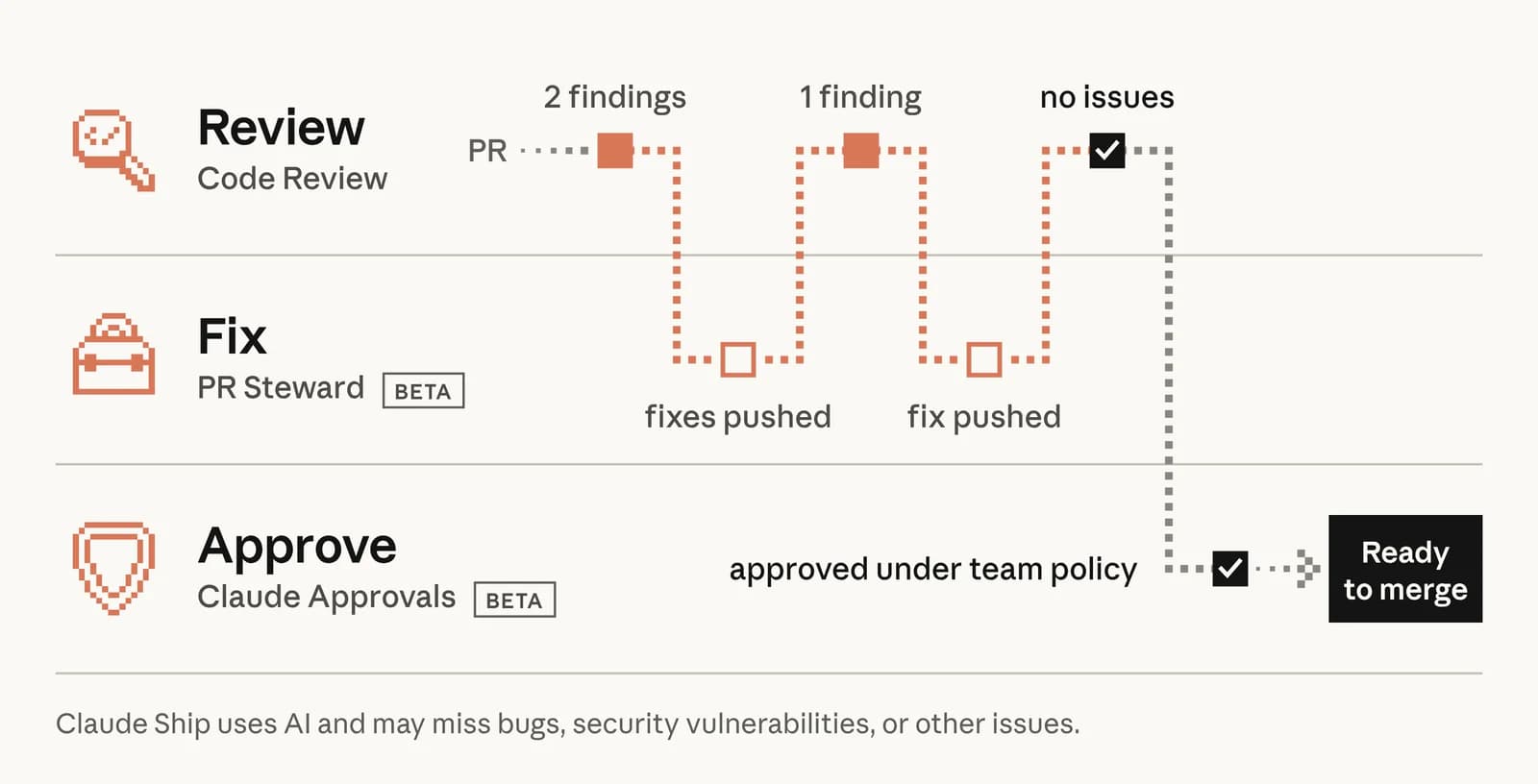
The diagram is a happy path. The docs are more careful about what stays outside Claude’s control. Code Review by itself does not approve or block a pull request. PR Steward is designed not to approve or merge. Claude Approvals is a check that blocks a merge only where you make it a required check in GitHub, and normally not in observe mode. Merging remains a GitHub decision governed by branch protection, required checks and whoever holds merge rights.
The agents are independent. The product page’s FAQ says you adopt each one separately, repo by repo, with one dependency: an approval policy that uses Claude’s review also runs Code Review on that repository. It also says using Claude Ship does not require using Claude Code, and that Claude Ship works after the pull request opens, whether a person or a coding agent wrote the code.
Code Review: the finder
Per the Code Review documentation, several agents read each change alongside the surrounding code. A verification step checks candidate findings against the code before they are reported. The docs lay out four stages that run on Anthropic infrastructure: find (agents examine the diff and surrounding code in parallel), verify (filter false positives), rank (deduplicate and order by severity) and post (publish results on the pull request). The product page says findings state the problem, the trigger and the fix in a few sentences, and are ranked Important, Nit or Pre-existing.
By default it focuses on correctness: bugs that would break production, not formatting preferences or missing test coverage. Each review leaves inline comments with a summary in the review body, a check run named Claude Code Review whose details list the findings, and a note in place of findings when the check run’s title reads Code review found no issues. The check run does not conclude as a failure.
Review levels and when reviews run
An Owner picks one review level for the organization and can override it per repository: Quick (a lighter pass, fastest, lowest cost), Standard (the default, balanced) or Deep (the most thorough, longest, most expensive). Anthropic’s example is Quick for a routine codebase and Deep for a critical one. Code Review chooses the Claude models itself, and the admin settings do not offer a model choice.
Each repository also has a Review runs setting: once after the pull request is created, after every push, or manual. Whichever is chosen, someone with write access can comment @claude review to start a review. A repository you add from the admin page starts at After every push, the setting that runs the most reviews. Automatic reviews skip drafts and pull requests from forks.
What a review can reach
A review reaches the repository through the Claude GitHub App. Inside a review, repository access is read-only and a review does not push commits. It works from the diff and surrounding code, without building or running your code. It follows REVIEW.md from the base or default branch and never from the pull request’s own changes, which matters because a pull request author cannot rewrite the reviewer’s instructions in the same change. Anthropic documents REVIEW.md and CLAUDE.md files as the way to tune what gets flagged.
The docs include a disclaimer worth repeating: a review with no findings does not mean the code is error-free or secure. Anthropic also lists alternatives for people outside the managed service, including /code-review in a Claude Code session on any plan and Claude running in your own CI with GitHub Actions or GitLab CI/CD.
The vendor-reported result
Anthropic says that on the Claude Code team, where Claude’s review is one layer of a broader process, merged pull requests more than doubled from June to September while the share reverted fell by more than 40%. Treat that as vendor-reported. InfoWorld noted that Anthropic did not say how much of the improvement was attributable to its code review tool, and The New Stack pointed out that Claude Ship covers only part of that overall process: the team’s own October engineering post describes a separate security review that can block a merge.
PR Steward: the fixer
PR Steward is an agent that works on your team’s open GitHub pull requests. It picks up a problem on GitHub, works on it in a cloud session and reports back on the pull request. The announcement says it “jumps in on failing CI checks, merge conflicts, and review feedback from Code Review, other review tools, or team members”, and that after every push it comments with what it changed and how to undo it.
What it touches
| Situation | What PR Steward does (per docs) |
|---|---|
| A failing check | Attempts a fix when the cause is in code that the pull request touches |
| A merge conflict | Attempts to merge the base branch in and resolve the conflicts |
| A person’s review comment | Attempts small, specific changes and replies. May reply without pushing when the request is large or about the design |
| A review bot’s finding | Works on findings that Code Review marks Important. For other bots, works on lint findings and bugs |
| The Claude Approvals check | Works on it where the check waits for something a commit can fix, such as open Code Review findings. Leaves it where the check waits for people’s approvals |
When it starts and how to stop it
Where an Owner set PR Steward to On, it starts when a pull request is opened, reopened or marked ready for review, and at the next push to an open pull request it has not started on. It skips drafts, forks, pull requests that a bot opened and authors without write access. The repository setting has four options:
| Option | When PR Steward starts |
|---|---|
| Manual (@claude steward) | When a person with write access comments @claude steward or adds the claude-pr-steward-watching label |
| On | On opened, reopened or ready-for-review pull requests it does not skip, and at the next push to an open one it has not started on |
| On (including drafts) | The same as On, and on draft pull requests |
| Off | It does not start in the repository |
While it is watching, the pull request carries the claude-pr-steward-watching label. Developers steer it by commenting @claude with an instruction, and stop it on one pull request by removing the label or commenting @claude stop. Anthropic’s guidance, repeated on the product page, is to start in Manual mode and turn it on by default once the team trusts it. PR Steward can be on in up to 256 repositories. A .claude/skills/steward/SKILL.md file in the repository can tell it how to look after pull requests; the same file serves the local /steward command.
Identity, permissions and hard limits
The security page says PR Steward acts on GitHub as the Claude GitHub App, or as the app your organization created on GitHub Enterprise Server. The app’s permissions on contents, pull requests and issues are read and write. Where your installation grants them it also has read on checks and statuses and write on Actions, and on github.com the installation can grant write on workflows, which lets it push changes to workflow files. The token is kept outside the session’s sandbox, and by default gh and git requests go through Anthropic’s service, which adds it. Sessions start in auto mode, and a request for permission is denied.
In an Anthropic-hosted environment, Anthropic’s service refuses four things from a PR Steward session: approving a pull request; changing branch protection, rulesets or statuses, or writing check runs; deleting a branch; and pushing tags. It leaves merging, turning on auto-merge, force-pushing, pushing to another branch and dismissing a review to GitHub’s branch rules. For merging, auto-merge and force-pushes, two further checks run on Claude’s commands: permission rules that deny the usual commands, and auto mode’s model-based check. The docs state plainly that the rules match command text and the check is a model’s judgment, so a command written another way can pass both. That is why the setup page asks you to put the approval requirement in GitHub itself.
Self-hosted environments and credentials
PR Steward can run in an organization-shared environment with a setup script, environment variables or different network access, and an Owner can select a self-hosted environment. Anthropic warns that in a self-hosted environment Claude can reach GitHub directly with any GitHub credential that a session can read, that the service cannot refuse an approval made that way, and that GitHub can count it toward required approvals. The documented limits on approvals and merges apply to Anthropic-hosted sessions only. To give PR Steward a credential such as a private package registry login, the docs route it through a Claude Tag bundle with the PR Steward switch turned on, and warn that because PR Steward works unattended and reads pull request text other people write, each credential should be limited to the hosts and permissions needed for building and testing.
Claude Approvals: the policy engine
Claude Approvals is a check on GitHub pull requests that reports who still has to approve. It follows a policy: a file in your repository that sets how many people have to approve a change to a path, and where Claude may approve. Anthropic’s thread calls it “a smarter CODEOWNERS file”. To evaluate a pull request, it reads the policy, finds the rules that apply and counts approvals. Billing code can need two people while test fixtures need one once Code Review passes.
What you see on a pull request
Approvals adds a check named Claude Approvals. Its title says what is still needed, such as Waiting on human review from any person (1/2). A title that starts with (observe mode) means the policy was not enforced when the check ran. Claude also posts a comment with its reasons. Where the policy allows it, Claude can post an approving review: from claude[bot] in github.com repositories where the Claude GitHub App reports the check, or from claude-approvals[bot] on a pull request that claude[bot] opened, once you add the Claude Approvals GitHub App.
The first policy, in observe mode
The Approvals overview shows a one-rule policy that asks for two people on every change and keeps Claude from approving. This is quoted from the docs:
# .claude/approvals.yml
version: 1
mode: observe
rules:
  - purpose: "A change takes two people, and Claude doesn't approve."
    paths: ["**"]
    verdict: { claude: comments, seats: 2 }
    advisory: [claude/code_review]
The docs explain each part: mode: observe starts the policy in observe mode; purpose says why the rule exists; paths names the files, here every file; seats: 2 asks for two people, one of whom can be the author; claude: comments means Claude does not approve; and advisory keeps automatic Code Reviews. Rules can also have a condition, which can read facts about the pull request (lines changed, who opened it, which branch it targets) or a classifier’s answer. A condition cannot read CI results, so Anthropic says to keep CI as its own required check in GitHub.
Two starter policies
The setup page offers two starters, both beginning in observe mode and both naming claude/code_review. “Let Claude approve when Code Review passes” means a pull request that passes Claude’s review usually needs no other person’s approval once enforced, except for changes under .claude/. “Keep two people on each change” means a pull request usually needs one person besides the author, and Claude does not approve. The first starter, quoted from the docs:
# .claude/approvals.yml
version: 1
mode: observe
rules:
  - purpose: "A change takes two people. When Claude's review passes, one is enough and Claude approves."
    paths: ["**"]
    verdict: { claude: comments, seats: 2 }
    override:
      - { if: "claude/code_review = pass", verdict: { claude: approves, seats: 1 } }
  - purpose: "A change to the review rules takes two people."
    paths: ["**/.claude/**"]
    nested: inherit
    verdict: { claude: comments, seats: 2 }
A file under .claude/ matches both rules. Approvals takes the strictest of the verdicts that apply, so once the policy is enforced a change to that file needs two people, because the second rule has no override. The docs note that in both starters the pull request’s author can count as one person, and the starter that lets Claude approve can start a billed Code Review at each push.
Observe first, then enforce
The rollout steps in the docs are specific. Add the policy file in a pull request of its own from a branch in the repository. Merge it when Claude comments that it found the policy file in the change valid; an invalid file produces a failed check titled This change breaks a policy file. Open a second non-draft pull request and look for a Claude Approvals check whose title starts (observe mode). Enforce only once those titles match what your reviewers actually decide: delete the mode: observe line and merge, rerun @claude approvals rerun on open pull requests whose check still says observe mode, require the Claude Approvals check in GitHub with the Claude app as the source, and confirm that a change under .claude/ shows Waiting on human review from any person (1/2).
Two details deserve a flag. The docs say a policy file with no mode line is enforced, because enforce is the default. And you should have two people with write access before enforcing either starter; with only one, the check cannot pass on a change under .claude/, or where Claude’s review fails or gives no result. The recommended source setting matters too: with any source, GitHub accepts a check named Claude Approvals from elsewhere, and the docs give the Claude app’s ID, 1236702, for ruleset or branch protection configuration through the API.
Facts, classifiers and what a condition can read
Beyond file paths, a rule can depend on classifiers: a name, a question and the answers it can give. Anthropic ships claude/code_review (answers pass when a review finished with no Important finding open, fail when one is open) and claude/diff (how much a pull request changed since an approval or earlier answer: trivial, same_intent or different). A custom classifier is a folder at .claude/classifiers/<name>/def.yml on the default branch, named repo/<name> in policy. The docs’ example asks a model to rate change risk:
# .claude/classifiers/change_risk/def.yml
version: 1
description: "How risky is this change to ship?"
model: opus
prompt: |
  Rate how risky this change is to ship.
  high: it touches sign-in, billing or a data migration.
  medium: it changes behavior a user can see.
  low: anything else.
  When two ratings fit, pick the higher.
outputs:
  risk: { type: ordinal, values: [low, medium, high] }
A rule could then say if: "repo/change_risk = low" to ask for fewer people. Each run that calls a model is billed to your usage credits, and a definition can set a budget to limit each run. Anthropic’s launch coverage describes these classifiers as written in natural language, which is the practical meaning of the prompt field.
The illustrative policy, line by line
The third official post includes an image of a sample .claude/approvals.yml, labelled “Illustrative example”. It is the best single picture of what Anthropic expects a mature policy to look like. We transcribed it below from the image, so treat it as a reading of a screenshot rather than a downloadable file. The line numbers in the original run 1 to 25; lines 11 to 16, the docs rule, are highlighted.
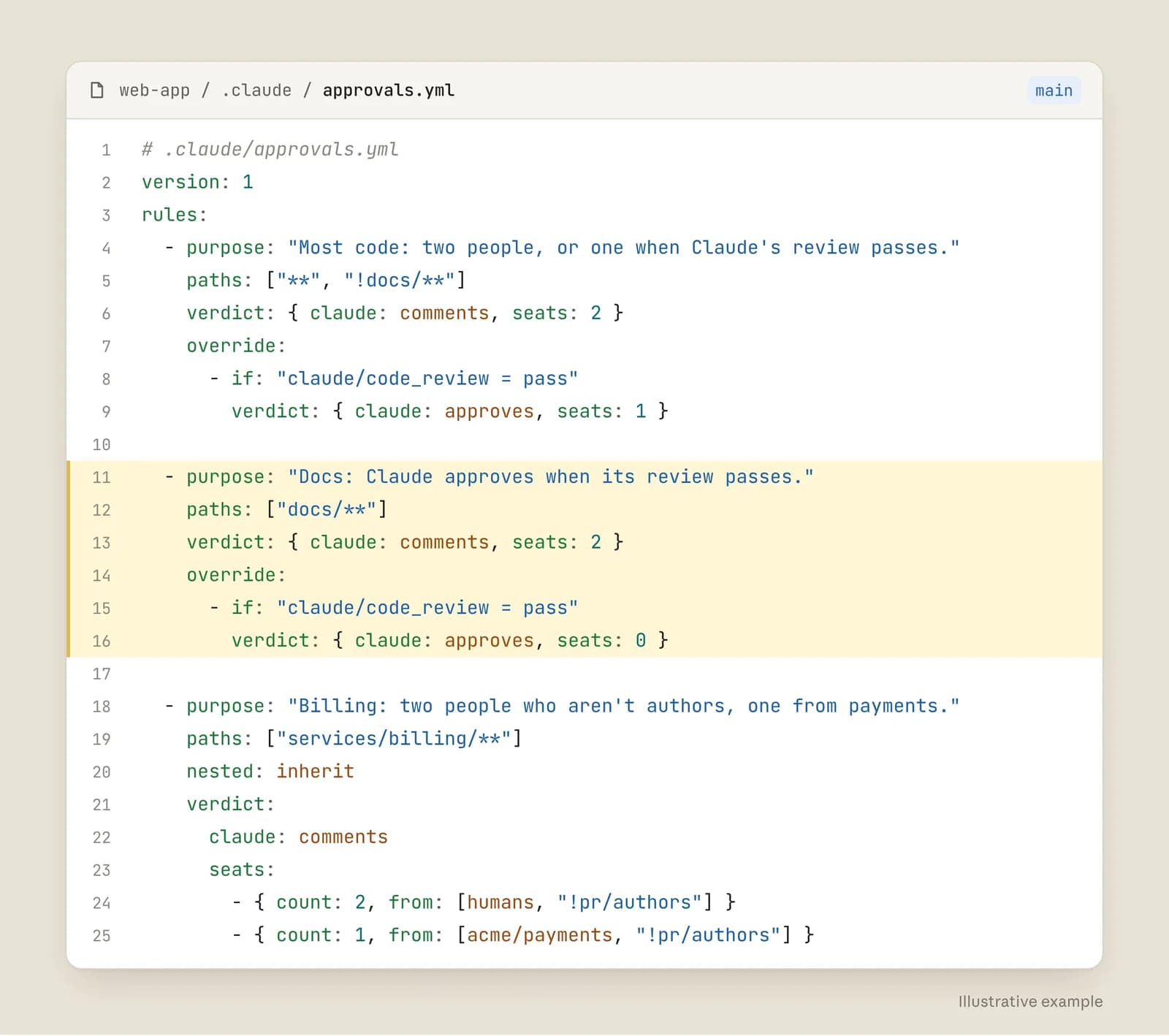
# .claude/approvals.yml
version: 1
rules:
  - purpose: "Most code: two people, or one when Claude's review passes."
    paths: ["**", "!docs/**"]
    verdict: { claude: comments, seats: 2 }
    override:
      - if: "claude/code_review = pass"
        verdict: { claude: approves, seats: 1 }

  - purpose: "Docs: Claude approves when its review passes."
    paths: ["docs/**"]
    verdict: { claude: comments, seats: 2 }
    override:
      - if: "claude/code_review = pass"
        verdict: { claude: approves, seats: 0 }

  - purpose: "Billing: two people who aren't authors, one from payments."
    paths: ["services/billing/**"]
    nested: inherit
    verdict:
      claude: comments
      seats:
        - { count: 2, from: [humans, "!pr/authors"] }
        - { count: 1, from: [acme/payments, "!pr/authors"] }
| Rule | Paths | Default | When claude/code_review = pass |
|---|---|---|---|
| 1. Most code | Everything except docs/** | Claude comments; two seats | Claude approves; one seat |
| 2. Docs | docs/** | Claude comments; two seats | Claude approves; zero seats |
| 3. Billing | services/billing/** | Claude comments; two humans who are not authors plus one non-author from acme/payments | No override: Claude’s review does not lower it |
Reading it with the policy reference open: each rule has a purpose (why it exists) and paths. In the first rule the pattern "!docs/**" takes the docs files out of that rule only, and the reference says a rule needs at least one pattern with no !. The verdict sets what Claude does (approves, comments or blocks) and how many seats must be filled. An override replaces the verdict while its if is true; Approvals reads overrides from the top and the first true one applies. Here the override reads the Code Review classifier, so a passing review lowers two seats to one on general code and to zero on documentation.
The billing rule shows the opposite direction. nested: inherit keeps the rule in force under policy files in subdirectories, which would otherwise be able to ask for less. The seats list has two sets that must both be filled: two people from humans minus !pr/authors, and one from the acme/payments team, also minus authors. Per the reference, one person can fill a seat in several sets, so a payments-team member who is not an author can count toward both sets. We read that as meaning the rule can be satisfied by two non-author humans of whom at least one is on the payments team. That is our interpretation of the reference, not an Anthropic example.
How the three rules combine, and what the image leaves out
Billing files also match rule 1, since ** minus docs includes services/billing/**. The reference says Approvals takes the strictest of the verdicts that apply, with every rule’s seats filled, so rule 3’s unconditional requirement is what bites there. Rule 1’s override cannot relax it. That is our reading of the combination rule applied to the image.
Four things are not in the image. It has no mode line, which under the docs means it would be enforced if copied as is; you would want mode: observe first. It does not show a rule for the files Anthropic’s protected-files list covers, such as the policy file, REVIEW.md and CODEOWNERS, which Approvals normally asks a person to approve when a rule covers them. It does not cover .github/, CLAUDE.md, AGENTS.md or .mcp.json, which the docs say not to assume are protected. And it includes no advisory line, although reading claude/code_review in an if counts as naming it for the purpose of keeping automatic reviews, and it also means each push can start a billed review.
One more consequence worth stating plainly. Rule 2 lets Claude approve documentation with zero seats. For a docs change, that is the intended fast lane; the Analytics API story fits it, though Anthropic says a docs reviewer signed off in that case. With zero seats and a passing review, no person is required by this policy to look at the change. Anthropic’s documentation treats that as your choice, and the next section covers why it deserves a deliberate decision.
Rule combination limits and coverage gaps
The policy reference documents several coverage traps. If no rule covers a changed file, nobody is asked to review that file and Claude does not approve the pull request. If rules cover a file and none applies, for example because every rule has an if that is false, the check fails with a title that starts No rule applies to. The docs therefore advise covering every path with root rules that have no if, as the first rule of the starter does. Policy files can also sit in subdirectories; the nearest enforcing file decides, and it can ask for less than the root file unless the root rule is marked nested: inherit. Limits include 512 rules per file and 448 KiB per file, and a pull request that changes 2,000 or more files shows Change too large to evaluate.
Merges without human review: the risks
Warning from Anthropic’s docs: if you use GitHub auto-merge or a merge queue with a policy that does not require a person’s approval, a change can merge without anyone acting.
This is the section to read before enabling enforcement. The Approvals docs state that a pull request can merge when nobody but its author has looked at it, and that with Approvals on it can merge with no person at all if a bot wrote it. The GitHub rules page lists the ways this happens. We group them below.
| Setting or case | What can happen (per docs) | What the docs suggest |
|---|---|---|
| Check not required | The Claude Approvals check blocks a merge only where you make it a required check in GitHub, and normally not in observe mode | Require the check, with the Claude app as the source, after observe mode matches your reviewers |
| seats: 1 | The author can fill a seat, so nobody else has to look | Ask for a person who is not an author on paths that matter |
| seats: 0 | A pull request that a bot wrote can merge when no person has looked at it | Use only on paths where that is intended |
| A from list that admits bots | Bots can fill seats; if the set admits Claude and every rule says approves, a seat counts as filled before Claude approves, so the check can pass with no person | Prefer humans, and exclude machine users by login where needed |
| Machine users | A user account that a script or agent drives counts as a person | Exclude its login, for example [humans, "!pr/authors", "!acme-ci"] |
| GitHub counts Claude’s approval | Where a branch rule requires one approval, Claude’s approving review can be that approval | Require no more than one approval in GitHub where the check is required; ask for more people in seats |
| claude: approves with no review | That verdict starts no Code Review by itself, so Claude can approve a change nothing has reviewed | Read claude/code_review in the rule’s if so a review exists (the docs’ own starter does this; the wording is our suggestion) |
| Uncovered files | Where no rule covers a changed file, GitHub counts the neutral result as passing | Cover every path with root rules that have no if |
| Classifier-conditioned lowering | A classifier’s answer is one that a pull request’s text can steer, so a steered answer can lower what the change needs | Add a catch-all rule that asks for one person who is not an author on every path (example below) |
| Auto-merge and merge queues | A change can merge without anyone acting | Add the non-author rule and require the Claude Approvals check |
The classifier row deserves emphasis. The docs say Approvals applies the policy files and classifier definitions from the default branch, but the pull request author’s text can steer a classifier’s answer. Where an if or reuse condition reads that answer, a steered answer can lower what the pull request needs. The docs’ suggested countermeasure is a catch-all rule asking for one person who is not an author on every path:
# .claude/approvals.yml
version: 1
rules:
  - purpose: "A change takes one person who isn't an author."
    paths: ["**"]
    nested: inherit
    verdict:
      claude: comments
      seats: [{ count: 1, from: [humans, "!pr/authors"] }]
    advisory: [claude/code_review]
Per the table in the docs, humans lets a machine user fill the seat unless you exclude its login; "!pr/authors" excludes the authors, and on a fork’s pull request no approval counts toward that seat; and advisory keeps automatic Code Reviews. For paths that need more people, copy the rule, narrow paths and raise count.
Who can change the policy
A policy is a file in your repository, so GitHub permissions decide who can change it. Anyone who can merge into the default branch can change a policy file, although it is a protected file, so a pull request that changes it can need a person with write access, who can be the pull request’s author. A repository admin can stop requiring the check in the repository’s own branch rules. Anyone who can bypass every rule that requires the check can merge past it. An Owner in the Claude organization can turn Approvals off for a GitHub organization, a repository or the whole Claude organization. A push directly to the default branch gets no check at all, so require pull requests in GitHub.
Staleness, reuse and merge queues
Claude posts its approving review on one commit, and GitHub can keep counting that review until it is dismissed. Approvals normally asks GitHub to dismiss it when evaluating the next push, but GitHub can refuse, so the docs tell you to turn on Dismiss stale pull request approvals when new commits are pushed, or Require approval of the most recent reviewable push. After a push that changes the diff’s text, earlier people’s approvals normally stop counting, unless a rule uses reuse, typically conditioned on claude/diff. Merge queues add one more wrinkle: Approvals does not evaluate the commits a queue creates, and normally marks them Stamped for merge queue, so you should rerun the check on each open pull request before queuing it after you start enforcing, and an owner of your GitHub organization must accept the Claude GitHub App’s Merge queues permission or entries wait.
What the press said
InfoWorld quoted analysts on the same risk from a different angle. Gartner’s Nitish Tyagi said “AI models are inherently non-deterministic, which makes them unsuitable as the sole quality gate”. IDC’s Deepika Giri said the model that writes code and the one that reviews it could share blind spots, recommended restricting automated approvals to low-risk changes, keeping security scans and CI independent of the agent, and keeping a designated human owner on every merge. The Register quoted an engineer at a company that uses Claude, who was cynical about the whole thing and said their rule is to limit Claude to read operations in Git so developers keep the judgment. These are opinions, not tests, but they map onto the docs’ own warnings.
/ship and /steward for individual developers
You do not need an admin to try the developer path. The command documentation says /ship is a Claude Code command that opens a GitHub pull request for your change if your branch does not have one, reviews it, and works on feedback and failing checks. Run it from the Claude Code CLI in a terminal, in your local clone. Cloud sessions do not have the commands. The launch thread says /ship is rolling out in the CLI and the desktop app; the docs page we read describes the CLI, so check your own install rather than assuming the desktop app behaves the same.
The four steps
- Pull request:
/shipcan commit your work, push your branch and open the pull request as you. - Review: Claude reviews your change with
/code-review. - Watch: Claude keeps checking the pull request from your session, works on failing checks, merge conflicts, reviewers’ comments and its own findings, and pushes fixes.
- Merge: once ready, you merge it yourself.
/steward skips steps 1 and 2 and starts the watch. Use /ship when the change is finished and you want a review first; use /steward when your pull request is already open and you do not want a review, or a watch ended and you want to start it again. A review alone is /code-review; fixes from a cloud session are Auto-fix or /autofix-pr. /steward is separate from PR Steward, the organization agent, and where PR Steward is already working on your pull request no watch starts.
Prerequisites
| Requirement | Detail from the docs |
|---|---|
| Claude Code | v2.1.330 or later |
| GitHub CLI | 2.63 or later, signed in with gh auth login; with an older version Claude cannot push fixes |
| git | 2.38 or later, to merge new commits into your branch; with an older git Claude leaves the merges to you |
| For /ship | A finished change in your local clone of a GitHub repository: uncommitted, committed on a non-default branch, or in an open pull request of yours |
| For /steward | An open pull request on GitHub that is your own, with its branch checked out locally |
| Permission mode | Auto mode for unattended work; most other modes wait at each prompt; in bypassPermissions mode no watch starts |
| Platform | On native Windows, no watch starts |
Know what /ship commits
The docs are blunt: /ship proceeds with no confirmation prompt. After you press Enter it can commit your work, push your branch and open the pull request as you. Before the commit and again before the push, a line ending Esc to cancel says what is about to happen, and if you do nothing it continues after a few seconds. If you cancel before the push, a commit that /ship made stays; undo it and keep your files with git reset HEAD~1. It can commit all uncommitted changes including new files, so run git status first and remove or stash files you do not want. It looks for secrets by file name such as .env, not by content, so look inside your files yourself, and a deny rule such as Read(./notes.txt) does not keep a file out of the commit.
On a github.com repository that is not a fork it can commit, push and open the pull request before the review; on the default branch it commits on a new branch and switches your checkout to it. It does not commit uncommitted changes when a pull request is already open for the branch, when the repository is public and you are on a branch with commits of its own, or when an uncommitted file’s name suggests a secret in a repository that is not public. Open the pull request yourself first if you want a draft, another base branch, your repository’s template, or a pull request on GitHub Enterprise or from a fork.
What a watch does, and what ends it
A watch is Claude’s ongoing work on your pull request. Claude uses your gh and git sign-ins, so its work appears under your name. In auto mode it works on the review findings it judges to be problems, can post one summary comment, pushes commits, merges the base branch into yours, works on failing checks and re-runs failed ones, answers comments, resolves threads and re-requests reviews. It reads comments from you and from people with write access, and on github.com from Claude’s bot; to have it read another bot, type /steward +my-lint-bot.
| Where | What ends the watch |
|---|---|
| On the pull request | It is merged or closed, PR Steward labels it, or seven days pass |
| At the keyboard | You press Esc or Ctrl+C at the prompt or while Claude works; one press can end it with no confirmation |
| In your checkout | You check out another branch, or change git’s settings (for example with git push -u) |
| In the session | The session ends, you send it to the background, you start another watch or a /loop with a task, or you run /clear, /resume or /branch |
| After a failure | An error, a declined prompt or a usage limit can end it early |
To check whether a watch is running, type /tasks; a running watch shows as a scheduled task whose name starts with /steward --tend. To end it, type /ship stop in the session; to restart, type /steward. Keep the session open and in the foreground, the computer awake and the branch checked out. The New Stack summarized this as running locally for up to seven days. Push your own commits by naming the remote and branch, as in git push origin <branch>.
Arguments
| You type | Commands | What it does |
|---|---|---|
| low, medium, high, xhigh or max | /ship | Review at that effort level; the default is high |
| 41 or a pull request URL | /ship, /steward | Works on that pull request; for a watch it has to be your own with its branch checked out |
| +botname | /ship, /steward | Also reads that bot’s comments; repeat when you start a watch again |
| stop | /ship, /steward | Ends the watch |
| terms | /ship, /steward | Shows what Claude may do during a watch and what limits it |
Combine arguments with the effort level first, as in /ship low 41 +my-lint-bot. The docs also show how to tell Claude to check with you first, with a prompt such as “From now on, don’t push code changes or reply to reviewers without asking me first. Show me the review findings and wait.” They add that this is a request to Claude and Claude Code does not enforce it.
Limits, trust and the merge question
When Claude acts without a message from you, Claude Code blocks gh and git commands that merge the pull request, approve it, turn on auto-merge or force-push, and limits Claude to a short list of commands. The docs then say the limits do not cover everything. The watch uses your sign-ins, so it could merge a pull request that your branch rules let you merge without another person’s approval. Auto-merge on the pull request can bring about a merge when a pushed fix makes checks pass. Sending a session to the background ends the watch while work under way can go on without the limits. And code from the base branch, other people’s pushes to your branch, programs from your branch such as tests, your hooks and the steward skill file can all run on your computer with your credentials, which is why the docs say to run a watch only where you trust everyone who can merge to the base branch or push to your branch.
Admins who want neither command can set ship-local and steward to off under skillOverrides in managed settings. A deny rule such as Bash(git push *) stops /ship’s own pushes and means no watch starts.
{
  "skillOverrides": {
    "ship-local": "off",
    "steward": "off"
  }
}
The troubleshooting page covers the usual failure modes. If /ship is missing or starts /code-review instead, run claude update, restart, run /status to see which settings loaded and remove disableBundledSkills or a ship-local override you set yourself; sessions that skip feature-flag fetching, for example with DISABLE_TELEMETRY set or on a third-party provider, do not get it. If gh reports it cannot say where the pull request’s head and base stand, one cause is a GitHub CLI older than 2.63. If the pull request title reads like “Update greet.py and 1 more”, /ship could not write one from the session’s conversation and you should edit it on GitHub.
Admin rollout, one repository at a time
Anthropic’s guidance is consistent across the announcement, product page and docs: add one agent at a time, starting on one repository, in the order Code Review, PR Steward, Approvals. Settings live at Organization settings > Claude Ship and need an Owner role. This checklist is ours, built from those pages; it is not an Anthropic-published runbook.
- Confirm eligibility. Team or Enterprise plan, GitHub repositories, and none of Zero Data Retention, the HIPAA configuration or customer-managed encryption keys. Approvals also cannot start with FERPA or Access Transparency settings.
- Prepare GitHub. Install the Claude GitHub App (a GitHub organization Owner does this), turn on the GitHub connector at Organization settings > Connectors, make sure you have usage credits, and have a repository admin handle branch rules. A private repository needs a paid GitHub plan for those rules.
- Set branch rules before Steward. On the default branch require a pull request with at least one approval, dismiss stale approvals on new commits or require approval of the most recent push, keep the Claude GitHub App off the ruleset’s bypass list, and protect other branches Steward should not push to.
- Start with Code Review. Connect one repository, choose a review level, choose when reviews run, and set a monthly spend limit first. A new repository starts at After every push, so change it to once or manual for the pilot. After several reviews, read the average cost per review under Cost in the repository’s Edit dialog.
- Add PR Steward in Manual mode. Choose Listed users only to pilot with a few people, set the PR Steward row’s monthly limit under Organization settings > Usage, set the per-repository spend cap, then test with
@claude stewardon a pull request from an account with write access. Expect the label and a comment headed Claude PR Steward. Move to On once its fixes match what your reviewers would do. - Add the policy in observe mode. Commit
.claude/approvals.ymlwithmode: observein its own pull request, nameclaude/code_reviewso automatic reviews continue, and compare check titles against human decisions for weeks, not days. - Decide where Claude may approve. Keep a person on money, customer data, security and the files that control review itself. Add the non-author rule if you use auto-merge or a merge queue.
- Enforce and require the check. Follow the four-step switch in the Approvals setup page, only after the observe-mode titles match your reviewers.
- Watch spend and expand. Use the analytics pages, add repositories, and revisit limits.
One warning in the PR Steward setup page applies to step 4 and 5: adding a repository can start billed Code Review there. If no repository is listed yet, a dialog asks what Claude does and Code review is selected by default; selecting Steward turns on PR Steward for the organization before you have set a spend limit. If others are listed, no dialog opens and the new repository is set up for review at every push. Choose Not now in the dialog if you want to configure first.
Pricing and cost control
Anthropic publishes no flat price for Claude Ship in the sources we read. The announcement says usage is billed on tokens, and the amount depends on the number and size of pull requests covered, the review level, how often reviews run and how much work PR Steward does. The docs say each agent is billed through your organization’s usage credits, separately from your plan’s included usage, and that reviews are billed to the organization rather than to the developer who opened the pull request.
| Item | How it is billed (per Anthropic) |
|---|---|
| Code Review | Tokens, through usage credits. Cost scales with review level, change size, surrounding code complexity and how many candidate issues need verification, times how many reviews run. No flat per-review price |
| PR Steward | Tokens, through usage credits. No spend limit of its own until you set one; Owners can set a monthly limit, a per-repository cap and see estimated spend |
| Claude Approvals | No base charge. Classifier runs that call a model are billed, and a policy that reads Claude’s review starts billed Code Reviews, in observe mode too |
| /ship and /steward (local) | Regular Claude Code usage in your session, counted against your usage, not the organization’s Claude Ship billing |
Estimating spend
The costs page recommends a pilot: set a monthly spend limit, turn on Code Review for a few representative repositories with Once after PR creation or Manual, and after several reviews read the repository’s average cost per review. Multiply by the number of pull requests per month, and for After every push multiply again by the typical number of pushes per pull request. The docs say a repository’s average moves with its pull request size and review level. The @claude review always comment opts one pull request into push-triggered reviews, and @claude review runs a single review without subscribing to future pushes.
Press adds a number and some advice, which we label secondary. The New Stack wrote that at Code Review’s launch in March the company put the average cost at $15 to $25 per review; we did not find that figure on the Anthropic pages we read, and the docs say there is no flat per-review price, so check your own dashboard. InfoWorld quoted Gartner’s Tyagi that large pull requests can be especially expensive to review with premium models and that smaller changes help contain tokens. It also quoted IDC’s Giri suggesting amount spent per merged pull request as the adoption metric, benchmarked on one repository first.
Limits and what happens when you hit them
Code Review is capped under claude.ai/admin-settings/usage for the Claude Code Review service, and it skips reviews when the service limit, the organization’s usage-credit limit or the credit balance runs out, or when what is left is less than the expected cost of one review. Developers then see a pull request comment naming the cause. PR Steward pauses at its monthly limit or the organization limit and picks up at the next push or comment; at the per-repository spend cap it stops on that pull request, although spend can pass the cap before it stops, and a person with write access can start it again with the full cap. For Approvals, set limits in three places: the organization’s usage-credit limit, the Claude Code Review row, and the Approvals row for classifier runs. If a reseller bills your organization, ask the reseller for a limit. At Code Review’s limit, a check that needs Claude’s review can stop passing. Analytics live at claude.ai/analytics/code-review and claude.ai/analytics/pr-steward, with cost figures estimated at list price rather than invoice-accurate.
Turning off credits does not turn off the agents
This is easy to miss. Anthropic says that if you turn off usage credits in Organization settings > Usage, an agent that is on keeps running and billing your organization. For Approvals, billing can start and continue while credits are turned off. To stop charges, turn things off in this order: Approvals first (a policy can start billed reviews where Code Review is off), then PR Steward, then Code Review. Before that, stop requiring the Claude Approvals check in GitHub on each branch protection rule and ruleset, turn on Dismiss stale pull request approvals so GitHub does not keep counting Claude’s earlier approving review, and dismiss Claude’s reviews on open pull requests it approved. Suspend or uninstall the Claude GitHub App only after turning Approvals off, or new commits get no check and a required check can block merges. These steps leave the local /ship and /steward commands on.
The credit promotion
Per the announcement, eligible Claude Enterprise organizations can claim at least $10,000 in Claude Ship credits to use within 30 days of claiming, with a claim deadline of January 15, 2027, and terms apply. The terms are linked from the product page. The New Stack summarized it the same way. We do not know how many organizations qualify, because the eligibility rules are in the terms rather than the announcement text.
Availability and exclusions
| Topic | What the sources say | Source |
|---|---|---|
| Plans | Claude Team and Enterprise; the product page says beta | Announcement; product page; docs |
| Code hosts | GitHub. Code Review: including GitHub Enterprise Server and GitHub Enterprise Cloud with data residency. PR Steward: github.com or a connected GitHub Enterprise Server instance on port 443. Approvals: github.com including GitHub Enterprise Cloud | Code Review, PR Steward and Approvals docs |
| GitLab, Bitbucket | Not announced for Claude Ship. Code Review docs mention GitLab CI/CD only for running Claude in your own CI | Code Review docs |
| Zero Data Retention | Not available | Announcement; docs |
| HIPAA configuration | Not available; Code Review is also not covered under Anthropic’s BAA | Announcement; Code Review docs |
| Customer-managed encryption keys | Not available | Announcement; docs |
| FERPA or Access Transparency | Approvals cannot start with these settings | Approvals docs |
| Cloud providers | A Claude organization on a qualifying plan is still needed if developers use Claude Code through Bedrock, Google Cloud’s Agent Platform or Microsoft Foundry | Code Review docs |
| Other limits | PR Steward on up to 256 repositories; on GitHub Enterprise Server, PR Steward needs All eligible authors, since it does not start with a list there | PR Steward setup docs |
Reviews run on Anthropic infrastructure in a managed environment and do not run in self-hosted environments. PR Steward can use a self-hosted environment, with the caveats above. For how session data is handled, Anthropic’s PR Steward pages point to its data usage documentation, which we did not review.
How it compares
We have not run Claude Ship or its competitors, so this is limited to what sources state. The New Stack, in its launch story, listed how other vendors handle approvals: GitHub introduced approvals for Copilot code review on September 1 and made them generally available on October 28, with admins able to restrict which paths Copilot can approve; Cursor’s PR Routing and Approval agent applies a team’s risk threshold and reads the APPROVAL_POLICY.md file closest to the changed file; CodeRabbit lets teams set separate limits for merge risk and security risk in .coderabbit.yaml; and GitHub’s Max review level, in public preview, uses models from different providers and reconciles their findings. The New Stack noted that in Claude Ship, all three agents use Claude. Those are secondary claims about other companies’ products, and we did not verify them against those vendors’ pages.
| Dimension | Claude Ship | What we can say about others |
|---|---|---|
| Policy as a file in the repo | Yes: .claude/approvals.yml on the default branch, with per-directory files | Cursor reportedly reads APPROVAL_POLICY.md; CodeRabbit uses .coderabbit.yaml (The New Stack) |
| Approval by the AI | Claude Approvals, beta, policy-gated | GitHub Copilot approvals GA since Oct 28 with path restrictions (The New Stack) |
| Fix agent | PR Steward, beta; cannot approve or merge by design | Not stated in our sources |
| Models | Claude only (The New Stack); Code Review picks its own models | GitHub Max review level reportedly mixes providers (The New Stack) |
| Code hosts | GitHub only at launch | Not stated here; see our comparison guide |
| Price | Token-based usage credits; no flat price published | Not stated here; see our comparison guide |
InfoWorld added a market read. Omdia’s Lian Jye Su said the integration with Claude Code could make it attractive to enterprises already using Anthropic’s coding tools. IDC’s Deepika Giri said GitHub and GitLab have an advantage in how closely their AI tools integrate with their own platforms. Gartner’s Tyagi called it “not a breakthrough innovation as much as an evolution of existing AI-assisted code review capabilities”. TechCrunch’s view was that the approval agent is the more interesting part, since AI coding tools already offered review features. For feature and pricing depth across CodeRabbit, Greptile, Copilot, Cursor Bugbot and others, use our AI code review tools comparison; we have not re-verified those entries for this post.
What customers said
The announcement quotes Vatsal Bhatt, Director of Engineering, saying that Code Review caught real issues before a human reviewer got to the pull request, that PR Steward helped the contributor fix them, and “We keep a human in the loop, and the human’s time now goes to the changes that need it.” The product page adds a second quote from Alex Devkar, Senior Vice President, Engineering and Analytics, about PR Steward in a pilot. Anthropic’s pages do not name the companies; The New Stack identifies them as TELUS Digital and Carvana, and notes that neither describes using Claude to approve a pull request on its own. Vendor-supplied statements, in other words, and mostly about review and fixes rather than the approval step.
Open questions: what is not announced
| Question | Status as of November 24, 2026 |
|---|---|
| GitLab or Bitbucket support | Not announced; Claude Ship is GitHub-only in all sources we read |
| General availability date for PR Steward and Claude Approvals | Not announced; both are in beta |
| Average cost per review, per merged pull request, or per policy run | Not published by Anthropic on the pages we read; The New Stack cites an older $15 to $25 per review figure from March |
| Pricing after the Enterprise credit promotion | Not stated beyond usage-based billing |
| Eligibility rules for the $10,000 credits | In the terms; the announcement says only eligible Claude Enterprise organizations |
| Which models PR Steward and Claude Approvals classifiers run on | Not stated for PR Steward; a custom classifier’s definition sets its own model, with opus in Anthropic’s example |
| Data retention for review, steward and approvals sessions | Not stated in the pages we read; see Anthropic’s data usage docs |
| Independent evaluation of false positives and misses | None in our sources; Anthropic says the system may miss bugs and security vulnerabilities |
| Desktop app behavior for /ship | Announcement says rolling out in the desktop app; the command docs describe the CLI and say cloud sessions lack the commands |
Verdict
Claude Ship is three different bets under one name, and they carry different risk. Code Review is generally available, read-only and does not push or block; if you already pay for review time, it is the low-risk piece, and the cost controls are clear. PR Steward changes your code, but on a branch, with a comment after every push explaining what changed and how to undo it, and with hard refusals on approving, protection changes and tags. The thing that can go wrong is cost and noise, which you can bound with Manual mode and spend caps. Claude Approvals is where your risk model changes. It is useful as a CODEOWNERS replacement that counts people per path, and the observe mode lets you see decisions without consequences. It becomes a different kind of tool the moment you let Claude approve with fewer people than your branch rules otherwise require.
Turn it on now if you are on Team or Enterprise with GitHub, review time is a measurable bottleneck, and you can run a pilot on one repository with spend limits, Manual PR Steward, and an observe-mode policy for several weeks. Start the individual path with /ship if you want to learn the behavior without touching org settings, remembering that it commits and pushes with no confirmation beyond a short cancel window. Wait if you are on Zero Data Retention, HIPAA or customer-managed keys, if you use GitLab or Bitbucket, if you need GA stability, or if you cannot yet say which paths must always have a human. Do not enable auto-merge or a merge queue alongside a policy with seats: 0 or a bot-admitting seat set until you have read the risk table above. Anthropic’s own advice, and the advice of the analysts in the press coverage, points the same direction: keep CI and security scans independent of the AI reviewer, and let Claude approve only low-risk paths.
FAQ
What is Claude Ship?
Claude Ship is Anthropic’s set of three agents for GitHub pull requests: Code Review (generally available), PR Steward (beta) and Claude Approvals (beta). Code Review finds problems, PR Steward pushes fixes for failing checks, merge conflicts and review feedback, and Claude Approvals checks the pull request against an approval policy file that your team writes. It was announced on November 23, 2026.
Which plans and code hosts does it support?
Team and Enterprise plans, for repositories on GitHub. Per the docs, Code Review also covers GitHub Enterprise Server and GitHub Enterprise Cloud with data residency, PR Steward covers github.com and a connected GitHub Enterprise Server instance on port 443, and Claude Approvals works on github.com including GitHub Enterprise Cloud. GitLab and Bitbucket support has not been announced.
Can Claude merge my pull requests?
PR Steward is designed not to approve or merge, and Anthropic’s service refuses its approval requests when it runs in an Anthropic-hosted environment. Claude Approvals can post an approving review where your policy allows it, and GitHub can count that review toward required approvals. Approval is not merging: GitHub branch rules, required checks, auto-merge and merge queues still decide what merges. With auto-merge or a merge queue and a policy that needs no person, a change can merge with nobody acting.
What does /ship do?
In the Claude Code CLI, /ship can commit your work, push the branch and open a pull request as you, then runs a review with /code-review and starts a watch that works on failing checks, merge conflicts, reviewer comments and review findings. You merge it yourself. The docs say it proceeds with no confirmation prompt after you press Enter, apart from a short Esc-to-cancel notice before the commit and before the push.
What is observe mode?
A policy file with mode: observe makes the Claude Approvals check show what the policy would decide while Claude approves nothing and the check normally counts as passing. Anthropic recommends starting there. Observe mode is still billed for Code Reviews and classifier runs that the policy starts.
How much does it cost?
There is no flat price. Each agent is billed on tokens through your organization’s usage credits, separately from your plan’s included usage. Code Review cost scales with review level, change size, code complexity and how often reviews run. Claude Approvals has no base charge, but its classifiers and any Code Review it starts are billed. Running /ship counts as regular Claude Code usage. Anthropic does not publish an average per-review price on the pages we read.
Does turning off usage credits stop Claude Ship?
No. The docs say an agent that is on keeps running and billing your organization even if you turn off usage credits. To stop the charges, turn the agents off in this order: Claude Approvals, PR Steward, then Code Review.
Why did my automatic Code Reviews stop after I added a policy file?
Per the docs, once .claude/approvals.yml is on the default branch, automatic reviews normally stop where no matching rule names claude/code_review. That holds in observe mode and when enforced. To keep them, list claude/code_review under advisory, or read it in an if condition, in a rule that matches the files you want reviewed.
Who is excluded?
Organizations with Zero Data Retention enabled, the HIPAA configuration applied, or customer-managed encryption keys cannot use the Claude Ship agents. Claude Approvals also cannot start with FERPA or Access Transparency settings.
Did you test it?
No. This article is a reading of Anthropic’s announcement, product page, documentation and press coverage. Nothing here comes from hands-on use. Vendor-reported numbers are labelled as such.
Sources
Sources checked November 24, 2026. We did not use the product; claims come from the pages below. Official sources first, then press.
- Introducing Claude Ship: Claude / Anthropic, Nov 23, 2026 (announcement, availability, billing, credit promotion, customer quotes)
- Claude Ship product page: Anthropic (capabilities, FAQ, credit terms)
- Claude Ship: Claude Code docs (overview, setup order, billing, turn-off order)
- /ship and /steward: Claude Code docs (prerequisites, watch, arguments, limits)
- Troubleshoot /ship and /steward: Claude Code docs
- Code Review and Code Review costs and usage: Claude Code docs
- PR Steward, Set up PR Steward and What PR Steward can access: Claude Code docs
- Claude Approvals, Set up, Policy file reference, Approvals and your GitHub rules and Classifiers: Claude Code docs
- X posts: @ClaudeDevs, post 2 and post 3, Nov 23, 2026 (including the pipeline diagram and the illustrative policy image)
- TechCrunch, Sarah Perez, Nov 23, 2026
- The Verge, Jay Peters, Nov 23, 2026 (Code Review timeline)
- The New Stack, Frederic Lardinois, Nov 23, 2026 (competitor approvals, customer names, March cost figure)
- The Register, Richard Speed, Nov 24, 2026 (engineer reaction)
- InfoWorld, Prasanth Aby Thomas, Nov 24, 2026 (analyst comments)