GitHub Code Quality is a standalone paid product, not a GitHub Advanced Security bundle or a feature that requires a GitHub Copilot subscription. It was not available on GitHub Enterprise Server at launch. This guide turns the GA announcement into an implementation plan: establish cost boundaries, enable a pilot, upload coverage, observe rulesets in evaluate mode, measure noise, and keep a tested rollback.
The research cutoff is July 22, 2026. Product facts come from GitHub's announcement and live documentation. No licensed Code Quality organization or metered scan was available for hands-on testing, so the workflow and API examples below were reviewed against official documentation rather than executed.
What GitHub shipped at general availability
The GA release joins four jobs that teams often operate separately: finding quality problems on a pull request, suggesting a repair, measuring test coverage, and deciding whether a pull request meets the merge policy.
| Capability | What GitHub documents | Rollout consequence |
|---|---|---|
| Repository and organization enablement | Organization owners can target all repositories, a selected list, or repositories matching a filter; an organization dashboard summarizes maintainability and reliability | Pilot by team or custom property before changing the organization default |
| Quality analysis | Deterministic CodeQL queries find known anti-patterns; AI-assisted analysis looks for maintainability and reliability issues beyond existing rule sets | Evaluate rule-based and AI findings separately because their enforcement and noise profiles differ |
| Copilot Autofix | Findings include reviewable suggested changes | Treat a suggestion as a patch to review and test, not as an automatic merge decision |
| Coverage in pull requests | GitHub accepts Cobertura XML and compares a pull-request branch with the latest default-branch upload | Run the coverage workflow on both push and pull-request events |
| Ruleset gates | Rules can require CodeQL findings above a chosen severity to be resolved and can restrict minimum coverage or maximum coverage drop | Start in evaluate mode, then activate only after the check reports reliably |
| REST API | Endpoints list findings and read or update repository setup | Automate inventory and reporting after the UI pilot establishes a sound policy |
GitHub reports that more than 10,000 enterprises used the public preview and that its own engineering teams resolved 67.3% of findings before merging. Both numbers are vendor-reported. GitHub has not supplied an independent reproduction or enough detail to treat either figure as a performance guarantee for another organization.
How CodeQL and AI-assisted detection fit together
Code Quality is not one opaque model call. Its documented analysis path has distinct layers:
- CodeQL performs deterministic analysis. GitHub maintains queries for known reliability and maintainability anti-patterns. On pull requests, the
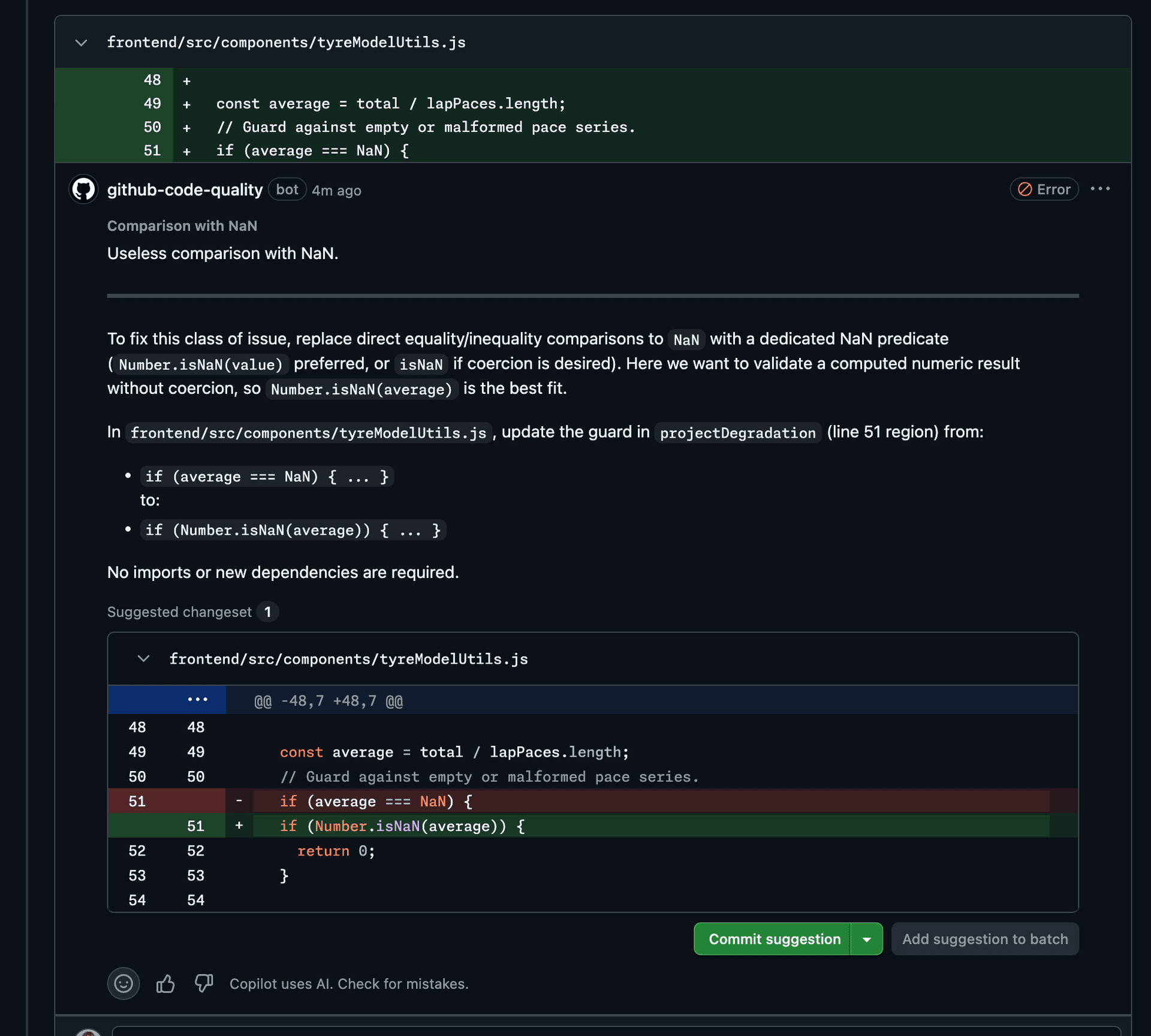
CodeQL - Code Qualitycheck reports rule-based findings and their severity. - AI-assisted analysis broadens detection. GitHub's separate AI scan analyzes recently pushed files on the default branch and may identify issues in languages beyond CodeQL's supported quality-query set. It is not an AI ruleset signal on pull requests.
- Copilot Autofix proposes a patch. A developer reviews the suggestion in context, applies or edits it, and relies on ordinary tests and review before merge.
That separation matters for governance. A CodeQL rule has a named rule, severity, location, and repeatable detection path. An AI-assisted finding can be useful where no rule exists, but it requires closer review for relevance. GitHub's current threshold documentation says AI detections cannot be used as the Require code quality results ruleset threshold. Deterministic findings and uploaded coverage remain the enforceable signals.
Do not conflate three products that can appear in the same interface:
| Product or capability | License relationship | Practical boundary |
|---|---|---|
| GitHub Code Quality | Standalone paid product | Rule-based quality analysis, Autofix, coverage, dashboards, quality APIs, and optional AI detections; AI features consume GitHub AI Credits |
| GitHub Advanced Security | Separate product and licenses | Security products are complementary; Code Quality does not consume an Advanced Security license |
| GitHub Copilot subscription | Not required for Code Quality's own Autofix or AI detections | Copilot code-review findings on pull requests and cloud-agent delegation require Copilot licenses |
The responsible workflow is still familiar: inspect the finding, understand the proposed change, run the relevant tests, and require the usual reviewer approval. Autofix shortens repair work; it does not prove that a change is correct.
Pricing: model the three cost lines
As of July 22, 2026, GitHub's Code Quality billing documentation defines three cost parts.
| Cost line | How it is measured | Control to establish before rollout |
|---|---|---|
| Base license | $10 per active committer per month | Limit the first cohort to repositories whose value can be measured |
| AI-powered work | GitHub AI Credits for generated Autofix suggestions and, when enabled, scans on the public-preview AI detections page | Set a product or shared-pool budget with a hard stop and watch actual usage |
| Deterministic analysis | CodeQL runs through GitHub Actions; hosted-runner minutes can be billed, while self-hosted runners move compute cost to your infrastructure | Measure scan duration, queue time, and runner capacity in the pilot |
GitHub defines an active committer precisely: a person is active when one of their commits has been pushed to at least one Code Quality-enabled repository in the last 90 days, regardless of when the commit was authored. The person must have a Team or Enterprise license relationship with the organization or enterprise; the definition includes members, enterprise-managed users, external collaborators, and people with a pending invitation. Each person consumes one Code Quality license across the relevant billing organization or enterprise even if they contribute to several enabled repositories. GitHub App bot accounts are ignored.
Illustrative monthly cost model
Suppose a pilot covers 120 active committers. The predictable base is:
120 active committers × $10 = $1,200 per month

illustrative total = $1,200
                   + metered Code Quality AI usage
                   + billed GitHub-hosted Actions compute
This is an illustration, not a quote. The sources do not provide a universal AI charge or scan duration, so inserting invented averages would make the estimate look more precise than it is. Export the billing usage report for repository-level allocation, group the AI usage view by product, and record hosted-runner minutes during the pilot. Self-hosted scans still incur infrastructure and operational costs.
GitHub says there is no pre-enable estimate for the complete spend because it depends on committers, scan frequency, and findings. Billing began automatically at GA on July 20, 2026 for repositories that remained enabled from public preview.
Enable a repository or organization pilot
Before enabling anything, confirm the account is on GitHub Team or GitHub Enterprise Cloud. For an enterprise, an enterprise owner must first allow Code Quality. GitHub Actions must also be enabled because deterministic CodeQL analysis runs as Actions workflows. GitHub documents these prerequisites and the controls below in its enablement guide.
For one repository:
- Open Repository → Settings → Security → Code quality.
- Select Enable code quality.
- Choose the languages for deterministic CodeQL analysis.
- Choose the standard runner or a labeled runner and supply its label.
- Review the billing impact, save, and confirm that
CodeQL - Code Qualitycompletes on a pull request.
For an organization:
- Open Organization → Settings → Security → Code quality.
- Set Repository access to Selected repositories for a fixed pilot or Matching a filter for a pilot driven by visibility, fork status, or a custom property.
- Leave Enforce access off while teams calibrate, unless central policy must prevent repository administrators from opting out.
- Review the dialog showing repositories that will be enabled and disabled plus the billing effect, then confirm.
The repository-access setting is bidirectional. Moving to a filter enables matching repositories and disables nonmatching repositories. A review dialog exists because one organization change can alter both groups. For a pilot, a custom property such as code-quality-enabled: true creates a visible expansion mechanism without maintaining a long list by hand.
Expected evidence after setup is a successful Code Quality Actions run, pull-request annotations when a test change triggers a known rule, and repository or organization dashboard data after analysis completes. Do not add a merge gate until that check reports consistently.
Add Cobertura coverage to pull requests
Coverage is opt-in per repository; enabling Code Quality does not create or upload a report. GitHub's coverage setup guide accepts Cobertura XML from any language or framework that can generate it. The official upload action needs code-quality: write permission.
This workflow is adapted from GitHub's setup documentation. Replace the test command, branch, language, and file path for the repository. It has not been executed for this article.
name: Code Coverage

on:
  push:
    branches: [main]
  pull_request:
    branches: [main]

permissions:
  contents: read
  code-quality: write

jobs:
  test:
    runs-on: ubuntu-latest
    steps:
      - uses: actions/checkout@v6
        with:
          ref: ${{ github.event.pull_request.head.sha || github.sha }}

      - uses: actions/setup-python@v5
        with:
          python-version: "3.x"

      - run: |
          python -m pip install -r requirements.txt
          python -m pip install pytest pytest-cov
          pytest --cov=. --cov-report=xml

      - name: Upload coverage report
        if: github.event_name != 'pull_request' || github.event.pull_request.head.repo.full_name == github.repository
        uses: actions/upload-code-coverage@v1
        with:
          file: coverage.xml
          language: Python
          label: code-coverage/pytest
Two details prevent misleading deltas. First, push to the default branch establishes the baseline and pull-request runs establish the comparison. Second, checking out the pull-request head commit keeps coverage line numbers aligned with the diff instead of the synthetic merge commit. The fork condition also avoids attempting a privileged upload from an untrusted fork context.
GitHub stores the latest upload for each branch. It reports covered lines divided by total lines and shows the pull-request branch against the default branch, including per-file changes. A move from 44% to 65% is a gain of 21 percentage points, not a 21% relative increase.
Configure quality and coverage rulesets safely
GitHub documents separate branch rules for quality severity thresholds and coverage thresholds:
| Ruleset rule | Input | Available threshold |
|---|---|---|
| Require code quality results | Deterministic CodeQL findings | Errors; warnings and higher; notes and higher; or all findings |
| Restrict code coverage | Uploaded coverage report | Minimum aggregate coverage and maximum allowed drop in percentage points |
Before adding Require code quality results, open a recent pull request and verify the CodeQL - Code Quality check completes successfully. GitHub warns that a ruleset can block every pull request if the required analysis is not reporting.
Create the branch ruleset at repository level for a special case or organization level for a shared standard. Target the default branch, enable the relevant rule, and start with the weakest threshold that protects the pilot's current bar. AI detections cannot be selected as the quality threshold.
Set the ruleset to Evaluate first. Evaluate mode records which pull requests would have been blocked without preventing merges. GitHub's rollout guide suggests collecting roughly one or two weeks of activity, inspecting ruleset insights, and adjusting the severity or coverage thresholds before switching to Active.
Triage findings without training teams to ignore them
Every finding should end in one of three states: fixed, dismissed with a reason, or escalated to the rule or product owner. “Ignore the bot” is not a sustainable fourth state.
GitHub's pull-request findings guide supports applying a suggestion or dismissing an irrelevant finding. A review policy should make that choice auditable:
- Read the rule, severity, affected location, and explanation before opening the suggested patch.
- Decide whether the issue is present in changed code and whether the proposed repair preserves behavior.
- Apply or edit Autofix only after checking the complete diff; run focused tests plus the repository's required suite.
- If the finding is irrelevant or unactionable, use Dismiss finding for the Code Quality bot comment. GitHub also documents Resolve for a Copilot review comment.
- Record a reason such as false positive, accepted legacy exception, or non-actionable generated code. Repeated dismissals for one rule should trigger a rule-policy review rather than repeated local work.
A practical pilot sample separates deterministic and AI-assisted findings and records these fields:
| Field | Why it matters |
|---|---|
| Detection type and rule ID | Distinguishes repeatable CodeQL behavior from AI review judgment |
| Severity and category | Tests whether the gate focuses on meaningful reliability or maintainability risk |
| Fixed, dismissed, or unresolved | Measures actionability rather than raw finding volume |
| Dismissal reason | Exposes generated-code noise, repository conventions, and false positives |
| Autofix accepted unchanged, edited, or rejected | Shows whether suggested patches save review work |
| Test outcome and reviewer correction | Prevents a plausible patch from being counted as a successful repair |
Repository scores need context. GitHub's default-branch scores are based on the most severe deterministic finding: no findings is Excellent, at least one note is Good, at least one warning is Fair, and at least one error is Poor. Generated code, repository size, and supported-language coverage can distort comparisons. Use the scores to locate work inside a repository, not to rank teams without normalization.
Use the findings and setup APIs
GitHub's Code Quality REST reference has four documented operations:
| Method and path | Purpose | Fine-grained permission |
|---|---|---|
GET /repos/{owner}/{repo}/code-quality/findings | List repository findings | Code quality: read |
GET /repos/{owner}/{repo}/code-quality/findings/{finding_number} | Get one finding | Code quality: read |
GET /repos/{owner}/{repo}/code-quality/setup | Read setup configuration | Administration: write |
PATCH /repos/{owner}/{repo}/code-quality/setup | Enable, disable, or change setup | Administration: write |
Use the findings endpoint to build a pilot report without scraping the dashboard:
gh api \
  -H "Accept: application/vnd.github+json" \
  -H "X-GitHub-Api-Version: 2026-03-10" \
  "/repos/OWNER/REPO/code-quality/findings?state=open&per_page=100"
The setup endpoint supports configured and not-configured states plus language and runner settings. A controlled enablement request can look like this:
gh api --method PATCH \
  -H "Accept: application/vnd.github+json" \
  -H "X-GitHub-Api-Version: 2026-03-10" \
  "/repos/OWNER/REPO/code-quality/setup" \
  -f state=configured \
  -f runner_type=standard \
  -f 'languages[]=javascript-typescript' \
  -f 'languages[]=python'
GitHub may return 202 Accepted with a run_url; poll that run instead of assuming the configuration has completed. A 409 means another setup update is in progress. Use the minimum token scope, inventory current configuration before patching, log every change, and keep the UI pilot as the policy source before automating at scale.
A staged rollout and governance plan
A staged rollout expands only after the previous stage produces enough evidence to make a decision. This sequence adapts GitHub's rollout-at-scale guidance into explicit exit conditions.
| Stage | Scope | Exit condition |
|---|---|---|
| 0. Inventory | Preview-enabled and candidate repositories | Owners, active-committer exposure, runner choice, existing coverage format, and rollback owner are known |
| 1. Observe | One active team or a small representative repository set | Scans complete reliably; spend and finding taxonomy are visible |
| 2. Evaluate | Organization ruleset scoped to the pilot | One to two weeks of ruleset insights show an acceptable would-block rate and no systemic check failures |
| 3. Enforce | Pilot ruleset set to Active | Blocking findings are actionable; exceptions have owners and documented reasons |
| 4. Expand | More repositories selected or matched by custom property | Cost per active committer and per merged pull request stays within budget; runner capacity holds |
| 5. Standardize | All matching repositories, with access enforcement if required | Central policy, exception process, quarterly threshold review, and rollback drill are operating |
Assign explicit owners for product billing, Actions capacity, ruleset policy, false-positive review, and repository onboarding. Keep the gate definition in the normal change-review process. A threshold change can block every merge as effectively as a broken CI workflow.
Coverage deserves a repository-specific baseline. A new service and a large legacy monolith should not inherit one arbitrary percentage. Prefer a maximum-drop rule first, then raise the minimum only after the baseline workflow is stable. For quality findings, start with errors, review warnings in evaluate mode, and avoid “all findings” until notes have proven consistently actionable.
If your team also uses automated reviewers, the Codex Code Review rules guide explains how repository-specific instructions differ from deterministic CI. The OpenAI Agents SDK guide covers guardrails for broader agent workflows, while the mobile coding-agent comparison helps separate review policy from the client used to supervise an agent.
Metrics that justify expansion
Do not use total findings as the primary success metric; a noisier detector can make that number rise while trust falls. Track a compact scorecard by repository and detection type.
| Metric | Suggested calculation | Decision it supports |
|---|---|---|
| Pre-merge resolution rate | Findings fixed before merge ÷ findings raised on pull requests | Whether developers act before debt reaches the default branch |
| Dismissal rate | Dismissed findings ÷ resolved plus dismissed findings | Whether noise is eroding trust |
| False-positive concentration | Dismissals marked false positive grouped by rule ID | Which rules need escalation or exclusion policy |
| Autofix utility | Accepted or usefully edited suggestions ÷ suggestions reviewed | Whether AI work reduces repair time |
| Gate would-block and block rates | Pull requests flagged in evaluate or active mode ÷ evaluated pull requests | Whether thresholds match the actual repository baseline |
| Coverage movement | Pull-request aggregate and per-file delta against default branch | Whether new changes preserve tested behavior |
| Scan reliability | Successful Code Quality runs ÷ triggered runs, plus p50/p95 duration | Whether enforcement can be trusted operationally |
| Unit economics | License, AI, and hosted Actions cost ÷ merged pull requests or accepted fixes | Whether expansion remains worth the spend |
GitHub's 67.3% pre-merge figure is a useful vendor reference, not a target to copy. Freeze your definitions before comparing periods. A resolved finding, a dismissed finding, and an Autofix accepted without tests are not equivalent outcomes.
If the public preview was already enabled
GitHub says there is no technical migration or reconfiguration for preview users. Existing configurations continue under the current GitHub agreement, now as a paid product. The urgent work is commercial and operational:
- Export the list of enabled repositories and map them to owners.
- Calculate the current 90-day active-committer population rather than using repository membership as a proxy.
- Verify who can draw from the shared AI-credit pool and set a hard-stop budget.
- Inspect runner minutes and queue time from preview scans.
- Check whether the AI detections page remained enabled from preview; GitHub's cost guide says that page is off by default for new use but remains on for repositories that enabled it during preview.
- Reconfirm any ruleset gate, especially the coverage rule's current release label.
- Disable repositories whose owner, budget, or value cannot be established.
Billing began automatically on July 20, 2026. Waiting for a later migration window does not defer that start date.
Roll back without losing the audit trail
Use the smallest rollback that addresses the problem.
- Gate problem: Change an Active ruleset back to Evaluate or disable only the failing quality or coverage rule. Confirm ordinary pull requests can merge again.
- Repository problem: Open Repository → Settings → Security → Code quality, select Disable, and save.
- Organization problem: Set Repository access to a smaller selected set or No repositories. Turn on Enforce access if repository administrators must not re-enable it.
- API-managed repository: Patch setup to
state=not-configured, then read the configuration back and verify no later scans begin. - Cost overrun: Apply the hard-stop budget and reduce enabled scope; a budget does not remove license or already accrued usage.
GitHub's disablement guide says disabling stops future scans and new Actions or AI consumption immediately. Existing findings, scores, and scan history remain available if Code Quality is re-enabled. Usage and licenses already accrued in the billing cycle still appear on the next bill. Verify the setting, watch the Actions tab for later triggers, and record the disable timestamp and reason.
Use it or skip it
Pilot GitHub Code Quality when teams want a GitHub-native quality workflow, already use Actions, and can assign owners for spend, thresholds, and dismissal review. The combination of deterministic rules, reviewable Autofix, coverage deltas, organization targeting, and findings APIs is most useful when it feeds an existing engineering policy rather than creating a separate quality program.
Wait before enforcing gates when Code Quality checks are not reliable on representative pull requests, the repository lacks a default-branch coverage baseline, or teams have not classified dismissal reasons. Observe first; enforcement magnifies configuration errors.
Skip or disable it when the organization is on GitHub Enterprise Server, cannot accept the three-part cost, or already has an established quality system whose migration cost exceeds the value of consolidating in GitHub. Keep deterministic tests, linters, ownership review, and branch protections regardless of the product decision.
FAQ
Who can use GitHub Code Quality at general availability?
As of July 22, 2026, GitHub Code Quality is available as a paid product for GitHub Team and GitHub Enterprise Cloud. GitHub says it is not available on GitHub Enterprise Server at launch.
How much does GitHub Code Quality cost?
The base license is $10 per active committer per month. AI-powered detection and Copilot Autofix add metered AI usage, while deterministic CodeQL scans consume GitHub Actions compute unless they run on self-hosted runners.
What counts as an active committer for Code Quality billing?
GitHub counts a committer as active when one of their commits has been pushed to a Code Quality-enabled repository within the last 90 days, regardless of when it was authored. Each eligible person is counted once across the billing organization or enterprise; GitHub App bots are excluded.
Does GitHub Code Quality require GitHub Advanced Security?
No. GitHub describes Code Quality as a standalone paid product with its own licenses. It complements GitHub Advanced Security but does not consume an Advanced Security license.
Do I need a GitHub Copilot subscription for Copilot Autofix?
Code Quality's own Autofix and AI detections consume GitHub AI Credits but do not require a Copilot subscription. Copilot code-review findings on pull requests and cloud-agent delegation require Copilot licenses.
How do I add coverage to GitHub Code Quality pull requests?
Generate a Cobertura XML report in GitHub Actions, grant code-quality: write, and upload the report with actions/upload-code-coverage@v1 on both the default branch and pull requests. GitHub then compares pull-request coverage with the latest default-branch upload.
What happened to repositories enabled during public preview?
GitHub says preview configurations continue running without migration or reconfiguration, and billing began automatically on July 20, 2026. Review enabled repositories immediately and disable Code Quality on low-value repositories if the paid terms are not acceptable.
Get the latest on AI, LLMs & developer tools
New MCP servers, model updates, and guides like this one — delivered weekly.
Official sources
Launch, availability, and billing
- GitHub Code Quality general availability announcement — July 20 release, availability, new capabilities, pricing summary, preview transition, and vendor-reported adoption figures
- About GitHub Code Quality — analysis model, supported use cases, licensing boundaries, languages, and optional Copilot delegation
- GitHub Code Quality billing — Actions, AI-credit, active-committer, bot, and unique-user definitions
- Viewing and managing Code Quality costs — usage reports, AI usage views, budgets, preview AI-detection setting, and cost controls
Setup, findings, and organization rollout
- Enabling GitHub Code Quality — repository and organization UI paths, prerequisites, runners, and billing confirmation
- Code Quality enablement across organizations and enterprises — repository-access modes, filters, custom properties, enforcement, and change behavior
- Rolling out GitHub Code Quality at scale — pilot selection, evaluate mode, tuning, enforcement, and expansion
- Fixing findings on a pull request — rule-based and AI comments, Autofix review, dismissal, and optional delegation
- Metrics and scores reference — maintainability, reliability, severity, and default-branch score definitions
Coverage, gates, API, and rollback
- Setting up code coverage — Cobertura XML generation, permissions, upload action, branch triggers, and pull-request display
- Code coverage reference — percentage and per-file delta calculations
- Setting code quality thresholds — severity choices, prerequisites, and organization or repository rulesets
- Setting code coverage thresholds — minimum coverage, maximum drop, evaluate mode, and current public-preview label
- REST API endpoints for Code Quality — findings and setup operations, permissions, request fields, and responses
- Disabling GitHub Code Quality — repository and organization paths, retained data, billing cutoff behavior, and verification
Related Guides
How to Change Antigravity Themes
Customize themes, dark mode, icons, and color schemes.
Rules & ConfigurationAntigravity Rules Guide
How to build custom rules with AGENTS.md and GEMINI.md.
MCP & IntegrationMCP Servers Setup Guide
Step-by-step guide to connecting MCP servers in Antigravity.
ComparisonBest Antigravity Alternatives 2026
Claude Code, Cursor, Windsurf, Codex, and Kiro compared.
Pricing & QuotaAntigravity Cockpit Guide
Monitor AI quota, track rate limits, and manage credits.
MCP & IntegrationGoogle Stitch + Antigravity Guide
The complete design-to-code workflow with DESIGN.md and Vibe Design.