Get the latest on AI, LLMs & developer tools
New MCP servers, model updates, and guides like this one — delivered weekly.
What Kimi Work Is
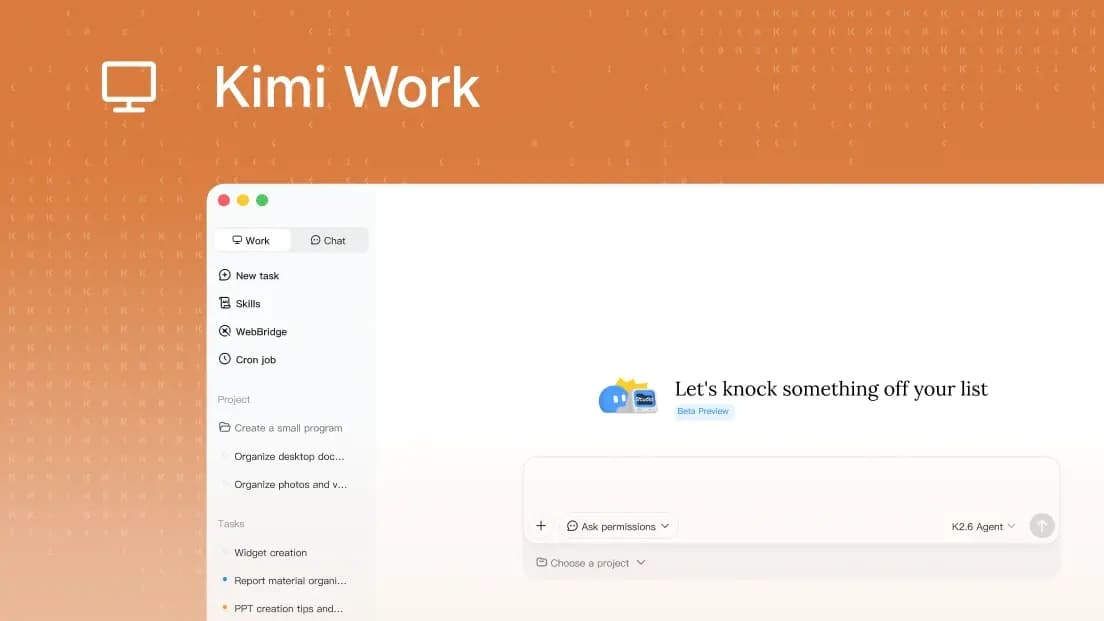
Kimi Work is a desktop AI agent for local, browser, office, and finance workflows. The official page positions it as a local agent that can connect to folders on your machine, automate browser tasks through WebBridge, run scheduled jobs, coordinate specialized agents, and turn research into office files.
The launch post adds the highest-signal product claims: native Agent Swarm with up to 300 agents running in parallel on the local machine, browser actions through WebBridge, finance data tool calls from Yahoo Finance and World Bank, and a memory system that tracks user preferences and prior context.
Product
Kimi Work
Company
Kimi by Moonshot AI
Positioning
AI desktop agent for knowledge workers
Main surface
Desktop app connected to local files and browser automation
Platforms
macOS for Apple silicon and Windows
Source policy
Official Kimi and Moonshot sources only
Official Snapshot
The clean way to understand Kimi Work is to separate the product promise from the individual features. The product promise is a desktop agent that can operate closer to your files and daily apps than the Kimi web chat. The features are the machinery that makes that possible: WebBridge, Cron, Agent Swarm, office creation, and native finance data access.
| Area | Official detail | Practical meaning |
|---|---|---|
| Local workspace | Kimi Work can mount local folders and work with files on the user's machine. | Use it for document discovery, summarization, folder cleanup, and local research workflows. |
| Browser control | WebBridge lets the agent browse across tabs, click, scroll, type, extract data, and complete web tasks. | It is meant for workflows that cross normal web pages, not only chat or API calls. |
| Scheduled work | The built-in Cron engine supports scheduled LLM agent calls, Python, shell execution, and related jobs. | Recurring briefs, data processing, and repeat office work can run on a schedule. |
| Parallel agents | Kimi's X announcement says native Agent Swarm can run up to 300 AI agents in parallel locally. | Kimi is positioning Work for broad task decomposition, not just a single chat assistant. |
| Office output | Kimi says research can be converted into PowerPoint decks or Excel sheets. | The product is aimed at finishing work artifacts, not stopping at a prose answer. |
| Finance | Kimi lists built-in market data for A-shares, HK stocks, and US equities, with the X post naming Yahoo Finance and World Bank tool calls. | Analyst-style workflows can start from natural language without separate API setup. |
Launch Details From X
Kimi.ai's official X announcement is the most compact launch summary. It calls Kimi Work a local desktop AI agent and highlights parallel agents, browser use, finance data calls, memory, and desktop availability.
| Claim | Official detail |
|---|---|
| Announcement date | The official X post was published on June 8, 2026. |
| Parallelism claim | Up to 300 AI agents running in parallel on the local machine. |
| Browser actions | Search, scroll, click, type, and complete tasks through WebBridge. |
| Finance sources named | Yahoo Finance and World Bank are named in the official X announcement. |
| Memory | The X post says Kimi Desktop keeps a diary of preferences, decisions, and context. |
| Availability | The X post and product page both point to macOS Apple silicon and Windows availability. |
Local Agent Model
Kimi Work's most important difference from a web chat is local context. The product FAQ says the desktop version mounts local folders, can run code in the background, and executes scheduled tasks. That makes it closer to a workbench for files and automation than a pure chatbot window.
Kimi Work mental model:
local folders
  -> agent reads and organizes workspace context
browser tabs through WebBridge
  -> agent gathers and acts on web information
Cron engine
  -> scheduled LLM, Python, or shell tasks
Agent Swarm
  -> parallel specialists break down larger work
office outputs
  -> documents, PowerPoint decks, and Excel sheets
That model is useful for knowledge work because many real tasks are messy mixtures: files on disk, live web pages, spreadsheets, reports, and recurring deadlines. Kimi Work is trying to make one desktop agent coordinate those pieces.
WebBridge Browser Use
WebBridge is Kimi's browser automation layer. The product page says Kimi can browse across tabs, extract data, and execute multi-step web tasks. The X post describes the browser action set in concrete terms: search, scroll, click, type, and complete tasks.
The practical use case is not only "summarize this page." It is a workflow where the agent can visit multiple pages, compare data, fill forms where appropriate, and return the result to a local document or spreadsheet. Kimi's own examples include checking a public announcement and saving historical stock data to Excel.
24/7 Automation
Kimi Work includes a built-in Cron engine. Kimi says it can schedule LLM agent calls, Python scripts, shell executions, and more. The product page also says users can enable Keep Computer Awake for overnight scheduled tasks.
| Workflow | Setup | Watch for |
|---|---|---|
| Morning briefing | Schedule an LLM agent call to gather source material and draft a daily note. | Use approved sources and review the output before forwarding it to clients or teams. |
| Nightly data processing | Run Python or shell jobs on a schedule through Kimi Work's Cron engine. | Treat scheduled code as production automation: test paths, logs, and permissions first. |
| Local document sweep | Ask Kimi to search a mounted workspace for PDFs or office documents and summarize findings. | Keep folder scope narrow when sensitive local files live nearby. |
| Web research packet | Use WebBridge to navigate pages, extract data, and turn the result into a document or sheet. | Check that source pages permit the data collection you are asking for. |
Agent Swarm
Kimi's product page describes Agent Swarm as a way to coordinate specialized agents so complex tasks can be broken down and solved in parallel. The official X post gives the scale claim: up to 300 agents in parallel on the local machine.
The interesting product direction is artifact completion. Kimi says that after research is complete, Kimi Work can convert insights into PowerPoint decks or Excel sheets. That matters because the value of agentic work is often not the raw answer, but the finished artifact a team can review, edit, and send.
Finance Workflows
Kimi is explicitly selling Kimi Work into finance-heavy knowledge work. The product page says Kimi Work has native market data coverage for A-shares, HK stocks, and US equities. The launch post names Yahoo Finance and World Bank as finance data tool-call sources.
| Finance point | Official detail |
|---|---|
| Market coverage | The product page names A-shares, HK stocks, and US equities. |
| Named data tools | The official X post names Yahoo Finance and World Bank tool calls. |
| Likely workflow | Pull earnings reports, inspect market anomalies, and reconcile spreadsheet data by prompt. |
| Important caveat | Kimi does not make this a substitute for regulated financial advice. |
Privacy and Local File Safety
Local agents are powerful precisely because they can reach important files. Kimi's FAQ addresses that directly: users control file access, and before Kimi modifies, overwrites, or runs code in local directories, it prompts for explicit authorization when the protective mode is enabled.
| Safety area | Official detail or practical setup |
|---|---|
| Local file control | Kimi says users keep control over files that Kimi Work can access. |
| Before acting | The product FAQ says Kimi prompts for explicit authorization before modifying files, overwriting files, or running code in local directories. |
| Yolo mode | Kimi describes the safeguard as Ask before acting when Yolo mode is off. |
| Practical setup | Start with a dedicated Kimi workspace folder rather than mounting an entire home directory. |
A sensible first setup is a dedicated workspace folder. Put the files you want Kimi to use there, keep sensitive material outside it, and expand access only after you are comfortable with the approval prompts and task logs.
Platforms and Download Notes
Kimi's product page lists downloads for macOS on Apple silicon and Windows. It does not list Linux, Intel Mac, iOS, or Android downloads on the Kimi Work page at the time of this article.
| Platform note | Official detail |
|---|---|
| macOS | Apple silicon is listed on the product page. |
| Windows | Windows is listed on the product page. |
| Mobile | The product page tells visitors to download on desktop. |
| Sleep behavior | For overnight scheduled tasks, Kimi says users can enable a Keep Computer Awake setting. |
Best Use Cases
Kimi Work looks strongest when a task needs more than a single answer. It is built for loops where local files, websites, scheduled actions, and office outputs all matter.
- Document research: find PDFs in a local workspace, extract the relevant passages, and prepare a summary document.
- Market analysis: combine public market data, earnings documents, and spreadsheet reconciliation.
- Recurring briefs: run scheduled research jobs and draft daily or weekly updates.
- Web-to-sheet workflows: collect structured web data through WebBridge and save it into an Excel-style artifact.
- Research-to-presentation: split research across agents, synthesize findings, and produce a PowerPoint deck.
Decision Guide
Use Kimi Work when the desktop context is the point. If your task is only a quick question, the web app may be enough. If the job involves local files, scheduled runs, browser navigation, or spreadsheet and slide outputs, the desktop app is where Kimi is concentrating the agentic workflow.
Choose Kimi Work when:
- the task needs local folders or files
- browser steps are part of the work
- you need scheduled LLM, Python, or shell runs
- many agents can divide the task
- the final output should be a document, deck, or spreadsheet

Stay with web chat when:
- you only need a quick answer
- you do not want to mount local folders
- no browser or scheduled automation is needed
The official materials do not publish pricing, enterprise controls, model routing details, or a full security architecture for Kimi Work on the product page. For production teams, those are the follow-up questions to answer before rolling the app into sensitive workflows.
FAQ
What is Kimi Work?
Kimi Work is Kimi's desktop AI agent for knowledge workers. Officially, it connects to local files, uses WebBridge for browser automation, runs scheduled tasks, coordinates Agent Swarm, and can produce office artifacts such as documents, slides, and sheets.
Is Kimi Work different from the Kimi web app?
Yes. Kimi's product FAQ frames the web app as better for quick chat and Kimi Work as a local desktop agent for deep workflows with local folders, WebBridge, code execution, and scheduled work.
Does Kimi Work support browser automation?
Yes. Official Kimi materials say WebBridge can navigate websites like a human by searching, scrolling, clicking, typing, extracting data, and completing multi-step web tasks.
How many agents can Kimi Work run?
Kimi's official X announcement says native Agent Swarm supports up to 300 AI agents running in parallel on the local machine.
What operating systems are supported?
The official product page lists macOS for Apple silicon and Windows. The page does not list Intel Mac, Linux, iOS, or Android downloads.
How does Kimi Work handle local file safety?
Kimi says users control file access and that Kimi Work asks for explicit authorization before modifying, overwriting, or running code inside local directories when Ask before acting is enabled.
Sources
This post intentionally uses official Kimi and Moonshot sources only. No third-party reporting, forums, or unofficial claims were used.
Get practical AI workflow notes
Join the Agentpedia Codes newsletter for hands-on guides to agentic tools, browser automation, coding assistants, and production workflows.