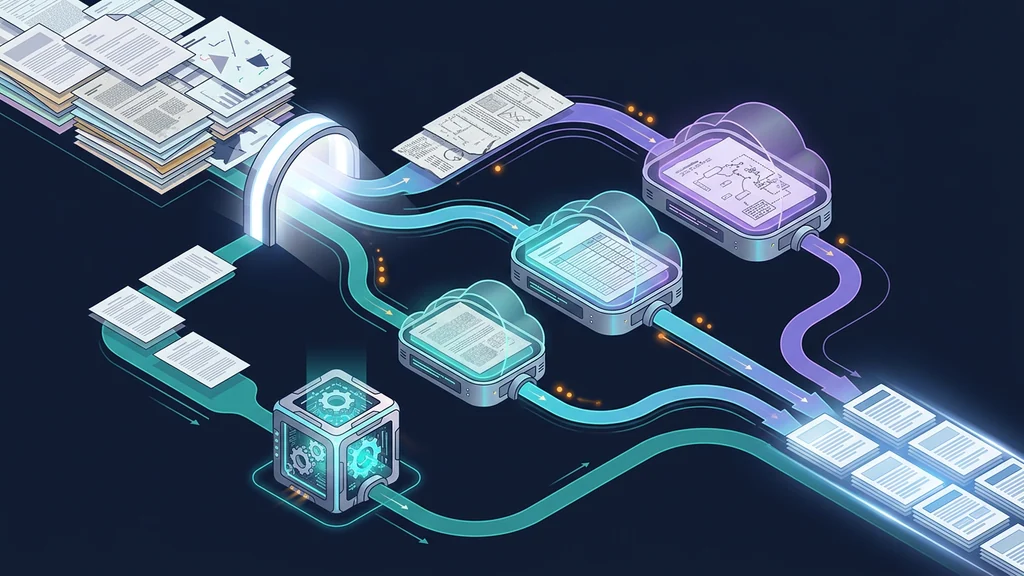
LlamaIndex Parse Gateway estimates page complexity, assigns simple text pages to LiteParse, and selects cost_effective, agentic, or agentic_plus parsing for harder pages. This can avoid processing every page at the highest tier, but it does not keep the non-selected pages out of LlamaCloud: the current parse.ts uploads the same complete PDF separately for each non-empty cloud-tier group and supplies page numbers to limit parsing. The useful production pattern is page-level classification plus observable fallback; the public app itself remains a small source-available demo.
What Parse Gateway is—and is not
The repository was created July 10, 2026. Its README describes a TanStack Start application with a single server route that accepts a PDF, runs LiteParse complexity estimation, fans pages out to local and cloud parsers, and streams status through Server-Sent Events (SSE).
| Question | Answer as of July 31, 2026 |
|---|---|
| Is it a web demo? | Yes, with upload, status, per-tier breakdown and merged Markdown output |
| Is it a parsing library? | No; the app composes @llamaindex/liteparse and LlamaCloud |
| Does it have releases? | GitHub reports no releases |
| Does it declare a license? | No license is declared by GitHub and no repository license file is shown |
| Can it prove production readiness? | No; the repository and blog do not establish an SLO, security audit or supported SDK contract |
| Can you study or run the published source? | Yes; source availability does not grant unstated redistribution rights |
Do not label the repository MIT, Apache-2.0 or “open-source” without a license grant. If your organization wants to reuse its code, ask LlamaIndex for written terms or reimplement the documented behavior from independently reviewed requirements.
This architecture is adjacent to general model routing. The OmniRoute AI gateway guide covers request routing at the model layer; Parse Gateway makes a similar decision at the PDF-page layer.
Follow the request and control flow
The demo's main components are small enough to reason about:
| Stage | Location | Input | Decision/output | Failure surface |
|---|---|---|---|---|
| Upload/UI | src/routes/index.tsx | PDF, API key, layout toggle | Form request to /api/parse | Browser memory, file limits, key exposure |
| API route | src/routes/api/parse.ts | Multipart form and bearer key | Starts SSE stream and orchestration | Authentication, timeout, partial response |
| Complexity estimate | LiteParse isComplex() | PDF pages | OCR reasons, magnitudes and layout signals | Malformed/encrypted PDF, estimator error |
| Tier classifier | classifyPageTier() | Per-page signals | Local, cost_effective, agentic, agentic_plus | Misclassification or policy drift |
| Local parse | LiteParse | Simple page set | Page Markdown | Extraction order/format errors |
| Cloud parse | LlamaCloud API | Complete PDF plus tier-specific page numbers | Page Markdown for the selected pages | Full-document upload, repeated upload across tiers, rate limit, auth, quota, provider error |
| SSE client | use-parse-gateway.ts | Stage events | UI state and progress | Disconnect, duplicate or out-of-order handling |
| Result merge | Server/client result path | Parsed pages | Sorted combined Markdown | Missing, duplicated or misnumbered pages |
The control flow is:
PDF upload
  -> estimate every page
  -> derive OCR baseline tier
  -> optionally raise tier from layout signals
  -> group page numbers by final tier
  -> parse simple pages locally
  -> for each non-empty cloud tier, upload the complete PDF
  -> ask LlamaParse to process that tier's selected page numbers
  -> stream status and page results
  -> sort by original page number
  -> render/export combined Markdown
The final merge is as important as the parser choice. A pipeline that silently omits a timed-out page can look successful while producing an incomplete document.
Run the demo locally
The README's shortest path is:
# Starting commands from the repository README; not executed for this guide.
git clone https://github.com/run-llama/parse-gateway.git
cd parse-gateway
pnpm install
pnpm dev
The development app listens on local port 3000. A LlamaParse Platform API key is needed only when pages escalate beyond local LiteParse. The README also lists:
# Production-build commands from the README; not a production-readiness claim.
pnpm build
pnpm start
pnpm start uses Vite preview and defaults to port 4173 through $PORT. Vite preview is not by itself an application security, scaling or availability architecture.
Before uploading sensitive documents:
- inspect the current repository revision and dependencies;
- run it on a private developer machine;
- use a short-lived or low-scope test key if the platform supports one;
- start with synthetic PDFs;
- assume the complete PDF leaves the machine if any page escalates, and inspect whether multiple cloud tiers cause repeated full-document uploads;
- delete browser storage and generated output after the trial.
Understand the routing decisions
The official blog and README map each OCR reason to a baseline:
| Signal | Meaning in the official blog | Baseline tier |
|---|---|---|
no-text | Almost no extractable text and no full-page raster | cost_effective |
scanned | Full-page raster with little or no native text | agentic |
sparse-text | Very little page area covered by text | agentic |
embedded-images | Substantial images mixed with native text | agentic |
garbled | Extracted text does not represent visible glyphs | agentic_plus |
vector-text | Glyphs painted as vector outlines, outside the text layer | agentic_plus |
| No OCR reason, simple layout | Native text can be handled locally | LiteParse |
Magnitude can raise a baseline. The demo also escalates an agentic page to agentic_plus when three or more OCR reasons fire, because independent defects compound.
The README intends layout to be a separate, optional input:
| Layout condition | When considered | Effect |
|---|---|---|
| Multiple columns | include_layout=true | Can raise tier |
| Heavy ruled-table coverage | include_layout=true | Can raise tier |
| Dense figures | include_layout=true | Can raise tier |
| Multiple layout problems | include_layout=true | Can raise tier further |
| Simple layout | Either mode | Does not reduce an OCR-derived tier |
When layout escalation is enabled, the final tier is the maximum selected by OCR and layout rules. Layout can only raise, never lower, the result.
The current implementation does not fully match the README's promise that disabling the toggle produces purely OCR-based routing. In src/routes/api/is-complex.ts at the reviewed revision, the initial local-versus-cloud branch still checks layout.isComplex even when include_layout is false. A page with no OCR requirement but complex layout can therefore miss the local branch and fall through to a cloud tier, although the later layout-escalation function is disabled. Treat this as a current source/README mismatch and test the actual revision before relying on the toggle.
Production policy wrapper
Do not bury these thresholds inside unversioned application code. Wrap them in a policy record:
# Illustrative routing policy, not the repository's configuration format.
policy_version: "pdf-routing-2026-07-31"
estimator:
  package: "@llamaindex/liteparse"
  version: "<pinned-version>"
routing:
  local_when:
    ocr_reasons: []
    layout_complex: false
  compound_escalation:
    minimum_ocr_reasons: 3
  layout_enabled: true
fallback:
  on_estimator_error: "quarantine"
  on_cloud_timeout: "retry-once-then-review"
  on_missing_page: "fail-document"
Pinning the policy makes a cost or accuracy shift explainable after a dependency upgrade.
Secure the browser-to-server API-key boundary
The README says the API key is stored in browser localStorage, sent as a bearer token to /api/parse, and never persisted server-side. That is transparent demo behavior, but “not persisted on the server” is not the same as “safe.”
| Threat | Demo exposure | Production alternative |
|---|---|---|
| Cross-site scripting | Same-origin script can read localStorage | Server-side secret manager and strict CSP |
| Shared browser/device | Key remains after the session | Short session token; explicit logout and expiry |
| Browser extension compromise | Extension may access page data | Managed device/browser policy; no long-lived provider key |
| Server logs/proxy capture | Authorization headers may be logged | Header redaction and log tests |
| Over-broad provider key | Compromise affects unrelated use | Per-app scoped credential, quotas and rotation |
| User uploads sensitive PDF | Any cloud escalation uploads the complete PDF; multiple cloud tiers can repeat that upload | Document-level classification and explicit provider boundary |
Page-number filtering limits which pages a cloud parse job processes; it does not limit which bytes the current demo uploads. A production review should therefore classify and approve the document as a whole before any cloud route is allowed. If page-level confidentiality is required, split or redact the document before the provider boundary and verify that the resulting files cannot reconstruct excluded content.
A production application should authenticate the user to your backend, authorize the document and requested policy, retrieve the provider credential from a secret manager, and proxy only the allowed operation. Never return the provider secret to browser JavaScript.
Design failure and fallback behavior
Routing saves money only if it does not hide incomplete output.
| Failure | Safe default | Optional fallback | Required evidence |
|---|---|---|---|
| PDF cannot be opened | Reject and quarantine | Request a clean/exported PDF | File digest and parser error |
| Complexity estimate fails | Do not guess “simple” | Review or send full document to an approved tier | Estimator version and error |
| Local parse fails one page | Mark document incomplete | Escalate that page if policy allows | Page number and retry chain |
| Cloud returns 401/403 | Stop; do not retry repeatedly | Rotate/re-authorize key | Provider request ID |
| Cloud rate limit | Bounded backoff | Queue with deadline | Attempts and delay |
| Cloud timeout | Retry idempotently once | Manual review or alternate approved parser | Stable operation ID |
| SSE disconnect | Reconnect to durable job state | Poll job endpoint | Last acknowledged event |
| Duplicate event | Deduplicate by job/page/stage ID | Ignore exact duplicate | Event sequence |
| Missing page after merge | Fail the document | Reparse only missing pages | Completeness manifest |
| Tier result is low quality | Flag through acceptance checks | Raise tier and compare | Quality delta and cost |
The public demo streams live state; a production service should keep durable server-side job state so a phone sleep, tab close or proxy timeout does not destroy observability.
Measure cost without inventing prices
LlamaParse prices are volatile and tier-specific. Retrieve current official pricing when you run the evaluation rather than copying a number into code or this article.
Use:
cloud_parse_cost =
  pages_cost_effective * current_cost_effective_unit
  + pages_agentic * current_agentic_unit
  + pages_agentic_plus * current_agentic_plus_unit

total_pipeline_cost =
  cloud_parse_cost
  + local_compute
  + storage_and_transfer
  + retry_cost
  + quality_review_cost
For each corpus, report:
| Metric | Why |
|---|---|
| Documents and total pages | Denominator |
| Pages per selected tier | Routing distribution |
| Pages escalated by layout only | Cost of enabling layout analysis |
| Pages reprocessed at a higher tier | Misrouting/quality signal |
| Parse latency p50/p95 by tier | Operational tradeoff |
| Missing/failed page rate | Reliability |
| Acceptance rate by document type | Output utility |
| Current unit price and retrieval date | Reproducible cost |
| Total and cost per accepted page/document | Decision metric |
Compare at least three policies: all-local where feasible, all-highest-tier, and page routing. Hold the corpus and acceptance rubric fixed. The routing policy wins only if it meets the required quality and completeness at a better cost/latency point.
Use the parsing MCP tools carefully
The live official tools/list response from https://mcp.llamaindex.ai/parse/mcp, checked July 31, 2026, exposes this storage and parsing sequence:
getUploadUrlreturns a pre-signed URL for LlamaParse S3 storage.uploadFileByUrldownloads a file from the supplied URL and places it in LlamaParse S3 storage.estimateFileComplexityrequires a file ID obtained from one of those upload tools or supplied by the user.parseWithLiteParsealso requires such a file ID; its in-process parser consumes no LlamaParse Platform credits, but the referenced document is already in the provider's file-storage boundary.
Zero provider price and in-process LiteParse execution do not mean the document remains on the caller's machine when these MCP tools are used. This gives an agent a routing decision, not permission to upload any document. Wrap upload and parse calls with document-level classification, destination, retention and cost policy. Record the document digest, tool name, server identity, arguments, storage decision, route decision and returned page manifest.
For a broader view of agent-facing MCP permissions and review surfaces, see the GitHub Copilot agent skills and MCP guide.
Prepare a production implementation
- Obtain an explicit license or reimplement from reviewed requirements.
- Pin LiteParse, LlamaCloud client and routing-policy versions.
- Move provider credentials out of browser storage.
- Authenticate users and authorize document classes server-side.
- Reject oversized, encrypted, malformed or unsupported files predictably.
- Scan uploads and isolate parser execution.
- Use durable jobs rather than relying only on one SSE connection.
- Add idempotency keys for cloud parse retries.
- Emit a page manifest with one terminal status per source page.
- Fail the document when a page is missing, duplicated or out of order.
- Redact bearer tokens, document text and sensitive metadata from logs.
- Add retry budgets, circuit breakers and provider quota alerts.
- Measure quality by document class, not only average extraction success.
- Retrieve official current prices and store the dated cost calculation.
- Retain a manual review route for ambiguous or high-impact documents.
- Test restore, deletion and provider-key rotation.
If you plan to host the service yourself, the OpenShip deployment guide covers surrounding build and runtime concerns. It does not resolve Parse Gateway's absent license.
FAQ
What does LlamaIndex Parse Gateway do?
It is a TanStack Start demo that estimates complexity and selects a parser tier page by page. Simple pages can use local LiteParse, but if any page uses a cloud tier, the current server uploads the complete PDF with selected page numbers; multiple cloud tiers can cause repeated full-document uploads.
Is Parse Gateway an open-source production SDK?
Do not treat it as one. As of July 31, 2026, GitHub showed no declared license and no releases. The public repository is source-available demonstration code whose production and redistribution terms are not established by a repository license.
Where is the LlamaParse API key stored?
The README says the demo stores the key in browser localStorage, sends it as a bearer token to the server route, and does not persist it server-side. localStorage remains exposed to same-origin script compromise and should not be the production design for a shared application.
When does a page use LiteParse?
The intended rule is local LiteParse when a page needs no OCR and no enabled layout rule escalates it. In the current source, however, the initial branch still consults layout.isComplex when include_layout is false, so a layout-complex page can fall through to a cloud tier even with layout escalation disabled.
How does layout complexity affect routing?
The README intends layout signals to raise tiers only when Include Layout Complexity is enabled, and they never lower an OCR-derived tier. The current implementation still checks layout.isComplex in its initial local-versus-cloud branch when the toggle is off, so disabling it does not guarantee purely OCR-only routing.
How should I estimate Parse Gateway cost?
Measure page counts by selected tier, retrieve the current official unit prices at run time, calculate cloud parser cost by tier, and add your own compute, storage, retry and review costs. This guide does not hardcode prices.
Get the latest on AI, LLMs & developer tools
New MCP servers, model updates, and guides like this one — delivered weekly.
Related Guides
How to Change Antigravity Themes
Customize themes, dark mode, icons, and color schemes.
Rules & ConfigurationAntigravity Rules Guide
How to build custom rules with AGENTS.md and GEMINI.md.
MCP & IntegrationMCP Servers Setup Guide
Step-by-step guide to connecting MCP servers in Antigravity.
ComparisonBest Antigravity Alternatives 2026
Claude Code, Cursor, Windsurf, Codex, and Kiro compared.
Pricing & QuotaAntigravity Cockpit Guide
Monitor AI quota, track rate limits, and manage credits.
MCP & IntegrationGoogle Stitch + Antigravity Guide
The complete design-to-code workflow with DESIGN.md and Vibe Design.
Official sources
LlamaIndex
- Parse Gateway: Smart, Page-Level Document Parser Routing — routing rationale, OCR reason baselines, layout escalation and MCP tools
- Parse Gateway repository — source, architecture, creation date, release and license state
- Parse Gateway README — app flow, startup commands, SSE behavior and API-key handling
- Parse route at reviewed revision — complete-file upload for each non-empty cloud-tier group plus page-number filtering
- Complexity route at reviewed revision — current layout-toggle control flow
- LlamaIndex parsing MCP endpoint — official parsing tool endpoint
- LlamaParse API key documentation — current authentication setup