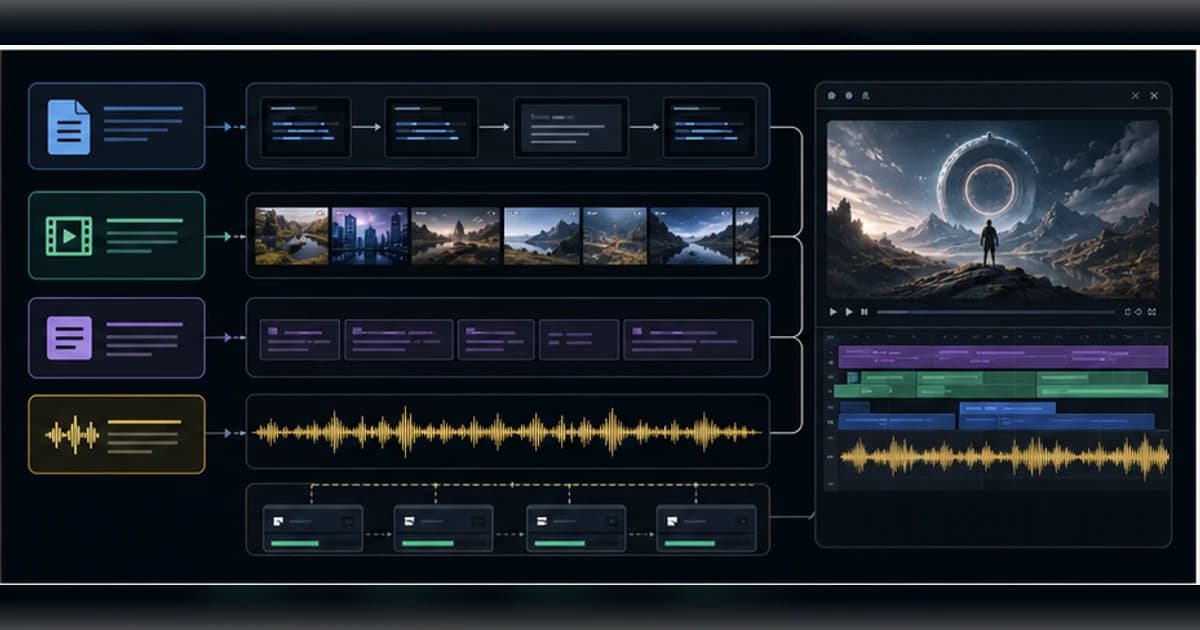
The honest frame is local-first video production plumbing, not magic money printing. It can assemble a video quickly, but the quality, legality, relevance, and platform fit still depend on your prompt, assets, model configuration, media licenses, and review process.
Get the latest on AI, LLMs & developer tools
New MCP servers, model updates, and guides like this one — delivered weekly.
Editorial note
This article uses the GitHub repo, Chinese and English READMEs, pyproject, config examples, API and service source files, current issues and PRs, Pexels/Pixabay/YouTube policy references, X posts, Reddit, and third-party tutorials gathered on June 2, 2026.
1. MoneyPrinterTurbo in One Sentence
MoneyPrinterTurbo is an MIT-licensed Python app and API that automates short-video assembly from a topic by generating script text, search keywords, voiceover, subtitles, stock or local footage, music, and a rendered video.
| Area | Detail | Why it matters |
|---|---|---|
| Repository | harry0703/MoneyPrinterTurbo | https://github.com/harry0703/MoneyPrinterTurbo |
| Primary language | Python | Primary GitHub language at research time. |
| License | MIT | Check bundled or binary licenses separately where relevant. |
| Created | March 11, 2024 | Latest release checked: v1.2.9 on May 30, 2026. |
2. Why It Matters
The project matters because short-video production has many mechanical steps that can be automated: ideation, script writing, asset search, narration, subtitle alignment, music mixing, aspect-ratio formatting, and encoding.
It also exposes the limits of automation. A generated video can be technically valid but semantically bad: mismatched footage, generic narration, weak pacing, wrong language voice, repeated clips, or licensing risk.
The best use case is not unattended spam. The best use case is a draft factory: generate several candidate videos, inspect the assets, edit the script, swap weak clips, verify licenses, then publish only the good ones.
3. Architecture and Mental Model
MoneyPrinterTurbo is structured around a Python service layer with a Streamlit WebUI and FastAPI API. The core task pipeline calls LLM, material, voice, subtitle, and video services, then tracks work through in-memory or Redis-backed task state.
| Area | Detail | Why it matters |
|---|---|---|
| WebUI | `webui/Main.py` | Streamlit interface for non-API users. |
| API entry | `main.py`, `app/asgi.py`, `app/router.py` | FastAPI and Uvicorn service with docs under `/docs`. |
| Controllers | `app/controllers/v1/video.py`, `llm.py` | Video task endpoints plus script, terms, and social metadata endpoints. |
| Task pipeline | `app/services/task.py` | Coordinates script generation, terms, TTS, subtitles, materials, composition, and final output. |
| LLM providers | `app/services/llm.py` and config | Supports multiple hosted and local providers through configurable routing. |
| Media layer | `material.py`, `voice.py`, `subtitle.py`, `video.py` | Stock download, TTS, subtitle alignment, MoviePy/FFmpeg rendering. |
| Config | `config.example.toml` | API keys, provider settings, video dimensions, subtitles, encoder choices, and task behavior. |
| Deployment | Docker, GPU Docker, uv, venv, Windows batch files | Several runtime paths, each with its own environment caveats. |
4. Smallest End-to-End Setup
The commands below are copied from the repository documentation and checked against the current research snapshot. Treat them as a starting point, then read the linked README before installing into a production environment.
git clone https://github.com/harry0703/MoneyPrinterTurbo.git
cd MoneyPrinterTurbo

# Recommended Python path
uv python install 3.11
uv sync --frozen
cp config.example.toml config.toml

# Web interface
uv run streamlit run ./webui/Main.py --browser.gatherUsageStats=False

# API service
uv run python main.py
A small first task should prove the integration before you attach it to critical data or large workspaces.
# Docker path
docker compose up

# Then open:
# WebUI: http://127.0.0.1:8501
# API docs: http://127.0.0.1:8080/docs

# Before generation, configure at least:
# - llm_provider and provider API key
# - pexels_api_keys or pixabay_api_keys
# - voice/subtitle/video preferences
5. Technical Deep Dive
5.1 The pipeline is simple but long
The task service is the best mental model. MoneyPrinterTurbo starts with a topic, asks an LLM for a script, asks for search terms, creates voice audio, creates subtitles, downloads or loads materials, combines clips, renders video, and optionally prepares posting metadata.
Each step can succeed while the whole video still fails editorially. A correct script and working encoder do not guarantee good footage, truthful claims, or platform-safe output.
topic
  -> script
  -> search terms
  -> TTS voice
  -> subtitle alignment
  -> stock or local clips
  -> MoviePy composition
  -> FFmpeg render
  -> review before publishing
5.2 Provider flexibility is a strength and a support burden
The README lists many model routes: OpenAI-compatible providers, AIHubMix, Moonshot, Azure, Qwen, Gemini, Ollama, DeepSeek, MiniMax, ERNIE, Pollinations, ModelScope, LiteLLM, and others.
That breadth makes the project easier to adapt to local budgets and regional provider access. It also means many bug reports are provider-specific: malformed model responses, missing keys, network failures, or voice/language mismatches.
5.3 Stock media is not a legal shield
The README describes the video material sources as high-definition and royalty-free, and it also allows local materials. That is useful, but Pexels and Pixabay still have restrictions around trademarks, identifiable people, misleading use, standalone resale, and third-party rights.
The bundled music caveat is even more direct: the README thanks YouTube creators and says to delete music if copyright issues arise. Treat music and stock clips as review items, not automatic permission.
5.4 WebUI and API serve different users
The Streamlit WebUI is the fastest path for creators and non-API testing. The FastAPI service is better for automation, batch generation, internal tools, or wrapping the generator behind another interface.
Do not expose the API directly to the internet without hardening. Any service that can spend provider credits, download media, render files, and write outputs needs authentication, quotas, storage rules, and abuse controls.
5.5 GPU is optional, but codecs still matter
The README says GPU is not required, while the GPU Docker docs call out local transcription and heavier processing as places where GPU helps. In ordinary cloud-LLM plus cloud-TTS flows, CPU and RAM matter more than VRAM.
The current issue tracker includes codec and NVENC fallback reports. That is normal for video tooling: FFmpeg availability, driver support, hardware encoder names, and container runtime flags all affect reliability.
6. Real-World Wrong vs Right Patterns
| Wrong | Right | Reason |
|---|---|---|
| Assume generated stock footage is always relevant. | Review each clip and replace weak or misleading material. | Issue #971 shows narration and action can diverge. |
| Publish automatically because assets are called royalty-free. | Check Pexels, Pixabay, YouTube music, likeness, trademark, and platform rules. | Stock licenses have restrictions and third-party rights caveats. |
| Expose the API publicly after `docker compose up`. | Put it behind auth, rate limits, quotas, and storage controls. | The service can spend API credits and generate media jobs. |
| Expect GPU acceleration to work because a GPU exists. | Verify FFmpeg encoder support and fallback behavior on your exact host. | Hardware video encoding is driver and container sensitive. |
7. Common Mistakes and Current Issues
The issue tracker matters because these are young, fast-moving repos. The article uses issues as risk signals, not as proof that a project is unusable.
| Area | Detail | Why it matters |
|---|---|---|
| Video relevance | Issue #971 reports incorrect or unrelated generated video content. | Human review is mandatory for production posts. |
| NVENC fallback | Issue #978 reports h264_nvenc disabled after runtime failure and fallback to libx264. | Benchmark your encoder path before bulk rendering. |
| CLI-only demand | Issue #976 asks for pure command-line use. | The current public surface is WebUI plus API, not a polished CLI workflow. |
| Local material questions | Issue #969 covers user confusion around adding local assets. | Asset directories and WebUI upload flows need clear operator process. |
| Provider parsing | Issue #966 and PR #967 fixed Qwen script/keyword parsing. | Provider adapters can break on response-shape changes. |
| Material caching | Issue #955 asks for local video cache to avoid repeated downloads. | Repeated generation can waste time, bandwidth, and API quota. |
8. Performance, Scaling, and Cost Notes
Throughput depends on the slowest path: LLM response, TTS, stock search/download, subtitle alignment, and video encoding. A local GPU only helps some parts of that chain.
Batch generation is useful because short-video quality is stochastic. Generate several candidates, but enforce hard budgets for LLM calls, media downloads, and render jobs.
For teams, Redis-backed task state and API orchestration matter more than the WebUI. For solo users, the WebUI is usually enough until repeatability, monitoring, or bulk rendering becomes the bottleneck.
9. Who It Is For
| Use it if | Skip it if |
|---|---|
| You want a local short-video draft pipeline with WebUI and API access. | You expect publish-ready videos without human review. |
| You are comfortable configuring LLM, TTS, stock-media, and FFmpeg settings. | You need a hosted creator tool with no setup. |
| You want to generate candidates for TikTok, YouTube Shorts, Reels, or internal content. | You need legal clearance, brand review, and editorial quality guarantees out of the box. |
| You can replace bad clips and verify media licenses. | You plan unattended high-volume posting. |
10. Community Signal
MoneyPrinterTurbo has broad public visibility because the promise is easy to understand: type a topic and get a video. X posts, Reddit threads, and tutorial articles repeat that framing.
The community signal is mixed in a useful way. People are excited about local automation, but skeptical commenters correctly ask whether popularity maps to real usage and whether generic generated videos are worth publishing.
The issue tracker is practical and creator-oriented: codec fallbacks, local materials, subtitle backgrounds, provider parsing, local TTS, CLI requests, download caching, and video relevance.
11. The Verdict: Is It Worth Using?
Our Take
Use MoneyPrinterTurbo as a local video draft engine, especially when you want WebUI plus API control. Skip unattended publishing, monetization claims, or public API deployment until you have editorial review, licensing checks, authentication, quota limits, and platform-policy controls.
12. The Bigger Picture
MoneyPrinterTurbo sits inside the bigger AI-media shift: the bottleneck is moving from mechanical assembly to judgment. Anyone can generate more drafts; fewer people can select, verify, edit, and publish responsibly.
The repo is most valuable when it compresses repetitive production steps while preserving human accountability over claims, assets, voice, pacing, and distribution.
13. Frequently Asked Questions
Q: Is MoneyPrinterTurbo free to use?
The code is MIT-licensed, but generation can require paid or rate-limited services such as LLM providers, TTS providers, Pexels/Pixabay APIs, storage, and compute.
Q: Does it require a GPU?
No. The README says GPU is optional. A GPU mainly helps local transcription, heavier processing, and some video encoding paths when drivers and FFmpeg support are configured.
Q: What API keys do I need?
At minimum, configure an LLM provider and a stock-media source such as Pexels or Pixabay unless you rely entirely on local materials.
Q: Can I use my own local clips?
Yes. The README and issues mention local materials, but you should test the WebUI/API path and organize assets clearly before relying on it in bulk.
Q: Can I monetize generated videos?
Maybe, but the repo cannot grant that right. Verify stock-media licenses, music rights, likeness restrictions, platform policies, trademarks, and factual claims before publishing.
Q: Does it have a pure CLI mode?
Not as a polished primary workflow in the current issue snapshot. Users have requested CLI-only support while the documented surfaces are WebUI, API, Docker, and scripts.
14. Glossary
| Area | Detail | Why it matters |
|---|---|---|
| TTS | Text-to-speech voice generation. | Creates narration audio from the script. |
| Pexels and Pixabay | Stock media sources. | Useful but still subject to license restrictions. |
| MoviePy | Python video composition library. | Used for assembling clips, subtitles, and audio. |
| FFmpeg | Video/audio transcoder and encoder. | Final render reliability depends on local setup. |
| Streamlit | Python WebUI framework. | Powers the browser interface. |
| FastAPI | Python API framework. | Powers the service endpoints. |
| NVENC | NVIDIA hardware encoder. | Fast when configured; can fall back to software encoding. |
15. All Sources and Links
Primary Sources
Key Code and Policy Sources
Issues and Community
Internal Links
16. Source Attribution Table
| Area | Detail | Why it matters |
|---|---|---|
| README and config | Install paths, features, provider configuration, media settings. | Primary source. |
| Service source files | Task pipeline, API endpoints, material, voice, subtitle, and video flow. | Architecture source. |
| Issues and PRs | Codec, CLI, relevance, local materials, provider parsing, cache caveats. | Current risk signal. |
| License/policy pages | Stock media and music caveats. | Legal context. |
| Reddit and tutorials | Public discovery, setup guidance, and skepticism. | Secondary signal. |
Get the Ultimate Antigravity Cheat Sheet
Join 5,000+ developers and get our exclusive PDF guide to mastering Gemini 3 shortcuts and agent workflows.
Related Guides
Humanizer Skill Guide
blader/humanizer: 29 AI-writing patterns, voice calibration, and a two-pass audit, all in one Claude Code skill.
Guides & FeaturesMastering Agent Skills
The open standard for portable AI agent expertise.
Guides & FeaturesAntigravity Workflows Guide
Create automation recipes with Turbo Mode and AgentKit 2.0.
Guides & FeaturesHow to Change Antigravity Themes
Customize themes, dark mode, icons, and color schemes.
Guides & FeaturesHow to Change Language
Switch Antigravity to Spanish, German, Japanese, and more.
Guides & FeaturesAntigravity Security Guide
Known vulnerabilities, safe settings, and hardening steps.