OpenAI documents Sandbox Agents for the Python and TypeScript Agents SDKs. The Python SDK introduced the beta runtime, manifests, sandbox clients, filesystem and shell capabilities, snapshots, resume and memory in its v0.14.0 release. The APIs are beta and should be treated as an evolving contract. For the broader SDK architecture, start with the OpenAI Agents Python guide.
Build long-running agents with more control over agent execution. New capabilities in the Agents SDK: Run agents in controlled sandboxes; inspect and customize the open-source harness; control when memories are created and where they’re stored.
— @OpenAIDevs April 15, 2026
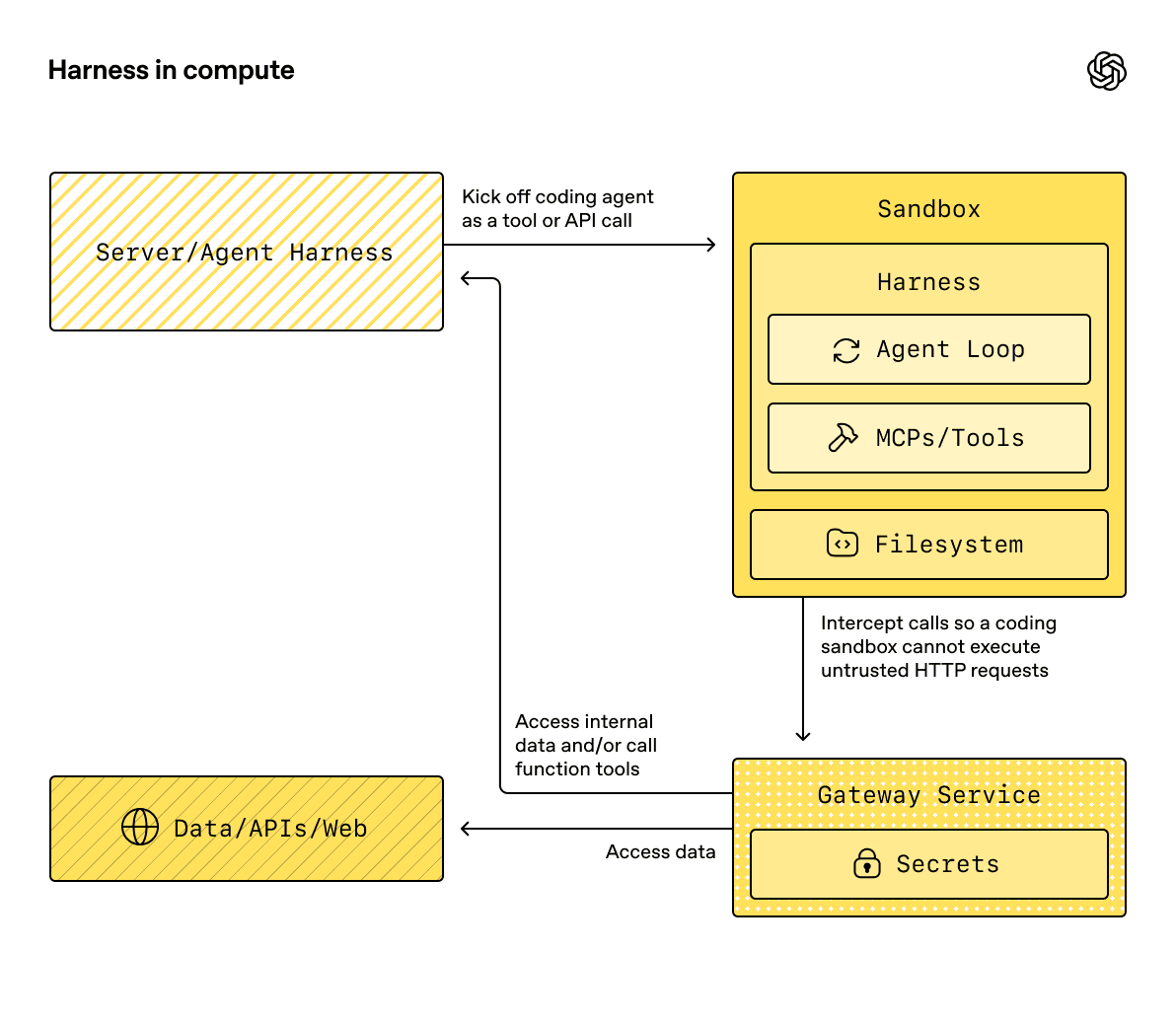
Sandbox architecture
A SandboxAgent combines normal agent settings—instructions, tools, handoffs, guardrails, model configuration and hooks—with a workspace contract. The main pieces are:
| Piece | Responsibility |
|---|---|
| Manifest | Initial files, directories, local sources, repositories, mounts, environment variables and path grants |
| Capability | Operations such as filesystem editing, shell execution, compaction and memory |
| Client | Where the sandbox runs: Unix-local, Docker or a hosted provider |
| Session state | Serialized backend/runtime state for reconnecting to an existing sandbox |
| Snapshot | Workspace contents used to seed a new sandbox |
| RunState | Runner-managed state that can carry a paused workflow forward |
The distinction matters. A manifest describes a fresh session; a reused session or snapshot may be the effective source of workspace state. A snapshot is not the same as a durable workflow record, and a conversation session is not the same as the sandbox identity.
Files, shell and memory
OpenAI documents Filesystem for operations such as apply_patch and view_image, and Shell for commands and, where supported, interactive input. Patch paths are workspace-root-relative, which is useful for preventing an agent from casually addressing arbitrary host paths—but only if the client and manifest enforce that boundary.
The default capability set includes filesystem, shell and compaction. Passing an explicit capabilities=[...] list replaces defaults, so include every capability you still need:
capabilities=[Filesystem(), Shell(), Memory()]
Sandbox memory is different from SDK conversational Session history. Memory distills lessons into workspace files such as MEMORY.md, summaries and rollout records. It uses progressive disclosure: a small summary is injected first, and detailed files are searched only when relevant.
Memory also needs stable identity. OpenAI documents an explicit resolution order involving conversation_id, an SDK session ID, RunConfig.group_id and a generated per-run identity. A sandbox session ID is the workspace identity; it is not automatically the same as the memory conversation identity.
Keep memory domains separate. Engineering, finance and customer-support agents should not share one layout merely because they run in the same application.
Unix-local, Docker and hosted clients
| Client | What it provides | Boundary |
|---|---|---|
| Unix-local | Fast local development against a host workspace | Commands run on the host; not a process/container isolation boundary |
| Docker | Container-based execution | Mounts, privileges, network and credentials still require review |
| Hosted provider | Remote sandbox through an optional client/provider | Provider availability, data handling, region and billing are provider-specific |
The sandbox client documentation lists Unix-local, Docker and hosted integrations including providers such as E2B, Modal, Runloop, Daytona, Cloudflare, Vercel and others. Do not infer identical behavior across clients.
Use Unix-local only with a disposable checkout and non-sensitive data. For untrusted code, use Docker or a hosted sandbox with narrow mounts and default-deny egress. Docker can still become unsafe through privileged mounts, host sockets, broad environment variables or production credentials.
Sessions, snapshots and resume
OpenAI documents several ways to carry work forward:
- SDK Sessions persist conversational message history;
session_statereconnects to serialized backend state;- snapshots seed a new sandbox with saved workspace contents;
RunStatecarries runner-managed state across pauses and resumes;- memory writes durable lessons into workspace files.
Do not combine server-managed continuation and SDK session persistence casually. Choose a primary history strategy for each run and document how it interacts with snapshots and memory.
A reliable repository workflow stores the commit or checkout revision, manifest hash, snapshot ID, task ID, test results and approval state. That makes a resumed run auditable instead of simply “continuing where the agent left off.”
Long-horizon orchestration
Long tasks need more than a large context window. They need retries, approval pauses, deadlines, checkpoints, cancellation and recovery after a process failure. OpenAI documents integrations and patterns involving durable workflow systems such as Temporal, Restate, DBOS and Dapr/Diagrid. Those systems are integrations, not automatic properties of SandboxAgent.
Use compaction to reduce context pressure, but do not treat compaction as a substitute for tests or workspace snapshots. After compaction, re-read the task contract, inspect the current diff and rerun the focused tests.
Safe coding example
The following pattern is intentionally a disposable Unix-local example. It is not a host security boundary:
from agents import Runner
from agents.run import RunConfig
from agents.sandbox import Manifest, SandboxAgent, SandboxRunConfig
from agents.sandbox.capabilities import Filesystem, Memory, Shell
from agents.sandbox.entries import LocalDir
from agents.sandbox.sandboxes.unix_local import UnixLocalSandboxClient

agent = SandboxAgent(
    name="Repository engineer",
    instructions=(
        "Read repo/task.md before editing. Make the smallest correct change. "
        "Run the focused test and report the exact command and result. "
        "Do not access paths outside the workspace."
    ),
    default_manifest=Manifest(entries={
        "repo": LocalDir(src="/absolute/path/to/disposable/checkout"),
    }),
    capabilities=[Filesystem(), Shell(), Memory()],
)

result = Runner.run_sync(
    agent,
    "Inspect repo/task.md, fix the issue, and run the focused test.",
    run_config=RunConfig(
        sandbox=SandboxRunConfig(client=UnixLocalSandboxClient())
    ),
)
print(result.final_output)
Use Docker or a hosted client for untrusted code. Keep secrets out of the manifest unless the provider and task require them, and never let the model choose arbitrary mounts or credentials.
Production checklist
- [ ] Pin SDK version and record the client/provider.
- [ ] Use a disposable repository for Unix-local work.
- [ ] Set an explicit manifest and workspace root.
- [ ] Include only required capabilities.
- [ ] Separate memory layouts by domain and identity.
- [ ] Choose one primary conversation persistence strategy.
- [ ] Snapshot before risky migrations or large changes.
- [ ] Use external approval for writes and deployments.
- [ ] Bound shell commands, time, output and network access.
- [ ] Persist task, snapshot, diff, test and approval identifiers.
- [ ] Keep a non-agent rollback path.
Sandbox Agents make agent work more reproducible. They do not make an arbitrary host, mount or credential safe by default.
FAQ
The short answers are in metadata; the client, state and security distinctions above are the article’s main operational guidance.
Official sources
- OpenAI Sandbox Agents
- Sandbox concepts
- Sandbox clients
- Agent memory
- Sessions
- Running agents and durable workflows
- OpenAI Agents Python release v0.14.0
- OpenAI Agents SDK sandbox example
Related Guides
How to Change Antigravity Themes
Customize themes, dark mode, icons, and color schemes.
Rules & ConfigurationAntigravity Rules Guide
How to build custom rules with AGENTS.md and GEMINI.md.
MCP & IntegrationMCP Servers Setup Guide
Step-by-step guide to connecting MCP servers in Antigravity.
ComparisonBest Antigravity Alternatives 2026
Claude Code, Cursor, Windsurf, Codex, and Kiro compared.
Pricing & QuotaAntigravity Cockpit Guide
Monitor AI quota, track rate limits, and manage credits.
MCP & IntegrationGoogle Stitch + Antigravity Guide
The complete design-to-code workflow with DESIGN.md and Vibe Design.