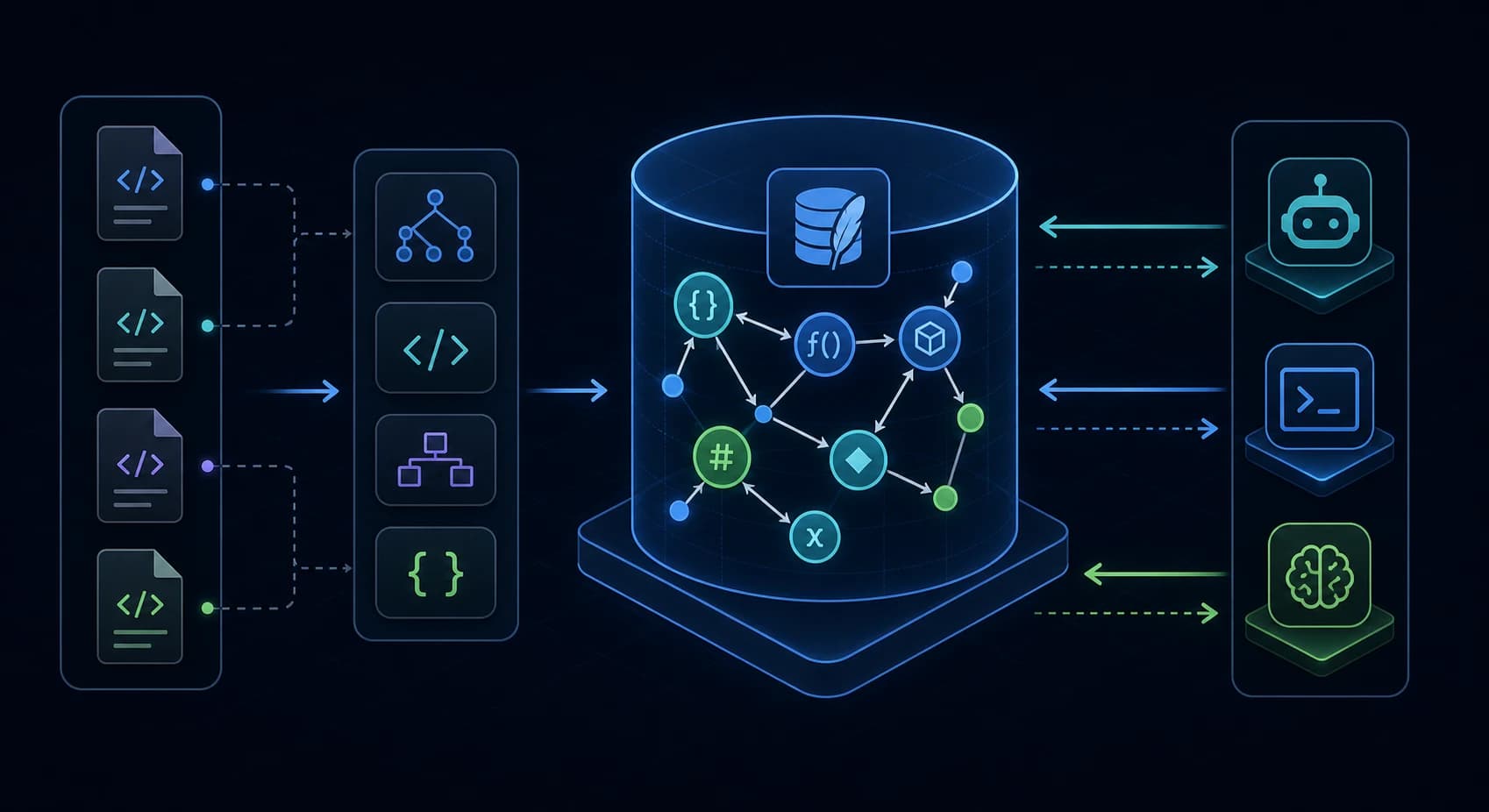
CodeGraph is worth understanding because it attacks a real failure mode in AI coding: agents burn turns rediscovering the same code structure with grep, glob, and file reads. Its answer is a local index of symbols and edges, then a small MCP tool surface that encourages the agent to ask the index before scanning files.
Get the latest on AI, LLMs & developer tools
New MCP servers, model updates, and guides like this one — delivered weekly.
Editorial note
We did not complete an end-to-end local install while drafting this post. A direct npx smoke test did not expose a runnable codegraph binary in this environment. Setup examples below are sourced from the README, installer target code, and npm page; performance claims are sourced from CodeGraph's published benchmark methodology, not from our own benchmark run.
1. CodeGraph in One Sentence
CodeGraph is an MIT-licensed, local-first code intelligence tool that parses a repository into a SQLite knowledge graph of files, symbols, calls, imports, routes, and references, then exposes that graph to AI coding agents through MCP.
A code knowledge graph is a database of code entities and relationships. MCP, or Model Context Protocol, is the tool protocol many agents use to call external tools. The useful claim is not “search is faster.” The useful claim is that the agent can answer structural questions without rebuilding the same map every turn.
| Plain task | CodeGraph view |
|---|---|
| Find a function | FTS5 search over indexed symbols |
| Understand a flow | Trace calls and dynamic-dispatch edges |
| Plan a refactor | Walk callers, callees, imports, and impact radius |
| Ask an agent about a feature | Build task context from graph search plus source snippets |
2. Why It Exists
The repo's README frames the problem around Claude Code exploration agents that repeatedly call grep, glob, Bash, and Read before answering architecture questions. That is expensive because file discovery is repeated per session and per task. CodeGraph moves discovery up front: parse once, store relationships locally, then let the agent query the graph.
The official docs site makes the same point in a smaller form: CodeGraph turns a codebase into a queryable local graph for AI coding agents, using tree-sitter parsing, MCP, and impact analysis. The npm package page repeats the README benchmark table and setup commands, which matters because the npm package is the main installation surface for many developers.
Status quo:
agent question
  -> grep/glob/read loop
  -> partial mental map
  -> answer
  -> next task repeats discovery

CodeGraph model:
codegraph init/index
  -> .codegraph/codegraph.db
  -> agent calls codegraph_context / trace / impact
  -> answer from graph-backed source context
3. Mental Model: The Five Pieces
CodeGraph is easier to evaluate as a pipeline, not as a single search command. The source layout maps cleanly to five named pieces: scanner, extractor, resolver, graph database, and MCP server.
+---------------------+      +----------------------+      +----------------------+
| scanner             | ---> | extractor             | ---> | resolver             |
| git + filesystem    |      | tree-sitter + helpers  |      | imports, calls,      |
| ignore rules        |      | language files         |      | frameworks, bridges  |
+---------------------+      +----------------------+      +----------+-----------+
                                                                      |
                                                                      v
                         +----------------------+      +----------------------+
                         | MCP tools            | <--- | SQLite graph         |
                         | context, trace,      |      | nodes, edges, files, |
                         | callers, impact      |      | FTS5 search          |
+----------------------+ +----------------------+| Piece | Source anchor | What it does |
|---|---|---|
| Scanner | src/extraction/index.ts | Collects project files using git visibility, default ignores, file size limits, and language detection. |
| Extractor | src/extraction/languages/* | Parses source into nodes and unresolved references using tree-sitter and framework-specific extractors. |
| Resolver | src/resolution/* | Turns references into graph edges such as calls, imports, extends, implements, routes, and bridge edges. |
| Database | src/db/schema.sql | Stores nodes, edges, files, unresolved refs, metadata, and an FTS5 index. |
| MCP server | src/mcp/tools.ts | Exposes codegraph_context, codegraph_trace, codegraph_impact, and related tools. |
4. Smallest End-to-End Example
The project's README currently gives a short install path and a deeper quick-start path. The issue tracker shows why the order matters: codegraph init -i builds a project index, but the agent still needs an MCP server entry before it can call CodeGraph.
# 1. Install or run the interactive installer.
npx @colbymchenry/codegraph

# 2. Restart the agent after the installer writes its MCP config.

# 3. Build the project-local graph.
cd your-project
codegraph init -i

# 4. Check the index from the CLI.
codegraph status

# 5. Ask the agent a structural question.
# Example prompt:
"Use CodeGraph first. How does the auth request reach the database?"
For manual Claude Code setup, the README shows a JSON MCP entry under mcpServers.codegraph. For Codex CLI, the source target writes a TOML table to ~/.codex/config.toml. Those paths are not interchangeable.
# Codex CLI manual shape, from the installer target.
[mcp_servers.codegraph]
command = "codegraph"
args = ["serve", "--mcp"]
Takeaway
Treat setup as two steps: wire the agent, then initialize the repository. If either half is missing, the agent falls back to native search and CodeGraph looks broken.
5. Deep Dive: How Each Layer Works
5.1 Scanner: What Gets Indexed
The scanner uses git-visible files when possible and falls back to a filesystem walk for non-git projects or ignored parent layouts. It applies a large default ignore set for dependency, build, cache, and generated-output directories, including common paths such as node_modules, dist, target, .venv, Pods, and .next. Files above the repo's source size cap are skipped to avoid parsing generated bundles.
// Schema-level artifact: each indexed file becomes a row.
files(path, content_hash, language, size, modified_at, indexed_at, node_count, errors)

// Scanner-level artifact: ignored dependency/build directories are excluded
// before the graph becomes agent context.
Opinionated takeaway: CodeGraph is strongest when the index scope is boring and predictable. If your real source is hidden behind unusual gitignore or embedded-repo layouts, check the issue tracker before assuming the graph sees it.
5.2 Extractor: Symbols First, Text Second
Extraction is built around tree-sitter, an incremental parser that produces syntax trees. Language-specific files under src/extraction/languages/ turn those trees into nodes such as functions, methods, classes, interfaces, routes, components, variables, constants, and modules. Special extractors cover formats that normal source parsers do not handle cleanly, including Svelte, Vue, Liquid, DFM, MyBatis, and file-level config formats.
nodes(
  id,
  kind,
  name,
  qualified_name,
  file_path,
  language,
  start_line,
  end_line,
  docstring,
  signature
)
Opinionated takeaway: this is why CodeGraph is not a vector-search wrapper. It depends on extracted code structure, so unsupported language shapes and framework conventions become real product gaps.
5.3 Resolver: The Hard Part
Static extraction finds references, but references are not useful until they resolve. CodeGraph's resolver handles import paths, name matching, framework routes, callback synthesis, dynamic-dispatch bridges, Swift to Objective-C bridging, React Native bridges, Expo modules, and framework-specific route shapes. Recent release notes show that much of the project's velocity is in this layer.
edges(
  source,
  target,
  kind,        -- calls, imports, contains, references, extends, implements...
  metadata,
  line,
  col,
  provenance
)
Opinionated takeaway: resolver quality decides whether CodeGraph is safe for refactors. A false 0 callers result can be worse than no tool, because it tells the agent live code is dead.
5.4 SQLite and FTS5: Local Graph, Local Search
The schema stores nodes, edges, files, unresolved references, and project metadata in a local SQLite database under .codegraph/codegraph.db. FTS5, SQLite's full-text search extension, indexes node names, qualified names, docstrings, and signatures. The README says the current bundled runtime uses SQLite WAL mode, which lets concurrent reads proceed while writes happen.
CREATE VIRTUAL TABLE nodes_fts USING fts5(
  id,
  name,
  qualified_name,
  docstring,
  signature,
  content='nodes'
);
Opinionated takeaway: local SQLite is the right storage choice for this class of tool. It keeps source on the developer machine and makes MCP reads cheap, but it also means resource management bugs show up as local daemon bugs.
5.5 MCP Tools: Steering the Agent
CodeGraph exposes a compact set of MCP tools: search, context, callers, callees, impact, node, explore, status, files, and trace. The server instructions explicitly tell agents to answer structural questions directly with CodeGraph before reaching for grep/read loops. That steering text lives in src/mcp/server-instructions.ts, so it loads through the MCP initialize response rather than being duplicated into each agent's instruction file.
| Tool | Use it for |
|---|---|
codegraph_context | Architecture, bug, or feature questions where the agent needs entry points plus key code. |
codegraph_trace | Flow questions from one symbol to another. |
codegraph_impact | Refactor blast-radius checks. |
codegraph_explore | Several related symbols' source grouped by file. |
codegraph_files | Indexed file tree without scanning the filesystem. |
Opinionated takeaway: the MCP guidance is part of the product. If the agent ignores it and delegates exploration to file-reading subagents, CodeGraph becomes overhead.
6. What We Got Wrong
I first treated CodeGraph as another token-compression project. That framing was too small. The better frame is structural reuse: build a code map once, then reuse it when agents ask about flows, symbols, routes, and impact.
I also assumed the setup path would be install-and-index. Current issues show that the missing step is often agent wiring: a local index can exist while the agent has no MCP server configured. The README and docs are already being adjusted through open PRs, which is a good sign but also a maturity signal.
Bad assumption:
"init -i means my agent has CodeGraph"

Correct model:
"install wires MCP; init/index builds the repo graph"
7. Real-World Workflow Patterns
| Wrong | Right | Root cause |
|---|---|---|
| Ask the agent to grep for every auth file. | Ask for codegraph_context on the auth task, then one codegraph_explore. | Literal search rebuilds the map that the graph already stores. |
Trust 0 callers blindly in a Svelte or React barrel-heavy repo. | Check known open issues around re-export barrels and package subpaths. | Unresolved re-export chains can hide live callers. |
| Install every token optimizer in parallel. | Measure one real task with and without CodeGraph. | Stacking context tools can reduce debuggability before it reduces cost. |
| Leave watch mode on for a huge home-directory-scale root. | Scope the project and consider no-watch/manual sync while resource guardrails mature. | Watcher and file-descriptor pressure is a live issue on large trees. |
8. Common Mistakes and Failure Modes
The active GitHub issues are the best source for mistakes because users are reporting real failures, not generic advice. These are the ones that matter for adoption.
| Failure mode | What users saw | Practical response |
|---|---|---|
| Setup-order confusion | Following “Get Started” indexed the repo but did not wire the agent. | Run installer or add MCP config before expecting the agent to call tools. |
| MCP discovery gap | Some clients requested resources/list or prompts/list and got method-not-found errors. | Watch the PRs that add empty discovery responses for clients that expect them. |
| Large database timeout | A user reported MCP calls timing out against a very large database. | Start with scoped project indexes and verify codegraph_status before relying on flow tools. |
| macOS resource pressure | Open issues report file-descriptor accumulation and system-wide ENFILE symptoms. | Use tighter roots and consider --no-watch until guardrails land. |
| Language edge miss | Open issues cover TypeScript string-literal service names and Svelte/TS barrel re-exports. | Use graph results as high-quality context, not as the sole correctness proof. |
| Windows shell flashes | Users reported visible command windows during daemon/git subprocess work. | Keep current and kill stale older daemon processes if the issue persists. |
9. Performance, Scaling, and Cost Notes
CodeGraph's README reports benchmark wins across several open-source codebases using Claude headless runs with and without CodeGraph. The important part is the methodology: same architecture question, same repo, CodeGraph MCP enabled in one arm and an empty MCP config in the other, median of multiple runs. The repo says the benchmark was revalidated in late May 2026 on the build with adaptive codegraph_explore sizing.
The honest reading is narrower than the headline. CodeGraph wins when the agent would otherwise spend many tool calls on discovery. It wins less on small repos or literal lookups where native search is cheap. The Reddit thread on token optimizers makes the same practical point: measure the workflow, not only the tool's claimed saved tokens.
Use this local A/B shape:

Task: "How does request X reach handler Y?"
Run A: agent with CodeGraph MCP enabled
Run B: same agent, same repo, CodeGraph disabled

Measure:
- time to first useful answer
- file reads
- grep/bash/search calls
- accepted edits
- follow-up corrections
- total cost, if your client exposes it
10. Who CodeGraph Is For
| Use it if | Skip it if |
|---|---|
| You ask agents cross-file architecture questions daily. | Your repo is small enough that native search finds the answer immediately. |
| You work in TypeScript, Python, Go, Rust, Java, Swift, C#, PHP, Ruby, Svelte, Vue, or similar supported stacks. | Your main language or framework shape is not covered and you need exact static analysis. |
| You care about local-only code context and do not want source uploaded to a hosted indexer. | You want a managed SaaS code assistant with hosted indexing and team analytics. |
| You want callers, callees, routes, impact, and traces in the agent loop. | You only need one-time repo packing or literal command-output compression. |
11. Community Signal
The public reaction is mixed in a useful way. X posts amplified CodeGraph as part of a fast-growing AI-infrastructure list, while smaller firsthand replies were more cautious. One user said it had sped up reads in their coding projects but that they could not confirm token reduction.
@Teknium I've been using this for my coding projects also which so far has sped up reads but I can't confirm token usage reduction.
— Joe (@UOSJoe)May 31, 2026
Reddit discussion in r/ClaudeCode grouped CodeGraph with other token and context optimizers such as repo packers, command-output compressors, memory tools, and MCP code explorers. The most useful comment argued against stacking all tools at once: choose the bottleneck, then compare one real task with and without the candidate tool.
A separate r/ClaudeAI thread about large TypeScript monorepos asked how people handle codebases that do not fit context. The discussion centered on repo maps, per-package notes, search slices, and graph tools as partial help. The contrarian line is correct: even a good graph is still a graph of a big system, not a substitute for clear module boundaries.
12. The Verdict: Is CodeGraph Worth Using?
Our Take
Use CodeGraph if your agent repeatedly needs structural context from the same repository. Skip it if your current pain is literal search, tiny repos, or unsupported language semantics. It is a serious local graph layer, not a magic token reducer.
The best version of CodeGraph is boring: initialize the repo, let the agent call codegraph_context first, use trace for flow questions, and use impact before edits. The risky version is treating every graph answer as proof. Compilers, tests, linters, and code review still own correctness.
13. The Bigger Picture
CodeGraph sits in the broader move from prompt stuffing to tool-backed context. Repo packers put many files into one prompt. Vector indexes retrieve semantically similar chunks. LSPs provide editor-grade language services. CodeGraph aims at a different middle: static graph context that is cheap enough for an agent to query repeatedly.
That middle is valuable because AI coding agents need more than snippets. They need call paths, route bindings, implementation edges, generated-code deprioritization, stale-file warnings, and refactor impact. The open issues show the cost of this ambition: every language pattern and framework convention becomes an edge case the project has to earn.
Context stack:
AGENTS.md / CLAUDE.md     -> rules and project intent
docs / package READMEs    -> human-authored architecture notes
CodeGraph                 -> local symbol and relationship graph
compiler / tests / linter -> correctness checks

The graph helps the agent navigate. It does not replace the rest.
14. Frequently Asked Questions
Q: What is CodeGraph?
CodeGraph is a local code-intelligence tool that indexes a repository into a SQLite knowledge graph of files, symbols, and relationships, then exposes that graph to AI coding agents through MCP tools.
Q: Does CodeGraph replace grep or ripgrep?
No. It replaces repeated discovery loops for structural questions. Use grep for literal text. Use CodeGraph when you need symbols, callers, callees, impact radius, or a task-oriented code context.
Q: Which AI agents does CodeGraph support?
The README and installer targets document Claude Code, Cursor, Codex CLI, opencode, Hermes Agent, Gemini CLI, Antigravity IDE, and Kiro. The exact config file differs by agent.
Q: Is CodeGraph cloud-based?
No. The repo positions CodeGraph as local-first. Source code is parsed locally, stored in a local `.codegraph/codegraph.db` SQLite database, and served to agents through a local MCP server.
Q: What are the biggest current risks?
The active issue tracker shows resource pressure in watch mode, large-index timeouts, setup-order confusion, MCP handshake gaps in some clients, and missed edges for language-specific patterns.
Q: Should every project install CodeGraph?
No. It pays off when agents repeatedly answer cross-file or architecture questions. For small repos, one-off searches, or literal text lookup, native search may be enough.
15. Glossary
| Term | Definition |
|---|---|
| AST | Abstract syntax tree; parsed structure of source code. |
| Code knowledge graph | Database of code entities and their relationships. |
| Edge | A relationship between two graph nodes. |
| FTS5 | SQLite's full-text search engine. |
| MCP | Model Context Protocol; tool protocol for agents. |
| Node | A symbol, file, route, component, or similar code entity. |
| Resolver | Code that links extracted references to real definitions. |
| Tree-sitter | Parser framework used for source syntax trees. |
| WAL | SQLite write-ahead log mode for concurrent access. |
| Watcher | File-change listener that keeps the index fresh. |
16. All Sources & Links
Primary Sources
- colbymchenry/codegraph GitHub repo
- Official CodeGraph docs site
- npm package page for @colbymchenry/codegraph
- Current release page checked during research
- CHANGELOG.md
Source Files Read
- src/index.ts - main
CodeGraphclass. - src/db/schema.sql - nodes, edges, files, FTS5 schema.
- src/extraction/index.ts - scanner, default ignores, indexing orchestration.
- src/mcp/tools.ts - MCP tool definitions.
- src/mcp/server-instructions.ts - agent steering guidance.
- src/sync/watcher.ts - file watcher and pending-file staleness model.
- src/installer/targets/codex.ts - Codex CLI config shape.
- src/installer/targets/claude.ts - Claude Code config shape.
GitHub Issues and Pull Requests
- Issue #644 - macOS file-descriptor leak / ENFILE report.
- Issue #631 - README setup-order confusion.
- Issue #629 - unresolved Svelte/TypeScript barrel re-exports.
- Issue #628 - watch-mode resource guardrails.
- Issue #621 - MCP resources/list and prompts/list gaps.
- Issue #613 - MCP timeout on a large database.
- Issue #634 - TypeScript string-literal service names not indexed.
- PR #632 - setup docs and MCP discovery fixes.
- PR #643 - proposed
.codegraphignoreoverride support. - PR #603 - restored embedded SDK API.
Community Sources
- r/ClaudeCode token optimizer discussion
- r/ClaudeAI large-codebase context discussion
- X post with a cautious firsthand read-speed comment
- X post that listed CodeGraph among fast-growing AI repos
Internal Links
- Claude Context Guide: Semantic Code Search MCP via Milvus
- ArcKit Guide: Wardley Mapping + Multi-AI Architecture Toolkit
- OpenAI Agents Python SDK: Deep Dive vs LangGraph & CrewAI
- AntiGravity MCP: Stop Context Switching
17. Source Attribution Table
| Source | Type | Key insight used |
|---|---|---|
| GitHub README | Primary | Install flow, benchmarks, supported agents, languages, local-first positioning. |
| Official docs site | Primary | Concise product definition: local code graph, tree-sitter, MCP, impact analysis. |
| Source code clone | Primary | Architecture of scanner, extractor, resolver, SQLite schema, MCP tools, installer targets. |
| GitHub issues | Community / critical | Resource pressure, setup confusion, timeouts, missed edges, and client compatibility gaps. |
| GitHub PRs | Primary / community | Active fixes around setup docs, discovery responses, SDK API, ignore overrides. |
| Reddit threads | Community | Developers compare CodeGraph with other context tools and recommend workflow-level measurement. |
| X posts | Community | Public hype around growth plus a cautious user note about read speed versus token savings. |
Get the Ultimate Antigravity Cheat Sheet
Join 5,000+ developers and get our exclusive PDF guide to mastering Gemini 3 shortcuts and agent workflows.
Related Guides
Humanizer Skill Guide
blader/humanizer: 29 AI-writing patterns, voice calibration, and a two-pass audit, all in one Claude Code skill.
Guides & FeaturesMastering Agent Skills
The open standard for portable AI agent expertise.
Guides & FeaturesAntigravity Workflows Guide
Create automation recipes with Turbo Mode and AgentKit 2.0.
Guides & FeaturesHow to Change Antigravity Themes
Customize themes, dark mode, icons, and color schemes.
Guides & FeaturesHow to Change Language
Switch Antigravity to Spanish, German, Japanese, and more.
Guides & FeaturesAntigravity Security Guide
Known vulnerabilities, safe settings, and hardening steps.