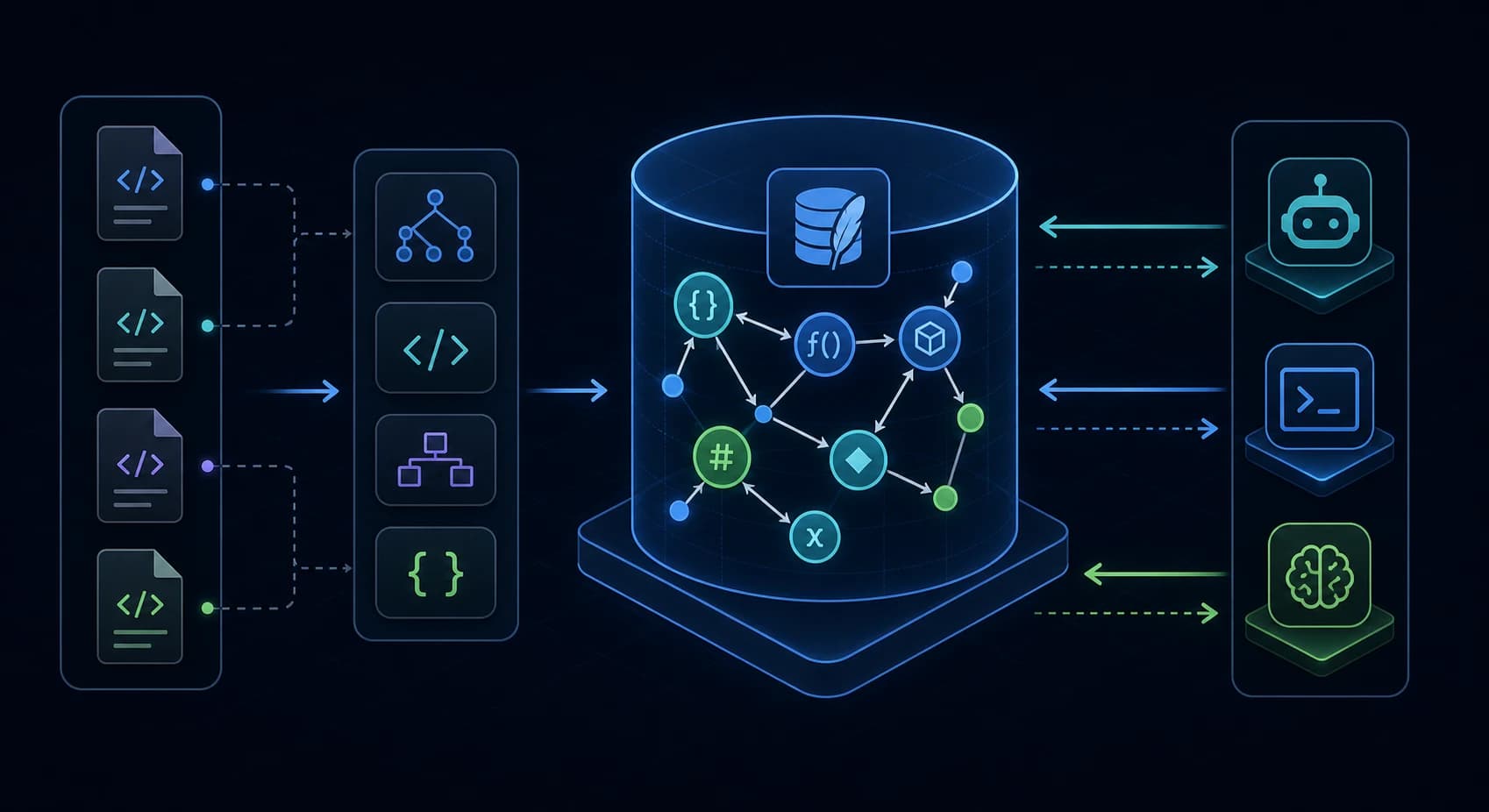
CodeGraph 值得深入了解,因为它解决了 AI 编程中的一个核心痛点:Agent 在每次交互中都会通过 grep、glob 和文件读取重复探索相同的代码结构,从而浪费大量轮次。
Get the latest on AI, LLMs & developer tools
New MCP servers, model updates, and guides like this one — delivered weekly.
编辑注
我们在撰写本文时并未完成端到端的本地安装。直接的 npx 冒烟测试未能展示一个可运行的 codegraph binary in this environment. Setup examples below are sourced from the README, installer target code, and npm page; performance claims are sourced from CodeGraph's published benchmark methodology, not from our own benchmark run.
1. 一句话介绍 CodeGraph
CodeGraph 是一款采用 MIT 协议的本地优先代码智能工具,它将代码仓库解析为包含文件、符号、调用、导入、路由和引用的 SQLite 知识图谱,并通过 MCP 将该图谱提供给 AI 编程 Agent 使用。
A 代码知识图谱 是一个存储代码实体及其关系的数据库。 MCP,即 Model Context Protocol,是许多 Agent 用于调用外部工具的协议。
| 普通任务 | CodeGraph 视图 |
|---|---|
| 查找函数 | 基于索引符号的 FTS5 搜索 |
| 理解代码流程 | 追踪调用关系和动态分发(dynamic-dispatch)边缘 |
| 规划重构方案 | 遍历调用者、被调用者、导入项及影响范围 |
| 向 Agent 询问关于某个功能的问题 | 通过图搜索和源代码片段构建任务上下文 |
2. 存在意义
The repo's README frames the problem around Claude Code exploration agents that repeatedly call grep, glob, Bash, and Read before answering architecture questions. That is expensive because file discovery is repeated per session and per task. CodeGraph moves discovery up front: parse once, store relationships locally, then let the agent query the graph.
The official docs site makes the same point in a smaller form: CodeGraph turns a codebase into a queryable local graph for AI coding agents, using tree-sitter parsing, MCP, and impact analysis. The npm package page repeats the README benchmark table and setup commands, which matters because the npm package is the main installation surface for many developers.
Status quo:
agent question
  -> grep/glob/read loop
  -> partial mental map
  -> answer
  -> next task repeats discovery

CodeGraph model:
codegraph init/index
  -> .codegraph/codegraph.db
  -> agent calls codegraph_context / trace / impact
  -> answer from graph-backed source context
3. 心智模型:五个核心组件
CodeGraph 更适合作为流水线来评估,而非单一的搜索命令。
+---------------------+      +----------------------+      +----------------------+
| scanner             | ---> | extractor             | ---> | resolver             |
| git + filesystem    |      | tree-sitter + helpers  |      | imports, calls,      |
| ignore rules        |      | language files         |      | frameworks, bridges  |
+---------------------+      +----------------------+      +----------+-----------+
                                                                      |
                                                                      v
                         +----------------------+      +----------------------+
                         | MCP tools            | <--- | SQLite graph         |
                         | context, trace,      |      | nodes, edges, files, |
                         | callers, impact      |      | FTS5 search          |
+----------------------+ +----------------------+| 组件 | 源代码锚点 | 功能描述 |
|---|---|---|
| Scanner | src/extraction/index.ts | 利用 git 可见性、默认忽略规则、文件大小限制和语言检测来收集项目文件。 |
| Extractor | src/extraction/languages/* | 使用 tree-sitter 和特定框架的提取器将源代码解析为节点和未解析的引用。 |
| Resolver | src/resolution/* | 将引用转换为图边缘,例如调用、导入、继承、实现、路由和桥接边缘。 |
| Database | src/db/schema.sql | 存储节点、边、文件、未解析的引用、元数据以及 FTS5 索引。 |
| MCP server | src/mcp/tools.ts | 暴露 codegraph_context, codegraph_trace, codegraph_impact,以及相关工具。 |
4. 最小端到端示例
该项目的 README 目前提供了一条简短的安装路径和一条更深入的快速入门路径。 codegraph init -i 构建项目索引,但 Agent 在调用 CodeGraph 之前仍需要一个 MCP server 条目。
# 1. Install or run the interactive installer.
npx @colbymchenry/codegraph

# 2. Restart the agent after the installer writes its MCP config.

# 3. Build the project-local graph.
cd your-project
codegraph init -i

# 4. Check the index from the CLI.
codegraph status

# 5. Ask the agent a structural question.
# Example prompt:
"Use CodeGraph first. How does the auth request reach the database?"
对于手动 Claude Code 设置,README 在 mcpServers.codegraph下展示了一个 JSON MCP 条目。 ~/.codex/config.toml。
# Codex CLI manual shape, from the installer target.
[mcp_servers.codegraph]
command = "codegraph"
args = ["serve", "--mcp"]
关键点
将设置视为两个步骤:连接 Agent,然后初始化存储库。如果缺少其中任何一半,Agent 将回退到原生搜索,且 CodeGraph 会看起来无法正常工作。
5. 深度解析:各层的工作原理
5.1 扫描器:哪些内容会被索引
扫描器在可能的情况下使用 git 可见文件,对于非 git 项目或被忽略的父级布局,则回退到文件系统遍历。 node_modules, dist, target, .venv, Pods,以及 .next。
// Schema-level artifact: each indexed file becomes a row.
files(path, content_hash, language, size, modified_at, indexed_at, node_count, errors)

// Scanner-level artifact: ignored dependency/build directories are excluded
// before the graph becomes agent context.
观点总结:当索引范围简单且可预测时,CodeGraph 的表现最为强劲。
5.2 提取器:先符号,后文本
提取过程基于 tree-sitter 构建,这是一个能够生成语法树的增量解析器。 src/extraction/languages/ 将这些树转换为函数、方法、类、接口、路由、组件、变量、常量和模块等节点。
nodes(
  id,
  kind,
  name,
  qualified_name,
  file_path,
  language,
  start_line,
  end_line,
  docstring,
  signature
)
观点总结:这就是为什么 CodeGraph 不是一个向量搜索封装器。
5.3 解析器:最困难的部分
Static extraction finds references, but references are not useful until they resolve. CodeGraph's resolver handles import paths, name matching, framework routes, callback synthesis, dynamic-dispatch bridges, Swift to Objective-C bridging, React Native bridges, Expo modules, and framework-specific route shapes. Recent release notes show that much of the project's velocity is in this layer.
edges(
  source,
  target,
  kind,        -- calls, imports, contains, references, extends, implements...
  metadata,
  line,
  col,
  provenance
)
观点总结:解析器的质量决定了 CodeGraph 是否能安全地用于重构。 0 callers 结果可能比没有工具更糟糕,因为它会误导 Agent 认为活跃代码已失效。
5.4 SQLite 和 FTS5:本地图谱,本地搜索
该模式将节点、边、文件、未解析的引用以及项目元数据存储在位于以下路径的本地 SQLite 数据库中: .codegraph/codegraph.db。
CREATE VIRTUAL TABLE nodes_fts USING fts5(
  id,
  name,
  qualified_name,
  docstring,
  signature,
  content='nodes'
);
观点总结:对于此类工具,本地 SQLite 是正确的存储选择。
5.5 MCP 工具:引导 Agent
CodeGraph 提供了一套精简的 MCP 工具:search、context、callers、callees、impact、node、explore、status、files 和 trace。 src/mcp/server-instructions.ts,因此它通过 MCP initialize 响应加载,而不是重复复制到每个 Agent 的指令文件中。
| 工具 | 使用场景 |
|---|---|
codegraph_context | 涉及架构、Bug 或功能的问题,需要 Agent 提供入口点及关键代码。 |
codegraph_trace | 从一个符号到另一个符号的流程问题。 |
codegraph_impact | 重构影响范围(blast-radius)检查。 |
codegraph_explore | 按文件分组的多个相关符号的源代码。 |
codegraph_files | 无需扫描文件系统即可获取的索引文件树。 |
核心观点:MCP 指南是产品的一部分。
6. 我们做错的地方
我最初将 CodeGraph 视为另一个 Token 压缩项目。
我还假设设置路径应该是“安装即索引”。
Bad assumption:
"init -i means my agent has CodeGraph"

Correct model:
"install wires MCP; init/index builds the repo graph"
7. 真实世界的工作流模式
| 错误 | 正确 | 根本原因 |
|---|---|---|
| 要求 Agent 使用 grep 查找所有身份验证文件。 | 要求 codegraph_context 在身份验证任务上,然后是一个 codegraph_explore。 | 字面搜索会重建图谱中已经存储的映射。 |
盲目信任 0 callers 在充斥着 barrel 文件的 Svelte 或 React 仓库中。 | Check known open issues around re-export barrels and package subpaths. | Unresolved re-export chains can hide live callers. |
| 并行安装所有 token 优化器。 | 在使用和不使用 CodeGraph 的情况下,分别对同一个实际任务进行评估。 | 堆叠上下文工具(context tools)在降低成本之前,可能会先降低可调试性。 |
| 对于超大规模的根目录(home-directory-scale root),请保持 watch 模式开启。 | 在资源防护机制(resource guardrails)成熟之前,请限定项目范围,并考虑使用 no-watch 或手动同步模式。 | 在大型目录树中,Watcher 和文件描述符(file-descriptor)压力是一个亟待解决的问题。 |
8. 常见错误与故障模式
GitHub 上的活跃 issue 是了解错误信息的最佳来源,因为用户反馈的是真实的故障,而非泛泛的建议。
| 故障模式 | 用户遇到的现象 | 实际应对方案 |
|---|---|---|
| 安装顺序混淆 | 按照“Get Started”操作后,虽然索引了 repo,但并未成功连接 agent。 | 在期望 agent 调用工具之前,请先运行安装程序或添加 MCP 配置。 |
| MCP 发现机制缺失 | 部分客户端请求了 resources/list 或 prompts/list 并收到了 method-not-found 错误。 | 请关注那些为有需求的客户端添加空发现响应(empty discovery responses)的 PR。 |
| 大型数据库超时 | 有用户反馈称,针对超大型数据库进行 MCP 调用时出现了超时现象。 | 请先从范围限定的项目索引开始并进行验证, codegraph_status 然后再依赖流程工具。 |
| macOS 资源压力 | 开放问题报告显示存在文件描述符累积及系统级 ENFILE 症状。 | 请使用更严格的根目录(roots),并考虑 --no-watch 在防护机制(guardrails)落地之前采取措施。 |
| 语言边缘情况缺失 | 开放问题涵盖了 TypeScript 字符串字面量服务名称以及 Svelte/TS 桶文件(barrel)重新导出的问题。 | 请将图谱结果作为高质量的上下文参考,而非唯一的正确性证明。 |
| Windows shell 闪烁 | 用户反馈在执行 daemon/git 子进程任务时,会出现可见的命令行窗口。 | 请保持更新,如果问题持续存在,请终止陈旧的旧版 daemon 进程。 |
9. 性能、扩展性与成本说明
CodeGraph 的 README 指出,在多个开源代码库中,使用 Claude 无头运行(headless runs)并配合 CodeGraph,其基准测试表现优于不使用 CodeGraph 的情况。 codegraph_explore 大小调整的版本上进行了重新验证。
客观来看,其实际效果比标题宣传的要窄。
Use this local A/B shape:

Task: "How does request X reach handler Y?"
Run A: agent with CodeGraph MCP enabled
Run B: same agent, same repo, CodeGraph disabled

Measure:
- time to first useful answer
- file reads
- grep/bash/search calls
- accepted edits
- follow-up corrections
- total cost, if your client exposes it
10. CodeGraph 的适用对象
| 如果符合以下情况,请使用它: | 如果符合以下情况,请跳过: |
|---|---|
| 你每天都会向 Agent 询问跨文件的架构问题。 | 你的仓库规模很小,原生搜索就能立即找到答案。 |
| 你使用 TypeScript、Python、Go、Rust、Java、Swift、C#、PHP、Ruby、Svelte、Vue 或类似的受支持技术栈。 | 你的主要语言或框架不在支持范围内,且你需要精确的静态分析。 |
| 你非常在意仅限本地的代码上下文,且不希望将源码上传到托管的索引器。 | 你需要一个带有托管索引和团队分析功能的托管式 SaaS 代码助手。 |
| 你需要在 Agent 循环中获取调用者(callers)、被调用者(callees)、路由、影响范围和追踪信息。 | 你只需要一次性的仓库打包或简单的命令输出压缩。 |
11. 社区反馈
公众的反应呈现出有价值的多元化。
@Teknium 我也在我的编码项目中使用了它,到目前为止确实加快了读取速度,但我无法确认 token 使用量是否有所减少。
— Joe (@UOSJoe)2026年5月31日
r/ClaudeCode 上的 Reddit 讨论将 CodeGraph 与其他 token 和上下文优化工具归为一类,例如仓库打包器、命令输出压缩器、内存工具和 MCP 代码探索器。
r/ClaudeAI 上关于大型 TypeScript monorepo 的另一个讨论帖询问了人们如何处理超出上下文限制的代码库。
12. 结论:CodeGraph 值得使用吗?
我们的观点
如果你的 Agent 需要反复从同一个仓库中获取结构化上下文,请使用 CodeGraph。如果目前困扰你的是简单的搜索需求、微型仓库或不支持的语言语义,请跳过它。
The best version of CodeGraph is boring: initialize the repo, let the agent call codegraph_context 首先,使用 trace 用于流程相关问题,并在 impact 编辑前使用。
13. 更宏大的愿景
CodeGraph 处于从“提示词填充”(prompt stuffing)向“工具支持上下文”转变的更广阔趋势中。
这个中间地带之所以有价值,是因为 AI 编程 Agent 需要的不仅仅是代码片段。
Context stack:
AGENTS.md / CLAUDE.md     -> rules and project intent
docs / package READMEs    -> human-authored architecture notes
CodeGraph                 -> local symbol and relationship graph
compiler / tests / linter -> correctness checks

The graph helps the agent navigate. It does not replace the rest.
14. 常见问题解答
问: 什么是 CodeGraph?
CodeGraph 是一款本地代码智能工具,它将代码仓库索引为包含文件、符号和关系的 SQLite 知识图谱,并通过 MCP 工具将该图谱提供给 AI 编程 Agent 使用。
问: CodeGraph 会取代 grep 或 ripgrep 吗?
不会。它旨在取代针对结构性问题的重复探索循环。对于字面文本搜索,请使用 grep;当需要分析符号、调用者、被调用者、影响范围或面向任务的代码上下文时,请使用 CodeGraph。
问: CodeGraph 支持哪些 AI Agent?
README 和安装程序文档中列出了 Claude Code、Cursor、Codex CLI、opencode、Hermes Agent、Gemini CLI、Antigravity IDE 和 Kiro。具体的配置文件因 Agent 而异。
问: CodeGraph 是基于云端的吗?
不是。该仓库将 CodeGraph 定位为本地优先(local-first)。源代码在本地进行解析,存储在本地的 `.codegraph/codegraph.db` SQLite 数据库中,并通过本地 MCP 服务器提供给 Agent。
问: 目前最大的风险是什么?
当前的问题追踪器显示,在监视模式(watch mode)下存在资源压力、大型索引超时、设置顺序混淆、部分客户端的 MCP 握手间隙,以及针对特定语言模式的边缘情况遗漏。
问: 每个项目都应该安装 CodeGraph 吗?
不需要。当 Agent 需要反复回答跨文件或架构层面的问题时,它才具有价值。对于小型仓库、一次性搜索或字面文本查找,原生搜索通常已足够。
15. 术语表
| 术语 | 定义 |
|---|---|
| AST | 抽象语法树;源代码的解析结构。 |
| 代码知识图谱 | 存储代码实体及其关系的数据库。 |
| 边(Edge) | 两个图节点之间的关系。 |
| FTS5 | SQLite 的全文搜索引擎。 |
| MCP | Model Context Protocol;用于 Agent 的工具协议。 |
| 节点(Node) | 符号、文件、路由、组件或类似的编程实体。 |
| Resolver | 将提取的引用链接到实际定义的代码。 |
| Tree-sitter | 用于源代码语法树的解析器框架。 |
| WAL | 用于并发访问的 SQLite 预写日志(write-ahead log)模式。 |
| Watcher | 用于保持索引更新的文件变更监听器。 |
16. 所有来源与链接 & Links
主要来源
- colbymchenry/codegraph GitHub 仓库
- CodeGraph 官方文档网站
- npm package page for @colbymchenry/codegraph
- 研究期间检查的当前版本发布页面
- CHANGELOG.md
已读取的源文件
- src/index.ts - main
CodeGraphclass. - src/db/schema.sql - nodes, edges, files, FTS5 模式。
- src/extraction/index.ts - 扫描器、默认忽略规则、索引编排。
- src/mcp/tools.ts - MCP 工具定义。
- src/mcp/server-instructions.ts - Agent 引导指令。
- src/sync/watcher.ts - 文件监视器及待处理文件的过期模型。
- src/installer/targets/codex.ts - Codex CLI 配置结构。
- src/installer/targets/claude.ts - Claude Code 配置结构。
GitHub Issues 和 Pull Requests
- Issue #644 - macOS 文件描述符泄漏 / ENFILE 报告。
- Issue #631 - README 安装顺序混淆。
- Issue #629 - 未解决的 Svelte/TypeScript 桶文件(barrel)重新导出问题。
- Issue #628 - 监视模式(watch-mode)资源防护机制。
- 问题 #621 - MCP resources/list 和 prompts/list 缺失。
- 问题 #613 - 大型数据库上的 MCP 超时问题。
- 问题 #634 - TypeScript 字符串字面量服务名称未被索引。
- PR #632 - 设置文档和 MCP 发现机制修复。
- PR #643 - 提议
.codegraphignoreoverride 支持。 - PR #603 - 恢复了嵌入式 SDK API。
社区资源
内部链接
- Claude 上下文指南:通过 Milvus 实现语义代码搜索 MCP
- ArcKit 指南:Wardley Mapping + 多 AI 架构工具包
- OpenAI Agents Python SDK:深度解析与 LangGraph 及 CrewAI 的对比
- AntiGravity MCP:告别上下文切换
17. 来源归属表
| 来源 | 类型 | 采用的关键见解 |
|---|---|---|
| GitHub README | 主要 | 安装流程、基准测试、支持的 Agent、语言、本地优先(local-first)定位。 |
| 官方文档站点 | 主要 | 简洁的产品定义:本地代码图谱、tree-sitter、MCP、影响分析。 |
| 源代码克隆 | 主要 | 扫描器、提取器、解析器、SQLite 架构、MCP 工具、安装程序目标的架构。 |
| GitHub issues | 社区 / 关键问题 | 资源压力、配置困惑、超时、遗漏的边缘情况以及客户端兼容性差距。 |
| GitHub PRs | 主要 / 社区 | 针对安装文档、发现响应 (discovery responses)、SDK API 以及忽略覆盖 (ignore overrides) 的主动修复。 |
| Reddit 讨论帖 | 社区 | 开发者们将 CodeGraph 与其他上下文工具进行对比,并建议进行工作流层面的衡量。 |
| X 平台推文 | 社区 | 关于增长的公众热议,以及用户对于读取速度与 Token 节省之间权衡的谨慎提示。 |
Get the Ultimate Antigravity Cheat Sheet
Join 5,000+ developers and get our exclusive PDF guide to mastering Gemini 3 shortcuts and agent workflows.
Related Guides
Humanizer Skill Guide
blader/humanizer: 29 AI-writing patterns, voice calibration, and a two-pass audit, all in one Claude Code skill.
Guides & FeaturesMastering Agent Skills
The open standard for portable AI agent expertise.
Guides & FeaturesAntigravity Workflows Guide
Create automation recipes with Turbo Mode and AgentKit 2.0.
Guides & FeaturesHow to Change Antigravity Themes
Customize themes, dark mode, icons, and color schemes.
Guides & FeaturesHow to Change Language
Switch Antigravity to Spanish, German, Japanese, and more.
Guides & FeaturesAntigravity Security Guide
Known vulnerabilities, safe settings, and hardening steps.