
Agentic video understanding lets Gemini decide which parts of a video to watch, at what frame rate, and through which modality — instead of ingesting the whole file at a fixed 1 FPS. Google launched the capability on September 1, 2026 across Gemini 3.7 Flash, 3.6 Flash, and 3.5 Flash-Lite, reporting up to 88% fewer tokens, up to 66% lower analysis cost, and up to 7% better accuracy than static processing.
This guide follows the official launch post, the developer guide in AI Studio, and the launch threads from Google DeepMind, Google, Google AI Studio, and Gemini API lead Logan Kilpatrick. It was checked on September 1, 2026, the day of the announcement.
What Google launched
Until now, Gemini processed video the way most multimodal models do: statically. The API decoded the timeline at a fixed frame rate — 1 frame per second by default, adjustable in the API — and filled the context window with that uniform sample. The model had no say in what deserved more attention.
Agentic video understanding replaces that fixed pipeline with a server-side tool loop. The announcement frames the result in three numbers: up to 88% token reduction, up to 66% cost reduction, and up to 7% accuracy improvement, with the largest gains on long-form content — 10-minute guides, 90-minute lectures, and multi-hour recordings.
We’re bringing agentic video understanding to our latest Gemini models. They can now analyze videos with better accuracy while using up to 88% fewer tokens.
— @GoogleDeepMind September 1, 2026
Google’s main account posted the same launch with an official demo video showing the model scanning, inspecting, and re-watching segments of a long recording:
We’re introducing a new capability to our latest Gemini models: agentic video understanding. This allows developers to process long-form video content with more accuracy, while using up to 88% less tokens.
— @Google September 1, 2026
The demo above is Google’s official launch video. The pattern it shows — skim first, then zoom into the moments that matter — is the core mechanism the next section breaks down.
How the agentic loop works
The developer guide describes a Think → Act → Observe loop that replaces upfront ingestion. The key structural change is pass by reference: instead of decoding the entire file, the API passes a lightweight pointer, and the initial context contains only video metadata — duration, container format, and file ID.
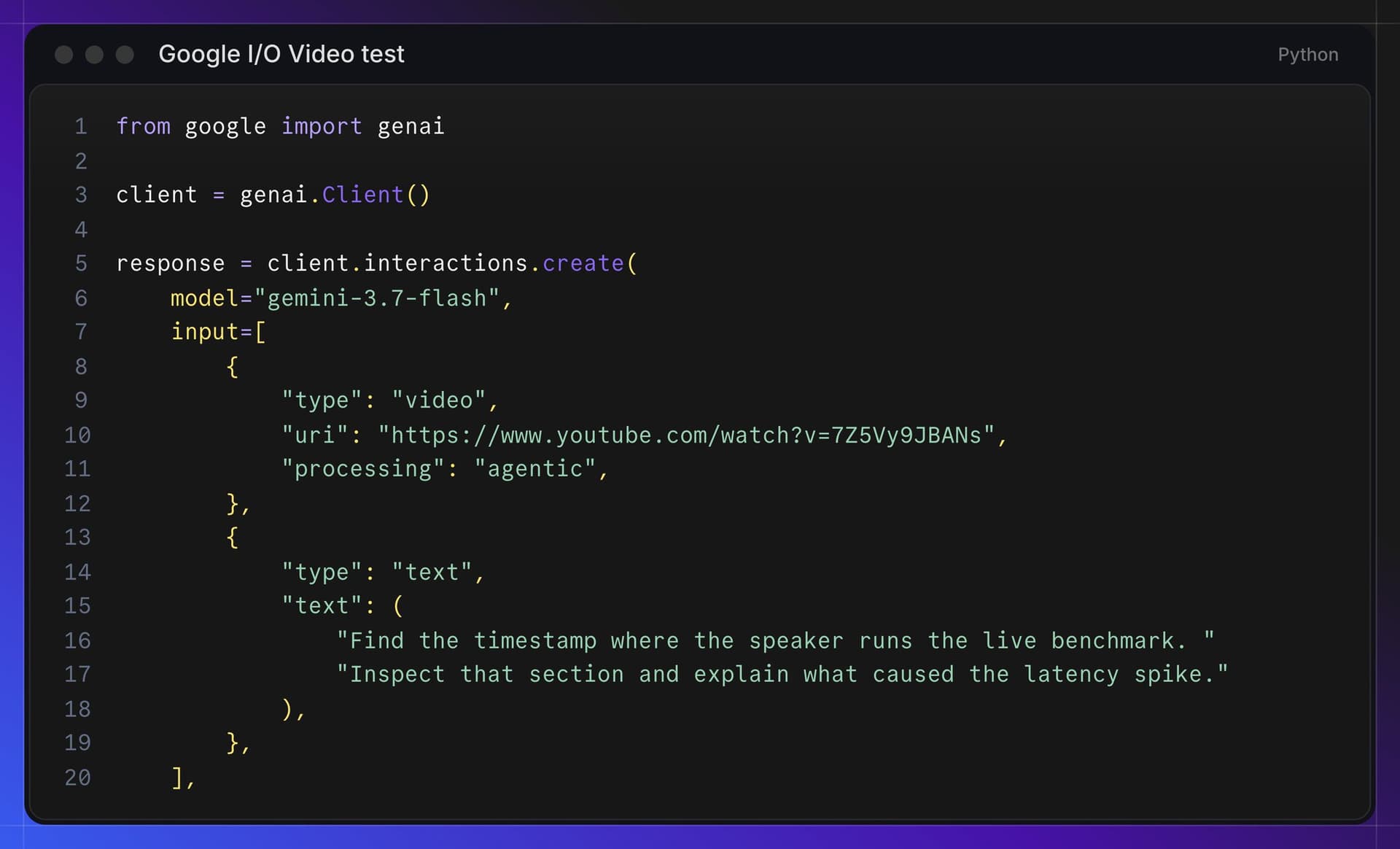
Inside the loop, the model has three internal tools, each mapped to a modality:
| Internal tool | What it retrieves | When the model uses it |
|---|---|---|
get_transcript | Timestamped speech transcript. | Transcript-first: general orientation and spoken content before any visual inspection. |
get_frames(start, end, fps) | A targeted time window at a model-chosen frame rate. | Temporal zooming: 5–10 FPS for fast motion, down to 0.1 FPS to skim for relevant sections. |
get_audio(start, end) | The raw audio stream for a window. | When acoustic cues, music, or speaker tone carry the signal. |
The model can iterate — pull a transcript, zoom into two seconds at 10 FPS, listen to a specific window — and then synthesize a grounded answer. You could previously build this pattern yourself with media resolution controls and client-side orchestration; Google’s point is that the model now does it internally, per request, with no developer-side agent scaffolding.
Some launch-day replies dismissed the feature as “just an FPS cap.” Logan Kilpatrick’s answer is the precise distinction: the model decides which frames to look at. The frame budget is dynamic and query-dependent — not a fixed downsample applied before the model sees anything.
Benchmark evidence
Google’s official bar-chart comparison pairs token consumption with accuracy across three benchmarks on Gemini 3.7 Flash. The methodology note on the chart: high thinking level, low media resolution, and 1 FPS for the static baseline.
| Benchmark | Tokens: static | Tokens: agentic | Token saving | Accuracy: static | Accuracy: agentic | Relative gain |
|---|---|---|---|---|---|---|
| MinerVa (complex reasoning) | 80.9K | 33.6K | 58.4% | 73.7% | 79.0% | 7.2% |
| 1H-VideoQA (long video) | 397.6K | 47.7K | 88.0% | 87.5% | 88.5% | 1.1% |
| LVBench (long video) | 300.3K | 36.0K | 88.0% | 85.1% | 88.6% | 4.1% |
Read the two columns separately. The token story is dramatic and consistent — an 8.3× reduction on both long-video benchmarks. The accuracy story is real but smaller: the headline “up to 7%” is the relative gain on MinerVa, a complex-reasoning benchmark; on the long-video QA tasks it is 1.1–4.1% relative. The efficiency claim, not the accuracy claim, is the primary result.
The accuracy-cost frontier
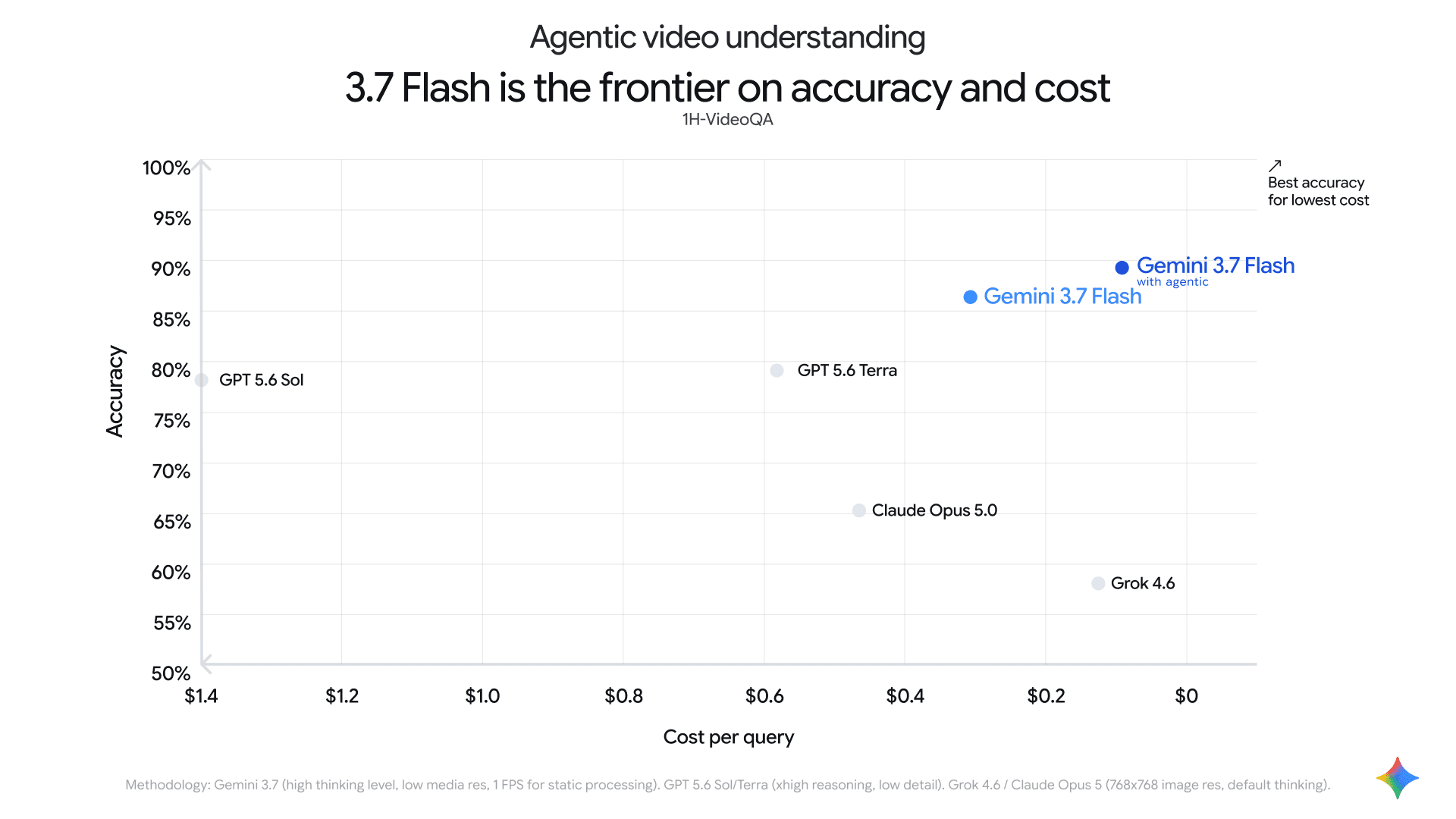
The second official chart places Gemini 3.7 Flash against competing frontier models on 1H-VideoQA, plotting accuracy against cost per query (the cost axis runs from $1.40 on the left to $0 on the right, so the upper-right corner is best).
| Model (1H-VideoQA) | Accuracy | Cost per query | Notes from the chart |
|---|---|---|---|
| Gemini 3.7 Flash with agentic | ~90% | ~$0.10 | Best accuracy at the lowest cost in the chart. |
| Gemini 3.7 Flash (static) | ~87% | ~$0.30 | Already strong; agentic improves both axes. |
| GPT 5.6 Sol | ~79% | ~$1.40 | Highest cost on the chart (xhigh reasoning, low detail). |
| GPT 5.6 Terra | ~79% | ~$0.60 | Same accuracy tier as Sol at lower cost. |
| Claude Opus 5.0 | ~65% | ~$0.47 | 768×768 image res, default thinking. |
| Grok 4.6 | ~58% | ~$0.15 | Cheapest non-Gemini point, lowest accuracy shown. |
Two honest caveats before quoting this chart. First, these are Google-selected configurations (“xhigh reasoning” for GPT, “low detail” media res) — competitor numbers on a vendor chart are directional, not adversarially tuned. Second, the values are read off the chart; Google labels the points but the underlying table is not published in text form. Directionally, though, the claim is specific: agentic processing moves Gemini 3.7 Flash up and to the right — more accurate and cheaper — which is the rare direction to move on this kind of plot.
What it unlocks
The launch post names four capability classes that static 1 FPS sampling handles poorly:
| Capability | Why 1 FPS static misses it | Example from Google |
|---|---|---|
| Sub-second moment retrieval | Split-second events fall between the 1-second samples. | Finding tight cut boundaries for automated video editing. |
| Long-form needle-in-a-haystack | Uniform sampling of multi-hour video consumes millions of tokens. | Answering complex questions across a multi-hour recording. |
| Anomaly detection | Rapid motion needs a higher FPS than a fixed budget allows. | Re-sampling an interesting window at higher FPS to inspect motion. |
| Counting actions and objects | Repeats get double-counted or merged across sparse frames. | Accurately tracking repeated physical movements over time. |
Getting started
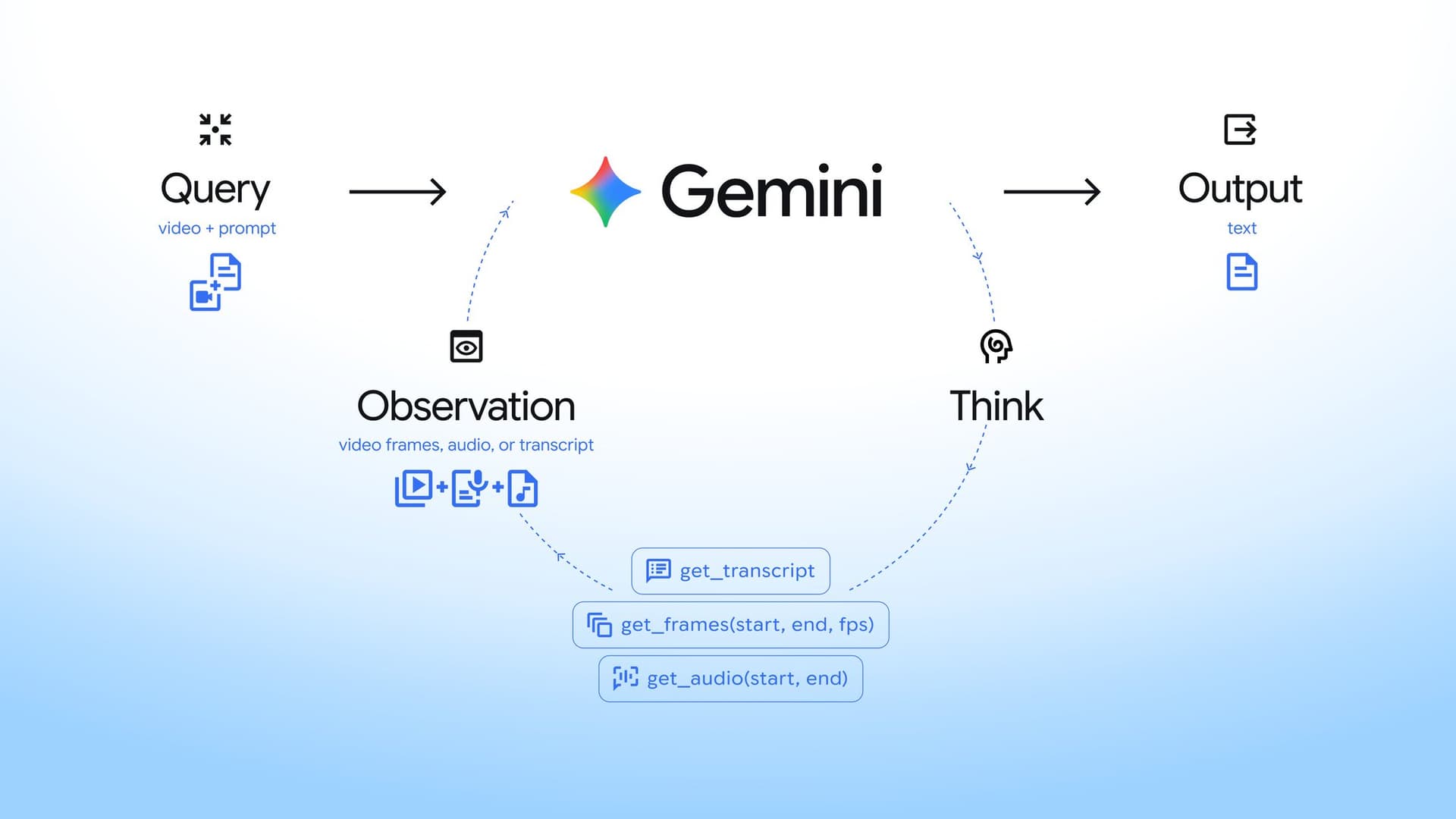
Enablement is a single parameter: set processing to "agentic" on the video part of your request. This is Google’s official example, asking the model to find a live benchmark moment in a YouTube keynote:
from google import genai

client = genai.Client()

interaction = client.interactions.create(
    model="gemini-3.7-flash",
    input=[
        {
            "type": "video",
            "uri": "https://youtu.be/7Z5Vy9JBANs",
            "processing": "agentic",
        },
        {
            "type": "text",
            "text": "What are the 3 most important announcements in this keynote?",
        },
    ],
)

print(interaction.output_text)
Processing mode is configured per media item, so one request can mix modes. The developer guide’s example pairs a 45-minute reference recording in agentic mode with a 10-second query clip in static mode:
interaction = client.interactions.create(
    model="gemini-3.7-flash",
    input=[
        {
            "type": "video",
            "uri": full_match_file.uri,
            "mime_type": "video/mp4",
            "processing": "agentic",
        },
        {
            "type": "video",
            "uri": highlight_snippet_file.uri,
            "mime_type": "video/mp4",
            "processing": "static",
        },
        {
            "type": "text",
            "text": "Find the exact timestamp in the full recording where the highlight sequence occurred.",
        },
    ],
)
Two input paths work with agentic mode: files uploaded through the Files API (upload, poll until PROCESSING completes, then reference the URI) and public YouTube URLs passed directly. The launch post lists no additional feature fee — the next section covers how billing actually works.
Token billing and pricing
Agentic video understanding uses standard Gemini API token pricing. The interesting part is what gets billed, because the model only materializes what it retrieves:
| Cost component | How it is billed |
|---|---|
| Video input tokens | Only for media actually materialized: the lightweight initial reference plus the frame slices and audio segments the model explicitly retrieved. The 88% token saving flows directly from this. |
| Thinking and output tokens | Standard output and thinking rates. The loop’s reasoning steps and tool calls are not free — budget for them on complex queries. |
| Context caching | Videos reused across multi-turn sessions trigger standard implicit caching; explicit cache instances are supported. |
| Batch API | Agentic video processing works with the Gemini Batch API at 50% of standard cost. |
The 66% cost-reduction figure nets input savings against loop overhead. A simple question over a two-hour lecture will net close to the full 88% input saving; a query that forces many retrieval rounds pays more thinking tokens. Simple, transcript-answerable questions benefit most.
Agentic vs static: how to choose
The developer guide’s default is to start with agentic mode and fall back to static for short, latency-sensitive clips. The practical decision table:
| Situation | Recommended mode | Why |
|---|---|---|
| Lectures, webinars, earnings calls, sports, archives (>5 minutes) | agentic | Token savings scale with length; transcript-first search fits spoken content. |
| Timestamp-precision tasks, fast motion analysis | agentic | Adaptive FPS finds what 1 FPS sampling structurally misses. |
| Mixed requests: long reference + short clip | agentic + static per item | Per-media config; keep the short clip fully sampled. |
| Short clips (<5 minutes), UI animations, product GIFs | static | Frame-level precision across the whole clip, minimal loop overhead, lower latency. |
Models and availability
Agentic video understanding launched on September 1, 2026 for three models. Google’s guidance on which to pick: 3.7 Flash with agentic processing offers the best quality overall and sits at the accuracy-to-cost Pareto frontier among the tested models.
| Surface | Status at launch |
|---|---|
| Gemini API — AI Studio | Available now (3.7 Flash, 3.6 Flash, 3.5 Flash-Lite). |
| Gemini Enterprise Agent Platform | Available now for video uploads and YouTube videos. |
| Gemini app | Rolling out soon to all users across Flash and Flash-Lite models. |
| YouTube “Ask YouTube” | Coming in the coming months on the watch page, grounded in visuals. |
Caveats
All performance figures are vendor-reported. The 88/66/7 numbers and the competitor scatter come from Google’s own launch materials, with Google-chosen configurations for competing models (xhigh reasoning and low media detail for GPT 5.6, 768×768 resolution for Claude Opus 5.0 and Grok 4.6). Directionally credible, but if you are migrating a pipeline, benchmark on your own videos — Google’s own guidance for evaluating Fable-class claims applies here too: long, tool-heavy tasks are where the differences show.
Loop overhead is real. Thinking and tool-call tokens bill at standard rates. On short clips with simple questions, static processing can be cheaper end-to-end. The token saving is on the video input side only.
Model coverage is Flash-only at launch. There is no agentic option announced for Gemini 3 Pro-class models, and the Gemini app rollout had not started at publication. Check current docs before committing an integration.
Use it if
Use agentic video understanding if you process video longer than a few minutes — lecture analysis, meeting and call archives, sports or broadcast footage, media asset management, or any needle-in-a-haystack question over long recordings. An 8× input-token reduction on exactly those workloads changes what is economically feasible at all.
Stay static if your videos are short, your latency budget is tight, or you need uniform frame-level coverage of the entire clip — and you can always mix modes per media item while you migrate.
FAQ
Which Gemini models support agentic video understanding?
Gemini 3.7 Flash, 3.6 Flash, and 3.5 Flash-Lite, via the Gemini API in Google AI Studio and the Gemini Enterprise Agent Platform, as of September 1, 2026.
How do I enable it?
Set processing: "agentic" on the video part of your request. Omit it or set "static" for the previous fixed-frame-rate behavior.
Does it work with YouTube videos?
Yes. Public YouTube URLs can be passed directly as the video URI with agentic mode enabled.
Is there an extra fee?
No. It uses standard Gemini API token pricing, and you are billed only for the video slices the model actually retrieves, plus standard thinking/output tokens. Batch API processing costs 50% of standard.
What does “up to 88% fewer tokens” actually mean?
On Google’s official long-video benchmarks (1H-VideoQA and LVBench), static 1 FPS processing consumed 397.6K and 300.3K tokens per query versus 47.7K and 36.0K agentic — both exactly 88% reductions. Savings vary by query; complex reasoning tasks saved 58.4%.
When should I keep static processing?
Short clips under about 5 minutes, latency-sensitive requests, and tasks that need complete, uniform frame coverage of the clip.
Sources
Sources checked September 1, 2026:
- Introducing agentic video understanding with Gemini — Google blog (Rohan Doshi & Mario Lučić, Google DeepMind)
- Agentic video understanding in Gemini: Developer Guide — Google AI Studio
- Google DeepMind launch thread (official diagrams and charts)
- Google launch thread with official demo video and accuracy-cost chart
- Google AI Studio announcement and developer-guide link
- Logan Kilpatrick (Gemini API lead): per-video control and model availability
Related reading: Gemini 3.7 Flash guide, Gemini Omni complete guide, and Gemini MD system prompt guide.