GitHub announced Agentic Workflows in public preview in June 2026. The concept is straightforward: describe a reasoning-based task in Markdown, compile it into Actions YAML, and run it on GitHub’s existing runner and policy infrastructure. For deterministic repository quality gates, compare the GitHub Code Quality GA guide rather than replacing ordinary checks with an agent.
GitHub Agentic Workflows are now in public preview. Intelligent automations for GitHub, with strong guardrails, observability, and cost controls. Start automating today.
— @github June 11, 2026
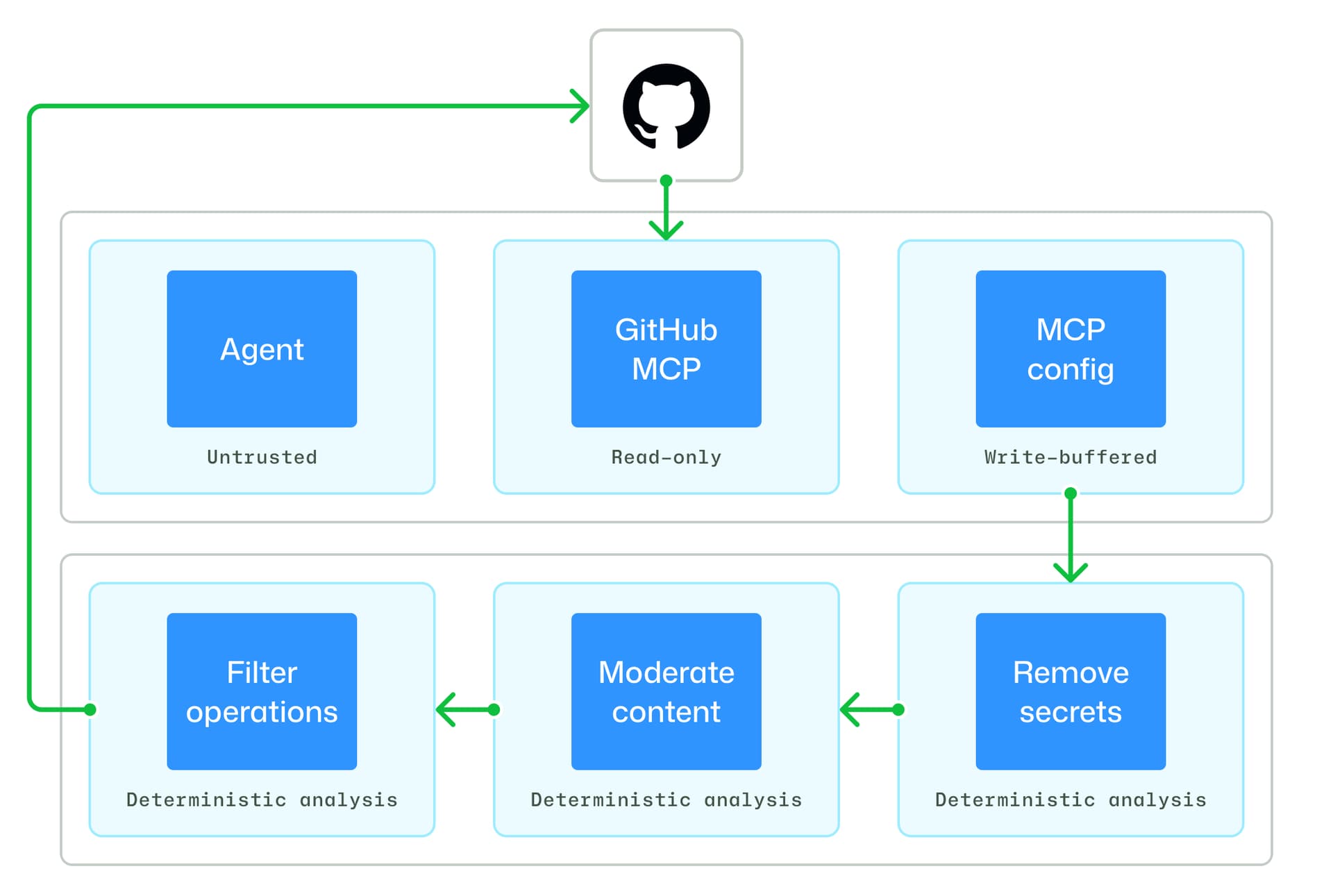
This guide is about the operational decision, not a launch-summary rewrite. It explains what the Markdown layer changes, where permissions still apply, how safe outputs and the Agent Workflow Firewall fit together, and how to start without granting an agent a deployment key.
The practical verdict
Agentic Workflows are a good fit for bounded repository work where a human can review the result: issue classification, CI-failure summaries, release notes, documentation proposals and recurring reports.
They are a poor first fit for autonomous production deployment, permission changes, secret rotation or destructive cleanup. Those jobs need a separate authorization boundary, deterministic checks and a kill path outside the agent workflow.
Start with three controls:
- read-only repository permissions;
- a safe-output mechanism that proposes changes instead of applying them directly;
- a protected reviewer or branch gate.
How Agentic Workflows work
The Markdown file is an intent layer, not a new execution runtime. GitHub says the system compiles the natural-language workflow into standard Actions YAML. That matters because Actions permissions, runner groups, secrets, environments and branch protections remain relevant.
A useful mental model is:
Markdown intent
  -> generated Actions workflow
  -> runner and agent engine
  -> repository/tool observations
  -> proposed safe output
  -> human or policy review
The generated YAML should be reviewed like code. Inspect triggers, permissions, checkout behavior, external actions, token scopes, artifact handling, network access and any step that can write to a branch or issue.
Permissions and safe outputs
GitHub describes layered safeguards including read-only defaults, integrity-filter rules, sandboxed execution, safe outputs and threat detection. These layers address different failure modes.
| Control | Protects against | Does not prove |
|---|---|---|
| Read-only permissions | Direct mutation by the workflow token | That the agent’s analysis is correct |
| Safe outputs | Unreviewed generated issue, PR or file changes | That the proposal is safe to merge |
| Branch protection | Direct unreviewed integration | That a reviewer understands an AI-generated diff |
| Threat detection | Selected suspicious changes or behavior | Complete prompt-injection prevention |
| Agent firewall | Selected network and execution paths | Full isolation from every dependency or credential |
Do not collapse these into “the agent is secure.” Each control has a scope and a failure mode. Test the exact workflow after compilation.
Sandbox and firewall boundaries
The Agent Workflow Firewall is intended to constrain agent execution and network behavior inside the workflow environment. It reduces exposure, but repository content remains untrusted input. An issue, pull request, README or generated artifact can contain instructions designed to redirect the agent.
Keep the workflow narrow:
- check out only the repository and revision required;
- deny access to unrelated repositories;
- avoid passing production secrets to the runner;
- allowlist network destinations;
- pin third-party Actions and container images;
- set time, token and artifact budgets;
- treat external issue text and pull requests as hostile content;
- make generated changes land in a proposal path.
If a task needs a secret, ask whether it should be automated at all. A read-only diagnostic normally should not need one.
Design a first workflow
A good first task is “summarize failing tests and open a draft issue.” Keep the output bounded and reviewable. The exact syntax and CLI commands are still preview-sensitive, so use GitHub’s current quickstart rather than copying an old example unchanged.
Before enabling it:
- Write the task in plain language with a narrow success condition.
- Generate or compile the workflow.
- Review the resulting YAML.
- Set the minimum
permissionsblock. - Configure a non-production runner or sandbox.
- Test with a synthetic failure and a malicious issue body.
- Verify the agent cannot write to protected branches.
- Inspect the safe output and audit trail.
- Add a human review gate.
- Pin the workflow revision and document its owner.
For documentation updates, require a diff and link-check before merging. For CI analysis, have the agent report evidence such as failing command, log range and likely owner rather than asking for an unconstrained fix.
What it does not protect
Agentic Workflows do not remove ordinary Actions risks:
- a compromised third-party action can still be dangerous;
- an over-broad
GITHUB_TOKENremains over-broad; - repository instructions can be malicious or misleading;
- a model can produce a plausible but incorrect diagnosis;
- generated YAML can contain a configuration error;
- safe outputs can still propose a harmful change;
- external providers may have separate billing and data policies;
- preview behavior can change.
The workflow is an automation system with an agent inside it, not an autonomous security boundary.
Production checklist
- [ ] Confirm public-preview status and organization eligibility.
- [ ] Review generated YAML as code.
- [ ] Use read-only permissions by default.
- [ ] Keep production secrets out of analysis workflows.
- [ ] Pin third-party actions and runner images.
- [ ] Treat repository and issue text as untrusted.
- [ ] Set explicit network, time and token budgets.
- [ ] Require safe outputs and human review.
- [ ] Test prompt injection and malicious diffs.
- [ ] Log workflow, agent, tool and output identifiers.
- [ ] Keep a deterministic non-agent fallback.
Agentic Workflows can reduce the cost of repetitive repository operations. Their safe adoption depends on treating the generated workflow, not the Markdown prompt, as the real production artifact.
FAQ
The concise answers are in metadata; the safeguards and setup sequence above are the implementation guide.
Official sources
- GitHub Agentic Workflows public preview
- GitHub Agentics repository
- GitHub Actions security hardening
- GitHub MCP Server
Related Guides
How to Change Antigravity Themes
Customize themes, dark mode, icons, and color schemes.
Rules & ConfigurationAntigravity Rules Guide
How to build custom rules with AGENTS.md and GEMINI.md.
MCP & IntegrationMCP Servers Setup Guide
Step-by-step guide to connecting MCP servers in Antigravity.
ComparisonBest Antigravity Alternatives 2026
Claude Code, Cursor, Windsurf, Codex, and Kiro compared.
Pricing & QuotaAntigravity Cockpit Guide
Monitor AI quota, track rate limits, and manage credits.
MCP & IntegrationGoogle Stitch + Antigravity Guide
The complete design-to-code workflow with DESIGN.md and Vibe Design.