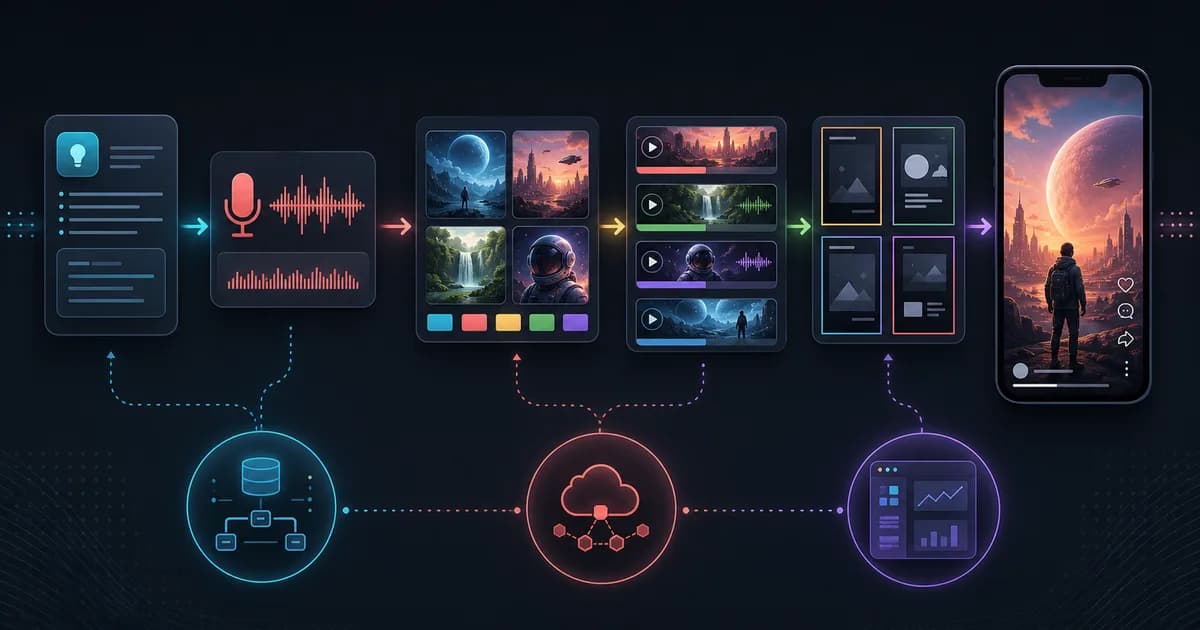
The repo sits between one-click video tools and a local media pipeline. It supports a Windows all-in-one package, source installs with `uv`, a Streamlit Web UI, a FastAPI server, ComfyUI/RunningHub workflows, direct API media providers, Edge-TTS/Index-TTS, templates, history, and multiple generation pipelines.
Get the latest on AI, LLMs & developer tools
New MCP servers, model updates, and guides like this one — delivered weekly.
Editorial note
This article is based on the GitHub repo, README/English README, docs, pyproject, config example, core service, API app, release notes, current issues, and current PRs researched on June 3, 2026. Setup guidance prefers `pyproject.toml` when docs and package metadata disagree.
1. Pixelle-Video in One Sentence
Pixelle-Video is an Apache-2.0 Python short-video automation engine with Streamlit UI, FastAPI routes, LLM script generation, TTS, ComfyUI/RunningHub workflows, direct image/video APIs, templates, pipelines, persistence, and history.
| Area | Detail | Why it matters |
|---|---|---|
| Repository | AIDC-AI/Pixelle-Video | https://github.com/AIDC-AI/Pixelle-Video |
| Primary language | Python | Primary GitHub language at research time. |
| License | Apache 2.0 | Check bundled or binary licenses separately where relevant. |
| Created | November 7, 2025 | Latest GitHub release checked: v0.1.15 on January 27, 2026; main had newer changes through June 2026. |
2. Why It Matters
The project matters because short-video generation is not one model call. A usable video requires script generation, scene planning, image or video generation, voice synthesis, timing, template layout, BGM, composition, export, and revision.
Pixelle-Video's useful contribution is orchestration. It gives users a Web UI and a pipeline structure for connecting LLMs, ComfyUI, RunningHub, direct media APIs, TTS engines, templates, and FFmpeg-style composition steps.
It is also a reminder that local AI media tooling is operationally heavy. Running entirely local usually means local LLM or Ollama plus local ComfyUI plus workflow nodes plus FFmpeg plus TTS. Cloud/API paths are easier but introduce provider cost and credential setup.
3. Architecture and Mental Model
Pixelle-Video is organized around a central service coordinator, Streamlit Web UI, FastAPI app, media/TTS/LLM services, multiple pipelines, template folders, workflow folders, config files, and persistence/history layers.
| Area | Detail | Why it matters |
|---|---|---|
| Web UI | `web/app.py` | Streamlit entrypoint for configuration, content input, voice/visual settings, and generation. |
| API server | `api/app.py` | FastAPI app with health, LLM, TTS, image, content, video, tasks, files, resources, and frame routers. |
| Core coordinator | `pixelle_video/service.py` | Initializes services and registers pipelines. |
| Pipelines | `pixelle_video/pipelines/*` | Standard, custom, asset-based, linear, and base pipeline abstractions. |
| Services | `pixelle_video/services/*` | LLM, TTS, API media, Comfy media, video, frame processing, persistence, history, and analysis. |
| Templates | `templates/` | Portrait, square, and landscape HTML templates for scene rendering. |
| Workflows | `workflows/` | RunningHub and self-hosted ComfyUI workflow groups. |
| Config | `config.example.yaml` | LLM, API providers, ComfyUI, RunningHub, TTS/image/video defaults, and templates. |
4. Smallest End-to-End Setup
The commands below are copied from the repository documentation and checked against the current research snapshot. Treat them as a starting point, then read the linked README before installing into a production environment.
# Windows recommended path
# 1. Download the latest all-in-one package from releases/latest
# 2. Extract it
# 3. Run start.bat
# 4. Open http://localhost:8501

# Source path
git clone https://github.com/AIDC-AI/Pixelle-Video.git
cd Pixelle-Video
uv run streamlit run web/app.py
A small first task should prove the integration before you attach it to critical data or large workspaces.
# Alternative source setup shown in docs
uv sync
streamlit run web/app.py

# REST API server
uv run uvicorn api.app:app --host 0.0.0.0 --port 8000

# Stronger version source:
# pyproject.toml requires Python >= 3.11.
5. Technical Deep Dive
5.1 The pipeline turns a prompt into production steps
Pixelle-Video's README describes the core flow as script generation, image planning, frame-by-frame processing, and video composition. The code structure reinforces that with a central service object, specific media/TTS/LLM services, and pipeline classes.
This matters because short-video generation fails at boundaries. A good script can still produce bad scene timing. A good image can mismatch the voice. A good TTS file can break composition. A pipeline gives each stage a named place to validate and debug.
topic or fixed script
  -> LLM narration / script
  -> scene and visual planning
  -> images or video clips
  -> TTS voice
  -> template rendering
  -> video composition
  -> preview, history, export
5.2 ComfyUI, RunningHub, and direct APIs are different execution modes
Pixelle-Video supports local ComfyUI workflows, cloud RunningHub workflows, and direct API media providers such as DashScope/Wan, OpenAI image, Seedream/Seedance, Kling, and similar services.
Users should not treat those as interchangeable. Local ComfyUI gives control but requires nodes and model assets. RunningHub reduces local setup but uses a cloud workflow. Direct APIs are simpler for specific providers but require keys, base URLs, limits, and provider-specific parameters.
5.3 The Web UI is the product surface
The README explains a three-column Streamlit UI: content input, voice/visual settings, and generation output. First-time setup includes LLM configuration, ComfyUI/RunningHub, and API media model configuration.
That UI matters because the target user is not necessarily a Python developer. A video engine with ten config files is powerful; a Web UI with model presets, previews, and saved config is usable.
5.4 Templates separate layout from media generation
The template system supports static, image, and video templates, with portrait, square, and landscape folders. That is the right separation: AI creates or selects media, while templates define how text, background, clips, and timing appear.
This also gives advanced users a customization path. If you can write HTML/CSS templates, you can create a house style without rewriting the whole generation pipeline.
5.5 Local does not mean frictionless
Recent issues show predictable pain points: ComfyUI missing nodes, local synthesis failures, Edge TTS instability, local Ollama returning empty responses on macOS, and confusion when generation appears to use cloud models despite local ComfyUI config.
That does not invalidate the project. It means a realistic install checklist must include Python >=3.11, `uv`, FFmpeg, provider keys or local services, ComfyUI workflow nodes, and a small end-to-end test before trying a long video.
6. Real-World Wrong vs Right Patterns
| Wrong | Right | Reason |
|---|---|---|
| Assume the Windows package and source install have identical setup. | Use the Windows all-in-one package for lowest-friction Windows use; use source for customization. | The package bundles dependencies, while source requires local tooling. |
| Assume local ComfyUI means every step is local. | Check selected workflows and API media provider settings. | Issue #188 shows local-vs-cloud routing can confuse users. |
| Use docs saying Python 3.10+ as the only source. | Prefer `pyproject.toml`'s Python >=3.11 requirement. | Package metadata is stricter and closer to install resolution. |
| Ignore open security PRs for API deployments. | Review file-serving routes and PR #175 before exposing the API server. | An open PR alleges a path traversal issue. |
7. Common Mistakes and Current Issues
The issue tracker matters because these are young, fast-moving repos. The article uses issues as risk signals, not as proof that a project is unusable.
| Area | Detail | Why it matters |
|---|---|---|
| Python version | Docs mention 3.10+, while `pyproject.toml` requires >=3.11. | Use Python 3.11 or newer. |
| ComfyUI nodes | Issue #182 reports missing node errors. | Install required workflow nodes before blaming Pixelle. |
| Local vs cloud | Issue #188 reports generation still using cloud provider despite local ComfyUI setup. | Verify workflow/provider selection. |
| TTS reliability | Issues report Edge TTS and local synthesis failures. | Keep backup TTS options. |
| Video composition | Issue #187 reports stutter between composed segments. | Inspect frame rate, transitions, and clip durations. |
| API security | Open PR #175 patches a claimed file-serving path traversal. | Do not expose unreviewed API servers publicly. |
8. Performance, Scaling, and Cost Notes
The slowest stage is usually media generation, not the LLM script. Local ComfyUI performance depends on GPU, workflow complexity, model size, and node availability. Direct API video generation depends on provider queueing and rate limits.
TTS and composition create their own bottlenecks. Voice preview is cheap; full narration plus per-scene timing plus video composition can reveal edge cases only after a full render.
The cheapest evaluation loop is a tiny video: short script, one or two scenes, one TTS voice, one template, and a known-good image workflow. Scale only after that path succeeds.
9. Who It Is For
| Use it if | Skip it if |
|---|---|
| You want a hackable local/cloud pipeline for AI short-video generation. | You want a fully hosted consumer video product with no setup. |
| You already use ComfyUI, RunningHub, or media-model APIs. | You do not want to manage FFmpeg, Python, model keys, or workflow nodes. |
| You need templates, TTS, BGM, history, Web UI, and API surfaces in one repo. | You only need a single image-to-video API call. |
| You can review outputs before publishing. | You need unattended brand-safe video publishing without human QA. |
10. Community Signal
Recent issues are practical and user-facing: how to run fully local, why ComfyUI workflows fail, why TTS is unstable, whether English/free/API-paid usage is supported, and why generated clips stutter.
Recent PRs show the project expanding provider and API capability: streaming LLM API support, direct API media generation, Azure OpenAI image generation, Responses API support, and new providers.
The open security PR is important. Even if you only use the Streamlit UI locally, API routes that serve files need careful review before public deployment.
11. The Verdict: Is It Worth Using?
Our Take
Use Pixelle-Video if you want a flexible, hackable AI short-video pipeline and can manage local media tooling or provider APIs. Skip it if you need a zero-setup commercial video editor, guaranteed local-only generation, or a public API deployment without security review.
12. The Bigger Picture
Pixelle-Video shows where AI video tooling is heading: not a single model, but orchestration across text, voice, image, video, templates, timing, and editing.
The hard problem is consistency. Short-form content needs coherent visuals, timing, voice, text layout, and style. Tools like Pixelle are valuable when they make that pipeline inspectable and customizable rather than hiding it behind one black-box button.
13. Frequently Asked Questions
Q: Is Pixelle-Video fully free?
It can use local components such as ComfyUI and local models, but many workflows use cloud/API providers that may require paid keys. Check your selected LLM, TTS, image, and video providers.
Q: Can it run entirely locally?
Some flows can be local with tools like local ComfyUI and local LLMs, but you must verify workflow selection and dependencies. Recent issues show users can accidentally route through cloud providers.
Q: What Python version should I use?
Use Python 3.11 or newer because `pyproject.toml` requires >=3.11, even though some docs still mention 3.10+.
Q: What is the difference between ComfyUI and RunningHub?
ComfyUI is the local workflow engine path; RunningHub is a cloud workflow path. Direct API media providers are a third path with provider-specific keys and parameters.
Q: Can I use an API instead of the Web UI?
Yes. The repo includes a FastAPI app that can be started with `uv run uvicorn api.app:app --host 0.0.0.0 --port 8000`.
Q: Why do ComfyUI workflows fail with missing node errors?
ComfyUI workflows often depend on custom nodes and models. Install the workflow's required nodes/assets before rerunning the generation.
Q: Should I expose the API server publicly?
Not without review. An open PR at research time patched a claimed path traversal issue in file serving, so public deployment needs security hardening.
14. Glossary
| Area | Detail | Why it matters |
|---|---|---|
| ComfyUI | Node-based local AI media workflow engine. | Used for image/video/TTS workflows. |
| RunningHub | Cloud workflow execution path. | Alternative to local ComfyUI. |
| Streamlit | Python Web UI framework. | Pixelle's interactive UI layer. |
| FastAPI | Python API framework. | Pixelle's REST API surface. |
| TTS | Text-to-speech. | Narration generation stage. |
| Template | HTML scene layout. | Controls portrait/square/landscape video presentation. |
| FFmpeg | Video/audio processing toolchain. | Required for composition and media handling. |
15. All Sources and Links
Primary Sources
Issues and PRs
Internal Links
16. Source Attribution Table
| Area | Detail | Why it matters |
|---|---|---|
| README/docs | Setup paths, Web UI flow, provider configuration, templates, and workflow explanations. | Primary source. |
| pyproject/config | Python requirement, dependencies, provider defaults, workflow defaults. | Primary source. |
| Source tree | Streamlit, FastAPI, service coordinator, pipelines, services, templates. | Architecture source. |
| Issues | Local generation, TTS, ComfyUI, Ollama, and composition caveats. | Community signal. |
| PRs | Direct API media, security patch, streaming LLM, provider expansion. | Freshness signal. |
The weekly AI coding roundup
What shipped in AI and LLMs this week, and how to use it in your agent setup. No spam, unsubscribe anytime.
Related Guides
Humanizer Skill Guide
blader/humanizer: 29 AI-writing patterns, voice calibration, and a two-pass audit, all in one Claude Code skill.
Guides & FeaturesMastering Agent Skills
The open standard for portable AI agent expertise.
Guides & FeaturesAntigravity Workflows Guide
Create automation recipes with Turbo Mode and AgentKit 2.0.
Guides & FeaturesHow to Change Antigravity Themes
Customize themes, dark mode, icons, and color schemes.
Guides & FeaturesHow to Change Language
Switch Antigravity to Spanish, German, Japanese, and more.
Guides & FeaturesAntigravity Security Guide
Known vulnerabilities, safe settings, and hardening steps.