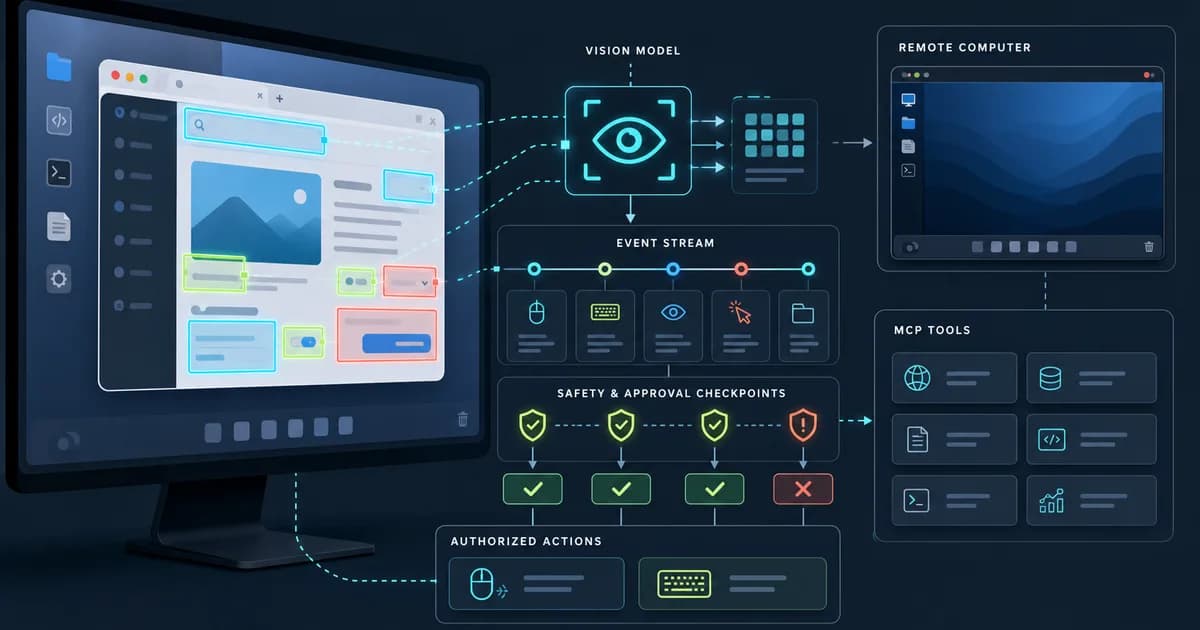
The repo is best understood as two related products sharing one ecosystem: Agent TARS brings multimodal agent workflows to terminal, browser, computer, and product surfaces; UI-TARS Desktop focuses on a native GUI agent driven by UI-TARS and Seed vision-language models for local, remote, and browser control.
Get the latest on AI, LLMs & developer tools
New MCP servers, model updates, and guides like this one — delivered weekly.
Watch the UI-TARS Video
Prefer reading? The written guide below covers the stack, setup paths, safety caveats, and tradeoffs.
Editorial note
This article is based on the GitHub repo, README, quick-start docs, release list, issue tracker, PR tracker, homepage/docs links, and source tree researched on June 3, 2026. Exact popularity counts are omitted because they change quickly.
1. UI-TARS-desktop in One Sentence
UI-TARS Desktop is an Apache-2.0 TypeScript monorepo for multimodal GUI agents, shipping Agent TARS CLI/Web UI plus a desktop computer-use application with visual grounding, browser operators, MCP integration, and local/remote operation modes.
| Area | Detail | Why it matters |
|---|---|---|
| Repository | bytedance/UI-TARS-desktop | https://github.com/bytedance/UI-TARS-desktop |
| Primary language | TypeScript | Primary GitHub language at research time. |
| License | Apache 2.0 | Check bundled or binary licenses separately where relevant. |
| Created | January 19, 2025 | Latest GitHub release checked: v0.3.0 on November 4, 2025; v0.2.4 had desktop binary assets while v0.3.0 release assets were ambiguous during research. |
2. Why It Matters
Computer-use agents are moving from browser-only demos to real desktop and product workflows. UI-TARS Desktop matters because it combines a vision-language agent, a native desktop app, a browser/computer operator model, and an MCP-based tool ecosystem in one open repository.
The split between Agent TARS and UI-TARS Desktop is important. Agent TARS is the broader stack: CLI, Web UI, event stream, MCP, browser agent, and multimodal workflow. UI-TARS Desktop is the GUI agent application that interacts with local or remote computers and browsers.
The project is also a useful case study in agent safety. A system that can click, type, run shell commands, operate browsers, and mount MCP servers needs approval gates, security hardening, coordinate correctness, and clear packaging. Recent PRs and issues show those topics are active.
3. Architecture and Mental Model
The repository is a TypeScript monorepo with `apps`, `packages`, `docs`, `examples`, `infra`, `multimodal`, and RFCs. Agent TARS exposes CLI and Web UI surfaces, while UI-TARS Desktop packages local/remote computer and browser operators driven by multimodal models.
| Area | Detail | Why it matters |
|---|---|---|
| Agent runtime | Agent TARS | CLI and Web UI agent stack for multimodal workflows and MCP tools. |
| Desktop product | UI-TARS Desktop | Native GUI agent for local computer, remote computer, and browser operation. |
| Model layer | UI-TARS, Seed vision-language models, provider-backed VLMs | Visual recognition and action prediction drive GUI control. |
| Tool layer | MCP plus browser/computer operators | Connects the agent to real-world tools and UI surfaces. |
| Event stream | Protocol-driven event stream | Used for context engineering, debugging, and agent UI state. |
| Docs and examples | `docs`, `examples`, `agent-tars.com` | Quick start, provider setup, CLI/Web UI, browser, MCP, and showcase material. |
| Release packaging | GitHub releases and npm package | Agent TARS CLI has release history; desktop binary discoverability appears to be a user question. |
4. Smallest End-to-End Setup
The commands below are copied from the repository documentation and checked against the current research snapshot. Treat them as a starting point, then read the linked README before installing into a production environment.
# Agent TARS CLI; package metadata observed Node >= 22.15.0
npx @agent-tars/cli@latest

# Global install
npm install @agent-tars/cli@latest -g

# Run with a provider/model
agent-tars --provider volcengine --model doubao-1-5-thinking-vision-pro-250428 --apiKey your-api-key
agent-tars --provider anthropic --model claude-3-7-sonnet-latest --apiKey your-api-key

# UI-TARS Desktop local development; root repo uses pnpm
pnpm i
pnpm dev:ui-tars
A small first task should prove the integration before you attach it to critical data or large workspaces.
# Desktop user path
brew install --cask ui-tars

# Read the repo quick-start first:
# https://github.com/bytedance/UI-TARS-desktop/blob/main/docs/quick-start.md

# Mental model:
# 1. choose local, remote computer, or browser operator
# 2. configure a supported vision-language model
# 3. verify single-monitor/browser/operator constraints
# 4. grant only the permissions needed for the target task
# 5. test on a harmless UI before using real accounts or paid actions
5. Technical Deep Dive
5.1 Agent TARS and UI-TARS Desktop solve adjacent problems
The README presents TARS as a multimodal agent stack with two shipped projects. Agent TARS aims at terminal, computer, browser, and product workflows through CLI and Web UI. UI-TARS Desktop is the native GUI agent application for local or remote computer/browser operation.
That distinction prevents confusion during setup. If you want a CLI/Web UI agent with MCP tools, start with Agent TARS. If you want a desktop GUI operator based on UI-TARS models, read the desktop quick-start and model deployment notes.
5.2 Visual grounding is the core capability
A GUI agent has to see the screen, infer the target element, and map that target to mouse and keyboard actions. The README highlights screenshot and visual recognition support, precise mouse/keyboard control, and examples such as changing VS Code settings or operating a browser.
The risk is coordinate drift. Recent issues include click prediction offset on newer macOS environments and interactions failing when the app brings itself to the top. Those are not cosmetic bugs; they directly affect whether an agent can safely act on a UI.
5.3 Browser operation is not only DOM automation
Agent TARS advertises a hybrid browser agent: GUI agent, DOM, or hybrid control. That matters because real websites mix visual state, dynamic DOMs, permissions, iframes, canvas, and anti-automation behavior.
A hybrid strategy lets the agent use DOM structure when it is reliable and visual grounding when the page is better understood as pixels. It also adds complexity because the agent must decide which observation/action channel is authoritative.
Browser task:
  visual screenshot
  + DOM structure where available
  + MCP/tool context
  -> action plan
  -> click/type/navigation
  -> event stream for review/debugging
5.4 MCP turns the agent into a tool host
The README says the Agent TARS kernel is built on MCP and supports mounting MCP servers. This is important because a computer-use agent should not use pixels for everything. Weather data, charts, files, documents, APIs, and internal tools are often safer through typed tools.
The MCP layer also increases the security burden. Tool description injection and output sanitization appear in the issue tracker, while PRs add command safety gates and harden security checks. Those are exactly the places a multimodal agent stack needs attention.
5.5 Releases are not the whole freshness story
The latest GitHub release checked was v0.3.0 from November 2025, but issues and PRs continued into May 2026. That means the release page does not fully describe the live repo's activity.
There is also a packaging nuance: the v0.3.0 release asset list was ambiguous during research, while v0.2.4 had desktop assets such as DMG/EXE/ZIP/update files. For users, this creates a practical setup question: whether to use Agent TARS CLI, Homebrew cask, a previous desktop binary release, source checkout, or docs from the website.
6. Real-World Wrong vs Right Patterns
| Wrong | Right | Reason |
|---|---|---|
| Treat computer-use control as ordinary chat automation. | Treat it as a permissioned UI operator with real side effects. | Click/type actions can purchase, delete, send, or expose data. |
| Start on a real account with money or sensitive data. | Smoke-test on harmless local apps and disposable browser sessions first. | Coordinate, focus, and model-grounding errors are possible. |
| Assume the desktop app and Agent TARS CLI install the same way. | Choose the path that matches your use case: CLI/Web UI or native desktop operator. | The repo ships two related but distinct products. |
| Mount arbitrary MCP servers without review. | Inspect tool descriptions, output handling, command permissions, and network scope. | MCP expands both capability and attack surface. |
7. Common Mistakes and Current Issues
The issue tracker matters because these are young, fast-moving repos. The article uses issues as risk signals, not as proof that a project is unusable.
| Area | Detail | Why it matters |
|---|---|---|
| Executable discovery | Issue #1878 asks where to download a desktop exe from v0.3.0. | Packaging expectations may not match release assets. |
| Single-monitor constraint | Quick-start docs call out single-monitor support limits. | Multi-monitor desktop setups may fail for some tasks. |
| Remote operator lifecycle | Docs referenced remote operator service discontinuation and self-deployment alternatives. | Check current service status before relying on hosted remote operators. |
| Coordinate drift | Issue #1876 reports click marker offset on macOS Tahoe 26. | GUI agents need platform-specific coordinate verification. |
| Window focus | Issue #1864 reports the desktop app placing itself on top before operations. | Focus behavior can break target-app automation. |
| Security reports | Issue #1854 discusses tool description injection and output sanitization. | Treat security hardening as an active area. |
| Setup confusion | Issue #1851 asks whether model deployment/config is enough. | Model, app, and operator setup should be verified together. |
| Approval gates | PR #1909 adds command safety approval gate. | Safety controls are moving through PRs. |
8. Performance, Scaling, and Cost Notes
Performance for UI agents is not just token speed. It is the loop from screenshot to model reasoning to action prediction to UI feedback. Latency, screen resolution, target-app responsiveness, and model visual precision all matter.
Remote operators add another dimension: network delay and remote environment state. A remote browser or computer can be easier to sandbox, but harder to make feel responsive.
MCP can improve performance by replacing pixel-level operations with typed tool calls. For example, generating a chart through an MCP server should be more reliable than manually clicking through a spreadsheet UI.
9. Who It Is For
| Use it if | Skip it if |
|---|---|
| You are experimenting with multimodal GUI agents and browser/computer operators. | You need a conservative enterprise RPA product with fixed releases and support SLAs. |
| You want an open stack around UI-TARS, Agent TARS, MCP, CLI, and Web UI. | You only need headless browser scripting through Playwright. |
| You can test actions in sandboxed apps before giving broad desktop access. | You cannot tolerate occasional coordinate, focus, or provider setup issues. |
| You want to study how event streams and multimodal context engineering work. | You want a one-command packaged desktop app with no model configuration. |
10. Community Signal
The repo has a long issue and PR surface, including community requests for providers, desktop packaging clarity, remote/browser operator behavior, mobile/iOS directions, security hardening, and approval-gated execution.
The strongest technical signal is that contributors are not only asking for features; they are pushing safety gates, security checks, provider support, scheduled tasks, and simulation-first execution ideas.
The strongest caution is that GUI agents fail in ways text agents do not: screen scaling, focus, browser profiles, permissions, and black-screen reports all affect usability.
11. The Verdict: Is It Worth Using?
Our Take
Use UI-TARS Desktop and Agent TARS if you want to explore serious open-source multimodal computer-use agents and can sandbox the workflow. Skip it for high-stakes unattended desktop automation until you have verified model setup, click accuracy, permission gates, and MCP security in your exact environment.
12. The Bigger Picture
UI-TARS Desktop sits in the same category as browser-use, computer-use agents, and multimodal operator frameworks, but it is unusually broad because it combines models, desktop app, CLI, Web UI, MCP, event streams, and remote operation.
The bigger shift is that agents are becoming operating surfaces, not just coding assistants. Once a model can see and act on a desktop, the engineering problem becomes permissioning, observability, rollback, and human review.
13. Frequently Asked Questions
Q: What is the difference between Agent TARS and UI-TARS Desktop?
Agent TARS is the broader CLI/Web UI multimodal agent stack. UI-TARS Desktop is the native GUI agent application for local, remote computer, and browser operation.
Q: Do I need to deploy my own model?
It depends on the path you choose. Agent TARS can run with configured model providers; UI-TARS Desktop expects OpenAI-compatible VLM endpoint settings such as provider, base URL, API key, and model name.
Q: Does it use MCP?
Yes. The README says the Agent TARS kernel is built on MCP and supports mounting MCP servers to connect real-world tools.
Q: Is it safe to let it control my computer?
Only with sandboxing, careful permissions, and human review. Recent PRs around command approval and security checks show this is an active concern.
Q: Why are GUI agents hard to make reliable?
They depend on screenshots, scaling, focus, coordinate mapping, app state, browser profiles, and model visual reasoning, all of which can vary by platform.
Q: What release should I check?
Use the latest docs and release page together. The latest checked release was v0.3.0 from November 2025, while v0.2.4 had desktop binary assets and issues/PRs continued in 2026.
14. Glossary
| Area | Detail | Why it matters |
|---|---|---|
| GUI agent | Agent that controls a graphical interface through screen observation and actions. | UI-TARS Desktop's core category. |
| Visual grounding | Mapping screen pixels to intended UI elements. | Critical for click/type accuracy. |
| MCP | Model Context Protocol. | Tool-server protocol mounted by Agent TARS. |
| Operator | Control mode for local computer, remote computer, or browser. | The action layer. |
| Event stream | Structured flow of agent/tool/runtime events. | Useful for debugging and agent UI. |
| VLM | Vision-language model. | Model class that reads screenshots and text. |
15. All Sources and Links
Primary Sources
Issues and PRs
Internal Links
16. Source Attribution Table
| Area | Detail | Why it matters |
|---|---|---|
| README | Two-project framing, Agent TARS features, UI-TARS Desktop features, install commands. | Primary source. |
| Docs | Quick start, provider/model setup, CLI/Web UI guidance. | Primary source. |
| Release list | v0.3.0 release timing. | Freshness source. |
| Issues | Packaging, setup, coordinate, focus, and security caveats. | Community signal. |
| PRs | Approval gates, security hardening, providers, scheduled tasks. | Active development signal. |
The weekly AI coding roundup
What shipped in AI and LLMs this week, and how to use it in your agent setup. No spam, unsubscribe anytime.
Related Guides
Humanizer Skill Guide
blader/humanizer: 29 AI-writing patterns, voice calibration, and a two-pass audit, all in one Claude Code skill.
Guides & FeaturesMastering Agent Skills
The open standard for portable AI agent expertise.
Guides & FeaturesAntigravity Workflows Guide
Create automation recipes with Turbo Mode and AgentKit 2.0.
Guides & FeaturesHow to Change Antigravity Themes
Customize themes, dark mode, icons, and color schemes.
Guides & FeaturesHow to Change Language
Switch Antigravity to Spanish, German, Japanese, and more.
Guides & FeaturesAntigravity Security Guide
Known vulnerabilities, safe settings, and hardening steps.