Get the latest on AI, LLMs & developer tools
New MCP servers, model updates, and guides like this one — delivered weekly.
Video editing starts long before the final effects, transitions, and color adjustments. The first major task is turning raw recordings into a sequence that makes sense. Editors need to review footage, identify useful moments, remove mistakes, and arrange clips in the right order.
Video from the Invideo for Filmmaking YouTube channel on editing with AI agents (finding takes, cleaning up retakes and pauses). It shows Invideo's own editor, so treat it as a vendor demo.
This early stage can take considerable time. A short YouTube video might require reviewing hours of recordings, while a product demonstration may contain several takes of the same scene.
AI agents are changing how this work gets done. Instead of manually handling every cut and clip arrangement, editors can give AI agents instructions to review footage, select takes, and assemble an initial timeline.
The result is not necessarily a finished video. It is an editable starting point that creators can review and improve.
This guide explains how AI agents handle rough cuts, how automated video assembly works, and where human editors still make the most important decisions.
What Is Rough Cut Editing?
A rough cut is the first assembled version of a video. It establishes the basic structure, scene order, and overall flow before detailed editing begins.
At this stage, editors focus on selecting the right footage and building a sequence that communicates the intended message.
A typical rough cut includes:
- Selecting usable clips from raw recordings.
- Removing repeated takes, mistakes, and unwanted pauses.
- Arranging scenes in a logical order.
- Matching footage with dialogue or voice recordings.
- Setting the approximate length of the video.
- Identifying sections that need additional footage.
The purpose is not to make every transition perfect. Instead, it is to create a clear version of the story that can be refined later.
For instance, a 30-minute interview may contain only ten minutes of material needed for the final video. The rough cut brings those useful sections together while preserving the meaning of the conversation.
Once this structure is ready, editors can focus on pacing, sound, graphics, and other finishing details.
How AI Agents Work in Video Editing
Traditional video editing relies on manually selecting clips, trimming footage, and arranging everything on a timeline.
AI agents introduce a different workflow by allowing editors to describe the work they want completed.
An AI editing agent can receive instructions, examine the available material using its supported tools, and carry out a series of editing actions.
For example, an editor might ask:
“Review these product demonstration clips, remove repeated explanations, select the clearest takes, and create a two-minute video showing the main features.”
A capable editing agent can break this request into smaller tasks.
It may examine the footage, identify different sections, compare takes, remove unwanted material, and arrange the selected clips into a timeline.
However, these capabilities depend on the software the agent can access. Some tools only generate video clips or return suggestions, while others can make direct changes to an editable editing project.
This distinction matters because video assembly requires more than generating a finished file. Editors often need access to individual clips so they can refine the results.
The Main Tasks AI Agents Handle During Rough Cuts
AI agents can assist with several stages of preparing and assembling video footage. The most useful tasks are those that involve repeated actions across a large amount of material.
1. Reviewing Raw Footage
Before editing begins, someone needs to understand what the recordings contain.
A single project may include interviews, product shots, screen recordings, supporting footage, and audio files.
AI agents with video understanding capabilities can help analyze these materials and identify sections relevant to the editing brief.
For example, an agent preparing a tutorial might look for clips showing each step of a process.
Similarly, an agent working on an interview could identify sections where a speaker discusses particular topics.
This helps editors locate useful footage without manually searching through every recording.
The accuracy of this process depends on the agent's ability to understand video, dialogue, and timing. Important selections should still be reviewed before they are included in the final sequence.
2. Selecting the Best Takes
Recording multiple versions of the same scene gives editors more choices, but it also creates additional work.
A presenter might repeat an explanation several times because of mistakes, interruptions, or changes in delivery.
AI editing agents can help compare these recordings and identify usable takes.
They may consider factors such as:
- Whether the speaker completes the sentence.
- Whether the recording contains interruptions.
- Whether the dialogue is clear.
- Whether the shot matches the requested scene.
- Whether the selected take fits the surrounding footage.
A technically clean recording is not always the best creative choice. The editor may prefer a more natural performance even if another take is more polished.
AI can narrow the options, while the editor makes the final selection.
3. Removing Mistakes and Repeated Sections
Raw footage frequently includes false starts, repeated explanations, long pauses, and unwanted material.
Removing these sections manually can involve many small timeline adjustments.
AI agents can help identify and trim these parts when the connected editor supports the necessary operations.
For example, an editor preparing a talking-head video might request that the agent remove obvious mistakes and repeated sentences.
However, removing too much can affect the meaning of the content.
A pause may be necessary for emphasis, while a repeated statement might help explain a complex idea.
The agent therefore needs clear instructions about what should remain, rather than simply removing every silence or repetition.
4. Arranging Clips Into a Video Sequence
Selecting useful footage is only part of the editing process. The next challenge is deciding how the clips should appear together.
This is where AI-assisted video assembly becomes useful.
An AI agent can arrange selected footage according to instructions about story structure, scene order, and duration.
For example, a product video might follow this sequence:
- Introduce the product.
- Show the main problem it solves.
- Demonstrate important features.
- Include supporting product footage.
- End with a closing message.
The agent can assemble the available clips around this structure and create an initial timeline.
This gives the editor a working sequence instead of a collection of disconnected recordings.
The editor can then evaluate whether the opening is strong enough, whether the story feels clear, and whether scenes need to be rearranged.
5. Adjusting Pacing and Video Length
Pacing affects how viewers experience a video.
A tutorial may need enough time for viewers to understand each step, while a promotional video may require shorter clips and a faster opening.
AI agents can help adjust timing by shortening sections, changing clip order, or removing material that does not support the main message.
For example, an editor could ask an agent to reduce a three-minute product demonstration to 90 seconds while keeping the main features.
The agent can make the requested changes using its available editing tools.
The editor should then review the sequence to make sure important details have not been removed and the video still feels natural.
How AI Agents Build an Editable Rough Cut
The value of AI-assisted editing becomes clearer when an agent can work directly on a timeline rather than returning only a completed video file.
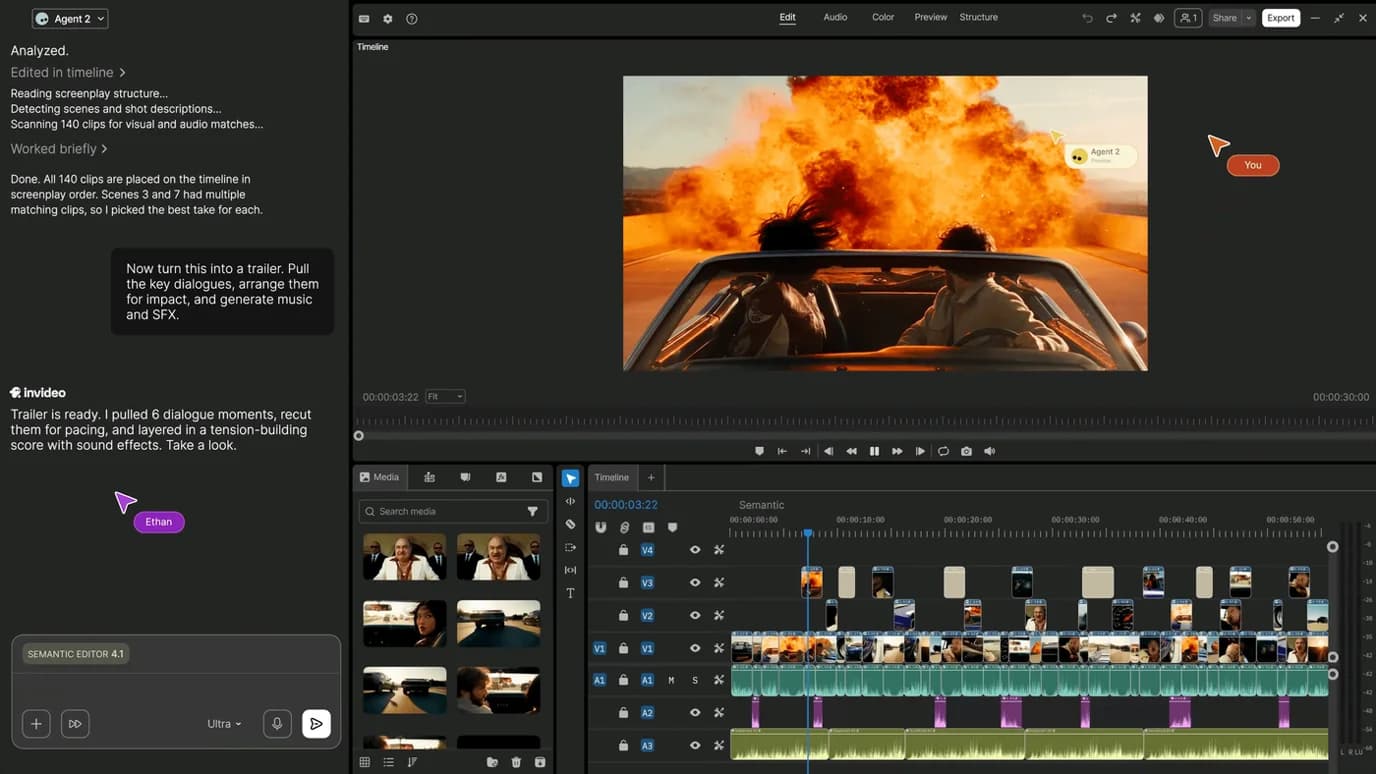
An editable timeline allows creators to inspect each scene, replace footage, change the order of clips, and make further adjustments without starting again.
Invideo Editor is one example of a browser-based editing platform that supports this workflow through AI editing agents.
With its rough cut editing capabilities, creators can upload raw footage and instruct an AI agent to review the material, select suitable takes, remove unusable sections, and assemble an initial cut on an editable timeline.
The agent can also arrange footage around a music track or voice recording, adjust pacing, and restructure the video based on additional instructions.
Once the first assembly is ready, editors can review the result and make manual changes to individual clips, timing, and audio.
This approach combines automated execution with the flexibility of traditional timeline editing.
It also highlights an important requirement when choosing AI editing software: whether the agent creates an editable project or only produces a rendered output.
A Practical AI Rough Cut Workflow
AI agents can simplify video assembly, but the results depend heavily on how the workflow is organized.
Here is a practical process for moving from raw footage to an editable first cut.
Step 1: Prepare the Source Material
Start by collecting the files needed for the project.
These might include camera recordings, interviews, product footage, voiceovers, background music, and supporting visuals.
Keep filenames clear so the editor or agent can identify the material.
If footage comes from different cameras, make sure the recordings are organized and any required audio synchronization is considered.
A well-prepared collection of files makes it easier to provide accurate editing instructions.
Step 2: Define the Video's Purpose
Before assigning the editing task, decide what the video needs to communicate.
A rough cut for an interview will follow a different structure from a product advertisement or event highlight.
Define the intended audience, approximate duration, main message, and important scenes.
For example, a creator preparing a YouTube tutorial might want a five-minute video that explains a process in a clear order without unnecessary introductions.
These details help the agent understand what material should receive priority.
Step 3: Give the Agent Specific Instructions
Broad requests often leave too many creative decisions open.
Instead of asking an agent to “make a good video,” explain how it should handle the footage.
A more useful instruction would be:
“Create a three-minute rough cut from these tutorial recordings. Keep the complete explanations of each step, remove false starts and repeated instructions, arrange the scenes in the correct order, and leave the original audio in place.”
This identifies the target duration, editing priorities, and expected structure.
It also gives the agent clearer limits on what can be removed.
Step 4: Review the First Assembly
Once the agent creates the initial sequence, review it from beginning to end.
Focus on the larger editing decisions before making small adjustments.
Check whether the story is complete, the scenes appear in the correct order, and the selected footage supports the intended message.
Also review the transitions between ideas. Two individually useful clips may still feel disconnected when placed next to each other.
A rough cut should provide a clear foundation, even when some details still need work.
Step 5: Refine the Sequence
After reviewing the first assembly, provide specific feedback.
For example:
“Move the demonstration before the explanation, shorten the opening by five seconds, and keep the complete customer response near the end.”
An agent with timeline editing access can apply supported changes to the existing sequence.
Creators can also make these adjustments manually when they prefer more direct control.
The goal is to improve the structure without rebuilding the entire project.
Step 6: Continue Toward the Final Edit
Once the rough cut is approved, the project moves into detailed editing.
This may include adding captions, improving audio, adjusting colors, inserting supporting footage, and refining transitions.
These finishing tasks build on the sequence established during the rough cut stage.
Keeping the project editable makes it easier to return to earlier decisions if something needs to change.
Where AI Video Assembly Works Best
AI editing agents are particularly helpful when projects contain large amounts of footage or follow a repeated editing process.
| Video type | How AI agents can help |
|---|---|
| Interviews | Identify complete answers, remove repeated takes, and organize discussion topics |
| YouTube tutorials | Arrange instructional clips, remove mistakes, and maintain the correct sequence |
| Product demonstrations | Select feature shots and assemble videos around a product brief |
| Podcasts | Locate important discussion moments and prepare shorter clips |
| Event highlights | Select useful moments and arrange footage around a story or music track |
| Social media videos | Create shorter versions of existing footage with adjusted pacing |
For teams producing content regularly, these tasks can become part of a repeatable workflow.
An agent can handle the initial assembly while the editor reviews the creative decisions.
AI Agents vs. Traditional Rough Cut Editing
AI-assisted and traditional editing workflows share the same basic goal: creating a clear sequence from raw footage.
The main difference is how the first assembly is produced.
| Editing task | Traditional approach | AI-assisted approach |
|---|---|---|
| Reviewing footage | Editor watches and searches recordings | Agent helps identify relevant sections |
| Choosing takes | Editor compares recordings manually | Agent suggests or selects takes based on instructions |
| Removing mistakes | Editor trims unwanted sections | Agent can identify and remove supported sections |
| Arranging scenes | Editor manually places clips | Agent assembles clips around a given structure |
| Changing duration | Editor adjusts timing and removes footage | Agent applies requested timing changes |
| Final review | Editor checks the sequence | Editor still checks and approves the sequence |
AI agents can reduce manual execution, but they do not automatically understand every creative requirement.
The most effective workflows combine AI assistance with editorial review.
Challenges of Using AI Agents for Rough Cuts
AI editing can make the early stages of production easier, but several limitations remain.
Understanding Creative Intent
AI agents can follow instructions about scene order, duration, and pacing. However, they may not always understand why a particular moment matters emotionally.
An interview response might contain a pause that makes the speaker's message more meaningful.
An agent focused only on removing silence could shorten that moment unnecessarily.
Editors need to review the results to make sure the intended tone remains intact.
Maintaining Context
Removing repeated or unnecessary material can improve a video, but excessive trimming may change its meaning.
This is particularly important for interviews, educational content, and documentary-style videos.
AI agents should receive instructions to preserve complete explanations and important supporting statements.
Handling Complex Footage
Projects with several cameras, inconsistent audio, or incomplete recordings can be difficult to assemble.
Some editing tools support multicamera workflows and detailed media analysis, while others have more limited capabilities.
Creators should check which operations their chosen AI editor actually supports before relying on it for complex projects.
Reviewing the Final Decisions
An AI-generated rough cut should be treated as a draft.
Editors still need to verify clip choices, scene order, continuity, and pacing.
Human review is especially important when the video represents a brand, explains technical information, or contains statements that could be misunderstood if edited incorrectly.
What Comes Next for AI Video Editing Agents?
AI editing agents are gradually moving beyond simple automated cuts.
More editing systems now support natural language instructions, video understanding, and direct interaction with editing projects.
This creates opportunities for connected workflows where an agent can review footage, assemble a sequence, make requested changes, and prepare different versions of the same video.
For developers building creative workflows, the distinction between generating content and editing existing footage is becoming increasingly important.
Video generation creates new material. Rough cut assembly organizes existing material into a structure. A useful editing agent needs to understand that difference and work with the appropriate tools.
As these capabilities improve, creators may be able to spend less time repeating basic editing actions and more time deciding how the story should be told.
Frequently Asked Questions
What is an AI rough cut?
An AI rough cut is an initial video sequence created with the help of AI editing tools. It usually includes selected footage, basic trims, and an arranged scene order that can be reviewed before detailed editing.
Can AI agents edit raw footage automatically?
Yes. Some AI editing agents can review uploaded footage, identify usable takes, remove unwanted sections, and assemble clips into a sequence. The available actions depend on the editing software.
Can AI agents choose the best takes?
AI agents with suitable video and audio understanding capabilities can help compare takes and identify recordings that meet the editing instructions. Editors should still review the selections for delivery, context, and creative quality.
What is the difference between a rough cut and a final cut?
A rough cut focuses on selecting footage and establishing the main structure. A final cut includes the approved timing, detailed audio work, visual adjustments, and other changes needed before delivery.
Can AI agents edit footage to match music?
Some AI editing tools can arrange clips around music, voice recordings, or beat patterns. This can help when preparing event highlights, sports videos, and promotional content.
Do AI agents replace video editors?
AI agents can handle many repetitive editing tasks, but human editors remain important for storytelling, pacing, and creative decisions. AI works best as part of a workflow where editors can review and refine the results.
Why does an editable timeline matter for AI rough cuts?
An editable timeline lets creators inspect each scene, replace footage, change the order of clips, and make further adjustments without starting again. It also means the agent produces a working project rather than only a rendered output, which is an important requirement when choosing AI editing software.
What should I tell an AI agent when I ask for a rough cut?
Be specific instead of asking for a good video. State the target duration, the editing priorities, and the expected structure, and say what should stay (for example, complete explanations and the original audio) and what can go (for example, false starts and repeated instructions). These details also give the agent clearer limits on what can be removed.
Conclusion
Rough cuts and video assembly are essential stages of video production. They turn large collections of recordings into an organized sequence that editors can develop into a finished video.
AI agents can help by reviewing footage, selecting takes, trimming unwanted material, and arranging clips according to a clear brief.
The greatest benefit comes when these actions happen within an editable project, allowing creators to inspect the results and make further changes.
As AI editing tools continue to develop, rough cut assembly is becoming a more practical area for automation. The technology can handle much of the repetitive work, while editors remain responsible for the creative choices that make the final video effective.
Related reading on this site