Get the latest on AI, LLMs & developer tools
New MCP servers, model updates, and guides like this one — delivered weekly.
Ask Claude for “a motion graphic about how lightning works” and you usually get a competent but generic animation: flat shapes, default easing, a stock font. The code is fine. What is missing is taste, a rendering engine suited to the job, and a library of moves that already work. Ten open GitHub repos fill those gaps, and each one plugs into Claude Code in a different way: a plugin, a skill, an MCP server, an npm package, or a prompt you paste.
Our answer, as of Nov 12, 2026: start with Lemo Opuscar if you want a finished film in a named style, add three.js and React Postprocessing when the scene should be 3D and look filmed, use Video ShotCraft with librosa for product promos cut to music, and reach for MCP for Blender when you need CGI-grade 3D and accept that it executes code on your machine. The rest (pixelfx, the two prompt packs, Claude Animation Base, React Three Rapier) are specialists for pixel art, borrowed prompts, painted characters and physics.
The video that inspired this list, “10 GitHub Repos to 10x Your AI Motion Graphics” by Matt Penny of Applied AI. It is a creator video, not documentation: we use it for the framing and for what each demo shows, and every number and install step below comes from the repos themselves.
The Short Answer
Pick by the job. A narrated explainer in a distinctive visual style: Lemo Opuscar. A 3D chart or product scene: three.js, lit and finished with React Postprocessing. A physics demonstration (dominoes, a Galton board): React Three Rapier. A game-style or pixel-art clip: pixelfx. A hand-painted cartoon with a recurring character: Claude Animation Base. A render that needs real CGI materials and camera work: MCP for Blender. A launch video that should hit the beat: Video ShotCraft plus librosa. If you are not sure what to ask for, copy a prompt from one of the two prompt packs and adapt it.
Two cautions apply across the list. First, licenses differ more than the star counts suggest: Lemo Opuscar splits code, docs and films across three licenses, the joeseesun/opus-video-prompts pack and the P(doom) source repo carry no license file we could find, and Video ShotCraft renders with Remotion, which charges larger companies. Second, MCP for Blender can run arbitrary Python, so back up your scene before you let Claude drive it. Both topics get their own section near the end.
Quick Picks
| Need | Repo | Why |
|---|---|---|
| Best first install | Lemo Opuscar | 99 ready film styles (15 categories) as a Claude Code plugin. Pick a style by name and Claude builds the whole film in code. |
| Best for real 3D | three.js | The reference WebGL library, MIT, 118,225 stars. Turns flat charts and scenes into 3D with camera moves. |
| Best for pixel art and game effects | pixelfx | 244 coded effects plus a Claude Code skill that drafts, renders, looks and refines new ones. |
| Best for CGI-style shots | MCP for Blender | Claude controls Blender through an MCP server and add-on. Powerful, and it runs arbitrary Python in Blender, so save first. |
| Best for borrowing proven prompts | Awesome Opus 5.5 Videos | 703 creator prompts, MIT. joeseesun's pack adds 18 full prompts in Chinese (no license file). |
| Best for painted explainers | Claude Animation Base | p5.js and p5.brush kit with the Clawd character, 31 emotions and a rulebook Claude reads first. |
| Best for physics explainers | React Three Rapier | Real rigid-body physics in React Three Fiber: dominoes, Galton boards, falling stacks. |
| Best for a film look | React Postprocessing | Bloom, depth of field, noise and vignette as React components on top of a 3D scene. |
| Best for beat sync | librosa | Python beat tracking that exports timestamps your animation timeline can snap to. |
| Best for product promos | Video ShotCraft | 124 shot recipe cards and 150 shots, Remotion rendering, beat sync and an editable result. |
Master Comparison Table
Star counts, licenses and descriptions come from the GitHub API and each repo’s README, fetched on Nov 12, 2026. Stars change daily; treat them as a snapshot of popularity, not quality.
| Repo | Stars (Nov 12, 2026) | License | What it adds to Claude | How it plugs in | Runtime needs | Best for |
|---|---|---|---|---|---|---|
| Lemo Opuscar | 15,125 | Code MIT; docs CC BY-NC 4.0; demo films CC BY 4.0 (GitHub shows NOASSERTION) | 99 film styles in 15 categories, each a style prompt plus a demo film made in code | Claude Code plugin from the lemolab marketplace, or git clone | Claude Code; README says Claude models with effort set to high | Whole films with a distinct visual identity |
| three.js | 118,225 | MIT | Real 3D scenes, particles, lighting and camera moves in the browser | npm install three, then ask Claude to build with it | A browser or headless Chrome to render frames | 3D charts, product scenes, particle effects |
| pixelfx | 7,110 | MIT (the Patch Pixel font is excluded) | 244 pixel-art effects, 12 whole moves, a skill for making new effects | Claude Code plugin, a copied skill, or npm i github:patch-gg/pixelfx | A canvas in the browser; Node for the make-your-own tools | Pixel art, game effects, stylized explainers |
| MCP for Blender | 34,140 | MIT | Claude drives Blender: objects, materials, cameras, renders, asset libraries | MCP server via uvx plus a Blender add-on | Blender, uv, Python 3.10 or newer | CGI-style 3D shots and product breakdowns |
| Awesome Opus 5.5 Videos | 14,991 | MIT | 703 creator-shared prompts, 100 highlighted with remakes | Copy a prompt into Claude | Opus 5.5 and a way to render one HTML file | Starting prompts for any style |
| Opus 5.5 Video Prompts | 1,065 | No license file found | 18 full prompts, 54 public cases, 9 technical routes (Chinese) | Copy a prompt into Claude Code | Node.js, Chrome and FFmpeg per the README | Structured explainer and promo templates |
| Claude Animation Base | 2,916 | MIT | A hand-painted p5.js and p5.brush kit, the Clawd character, 31 emotions, an animation guide | git clone, open in Claude Code, point it at ANIMATION_GUIDE.md | Node.js, Google Chrome, ffmpeg | Painted cartoon explainers |
| React Three Rapier | 1,595 | MIT | Rapier physics inside React Three Fiber | npm install @react-three/rapier | React and React Three Fiber (v2 needs fiber v9 and React 19) | Physics-based explainers |
| React Postprocessing | 1,574 | MIT | Bloom, depth of field, noise, vignette and more as components | npm install @react-three/postprocessing | React Three Fiber scene | Glow, focus and a filmic finish |
| librosa | 8,903 | ISC | Beat and tempo detection for syncing animation to music | pip install librosa | Python | Cutting visuals to the beat |
| Video ShotCraft | 18,910 | Apache-2.0 (Remotion has its own license) | 124 shot recipe cards, 150 shots, beat sync, sound design, editable output | npx skills add Vincentwei1021/video-shotcraft, or git clone | Node.js, ffmpeg; uv for beat analysis | Product launch and promo videos |
How Claude Makes Motion Graphics
Claude does not output video files. In every workflow in this article it writes code that draws each frame, using HTML Canvas, SVG, p5.js, three.js or Remotion. A headless browser or renderer captures the frames, and FFmpeg or Remotion assembles an MP4. The joeseesun prompt pack describes the same pipeline: write code, screenshot frame by frame in headless Chrome, merge with FFmpeg, add music. Claude Animation Base automates the last part with a render.mjs script that also writes contact sheets so the model can check its own work.
That architecture explains why these repos help. Plain Claude has to invent the visual style, pick a rendering approach, write the easing, and guess what “professional” means. A repo can hand it a style prompt (Lemo Opuscar), an engine (three.js, Rapier), a finishing stack (React Postprocessing), a timing source (librosa), or a rulebook (Claude Animation Base, Video ShotCraft). The creator of the video above puts the idea in his own words: the human has done the creative work, and the model is choosing which proven pieces to use. In our reading, that is the common thread: fewer decisions left to the model, and more of them already made well.
If you build video pipelines without Claude in the loop, our best AI video generators comparison covers the model-rendered route (Veo, Wan, Seedance, Kling), and the HeyGen HyperFrames guide covers another code-driven approach. The ten repos here are for the code-rendered route, where Claude writes the animation itself.
1. Lemo Opuscar: 99 film styles for Claude Code
| Repo | lemomo-ai/lemo-opuscar by Lemomo (LemoLab) |
| Stars | 15,125 (Nov 12, 2026) |
| Latest release | v2.0.0, published Nov 12, 2026 |
| License | Mixed: code MIT, docs CC BY-NC 4.0, demo films CC BY 4.0. GitHub shows NOASSERTION. |
| Plugs in as | Claude Code plugin (marketplace lemolab), or a cloned repo |
Lemo Opuscar is a toolbox of film styles made in code. Each style is a style prompt (a STYLE.md your agent follows) plus a short demo film made entirely in code by Claude Opus 5.5, with no video model involved. As of the README dated 2026-11-12 there are 99 styles in 15 categories, after 33 were added that day. The categories are sorted by what the picture looks like: Edit & Documentary (8 styles), Painting & Illustration (5), Sketch & Board (7), Traditional Crafts (7), Print & Printmaking (8), Graphic & Type (8), Line Diagrams (8), Cartoons (6), Games (4), Film & Tape (5), Screens & Interfaces (6), Light & Lines (5), 3D & Miniature (8), Instruments & Evidence (8) and Data & Maps (6). The video this article follows says 66 styles, a figure that predates the Nov 12 update.
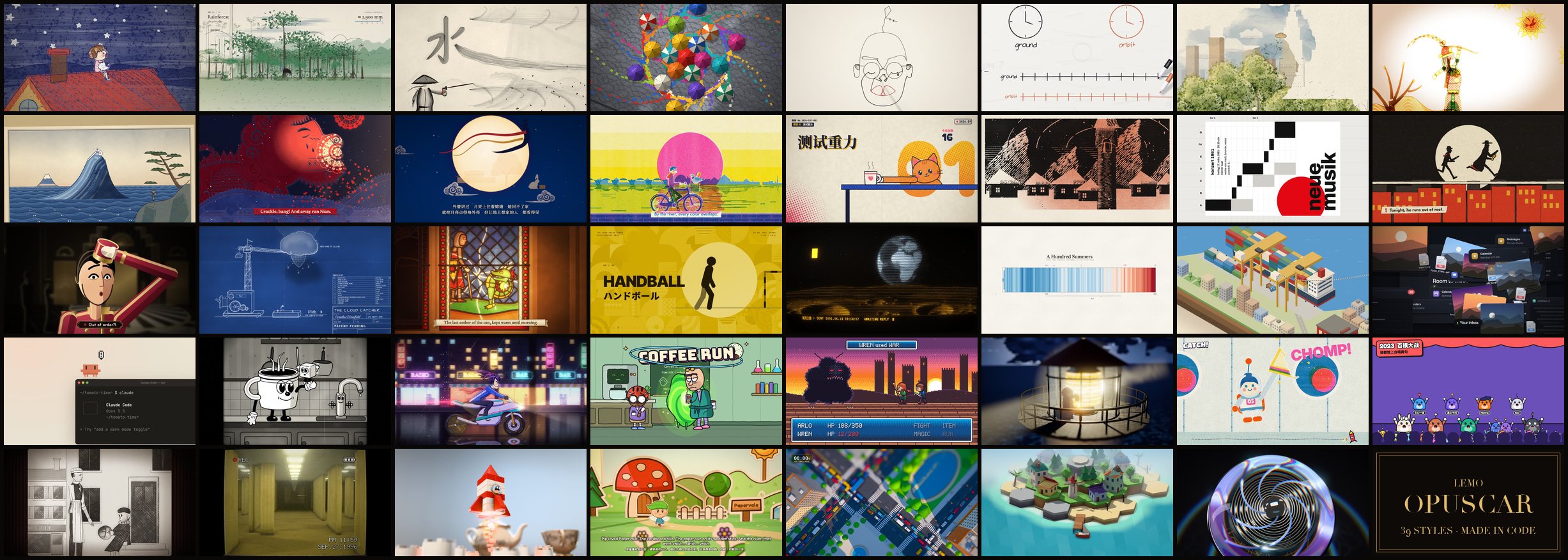
docs/). Source: github.com/lemomo-ai/lemo-opuscar.What it adds that plain Claude lacks
A named visual identity per film. The video lists paper cut, 80s anime, ink wash, retro terminal and isometric infographics among the styles, and shows an isometric explainer of how a phone talks to a cell tower, a paper-cut title piece with layered lighting, an ink-wash piece and a terminal scene. Each style also has its own page in the gallery with stills, what it suits and the STYLE.md. The README adds a director guide and a technique guide, a way to change a style or start blank and keep it as your own, and optional voice and music packages for narration and soundtrack.
Install and first prompt
claude plugin marketplace add lemomo-ai/lemo-opuscar
claude plugin install lemo-opuscar@lemolab

# or clone the repo and start Claude Code inside it
git clone https://github.com/lemomo-ai/lemo-opuscar.git
cd lemo-opuscar
claude
With the plugin route, the first use downloads the guides, tools and style prompts to ~/lemo-opuscar, shared by all your films. Then ask in one sentence, naming the style in English or Chinese:
Make a 45-second film in the watercolor style about the coffee farm my family runs. Warm female narrator.The README’s own advice: Claude Fable, Opus and Sonnet all work, set effort to high (/effort high in Claude Code), and other models may not reproduce the styles well. The plugin updates with claude plugin marketplace update lemolab && claude plugin update lemo-opuscar@lemolab.
License and caveats
Read the license section before using it commercially. Per the README: code is MIT; every Markdown file (style prompts and guides) is CC BY-NC 4.0, with an added permission to use them to make your own films, client and commercial films included; the demo films, posters and stills are CC BY 4.0; and films you make with the library are yours. Six narration tracks (five using Microsoft Edge TTS, one using Doubao TTS) are excluded from the CC BY grant and should not be extracted or reused. Clawd, Anthropic’s character, appears in some films and is not covered. Version 2.0.0 introduced the non-commercial docs license because, the authors say, the style library had been repackaged and sold inside paid products. Versions before 2.0.0 keep their original license. The README recommends Claude models with effort set to high, so results on other models are unverified.
Best for: a whole film with a strong, specific look, from one sentence. Not for: anyone planning to resell or bundle the style library itself, or users on a model the README warns about.
2. three.js: real 3D in the browser
| Repo | mrdoob/three.js (Mr.doob and contributors) |
| Stars | 118,225 (Nov 12, 2026) |
| Version | r187 (GitHub release Oct 30, 2026); npm three 0.187.0 |
| License | MIT |
| Plugs in as | npm package that Claude writes code against |
three.js is the reference JavaScript 3D library, and the project describes itself in one line: “JavaScript 3D Library.” It is not a Claude tool, so there is nothing to install into Claude; you install the package in your project and tell Claude to build with it. What it adds is a dimension. In the video, a revenue-by-year infographic is rebuilt with each bar as a stack of cash in 3D, scaled correctly against the Y axis, and the creator calls it more engaging than a static 2D bar chart. The same video shows a particle spiral galaxy, a camera flying through a scene, and a 3D model Claude built itself, whose visible polygon edges he says a later repo in the list helps to improve.

Install and starter prompt
npm install three

# then, in your Claude Code prompt:
# "Build a 3D bar chart of revenue by year with three.js. Scale each bar to the data,
#  add a slow orbiting camera, and render 1080p frames with headless Chrome."
three.js also ships a large set of official examples, including the keyframe-animation scene above and a CSS3D periodic table, which give Claude concrete patterns to imitate. Ask it to read an example that is close to your idea before it writes code.
Caveats
three.js renders in a browser, so a video needs a frame-capture step (headless Chrome, as in the pipelines above). The library is large, and Claude’s first scene often looks plain until you add lights, materials and post effects, which is where React Postprocessing and Blender come in. Version numbers move quickly; check the release you install.
Best for: 3D charts, product scenes, particles, camera flights. Not for: photoreal materials or complex rigging, where Blender is the better tool.
3. pixelfx: 244 pixel-art effects and a skill to make more
| Repo | patch-gg/pixelfx by Patch |
| Stars | 7,110 (Nov 12, 2026) |
| License | MIT for code and effects; the Patch Pixel font in gallery/fonts is Patch's own and not covered |
| Plugs in as | Claude Code plugin, a copied skill, or an npm package |
pixelfx is a library of 244 pixel-art effects and animations, each a small piece of code: fire, explosions, magic, weather, UI, pickups, critters and more, across 21 categories in the README table. Effects that involve a character are acted out (a wind-up, a release, a freeze on contact, a recovery), and twelve whole moves chain effects into attacks. The video shows fire, fireworks, an aurora, a large explosion and lightning scenes, and argues that a stylized pixel-art explainer on how lightning works looks more premium than asking Claude for a plain lightning graphic.
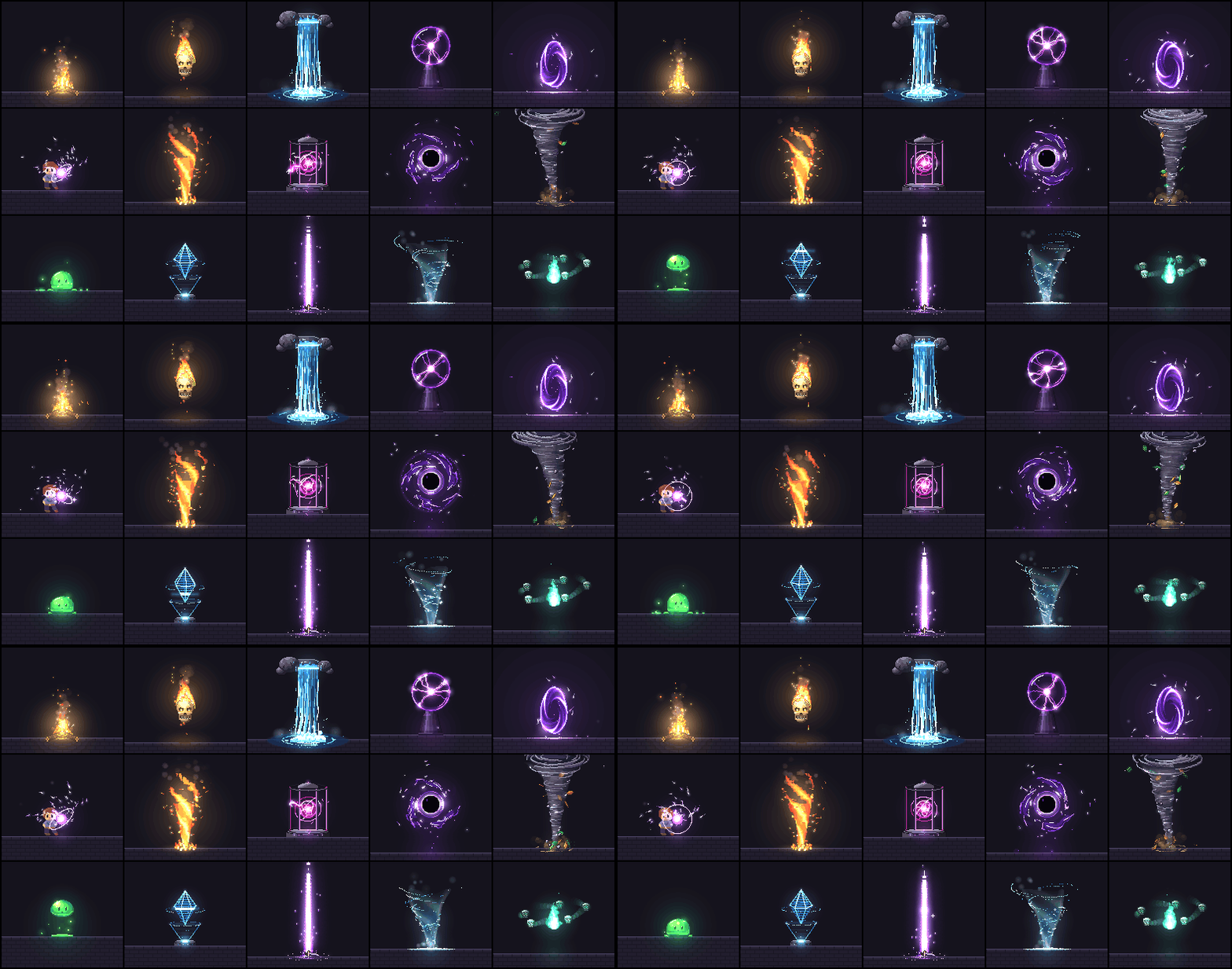
What it adds
The pixelfx skill teaches Claude Code to find, use, export and make effects. The README says it makes new ones the way a picky pixel artist would: draft, render, look, refine. It includes tools to scaffold an effect, render a contact sheet and check for spills, seams, unseeded randomness and slow frames. Example requests from the README include adding a frost nova to a mage’s ultimate, making five takes on a coin pickup sparkle, exporting fire and explosion categories as sprite sheets for Godot, and making a floaty hit effect punchier.
Install
/plugin marketplace add patch-gg/pixelfx
/plugin install pixelfx@pixelfx

# or copy skills/pixelfx into ~/.claude/skills/
# or use the code directly in a browser game:
npm i github:patch-gg/pixelfx
For a browser game or canvas page, the code path has no dependencies:
import { createFrame, clearFrame, createFx, composite } from "pixelfx";
import * as frostNova from "pixelfx/fx/ice/frost-nova";

const frame = createFrame(320, 180);
const fx = createFx(frostNova, { x: 160, y: 140 });
Caveats
The repo has no GitHub releases, so installs from GitHub track the main branch. Pixel art is a strong look but a narrow one: it suits games, retro explainers and stylized weather or physics topics, not corporate promos. Parts are adapted from Hugo Duprez’s MIT effects and from Hollow Crown’s MIT source; see the repo’s NOTICE file.
Best for: pixel-art clips and stylized explainers. Not for: realistic or brand-polished promos.
4. MCP for Blender: Claude drives Blender
| Repo | ahujasid/mcp-for-blender (formerly Blender MCP), by Siddharth Ahuja |
| Stars | 34,140 (Nov 12, 2026) |
| License | MIT |
| Affiliation | Community plugin. Not affiliated with the Blender Foundation (the repo description says so). |
| Plugs in as | MCP server run through uvx, plus a Blender add-on |
Blender is the free 3D suite professionals use for CGI and motion work, and this community project gives any MCP client a way to control it. The architecture has two parts: a Blender add-on (addon.py) that opens a socket server inside Blender to receive commands, and an MCP server (src/blender_mcp/server.py) that speaks the Model Context Protocol and talks to the add-on. The README lists object creation and editing, materials and colors, camera and multi-angle views so the model can check its own work, renders, Python execution, and asset sources including Poly Haven, Sketchfab and Poly Pizza, plus AI-generated models through Meshy, Tripo, Hyper3D Rodin and Hunyuan3D. A paid Premium tier provides some of the generation without your own API keys.
The video’s examples were each made from a single prompt: a population comparison shown as buildings, a solar-panel explainer, and an exploded view of headphones with their parts. The creator notes the one-shot results can be improved much further with more passes.
Siddharth Ahuja on launching the Blender MCP: a demo of a “low-poly dragon guarding treasure” scene made in a few sentences.
— @sidahuj March 11, 2025
Siddharth Ahuja on the Poly Haven integration: a beach scene built with words, importing HDRIs, textures and models from Poly Haven’s library of 1500+ assets (his figure, March 2025).
— @sidahuj March 17, 2025
Install and configure
# one-line installer (macOS / Linux)
curl -LsSf https://www.mcp-for-blender.com/install.sh | sh

# or, with uv already installed
uvx mcp-for-blender setup

# manual route for Claude Code
claude mcp add blender uvx mcp-for-blender
uvx mcp-for-blender install-addon

# optional: turn off the default anonymous usage record
DISABLE_TELEMETRY=true uvx mcp-for-blender
The one-line installer installs uv if needed, finds the MCP clients on your machine (Claude Desktop, Claude Code, Codex, Cursor, VS Code and others the README names), lets you choose which to configure, then installs and enables the Blender add-on. For other clients, add the server to the MCP config:
{
    "mcpServers": {
        "blender": {
            "command": "uvx",
            "args": ["mcp-for-blender"]
        }
    }
}
If you are new to MCP in Claude Code, our MCP servers for Claude Code list and the top MCP servers roundup explain the setup pattern. The project renamed from Blender MCP; the README says uvx blender-mcp still runs the server, no config change required, and new installs should use mcp-for-blender.
Caveats
This is the repo with real risk, so it gets its own safety notes below. In short: the execute_blender_code tool runs arbitrary Python in Blender, telemetry sends a minimal anonymous usage record by default (content collection is opt-in), and GUI-launched MCP clients sometimes cannot find uvx on PATH, which the README documents under a “spawn uvx ENOENT” fix. Complex operations also need to be broken into smaller steps.
Best for: CGI-style 3D shots, product breakdowns, scenes needing real materials and cameras. Not for: unattended runs on a scene you cannot afford to lose.
5. Two prompt packs: Awesome Opus 5.5 Videos and Opus 5.5 Video Prompts
| Repo A | yihui-dev/awesome-opus5-5-videos: 14,991 stars, MIT, last updated 2026-10-12 |
| Repo B | joeseesun/opus-video-prompts: 1,065 stars, no license file found, in Chinese |
| Plugs in as | Copy a prompt into Claude Code or the Claude app |
Awesome Opus 5.5 Videos collects viral videos made by asking Claude Opus 5.5 to write the animation as code (HTML, Canvas, SVG, Three.js and friends), each with the prompt the creator shared or, where none was published, their original post. As of the README, there are 703 prompts in the prompts/ folder and data/videos.json, 418 with a live remake on Skillry, and 100 remade videos highlighted, grouped as Motion graphics (58), Explainers (16), 3D scenes (14), Games and interactive (12) and 30 latest prompts. Usage is three steps: copy the block under Prompt, paste it into Opus 5.5, and ask for a single HTML file you can record.
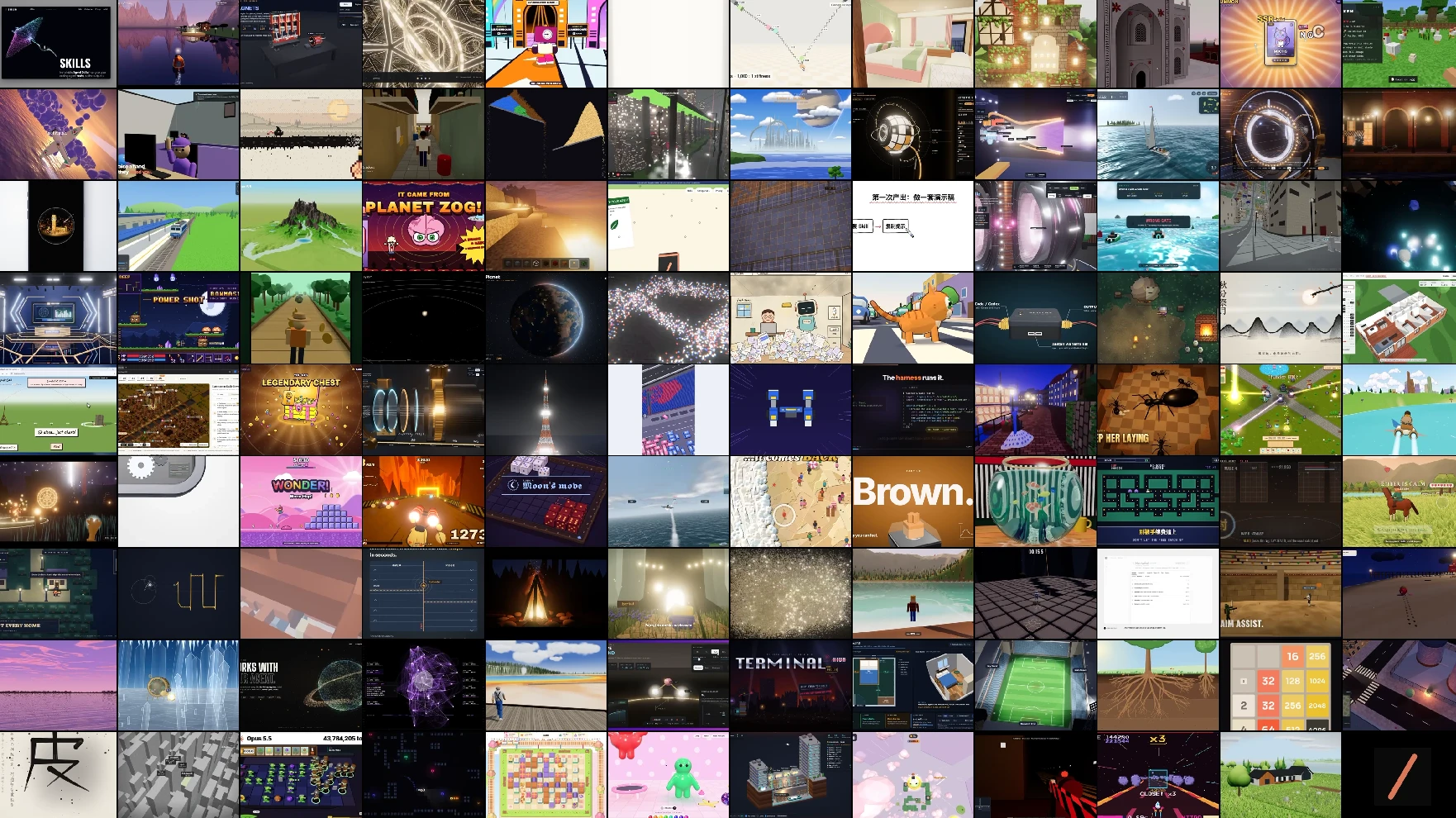
Opus 5.5 Video Prompts by joeseesun is written in Chinese and covers the first week after Opus 5.5 launched (2026-09-22 to 09-25). It lists 18 full prompts, 54 public cases and 9 technical routes, and only includes prompts the authors published themselves, each with a link to the original post. Its quick start is: install Claude Code, switch the model to Opus 5.5, set effort to high or xhigh, have Node.js, Chrome and FFmpeg ready, paste a prompt into an empty directory. It leads with the shortest test prompt, the one Deedy used for a launch video:
make a modern slick and punchy video for a modern startup that works on inferenceDeedy on making a launch video for an inference startup in about one minute for roughly $2 with Opus 5.5 (his figures).
— @deedydas September 23, 2026
zheke’s prompt: “Hello Opus 5.5 show me what an incredible motion designer you are.”
— @zheke September 25, 2026
What they add
Proven starting points. The video shows a mosaic scene with a fish swimming out of it and a flat weather explainer, and says one pack reuses interface elements people have used on websites for years, so the motion looks like something that already works. The joeseesun collection also has structured templates (a 30-second company explainer, a cocktail recipe diagram, app promos built in Remotion, a UI-morph loop at 1440 by 1440) that show how much specification the best prompts carry.
License and caveats
The first pack is MIT, but the prompts and videos belong to their creators, so credit them. The second has no license file, so ask before reusing its text in a product. Both are snapshots from the Opus 5.5 launch period; a prompt tuned for that model may need adjusting for another.
Best for: getting unstuck on what to ask for. Not for: consistent brand output, since each prompt is a one-off.
6. Claude Animation Base: painted explainers with Clawd
| Repo | JohnHeibel/ClaudeAnimationBase by John Heibel |
| Stars | 2,916 (Nov 12, 2026); last push 2026-09-24 |
| License | MIT (the Clawd character itself is Anthropic's, see caveats) |
| Related | JohnHeibel/PDoomVideo, 2,913 stars, no license file found |
| Plugs in as | Clone the repo, open it in Claude Code, point it at ANIMATION_GUIDE.md |
Claude Animation Base is a small starter kit for animating hand-painted cartoons with Claude Opus 5.5, built on p5.js and p5.brush. It is based on the code from John Heibel’s music video “I’m Upping My P(doom)”, whose source is the second repo. The kit includes the Clawd character with five key views, 31 acted emotions, eyes, mouths, hats and dances; painting, timing and camera helpers; a timeline with a brush-wipe transition; and a headless renderer. The video points to it for the cute, mascot-style explainers you see on Instagram.
What it adds
A rulebook that the model reads before it draws. ANIMATION_GUIDE.md names three goals (handmade, alive, one piece) and rules such as no lettering, transitions between every scene, something happening in every scene, and a solid flat-2D painted medium where the ink lines “boil”, reseeded 12 times a second. It says timing is the rule models get wrong most often. The workflow is storyboard first, build shot by shot, render contact sheets to check the work, then write out/video.mp4. The guide also says no design in it is final: change Clawd, the props and the helpers, or add your own characters.
Install and first prompt
git clone https://github.com/JohnHeibel/ClaudeAnimationBase.git
cd ClaudeAnimationBase
npm install
node render.mjs --clip --out=out/video.mp4   # renders the 11-second demo
# open studio.html in Chrome to scrub through it
Then, in Claude Code inside the clone:
Read ANIMATION_GUIDE.md, then make a 15-second video of Clawd trying to catch a butterfly.AI Finance Labs, a 25-second painted explainer. The brief for this article credits it to Claude Animation Base; the post itself does not name the kit. Shown only as an animation example, not investment advice.
— @aifinancelabs October 7, 2026
Caveats
You need Node.js, Google Chrome and ffmpeg. Without a dedicated GPU, p5.brush watercolour fills render slowly, measured in seconds per frame; the README suggests asking the model to avoid those fills on integrated graphics, and offers --soft-gl for machines with no GPU. On Linux render.mjs starts Chrome with --no-sandbox. The repo code is MIT, but the Lemo Opuscar README states that Clawd, Anthropic’s character, is not covered by its licenses; we found no Anthropic policy on the mascot, so confirm before using it in commercial work. The P(doom) repo has no license file we could find, and its credits point to a song of uncertain origin, so treat that repo as reading material and do not reuse its audio.
Best for: painted, character-led explainers with a coherent look. Not for: photoreal or text-heavy designs, since the guide forbids lettering by default.
7. React Three Rapier: real physics in React Three Fiber
| Repo | pmndrs/react-three-rapier (Poimandres) |
| Stars | 1,595 (Nov 12, 2026) |
| Version | @react-three/rapier 2.2.0 |
| License | MIT |
| Plugs in as | npm package: npm install @react-three/rapier |
React Three Rapier wraps the Rapier physics engine for React Three Fiber, the React renderer for three.js. In the video it supplies the physics for a falling Jenga tower, a row of dominoes that reveals a word, and a Galton board whose dropped balls build a binomial distribution at the bottom. The creator’s point is that physics can explain a principle as well as decorate a scene, which suits science and maths videos.
What it adds
Believable motion that Claude would otherwise fake with hand-written easing. You wrap a scene in a <Physics> component and meshes in <RigidBody>, and the engine does the collisions. The official demo app includes folders for attractors, joints, ropes, springs, a Plinko board, a car and instanced meshes, which give Claude working patterns. For video, the important detail is manual stepping: by default the simulation advances when a frame renders, but the README shows that you can call step from the useRapier hook yourself, which lets a frame-by-frame renderer advance physics at a fixed 1/60 second.
import { Canvas } from "@react-three/fiber";
import { Physics, RigidBody, CuboidCollider } from "@react-three/rapier";

// <Physics> wraps the scene; <RigidBody> turns a mesh into a simulated body.
// For frame-by-frame rendering, step the simulation yourself:
// const { step } = useRapier();
// step(1 / 60);
Caveats
Version 2 supports React Three Fiber v9 and React 19. If your project uses React 18, the README says to use @react-three/rapier v1 with the matching fiber version. A physics simulation that runs on wall-clock time will give different results on each render, so step it deterministically for video and seed any randomness. We did not test a full render pipeline for this article.
Best for: dominoes, collisions, probability and mechanics explainers. Not for: cloth, fluid or soft-body effects, which the README does not claim.
8. React Postprocessing: the film look
| Repo | pmndrs/react-postprocessing (Poimandres) |
| Stars | 1,574 (Nov 12, 2026) |
| Version | v3.2.2 (release Oct 21, 2026) |
| License | MIT |
| Plugs in as | npm package: npm install @react-three/postprocessing |
React Postprocessing adds screen-space effects to a React Three Fiber scene. After each frame is drawn, the image passes through a stack of filters. The video lists glow, depth of field, film grain, lens coloring and glitch effects, and shows electron shells in a sodium atom lit with glow so the shell under discussion stands out. The README’s own example stacks depth of field, bloom, noise and vignette.
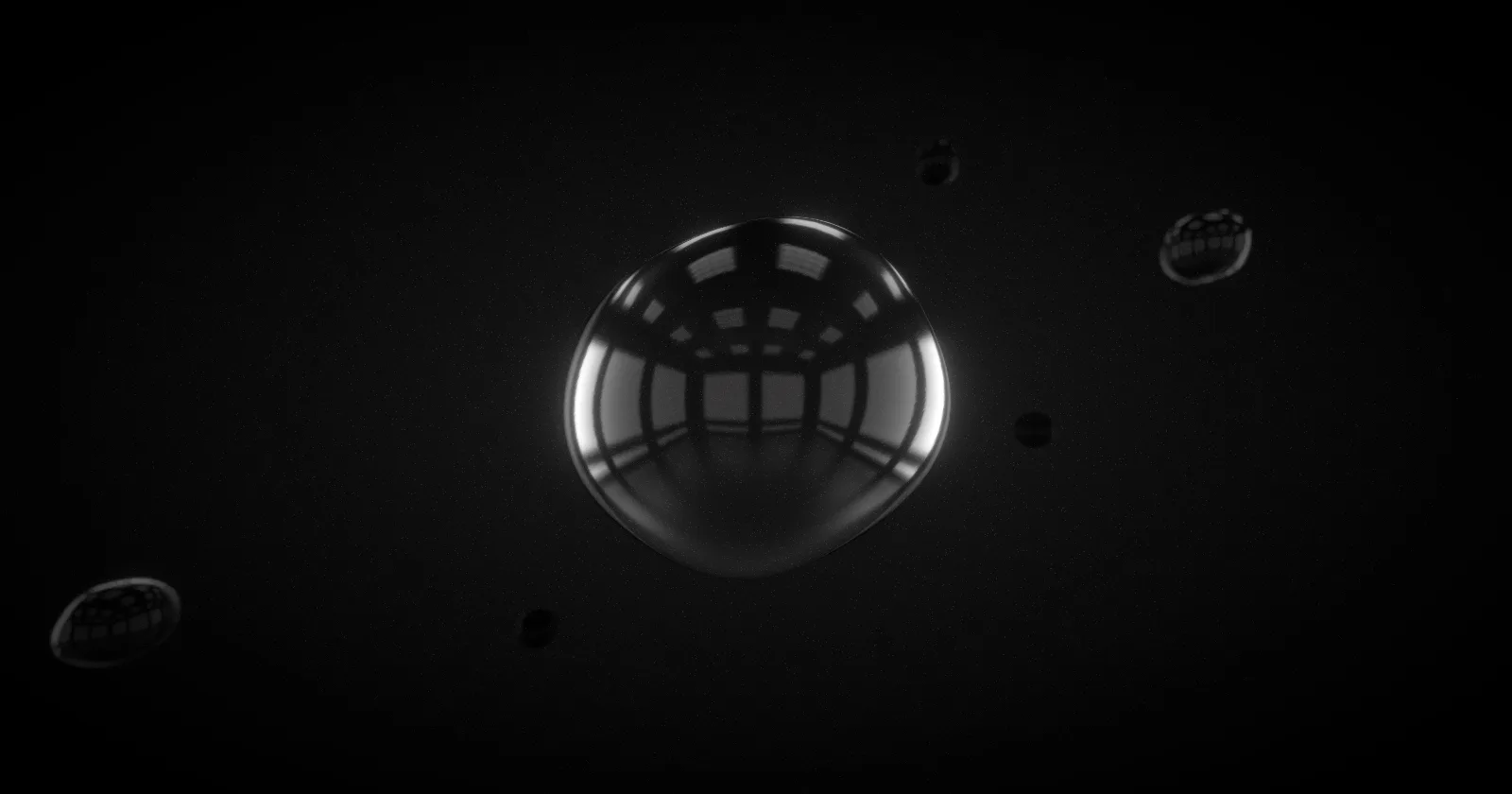
@react-three/postprocessing. Credit: Poimandres (pmndrs), MIT. A sibling example, Take Control, uses the same package.Install and starter code
npm install @react-three/postprocessing

import { Bloom, DepthOfField, EffectComposer, Noise, Vignette } from "@react-three/postprocessing";

<EffectComposer>
    <DepthOfField focusDistance={0} focalLength={0.02} bokehScale={2} height={480} />
    <Bloom luminanceThreshold={0} luminanceSmoothing={0.9} height={300} />
    <Noise opacity={0.02} />
    <Vignette eskil={false} offset={0.1} darkness={1.1} />
</EffectComposer>
Ask Claude to wrap the finished scene in an EffectComposer with exactly the effects you name, and to leave the rest off. A subtle vignette and bloom do more for a “filmed” feel than a stack of every effect.
Caveats
It only works inside a React Three Fiber scene, so it pairs with three.js work rather than 2D Canvas or p5.js films. Effects cost GPU time; a headless renderer without a GPU will be slow.
Best for: glow, focus pulls and grain on a 3D scene. Not for: flat 2D animation, or as a fix for a poorly composed scene.
9. librosa: cut the animation to the beat
| Repo | librosa/librosa (the librosa team) |
| Stars | 8,903 (Nov 12, 2026) |
| Version | 1.0.0 (release Aug 11, 2026) |
| License | ISC |
| Plugs in as | Python package: pip install librosa |
librosa is a Python library for audio and music analysis, and the beat tracker is the piece that matters for motion graphics. The video plays a music bed, shows the detected beats, and has every on-screen change land on a beat, the habit of software product launch videos. The creator says he had not thought about it until he saw it, and that moving in time with the music is one thing that makes a video feel more premium.
A beat-timestamp export you can hand to Claude
This short script loads a track, runs librosa.beat.beat_track, converts beat frames to seconds and writes a JSON file the animation timeline can read. We ran it against librosa’s bundled “Choice” example track with librosa 1.0.0: it reported a tempo of about 136 BPM and 57 beats, the first at 0.07 s.
import json
import librosa
import numpy as np

y, sr = librosa.load(librosa.ex("choice"))          # or your own track
tempo, beat_frames = librosa.beat.beat_track(y=y, sr=sr)
beat_times = librosa.frames_to_time(beat_frames, sr=sr)

with open("beats.json", "w") as f:
    json.dump({"tempo": float(np.squeeze(tempo)),
               "beats": [round(float(t), 3) for t in beat_times]}, f)
Read beats.json. Cut every scene change, text reveal and camera push to the nearest beat time, and put the strongest visual change on beat 1 of each bar.Caveats
In librosa 1.0 beat_track returns the tempo as an array, which is why the script squeezes it before converting to a float. Automatic beat tracking can drift or lock to half or double time. Video ShotCraft’s own beat-sync notes, written in Chinese, warn that the tempo scalar can be off by more than 2% and that beat and onset detection can drift, and they suggest a tighter tightness value plus checking against the real grid. Always listen to the cut before you render the whole film. The bundled “Choice” track is by Admiral Bob (admiralbob77) and is part of librosa’s example data; we did not check its terms for reuse, so use your own licensed music for real projects.
Best for: product launches and any film cut to music. Not for: free-tempo or speech-only pieces, where there is no beat to find.
10. Video ShotCraft: a promo-video playbook
| Repo | Vincentwei1021/video-shotcraft by Vincent Wei |
| Stars | 18,910 (Nov 12, 2026) |
| License | Apache-2.0 for code and docs; Freesound audio keeps its own licenses; Remotion has its own license |
| Plugs in as | Skill for Claude Code and Codex, via the skills CLI, a hand-off prompt, or git clone |
Video ShotCraft turns Claude Code or Codex into a product-promo maker. The README’s description: tell the agent to make a promo for your product, and it captures your real pages, picks shots from a library of tuned motion recipes, storyboards the film, animates it with Remotion, cuts it to the beat, adds sound design, checks every frame and hands you a finished MP4 you can keep editing. As of the README, the library holds 124 recipe cards in 10 categories (opening and brand, camera, transitions, typography, UI entrance, interaction, data, light and emphasis, rhythm, outro), 150 shots in total, with 150 motion previews in the gallery.
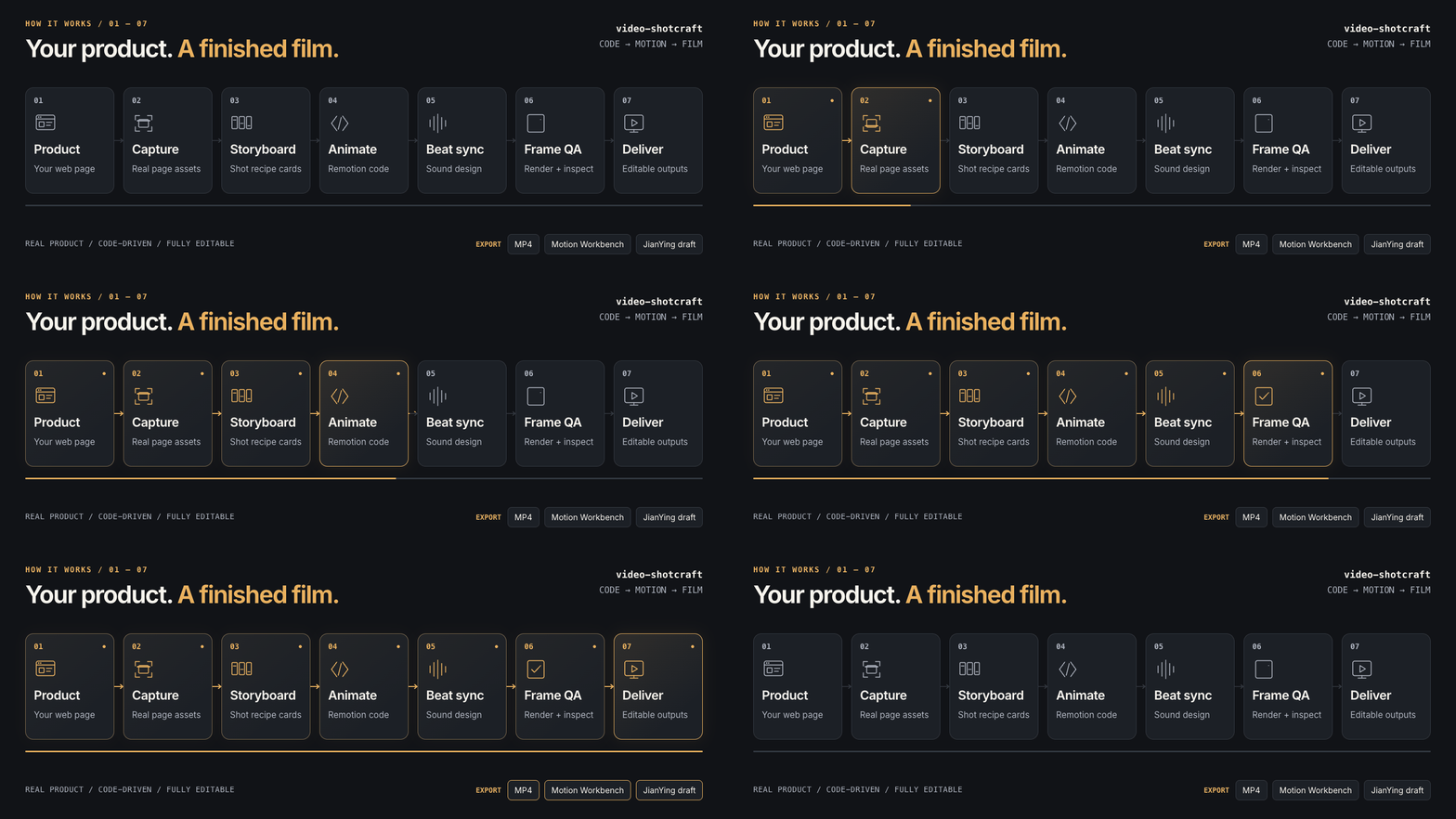
What it adds
As the video describes it, the human has already done the creative work: Claude looks through the recipe cards, chooses which suit your product and adapts them. Each card lives in references/shots/<category>/<card>.md with a Remotion implementation under demos/. You can also steer a single shot by name, for example by asking for a product close-up inspired by spotlight-hero-card. After delivery, the Motion Workbench opens a CapCut-style browser editor with shot, transition, caption and SFX tracks, and an optional export produces an editable JianYing (CapCut CN) draft.
Install and first prompt
Install this skill for me: https://github.com/Vincentwei1021/video-shotcraft

# or with the skills CLI
npx skills add Vincentwei1021/video-shotcraft

# or by hand
git clone https://github.com/Vincentwei1021/video-shotcraft.git
Then:
Make a promo for my product.Caveats
You need Node.js and npm, ffmpeg and ffprobe, and uv for beat analysis; puppeteer is installed on demand for page capture, and Remotion downloads its own headless Chrome on the first render. It is tested on macOS, and Linux works with the README’s notes. Remotion’s license is free for individuals and companies of up to three people, and larger companies need a paid Company License (remotion.pro, fetched Nov 12, 2026). Freesound clips used in sound design keep their own licenses, and CC BY files need credit. The workbench guide is written in Chinese.
Best for: SaaS and app launch videos, with real captured UI. Not for: narrative or artistic films, where a recipe library gets in the way.
Combining the Repos
The repos are modular, so the strongest results come from stacking two or three. These three pipelines follow from what each README says each tool does. We did not run them end to end for this article, so treat the order of steps as a starting plan to adapt.
Pipeline A: a styled explainer
Lemo Opuscar + three.js + React Postprocessing + librosa. Pick a style from the gallery that matches the subject (an isometric or line-diagram style for a technical topic). Let Claude build the film with the Lemo Opuscar skill; where a scene needs real depth, ask it to build that scene with three.js, wrap it in an EffectComposer with bloom and a light vignette, and drive the cuts from a beats.json exported by librosa. Check the license of each demo asset you copy from.
Pipeline B: a product promo
Video ShotCraft + librosa. ShotCraft already captures your real pages, selects shot recipes and does beat sync. Use librosa yourself to confirm the beat grid it produced (the repo’s own notes say beat tracking can drift), then adjust the cut points in the Motion Workbench.
Pipeline C: a 3D product breakdown
MCP for Blender on its own. Ask Claude to build the object, add materials, set a camera and render, then separate the parts for an exploded view, as in the headphones example. Work on a copy of the scene, render a still first, and only then ask for an animation. Pair it with the prompt packs if you want a layout for the surrounding title and captions.
For other video routes see our MoneyPrinterTurbo guide and the Pixelle-Video guide, which automate script-to-video without Claude writing the animation. To get more out of Claude Code itself, see Claude Code best practices and the Karpathy-style Claude Code skills guide.
Safety and Licensing Notes
MCP for Blender runs code on your machine
The README warns in bold that the execute_blender_code tool runs arbitrary Python inside Blender, which “can be powerful but potentially dangerous”, and says to always save your work before using it. Practical steps: keep a versioned copy of the .blend file, work in a scratch scene, review generated code before approving each tool call, and do not run it on a machine that holds credentials you cannot afford to expose. Poly Haven downloads models, textures and HDRIs, and the README says to turn it off in the add-on checkbox if you do not want it. A minimal anonymous usage record (install ID, tool name, success, duration, versions, OS) is collected by default and can be disabled with DISABLE_TELEMETRY=true; the README says prompts, generated code, screenshots and scene data are collected only if you opt in, and that collected data may be used for research and to train AI models.
Licenses are not uniform
- Lemo Opuscar: code MIT, docs CC BY-NC 4.0 with a permission to make your own films, demo films CC BY 4.0 except six narration tracks. GitHub shows NOASSERTION.
- joeseesun/opus-video-prompts and JohnHeibel/PDoomVideo: no license file found. Ask before reusing text, code or audio.
- Video ShotCraft: Apache-2.0, but Remotion rendering may require a paid company license, and Freesound audio keeps its own terms.
- Clawd: Anthropic’s character; the Lemo Opuscar README excludes it from its licenses.
- Third-party assets: the three.js “Littlest Tokyo” model is CC Attribution (Glen Fox), and every prompt in the Opus 5.5 collections belongs to its creator.
How to Choose
| If you want to make | Start with | Add |
|---|---|---|
| A narrated explainer in a distinct style | Lemo Opuscar | three.js for depth scenes |
| A 3D data visual or product scene | three.js | React Postprocessing for the finish |
| A physics demonstration | React Three Rapier | React Postprocessing for glow and focus |
| A retro or game-style clip | pixelfx | A prompt from Awesome Opus 5.5 Videos |
| A CGI-style product render | MCP for Blender | Safe working copy and a render of one still first |
| A painted cartoon explainer | Claude Animation Base | librosa if it has music |
| A SaaS launch video | Video ShotCraft | librosa to check the beat grid |
| You do not know what to ask for | Awesome Opus 5.5 Videos | Opus 5.5 Video Prompts for structured templates |
How We Evaluated
No paid placement. There are no affiliate links, no sponsored labels and no repo owner review of this page. The order of the list follows the video that prompted it, not a ranking.
- Facts (stars, licenses, versions, counts, install commands) come from the GitHub API and each repo’s README, fetched on Nov 12, 2026. Where the README and a third-party source disagree, we use the README and say so.
- The video is a secondary source, used for framing and for what its demos show, and always attributed (“in the video”).
- Tested by us: the librosa beat-export script, run with librosa 1.0.0 on its bundled “Choice” example. Nothing else in this article was run by us; we did not render a film with any other repo.
- Not verified: Clawd’s commercial-use status, Lemo Opuscar results on models other than those the README names, and whether the pipelines above run end to end as described.
Clips and Credits
Embeds and images in this article belong to their creators and are shown with attribution.
- Lemo Opuscar demo films and cover image by Lemomo (LemoLab), CC BY 4.0: github.com/lemomo-ai/lemo-opuscar
- three.js examples webgl_animation_keyframes (model “Littlest Tokyo” by Glen Fox, CC Attribution) and css3d_periodictable
- pixelfx README animations and live gallery by Patch (MIT)
- Blender MCP demos by Siddharth Ahuja (@sidahuj)
- Launch film by Deedy (@deedydas); a motion-design prompt by zheke (@zheke)
- Painted explainer by AI Finance Labs (@aifinancelabs), attributed to Claude Animation Base by the article brief, not by the post; not investment advice
- Claude Animation Base emotions sheet and the “I’m Upping My P(doom)” loops by John Heibel: Claude Animation Base, PDoomVideo
- React Three Rapier demos “Attractors” and “Joints” (react-three-rapier.pmnd.rs); pmndrs examples Take Control and Bubbles (Poimandres)
- librosa beat tracking on “Choice” by Admiral Bob (admiralbob77), from librosa’s example data
- NeoBox promo by Haris Amin, made with Video ShotCraft; ShotCraft workflow animation by Vincent Wei: showcase
- Prompt collections: Awesome Opus 5.5 Videos (mosaic image hosted by Skillry) and Opus 5.5 Video Prompts
- Video: “10 GitHub Repos to 10x Your AI Motion Graphics” by Matt Penny, Applied AI: YouTube
FAQ
Do I need all ten repos?
No. They solve different problems and most films need two or three. A tech explainer might pair Lemo Opuscar with three.js; a product promo might use Video ShotCraft plus librosa. The combination section below lists three working pipelines.
Can I just paste a repo URL into Claude and ask it to use the repo?
The creator of the video this article follows says you can, and for prompt collections that is often enough. For skills and plugins (Lemo Opuscar, pixelfx, Video ShotCraft) our recommendation is to install them the way each README describes, because Claude Code then loads the skill files itself. For libraries (three.js, React Three Rapier, React Postprocessing, librosa) the package still has to be installed in the project.
Is Lemo Opuscar free for commercial work?
Per its README as of Nov 12, 2026: films you make with the library are yours, commercial films included. The code is MIT. The style prompts and guides are CC BY-NC 4.0, with an added permission to use them to make your own films, including client films. Selling or repackaging the library itself needs a commercial licence. The demo films are CC BY 4.0, except six narration tracks that are excluded. GitHub's license box shows NOASSERTION because the repo mixes licenses, so read the LICENSE file.
Is Lemo Opuscar 66 styles or 99?
Both numbers appear in sources. The video this article follows, published before Nov 12, says 66. The README dated 2026-11-12 says 33 new styles were added, for 99 in 15 categories, and the repo description also says 99. We use 99, as of Nov 12, 2026.
Is it safe to connect Claude to Blender?
With care. The MCP for Blender README warns that the execute_blender_code tool runs arbitrary Python inside Blender and says to always save your work first. Work on a copy of the .blend file, review code before approving it, turn off the Poly Haven checkbox if you do not want downloads, and note that the project collects a minimal anonymous usage record by default unless you set DISABLE_TELEMETRY=true.
Does Claude actually output a video file?
Not directly. In these workflows Claude writes code that draws every frame (HTML, Canvas, p5.js, three.js, Remotion). A headless browser or renderer captures the frames and FFmpeg or Remotion assembles an MP4. Claude Animation Base ships render.mjs for this, and Video ShotCraft renders with Remotion.
Which Claude model should I use?
Lemo Opuscar says Claude Fable, Opus and Sonnet all work with effort set to high, and warns that other models may not reproduce its styles. The two prompt packs and Claude Animation Base were built around Opus 5.5. The rendering libraries (three.js, Rapier, Postprocessing, librosa) do not depend on a model.
Does Video ShotCraft cost anything?
The repo is Apache-2.0. It renders with Remotion, whose license is free for individuals and for companies of up to three people; larger companies need a Company License, per remotion.pro on Nov 12, 2026. Audio from Freesound keeps its own license, and CC BY files need credit.
Can I reuse the Clawd character from Claude Animation Base?
The repo code and assets are MIT, but the Lemo Opuscar README states that Clawd is Anthropic's character and is not covered by its own licenses. We did not find an Anthropic usage policy for the mascot, so treat commercial use of Clawd as unconfirmed and check with Anthropic.
Where should a beginner start?
If you want a finished, good-looking film with the least setup, install Lemo Opuscar and name a style. If you make product promos, install Video ShotCraft. If you want to learn how the pieces fit, start with Claude Animation Base, which includes a runnable 11-second demo and a short rulebook.
Sources
All fetched on Nov 12, 2026 unless the label gives a different date.
- YouTube: 10 GitHub Repos to 10x Your AI Motion Graphics (Matt Penny | Applied AI)
- GitHub: lemomo-ai/lemo-opuscar
- Lemo Opuscar style gallery
- GitHub: mrdoob/three.js
- three.js example: webgl_animation_keyframes
- three.js example: css3d_periodictable
- GitHub: patch-gg/pixelfx
- pixelfx live gallery
- GitHub: ahujasid/mcp-for-blender
- MCP for Blender site
- GitHub: yihui-dev/awesome-opus5-5-videos
- Skillry: Opus 5.5 videos with live remakes
- GitHub: joeseesun/opus-video-prompts
- GitHub: JohnHeibel/ClaudeAnimationBase
- GitHub: JohnHeibel/PDoomVideo
- GitHub: pmndrs/react-three-rapier
- React Three Rapier demos
- pmndrs examples gallery
- GitHub: pmndrs/react-postprocessing
- React Postprocessing docs
- GitHub: librosa/librosa
- librosa documentation
- GitHub: Vincentwei1021/video-shotcraft
- Video ShotCraft showcase
- Remotion Company Licensing
- Claude Code: MCP server setup (Anthropic docs)
- X: @sidahuj, Blender MCP launch demo (Mar 11, 2025)
- X: @sidahuj, Blender MCP Poly Haven update (Mar 17, 2025)
- X: @deedydas, Opus 5.5 launch film (Sep 23, 2026)
- X: @zheke, Opus 5.5 motion design (Sep 25, 2026)
- X: @aifinancelabs, painted explainer (Oct 7, 2026)