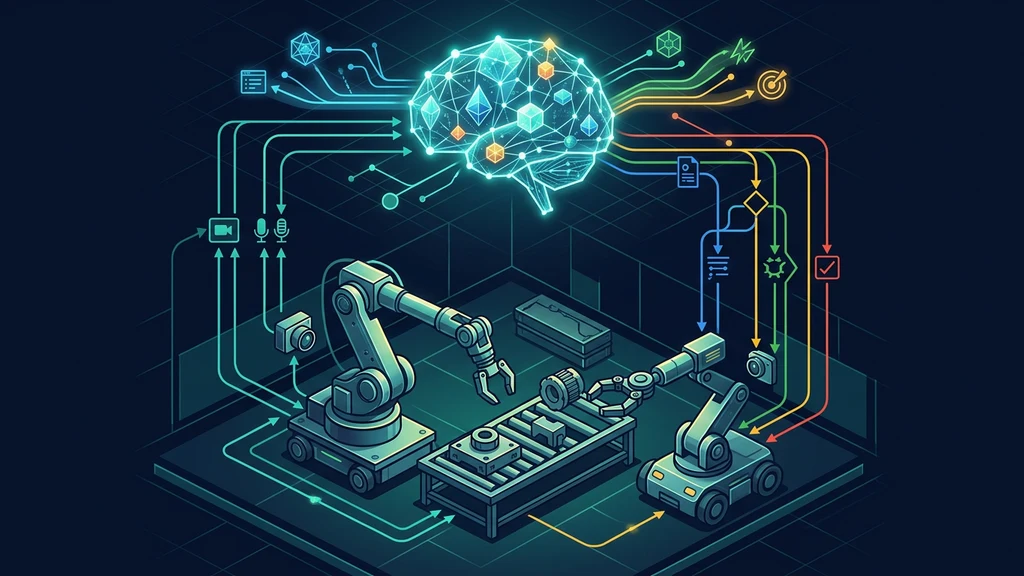
Google launched Gemini Robotics ER 2 on July 30, 2026. The useful developer change is not just better visual reasoning: the official API sample, Live API server, progress checks, and robot adapters now show how to build a high-level control loop without pretending the model is a motion controller.
This guide uses only Google's current model page, launch post, samples, and July 30 sample commits. The benchmark figures are Google-reported and have not been independently reproduced here.
What Google launched
Gemini Robotics ER 2 is available in public preview through Google AI Studio and the Gemini API. Google lists Gemini Enterprise Agent Platform separately as a private preview. The current model overview accepts text, image, video, and audio input; it produces text and supports search, function calling, code execution, structured output, and URL context. Its Live API support is explicitly text out only.
That last detail changes the integration plan. A microphone can feed the session, but ER 2 does not provide spoken output through this preview. If a robot must talk, place text-to-speech after the model and keep it independent from the command channel.
The official repository added two relevant artifacts on launch day:
- the ER 2 notebook update, covering spatial reasoning, tool orchestration, moment finding, and progress classification;
- the Live API examples merge, with an agent server and Spot and Tinybot integrations.
For the underlying general model behavior, the Gemini 3.6 Flash developer guide is a useful companion. ER 2 adds a robotics-specific reasoning and orchestration layer; it does not erase the need for ordinary API error handling, tool validation, and observability.
Draw the system and hardware boundaries first
The safest mental model is a hierarchy:
| Layer | Responsibility | What ER 2 should receive |
|---|---|---|
| ER 2 orchestrator | Interpret multimodal context, plan steps, select tools, assess progress | Sanitized observations and narrow tool schemas |
| Application control plane | Authenticate, authorize, rate-limit, log, validate, and sequence calls | Proposed tool calls and text decisions |
| Robot API or VLA | Convert a bounded goal into robot-specific movement | A validated target, pose, waypoint, or named action |
| Hardware controller | Servo timing, joint limits, collision avoidance, emergency stop | Deterministic commands from supported SDKs |
| Human operator | Approve hazardous or ambiguous operations | State, evidence, proposed action, abort controls |
Google describes ER 2 as a “high-level brain” that hands motor execution to a lower-level vision-language-action model. The samples reinforce that separation: the agent server dispatches tools to embodiment adapters, while Spot and Tinybot expose their own REST or SDK controls.
Do not expose a generic shell, unrestricted HTTP client, or raw joint-control endpoint as a model tool. Prefer verbs such as navigate_to_named_waypoint, detect_object, pick_if_clear, and stop. Each tool should enforce its own input range, lease, timeout, workspace, and safety preconditions.
Run the official API sample first
The July 30 notebook clearly identifies the preview model and uses the google-genai interactions API. This is the smallest official smoke test:
from google import genai

client = genai.Client(api_key=GEMINI_API_KEY)
MODEL_ID = "gemini-robotics-er-2-preview"

response = client.interactions.create(
    model=MODEL_ID,
    input="Hello Physical World?",
)
print(response.output_text)
Install the notebook's documented minimum SDK:
python -m pip install -U "google-genai>=2.9.0" pydantic
Use that call only to verify credentials, model access, and response parsing. It does not connect a robot. The notebook's image examples use structured response schemas, but copying one generic request shape into every robotics task would be a mistake. Define a narrow schema for the observation or decision you need, then validate every returned field before it reaches a tool.
For launch-critical automation, pin the SDK and record the resolved version. Public-preview model names, schemas, limits, and behavior can change.
Build the Live API architecture as a control loop
The official live-api sample separates the system into an agent server, an embodiment, and robot-specific services:
| Component | Official sample role | Production concern |
|---|---|---|
| Agent server | FastAPI and WebSocket bridge to Gemini Live API | Session auth, reconnect policy, bounded queues |
| Observation pipeline | Video, audio, and text queues | Frame freshness, timestamps, dropped-input metrics |
| Tool dispatcher | Maps model calls to embodiment methods | Schema validation, allowlists, idempotency |
| Embodiment adapter | Spot, Tinybot, or human control surface | Capability discovery and safe failure |
| Robot service | Navigation, manipulation, leases, camera feeds | Vendor SDK rules and physical interlocks |
| Peer-agent map | Named agent endpoints | Identity, delegation depth, cyclic-call prevention |
The sample registers gemini-robotics-er-2-streaming-preview for Live API sessions. It serializes stream writes, sends JPEG video frames as real-time input, and supports text or audio response modality at the generic server level. For ER 2, select TEXT because the model page limits this preview to text output.
Start by running the sample's own agent tests and server without a robot:
cd live-api/agent
UV_CACHE_DIR=.uv-cache uv sync --default-index https://pypi.org/simple
UV_CACHE_DIR=.uv-cache uv run --default-index https://pypi.org/simple \
  python -m unittest discover -p "*_test.py"
Then launch with an explicit model and no hardware endpoint. Add the robot URL only after a mock implementation has passed authorization and failure tests:
UV_CACHE_DIR=.uv-cache uv run --default-index https://pypi.org/simple \
  python server.py \
  --model gemini-robotics-er-2-streaming-preview \
  --no-tts \
  --port 8000
The sample README documents Python 3.10 or newer and uv. Treat its web UI and HTTP docs as local development surfaces, not internet-facing production endpoints.
Make progress tracking part of control
Open-loop orchestration issues a command and assumes it worked. A physical system needs a repeated observe-decide-act-verify cycle:
- Capture a fresh, timestamped camera observation.
- Ask whether the current step is idle, progressing, blocked, complete, or unsafe.
- Validate that result against deterministic telemetry where available.
- Continue, retry, re-plan, stop, or escalate.
- Record the evidence and state transition.
Google's sample uses a proactive heartbeat. Its default heartbeat asks the model to acknowledge normal progress, run the next instruction when a step completes, or reset when the goal is achieved. That is a useful orchestration pattern, not a safety guarantee.
Use a state machine outside the model:
| Model assessment | Deterministic corroboration | Action |
|---|---|---|
| Progressing | Fresh frames; motion within expected envelope | Continue until time budget |
| Step complete | Target sensor or robot state agrees | Advance one step |
| Blocked | No progress across several observations | Stop, inspect, then re-plan |
| Goal complete | All required postconditions pass | End task and release resources |
| Unsafe or uncertain | Any safety signal or stale observation | Stop and require human review |
Never let one visual classification be the only completion signal for a consequential action. A gripper sensor, joint state, force threshold, waypoint result, or human acknowledgement is stronger evidence when available.
Coordinate multiple robots through capabilities
Google says ER 2 can reason about different robots' strengths and delegate parts of a shared mission. Implement that claim as a capability registry rather than a free-form chat among robots.
{
  "robots": {
    "spot-1": {
      "capabilities": ["navigate", "inspect", "carry"],
      "location": "loading-bay",
      "status": "idle"
    },
    "arm-2": {
      "capabilities": ["pick", "place"],
      "workspace": "packing-cell",
      "status": "idle"
    }
  }
}
The orchestrator can propose spot-1 carrying an item to the packing cell and arm-2 placing it. The control plane should reject assignments outside a robot's declared capability or workspace.
Run independent execution tasks concurrently only after dependencies are explicit. ER 2 can reason about the next step while a robot acts, but the application must prevent stale plans from firing after the world changes. Attach a plan version and observation timestamp to every proposed command; invalidate queued commands when a safety event, human intervention, or unexpected state change occurs.
AgentPedia's Fugu orchestration guide covers a similar trust boundary in software: a planner may coordinate specialists, but permissions and acceptance gates belong outside the planner. The physical consequences make that separation stricter here.
Read the vendor benchmarks narrowly
Google reports the following launch evaluations:
| Capability | ER 2 result | What the metric says | Caveat |
|---|---|---|---|
| Progress classification | 57.4% accuracy | Classifies video frames into five progress bands | Vendor-reported; task and camera distribution may differ |
| Moment finding | 91.3% accuracy | Identifies the critical event frame | Vendor-reported; accuracy definition is not a universal safety threshold |
| Moment-finding distance | 0.96 seconds mean absolute distance | Average timestamp error from the labeled moment | Vendor-reported mean can hide tail latency |
| Execution speed | 4× | Google says ER 2 runs four times faster in the cited comparison | Vendor-reported; comparison configuration and workload matter |
These numbers support testing ER 2 for progress-aware orchestration. They do not prove that a 0.96-second average is safe for your moving platform, nor that 57.4% classification accuracy is sufficient to autonomously advance a hazardous process. Measure false completion, late stop, stale-frame, and worst-case response latency on your own tasks.
The validation discipline in AgentPedia's scientific software guide applies directly: define the acceptance target before tuning, preserve held-out scenarios, and inspect downstream consequences rather than one aggregate score.
Design for predictable failure
| Failure | Detection | Safe response |
|---|---|---|
| Stale or frozen camera | Frame timestamp and hash do not advance | Stop motion; reinitialize sensor |
| Hallucinated tool or argument | Tool name/schema allowlist fails | Reject without side effects |
| Duplicate tool call | Idempotency key already completed | Return prior result |
| Lost Live API session | WebSocket closes or heartbeat expires | Stop or enter hardware-safe hold |
| Progress oscillation | State flips repeatedly across bands | Increase evidence window; escalate |
| Concurrent plan drift | Command plan version is obsolete | Cancel queued command |
| Robot API timeout | No acknowledgement before deadline | Issue supported stop; alert operator |
| Unsafe proximity | Independent safety sensor trips | Emergency stop outside model path |
Keep safety classifiers, workspace limits, speed caps, and human-presence rules active even if the model reports success. The sample repository contains internal-looking model entries marked without safety classifiers; do not select undocumented identifiers. Use only the public preview identifiers documented by the official notebook and public Live sample.
Verify the integration in layers
- API smoke test: confirm the preview model returns text for a harmless request.
- Recorded media: evaluate progress and moment finding on labeled videos with no robot attached.
- Mock tools: record every proposed call and inject timeouts, malformed results, and duplicate responses.
- Simulation: connect the orchestrator to a simulator or software VLA with hard workspace limits.
- Powered hardware, no payload: use reduced speed, a clear enclosure, and a human emergency stop.
- Representative tasks: include occlusion, dropped objects, changed lighting, human interruption, and peer failure.
- Held-out acceptance: measure completion precision, unsafe-advance rate, p95/p99 decision latency, and recovery success.
Log the input timestamp, model identifier, plan version, tool request, validation result, hardware acknowledgement, and final state. Without that chain, a successful demo cannot explain a later failure.
Adoption checklist
- Public-preview change risk is acceptable and the model identifier is pinned in configuration.
- Text-only Live API output fits the interaction design, or TTS is isolated downstream.
- Robot tools are narrow, authenticated, allowlisted, and idempotent.
- Lower-level controllers enforce limits independently of ER 2.
- Heartbeats can never bypass safety or completion gates.
- Every command is tied to fresh observations and a current plan version.
- Multi-robot delegation uses capability and workspace constraints.
- A lost session leads to a defined hardware-safe state.
- Benchmarks have been repeated on representative and held-out tasks.
- Operators can stop, inspect, and recover without model cooperation.
Practical verdict
ER 2 is worth evaluating when a project already has reliable robot APIs or a lower-level VLA and needs a multimodal planner above them. The Live API and progress features address real orchestration problems: reasoning while execution continues, deciding when a step is done, and delegating work across embodiments.
Skip autonomous physical deployment if the only control interface is an unrestricted model tool, completion depends on visual judgment alone, or the platform lacks an independent stop path. ER 2 can improve the high-level loop; it cannot supply the missing hardware contract.
FAQ
Is Gemini Robotics ER 2 publicly available?
Yes, as a public preview through Google AI Studio and the Gemini API as of July 30, 2026. Gemini Enterprise Agent Platform access is listed separately as private preview.
What model identifier does the official ER 2 notebook use?
The July 30 official notebook uses gemini-robotics-er-2-preview with the google-genai interactions API. The Live API sample also lists gemini-robotics-er-2-streaming-preview for streaming sessions.
Does the Gemini Robotics ER 2 API control robot motors directly?
No. ER 2 is the high-level reasoning and orchestration layer. Your integration must expose robot or tool APIs and delegate motor execution to a lower-level VLA, controller, SDK, or human operator.
Does ER 2 Live API return audio?
Google's current model page says ER 2 supports the Live API with text output only. Audio can be an input stream, but an application that needs speech output must add its own text-to-speech layer.
Are the published ER 2 benchmark numbers independently verified?
No. The progress, moment-finding, latency, and execution-speed figures in this guide are vendor-reported Google evaluations and should be reproduced on your cameras, tasks, robots, and safety constraints.
Official sources
- Google launch: Gemini Robotics ER 2
- Google DeepMind model overview and availability
- Official Gemini Robotics samples repository
- ER 2 notebook update, July 30, 2026
- Live API examples merge, July 30, 2026
Get the latest on AI, LLMs & developer tools
New MCP servers, model updates, and guides like this one — delivered weekly.
Related Guides
How to Change Antigravity Themes
Customize themes, dark mode, icons, and color schemes.
Rules & ConfigurationAntigravity Rules Guide
How to build custom rules with AGENTS.md and GEMINI.md.
MCP & IntegrationMCP Servers Setup Guide
Step-by-step guide to connecting MCP servers in Antigravity.
ComparisonBest Antigravity Alternatives 2026
Claude Code, Cursor, Windsurf, Codex, and Kiro compared.
Pricing & QuotaAntigravity Cockpit Guide
Monitor AI quota, track rate limits, and manage credits.
MCP & IntegrationGoogle Stitch + Antigravity Guide
The complete design-to-code workflow with DESIGN.md and Vibe Design.