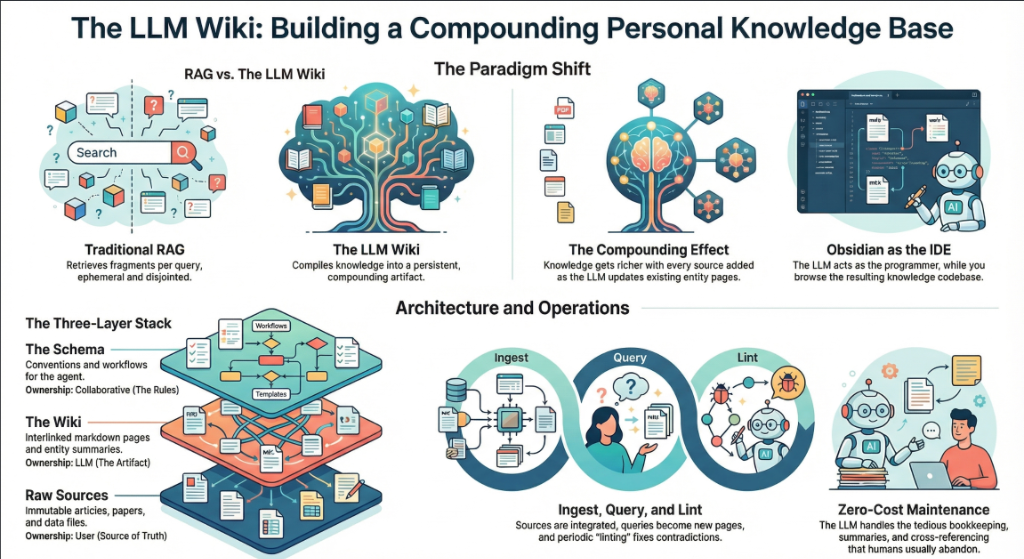
On April 3, 2026, Andrej Karpathy — co-founder of OpenAI, former AI lead at Tesla, and the person who coined “vibe coding” — posted a tweet titled “LLM Knowledge Bases” describing how he now uses LLMs to build personal knowledge wikis instead of just generating code. That tweet went massively viral. The next day, he followed up with something new: an “idea file” — a GitHub gist that lays out the complete architecture, philosophy, and tooling behind the concept. We covered the original tweet in our first article. This is the deep dive into the follow-up — every word, every tool, every implementation detail.
Get the latest on AI, LLMs & developer tools
New MCP servers, model updates, and guides like this one — delivered weekly.
🎬 Watch the Video Breakdown
Prefer reading? Keep scrolling for the full written guide with code examples.
1. The Viral Moment
The original tweet described Karpathy's shift from spending tokens on code to spending tokens on knowledge. He outlined a system where raw source documents (articles, papers, repos, datasets, images) get dropped into a raw/ directory, and an LLM incrementally “compiles” them into a structured wiki — a collection of interlinked .md files with summaries, backlinks, and concept articles.
LLM Knowledge Bases
— Andrej Karpathy (@karpathy) April 2, 2026
Something I'm finding very useful recently: using LLMs to build personal knowledge bases for various topics of research interest. In this way, a large fraction of my recent token throughput is going less into manipulating code, and more into manipulating…
The tweet exploded. Karpathy himself acknowledged it: “Wow, this tweet went very viral!” So he did something interesting — instead of just sharing the code or the app, he shared an idea file.
わあ、このツイートはものすごく拡散されていますね!
— Andrej Karpathy (@karpathy) 2026年4月4日
このツイートを少し改良したバージョンを「“idea file”」として共有したいと思いました。idea fileの考え方は、LLMエージェントの時代においては、特定のコードやアプリを共有する意味や必要性が薄れ、アイデアだけを共有すれば、あとは…
追記のツイートでは、以下のタイトルのGitHub gistにリンクしています。 “LLM Wiki” — パターン、アーキテク
Read the Full Gist
Karpathy's complete idea file is available here: gist.github.com/karpathy/442a6bf555914893e9891c11519de94f. You can copy it directly and paste it to your LLM agent to get started.
2. Idea Files: A New Format for the Agent Era
Karpathy introduces a concept he calls an “idea file”. His exact words:
Karpathy's Definition
“The idea of the idea file is that in this era of LLM agents, there is less of a point/need of sharing the specific code/app, you just share the idea, then the other person's agent customizes & builds it for your specific needs.”
This is a subtle but profound shift. Traditionally, when a developer builds something useful, they share the implementation: a GitHub repo, a package on npm, a Docker image. The recipient clones it, configures it, and runs it. But in a world where everyone has access to an LLM agent (Claude Code, OpenAI Codex, OpenCode, Cursor, etc.), sharing the idea can be more useful than sharing the code.
Why? Because the idea is portable. The code is specific. Karpathy uses Obsidian on macOS with Claude Code. You might use VS Code on Linux with OpenAI Codex. A shared GitHub repo would need to be forked, adapted, and debugged. A shared idea file gets copy-pasted to your agent, and your agent builds a version customized to your exact setup.
Karpathy says the gist is “intentionally kept a little bit abstract/vague because there are so many directions to take this in.” That's not a bug — it's the design. The document's last line says it plainly: “The document's only job is to communicate the pattern. Your LLM can figure out the rest.”
He also mentions that the gist has a Discussion tab where people can “adjust the idea or contribute their own,” turning it into a collaborative idea space. This is a new kind of open source — not open code, but open ideas, designed to be interpreted and instantiated by AI agents.
How to Use the Idea File
Karpathy says you can “give this to your agent and it can build you your own LLM wiki and guide you on how to use it.” In practice, that means:
- Copy the gist content (the full
llm-wiki.mdfile) - Paste it into your LLM agent's context (Claude Code, Codex, OpenCode, or any agentic IDE)
- Tell the agent: “Set up an LLM Wiki based on this idea file for [your topic]”
- The agent will create the directory structure, write the schema file, and guide you through first ingestion
# Claude Code、OpenCode、またはその他のエージェント指向 IDE において:
> Karpathyによる、LLM Wikiの構築に関する
> アイデアファイルがあります。[機械学習の研究 /
> 競合分析 / 読書メモ / その他] 用に構築したいと考えています。
>
> [gistの内容をすべて貼り付ける]
>
> ディレクトリ構造をセットアップし、スキーマファイル
> (CLAUDE.md または AGENTS.md)を作成して、
> through ingesting my first source document.
3. The Core Idea: Wiki Beats RAG
The heart of the gist is a comparison between how most people use LLMs with documents today versus what Karpathy proposes. Let's break this down precisely.
The RAG Problem
Karpathy writes: “Most people's experience with LLMs and documents looks like RAG: you upload a collection of files, the LLM retrieves relevant chunks at query time, and generates an answer.”
RAG (Retrieval-Augmented Generation) is the dominant pattern for connecting LLMs to private data. Tools like NotebookLM, ChatGPT file uploads, and most enterprise AI tools work this way. You upload documents. When you ask a question, the system searches for relevant chunks, feeds them to the LLM, and generates an answer.
The problem, as Karpathy identifies it: “The LLM is rediscovering knowledge from scratch on every question. There's no accumulation.”
Ask a question that requires synthesizing five documents, and the RAG system has to find and piece together the relevant fragments every time. Ask the same question tomorrow, and it does the same work again. Nothing is built up. Nothing compounds.
The Wiki Solution
Karpathy's alternative: “Instead of just retrieving from raw documents at query time, the LLM incrementally builds and maintains a persistent wiki — a structured, interlinked collection of markdown files that sits between you and the raw sources.”
When you add a new source, the LLM doesn't just index it for later retrieval. It reads it, extracts key information, and integrates it into the existing wiki — updating entity pages, revising topic summaries, noting where new data contradicts old claims, strengthening or challenging the evolving synthesis.
The key line: “The knowledge is compiled once and then kept current, not re-derived on every query.”
| Dimension | Traditional RAG | LLM Wiki |
|---|---|---|
| When knowledge is processed | At query time (on every question) | At ingest time (once per source) |
| Cross-references | Discovered ad-hoc per query | Pre-built and maintained |
| Contradictions | 気づかれない可能性があります | インジェスチョン(取り込み)時にフラグが立てられます |
| 知識の蓄積 | なし — クエリごとに新しく開始されます | ソースとクエリが増えるたびに蓄積(複利化)されます |
| 出力形式 | チャットの回答(一時的) | 永続的な markdown ファイル(恒久的) |
| 誰がメンテナンスするか | システム(ブラックボックス) | LLM(透明、編集可能) |
| 人間の役割 | アップロードとクエリ | キュレーション、探索、そして問いかけ |
| 例 | NotebookLM、ChatGPT へのアップロード | Karpathy's LLM Wiki パターン |
複利効果
Karpathy 氏はこれを繰り返し強調しています: “Wiki は永続的で、複利的に成長する成果物である。” 相互参照はすでにそこにあり、矛盾にはすでにフラグが立てられています。統合された内容は、あなたが読んだすべてのものをすでに反映しています。ソースを追加し、質問を投げかけるたびに、Wiki はより豊かなものになります。
人間と LLM の分業
Karpathy 氏によるワークフローの説明: “Wiki を自分自身で書くことは(ほとんど)ありません — LLM がそのすべてを書き、メンテナンスします。あなたはソーシング、探索、そして適切な質問をすることに専念します。LLM は、要約、相互参照、ファイリング、記録管理といったすべての単純作業をこなします。”
彼の日常的なセットアップ: “片側に LLM エージェント、もう片側に Obsidian を開いています。LLM は会話に基づいて編集を行い、私はその結果をリアルタイムで閲覧します — リンクを辿り、グラフビューを確認し、更新されたページを読みます。”
そして、システム全体を捉えた比喩がこちらです: “Obsidian は IDE であり、
4. The Three-Layer Architecture
Karpathy defines three distinct layers. Each has a clear owner and a clear purpose.
Layer 1: Raw Sources
Karpathy writes: “Your curated collection of source documents. Articles, papers, images, data files. These are immutable — the LLM reads from them but never modifies them. This is your source of truth.”
The raw/ directory is sacred. The LLM can read anything in it but must never write to it. This is critical because it means you always have the original sources to verify against. If the LLM makes a mistake in the wiki, you can trace back to the raw source and correct it.
raw/
articles/
2026-03-attention-is-all-you-need-revisited.md
2026-04-scaling-laws-update.md
papers/
transformer-architecture-v2.pdf
mixture-of-experts-survey.pdf
repos/
llama-3-readme.md
vllm-architecture-notes.md
data/
benchmark-results.csv
model-comparison.json
images/
transformer-diagram.png
scaling-curves.png
assets/
# クリップした記事からダウンロードされた画像
レイヤー 2: Wiki
Karpathy 氏は次のように述べています: 「LLM によって生成された Markdown ファイルのディレクトリ。要約、
wiki/
index.md # Master catalog of all pages
log.md # Chronological activity record
overview.md # High-level synthesis
concepts/
attention-mechanism.md
mixture-of-experts.md
scaling-laws.md
tokenization.md
entities/
openai.md
anthropic.md
google-deepmind.md
sources/
summary-attention-revisited.md
summary-scaling-update.md
comparisons/
gpt4-vs-claude-vs-gemini.md
rag-vs-finetuning.md
重要な洞察:wikiは 以下の間に位置します あなたと生のソースの間に。質問に答えるために生の論文を読む必要はありません — wikiを読めばいいのです。wikiは事前に要約され、相互参照され、統合されています。それは、リサーチアシスタントがすべてを読み込み、あなたのために整理した成果物のようなものです。
レイヤー 3: スキーマ
Karpathyは次のように書いています: “A document (e.g. CLAUDE.md for Claude Code or AGENTS.md for Codex) that tells the LLM how the wiki is structured, what the conventions are, and what workflows to follow when ingesting sources, answering questions, or maintaining the wiki. This is the key configuration file — it's what makes the LLM a disciplined wiki maintainer rather than a generic chatbot.”
The schema is the most important piece. Without it, the LLM is just a chatbot that happens to have access to files. With it, the LLM becomes a systematic wiki maintainer that follows consistent rules across sessions.
Karpathy adds: “You and the LLM co-evolve this over time as you figure out what works for your domain.” The schema isn't static. You start with something basic and refine it as you learn what page structures, frontmatter fields, and workflows work best.
# LLM Wiki Schema
## Project Structure
- `raw/` — immutable source documents. NEVER modify.
- `wiki/` — LLM-generated wiki. You own this entirely.
- `wiki/index.md` — master catalog. Update on every ingest.
- `wiki/log.md` — append-only activity log.
## Page Conventions
Every wiki page MUST have YAML frontmatter:
```
---
title: Page Title
type: concept | entity | source-summary | comparison
sources: [list of raw/ files referenced]
related: [list of wiki pages linked]
created: YYYY-MM-DD
updated: YYYY-MM-DD
confidence: high | medium | low
---
```
## Ingest Workflow
When I say "ingest [filename]":
1. Read the source file in raw/
2. Discuss key takeaways with me
3. Create/update a summary page in wiki/sources/
4. Update wiki/index.md
5. 関連するすべてのコンセプトおよびエンティティページを更新する
6. wiki/log.md にエントリを追記する
## Query ワークフロー
質問をした際:
1. wiki/index.md を読み、関連するページを探す
2. それらのページを読み込む
3. [[wiki-link]] 形式の引用を含めて回答を合成する
4. 回答に価値がある場合、以下として保存することを提案する
新しい wiki ページ
## Lint ワークフロー
"
1. Check for contradictions between pages
2. Find orphan pages with no inbound links
3. List concepts mentioned but lacking own page
4. Check for stale claims superseded by newer sources
5. Suggest questions to investigate next
If you're using OpenAI Codex, the same schema goes into AGENTS.md instead. If you're using OpenCode, it goes in OPENCODE.md. The content is the same — only the filename changes based on which agent reads it.
Why the Schema Matters
Without a schema, every session with the LLM starts from zero. The LLM doesn't know your conventions, your page formats, or your workflows. You end up re-explaining everything. The schema is persistent memory — it carries knowledge across sessions and ensures consistency. It's what turns a generic LLM into your wiki maintainer.
5. Operations: Ingest, Query, Lint
Karpathy defines three core operations. Each one has a clear trigger, a clear process, and a clear output.
Operation 1: Ingest
Karpathy writes: “You drop a new source into the raw collection and tell the LLM to process it. An example flow: the LLM reads the source, discusses key takeaways with you, writes a summary page in the wiki, updates the index, updates relevant entity and concept pages across the wiki, and appends an entry to the log. A single source might touch 10-15 wiki pages.”
This is the most important operation. A single ingest doesn't just create one new page — it ripples across the entire wiki. If you ingest a paper about a new transformer variant, the LLM might:
- Create a new summary page for the paper
- Update the “Attention Mechanism” concept page with the new variant
- Update the “Scaling Laws” page if the paper contains new benchmarks
- Update the entity page for the paper's authors or their organization
- Update the comparison page if the paper benchmarks against known models
- 新しいコンテンツを参照するようになった既存のページにリンクを追加
- インデックスを新しいページで更新
- アクティビティログに取り込み(ingest)を記録
Karpathyは個人の好みを次のように付け加えています: “私はソースを一つずつ取り込み、プロセスに関与し続けることを好みます。要約を読み、更新内容を確認し、LLMに何を強調すべきかを指示します。しかし、あまり監視せずに多くのソースを一度に一括で取り込むことも可能です。”
# raw/ に新しい記事を投入
> raw/articles/ に新しい記事を追加しました
> 2026-04-mixture-of-experts-efficiency.md
> Please ingest it.
# The LLM reads it, then responds:
Key takeaways from this article:
1. MoE models achieve 4x throughput at same quality
2. Routing efficiency improved 23% over Switch Transformer
3. Contradicts our wiki claim that dense models are
always more efficient below 10B params
I will:
- Create wiki/sources/summary-moe-efficiency-2026.md
- Update wiki/concepts/mixture-of-experts.md
- Update wiki/concepts/scaling-laws.md (new benchmarks)
- Flag contradiction on wiki/concepts/dense-vs-sparse.md
- Update wiki/index.md
- Append to wiki/log.md
Shall I proceed?
Operation 2: Query
Karpathy writes: “You ask questions against the wiki. The LLM searches for relevant pages, reads them, and synthesizes an answer with citations. Answers can take different forms depending on the question — a markdown page, a comparison table, a slide deck (Marp), a chart (matplotlib), a canvas.”
But the most important insight about queries is this: “Good answers can be filed back into the wiki as new pages.” A comparison you asked for, an analysis, a connection you discovered — these are valuable and shouldn't disappear into chat history. “This way your explorations compound in the knowledge base just like ingested sources do.”
This is the compounding loop: sources get ingested into the wiki, queries generate new insights, and the best insights get filed back as wiki pages. The wiki grows not just from external sources, but from your own exploration.
> Compare the routing strategies in MoE models across
> our sources. Which approach has the best efficiency/
> quality tradeoff?
# LLM reads wiki/concepts/mixture-of-experts.md,
# wiki/sources/summary-moe-*.md, produces analysis
[LLM produces a detailed comparison with a table]
> This is great. File it as a wiki page.
# LLMが wiki/comparisons/moe-routing-strategies.md を作成
# index.md を更新し、関連ページからのリンクを追加
オペレーション 3: Lint
Karpathy氏は次のように述べています: “定期的にLLMにWikiのヘルスチェックを依頼してください。ページ間の矛盾、新しいソースによって古くなった主張、インバウンドリンクのない孤立したページ、言及されているが専用ページがない重要な概念、不足している相互参照、ウェブ検索で補完できるデータの欠落などを探させます。”
彼はさらに付け加えています: “LLMは、調査すべき新しい
> Lint the wiki.
Wiki Health Report (2026-04-04):
CONTRADICTIONS (2):
- concepts/dense-vs-sparse.md claims dense > sparse
below 10B, but sources/summary-moe-efficiency.md
shows opposite. Recommend: update with nuance.
- entities/openai.md says GPT-5 is 200B params,
but sources/summary-gpt5-leak.md says 300B.
ORPHAN PAGES (3):
- concepts/tokenization.md (no inbound links)
- sources/summary-old-bert-paper.md (no references)
- comparisons/old-gpu-benchmark.md (outdated)
MISSING PAGES (4):
- "RLHF" mentioned 12 times, no concept page
- "Constitutional AI" mentioned 8 times, no page
- "KV Cache" referenced in 5 sources, no page
- "Speculative Decoding" mentioned 3 times, no page
SUGGESTED INVESTIGATIONS:
- No sources on inference optimization post-2025
- Entity page for Meta AI is thin (only 1 source)
- The "Scaling Laws" page hasn't been updated in 3 weeks
6. Indexing and Logging
Karpathy defines two special files that are critical to how the LLM navigates the wiki. They serve different purposes and both are important.
index.md: The Content Catalog
Karpathy writes: “index.md is content-oriented. It's a catalog of everything in the wiki — each page listed with a link, a one-line summary, and optionally metadata like date or source count. Organized by category (entities, concepts, sources, etc.). The LLM updates it on every ingest.”
The key insight about index.md is how it replaces RAG: “When answering a query, the LLM reads the index first to find relevant pages, then drills into them. This works surprisingly well at moderate scale (~100 sources, ~hundreds of pages) and avoids the need for embedding-based RAG infrastructure.”
This is a practical revelation. Most people assume you need vector databases and embedding pipelines for knowledge retrieval. Karpathy says: at moderate scale, a well-maintained index file is enough. The LLM reads the index (a few thousand tokens), identifies relevant pages, and reads those directly.
# Wiki Index
## Concepts
- [[attention-mechanism]] — セルフアテンション、マルチヘッド
アテンション、およびその変種 (12件のソース)
- [[mixture-of-experts]] — スパースMoEアーキテクチャ、
ルーティング戦略 (8件のソース)
- [[scaling-laws]] — Chinchilla、Kaplanの法則、
計算最適化トレーニング (15件のソース)
- [[tokenization]] — BPE、SentencePiece、tiktoken
(3件のソース)
## エンティティ
- [[openai]] — GPTシリーズ、組織の歴史
(20件のソース)
- [[anthropic]] — Claudeシリーズ、憲法的AI (Constitutional AI)
(14件のソース)
- [[google-deepmind]] — Gemini、PaLM、AlphaFold
(18件のソース)
## ソースの要約
- [[summary-attention-revisited]] — 2026-03-15
- [[summary-moe-efficiency]] — 2026-04-01
- [[summary-scaling-update]] — 2026-04-02
## 比較
- [[moe-routing-strategies]] — 2026-04-04のクエリから登録
- [[rag-vs-finetuning]] — トレードオフとユースケース
log.md: アクティビティ・タイムライン
Karpathy氏は次のように述べています: “log.mdは時系列順です。これは、いつ何が起こったか(ingest、query、lintパスなど)を記録する追記専用のレコードです。”
彼は実用的なヒントも紹介しています: “各エントリが一定のプレフィックス(例: ## [2026-04-02] ingest | 記事タイトル)で始まっていれば、ログはシンプルなunixツールでパース可能になります — grep "^## [" log.md | tail -5 これで直近の5件のエントリを取得できます。”
# アクティビティログ
## [2026-04-04] ingest | MoE効率化に関する記事
ソース: raw/articles/2026-04-mixture-of-experts-efficiency.md
作成されたページ: sources/summary-moe-efficiency.md
更新されたページ: concepts/mixture-of-experts.md,
concepts/scaling-laws.md, concepts/dense-vs-sparse.md
メモ: 10B params未満におけるdense-vs-sparseの主張と矛盾しています。
レビュー対象としてフラグを設定。
## [2026-04-04] query | MoEルーティングの比較
質問: MoEモデルにおけるルーティング戦略の比較
読み込んだページ: concepts/mixture-of-experts.md、3つのソース要約
出力: comparisons/moe-routing-strategies.md として保存
## [2026-04-04] lint | 週次ヘルスチェック
矛盾の検出数: 2
孤立したページ: 3
提案された不足ページ: 4
提案された調査事項: 3
## [2026-04-03] ingest | スケーリング則の更新
ソース: raw/articles/2026-04-scaling-laws-update.md
作成されたページ: sources/summary-scaling-update.md
更新されたページ: concepts/scaling-laws.md、entities/openai.md
このログは、LLMが最近何が行われたかを理解するのにも役立ちます。新しいセッションを開始すると、LLMは直近の数件のログエントリを読み取り、wikiの現在の状態を把握できます。
7. ツールスタック
Karpathyはgistの中でいくつかの具体的なツールに言及しています。ここでは、それぞれのツールの役割と、ワークフローにどのように組み込まれるかを説明します。
qmd: Markdownのためのローカル検索
Karpathyは次のように書いています: “qmd は優れた選択肢です。これは、ハイブリッドBM25/ベクトル検索とLLMによるリランキングを備えた、すべてオンデバイスで動作するMarkdownファイル用のローカル検索エンジンです。CLI(LLMがシェル経由で実行可能)とMCPサーバー(LLMがネイティブツールとして利用可能)の両方を備えています。”
qmd はShopifyのCEOであるTobi Lutkeによって構築されました。これは、Karpathyが説明したユースケース、つまりMarkdownファイルのコレクション全体を検索するためにまさに設計されたものです。以下の3つの検索戦略を組み合わせています:
- BM25全文検索 — キーワードマッチング(高速、正確)
- ベクトル意味論的検索 — 意味ベースのマッチング(関連する概念を見つける)
- LLMリランキング — LLMが結果の関連性をスコアリング(最高品質)
すべては以下を介してローカルで実行されます: node-llama-cpp (GGUFモデルを使用)。クラウドAPI呼び出しは不要で、データがマシンから外部に出ることはありません。
# qmdをグローバルにインストール
npm install -g @tobilu/qmd
# wikiをコレクションとして追加
qmd collection add ./wiki --name my-research
# キーワード検索 (BM25)
qmd search "mixture of experts routing"
# 意味論的検索 (ベクトル)
qmd vsearch "how do sparse models handle efficiency"
# LLMによるリランキングを伴うハイブリッド検索(最高品質)
qmd query "what are the tradeoffs of top-k vs expert-choice routing"
# LLMエージェントへのパイプ処理用のJSON出力
qmd query "scaling laws" --json
# Claude CodeなどのためのMCPサーバーとしてqmdを起動
qmd mcp
Karpathy氏は、小規模な段階では index.md ファイルだけでナビゲーションには十分であると述べています。 wikiが成長し、インデックスで処理しきれなくなるとqmdが — likely once you have hundreds of pages and the index itself is too large to read in one context window.
Obsidian Web Clipper
Karpathy writes: “Obsidian Web Clipper is a browser extension that converts web articles to markdown. Very useful for quickly getting sources into your raw collection.”
The Web Clipper is available for Chrome, Firefox, Safari, Edge, Brave, and Arc. When you clip an article, it:
- Converts the HTML to clean markdown
- Adds YAML frontmatter (author, date, source URL, tags)
- Preserves formatting, code blocks, and images
- Saves directly to your Obsidian vault (your
raw/directory)
It also supports templates — you can define different clipping formats for articles, recipes, academic papers, or any other content type. This makes ingestion consistent and predictable.
Downloading Images Locally
Karpathy gives a specific tip for images: “In Obsidian Settings → Files and links, set ‘Attachment folder path’ to a fixed directory (e.g. raw/assets/). Then in Settings → Hotkeys, search for ‘Download’ to find ‘Download attachments for current file’ and bind it to a hotkey (e.g. Ctrl+Shift+D).”
After clipping an article, you hit the hotkey and all images get downloaded to local disk. Why does this matter? Because it “lets the LLM view and reference images directly instead of relying on URLs that may break.”
He also notes a current limitation: “LLMs can't natively read markdown with inline images in one pass — the workaround is to have the LLM read the text first, then view some or all of the referenced images separately to gain additional context.”
Obsidian's Graph View
Karpathy writes: “Obsidian's graph view is the best way to see the shape of your wiki — what's connected to what, which pages are hubs, which are orphans.”
The graph view renders all your wiki pages as nodes and all [[wiki-links]] エッジとして表示されます。ハブページ(多くの接続を持つコアコンセプトなど)は大きなノードとして表示されます。孤立したページ(リンクがないもの)は独立して表示されます。これにより、知識がどこに密集しており、どこにギャップがあるかを即座に視覚的に把握できます。
Marp: Markdownスライドデッキ
Karpathy氏は次のように述べています: 「MarpはMarkdownベースのスライドデッキ形式です。Obsidianにはそのためのプラグインがあります。wikiのコンテンツから直接プレゼンテーションを生成するのに便利です。」
Marp を使用すると、純粋なMarkdownでプレゼンテーションを作成できます。スライドの区切りには --- (horizontal rules). It supports themes, image syntax, math typesetting, and exports to HTML, PDF, and PowerPoint.
---
marp: true
theme: default
---
# Mixture of Experts: Key Findings
Compiled from 8 sources in the research wiki
---
## Routing Strategies Compared
| Strategy | Throughput | Quality |
|----------|-----------|---------|
| Top-K | 2.1x | Baseline |
| Expert Choice | 3.4x | +2% |
| Hash | 4.0x | -1% |
---
## Key Insight
Expert-choice routing gives the best quality/efficiency
tradeoff for models above 10B parameters.
Source: wiki/comparisons/moe-routing-strategies.md
Dataview: Query Your Frontmatter
Karpathy writes: “Dataview is an Obsidian plugin that runs queries over page frontmatter. If your LLM adds YAML frontmatter to wiki pages (tags, dates, source counts), Dataview can generate dynamic tables and lists.”
Dataview treats your vault as a database. If your wiki pages have frontmatter like type: concept, sources: [file1, file2], confidence: high, then Dataview lets you query it with an SQL-like language:
# List all concept pages with source counts
```dataview
TABLE length(sources) AS "Sources", confidence
FROM "wiki/concepts"
SORT length(sources) DESC
```
# 先週更新されたページを検索
```dataview
LIST
FROM "wiki"
WHERE updated >= date(today) - dur(7 days)
SORT updated DESC
```
# レビューが必要な信頼度の低いページを検索
```dataview
TABLE title, sources
FROM "wiki"
WHERE confidence = "low"
SORT file.name ASC
```
Git: 知識のためのバージョン管理
Karpathy氏は次のように述べています: 「Wikiは単なるMarkdownファイルのGitリポジトリです。バージョン履歴、ブランチ、コラボレーション機能を無料で利用できます。」
これは控えめな表現ですが、非常に強力です。Wiki全体がディレクトリ内のプレーンなMarkdownであるため、以下のことが可能です:
git logWikiが時間の経過とともにどのように進化したかを確認するgit diff各インジェストで何が変更されたかを正確に把握するgit revert不適切なコンパイルをロールバックするgit branch代替の組織構造を検討するgit blame特定の主張がいつ追加されたかを追跡する- プルリクエストを使用したチームコラボレーションにGitHub/GitLabを使用する
| ツール | LLM Wikiにおける役割 | 必須か? |
|---|---|---|
| Obsidian | Wikiを閲覧するためのIDE / ビューア | 推奨(任意のMarkdownビューアが利用可能) |
| Obsidian Web Clipper | インジェスチョン: ウェブ記事を markdown にクリップ | ウェブソースに推奨 |
| qmd | 大規模 wiki 用の検索エンジン | オプション(小規模なら index.md で十分) |
| Marp | 出力: wiki からスライドデッキを生成 | オプション |
| Dataview | ダッシュボード用に frontmatter をクエリ | オプション |
| Git | wiki のバージョン管理 | 推奨 |
| LLM Agent | Wiki メンテナー (Claude Code, Codex など) | Required |
8. Use Cases Karpathy Lists
The gist lists five specific contexts where this pattern applies. Let's look at each one with implementation details.
Personal Knowledge Base
Karpathy writes: “Tracking your own goals, health, psychology, self-improvement — filing journal entries, articles, podcast notes, and building up a structured picture of yourself over time.”
Implementation: Create a personal wiki with sections for goals, health metrics, reading notes, and reflections. Ingest journal entries, articles you read, podcast transcripts. The LLM builds concept pages for recurring themes (“sleep quality,” “exercise routine,” “career goals”) and connects them across time. Ask questions like: “What patterns do I see in my energy levels over the last 3 months?”
Research
Karpathy writes: “Going deep on a topic over weeks or months — reading papers, articles, reports, and incrementally building a comprehensive wiki with an evolving thesis.”
This is Karpathy's primary use case. His research wiki has ~100 articles and ~400,000 words on a single ML research topic. The wiki builds an evolving thesis that gets refined with every new source.
Reading a Book
Karpathy writes: “Filing each chapter as you go, building out pages for characters, themes, plot threads, and how they connect. By the end you have a rich companion wiki.”
He uses a vivid example: “Think of fan wikis like Tolkien Gateway — thousands of interlinked pages covering characters, places, events, languages, built by a community of volunteers over years. You could build something like that personally as you read, with the LLM doing all the cross-referencing and maintenance.”
Imagine reading War and Peace. After each chapter, you ingest your notes. The LLM maintains character pages (tracking their development across chapters), theme pages (connecting recurring ideas), and a timeline page. By the end, you have a personal companion wiki that rivals a literary analysis.
Business / Team
Karpathy writes: “An internal wiki maintained by LLMs, fed by Slack threads, meeting transcripts, project documents, customer calls. Possibly with humans in the loop reviewing updates. The wiki stays current because the LLM does the maintenance that no one on the team wants to do.”
これはエンタープライズ版です。ソースは内部的なもので、Slackのエクスポート、会議の録音(文字起こし済み)、プロジェクトドキュメント、顧客の通話ログ、CRMデータなどが含まれます。Wikiは、意思決定ログ、プロジェクトのタイムライン、顧客のインサイト、チームのナレッジをまとめます。Wikiの一部になる前に、Human-in-the-loopが更新内容をレビューします。
その他すべて
Karpathyは次のように書いています: “競合分析、デューデリジェンス、旅行の計画、講義ノート、趣味の深掘り — 時間をかけて知識を蓄積し、バラバラにするのではなく整理しておきたいあらゆる
The pattern is universal: if you're collecting information from multiple sources over time and want it structured, an LLM Wiki applies. We covered detailed implementations for competitive intelligence, legal compliance, academic literature reviews, and more in our previous article.
9. Step-by-Step Implementation Guide
Here is how to build a working LLM Wiki from scratch, following Karpathy's architecture exactly.
Step 1: Set Up the Directory Structure
mkdir -p my-research/raw/articles
mkdir -p my-research/raw/papers
mkdir -p my-research/raw/repos
mkdir -p my-research/raw/assets
mkdir -p my-research/wiki/concepts
mkdir -p my-research/wiki/entities
mkdir -p my-research/wiki/sources
mkdir -p my-research/wiki/comparisons
touch my-research/wiki/index.md
touch my-research/wiki/log.md
touch my-research/wiki/overview.md
# Initialize git
cd my-research && git init
# Open in Obsidian as a vault
Step 2: Create the Schema File
Create a CLAUDE.md (for Claude Code), AGENTS.md (for Codex), or equivalent schema file at the root of your project. Use the example schema from Section 4 above as a starting point. Customize it for your domain.
Step 3: Configure Obsidian
- Install Obsidian and open
my-research/as a vault - Install Web Clipper browser extension
- Settings → Files and links → Set “Attachment folder path” to
raw/assets - Settings → Hotkeys → Bind “Download attachments for current file” to
Ctrl+Shift+D - Marp Slidesプラグインをインストールする (任意、プレゼンテーション用)
- Dataviewプラグインをインストールする (任意、frontmatterクエリ用)
ステップ 4: 最初のソースを取り込む (Ingest)
- Web Clipperを使ってWeb記事をクリップ → 以下に保存:
raw/articles/ - 実行:
Ctrl+Shift+D画像をローカルにダウンロードする - LLMエージェント(Claude Code、Codex、OpenCodeなど)を開く
- 次のように指示します: “Ingest raw/articles/[
- Review the summary, guide emphasis, approve the wiki updates
- Check the wiki in Obsidian — browse the new pages, check the graph view
- Commit:
git add . && git commit -m “ingest: [article title]”
Step 5: Build Up Over Time
Repeat the ingest process for each new source. After 10-20 sources, start querying the wiki. After 50+, consider adding qmd for search. Run lint checks weekly.
The 10-Source Test
Start with just 10 sources on one topic. Ingest them all. Then ask the wiki a question that requires synthesizing multiple sources. If the structured wiki gives you an insight you wouldn't have gotten by reading the sources individually, the system is working. Scale from there.
Step 6: Evolve the Schema
As you use the wiki, you'll discover what works and what doesn't. Update the schema (CLAUDE.md / AGENTS.md) accordingly. Maybe you need a new page type. Maybe your frontmatter needs more fields. Maybe your ingest workflow should include a step you didn't anticipate. Karpathy says: “You and the LLM co-evolve this over time.”
10. The Memex Connection (1945)
Karpathy closes the gist with a historical connection that puts the whole idea in perspective:
Karpathy's Words
“The idea is related in spirit to Vannevar Bush's Memex (1945) — a personal, curated knowledge store with associative trails between documents. Bush's vision was closer to this than to what the web became: private, actively curated, with the connections between documents as valuable as the documents themselves. The part he couldn't solve was who does the maintenance. The LLM handles that.”
In 1945, Vannevar Bush — an MIT engineer who directed the US Office of Scientific Research and Development — published an article in The Atlantic called “As We May Think”. He described a hypothetical device called the Memex (memory + index): a desk-sized machine where an individual could store all their books, records, and communications on microfilm, search them rapidly, and create associative trails — 個人的な注釈が添えられた、ドキュメントのリンクされたシーケンス。
Bush'sの重要な洞察は、人間の精神は次のように働くということでした。 連想(アソシエーション), not alphabetical order. Hierarchical filing systems (like library catalogs) force you into rigid categories. The Memex would let you create your own paths through knowledge — linking a chemistry paper to an economics report to a historical essay, following your own logic.
彼の有名な言葉: “全く新しい形式の百科事典が登場するだろう。それは、連想の痕跡(アソシエイティブ・トレイル)が網の目のように張り巡らされた状態で提供される。”
Memexは以下に直接的な影響を与えました:
- Douglas Engelbart — 1945年にBushの記事
- Ted Nelson — who coined the term “hypertext” in 1965, directly inspired by the Memex's associative trails
- Tim Berners-Lee — whose World Wide Web (1989) implemented hypertext at global scale
But as Karpathy observes, the web became public and chaotic rather than private and curated. Bush imagined something personal — your knowledge, your connections, your trails. The LLM Wiki is closer to that original vision. It's private, actively curated, and the connections between documents are as valuable as the documents themselves.
The missing piece that Bush couldn't solve in 1945: who does the maintenance? Creating associative trails, updating connections, keeping everything consistent — that's tedious, manual work. Humans abandon knowledge systems because the maintenance burden grows faster than the value. As Karpathy writes: “LLMs don't get bored, don't forget to update a cross-reference, and can touch 15 files in one pass. The wiki stays maintained because the cost of maintenance is near zero.”
11. Community Ideas from the Gist
The GitHub gist has a Discussion tab that Karpathy specifically called out: “People can adjust the idea or contribute their own in the Discussion which is cool.” Here are some notable contributions from the community:
The .brain Folder Pattern
A developer shared a related pattern: a .brain folder at the root of a project containing markdown files (index.md, architecture.md, decisions.md, changelog.md, deployment.md) that acts as persistent memory across AI sessions. The core rule: “Read .brain before making changes. Update .brain after making changes. Never commit it to git.” This is a lighter-weight version of Karpathy's schema — project-specific rather than knowledge-base-specific.
Inter-Agent Communication via Gists
別のコントリビューターは、GitHubのgistを異なるAIエージェント間の通信チャネルとして使用する方法について述べています。開発の途中で、図解(SVG形式)とコンテキストを含むgistをプッシュし、それを異なるAIフロントエンド(ClaudeやGrokなど)の間で受け渡します。これはKarpathyの「idea file」の概念を拡張するもので、gistは単なる人間とエージェント間のコミュニケーション手段にとどまらず、 エージェント間のコミュニケーション手段となります。
Append-and-Review Note
あるコミュニティメンバーは、2025年のKarpathyによる以前のブログ記事「The Append and Review Note」( karpathy.bearblog.dev), feels like it should be part of this pattern. That post described a simpler workflow: an append-only notes file that gets periodically reviewed and reorganized. The LLM Wiki is the evolved version — the LLM does the review and reorganization automatically.
Team Knowledge Sharing
One question from the community: “How can I share the knowledge base with my team? Currently we create a RAG and then an MCP server.” Since the wiki is just a git repo, the natural answer is: push it to a shared repository. Team members can browse it in Obsidian, and the LLM agent can be configured to accept updates from multiple contributors. The schema file defines the rules; Git handles collaboration.
12. What This Means
The “Idea File” as a New Open Source Format
Karpathy may have accidentally created a new format for sharing ideas in the AI era. Instead of sharing code (which is implementation-specific), you share a structured description of the pattern, designed to be interpreted by an LLM agent. The agent adapts it to the user's environment, tools, and preferences. This is open ideas rather than open source.
Why This Pattern Will Spread
Karpathy explains exactly why wikis maintained by LLMs succeed where human-maintained wikis fail: “The tedious part of maintaining a knowledge base is not the reading or the thinking — it's the bookkeeping. Updating cross-references, keeping summaries current, noting when new data contradicts old claims, maintaining consistency across dozens of pages. Humans abandon wikis because the maintenance burden grows faster than the value. LLMs don't get bored, don't forget to update a cross-reference, and can touch 15 files in one pass.”
From Karpathy's Tweet to Your Wiki
The gist ends with a deliberate call to action: “The right way to use this is to share it with your LLM agent and work together to instantiate a version that fits your needs. The document's only job is to communicate the pattern. Your LLM can figure out the rest.”
That's the whole point. Don't overthink the setup. Don't wait for someone to build the perfect tool. Copy the gist, paste it to your agent, and start with one topic and 10 sources. The LLM will figure out the directory structure, the page formats, the frontmatter schema. You provide the sources and the questions. The wiki builds itself.
The Takeaway
Karpathy's gist is not a blueprint — it's a seed. You give it to your LLM agent, and together you grow it into something specific to your domain. The wiki is a persistent, compounding artifact that gets richer with every source and every question. The LLM does all the bookkeeping. You do the thinking.
13. All Resources & Links
Every resource, tool, and reference mentioned in this article and in Karpathy's gist:
Karpathy's Posts
- Original tweet: “LLM Knowledge Bases” (Apr 3, 2026)
- Follow-up tweet: “Idea File” (Apr 4, 2026)
- GitHub Gist: LLM Wiki (the full idea file)
- Karpathy's Blog (bearblog)
Tools Mentioned
- qmd — Local markdown search engine by Tobi Lutke (BM25 + vector + LLM re-ranking)
- Obsidian — Markdown-based knowledge management app
- Obsidian Web Clipper — Browser extension for clipping web articles to markdown
- Marp — Markdownベースのスライド作成フレームワーク(HTML、PDF、PowerPointへのエクスポートに対応)
- Dataview — ページのフロントマターをクエリするためのObsidianプラグイン
- Tolkien Gateway — 網羅的に相互リンクされたWikiの例
コンセプトと歴史
- ヴァネヴァー・ブッシュ著 “As We May Think”(1945年) — Memexについて記述されたThe Atlanticの記事
- Memex (Wikipedia) — ブッシュのコンセプトの歴史と影響
- Google NotebookLM — RAGベースのリサーチツール(Karpathyがその先へと進もうとしているアプローチ)
LLMエージェントプラットフォーム(スキーマファイル用)
- Claude Code — 使用:
CLAUDE.mdプロジェクトの指示用 - OpenAI Codex — 使用:
AGENTS.mdプロジェクトの指示用 - OpenCode — 使用:
OPENCODE.mdプロジェクトの指示用 - Cursor、Windsurfなど — それぞれ独自のスキーマファイルの慣習を持つ
解説内容
- パート1:KarpathyのLLMナレッジベース — ポストコード時代のAIワークフロー — 話題となった元のツイートの解説
- パート2:本記事 — 続報のGistとアイデアファイルの詳細解説
関連ガイド
- パート1:KarpathyのLLMナレッジベース — 元のツイートの徹底解説
- 2026年のバイブコーディング:完全ガイド — KarpathyのAIジャーニーが始まった原点
- AGENTS.md ガイド — AIエージェントのためのツール横断的なスキーマファイル
- エージェントスキルをマスターする — Wikiの自動コンパイルスキルの構築
- 独自のMCP Serverを構築する — MCPを通じてWikiをAIアシスタントに公開
- エージェント・オーケストレーション — 複雑なナレッジワークフローのためのマルチエージェント構成
Stay ahead on AI, LLMs & agent skills
Join 5,000+ developers getting the weekly rundown of agent skills, MCP servers and AI coding releases.