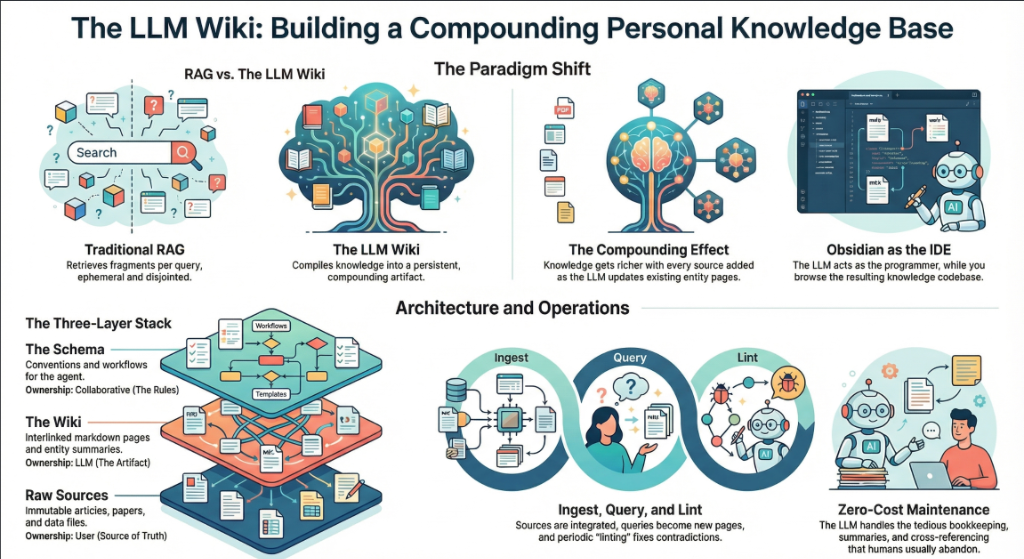
On April 3, 2026, Andrej Karpathy — co-founder of OpenAI, former AI lead at Tesla, and the person who coined “vibe coding” — posted a tweet titled “LLM Knowledge Bases” describing how he now uses LLMs to build personal knowledge wikis instead of just generating code. That tweet went massively viral. The next day, he followed up with something new: an “idea file” — a GitHub gist that lays out the complete architecture, philosophy, and tooling behind the concept. We covered the original tweet in our first article. This is the deep dive into the follow-up — every word, every tool, every implementation detail.
Get the latest on AI, LLMs & developer tools
New MCP servers, model updates, and guides like this one — delivered weekly.
🎬 Watch the Video Breakdown
Prefer reading? Keep scrolling for the full written guide with code examples.
1. The Viral Moment
The original tweet described Karpathy's shift from spending tokens on code to spending tokens on knowledge. He outlined a system where raw source documents (articles, papers, repos, datasets, images) get dropped into a raw/ directory, and an LLM incrementally “compiles” them into a structured wiki — a collection of interlinked .md files with summaries, backlinks, and concept articles.
LLM Knowledge Bases
— Andrej Karpathy (@karpathy) April 2, 2026
Something I'm finding very useful recently: using LLMs to build personal knowledge bases for various topics of research interest. In this way, a large fraction of my recent token throughput is going less into manipulating code, and more into manipulating…
The tweet exploded. Karpathy himself acknowledged it: “Wow, this tweet went very viral!” So he did something interesting — instead of just sharing the code or the app, he shared an idea file.
Uau, este tweet viralizou muito!
— Andrej Karpathy (@karpathy) 4 de abril de 2026
Eu queria compartilhar uma versão possivelmente um pouco melhorada do tweet em um “idea file”. A ideia do idea file é que, nesta era de agentes de LLM, faz menos sentido/há menos necessidade de compartilhar o código/app específico; você apenas compartilha a ideia, então…
O tweet seguinte traz um link para um gist do GitHub intitulado “LLM Wiki” — um documento cuidadosamente escrito que descreve o padrão, a arquitetura, as
Read the Full Gist
Karpathy's complete idea file is available here: gist.github.com/karpathy/442a6bf555914893e9891c11519de94f. You can copy it directly and paste it to your LLM agent to get started.
2. Idea Files: A New Format for the Agent Era
Karpathy introduces a concept he calls an “idea file”. His exact words:
Karpathy's Definition
“The idea of the idea file is that in this era of LLM agents, there is less of a point/need of sharing the specific code/app, you just share the idea, then the other person's agent customizes & builds it for your specific needs.”
This is a subtle but profound shift. Traditionally, when a developer builds something useful, they share the implementation: a GitHub repo, a package on npm, a Docker image. The recipient clones it, configures it, and runs it. But in a world where everyone has access to an LLM agent (Claude Code, OpenAI Codex, OpenCode, Cursor, etc.), sharing the idea can be more useful than sharing the code.
Why? Because the idea is portable. The code is specific. Karpathy uses Obsidian on macOS with Claude Code. You might use VS Code on Linux with OpenAI Codex. A shared GitHub repo would need to be forked, adapted, and debugged. A shared idea file gets copy-pasted to your agent, and your agent builds a version customized to your exact setup.
Karpathy says the gist is “intentionally kept a little bit abstract/vague because there are so many directions to take this in.” That's not a bug — it's the design. The document's last line says it plainly: “The document's only job is to communicate the pattern. Your LLM can figure out the rest.”
He also mentions that the gist has a Discussion tab where people can “adjust the idea or contribute their own,” turning it into a collaborative idea space. This is a new kind of open source — not open code, but open ideas, designed to be interpreted and instantiated by AI agents.
How to Use the Idea File
Karpathy says you can “give this to your agent and it can build you your own LLM wiki and guide you on how to use it.” In practice, that means:
- Copy the gist content (the full
llm-wiki.mdfile) - Paste it into your LLM agent's context (Claude Code, Codex, OpenCode, or any agentic IDE)
- Tell the agent: “Set up an LLM Wiki based on this idea file for [your topic]”
- The agent will create the directory structure, write the schema file, and guide you through first ingestion
# No Claude Code, OpenCode ou em qualquer IDE agentic:
> Aqui está um arquivo de ideia do Karpathy sobre a construção de
> uma LLM Wiki. Eu quero construir uma para [pesquisa em machine learning
> / análise competitiva / notas de livros / etc.].
>
> [cole o conteúdo completo do gist]
>
> Por favor, configure a estrutura de diretórios, crie o
> arquivo de schema
> through ingesting my first source document.
3. The Core Idea: Wiki Beats RAG
The heart of the gist is a comparison between how most people use LLMs with documents today versus what Karpathy proposes. Let's break this down precisely.
The RAG Problem
Karpathy writes: “Most people's experience with LLMs and documents looks like RAG: you upload a collection of files, the LLM retrieves relevant chunks at query time, and generates an answer.”
RAG (Retrieval-Augmented Generation) is the dominant pattern for connecting LLMs to private data. Tools like NotebookLM, ChatGPT file uploads, and most enterprise AI tools work this way. You upload documents. When you ask a question, the system searches for relevant chunks, feeds them to the LLM, and generates an answer.
The problem, as Karpathy identifies it: “The LLM is rediscovering knowledge from scratch on every question. There's no accumulation.”
Ask a question that requires synthesizing five documents, and the RAG system has to find and piece together the relevant fragments every time. Ask the same question tomorrow, and it does the same work again. Nothing is built up. Nothing compounds.
The Wiki Solution
Karpathy's alternative: “Instead of just retrieving from raw documents at query time, the LLM incrementally builds and maintains a persistent wiki — a structured, interlinked collection of markdown files that sits between you and the raw sources.”
When you add a new source, the LLM doesn't just index it for later retrieval. It reads it, extracts key information, and integrates it into the existing wiki — updating entity pages, revising topic summaries, noting where new data contradicts old claims, strengthening or challenging the evolving synthesis.
The key line: “The knowledge is compiled once and then kept current, not re-derived on every query.”
| Dimension | Traditional RAG | LLM Wiki |
|---|---|---|
| When knowledge is processed | At query time (on every question) | At ingest time (once per source) |
| Cross-references | Discovered ad-hoc per query | Pre-built and maintained |
| Contradictions | Pode não ser percebido | Sinalizado durante a ingestão |
| Acúmulo de conhecimento | Nenhum — começa do zero a cada consulta | Acumula-se com cada fonte e consulta |
| Formato de saída | Respostas de chat (efêmeras) | Arquivos markdown persistentes (duráveis) |
| Quem o mantém | O sistema (caixa preta) | O LLM (transparente, editável) |
| Papel humano | Upload e consulta | Curar, explorar e questionar |
| Exempl | NotebookLM, ChatGPT uploads | Karpathy's LLM Wiki pattern |
The Compounding Effect
Karpathy emphasizes this repeatedly: “The wiki is a persistent, compounding artifact.” The cross-references are already there. The contradictions have already been flagged. The synthesis already reflects everything you've read. Every source you add and every question you ask makes the wiki richer.
The Human-LLM Division of Labor
Karpathy's description of the workflow: “You never (or rarely) write the wiki yourself — the LLM writes and maintains all of it. You're in charge of sourcing, exploration, and asking the right questions. The LLM does all the grunt work — the summarizing, cross-referencing, filing, and bookkeeping.”
His daily setup: “I have the LLM agent open on one side and Obsidian open on the other. The LLM makes edits based on our conversation, and I browse the results in real time — following links, checking the graph view, reading the updated pages.”
Then the analogy that captures the whole system: “Obsidian is the IDE; the LLM is the programmer; the wiki is the codebase.”
4. The Three-Layer Architecture
Karpathy defines three distinct layers. Each has a clear owner and a clear purpose.
Layer 1: Raw Sources
Karpathy writes: “Your curated collection of source documents. Articles, papers, images, data files. These are immutable — the LLM reads from them but never modifies them. This is your source of truth.”
The raw/ directory is sacred. The LLM can read anything in it but must never write to it. This is critical because it means you always have the original sources to verify against. If the LLM makes a mistake in the wiki, you can trace back to the raw source and correct it.
raw/
articles/
2026-03-attention-is-all-you-need-revisited.md
2026-04-scaling-laws-update.md
papers/
transformer-architecture-v2.pdf
mixture-of-experts-survey.pdf
repos/
llama-3-readme.md
vllm-architecture-notes.md
data/
benchmark-
model-comparison.json
images/
transformer-diagram.png
scaling-curves.png
assets/
# Downloaded images from clipped articles
Layer 2: The Wiki
Karpathy writes: “A directory of LLM-generated markdown files. Summaries, entity pages, concept pages, comparisons, an overview, a synthesis. The LLM owns this layer entirely. It creates pages, updates them when new sources arrive, maintains cross-references, and keeps everything consistent. You read it; the LLM writes it.”
wiki/
index.md # Master catalog of all pages
log.md # Chronological activity record
overview.md # High-level synthesis
concepts/
attention-mechanism.md
mixture-of-experts.md
scaling-laws.md
tokenization.md
entities/
openai.md
anthropic.md
google-deepmind.md
sources/
summary-attention-revisited.md
summary-scaling-update.md
comparisons/
gpt4-vs-claude-vs-gemini.md
rag-vs-finetuning.md
O insight principal: a wiki fica entre você e as fontes brutas. Você não lê artigos originais para responder perguntas — você lê a wiki. A wiki é pré-digerida, com referências cruzadas e sintetizada. É o que um assistente de pesquisa produziria se lesse tudo e organizasse para você.
Camada 3: O Schema
Karpathy escreve: “Um documento (ex: CLAUDE.md para o Claude Code ou AGENTS.md para o Codex) que diz ao LLM como a wiki está estruturada, quais são as convenções e quais workflows seguir ao processar fontes, responder perguntas ou manter a wiki. Este é o arquivo de configuração principal — é o que torna o LLM um mantenedor de wiki disciplinado em vez de um chatbot genérico.”
O schema é a peça mais importante. Sem ele, o LLM é apenas um chatbot que por acaso tem acesso a arquivos. Com ele, o LLM se torna um mantenedor de wiki sistemático que segue regras consistentes entre as sessões.
Karpathy adiciona: “Você e o LLM evoluem isso juntos ao longo do tempo, conforme descobrem o que funciona para o seu domínio.” O schema não é estático. Você começa com algo básico e o refina à medida que aprende quais estruturas de página, campos de frontmatter e workflows funcionam melhor.
# Schema da Wiki do LLM
## Estrutura do Projeto
- `raw/` — documentos de origem imutáveis. NUNCA modifique.
- `wiki/` — wiki gerada pelo LLM. Você é o dono total disso.
- `wiki/index.md` — catálogo mestre. Atualize a cada ingest.
- `wiki/log.md` — log de atividades (append-only).
## Convenções de Página
Toda página da wiki DEVE ter frontmatter YAML:
```
---
title: Título da Página
type: concept | entity | source-summary | comparison
sources: [lista de arquivos raw/ referenciados]
related: [lista de páginas da wiki linkadas]
created: YYYY-MM-DD
updated: YYYY-MM-DD
confidence: high | medium | low
---
```
## Workflow de Ingest
Quando eu disser "ingest [nome-do-arquivo]":
1. Ler o arquivo de origem em raw/
2. Discutir os principais pontos (takeaways) comigo
3. Criar/atualizar uma página de resumo em wiki/sources/
4. Atualizar wiki/index.md
5. Atualize todas as páginas de conceitos e entidades relevantes
6. Adicione uma entrada em wiki/log.md
## Fluxo de Trabalho de Consulta
Quando eu fizer uma pergunta:
1. Leia wiki/index.md para encontrar páginas relevantes
2. Leia essas páginas
3. Sintetize uma resposta com citações [[wiki-link]]
4. Se a resposta for valiosa, ofereça-se para registrá-la como
uma nova página da wiki
## Fluxo de Trabalho de Lint
Quando eu disser "
1. Check for contradictions between pages
2. Find orphan pages with no inbound links
3. List concepts mentioned but lacking own page
4. Check for stale claims superseded by newer sources
5. Suggest questions to investigate next
If you're using OpenAI Codex, the same schema goes into AGENTS.md instead. If you're using OpenCode, it goes in OPENCODE.md. The content is the same — only the filename changes based on which agent reads it.
Why the Schema Matters
Without a schema, every session with the LLM starts from zero. The LLM doesn't know your conventions, your page formats, or your workflows. You end up re-explaining everything. The schema is persistent memory — it carries knowledge across sessions and ensures consistency. It's what turns a generic LLM into your wiki maintainer.
5. Operations: Ingest, Query, Lint
Karpathy defines three core operations. Each one has a clear trigger, a clear process, and a clear output.
Operation 1: Ingest
Karpathy writes: “You drop a new source into the raw collection and tell the LLM to process it. An example flow: the LLM reads the source, discusses key takeaways with you, writes a summary page in the wiki, updates the index, updates relevant entity and concept pages across the wiki, and appends an entry to the log. A single source might touch 10-15 wiki pages.”
This is the most important operation. A single ingest doesn't just create one new page — it ripples across the entire wiki. If you ingest a paper about a new transformer variant, the LLM might:
- Create a new summary page for the paper
- Update the “Attention Mechanism” concept page with the new variant
- Update the “Scaling Laws” page if the paper contains new benchmarks
- Update the entity page for the paper's authors or their organization
- Update the comparison page if the paper benchmarks against known models
- Adicione links de páginas existentes que agora referenciam o novo conteúdo
- Atualize o índice com a nova página
- Registre o ingest no log de atividades
Karpathy adiciona uma preferência pessoal: “Eu prefiro fazer o ingest de fontes uma por uma e continuar envolvido — leio os resumos, verifico as atualizações e guio o LLM sobre o que enfatizar. Mas você também pode fazer o batch-ingest de várias fontes de uma só vez com menos supervisão.”
# Você solta um novo artigo em raw/
> Acabei de adicionar um novo artigo em raw/articles/
> 2026-04-mixture-of-experts-efficiency.md
> Por favor, faça o ingest dele.
# O LLM lê o arquivo e responde:
Principais conclusões deste artigo:
1. Modelos MoE alcançam 4x mais throughput com a mesma qualidade
2. A eficiência de roteamento melhorou 23% em relação ao Switch Transformer
3. Contradiz nossa afirmação na wiki de que modelos densos são
sempre mais eficientes abaixo de 10B params
Eu vou:
- Criar wiki/sources/summary-moe-efficiency-2026.md
- Atualizar wiki/concepts/mixture-of-experts.md
- Atualizar wiki/concepts/scaling-laws.md (novos benchmarks)
- Sinalizar contradição em wiki/concepts/dense-vs-sparse.md
- Atualizar wiki/index.md
- Adicionar ao final de wiki/log.md
Devo prosseguir?
Operação 2: Query
Karpathy escreve: “Você faz perguntas à wiki. O LLM busca páginas relevantes, as lê e sintetiza uma resposta com citações. As respostas podem assumir diferentes formas dependendo da pergunta — uma página markdown, uma tabela comparativa, um slide deck (Marp), um gráfico (matplotlib), um canvas.”
Mas o insight mais importante sobre as queries é este: “Boas respostas podem ser arquivadas de volta na wiki como novas páginas.” Uma comparação que você solicitou, uma análise, uma conexão que você descobriu — tudo isso é valioso e não deve desaparecer no histórico do chat. “Dessa forma, suas explorações se acumulam na base de conhecimento assim como as fontes que passaram pelo ingest.”
Este é o loop de acumulação: fontes passam pelo ingest na wiki, queries geram novos insights e os melhores insights são arquivados como páginas da wiki. A wiki cresce não apenas a partir de fontes externas, mas a partir da sua própria exploração.
> Compare as estratégias de roteamento em modelos MoE em todas
> as nossas fontes. Qual abordagem tem o melhor tradeoff de
> eficiência/qualidade?
# O LLM lê wiki/concepts/mixture-of-experts.md,
# wiki/sources/summary-moe-*.md, e produz a análise
[O LLM produz uma comparação detalhada com uma tabela]
> Isso está ótimo. Arquive como uma página da wiki.
# LLM cria wiki/comparisons/moe-routing-strategies.md
# Atualiza index.md, adiciona links de páginas relacionadas
Operação 3: Lint
Karpathy escreve: “Periodicamente, peça ao LLM para fazer um health-check na wiki. Procure por: contradições entre páginas, afirmações obsoletas que fontes mais recentes superaram, páginas órfãs sem links de entrada, conceitos importantes mencionados mas sem página própria, referências cruzadas ausentes, lacunas de dados que poderiam ser preenchidas com uma busca na web.”
Ele adiciona: “O LLM
> Lint the wiki.
Wiki Health Report (2026-04-04):
CONTRADICTIONS (2):
- concepts/dense-vs-sparse.md claims dense > sparse
below 10B, but sources/summary-moe-efficiency.md
shows opposite. Recommend: update with nuance.
- entities/openai.md says GPT-5 is 200B params,
but sources/summary-gpt5-leak.md says 300B.
ORPHAN PAGES (3):
- concepts/tokenization.md (no inbound links)
- sources/summary-old-bert-paper.md (no references)
- comparisons/old-gpu-benchmark.md (outdated)
MISSING PAGES (4):
- "RLHF" mentioned 12 times, no concept page
- "Constitutional AI" mentioned 8 times, no page
- "KV Cache" referenced in 5 sources, no page
- "Speculative Decoding" mentioned 3 times, no page
SUGGESTED INVESTIGATIONS:
- No sources on inference optimization post-2025
- Entity page for Meta AI is thin (only 1 source)
- The "Scaling Laws" page hasn't been updated in 3 weeks
6. Indexing and Logging
Karpathy defines two special files that are critical to how the LLM navigates the wiki. They serve different purposes and both are important.
index.md: The Content Catalog
Karpathy writes: “index.md is content-oriented. It's a catalog of everything in the wiki — each page listed with a link, a one-line summary, and optionally metadata like date or source count. Organized by category (entities, concepts, sources, etc.). The LLM updates it on every ingest.”
The key insight about index.md is how it replaces RAG: “When answering a query, the LLM reads the index first to find relevant pages, then drills into them. This works surprisingly well at moderate scale (~100 sources, ~hundreds of pages) and avoids the need for embedding-based RAG infrastructure.”
This is a practical revelation. Most people assume you need vector databases and embedding pipelines for knowledge retrieval. Karpathy says: at moderate scale, a well-maintained index file is enough. The LLM reads the index (a few thousand tokens), identifies relevant pages, and reads those directly.
# Wiki Index
## Concepts
- [[attention-mechanism]] — Self-attention, multi-head
atenção e variantes (12 fontes)
- [[mixture-of-experts]] — Arquiteturas MoE esparsas,
estratégias de roteamento (8 fontes)
- [[scaling-laws]] — Chinchilla, leis de Kaplan,
treinamento compute-optimal (15 fontes)
- [[tokenization]] — BPE, SentencePiece, tiktoken
(3 fontes)
## Entidades
- [[openai]] — GPT series, organizational history
(20 sources)
- [[anthropic]] — Claude series, constitutional AI
(14 sources)
- [[google-deepmind]] — Gemini, PaLM, AlphaFold
(18 sources)
## Source Summaries
- [[summary-attention-revisited]] — 2026-03-15
- [[summary-moe-efficiency]] — 2026-04-01
- [[summary-scaling-update]] — 2026-04-02
## Comparisons
- [[moe-routing-strategies]] — Filed from query 2026-04-04
- [[rag-vs-finetuning]] — Tradeoffs and use cases
log.md: The Activity Timeline
Karpathy writes: “log.md is chronological. It's an append-only record of what happened and when — ingests, queries, lint passes.”
He includes a practical tip: “If each entry starts with a consistent prefix (e.g. ## [2026-04-02] ingest | Article Title), the log becomes parseable with simple unix tools — grep "^## [" log.md | tail -5 gives you the last 5 entries.”
# Activity Log
## [2026-04-04] ingest | MoE Efficiency Article
Source: raw/articles/2026-04-mixture-of-experts-efficiency.md
Pages created: sources/summary-moe-efficiency.md
Pages updated: concepts/mixture-of-experts.md,
concepts/scaling-laws.md, concepts/dense-vs-sparse.md
Notes: Contradicts dense-vs-sparse claim below 10B params.
Flagged for review.
## [2026-04-04] query | Comparação de Roteamento MoE
Pergunta: Comparar estratégias de roteamento em modelos MoE
Páginas lidas: concepts/mixture-of-experts.md, 3 resumos de fontes
Saída: Arquivado como comparisons/moe-routing-strategies.md
## [2026-04-04] lint | Verificação de Saúde Semanal
Contradições encontradas: 2
Páginas órfãs: 3
Páginas ausentes sugeridas: 4
Investigações sugeridas:
## [2026-04-03] ingest | Scaling Laws Update
Source: raw/articles/2026-04-scaling-laws-update.md
Pages created: sources/summary-scaling-update.md
Pages updated: concepts/scaling-laws.md, entities/openai.md
The log also helps the LLM understand what's been done recently. When you start a new session, the LLM can read the last few log entries to understand the current state of the wiki.
7. The Tool Stack
Karpathy mentions several specific tools in the gist. Here's what each one does and how it fits into the workflow.
qmd: Local Search for Markdown
Karpathy writes: “qmd is a good option: it's a local search engine for markdown files with hybrid BM25/vector search and LLM re-ranking, all on-device. It has both a CLI (so the LLM can shell out to it) and an MCP server (so the LLM can use it as a native tool).”
qmd was built by Tobi Lutke, CEO of Shopify. It's designed exactly for the use case Karpathy describes: searching over a collection of markdown files. It combines three search strategies:
- BM25 full-text search — keyword matching (fast, precise)
- Vector semantic search — meaning-based matching (finds related concepts)
- LLM re-ranking — the LLM scores results for relevance (highest quality)
Everything runs locally via node-llama-cpp with GGUF models. No cloud API calls. No data leaves your machine.
# Install qmd globally
npm install -g @tobilu/qmd
# Add your wiki as a collection
qmd collection add ./wiki --name my-research
# Keyword search (BM25)
qmd search "mixture of experts routing"
# Semantic search (vector)
qmd vsearch "how do sparse models handle efficiency"
# Busca híbrida com re-ranking via LLM (melhor qualidade)
qmd query "quais são os tradeoffs de roteamento top-k vs expert-choice"
# Saída JSON para piping para agentes LLM
qmd query "scaling laws" --json
# Iniciar qmd como um servidor MCP para Claude Code / etc.
qmd mcp
Karpathy observa que, em pequena escala, o index.md arquivo é suficiente para navegação. qmd torna-se útil à medida que a wiki cresce além do que o index — likely once you have hundreds of pages and the index itself is too large to read in one context window.
Obsidian Web Clipper
Karpathy writes: “Obsidian Web Clipper is a browser extension that converts web articles to markdown. Very useful for quickly getting sources into your raw collection.”
The Web Clipper is available for Chrome, Firefox, Safari, Edge, Brave, and Arc. When you clip an article, it:
- Converts the HTML to clean markdown
- Adds YAML frontmatter (author, date, source URL, tags)
- Preserves formatting, code blocks, and images
- Saves directly to your Obsidian vault (your
raw/directory)
It also supports templates — you can define different clipping formats for articles, recipes, academic papers, or any other content type. This makes ingestion consistent and predictable.
Downloading Images Locally
Karpathy gives a specific tip for images: “In Obsidian Settings → Files and links, set ‘Attachment folder path’ to a fixed directory (e.g. raw/assets/). Then in Settings → Hotkeys, search for ‘Download’ to find ‘Download attachments for current file’ and bind it to a hotkey (e.g. Ctrl+Shift+D).”
After clipping an article, you hit the hotkey and all images get downloaded to local disk. Why does this matter? Because it “lets the LLM view and reference images directly instead of relying on URLs that may break.”
He also notes a current limitation: “LLMs can't natively read markdown with inline images in one pass — the workaround is to have the LLM read the text first, then view some or all of the referenced images separately to gain additional context.”
Obsidian's Graph View
Karpathy writes: “Obsidian's graph view is the best way to see the shape of your wiki — what's connected to what, which pages are hubs, which are orphans.”
The graph view renders all your wiki pages as nodes and all [[wiki-links]] como arestas. Páginas centrais (como conceitos fundamentais com muitas conexões) aparecem como nós grandes. Páginas órfãs (sem links) aparecem isoladas. Isso oferece uma percepção visual imediata de onde seu conhecimento é denso e onde há lacunas.
Marp: Apresentações em Markdown
Karpathy escreve: “Marp é um formato de apresentação baseado em markdown. O Obsidian possui um plugin para isso. Útil para gerar apresentações diretamente do conteúdo da wiki.”
Marp permite que você escreva apresentações em Markdown puro. Você separa os slides com --- (linhas horizontais). Ele suporta temas, sintaxe de imagem, tipografia matemática e exporta para HTML, PDF e PowerPoint.
---
marp: true
theme: default
---
# Mixture of Experts: Principais Descobertas
Compilado de 8 fontes na wiki de pesquisa
---
## Comparativo de Estratégias de Roteamento
| Estratégia | Throughput | Qualidade |
|----------|-----------|---------|
| Top-K | 2.1x | Baseline |
| Expert Choice | 3.4x | +2% |
| Hash | 4.0x | -1% |
---
## Insight Principal
O roteamento expert-choice oferece o melhor equilíbrio entre qualidade/eficiência
para modelos acima de 10B de parâmetros.
Fonte: wiki/comparisons/moe-routing-strategies.md
Dataview: Consulte seu Frontmatter
Karpathy escreve: “Dataview é um plugin do Obsidian que executa consultas sobre o frontmatter das páginas. Se o seu LLM adicionar frontmatter YAML às páginas da wiki (tags, datas, contagem de fontes), o Dataview pode gerar tabelas e listas dinâmicas.”
Dataview trata seu vault como um banco de dados. Se as páginas da sua wiki tiverem frontmatter como type: concept, sources: [file1, file2], confidence: high, então o Dataview permite consultá-lo com uma linguagem semelhante ao SQL:
# Listar todas as páginas de conceitos com contagem de fontes
```dataview
TABLE length(sources) AS "Fontes", confidence
FROM "wiki/concepts"
SORT length(sources) DESC
```
# Encontrar páginas atualizadas na última semana
```dataview
LIST
FROM "wiki"
WHERE updated >= date(today) - dur(7 days)
SORT updated DESC
```
# Encontrar páginas de baixa confiança que precisam de revisão
```dataview
TABLE title, sources
FROM "wiki"
WHERE confidence = "low"
SORT file.name ASC
```
Git: Version Control for Knowledge
Karpathy writes: “The wiki is just a git repo of markdown files. You get version history, branching, and collaboration for free.”
This is understated but powerful. Because the entire wiki is plain markdown in a directory, you can:
git logto see how the wiki evolved over timegit diffto see exactly what changed in each ingestgit revertto roll back a bad compilationgit branchto explore alternative organizational structuresgit blameto trace when a specific claim was added- Use GitHub/GitLab for team collaboration with pull requests
| Tool | Role in LLM Wiki | Required? |
|---|---|---|
| Obsidian | IDE / viewer for browsing the wiki | Recommended (any markdown viewer works) |
| Obsidian Web Clipper | Ingestão: capture artigos da web para markdown | Recomendado para fontes da web |
| qmd | Motor de busca para wikis grandes | Opcional (index.md funciona em pequena escala) |
| Marp | Saída: gere apresentações de slides a partir da wiki | Opcional |
| Dataview | Consulte frontmatter para dashboards | Opcional |
| Git | Controle de versão para a wiki | Recomendado |
| Agente de LLM | Mantenedor da wiki (Claude Code, Codex, etc.) | Obrigatório |
8. Casos de Uso que Karpathy Lista
O gist lista cinco contextos específicos onde este padrão se aplica. Vamos analisar cada um com detalhes de implementação.
Base de Conhecimento Pessoal
Karpathy escreve: “Acompanhar seus próprios objetivos, saúde, psicologia, autoaperfeiçoamento — arquivando entradas de diário, artigos, notas de podcasts e construindo uma imagem estruturada de si mesmo ao longo do tempo.”
Implementação: Crie uma wiki pessoal com seções para objetivos, métricas de saúde, notas de leitura e reflexões. Faça a ingestão de entradas de diário, artigos que você lê e transcrições de podcasts. O LLM constrói páginas de conceitos para temas recorrentes (“qualidade do sono,” “rotina de exercícios,” “objetivos de carreira”) e os conecta ao longo do tempo. Faça perguntas como: “Quais padrões vejo nos meus níveis de energia nos últimos 3 meses?”
Pesquisa
Karpathy escreve: “Aprofundar-se em um tópico ao longo de semanas ou meses — lendo papers, artigos, relatórios e construindo incrementalmente uma wiki abrangente com uma tese em evolução.”
Este é o principal caso de uso de Karpathy. Sua wiki de pesquisa tem cerca de 100 artigos e 400.000 palavras sobre um único tópico de pesquisa em ML. A wiki constrói uma tese em evolução que é refinada a cada nova fonte.
Lendo um Livro
Karpathy escreve: “Arquivando cada capítulo conforme você avança, criando páginas para personagens, temas, fios da trama e como eles se conectam. Ao final, você tem uma wiki de acompanhamento rica.”
Ele usa um exemplo vívido: “Pense em wikis de fãs como Tolkien Gateway — milhares de páginas interligadas cobrindo personagens, lugares, eventos, idiomas, construídas por uma comunidade de voluntários ao longo de anos. Você poderia construir algo assim pessoalmente enquanto lê, com o LLM fazendo todo o cruzamento de referências e manutenção.”
Imagine ler Guerra e Paz. Após cada capítulo, você faz a ingestão de suas notas. O LLM mantém páginas de personagens (rastreando seu desenvolvimento ao longo dos capítulos), páginas de temas (conectando ideias recorrentes) e uma página de linha do tempo. Ao final, você tem uma wiki de acompanhamento pessoal que rivaliza com uma análise literária.
Negócios / Equipe
Karpathy escreve: “Uma wiki interna mantida por LLMs, alimentada por threads do Slack, transcrições de reuniões, documentos de projeto e chamadas de clientes. Possivelmente com humanos no loop revisando as atualizações. A wiki permanece atualizada porque o LLM faz a manutenção que ninguém na equipe quer fazer.”
Esta é a versão enterprise. As fontes são internas: exportações do Slack, gravações de reuniões (transcritas), documentos de projeto, registros de chamadas de clientes e dados de CRM. A wiki compila registros de decisões, cronogramas de projetos, insights de clientes e conhecimento da equipe. O human-in-the-loop revisa as atualizações antes que elas se tornem parte da wiki.
Todo o Resto
Karpathy escreve: “Análise competitiva, due diligence, planejamento de viagens, notas de aulas, mergulhos profundos em hobbies — qualquer coisa em que você esteja acumulando conhecimento ao longo do tempo e queira que ele seja organizado em vez de disperso.”
O padrão é universal: se você está coletando informações de múltiplas fontes ao longo do tempo e deseja estruturá-las, uma LLM Wiki se aplica. Cobrimos implementações detalhadas para inteligência competitiva, conformidade legal, revisões de literatura acadêmica e muito mais em nosso artigo anterior.
9. Guia de Implementação Passo a Passo
Veja como construir uma LLM Wiki funcional do zero, seguindo exatamente a arquitetura de Karpathy.
Passo 1: Configurar a Estrutura de Diretórios
mkdir -p my-research/raw/articles
mkdir -p my-research/raw/papers
mkdir -p my-research/raw/repos
mkdir -p my-research/raw/assets
mkdir -p my-research/wiki/concepts
mkdir -p my-research/wiki/entities
mkdir -p my-research/wiki/sources
mkdir -p my-research/wiki/comparisons
touch my-research/wiki/index.md
touch my-research/wiki/log.md
touch my-research/wiki/overview.md
# Inicializar o git
cd my-research && git init
# Abrir no Obsidian como um vault
Passo 2: Criar o Arquivo de Schema
Crie um arquivo CLAUDE.md (para o Claude Code), AGENTS.md (para o Codex), ou um arquivo de schema equivalente na raiz do seu projeto. Use o schema de exemplo da Seção 4 acima como ponto de partida. Personalize-o para o seu domínio.
Passo 3: Configurar o Obsidian
- Instale o Obsidian e abra
my-research/como um vault - Instale o Web Clipper extensão de navegador
- Settings → Files and links → Defina “Attachment folder path” para
raw/assets - Settings → Hotkeys → Vincule “Download attachments for current file” a
Ctrl+Shift+D - Instale o plugin Marp Slides (opcional, para apresentações)
- Instale o plugin Dataview (opcional, para consultas de frontmatter)
Passo 4: Ingestão da Sua Primeira Fonte
- Capture um artigo da web usando o Web Clipper → salve em
raw/articles/ - Pressione
Ctrl+Shift+Dpara baixar as imagens localmente - Abra seu agente de LLM (Claude Code, Codex, OpenCode, etc.)
- Diga a ele: “Ingest raw/articles/[filename].md”
- Revise o resumo, a ênfase do guia e aprove as atualizações da wiki
- Verifique a wiki no Obsidian — navegue pelas novas páginas, verifique a visualização em grafo (graph view)
- Commit:
git add . && git commit -m “ingest: [article title]”
Passo 5: Construa ao Longo do Tempo
Repita o processo de ingestão para cada nova fonte. Após 10-20 fontes, comece a consultar a wiki. Após 50+, considere adicionar qmd para busca. Execute verificações de lint semanalmente.
O Teste das 10 Fontes
Comece com apenas 10 fontes sobre um único tópico. Faça a ingestão de todas elas. Depois, faça uma pergunta à wiki que exija a síntese de múltiplas fontes. Se a wiki estruturada lhe fornecer um insight que você não teria obtido lendo as fontes individualmente, o sistema está funcionando. Dimensione a partir daí.
Passo 6: Evolua o Schema
Conforme você usa a wiki, descobrirá o que funciona e o que não funciona. Atualize o schema (CLAUDE.md / AGENTS.md) adequadamente. Talvez você precise de um novo tipo de página. Talvez seu frontmatter precise de mais campos. Talvez seu workflow de ingestão deva incluir uma etapa que você não previu. Karpathy diz: “Você e a LLM coevoluem isso ao longo do tempo.”
10. A Conexão Memex (1945)
Karpathy encerra o gist com uma conexão histórica que coloca toda a ideia em perspectiva:
Palavras de Karpathy
“A ideia é relacionada em espírito ao Memex (1945) de Vannevar Bush — um repositório de conhecimento pessoal e curado, com trilhas associativas entre documentos. A visão de Bush estava mais próxima disso do que do que a web se tornou: privada, ativamente curada, com as conexões entre documentos sendo tão valiosas quanto os próprios documentos. A parte que ele não conseguiu resolver foi quem faria a manutenção. A LLM cuida disso.”
Em 1945, Vannevar Bush — um engenheiro do MIT que dirigiu o US Office of Scientific Research and Development — publicou um artigo na The Atlantic chamado &. He described a hypothetical device called the Memex (memory + index): a desk-sized machine where an individual could store all their books, records, and communications on microfilm, search them rapidly, and create associative trails — sequências vinculadas de documentos com anotações pessoais.
O insight fundamental de Bush foi que a mente humana funciona por associação, not alphabetical order. Hierarchical filing systems (like library catalogs) force you into rigid categories. The Memex would let you create your own paths through knowledge — linking a chemistry paper to an economics report to a historical essay, following your own logic.
Sua famosa frase: “Surgirão formas inteiramente novas de enciclopédias, prontas com uma malha de trilhas associativas percorrendo-as.”
O Memex inspirou diretamente:
- Douglas Engelbart — que leu o artigo de Bush em 1945, “foi contagiado pela ideia” e passou a inventar o mouse do computador e o conceito de computação pessoal
- Ted Nelson — who coined the term “hypertext” in 1965, directly inspired by the Memex's associative trails
- Tim Berners-Lee — whose World Wide Web (1989) implemented hypertext at global scale
But as Karpathy observes, the web became public and chaotic rather than private and curated. Bush imagined something personal — your knowledge, your connections, your trails. The LLM Wiki is closer to that original vision. It's private, actively curated, and the connections between documents are as valuable as the documents themselves.
The missing piece that Bush couldn't solve in 1945: who does the maintenance? Creating associative trails, updating connections, keeping everything consistent — that's tedious, manual work. Humans abandon knowledge systems because the maintenance burden grows faster than the value. As Karpathy writes: “LLMs don't get bored, don't forget to update a cross-reference, and can touch 15 files in one pass. The wiki stays maintained because the cost of maintenance is near zero.”
11. Community Ideas from the Gist
The GitHub gist has a Discussion tab that Karpathy specifically called out: “People can adjust the idea or contribute their own in the Discussion which is cool.” Here are some notable contributions from the community:
The .brain Folder Pattern
A developer shared a related pattern: a .brain folder at the root of a project containing markdown files (index.md, architecture.md, decisions.md, changelog.md, deployment.md) that acts as persistent memory across AI sessions. The core rule: “Read .brain before making changes. Update .brain after making changes. Never commit it to git.” This is a lighter-weight version of Karpathy's schema — project-specific rather than knowledge-base-specific.
Inter-Agent Communication via Gists
Outro colaborador descreveu o uso de GitHub gists como canais de comunicação entre diferentes agentes de IA. No meio do desenvolvimento, eles fazem o push de gists com diagramas (como SVGs) e contexto, e depois os passam entre diferentes frontends de IA (Claude, Grok, etc.). Isso estende o conceito de idea file de Karpathy — gists tornam-se não apenas comunicação humano-para-agente, mas comunicação agente-para-agente.
A Nota de Anexar e Revisar
Um membro da comunidade apontou que o post anterior do blog de Karpathy de 2025, “The Append and Review Note&rdquo karpathy.bearblog.dev), feels like it should be part of this pattern. That post described a simpler workflow: an append-only notes file that gets periodically reviewed and reorganized. The LLM Wiki is the evolved version — the LLM does the review and reorganization automatically.
Team Knowledge Sharing
One question from the community: “How can I share the knowledge base with my team? Currently we create a RAG and then an MCP server.” Since the wiki is just a git repo, the natural answer is: push it to a shared repository. Team members can browse it in Obsidian, and the LLM agent can be configured to accept updates from multiple contributors. The schema file defines the rules; Git handles collaboration.
12. What This Means
The “Idea File” as a New Open Source Format
Karpathy may have accidentally created a new format for sharing ideas in the AI era. Instead of sharing code (which is implementation-specific), you share a structured description of the pattern, designed to be interpreted by an LLM agent. The agent adapts it to the user's environment, tools, and preferences. This is open ideas rather than open source.
Why This Pattern Will Spread
Karpathy explains exactly why wikis maintained by LLMs succeed where human-maintained wikis fail: “The tedious part of maintaining a knowledge base is not the reading or the thinking — it's the bookkeeping. Updating cross-references, keeping summaries current, noting when new data contradicts old claims, maintaining consistency across dozens of pages. Humans abandon wikis because the maintenance burden grows faster than the value. LLMs don't get bored, don't forget to update a cross-reference, and can touch 15 files in one pass.”
From Karpathy's Tweet to Your Wiki
The gist ends with a deliberate call to action: “The right way to use this is to share it with your LLM agent and work together to instantiate a version that fits your needs. The document's only job is to communicate the pattern. Your LLM can figure out the rest.”
That's the whole point. Don't overthink the setup. Don't wait for someone to build the perfect tool. Copy the gist, paste it to your agent, and start with one topic and 10 sources. The LLM will figure out the directory structure, the page formats, the frontmatter schema. You provide the sources and the questions. The wiki builds itself.
The Takeaway
Karpathy's gist is not a blueprint — it's a seed. You give it to your LLM agent, and together you grow it into something specific to your domain. The wiki is a persistent, compounding artifact that gets richer with every source and every question. The LLM does all the bookkeeping. You do the thinking.
13. All Resources & Links
Every resource, tool, and reference mentioned in this article and in Karpathy's gist:
Karpathy's Posts
- Original tweet: “LLM Knowledge Bases” (Apr 3, 2026)
- Follow-up tweet: “Idea File” (Apr 4, 2026)
- GitHub Gist: LLM Wiki (the full idea file)
- Karpathy's Blog (bearblog)
Tools Mentioned
- qmd — Local markdown search engine by Tobi Lutke (BM25 + vector + LLM re-ranking)
- Obsidian — Markdown-based knowledge management app
- Obsidian Web Clipper — Browser extension for clipping web articles to markdown
- Marp — Framework de apresentações baseado em Markdown (exporta para HTML, PDF, PowerPoint)
- Dataview — Plugin do Obsidian para consultar o frontmatter das páginas
- Tolkien Gateway — Exemplo de uma wiki interligada abrangente
Conceitos & História
- “As We May Think” de Vannevar Bush (1945) — O artigo da The Atlantic que descreveu o Memex
- Memex (Wikipedia) — História e influência do conceito de Bush
- Google NotebookLM — Ferramenta de pesquisa baseada em RAG (a abordagem que Karpathy está indo além)
Plataformas de Agentes de LLM (para o arquivo de schema)
- Claude Code — usa
CLAUDE.mdpara instruções do projeto - OpenAI Codex — usa
AGENTS.mdpara instruções do projeto - OpenCode — usa
OPENCODE.mdpara instruções do projeto - Cursor, Windsurf, etc. — cada um possui sua própria convenção de arquivo de schema
Nossa Cobertura
- Parte 1: Bases de Conhecimento de LLM do Karpathy — O Fluxo de Trabalho de IA Pós-Código — Cobertura do tweet viral original
- Parte 2: Este artigo — Mergulho profundo no gist de acompanhamento e no arquivo de ideias
Guias Relacionados
- Parte 1: Bases de Conhecimento de LLM do Karpathy — Análise do tweet original
- Vibe Coding em 2026: Guia Completo — Onde a jornada de IA do Karpathy começou
- Guia do AGENTS.md — Arquivos de schema multi-ferramenta para agentes de IA
- Dominando Habilidades de Agentes — Desenvolva habilidades para compilação automatizada de wikis
- Crie seu próprio servidor MCP — Exponha sua wiki para assistentes de IA via MCP
- Orquestração de Agentes — Configurações multi-agente para fluxos de trabalho de conhecimento complexos
Subscribe to the Agentpedia newsletter
The best of the AI coding world — new agent skills, MCP servers, LLM releases and workflow tips, curated weekly.