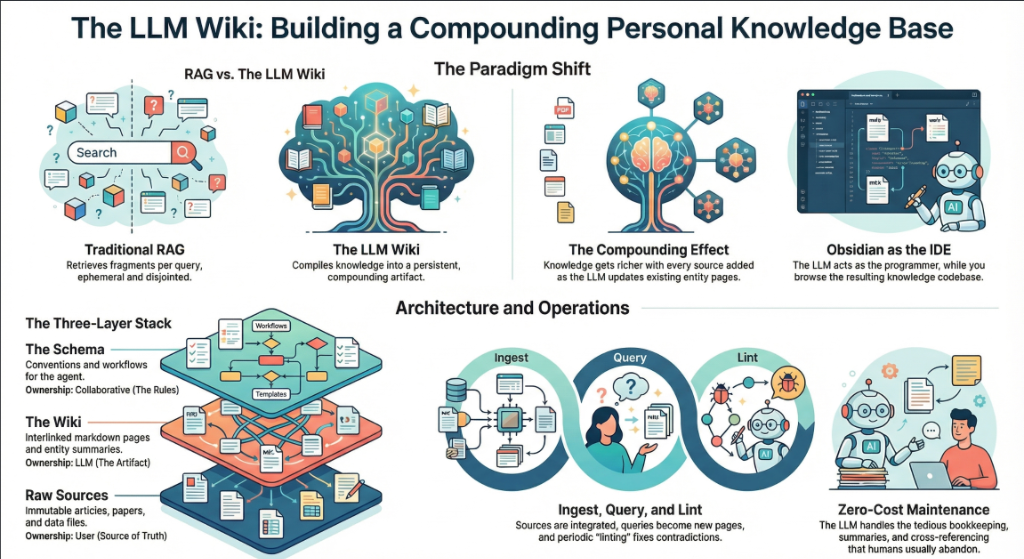
On April 3, 2026, Andrej Karpathy — co-founder of OpenAI, former AI lead at Tesla, and the person who coined “vibe coding” — posted a tweet titled “LLM Knowledge Bases” describing how he now uses LLMs to build personal knowledge wikis instead of just generating code. That tweet went massively viral. The next day, he followed up with something new: an “idea file” — a GitHub gist that lays out the complete architecture, philosophy, and tooling behind the concept. We covered the original tweet in our first article. This is the deep dive into the follow-up — every word, every tool, every implementation detail.
Get the latest on AI, LLMs & developer tools
New MCP servers, model updates, and guides like this one — delivered weekly.
🎬 Watch the Video Breakdown
Prefer reading? Keep scrolling for the full written guide with code examples.
1. The Viral Moment
The original tweet described Karpathy's shift from spending tokens on code to spending tokens on knowledge. He outlined a system where raw source documents (articles, papers, repos, datasets, images) get dropped into a raw/ directory, and an LLM incrementally “compiles” them into a structured wiki — a collection of interlinked .md files with summaries, backlinks, and concept articles.
LLM Knowledge Bases
— Andrej Karpathy (@karpathy) April 2, 2026
Something I'm finding very useful recently: using LLMs to build personal knowledge bases for various topics of research interest. In this way, a large fraction of my recent token throughput is going less into manipulating code, and more into manipulating…
The tweet exploded. Karpathy himself acknowledged it: “Wow, this tweet went very viral!” So he did something interesting — instead of just sharing the code or the app, he shared an idea file.
Ого, этот твит стал очень виральным!
— Andrej Karpathy (@karpathy) 4 апреля 2026 г.
Я хотел поделиться, возможно, слегка улучшенной версией твита в формате “idea file”. Суть idea file в том, что в эпоху LLM-агентов становится меньше смысла или необходимости делиться конкретным кодом или приложением — вы просто делитесь идеей, а затем…
Следующий твит ссылается на GitHub gist под названием “LLM Wiki” — тщательно проработан
Read the Full Gist
Karpathy's complete idea file is available here: gist.github.com/karpathy/442a6bf555914893e9891c11519de94f. You can copy it directly and paste it to your LLM agent to get started.
2. Idea Files: A New Format for the Agent Era
Karpathy introduces a concept he calls an “idea file”. His exact words:
Karpathy's Definition
“The idea of the idea file is that in this era of LLM agents, there is less of a point/need of sharing the specific code/app, you just share the idea, then the other person's agent customizes & builds it for your specific needs.”
This is a subtle but profound shift. Traditionally, when a developer builds something useful, they share the implementation: a GitHub repo, a package on npm, a Docker image. The recipient clones it, configures it, and runs it. But in a world where everyone has access to an LLM agent (Claude Code, OpenAI Codex, OpenCode, Cursor, etc.), sharing the idea can be more useful than sharing the code.
Why? Because the idea is portable. The code is specific. Karpathy uses Obsidian on macOS with Claude Code. You might use VS Code on Linux with OpenAI Codex. A shared GitHub repo would need to be forked, adapted, and debugged. A shared idea file gets copy-pasted to your agent, and your agent builds a version customized to your exact setup.
Karpathy says the gist is “intentionally kept a little bit abstract/vague because there are so many directions to take this in.” That's not a bug — it's the design. The document's last line says it plainly: “The document's only job is to communicate the pattern. Your LLM can figure out the rest.”
He also mentions that the gist has a Discussion tab where people can “adjust the idea or contribute their own,” turning it into a collaborative idea space. This is a new kind of open source — not open code, but open ideas, designed to be interpreted and instantiated by AI agents.
How to Use the Idea File
Karpathy says you can “give this to your agent and it can build you your own LLM wiki and guide you on how to use it.” In practice, that means:
- Copy the gist content (the full
llm-wiki.mdfile) - Paste it into your LLM agent's context (Claude Code, Codex, OpenCode, or any agentic IDE)
- Tell the agent: “Set up an LLM Wiki based on this idea file for [your topic]”
- The agent will create the directory structure, write the schema file, and guide you through first ingestion
# В Claude Code, OpenCode или любой агентной IDE:
> Вот файл с идеей от Karpathy о создании
> LLM Wiki. Я хочу создать такую для [исследований в области машинного обучения /
> конкурентного анализа / заметок по книгам / и т. д.].
>
> [вставьте полное содержимое gist]
>
> Пожалуйста, настрой структуру каталогов, создай
> schema file (CLAUDE.md or AGENTS.md), and walk me
> through ingesting my first source document.
3. The Core Idea: Wiki Beats RAG
The heart of the gist is a comparison between how most people use LLMs with documents today versus what Karpathy proposes. Let's break this down precisely.
The RAG Problem
Karpathy writes: “Most people's experience with LLMs and documents looks like RAG: you upload a collection of files, the LLM retrieves relevant chunks at query time, and generates an answer.”
RAG (Retrieval-Augmented Generation) is the dominant pattern for connecting LLMs to private data. Tools like NotebookLM, ChatGPT file uploads, and most enterprise AI tools work this way. You upload documents. When you ask a question, the system searches for relevant chunks, feeds them to the LLM, and generates an answer.
The problem, as Karpathy identifies it: “The LLM is rediscovering knowledge from scratch on every question. There's no accumulation.”
Ask a question that requires synthesizing five documents, and the RAG system has to find and piece together the relevant fragments every time. Ask the same question tomorrow, and it does the same work again. Nothing is built up. Nothing compounds.
The Wiki Solution
Karpathy's alternative: “Instead of just retrieving from raw documents at query time, the LLM incrementally builds and maintains a persistent wiki — a structured, interlinked collection of markdown files that sits between you and the raw sources.”
When you add a new source, the LLM doesn't just index it for later retrieval. It reads it, extracts key information, and integrates it into the existing wiki — updating entity pages, revising topic summaries, noting where new data contradicts old claims, strengthening or challenging the evolving synthesis.
The key line: “The knowledge is compiled once and then kept current, not re-derived on every query.”
| Dimension | Traditional RAG | LLM Wiki |
|---|---|---|
| When knowledge is processed | At query time (on every question) | At ingest time (once per source) |
| Cross-references | Discovered ad-hoc per query | Pre-built and maintained |
| Contradictions | Может остаться незамеченным | Помечается во время обработки |
| Накопление знаний | Отсутствует — каждый запрос начинается с чистого листа | Накапливается с каждым источником и запросом |
| Формат вывода | Ответы в чате (эфемерные) | Постоянные markdown-файлы (долговечные) |
| Кто поддерживает | Система («черный ящик») | LLM (прозрачная, редактируемая) |
| Роль человека | Загрузка и запрос | Курирование, исследование и постановка вопросов |
| Примеры | NotebookLM, загрузки в ChatGPT | Паттерн LLM Wiki от Karpathy's |
Эффект накопления
Karpathy неоднократно подчеркивает это: “Вики — это постоянный, накапливающийся артефакт.” Перекрестные ссылки уже на месте. Противоречия уже помечены. Синтез уже отражает все, что вы прочитали. Каждый добавленный источник и каждый заданный вопрос делают вики богаче.
Разделение труда между человеком и LLM
Описание рабочего процесса от Karpathy: “Вы никогда (или редко) не пишете вики сами — LLM пишет и поддерживает ее целиком. Вы отвечаете за подбор источников, исследование и правильные вопросы. LLM выполняет всю рутинную работу — суммаризацию, создание перекрестных ссылок, систематизацию и ведение записей.”
Его ежедневный сетап: “У меня с одной стороны открыт LLM-агент, а с другой — Obsidian. LLM вносит правки на основе нашего диалога, а я просматриваю результаты в реальном времени — перехожу по ссылкам, проверяю graph view, читаю обновленные страницы.”
И аналогия, которая описывает всю систему: “Obsidian — это IDE; LLM — это программист; вики — это кодовая база.”
4. Трехуровневая архитектура
Karpathy выделяет три четких уровня. У каждого есть свой владелец и конкретная цель.
Уровень 1: Исходные материалы
Karpathy пишет: “Ваша курируемая коллекция исходных документов. Статьи, доклады, изображения, файлы данных. Они неизменяемы — LLM читает их, но никогда не модифицирует. Это ваш источник истины.”
Директория raw/ священна. LLM может читать из нее что угодно, но никогда не должна в нее писать. Это критически важно, так как у вас всегда есть оригинальные источники для сверки. Если LLM допустит ошибку в вики, вы сможете вернуться к исходному материалу и исправить ее.
raw/
articles/
2026-03-attention-is-all-you-need-revisited.md
2026-04-scaling-laws-update.md
papers/
transformer-architecture-v2.pdf
mixture-of-experts-survey.pdf
repos/
llama-3-readme.md
vllm-architecture-notes.md
data/
benchmark-results.csv
model-comparison.json
images/
transformer-diagram.png
scaling-curves.png
assets/
# Загруженные изображения из сохраненных статей
Уровень 2: Wiki
Карпати пишет: “Директория с markdown-файлами, сгенерированными LLM. Саммари, страницы сущностей, страницы концепций, сравнения, обзор, синтез. LLM полностью владеет этим уровнем. Она создает страницы, обновляет их при появлении новых источников, поддерживает перекрестные ссылки и следит за согласованностью контента. Вы читаете; LLM пишет.”
wiki/
index.md # Главный каталог всех страниц
log.md # Хронологический журнал активности
overview.md # Высокоуровневый синтез
concepts/
attention-mechanism.md
mixture-of-experts.md
scaling-laws.md
tokenization.md
entities/
openai.md
anthropic.md
google-deepmind.md
sources/
summary-attention-revisited.md
summary-scaling-update.md
comparisons/
gpt4-vs-claude-vs-gemini.md
rag-vs-finetuning.md
Ключевая идея: вики находится между вами и исходными материалами. Вы не читаете первоисточники, чтобы ответить на вопросы — вы читаете вики. Вики уже структурирована, снабжена перекрестными ссылками и обобщена. Это то, что подготовил бы ассистент-исследователь, если бы изучил всё и организовал информацию для вас.
Уровень 3: Схема
Карпати пишет: “Документ (например, CLAUDE.md для Claude Code или AGENTS.md для Codex), который объясняет LLM, как устроена вики, каковы соглашения и каким рабочим процессам следовать при импорте источников, ответах на вопросы или поддержке вики. Это ключевой конфигурационный файл — именно он делает LLM дисциплинированным редактором вики, а не обычным чат-ботом.”
Схема — это важнейшая часть. Без неё LLM — просто чат-бот, у которого случайно оказался доступ к файлам. С ней же LLM становится системным редактором вики, который следует единым правилам во всех сессиях.
Карпати добавляет: “Вы и LLM развиваете её совместно с течением времени, по мере того как понимаете, что лучше подходит для вашей области.” Схема не статична. Вы начинаете с чего-то базового и дорабатываете её по мере того, как понимаете, какие структуры страниц, поля frontmatter и рабочие процессы подходят лучше всего.
# Схема LLM-вики
## Структура проекта
- `raw/` — неизменяемые исходные документы. НИКОГДА не редактировать.
- `wiki/` — вики, созданная LLM. Вы полностью ею владеете.
- `wiki/index.md` — основной каталог. Обновлять при каждом импорте.
- `wiki/log.md` — лог активности (только для добавления).
## Правила оформления страниц
Каждая страница вики ДОЛЖНА содержать YAML frontmatter:
```
---
title: Page Title
type: concept | entity | source-summary | comparison
sources: [list of raw/ files referenced]
related: [list of wiki pages linked]
created: YYYY-MM-DD
updated: YYYY-MM-DD
confidence: high | medium | low
---
```
## Рабочий процесс импорта (Ingest)
Когда я говорю "ingest [filename]":
1. Прочитать исходный файл в raw/
2. Обсудить со мной основные выводы
3. Создать/обновить страницу с кратким описанием в wiki/sources/
4. Обновить wiki/index.md
5. Обновите все соответствующие страницы концепций и сущностей
6. Добавьте запись в wiki/log.md
## Процесс запросов (Query Workflow)
Когда я задаю вопрос:
1. Прочитать wiki/index.md, чтобы найти релевантные страницы
2. Прочитать эти страницы
3. Сформировать ответ с цитатами в формате [[wiki-link]]
4. Если ответ представляет ценность, предложить сохранить его как
новую вики-страницу
## Процесс линтинга (Lint Workflow)
Когда я говорю "lint":
1. Проверить наличие противоречий между страницами
2. Найти «осиротевшие» страницы без входящих ссылок
3. Составить список упомянутых концепций, у которых нет собственной страницы
4. Проверить наличие устаревших утверждений, замененных более новыми источниками
5. Предложить вопросы для дальнейшего изучения
Если вы используете OpenAI Codex, та же схема помещается в AGENTS.md вместо этого. Если вы используете OpenCode, она помещается в OPENCODE.md. Содержимое остается прежним — меняется только имя файла в зависимости от того, какой агент его читает.
Почему схема важна
Без схемы каждая сессия с LLM начинается с нуля. LLM не знает ваших соглашений, форматов страниц или рабочих процессов. В итоге вам приходится объяснять всё заново. Схема — это постоянная память, которая переносит знания между сессиями и обеспечивает согласованность. Именно она превращает обычную LLM в вашего редактора вики.
5. Операции: Ingest, Query, Lint
Карпати выделяет три основные операции. У каждой есть четкий триггер, процесс и результат.
Операция 1: Ingest
Карпати пишет: “Вы добавляете новый источник в коллекцию необработанных данных и даете LLM команду обработать его. Пример процесса: LLM читает источник, обсуждает с вами ключевые выводы, создает страницу с кратким изложением в вики, обновляет индекс, актуализирует соответствующие страницы сущностей и концепций по всей вики и добавляет запись в лог. Один источник может затронуть 10–15 вики-страниц.”
Это самая важная операция. Один процесс ingest не просто создает новую страницу — он отражается на всей вики. Если вы загружаете статью о новом варианте трансформера, LLM может:
- Создать новую страницу с кратким изложением статьи
- Обновить страницу концепции «Механизм внимания» (Attention Mechanism), добавив новый вариант
- Обновить страницу «Законы масштабирования» (Scaling Laws), если в статье содержатся новые бенчмарки
- Обновить страницу сущности для авторов статьи или их организации
- Обновить страницу сравнения, если в статье проводится бенчмаркинг относительно известных моделей
- Добавьте ссылки с существующих страниц, которые теперь ссылаются на новый контент
- Обновите индекс новой страницей
- Запишите импорт (ingest) в журнал активности
Карпати добавляет личное предпочтение: “Я предпочитаю импортировать источники по одному и оставаться вовлеченным — я читаю резюме, проверяю обновления и направляю LLM, на чем сделать акцент. Но вы также можете выполнять batch-ingest множества источников одновременно с меньшим контролем.”
# Вы добавля
> I just added a new article to raw/articles/
> 2026-04-mixture-of-experts-efficiency.md
> Please ingest it.
# The LLM reads it, then responds:
Key takeaways from this article:
1. MoE models achieve 4x throughput at same quality
2. Routing efficiency improved 23% over Switch Transformer
3. Contradicts our wiki claim that dense models are
always more efficient below 10B params
I will:
- Create wiki/sources/summary-moe-efficiency-2026.md
- Update wiki/concepts/mixture-of-experts.md
- Update wiki/concepts/scaling-laws.md (new benchmarks)
- Flag contradiction on wiki/concepts/dense-vs-sparse.md
- Update wiki/index.md
- Append to wiki/log.md
Shall I proceed?
Operation 2: Query
Karpathy writes: “You ask questions against the wiki. The LLM searches for relevant pages, reads them, and synthesizes an answer with citations. Answers can take different forms depending on the question — a markdown page, a comparison table, a slide deck (Marp), a chart (matplotlib), a canvas.”
But the most important insight about queries is this: “Good answers can be filed back into the wiki as new pages.” A comparison you asked for, an analysis, a connection you discovered — these are valuable and shouldn't disappear into chat history. “This way your explorations compound in the knowledge base just like ingested sources do.”
This is the compounding loop: sources get ingested into the wiki, queries generate new insights, and the best insights get filed back as wiki pages. The wiki grows not just from external sources, but from your own exploration.
> Compare the routing strategies in MoE models across
> our sources. Which approach has the best efficiency/
> quality tradeoff?
# LLM reads wiki/concepts/mixture-of-experts.md,
# wiki/sources/summary-moe-*.md, produces analysis
[LLM produces a detailed comparison with a table]
> This is great. File it as a wiki page.
# LLM создает wiki/comparisons/moe-routing-strategies.md
# Обновляет index.md, добавляет ссылки с соответствующих страниц
Операция 3: Lint
Карпати пишет: “Периодически просите LLM проводить health-check вики. Ищите: противоречия между страницами, устаревшие утверждения, которые были вытеснены более новыми источниками, страницы-сироты без входящих ссылок, важные концепции, которые упоминаются, но не имеют собственной страницы, отсутствие перекрестных ссылок, пробелы в данных, которые можно восполнить с помощью поиска в вебе.”
Он добавля “The LLM is good at suggesting new questions to investigate and new sources to look for. This keeps the wiki healthy as it grows.”
> Lint the wiki.
Wiki Health Report (2026-04-04):
CONTRADICTIONS (2):
- concepts/dense-vs-sparse.md claims dense > sparse
below 10B, but sources/summary-moe-efficiency.md
shows opposite. Recommend: update with nuance.
- entities/openai.md says GPT-5 is 200B params,
but sources/summary-gpt5-leak.md says 300B.
ORPHAN PAGES (3):
- concepts/tokenization.md (no inbound links)
- sources/summary-old-bert-paper.md (no references)
- comparisons/old-gpu-benchmark.md (outdated)
MISSING PAGES (4):
- "RLHF" mentioned 12 times, no concept page
- "Constitutional AI" mentioned 8 times, no page
- "KV Cache" referenced in 5 sources, no page
- "Speculative Decoding" mentioned 3 times, no page
SUGGESTED INVESTIGATIONS:
- No sources on inference optimization post-2025
- Entity page for Meta AI is thin (only 1 source)
- The "Scaling Laws" page hasn't been updated in 3 weeks
6. Indexing and Logging
Karpathy defines two special files that are critical to how the LLM navigates the wiki. They serve different purposes and both are important.
index.md: The Content Catalog
Karpathy writes: “index.md is content-oriented. It's a catalog of everything in the wiki — each page listed with a link, a one-line summary, and optionally metadata like date or source count. Organized by category (entities, concepts, sources, etc.). The LLM updates it on every ingest.”
The key insight about index.md is how it replaces RAG: “When answering a query, the LLM reads the index first to find relevant pages, then drills into them. This works surprisingly well at moderate scale (~100 sources, ~hundreds of pages) and avoids the need for embedding-based RAG infrastructure.”
This is a practical revelation. Most people assume you need vector databases and embedding pipelines for knowledge retrieval. Karpathy says: at moderate scale, a well-maintained index file is enough. The LLM reads the index (a few thousand tokens), identifies relevant pages, and reads those directly.
# Wiki Index
## Concepts
- [[attention-mechanism]] — Self-attention, multi-head
внимание и его варианты (12 источников)
- [[mixture-of-experts]] — Разреженные архитектуры MoE,
стратегии маршрутизации (8 источников)
- [[scaling-laws]] — Chinchilla, законы Каплана,
оптимальное по вычислениям обучение (15 источников)
- [[tokenization]] — BPE, SentencePiece, tiktoken
(3 источника)
## Entities
- [[openai]] — GPT series, organizational history
(20 sources)
- [[anthropic]] — Claude series, constitutional AI
(14 sources)
- [[google-deepmind]] — Gemini, PaLM, AlphaFold
(18 sources)
## Source Summaries
- [[summary-attention-revisited]] — 2026-03-15
- [[summary-moe-efficiency]] — 2026-04-01
- [[summary-scaling-update]] — 2026-04-02
## Comparisons
- [[moe-routing-strategies]] — Filed from query 2026-04-04
- [[rag-vs-finetuning]] — Tradeoffs and use cases
log.md: The Activity Timeline
Karpathy writes: “log.md is chronological. It's an append-only record of what happened and when — ingests, queries, lint passes.”
He includes a practical tip: “If each entry starts with a consistent prefix (e.g. ## [2026-04-02] ingest | Article Title), the log becomes parseable with simple unix tools — grep "^## [" log.md | tail -5 gives you the last 5 entries.”
# Activity Log
## [2026-04-04] ingest | MoE Efficiency Article
Source: raw/articles/2026-04-mixture-of-experts-efficiency.md
Pages created: sources/summary-moe-efficiency.md
Pages updated: concepts/mixture-of-experts.md,
concepts/scaling-laws.md, concepts/dense-vs-sparse.md
Notes: Contradicts dense-vs-sparse claim below 10B params.
Flagged for review.
## [2026-04-04] query | Сравнение маршрутизации MoE
Вопрос: Сравнить стратегии маршрутизации в моделях MoE
Прочитано страниц: concepts/mixture-of-experts.md, 3 кратких описания источников
Результат: Сохранено как comparisons/moe-routing-strategies.md
## [2026-04-04] lint | Еженедельная проверка состояния
Найдено противоречий: 2
Страниц-сирот: 3
Предложено недостающих страниц: 4
Предложено исследований: 3
## [2026-04-03] ingest | Scaling Laws Update
Source: raw/articles/2026-04-scaling-laws-update.md
Pages created: sources/summary-scaling-update.md
Pages updated: concepts/scaling-laws.md, entities/openai.md
The log also helps the LLM understand what's been done recently. When you start a new session, the LLM can read the last few log entries to understand the current state of the wiki.
7. The Tool Stack
Karpathy mentions several specific tools in the gist. Here's what each one does and how it fits into the workflow.
qmd: Local Search for Markdown
Karpathy writes: “qmd is a good option: it's a local search engine for markdown files with hybrid BM25/vector search and LLM re-ranking, all on-device. It has both a CLI (so the LLM can shell out to it) and an MCP server (so the LLM can use it as a native tool).”
qmd was built by Tobi Lutke, CEO of Shopify. It's designed exactly for the use case Karpathy describes: searching over a collection of markdown files. It combines three search strategies:
- BM25 full-text search — keyword matching (fast, precise)
- Vector semantic search — meaning-based matching (finds related concepts)
- LLM re-ranking — the LLM scores results for relevance (highest quality)
Everything runs locally via node-llama-cpp with GGUF models. No cloud API calls. No data leaves your machine.
# Install qmd globally
npm install -g @tobilu/qmd
# Add your wiki as a collection
qmd collection add ./wiki --name my-research
# Keyword search (BM25)
qmd search "mixture of experts routing"
# Semantic search (vector)
qmd vsearch "how do sparse models handle efficiency"
# Гибридный поиск с переранжированием через LLM (лучшее качество)
qmd query "в чем заключаются компромиссы между маршрутизацией top-k и expert-choice"
# Вывод в формате JSON для передачи LLM-агентам через конвейер (pipe)
qmd query "законы масштабирования" --json
# Запуск qmd как MCP-сервера для Claude Code и др.
qmd mcp
Карпати отмечает, что на малых масштабах index.md файла достаточно для навигации. qmd becomes useful as the wiki grows beyond what the index can handle — likely once you have hundreds of pages and the index itself is too large to read in one context window.
Obsidian Web Clipper
Karpathy writes: “Obsidian Web Clipper is a browser extension that converts web articles to markdown. Very useful for quickly getting sources into your raw collection.”
The Web Clipper is available for Chrome, Firefox, Safari, Edge, Brave, and Arc. When you clip an article, it:
- Converts the HTML to clean markdown
- Adds YAML frontmatter (author, date, source URL, tags)
- Preserves formatting, code blocks, and images
- Saves directly to your Obsidian vault (your
raw/directory)
It also supports templates — you can define different clipping formats for articles, recipes, academic papers, or any other content type. This makes ingestion consistent and predictable.
Downloading Images Locally
Karpathy gives a specific tip for images: “In Obsidian Settings → Files and links, set ‘Attachment folder path’ to a fixed directory (e.g. raw/assets/). Then in Settings → Hotkeys, search for ‘Download’ to find ‘Download attachments for current file’ and bind it to a hotkey (e.g. Ctrl+Shift+D).”
After clipping an article, you hit the hotkey and all images get downloaded to local disk. Why does this matter? Because it “lets the LLM view and reference images directly instead of relying on URLs that may break.”
He also notes a current limitation: “LLMs can't natively read markdown with inline images in one pass — the workaround is to have the LLM read the text first, then view some or all of the referenced images separately to gain additional context.”
Obsidian's Graph View
Karpathy writes: “Obsidian's graph view is the best way to see the shape of your wiki — what's connected to what, which pages are hubs, which are orphans.”
The graph view renders all your wiki pages as nodes and all [[wiki-links]] в виде ребер. Хаб-страницы (например, основные концепции с множеством связей) отображаются как крупные узлы. Страницы-сироты (без ссылок) выглядят изолированными. Это дает мгновенное визуальное представление о том, где ваши знания плотны, а где есть пробелы.
Marp: Слайд-презентации на Markdown
Карпати пишет: “Marp — это формат презентаций на базе Markdown. Для Obsidian есть соответствующий плагин. Полезен для создания презентаций напрямую из контента вики.”
Marp позволяет создавать презентации на чистом Markdown. Слайды разделяются с помощью --- (горизонтальных линий). Он поддерживает темы, синтаксис изображений, верстку математических формул и экспорт в HTML, PDF и PowerPoint.
---
marp: true
theme: default
---
# Mixture of Experts: Ключевые выводы
Составлено на основе 8 источников из исследовательской вики
---
## Сравнение стратегий маршрутизации
| Стратегия | Пропускная способность | Качество |
|----------|-----------|---------|
| Top-K | 2.1x | Baseline |
| Expert Choice | 3.4x | +2% |
| Hash | 4.0x | -1% |
---
## Ключевой инсайт
Маршрутизация Expert-choice обеспечивает лучшее соотношение качества и эффективности
для моделей с более чем 10 млрд параметров.
Источник: wiki/comparisons/moe-routing-strategies.md
Dataview: Запросы к вашим Frontmatter-данным
Карпати пишет: “Dataview — это плагин для Obsidian, который выполняет запросы к frontmatter страниц. Если ваша LLM добавляет YAML frontmatter в вики-страницы (теги, даты, количество источников), Dataview может генерировать динамические таблицы и списки.”
Dataview относится к вашему хранилищу как к базе данных. Если у ваших вики-страниц есть frontmatter вида type: concept, sources: [file1, file2], confidence: high, то Dataview позволяет делать к ним запросы на SQL-подобном языке:
# Список всех страниц концепций с количеством источников
```dataview
TABLE length(sources) AS "Источники", confidence
FROM "wiki/concepts"
SORT length(sources) DESC
```
# Поиск страниц, обновленных за последнюю неделю
```dataview
LIST
FROM "wiki"
WHERE updated >= date(today) - dur(7 days)
SORT updated DESC
```
# Поиск страниц с низким уровнем доверия, требующих проверки
```dataview
TABLE title, sources
FROM "wiki"
WHERE confidence = "low"
SORT file.name ASC
```
Git: контроль версий для знаний
Карпати пишет: “Вики — это просто git-репозиторий с markdown-файлами. Вы бесплатно получаете историю версий, ветвление и возможности для совместной работы.”
Это звучит просто, но это мощный подход. Поскольку вся вики — это обычный markdown в директории, вы можете использовать:
git logчтобы увидеть, как вики развивалась со временемgit diffчтобы точно увидеть, что изменилось при каждом импорте (ingest)git revertчтобы откатить неудачную компиляциюgit branchчтобы изучить альтернативные структуры организацииgit blameчтобы отследить, когда было добавлено конкретное утверждение- Используйте GitHub/GitLab для совместной работы команды с помощью pull requests
| Инструмент | Роль в LLM Wiki | Обязательно? |
|---|---|---|
| Obsidian | IDE / вьюер для просмотра вики | Рекомендуется (подойдет любой просмотрщик markdown) |
| Obsidian Web Clipper | Ingestion: сохранение веб-статей в markdown | Рекомендуется для веб-источников |
| qmd | Поисковый движок для больших вики | Опционально (index.md подходит для небольших масштабов) |
| Marp | Вывод: создание презентаций из вики | Опционально |
| Dataview | Запросы к frontmatter для дашбордов | Опционально |
| Git | Контроль версий для вики | Рекомендуется |
| LLM-агент | Сопровождение вики (Claude Code, Codex и т. д.) | Обязательно |
8. Кейсы использования из списка Карпати
В gist перечислены пять конкретных контекстов применения этого паттерна. Давайте разберем каждый из них с деталями реализации.
Личная база знаний
Карпати пишет: “Отслеживание собственных целей, здоровья, психологии, саморазвития — ведение записей в журнале, сохранение статей, заметок из подкастов и формирование структурированного представления о себе с течением времени.”
Реализация: Создайте личную вики с разделами для целей, показателей здоровья, заметок о чтении и размышлений. Импортируйте записи журнала, прочитанные статьи, транскрипты подкастов. LLM создает страницы концепций для повторяющихся тем (“качество сна”, “режим тренировок”, “карьерные цели”) и связывает их во времени. Задавайте вопросы вроде: “Какие закономерности в уровне моей энергии я наблюдаю за последние 3 месяца?”
Исследования
Карпати пишет: “Глубокое погружение в тему в течение недель или месяцев — чтение научных работ, статей, отчетов и постепенное создание подробной вики с развивающимся тезисом.”
Это основной кейс использования для Карпати. Его исследовательская вики содержит около 100 статей и 400 000 слов по одной теме исследований в области ML. Вики формирует развивающийся тезис, который уточняется с каждым новым источником.
Чтение книги
Карпати пишет: “Добавление каждой главы по мере чтения, создание страниц для персонажей, тем, сюжетных линий и их взаимосвязей. К концу у вас будет полноценная вспомогательная вики.”
Он приводит яркий пример: “Представьте фанатские вики вроде Tolkien Gateway — тысячи взаимосвязанных страниц, посвященных персонажам, местам, событиям и языкам, созданные сообществом волонтеров за годы. Вы можете создать нечто подобное для себя в процессе чтения, при этом LLM возьмет на себя все перекрестные ссылки и поддержку структуры.”
Представьте, что вы читаете Войну и мир. После каждой главы вы импортируете свои заметки. LLM ведет страницы персонажей (отслеживая их развитие по главам), страницы тем (связывая повторяющиеся идеи) и страницу с временной шкалой. В итоге у вас получается личная вспомогательная вики, не уступающая литературному анализу.
Бизнес / Команда
Карпати пишет: “Внутренняя вики, поддерживаемая LLM, которая наполняется из тредов Slack, транскриптов встреч, проектной документации и звонков клиентам. Возможно, с участием человека для проверки обновлений. Вики остается актуальной, потому что LLM выполняет ту работу по поддержке, которую никто в команде делать не хочет.”
Это корпоративная версия. Источники данных внутренние: экспорт из Slack, записи встреч (с транскрипцией), проектная документация, логи звонков клиентам, данные CRM. Wiki объединяет журналы решений, таймлайны проектов, инсайты о клиентах и знания команды. Человек (human-in-the-loop) проверяет обновления перед тем, как они станут частью Wiki.
Всё остальное
Карпати пишет: “Конкурентный анализ, due diligence, планирование поездок, конспекты курсов, глубокое погружение в хобби — всё, где вы со временем накапливаете знания и хотите, чтобы они были структурированы, а не разбросаны.”
Этот паттерн универсален: если вы собираете информацию из нескольких источников в течение долгого времени и хотите её структурировать, LLM Wiki — подходящее решение. Мы подробно рассмотрели реализации для конкурентной разведки, соблюдения правовых норм, обзоров научной литературы и многого другого в нашей предыдущей статье.
9. Пошаговое руководство по внедрению
Вот как создать рабочую LLM Wiki с нуля, в точности следуя архитектуре Карпати.
Шаг 1: Настройте структуру директорий
mkdir -p my-research/raw/articles
mkdir -p my-research/raw/papers
mkdir -p my-research/raw/repos
mkdir -p my-research/raw/assets
mkdir -p my-research/wiki/concepts
mkdir -p my-research/wiki/entities
mkdir -p my-research/wiki
mkdir -p my-research/wiki/comparisons
touch my-research/wiki/index.md
touch my-research/wiki/log.md
touch my-research/wiki/overview.md
# Initialize git
cd my-research && git init
# Open in Obsidian as a vault
Step 2: Create the Schema File
Create a CLAUDE.md (for Claude Code), AGENTS.md (for Codex), or equivalent schema file at the root of your project. Use the example schema from Section 4 above as a starting point. Customize it for your domain.
Step 3: Configure Obsidian
- Install Obsidian and open
my-research/as a vault - Install Web Clipper browser extension
- Settings → Files and links → Set “Attachment folder path” to
raw/assets - Settings → Hotkeys → Bind “Download attachments for current file” to
Ctrl+Shift+D - Установите плагин Marp Slides (опционально, для презентаций)
- Установите плагин Dataview (опционально, для frontmatter-запросов)
Шаг 4: Импорт первого источника
- Сохраните веб-статью с помощью Web Clipper → сохраните в
raw/articles/ - Нажмите
Ctrl+Shift+Dчтобы скачать изображения локально - Откройте своего LLM-агента (Claude Code, Codex, OpenCode и т. д.)
- Дайте ему команду: “Ingest raw/articles/[filename].md”
- Проверьте резюме, расставьте акценты, подтвердите обновления вики
- Проверьте вики в Obsidian —
- Commit:
git add . && git commit -m “ingest: [article title]”
Step 5: Build Up Over Time
Repeat the ingest process for each new source. After 10-20 sources, start querying the wiki. After 50+, consider adding qmd for search. Run lint checks weekly.
The 10-Source Test
Start with just 10 sources on one topic. Ingest them all. Then ask the wiki a question that requires synthesizing multiple sources. If the structured wiki gives you an insight you wouldn't have gotten by reading the sources individually, the system is working. Scale from there.
Step 6: Evolve the Schema
As you use the wiki, you'll discover what works and what doesn't. Update the schema (CLAUDE.md / AGENTS.md) accordingly. Maybe you need a new page type. Maybe your frontmatter needs more fields. Maybe your ingest workflow should include a step you didn't anticipate. Karpathy says: “You and the LLM co-evolve this over time.”
10. The Memex Connection (1945)
Karpathy closes the gist with a historical connection that puts the whole idea in perspective:
Karpathy's Words
“The idea is related in spirit to Vannevar Bush's Memex (1945) — a personal, curated knowledge store with associative trails between documents. Bush's vision was closer to this than to what the web became: private, actively curated, with the connections between documents as valuable as the documents themselves. The part he couldn't solve was who does the maintenance. The LLM handles that.”
In 1945, Vannevar Bush — an MIT engineer who directed the US Office of Scientific Research and Development — published an article in The Atlantic called “As We May Think”. He described a hypothetical device called the Memex (memory + index): a desk-sized machine where an individual could store all their books, records, and communications on microfilm, search them rapidly, and create associative trails — связанные последовательности документов с личными аннотациями.
Ключевая идея Буша заключалась в том, что человеческий разум работает по принципу ассоциаций, not alphabetical order. Hierarchical filing systems (like library catalogs) force you into rigid categories. The Memex would let you create your own paths through knowledge — linking a chemistry paper to an economics report to a historical essay, following your own logic.
Его знаменитая цитата: “Появятся совершенно новые формы энциклопедий, уже снабженные сетью проходящих через них ассоциативных связей.”
Memex напрямую вдохновил:
- Дугласа Энгельбарта — который прочитал статью Буша в 1945 году, “заразился этой идеей” и в итоге изобрел компьютерную мышь и концепцию персональных компью
- Ted Nelson — who coined the term “hypertext” in 1965, directly inspired by the Memex's associative trails
- Tim Berners-Lee — whose World Wide Web (1989) implemented hypertext at global scale
But as Karpathy observes, the web became public and chaotic rather than private and curated. Bush imagined something personal — your knowledge, your connections, your trails. The LLM Wiki is closer to that original vision. It's private, actively curated, and the connections between documents are as valuable as the documents themselves.
The missing piece that Bush couldn't solve in 1945: who does the maintenance? Creating associative trails, updating connections, keeping everything consistent — that's tedious, manual work. Humans abandon knowledge systems because the maintenance burden grows faster than the value. As Karpathy writes: “LLMs don't get bored, don't forget to update a cross-reference, and can touch 15 files in one pass. The wiki stays maintained because the cost of maintenance is near zero.”
11. Community Ideas from the Gist
The GitHub gist has a Discussion tab that Karpathy specifically called out: “People can adjust the idea or contribute their own in the Discussion which is cool.” Here are some notable contributions from the community:
The .brain Folder Pattern
A developer shared a related pattern: a .brain folder at the root of a project containing markdown files (index.md, architecture.md, decisions.md, changelog.md, deployment.md) that acts as persistent memory across AI sessions. The core rule: “Read .brain before making changes. Update .brain after making changes. Never commit it to git.” This is a lighter-weight version of Karpathy's schema — project-specific rather than knowledge-base-specific.
Inter-Agent Communication via Gists
Другой участник описал использование GitHub gists как каналов связи между различными ИИ-агентами. В процессе разработки они пушат гисты с диаграммами (в формате SVG) и контекстом, а затем передают их между различными ИИ-интерфейсами (Claude, Grok и т. д.). Это расширяет концепцию «файла идей» Karpathy — гисты становятся не просто средством общения человека с агентом, а средством общения агента с агентом.
Заметка «Добавление и проверка» (The Append-and-Review Note)
Один из участников сообщества отметил, что более ранний пост Karpathy в блоге от karpathy.bearblog.dev), feels like it should be part of this pattern. That post described a simpler workflow: an append-only notes file that gets periodically reviewed and reorganized. The LLM Wiki is the evolved version — the LLM does the review and reorganization automatically.
Team Knowledge Sharing
One question from the community: “How can I share the knowledge base with my team? Currently we create a RAG and then an MCP server.” Since the wiki is just a git repo, the natural answer is: push it to a shared repository. Team members can browse it in Obsidian, and the LLM agent can be configured to accept updates from multiple contributors. The schema file defines the rules; Git handles collaboration.
12. What This Means
The “Idea File” as a New Open Source Format
Karpathy may have accidentally created a new format for sharing ideas in the AI era. Instead of sharing code (which is implementation-specific), you share a structured description of the pattern, designed to be interpreted by an LLM agent. The agent adapts it to the user's environment, tools, and preferences. This is open ideas rather than open source.
Why This Pattern Will Spread
Karpathy explains exactly why wikis maintained by LLMs succeed where human-maintained wikis fail: “The tedious part of maintaining a knowledge base is not the reading or the thinking — it's the bookkeeping. Updating cross-references, keeping summaries current, noting when new data contradicts old claims, maintaining consistency across dozens of pages. Humans abandon wikis because the maintenance burden grows faster than the value. LLMs don't get bored, don't forget to update a cross-reference, and can touch 15 files in one pass.”
From Karpathy's Tweet to Your Wiki
The gist ends with a deliberate call to action: “The right way to use this is to share it with your LLM agent and work together to instantiate a version that fits your needs. The document's only job is to communicate the pattern. Your LLM can figure out the rest.”
That's the whole point. Don't overthink the setup. Don't wait for someone to build the perfect tool. Copy the gist, paste it to your agent, and start with one topic and 10 sources. The LLM will figure out the directory structure, the page formats, the frontmatter schema. You provide the sources and the questions. The wiki builds itself.
The Takeaway
Karpathy's gist is not a blueprint — it's a seed. You give it to your LLM agent, and together you grow it into something specific to your domain. The wiki is a persistent, compounding artifact that gets richer with every source and every question. The LLM does all the bookkeeping. You do the thinking.
13. All Resources & Links
Every resource, tool, and reference mentioned in this article and in Karpathy's gist:
Karpathy's Posts
- Original tweet: “LLM Knowledge Bases” (Apr 3, 2026)
- Follow-up tweet: “Idea File” (Apr 4, 2026)
- GitHub Gist: LLM Wiki (the full idea file)
- Karpathy's Blog (bearblog)
Tools Mentioned
- qmd — Local markdown search engine by Tobi Lutke (BM25 + vector + LLM re-ranking)
- Obsidian — Markdown-based knowledge management app
- Obsidian Web Clipper — Browser extension for clipping web articles to markdown
- Marp — фреймворк для создания презентаций на базе Markdown (экспорт в HTML, PDF, PowerPoint)
- Dataview — плагин для Obsidian для запросов к frontmatter страниц
- Tolkien Gateway — пример обширной взаимосвязанной вики
Концепции & история
- “As We May Think” Ванневара Буша (1945) — статья в The Atlantic, описывающая Memex
- Memex (Wikipedia) — история и влияние концепции Буша
- Google NotebookLM — инструмент для исследований на базе RAG (подход, от которого Карпати отходит)
Платформы LLM-агентов (для файла схемы)
- Claude Code — использует
CLAUDE.mdдля инструкций проекта - OpenAI Codex — использует
AGENTS.mdдля инструкций проекта - OpenCode — использует
OPENCODE.mdдля инструкций проекта - Cursor, Windsurf и др. — у каждого свои соглашения по файлам схем
Наш обзор
- Часть 1: Базы знаний LLM от Карпати — ИИ-воркфлоу эпохи «после кода» — разбор оригинального вирусного твита
- Часть 2: Эта статья — глубокое погружение в последующий gist и файл идей
Похожие руководства
- Часть 1: Базы знаний LLM от Карпати — разбор оригинального твита
- Вайб-кодинг в 2026: полное руководство — с чего начался путь Карпати в мире ИИ
- Руководство по AGENTS.md — кросс-инструментальные файлы схем для ИИ-агентов
- Освоение навыков агентов — Создавайте навыки для автоматической компиляции вики
- Создайте свой собственный MCP сервер — Предоставьте доступ к вашей вики AI-ассистентам через MCP
- Оркестрация агентов — Мультиагентные системы для сложных рабочих процессов со знаниями
Stay ahead on AI, LLMs & agent skills
Join 5,000+ developers getting the weekly rundown of agent skills, MCP servers and AI coding releases.