On April 3, 2026, Andrej Karpathy — co-founder of OpenAI, former AI lead at Tesla, and the person who coined “vibe coding” — posted a tweet titled “LLM Knowledge Bases” describing how he now uses LLMs to build personal knowledge wikis instead of just generating code. That tweet went massively viral. The next day, he followed up with something new: an “idea file” — a GitHub gist that lays out the complete architecture, philosophy, and tooling behind the concept. We covered the original tweet in our first article. This is the deep dive into the follow-up — every word, every tool, every implementation detail.
Get the latest on AI, LLMs & developer tools
New MCP servers, model updates, and guides like this one — delivered weekly.
🎬 Watch the Video Breakdown
Prefer reading? Keep scrolling for the full written guide with code examples.
1. The Viral Moment
The original tweet described Karpathy's shift from spending tokens on code to spending tokens on knowledge. He outlined a system where raw source documents (articles, papers, repos, datasets, images) get dropped into a raw/ directory, and an LLM incrementally “compiles” them into a structured wiki — a collection of interlinked .md files with summaries, backlinks, and concept articles.
LLM Knowledge Bases
— Andrej Karpathy (@karpathy) April 2, 2026
Something I'm finding very useful recently: using LLMs to build personal knowledge bases for various topics of research interest. In this way, a large fraction of my recent token throughput is going less into manipulating code, and more into manipulating…
The tweet exploded. Karpathy himself acknowledged it: “Wow, this tweet went very viral!” So he did something interesting — instead of just sharing the code or the app, he shared an idea file.
¡Vaya, este tweet se hizo muy viral!
— Andrej Karpathy (@karpathy) 4 de abril de 2026
Quería compartir una versión posiblemente mejorada del tweet en un “archivo de ideas”. El concepto del archivo de ideas es que, en esta era de agentes LLM, tiene menos sentido o necesidad compartir el código o la app específica; simplemente compartes la idea y luego…
El tweet de seguimiento enlaza a un gist de GitHub titulado “LLM Wiki” — un documento cuidadosamente redactado que describe el patrón, la arquitectura, las operaciones y las herramientas
Read the Full Gist
Karpathy's complete idea file is available here: gist.github.com/karpathy/442a6bf555914893e9891c11519de94f. You can copy it directly and paste it to your LLM agent to get started.
2. Idea Files: A New Format for the Agent Era
Karpathy introduces a concept he calls an “idea file”. His exact words:
Karpathy's Definition
“The idea of the idea file is that in this era of LLM agents, there is less of a point/need of sharing the specific code/app, you just share the idea, then the other person's agent customizes & builds it for your specific needs.”
This is a subtle but profound shift. Traditionally, when a developer builds something useful, they share the implementation: a GitHub repo, a package on npm, a Docker image. The recipient clones it, configures it, and runs it. But in a world where everyone has access to an LLM agent (Claude Code, OpenAI Codex, OpenCode, Cursor, etc.), sharing the idea can be more useful than sharing the code.
Why? Because the idea is portable. The code is specific. Karpathy uses Obsidian on macOS with Claude Code. You might use VS Code on Linux with OpenAI Codex. A shared GitHub repo would need to be forked, adapted, and debugged. A shared idea file gets copy-pasted to your agent, and your agent builds a version customized to your exact setup.
Karpathy says the gist is “intentionally kept a little bit abstract/vague because there are so many directions to take this in.” That's not a bug — it's the design. The document's last line says it plainly: “The document's only job is to communicate the pattern. Your LLM can figure out the rest.”
He also mentions that the gist has a Discussion tab where people can “adjust the idea or contribute their own,” turning it into a collaborative idea space. This is a new kind of open source — not open code, but open ideas, designed to be interpreted and instantiated by AI agents.
How to Use the Idea File
Karpathy says you can “give this to your agent and it can build you your own LLM wiki and guide you on how to use it.” In practice, that means:
- Copy the gist content (the full
llm-wiki.mdfile) - Paste it into your LLM agent's context (Claude Code, Codex, OpenCode, or any agentic IDE)
- Tell the agent: “Set up an LLM Wiki based on this idea file for [your topic]”
- The agent will create the directory structure, write the schema file, and guide you through first ingestion
# En Claude Code, OpenCode o cualquier IDE agentic:
> Aquí tienes un archivo de idea de Karpathy sobre cómo construir
> una LLM Wiki. Quiero construir una para [investigación de machine learning /
> análisis competitivo / notas de libros / etc.].
>
> [pega el contenido completo del gist]
>
> Por favor, configura la estructura de directorios, crea el
> archivo de esquema (CLAUDE.md o AGENTS.md) y guíame
> en el proceso de ingesta de mi primer documento fuente.
3. La idea central: Wiki supera a RAG
El núcleo del gist es una comparación entre cómo la mayoría de las personas usan los LLMs con documentos hoy en día frente a lo que Karpathy propone. Vamos a desglosarlo con precisión.
El problema de RAG
Karpathy escribe: “La experiencia de la mayoría de las personas con los LLMs y documentos se parece a RAG: subes una colección de archivos, el LL
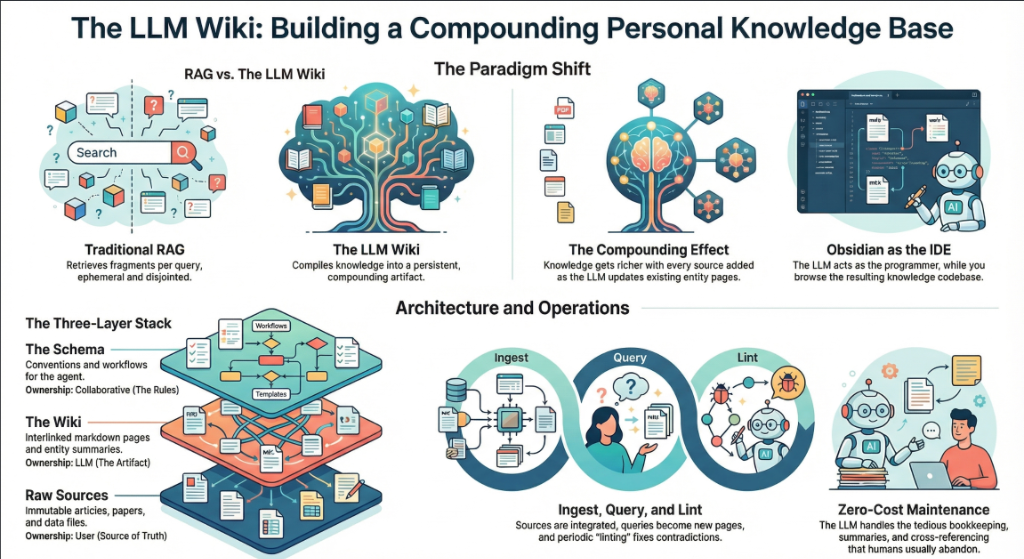
RAG (Retrieval-Augmented Generation) is the dominant pattern for connecting LLMs to private data. Tools like NotebookLM, ChatGPT file uploads, and most enterprise AI tools work this way. You upload documents. When you ask a question, the system searches for relevant chunks, feeds them to the LLM, and generates an answer.
The problem, as Karpathy identifies it: “The LLM is rediscovering knowledge from scratch on every question. There's no accumulation.”
Ask a question that requires synthesizing five documents, and the RAG system has to find and piece together the relevant fragments every time. Ask the same question tomorrow, and it does the same work again. Nothing is built up. Nothing compounds.
The Wiki Solution
Karpathy's alternative: “Instead of just retrieving from raw documents at query time, the LLM incrementally builds and maintains a persistent wiki — a structured, interlinked collection of markdown files that sits between you and the raw sources.”
When you add a new source, the LLM doesn't just index it for later retrieval. It reads it, extracts key information, and integrates it into the existing wiki — updating entity pages, revising topic summaries, noting where new data contradicts old claims, strengthening or challenging the evolving synthesis.
The key line: “The knowledge is compiled once and then kept current, not re-derived on every query.”
| Dimension | Traditional RAG | LLM Wiki |
|---|---|---|
| When knowledge is processed | At query time (on every question) | At ingest time (once per source) |
| Cross-references | Discovered ad-hoc per query | Pre-built and maintained |
| Contradictions | Puede que no se note | Marcado durante la ingesta |
| Acumulación de conocimiento | Ninguno — comienza de cero en cada consulta | Se acumula con cada fuente y consulta |
| Formato de salida | Respuestas del chat (efímeras) | Archivos markdown persistentes (duraderos) |
| Quién lo mantiene | El sistema (caja negra) | El LLM (transparente, editable) |
| Rol humano | Subir y consultar | Curar, explorar y cuestionar |
| Ejemplos | NotebookLM, ChatGPT uploads | Karpathy's LLM Wiki pattern |
The Compounding Effect
Karpathy emphasizes this repeatedly: “The wiki is a persistent, compounding artifact.” The cross-references are already there. The contradictions have already been flagged. The synthesis already reflects everything you've read. Every source you add and every question you ask makes the wiki richer.
The Human-LLM Division of Labor
Karpathy's description of the workflow: “You never (or rarely) write the wiki yourself — the LLM writes and maintains all of it. You're in charge of sourcing, exploration, and asking the right questions. The LLM does all the grunt work — the summarizing, cross-referencing, filing, and bookkeeping.”
His daily setup: “I have the LLM agent open on one side and Obsidian open on the other. The LLM makes edits based on our conversation, and I browse the results in real time — following links, checking the graph view, reading the updated pages.”
Then the analogy that captures the whole system: “Obsidian is the IDE; the LLM is the programmer; the wiki is the codebase.”
4. The Three-Layer Architecture
Karpathy defines three distinct layers. Each has a clear owner and a clear purpose.
Layer 1: Raw Sources
Karpathy writes: “Your curated collection of source documents. Articles, papers, images, data files. These are immutable — the LLM reads from them but never modifies them. This is your source of truth.”
The raw/ directory is sacred. The LLM can read anything in it but must never write to it. This is critical because it means you always have the original sources to verify against. If the LLM makes a mistake in the wiki, you can trace back to the raw source and correct it.
raw/
articles/
2026-03-attention-is-all-you-need-revisited.md
2026-04-scaling-laws-update.md
papers/
transformer-architecture-v2.pdf
mixture-of-experts-survey.pdf
repos/
llama-3-readme.md
vllm-architecture-notes.md
data/
benchmark-results.csv
model-comparison.json
images/
transformer-diagram.png
scaling-curves.png
assets/
# Downloaded images from clipped articles
Layer 2: The Wiki
Karpathy writes: “A directory of LLM-generated markdown files. Summaries, entity pages, concept pages, comparisons, an overview, a synthesis. The LLM owns this layer entirely. It creates pages, updates them when new sources arrive, maintains cross-references, and keeps everything consistent. You read it; the LLM writes it.”
wiki/
index.md # Master catalog of all pages
log.md # Chronological activity record
overview.md # High-level synthesis
concepts/
attention-mechanism.md
mixture-of-experts.md
scaling-laws.md
tokenization.md
entities/
openai.md
anthropic.md
google-deepmind.md
sources/
summary-attention-revisited.md
summary-scaling-update.md
comparisons/
gpt4-vs-claude-vs-gemini.md
rag-vs-finetuning.md
The key insight: the wiki sits between you and the raw sources. You don't read raw papers to answer questions — you read the wiki. The wiki is pre-digested, cross-referenced, and synthesized. It's what a research assistant would produce if they read everything and organized it for you.
Layer 3: The Schema
Karpathy writes: “A document (e.g. CLAUDE.md for Claude Code or AGENTS.md for Codex) that tells the LLM how the wiki is structured, what the conventions are, and what workflows to follow when ingesting sources, answering questions, or maintaining the wiki. This is the key configuration file — it's what makes the LLM a disciplined wiki maintainer rather than a generic chatbot.”
The schema is the most important piece. Without it, the LLM is just a chatbot that happens to have access to files. With it, the LLM becomes a systematic wiki maintainer that follows consistent rules across sessions.
Karpathy adds: “You and the LLM co-evolve this over time as you figure out what works for your domain.” The schema isn't static. You start with something basic and refine it as you learn what page structures, frontmatter fields, and workflows work best.
# LLM Wiki Schema
## Project Structure
- `raw/` — immutable source documents. NEVER modify.
- `wiki/` — LLM-generated wiki. You own this entirely.
- `wiki/index.md` — master catalog. Update on every ingest.
- `wiki/log.md` — append-only activity log.
## Page Conventions
Every wiki page MUST have YAML frontmatter:
```
---
title: Page Title
type: concept | entity | source-summary | comparison
sources: [list of raw/ files referenced]
related: [list of wiki pages linked]
created: YYYY-MM-DD
updated: YYYY-MM-DD
confidence: high | medium | low
---
```
## Ingest Workflow
When I say "ingest [filename]":
1. Read the source file in raw/
2. Discuss key takeaways with me
3. Create/update a summary page in wiki/sources/
4. Update wiki/index.md
5. Actualiza todas las páginas de conceptos y entidades relevantes
6. Añade una entrada a wiki/log.md
## Flujo de trabajo de consulta
Cuando haga una pregunta:
1. Lee wiki/index.md para encontrar páginas relevantes
2. Lee esas páginas
3. Sintetiza una respuesta con citas de [[wiki-link]]
4. Si la respuesta es valiosa, ofrece archivarla como
una nueva página de la wiki
## Flujo de trabajo de Lint
Cuando diga "lint":
1. Check for contradictions between pages
2. Find orphan pages with no inbound links
3. List concepts mentioned but lacking own page
4. Check for stale claims superseded by newer sources
5. Suggest questions to investigate next
If you're using OpenAI Codex, the same schema goes into AGENTS.md instead. If you're using OpenCode, it goes in OPENCODE.md. The content is the same — only the filename changes based on which agent reads it.
Why the Schema Matters
Without a schema, every session with the LLM starts from zero. The LLM doesn't know your conventions, your page formats, or your workflows. You end up re-explaining everything. The schema is persistent memory — it carries knowledge across sessions and ensures consistency. It's what turns a generic LLM into your wiki maintainer.
5. Operations: Ingest, Query, Lint
Karpathy defines three core operations. Each one has a clear trigger, a clear process, and a clear output.
Operation 1: Ingest
Karpathy writes: “You drop a new source into the raw collection and tell the LLM to process it. An example flow: the LLM reads the source, discusses key takeaways with you, writes a summary page in the wiki, updates the index, updates relevant entity and concept pages across the wiki, and appends an entry to the log. A single source might touch 10-15 wiki pages.”
This is the most important operation. A single ingest doesn't just create one new page — it ripples across the entire wiki. If you ingest a paper about a new transformer variant, the LLM might:
- Create a new summary page for the paper
- Update the “Attention Mechanism” concept page with the new variant
- Update the “Scaling Laws” page if the paper contains new benchmarks
- Update the entity page for the paper's authors or their organization
- Update the comparison page if the paper benchmarks against known models
- Agregar enlaces desde páginas existentes que ahora referencian el nuevo contenido
- Actualizar el índice con la nueva página
- Registrar la ingesta en el log de actividad
Karpathy añade una preferencia personal: “Prefiero ingerir fuentes una por una y mantenerme involucrado — leo los resúmenes, reviso las actualizaciones y guío al LLM sobre qué enfatizar. Pero también podrías realizar una ingesta por lotes de muchas fuentes a la vez con menos supervisión.”
# Arrastras un nuevo artículo a raw/
> Acabo de añadir un nuevo artículo
> 2026-04-mixture-of-experts-efficiency.md
> Please ingest it.
# The LLM reads it, then responds:
Key takeaways from this article:
1. MoE models achieve 4x throughput at same quality
2. Routing efficiency improved 23% over Switch Transformer
3. Contradicts our wiki claim that dense models are
always more efficient below 10B params
I will:
- Create wiki/sources/summary-moe-efficiency-2026.md
- Update wiki/concepts/mixture-of-experts.md
- Update wiki/concepts/scaling-laws.md (new benchmarks)
- Flag contradiction on wiki/concepts/dense-vs-sparse.md
- Update wiki/index.md
- Append to wiki/log.md
Shall I proceed?
Operation 2: Query
Karpathy writes: “You ask questions against the wiki. The LLM searches for relevant pages, reads them, and synthesizes an answer with citations. Answers can take different forms depending on the question — a markdown page, a comparison table, a slide deck (Marp), a chart (matplotlib), a canvas.”
But the most important insight about queries is this: “Good answers can be filed back into the wiki as new pages.” A comparison you asked for, an analysis, a connection you discovered — these are valuable and shouldn't disappear into chat history. “This way your explorations compound in the knowledge base just like ingested sources do.”
This is the compounding loop: sources get ingested into the wiki, queries generate new insights, and the best insights get filed back as wiki pages. The wiki grows not just from external sources, but from your own exploration.
> Compare the routing strategies in MoE models across
> our sources. Which approach has the best efficiency/
> quality tradeoff?
# LLM reads wiki/concepts/mixture-of-experts.md,
# wiki/sources/summary-moe-*.md, produces analysis
[LLM produces a detailed comparison with a table]
> This is great. File it as a wiki page.
# El LLM crea wiki/comparisons/moe-routing-strategies.md
# Actualiza index.md, añade enlaces desde páginas relacionadas
Operación 3: Lint
Karpathy escribe: “Periódicamente, pide al LLM que realice un health-check de la wiki. Busca: contradicciones entre páginas, afirmaciones obsoletas que fuentes más recientes hayan superado, páginas huérfanas sin enlaces entrantes, conceptos importantes mencionados pero que carecen de su propia página, referencias cruzadas faltantes y vacíos de datos que podrían completarse con una búsqueda web.”
Él añade: “El LLM es bueno sugiri
> Lint the wiki.
Wiki Health Report (2026-04-04):
CONTRADICTIONS (2):
- concepts/dense-vs-sparse.md claims dense > sparse
below 10B, but sources/summary-moe-efficiency.md
shows opposite. Recommend: update with nuance.
- entities/openai.md says GPT-5 is 200B params,
but sources/summary-gpt5-leak.md says 300B.
ORPHAN PAGES (3):
- concepts/tokenization.md (no inbound links)
- sources/summary-old-bert-paper.md (no references)
- comparisons/old-gpu-benchmark.md (outdated)
MISSING PAGES (4):
- "RLHF" mentioned 12 times, no concept page
- "Constitutional AI" mentioned 8 times, no page
- "KV Cache" referenced in 5 sources, no page
- "Speculative Decoding" mentioned 3 times, no page
SUGGESTED INVESTIGATIONS:
- No sources on inference optimization post-2025
- Entity page for Meta AI is thin (only 1 source)
- The "Scaling Laws" page hasn't been updated in 3 weeks
6. Indexing and Logging
Karpathy defines two special files that are critical to how the LLM navigates the wiki. They serve different purposes and both are important.
index.md: The Content Catalog
Karpathy writes: “index.md is content-oriented. It's a catalog of everything in the wiki — each page listed with a link, a one-line summary, and optionally metadata like date or source count. Organized by category (entities, concepts, sources, etc.). The LLM updates it on every ingest.”
The key insight about index.md is how it replaces RAG: “When answering a query, the LLM reads the index first to find relevant pages, then drills into them. This works surprisingly well at moderate scale (~100 sources, ~hundreds of pages) and avoids the need for embedding-based RAG infrastructure.”
This is a practical revelation. Most people assume you need vector databases and embedding pipelines for knowledge retrieval. Karpathy says: at moderate scale, a well-maintained index file is enough. The LLM reads the index (a few thousand tokens), identifies relevant pages, and reads those directly.
# Wiki Index
## Concepts
- [[attention-mechanism]] — Self-attention, multi-head
attention y variantes (12 fuentes)
- [[mixture-of-experts]] — Arquitecturas MoE dispersas (sparse),
estrategias de enrutamiento (8 fuentes)
- [[scaling-laws]] — Leyes de Chinchilla y Kaplan,
entrenamiento óptimo en cómputo (15 fuentes)
- [[tokenization]] — BPE, SentencePiece, tiktoken
(3 fuentes)
## Entidades
- [[openai]] — Series GPT, historia organizacional
 
- [[anthropic]] — Claude series, constitutional AI
(14 sources)
- [[google-deepmind]] — Gemini, PaLM, AlphaFold
(18 sources)
## Source Summaries
- [[summary-attention-revisited]] — 2026-03-15
- [[summary-moe-efficiency]] — 2026-04-01
- [[summary-scaling-update]] — 2026-04-02
## Comparisons
- [[moe-routing-strategies]] — Filed from query 2026-04-04
- [[rag-vs-finetuning]] — Tradeoffs and use cases
log.md: The Activity Timeline
Karpathy writes: “log.md is chronological. It's an append-only record of what happened and when — ingests, queries, lint passes.”
He includes a practical tip: “If each entry starts with a consistent prefix (e.g. ## [2026-04-02] ingest | Article Title), the log becomes parseable with simple unix tools — grep "^## [" log.md | tail -5 gives you the last 5 entries.”
# Activity Log
## [2026-04-04] ingest | MoE Efficiency Article
Source: raw/articles/2026-04-mixture-of-experts-efficiency.md
Pages created: sources/summary-moe-efficiency.md
Pages updated: concepts/mixture-of-experts.md,
concepts/scaling-laws.md, concepts/dense-vs-sparse.md
Notes: Contradicts dense-vs-sparse claim below 10B params.
Flagged for review.
## [2026-04-04] query | Comparativa de enrutamiento MoE
Pregunta: Comparar estrategias de enrutamiento en modelos MoE
Páginas leídas: concepts/mixture-of-experts.md, 3 resúmenes de fuentes
Resultado: Archivado como comparisons/moe-routing-strategies.md
## [2026-04-04] lint | Chequeo de estado semanal
Contradicciones encontradas: 2
Páginas huérfanas: 3
Páginas faltantes sugeridas: 4
Investigaciones sugeridas: 3
## [2026-04-03] ingest | Actualización de Scaling Laws
Fuente: raw/articles/2026-04-scaling-laws-update.md
Páginas creadas: sources/summary-scaling-update.md
Páginas actualizadas: concepts/scaling-laws.md, entities/openai.md
El log también ayuda al LLM a entender qué se ha hecho recientemente. Al iniciar una nueva sesión, el LLM puede leer las últimas entradas del log para comprender el estado actual de la wiki.
7. El stack de herramientas
Karpathy menciona varias herramientas específicas en el gist. Aquí explicamos qué hace cada una y cómo encaja en el flujo de trabajo.
qmd: Búsqueda local para Markdown
Karpathy escribe: “qmd es una buena opción: es un motor de búsqueda local para archivos markdown con búsqueda híbrida BM25/vectorial y re-ranking por LLM, todo ejecutándose en el dispositivo. Tiene tanto una CLI (para que el LLM pueda ejecutar comandos) como un servidor MCP (para que el LLM pueda usarlo como una herramienta nativa).”
qmd fue creado por Tobi Lutke, CEO de Shopify. Está diseñado exactamente para el caso de uso que describe Karpathy: buscar en una colección de archivos markdown. Combina tres estrategias de búsqueda:
- Búsqueda de texto completo BM25 — coincidencia por palabras clave (rápida, precisa)
- Búsqueda semántica vectorial — coincidencia basada en el significado (encuentra conceptos relacionados)
- Re-ranking por LLM — el LLM califica los resultados por relevancia (máxima calidad)
Todo se ejecuta localmente a través de node-llama-cpp con modelos GGUF. Sin llamadas a API en la nube. Ningún dato sale de tu máquina.
# Instalar qmd globalmente
npm install -g @tobilu/qmd
# Añadir tu wiki como una colección
qmd collection add ./wiki --name my-research
# Búsqueda por palabras clave (BM25)
qmd search "mixture of experts routing"
# Búsqueda semántica (vectorial)
qmd vsearch "how do sparse models handle efficiency"
# Búsqueda híbrida con re-ranking de LLM (mejor calidad)
qmd query "cuáles son los tradeoffs de top-k vs expert-choice routing"
# Salida JSON para redireccionar a agentes LLM
qmd query "scaling laws" --json
# Iniciar qmd como un servidor MCP para Claude Code / etc.
qmd mcp
Karpathy señala que a pequeña escala, el index.md archivo es suficiente para la navegación. qmd se vuelve útil a medida que la wiki crece más allá de lo que el índice puede manejar — likely once you have hundreds of pages and the index itself is too large to read in one context window.
Obsidian Web Clipper
Karpathy writes: “Obsidian Web Clipper is a browser extension that converts web articles to markdown. Very useful for quickly getting sources into your raw collection.”
The Web Clipper is available for Chrome, Firefox, Safari, Edge, Brave, and Arc. When you clip an article, it:
- Converts the HTML to clean markdown
- Adds YAML frontmatter (author, date, source URL, tags)
- Preserves formatting, code blocks, and images
- Saves directly to your Obsidian vault (your
raw/directory)
It also supports templates — you can define different clipping formats for articles, recipes, academic papers, or any other content type. This makes ingestion consistent and predictable.
Downloading Images Locally
Karpathy gives a specific tip for images: “In Obsidian Settings → Files and links, set ‘Attachment folder path’ to a fixed directory (e.g. raw/assets/). Then in Settings → Hotkeys, search for ‘Download’ to find ‘Download attachments for current file’ and bind it to a hotkey (e.g. Ctrl+Shift+D).”
After clipping an article, you hit the hotkey and all images get downloaded to local disk. Why does this matter? Because it “lets the LLM view and reference images directly instead of relying on URLs that may break.”
He also notes a current limitation: “LLMs can't natively read markdown with inline images in one pass — the workaround is to have the LLM read the text first, then view some or all of the referenced images separately to gain additional context.”
Obsidian's Graph View
Karpathy writes: “Obsidian's graph view is the best way to see the shape of your wiki — what's connected to what, which pages are hubs, which are orphans.”
The graph view renders all your wiki pages as nodes and all [[wiki-links]] como aristas. Las páginas centrales (como conceptos clave con muchas conexiones) aparecen como nodos grandes. Las páginas huérfanas (sin enlaces) aparecen aisladas. Esto te da una sensación visual inmediata de dónde es densa tu base de conocimientos y dónde hay lagunas.
Marp: Presentaciones en Markdown
Karpathy escribe: “Marp es un formato de presentaciones basado en Markdown. Obsidian tiene un plugin para ello. Es útil para generar presentaciones directamente desde el contenido de la wiki.”
Marp te permite escribir presentaciones en Markdown puro. Separas las diapositivas con --- (líneas horizontales). Soporta temas, sintaxis de imágenes, tipografía matemática y exporta a HTML, PDF y PowerPoint.
---
marp: true
theme: default
---
# Mixture of Experts: Hallazgos clave
Compilado de 8 fuentes en la wiki de investigación
---
## Comparativa de estrategias de enrutamiento
| Estrategia | Rendimiento | Calidad |
|----------|-----------|---------|
| Top-K | 2.1x | Baseline |
| Expert Choice | 3.4x | +2% |
| Hash | 4.0x | -1% |
---
## Conclusión clave
El enrutamiento por Expert Choice ofrece el mejor equilibrio entre calidad y eficiencia
para modelos de más de 10B de parámetros.
Fuente: wiki/comparisons/moe-routing-strategies.md
Dataview: Consulta tu Frontmatter
Karpathy escribe: “Dataview es un plugin de Obsidian que ejecuta consultas sobre el frontmatter de las páginas. Si tu LLM añade frontmatter YAML a las páginas de la wiki (etiquetas, fechas, recuento de fuentes), Dataview puede generar tablas y listas dinámicas.”
Dataview trata tu bóveda como una base de datos. Si las páginas de tu wiki tienen un frontmatter como type: concept, sources: [file1, file2], confidence: high, entonces Dataview te permite consultarlo con un lenguaje similar a SQL:
# Listar todas las páginas de conceptos con recuento de fuentes
```dataview
TABLE length(sources) AS "Fuentes", confidence
FROM "wiki/concepts"
SORT length(sources) DESC
```
# Buscar páginas actualizadas en la última semana
```dataview
LIST
FROM "wiki"
WHERE updated >= date(today) - dur(7 days)
SORT updated DESC
```
# Buscar páginas de baja confianza que necesitan revisión
```dataview
TABLE title, sources
FROM "wiki"
WHERE confidence = "low"
SORT file.name ASC
```
Git: Control de versiones para el conocimiento
Karpathy escribe: “La wiki es simplemente un repositorio git de archivos markdown. Obtienes historial de versiones, ramificación y colaboración de forma gratuita.”
Esto es sutil pero potente. Dado que toda la wiki es markdown puro en un directorio, puedes usar:
git logpara ver cómo evolucionó la wiki con el tiempogit diffpara ver exactamente qué cambió en cada ingestagit revertpara revertir una mala compilacióngit branchpara explorar estructuras organizativas alternativasgit blamepara rastrear cuándo se añadió una afirmación específica- Usa GitHub/GitLab para la colaboración en equipo con pull requests
| Herramienta | Rol en la Wiki LLM | ¿Requerido? |
|---|---|---|
| Obsidian | IDE / visor para navegar por la wiki | Recomendado (cualquier visor de markdown funciona) |
| Obsidian Web Clipper | Ingestión: recorta artículos web a markdown | Recomendado para fuentes web |
| qmd | Motor de búsqueda para wikis grandes | Opcional (index.md funciona a pequeña escala) |
| Marp | Salida: genera presentaciones desde la wiki | Opcional |
| Dataview | Consulta frontmatter para dashboards | Opcional |
| Git | Control de versiones para la wiki | Recomendado |
| Agente LLM | Mantenedor de la wiki (Claude Code, Codex, etc.) | Requerido |
8. Casos de uso que Karpathy enumera
El gist enumera cinco contextos específicos donde se aplica este patrón. Veamos cada uno con detalles de implementación.
Base de conocimientos personal
Karpathy escribe: “Hacer un seguimiento de tus propios objetivos, salud, psicología, superación personal — archivando entradas de diario, artículos, notas de podcasts y construyendo una imagen estructurada de ti mismo a lo largo del tiempo.”
Implementación: Crea una wiki personal con secciones para objetivos, métricas de salud, notas de lectura y reflexiones. Ingiere entradas de diario, artículos que leas y transcripciones de podcasts. El LLM construye páginas de conceptos para temas recurrentes (“calidad del sueño”, “rutina de ejercicio”, “objetivos profesionales”) y los conecta a lo largo del tiempo. Haz preguntas como: “¿Qué patrones veo en mis niveles de energía durante los últimos 3 meses?”
Investigación
Karpathy escribe: “Profundizar en un tema durante semanas o meses — leyendo papers, artículos, informes y construyendo incrementalmente una wiki exhaustiva con una tesis en evolución.”
Este es el caso de uso principal de Karpathy. Su wiki de investigación tiene ~100 artículos y ~400,000 palabras sobre un solo tema de investigación de ML. La wiki construye una tesis en evolución que se refina con cada nueva fuente.
Leer un libro
Karpathy escribe: “Archivar cada capítulo a medida que avanzas, creando páginas para personajes, temas, hilos argumentales y cómo se conectan. Al final, tienes una wiki complementaria muy completa.”
Él usa un ejemplo vívido: “Piensa en wikis de fans como Tolkien Gateway — miles de páginas entrelazadas que cubren personajes, lugares, eventos, idiomas, construidas por una comunidad de voluntarios a lo largo de los años. Podrías construir algo así personalmente mientras lees, con el LLM encargándose de todas las referencias cruzadas y el mantenimiento.”
Imagina leer Guerra y paz. Después de cada capítulo, ingieres tus notas. El LLM mantiene páginas de personajes (siguiendo su desarrollo a través de los capítulos), páginas de temas (conectando ideas recurrentes) y una página de cronología. Al final, tienes una wiki complementaria personal que rivaliza con un análisis literario.
Negocios / Equipo
Karpathy escribe: “Una wiki interna mantenida por LLMs, alimentada por hilos de Slack, transcripciones de reuniones, documentos de proyectos y llamadas de clientes. Posiblemente con humanos en el ciclo revisando las actualizaciones. La wiki se mantiene al día porque el LLM realiza el mantenimiento que nadie en el equipo quiere hacer.”
Esta es la versión empresarial. Las fuentes son internas: exportaciones de Slack, grabaciones de reuniones (transcritas), documentos de proyectos, registros de llamadas de clientes y datos de CRM. La wiki compila registros de decisiones, cronogramas de proyectos, insights de clientes y conocimiento del equipo. El human-in-the-loop revisa las actualizaciones antes de que formen parte de la wiki.
Todo lo demás
Karpathy escribe: “Análisis competitivo, due diligence, planificación de viajes, notas de cursos, investigaciones profundas sobre hobbies — cualquier cosa en la que estés acumulando conocimiento a lo largo del tiempo y quieras tenerlo organizado en lugar de disperso.”
The pattern is universal: if you're collecting information from multiple sources over time and want it structured, an LLM Wiki applies. We covered detailed implementations for competitive intelligence, legal compliance, academic literature reviews, and more in our previous article.
9. Step-by-Step Implementation Guide
Here is how to build a working LLM Wiki from scratch, following Karpathy's architecture exactly.
Step 1: Set Up the Directory Structure
mkdir -p my-research/raw/articles
mkdir -p my-research/raw/papers
mkdir -p my-research/raw/repos
mkdir -p my-research/raw/assets
mkdir -p my-research/wiki/concepts
mkdir -p my-research/wiki/entities
mkdir -p my-research/wiki/sources
mkdir -p my-research/wiki/comparisons
touch my-research/wiki/index.md
touch my-research/wiki/log.md
touch my-research/wiki/overview.md
# Initialize git
cd my-research && git init
# Open in Obsidian as a vault
Step 2: Create the Schema File
Create a CLAUDE.md (for Claude Code), AGENTS.md (for Codex), or equivalent schema file at the root of your project. Use the example schema from Section 4 above as a starting point. Customize it for your domain.
Step 3: Configure Obsidian
- Install Obsidian and open
my-research/as a vault - Install Web Clipper browser extension
- Settings → Files and links → Set “Attachment folder path” to
raw/assets - Settings → Hotkeys → Bind “Download attachments for current file” to
Ctrl+Shift+D - Instala el plugin Marp Slides (opcional, para presentaciones)
- Instala el plugin Dataview (opcional, para consultas de frontmatter)
Paso 4: Ingiere tu primera fuente
- Captura un artículo web usando Web Clipper → guardar en
raw/articles/ - Presiona
Ctrl+Shift+Dpara descargar imágenes localmente - Abre tu agente LLM (Claude Code, Codex, OpenCode, etc.)
- Dile: “Ingiere raw/articles/[filename].md”
- Revisa el resumen, el énfasis de la guía y aprueba las actualizaciones de la wiki
- Check the wiki in Obsidian — browse the new pages, check the graph view
- Commit:
git add . && git commit -m “ingest: [article title]”
Step 5: Build Up Over Time
Repeat the ingest process for each new source. After 10-20 sources, start querying the wiki. After 50+, consider adding qmd for search. Run lint checks weekly.
The 10-Source Test
Start with just 10 sources on one topic. Ingest them all. Then ask the wiki a question that requires synthesizing multiple sources. If the structured wiki gives you an insight you wouldn't have gotten by reading the sources individually, the system is working. Scale from there.
Step 6: Evolve the Schema
As you use the wiki, you'll discover what works and what doesn't. Update the schema (CLAUDE.md / AGENTS.md) accordingly. Maybe you need a new page type. Maybe your frontmatter needs more fields. Maybe your ingest workflow should include a step you didn't anticipate. Karpathy says: “You and the LLM co-evolve this over time.”
10. The Memex Connection (1945)
Karpathy closes the gist with a historical connection that puts the whole idea in perspective:
Karpathy's Words
“The idea is related in spirit to Vannevar Bush's Memex (1945) — a personal, curated knowledge store with associative trails between documents. Bush's vision was closer to this than to what the web became: private, actively curated, with the connections between documents as valuable as the documents themselves. The part he couldn't solve was who does the maintenance. The LLM handles that.”
In 1945, Vannevar Bush — an MIT engineer who directed the US Office of Scientific Research and Development — published an article in The Atlantic called “As We May Think”. He described a hypothetical device called the Memex (memory + index): a desk-sized machine where an individual could store all their books, records, and communications on microfilm, search them rapidly, and create associative trails — secuencias vinculadas de documentos con anotaciones personales.
La idea clave de Bush fue que la mente humana funciona mediante asociación, not alphabetical order. Hierarchical filing systems (like library catalogs) force you into rigid categories. The Memex would let you create your own paths through knowledge — linking a chemistry paper to an economics report to a historical essay, following your own logic.
Su famosa cita: “Aparecerán formas de enciclopedias totalmente nuevas, ya preparadas con una red de senderos asociativos que las recorren.”
El Memex inspiró directamente a:
- Douglas Engelbart — quien leyó el artículo de Bush en 1945, “se contagió de la idea” y pasó a inventar el ratón de computadora y el concepto de computación personal
- Ted Nelson — quien acuñó el término “hipertexto” en 1965, inspirado directamente por los senderos asociativos del Memex
- Tim Berners-Lee — cuya World Wide Web (1989) implementó el hipertexto a escala global
Pero como observa Karpathy, la web se volvió pública y caótica en lugar de privada y curada. Bush imaginó algo personal — tu conocimiento, tus conexiones, tus senderos. La LLM Wiki está más cerca de esa visión original. Es privada, se cura activamente y las conexiones entre documentos son tan valiosas como los documentos mismos.
La pieza faltante que Bush no pudo resolver in 1945: ¿quién se encarga del mantenimiento? Crear senderos asociativos, actualizar conexiones, mantener todo consistente — es un trabajo manual y tedioso. Los humanos abandonan los sistemas de conocimiento porque la carga de mantenimiento crece más rápido que el valor. Como escribe Karpathy: “Los LLM no se ab
11. Community Ideas from the Gist
The GitHub gist has a Discussion tab that Karpathy specifically called out: “People can adjust the idea or contribute their own in the Discussion which is cool.” Here are some notable contributions from the community:
The .brain Folder Pattern
A developer shared a related pattern: a .brain folder at the root of a project containing markdown files (index.md, architecture.md, decisions.md, changelog.md, deployment.md) that acts as persistent memory across AI sessions. The core rule: “Read .brain before making changes. Update .brain after making changes. Never commit it to git.” This is a lighter-weight version of Karpathy's schema — project-specific rather than knowledge-base-specific.
Inter-Agent Communication via Gists
Otro colaborador describió el uso de GitHub gists como canales de comunicación entre diferentes agentes de IA. A mitad del desarrollo, publican gists con diagramas (como SVGs) y contexto, y luego los pasan entre diferentes frontends de IA (Claude, Grok, etc.). Esto extiende el concepto de idea file de Karpathy — los gists se convierten no solo en comunicación de humano a agente, sino en comunicación de agente a agente.
La Nota de Añadir y Revisar
Un miembro de la comunidad señaló que la publicación anterior del blog de Karpathy de 2025, “The Append and Review Note” (en kar), feels like it should be part of this pattern. That post described a simpler workflow: an append-only notes file that gets periodically reviewed and reorganized. The LLM Wiki is the evolved version — the LLM does the review and reorganization automatically.
Team Knowledge Sharing
One question from the community: “How can I share the knowledge base with my team? Currently we create a RAG and then an MCP server.” Since the wiki is just a git repo, the natural answer is: push it to a shared repository. Team members can browse it in Obsidian, and the LLM agent can be configured to accept updates from multiple contributors. The schema file defines the rules; Git handles collaboration.
12. What This Means
The “Idea File” as a New Open Source Format
Karpathy may have accidentally created a new format for sharing ideas in the AI era. Instead of sharing code (which is implementation-specific), you share a structured description of the pattern, designed to be interpreted by an LLM agent. The agent adapts it to the user's environment, tools, and preferences. This is open ideas rather than open source.
Why This Pattern Will Spread
Karpathy explains exactly why wikis maintained by LLMs succeed where human-maintained wikis fail: “The tedious part of maintaining a knowledge base is not the reading or the thinking — it's the bookkeeping. Updating cross-references, keeping summaries current, noting when new data contradicts old claims, maintaining consistency across dozens of pages. Humans abandon wikis because the maintenance burden grows faster than the value. LLMs don't get bored, don't forget to update a cross-reference, and can touch 15 files in one pass.”
From Karpathy's Tweet to Your Wiki
The gist ends with a deliberate call to action: “The right way to use this is to share it with your LLM agent and work together to instantiate a version that fits your needs. The document's only job is to communicate the pattern. Your LLM can figure out the rest.”
That's the whole point. Don't overthink the setup. Don't wait for someone to build the perfect tool. Copy the gist, paste it to your agent, and start with one topic and 10 sources. The LLM will figure out the directory structure, the page formats, the frontmatter schema. You provide the sources and the questions. The wiki builds itself.
The Takeaway
Karpathy's gist is not a blueprint — it's a seed. You give it to your LLM agent, and together you grow it into something specific to your domain. The wiki is a persistent, compounding artifact that gets richer with every source and every question. The LLM does all the bookkeeping. You do the thinking.
13. All Resources & Links
Every resource, tool, and reference mentioned in this article and in Karpathy's gist:
Karpathy's Posts
- Original tweet: “LLM Knowledge Bases” (Apr 3, 2026)
- Follow-up tweet: “Idea File” (Apr 4, 2026)
- GitHub Gist: LLM Wiki (the full idea file)
- Karpathy's Blog (bearblog)
Tools Mentioned
- qmd — Local markdown search engine by Tobi Lutke (BM25 + vector + LLM re-ranking)
- Obsidian — Markdown-based knowledge management app
- Obsidian Web Clipper — Browser extension for clipping web articles to markdown
- Marp — Framework de presentaciones basado en Markdown (exporta a HTML, PDF, PowerPoint)
- Dataview — Plugin de Obsidian para consultar el frontmatter de las páginas
- Tolkien Gateway — Ejemplo de una wiki interconectada exhaustiva
Conceptos & Historia
- “As We May Think” de Vannevar Bush (1945) — El artículo de The Atlantic que describió el Memex
- Memex (Wikipedia) — Historia e influencia del concepto de Bush
- Google NotebookLM — Herramienta de investigación basada en RAG (el enfoque que Karpathy está dejando atrás)
Plataformas de Agentes de LLM (para el archivo de esquema)
- Claude Code — utiliza
CLAUDE.mdpara instrucciones del proyecto - OpenAI Codex — utiliza
AGENTS.mdpara instrucciones del proyecto - OpenCode — utiliza
OPENCODE.mdpara instrucciones del proyecto - Cursor, Windsurf, etc. — cada uno tiene su propia convención de archivos de esquema
Nuestra cobertura
- Parte 1: Bases de conocimiento de LLM de Karpathy — El flujo de trabajo de IA post-código — Cobertura del tweet viral original
- Parte 2: Este artículo — Análisis profundo del gist de seguimiento y el archivo de ideas
Guías relacionadas
- Parte 1: Bases de conocimiento de LLM de Karpathy — Desglose del tweet original
- Vibe Coding en 2026: Guía completa — Donde comenzó el viaje en IA de Karpathy
- Guía de AGENTS.md — Archivos de esquema multi-herramienta para agentes de IA
- Dominando las habilidades de los agentes — Desarrolla habilidades para la compilación automatizada de wikis
- Crea tu propio servidor MCP — Expón tu wiki a asistentes de IA a través de MCP
- Orquestación de agentes — Configuraciones multi-agente para flujos de trabajo de conocimiento complejos
The weekly AI coding roundup
What shipped in AI and LLMs this week, and how to use it in your agent setup. No spam, unsubscribe anytime.