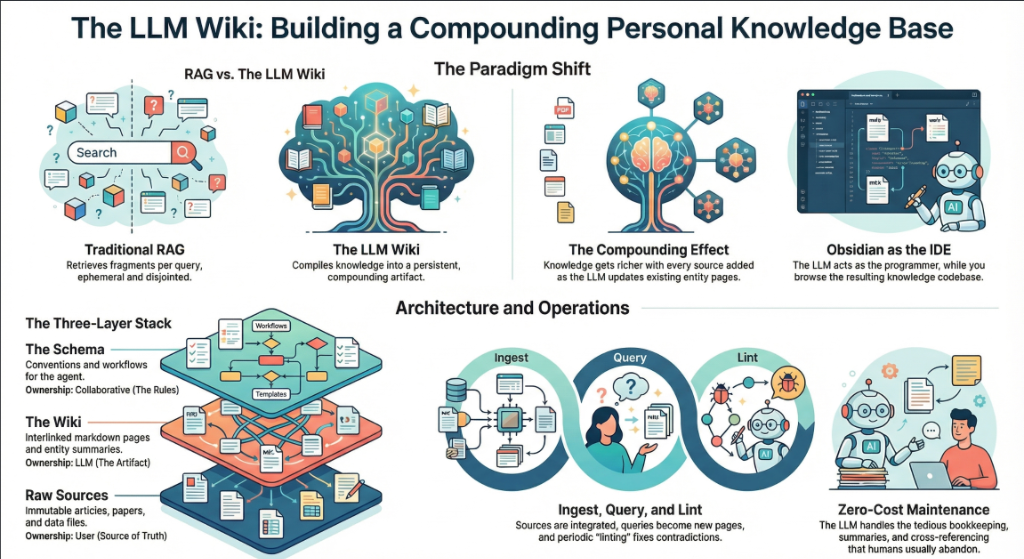
On April 3, 2026, Andrej Karpathy — co-founder of OpenAI, former AI lead at Tesla, and the person who coined “vibe coding” — posted a tweet titled “LLM Knowledge Bases” describing how he now uses LLMs to build personal knowledge wikis instead of just generating code. That tweet went massively viral. The next day, he followed up with something new: an “idea file” — a GitHub gist that lays out the complete architecture, philosophy, and tooling behind the concept. We covered the original tweet in our first article. This is the deep dive into the follow-up — every word, every tool, every implementation detail.
Get the latest on AI, LLMs & developer tools
New MCP servers, model updates, and guides like this one — delivered weekly.
🎬 Watch the Video Breakdown
Prefer reading? Keep scrolling for the full written guide with code examples.
1. The Viral Moment
The original tweet described Karpathy's shift from spending tokens on code to spending tokens on knowledge. He outlined a system where raw source documents (articles, papers, repos, datasets, images) get dropped into a raw/ directory, and an LLM incrementally “compiles” them into a structured wiki — a collection of interlinked .md files with summaries, backlinks, and concept articles.
LLM Knowledge Bases
— Andrej Karpathy (@karpathy) April 2, 2026
Something I'm finding very useful recently: using LLMs to build personal knowledge bases for various topics of research interest. In this way, a large fraction of my recent token throughput is going less into manipulating code, and more into manipulating…
The tweet exploded. Karpathy himself acknowledged it: “Wow, this tweet went very viral!” So he did something interesting — instead of just sharing the code or the app, he shared an idea file.
哇,这条推文彻底火了!
— Andrej Karpathy (@karpathy) 2026年4月4日
我想在一个 “idea file” 中分享这条推文的一个可能略有改进的版本。idea file 的核心理念是,在 LLM agent 时代,分享具体的代码/应用已经没那么重要/必要了,你只需要分享想法,然后…
后续推文链接到了一个名为 “LLM Wiki” — 的 GitHub gist,这是一份精心编写的文档,从概念层面描述了模式、架构、操作和工具
Read the Full Gist
Karpathy's complete idea file is available here: gist.github.com/karpathy/442a6bf555914893e9891c11519de94f. You can copy it directly and paste it to your LLM agent to get started.
2. Idea Files: A New Format for the Agent Era
Karpathy introduces a concept he calls an “idea file”. His exact words:
Karpathy's Definition
“The idea of the idea file is that in this era of LLM agents, there is less of a point/need of sharing the specific code/app, you just share the idea, then the other person's agent customizes & builds it for your specific needs.”
This is a subtle but profound shift. Traditionally, when a developer builds something useful, they share the implementation: a GitHub repo, a package on npm, a Docker image. The recipient clones it, configures it, and runs it. But in a world where everyone has access to an LLM agent (Claude Code, OpenAI Codex, OpenCode, Cursor, etc.), sharing the idea can be more useful than sharing the code.
Why? Because the idea is portable. The code is specific. Karpathy uses Obsidian on macOS with Claude Code. You might use VS Code on Linux with OpenAI Codex. A shared GitHub repo would need to be forked, adapted, and debugged. A shared idea file gets copy-pasted to your agent, and your agent builds a version customized to your exact setup.
Karpathy says the gist is “intentionally kept a little bit abstract/vague because there are so many directions to take this in.” That's not a bug — it's the design. The document's last line says it plainly: “The document's only job is to communicate the pattern. Your LLM can figure out the rest.”
He also mentions that the gist has a Discussion tab where people can “adjust the idea or contribute their own,” turning it into a collaborative idea space. This is a new kind of open source — not open code, but open ideas, designed to be interpreted and instantiated by AI agents.
How to Use the Idea File
Karpathy says you can “give this to your agent and it can build you your own LLM wiki and guide you on how to use it.” In practice, that means:
- Copy the gist content (the full
llm-wiki.mdfile) - Paste it into your LLM agent's context (Claude Code, Codex, OpenCode, or any agentic IDE)
- Tell the agent: “Set up an LLM Wiki based on this idea file for [your topic]”
- The agent will create the directory structure, write the schema file, and guide you through first ingestion
# 在 Claude Code、OpenCode 或任何 Agent-First IDE 中:
> 这是一份来自 Karpathy 关于构建
> LLM Wiki 的想法文件。我想为 [机器学习
> 研究 / 竞品分析 / 读书笔记 / 等] 构建一个。
>
> [在此粘贴完整的 gist 内容]
>
> 请设置目录结构,创建
> 架构文件(CLAUDE.md 或 AGENTS.md),并引导我
> 完成第一个
3. The Core Idea: Wiki Beats RAG
The heart of the gist is a comparison between how most people use LLMs with documents today versus what Karpathy proposes. Let's break this down precisely.
The RAG Problem
Karpathy writes: “Most people's experience with LLMs and documents looks like RAG: you upload a collection of files, the LLM retrieves relevant chunks at query time, and generates an answer.”
RAG (Retrieval-Augmented Generation) is the dominant pattern for connecting LLMs to private data. Tools like NotebookLM, ChatGPT file uploads, and most enterprise AI tools work this way. You upload documents. When you ask a question, the system searches for relevant chunks, feeds them to the LLM, and generates an answer.
The problem, as Karpathy identifies it: “The LLM is rediscovering knowledge from scratch on every question. There's no accumulation.”
Ask a question that requires synthesizing five documents, and the RAG system has to find and piece together the relevant fragments every time. Ask the same question tomorrow, and it does the same work again. Nothing is built up. Nothing compounds.
The Wiki Solution
Karpathy's alternative: “Instead of just retrieving from raw documents at query time, the LLM incrementally builds and maintains a persistent wiki — a structured, interlinked collection of markdown files that sits between you and the raw sources.”
When you add a new source, the LLM doesn't just index it for later retrieval. It reads it, extracts key information, and integrates it into the existing wiki — updating entity pages, revising topic summaries, noting where new data contradicts old claims, strengthening or challenging the evolving synthesis.
The key line: “The knowledge is compiled once and then kept current, not re-derived on every query.”
| Dimension | Traditional RAG | LLM Wiki |
|---|---|---|
| When knowledge is processed | At query time (on every question) | At ingest time (once per source) |
| Cross-references | Discovered ad-hoc per query | Pre-built and maintained |
| Contradictions | 可能不会被察觉 | 在摄取过程中被标记 |
| 知识积累 | 无 — 每次查询都从零开始 | 随着每个来源和查询不断复利 |
| 输出格式 | 聊天回复(瞬时性) | 持久化 Markdown 文件(持久性) |
| 谁来维护 | 系统(黑盒) | LLM(透明、可编辑) |
| 人类的角色 | 上传并查询 | 策展、探索与提问 |
| 示例 | NotebookLM、ChatGPT 上传 | Karpathy's LLM Wiki 模式 |
复利效应
Karpathy 反复强调这一点: “Wiki 是一种持久的、具有复利效应的产物。” 交叉引用已经存在。矛盾点已被标记。综合内容已经反映了你读过的一切。你添加的每一个来源、提出的每一个问题,都让 Wiki 变得更加丰富。
人机协作的分工
Karpathy 对工作流的描述: “你从不(或很少)亲自编写 Wiki — LLM 负责编写和维护所有内容。你负责寻找来源、探索并提出正确的问题。LLM 承担所有的繁重工作 — 总结、交叉引用、归档和记录。”
他的日常配置: “我一边打开 LLM 代理,另一边打开 Obsidian。LLM 根据我们的对话进行编辑,我实时浏览结果 — 点击链接、查看关系图谱、阅读更新后的页面。”
接着是一个概括整个系统的类比: “Obsidian 是 IDE;LLM 是程序员;Wiki 是代码库。”
4. 三层架构
Karpathy 定义了三个不同的层级。每一层都有明确的所有者和用途。
第一层:原始来源
Karpathy 写道: “你精心挑选的源文件集合。文章、论文、图像、数据文件。这些是不可变的 — LLM 只读取它们,绝不修改。这是你的事实来源。”
这个 raw/ 目录是神圣不可侵犯的。LLM 可以读取其中的任何内容,但绝不能写入。这至关重要,因为这意味着你始终拥有原始来源进行核实。如果 LLM 在 Wiki 中犯了错,你可以追溯到原始来源并予以纠正。
raw/
articles/
2026-03-attention-is-all-you-need-revisited.md
2026-04-scaling-laws-update.md
papers/
transformer-architecture-v2.pdf
mixture-of-experts-survey.pdf
repos/
llama-3-readme.md
vllm-architecture-notes.md
data/
benchmark-results.
model-comparison.json
images/
transformer-diagram.png
scaling-curves.png
assets/
# Downloaded images from clipped articles
Layer 2: The Wiki
Karpathy writes: “A directory of LLM-generated markdown files. Summaries, entity pages, concept pages, comparisons, an overview, a synthesis. The LLM owns this layer entirely. It creates pages, updates them when new sources arrive, maintains cross-references, and keeps everything consistent. You read it; the LLM writes it.”
wiki/
index.md # Master catalog of all pages
log.md # Chronological activity record
overview.md # High-level synthesis
concepts/
attention-mechanism.md
mixture-of-experts.md
scaling-laws.md
tokenization.md
entities/
openai.md
anthropic.md
google-deepmind.md
sources/
summary-attention-revisited.md
summary-scaling-update.md
comparisons/
gpt4-vs-claude-vs-gemini.md
rag-vs-finetuning.md
核心见解:Wiki 位于 之间 你与原始资料之间。你不再通过阅读原始论文来回答问题 — 而是阅读 Wiki。Wiki 经过了预先消化、交叉引用和综合汇总。它就像是一个研究助手在阅读完所有内容并为你整理后的产出。
第 3 层:Schema
Karpathy 写道: “一份文档(例如 Claude Code 的 CLAUDE.md 或 Codex 的 AGENTS.md),用于告知 LLM Wiki 的结构、规范,以及在摄取资料、回答问题或维护 Wiki 时应遵循的工作流。这是关键的配置文件 — 正是它让 LLM 成为一个守纪律的 Wiki 维护者,而非普通的聊天机器人。”
Schema 是最重要的部分。没有它,LLM 只是一个碰巧能访问文件的聊天机器人。有了它,LLM 就会变成一个 系统化的 Wiki 维护者 能够在不同会话中遵循一致的规则。
Karpathy 补充道: “随着你逐渐摸索出适合自己领域的方案,你和 LLM 会共同推动它的演进。” Schema 不是静态的。你可以从基础版本开始,随着对页面结构、frontmatter 字段和工作流的深入了解,不断对其进行优化。
# LLM Wiki Schema
## 项目结构
- `raw/` — 不可变的源文档。严禁修改。
- `wiki/` — LLM 生成的 Wiki。你拥有其完全所有权。
- `wiki/index.md` — 主目录。每次摄取时更新。
- `wiki/log.md` — 仅限追加的活动日志。
## 页面规范
每个 Wiki 页面必须包含 YAML frontmatter:
```
---
title: Page Title
type: concept | entity | source-summary | comparison
sources: [引用的 raw/ 文件列表]
related: [链接的 Wiki 页面列表]
created: YYYY-MM-DD
updated: YYYY-MM-DD
confidence: high | medium | low
---
```
## 摄取工作流
当我说 "ingest [文件名]" 时:
1. 读取 raw/ 中的源文件
2. 与我讨论核心要点
3. 在 wiki/sources/ 中创建/更新摘要页面
4. 更新 wiki/index.md
5. 更新所有相关的概念和实体页面
6. 在 wiki/log.md 中追加一条记录
## 查询工作流
当我提问时:
1. 阅读 wiki/index.md 以查找相关页面
2. 阅读这些页面
3. 综合答案并附上 [[wiki-link]] 引用
4. 如果答案有价值,提议将其归档为
一个新的 wiki 页面
## Lint 工作流
当我说 "lint" 时:
1. 检查页面之间是否存在矛盾
2. 查找没有入站链接的孤立页面
3. 列出已提及但缺少独立页面的概念
4. 检查被新来源取代的陈旧主张
5. 建议下一步要调研的问题
如果你正在使用 OpenAI Codex,同样的 schema 将存入 AGENTS.md 。如果你正在使用 OpenCode,它将存入 OPENCODE.md。内容是相同的 — 只是文件名会根据读取它的 agent 而变化。
为什么 Schema 很重要
如果没有 schema,与 LLM 的每一次会话都将从零开始。LLM 不了解你的约定、页面格式或工作流。你最终不得不反复解释一切。Schema 是持久化记忆 — 它跨会话承载知识并确保一致性。正是它将通用的 LLM 变成了 你的 wiki 维护者。
5. 操作:Ingest、Query、Lint
Karpathy 定义了三个核心操作。每一个都有明确的触发条件、处理流程和输出结果。
操作 1:Ingest
Karpathy 写道: “你将一个新来源放入原始集合中,并让 LLM 处理它。一个示例流程:LLM 阅读来源,与你讨论核心要点,在 wiki 中编写摘要页面,更新索引,更新整个 wiki 中相关的实体和概念页面,并在日志中追加一条记录。单个来源可能会涉及 10-15 个 wiki 页面。”
这是最重要的操作。单次 ingest 不仅仅是创建一个新页面 — 它会波及整个 wiki。如果你 ingest 了一篇关于新 transformer 变体的论文,LLM 可能会:
- 为该论文创建一个新的摘要页面
- 使用新变体更新 “Attention Mechanism” 概念页面
- 如果论文包含新的基准测试,则更新 “Scaling Laws” 页面
- 更新论文作者或其所属机构的实体页面
- 如果论文针对已知模型进行了基准测试,则更新对比页面
- 从引用新内容的现有页面中添加链接
- 使用新页面更新索引
- 在活动日志中记录导入 (ingest)
Karpathy 补充了一个个人偏好: “我更喜欢一次导入一个来源并保持参与 — 我会阅读摘要、检查更新,并引导 LLM 重点关注哪些内容。但你也可以在较少监督的情况下一次性批量导入多个来源。”
# 你将一篇新文章放入 raw/ 目录
> 我刚刚在 raw/articles/ 中添加了一篇新文章
> 2026-04-mixture-of-experts-efficiency.md
> 请导入它。
# LLM 读取它,然后回复:
本文的核心要点:
1. MoE 模型在相同质量下实现了 4 倍的吞吐量
2. 路由效率比 Switch Transformer 提高了 23%
3. 与我们 wiki 中关于稠密模型 (dense models) 的说法相矛盾:
即在 10B 参数以下总是更高效
我将执行以下操作:
- 创建 wiki/sources/summary-moe-efficiency-2026.md
- 更新 wiki/concepts/mixture-of-experts.md
- 更新 wiki/concepts/scaling-laws.md (新增基准测试)
- 在 wiki/concepts/dense-vs-sparse.md 中标记矛盾点
- 更新 wiki/index.md
- 追加到 wiki/log.md
是否继续?
操作 2:查询 (Query)
Karpathy 写道: “你针对 wiki 提出问题。LLM 会搜索相关页面,阅读并综合出带有引用的答案。根据问题的不同,答案可以采取不同的形式 — Markdown 页面、对比表、幻灯片 (Marp)、图表 (matplotlib) 或画布 (canvas)。”
但关于查询最重要的见解是: “优秀的答案可以作为新页面归档回 wiki 中。” 你要求的对比、分析或发现的关联 — 这些都是宝贵的,不应消失在聊天记录中。 “这样,你的探索就会像导入的来源一样,在知识库中产生复利效应。”
这就是复利循环:来源被导入 wiki,查询产生新的见解,而最好的见解被归档回 wiki 页面。Wiki 的增长不仅源于外部来源,还源于你自己的探索。
> 对比我们所有来源中
> MoE 模型的路由策略。哪种方法具有最佳的效率/
> 质量权衡?
# LLM 读取 wiki/concepts/mixture-of-experts.md,
# wiki/sources/summary-moe-*.md,并生成分析
[LLM 生成带有表格的详细对比]
> 太棒了。将其归档为 wiki 页面。
# LLM 创建 wiki/comparisons/moe-routing-strategies.md
# 更新 index.md,从相关页面添加链接
操作 3:Lint
Karpathy 写道: “定期让 LLM 对 wiki 进行健康检查。寻找:页面之间的矛盾、被新来源取代的陈旧主张、没有入站链接的孤立页面、提到但缺少独立页面的重要概念、缺失的交叉引用,以及可以通过网络搜索填补的数据空白。”
他补充道: “LLM 擅长建议需要调查的新问题和需要寻找的新来源。这能让 wiki 在增长过程中保持健康。&rdquo
> Lint the wiki.
Wiki Health Report (2026-04-04):
CONTRADICTIONS (2):
- concepts/dense-vs-sparse.md claims dense > sparse
below 10B, but sources/summary-moe-efficiency.md
shows opposite. Recommend: update with nuance.
- entities/openai.md says GPT-5 is 200B params,
but sources/summary-gpt5-leak.md says 300B.
ORPHAN PAGES (3):
- concepts/tokenization.md (no inbound links)
- sources/summary-old-bert-paper.md (no references)
- comparisons/old-gpu-benchmark.md (outdated)
MISSING PAGES (4):
- "RLHF" mentioned 12 times, no concept page
- "Constitutional AI" mentioned 8 times, no page
- "KV Cache" referenced in 5 sources, no page
- "Speculative Decoding" mentioned 3 times, no page
SUGGESTED INVESTIGATIONS:
- No sources on inference optimization post-2025
- Entity page for Meta AI is thin (only 1 source)
- The "Scaling Laws" page hasn't been updated in 3 weeks
6. Indexing and Logging
Karpathy defines two special files that are critical to how the LLM navigates the wiki. They serve different purposes and both are important.
index.md: The Content Catalog
Karpathy writes: “index.md is content-oriented. It's a catalog of everything in the wiki — each page listed with a link, a one-line summary, and optionally metadata like date or source count. Organized by category (entities, concepts, sources, etc.). The LLM updates it on every ingest.”
The key insight about index.md is how it replaces RAG: “When answering a query, the LLM reads the index first to find relevant pages, then drills into them. This works surprisingly well at moderate scale (~100 sources, ~hundreds of pages) and avoids the need for embedding-based RAG infrastructure.”
This is a practical revelation. Most people assume you need vector databases and embedding pipelines for knowledge retrieval. Karpathy says: at moderate scale, a well-maintained index file is enough. The LLM reads the index (a few thousand tokens), identifies relevant pages, and reads those directly.
# Wiki Index
## Concepts
- [[attention-mechanism]] — 自注意力、多头
注意力及其变体 (12 个来源)
- [[mixture-of-experts]] — 稀疏 MoE 架构,
路由策略 (8 个来源)
- [[scaling-laws]] — Chinchilla、Kaplan 定律,
计算最优训练 (15 个来源)
- [[tokenization]] — BPE、SentencePiece、tiktoken
(3 个来源)
## 实体
- [[openai]] — GPT 系列,组织历史
(20 个来源)
- [[anthropic]] — Claude 系列,宪法 AI
(14 个来源)
- [[google-deepmind]] — Gemini, PaLM, AlphaFold
(18 个来源)
## 来源摘要
- [[summary-attention-revisited]] — 2026-03-15
- [[summary-moe-efficiency]] — 2026-04-01
- [[summary-scaling-update]] — 2026-04-02
## 对比
- [[moe-routing-strategies]] — 归档自查询 2026-04-04
- [[rag-vs-finetuning]] — 权衡与使用场景
log.md: 活动时间线
Karpathy 写道: “log.md 是按时间顺序排列的。它是一个仅限追加的记录,记录了发生的事情和时间 — 包括 ingest、查询、lint 检查。”
他分享了一个实用技巧: “如果每个条目都以一致的前缀开头(例如: ## [2026-04-02] ingest | 文章标题),那么日志就可以通过简单的 unix 工具进行解析 — grep "^## [" log.md | tail -5 即可获取最后 5 条记录。”
# 活动日志
## [2026-04-04] ingest | MoE 效率文章
来源:raw/articles/2026-04-mixture-of-experts-efficiency.md
已创建页面:sources/summary-moe-efficiency.md
已更新页面:concepts/mixture-of-experts.md,
concepts/scaling-laws.md, concepts/dense-vs-sparse.md
Notes: Contradicts dense-vs-sparse claim below 10B params.
Flagged for review.
## [2026-04-04] query | MoE 路由策略对比
问题:对比 MoE 模型中的路由策略
已读页面:concepts/mixture-of-experts.md,3 份源码摘要
输出:归档为 comparisons/moe-routing-strategies.md
## [2026-04-04] lint | 每周健康检查
发现矛盾点:2
孤立页面:3
建议补充页面:4
建议调查项:3
## [2026-04-03] ingest | Scaling Laws
Source: raw/articles/2026-04-scaling-laws-update.md
Pages created: sources/summary-scaling-update.md
Pages updated: concepts/scaling-laws.md, entities/openai.md
The log also helps the LLM understand what's been done recently. When you start a new session, the LLM can read the last few log entries to understand the current state of the wiki.
7. The Tool Stack
Karpathy mentions several specific tools in the gist. Here's what each one does and how it fits into the workflow.
qmd: Local Search for Markdown
Karpathy writes: “qmd is a good option: it's a local search engine for markdown files with hybrid BM25/vector search and LLM re-ranking, all on-device. It has both a CLI (so the LLM can shell out to it) and an MCP server (so the LLM can use it as a native tool).”
qmd was built by Tobi Lutke, CEO of Shopify. It's designed exactly for the use case Karpathy describes: searching over a collection of markdown files. It combines three search strategies:
- BM25 full-text search — keyword matching (fast, precise)
- Vector semantic search — meaning-based matching (finds related concepts)
- LLM re-ranking — the LLM scores results for relevance (highest quality)
Everything runs locally via node-llama-cpp with GGUF models. No cloud API calls. No data leaves your machine.
# Install qmd globally
npm install -g @tobilu/qmd
# Add your wiki as a collection
qmd collection add ./wiki --name my-research
# Keyword search (BM25)
qmd search "mixture of experts routing"
# Semantic search (vector)
qmd vsearch "how do sparse models handle efficiency"
# 混合搜索与 LLM 重排序(质量最佳)
qmd query "what are the tradeoffs of top-k vs expert-choice routing"
# JSON 输出,用于通过管道传输给 LLM 代理
qmd query "scaling laws" --json
# 将 qmd 作为 MCP 服务器启动,供 Claude Code 等使用
qmd mcp
Karpathy 指出,在小规模下, index.md 文件足以用于导航。 当 wiki 的增长超出 index 所能处理的范围时,qmd 就会变得非常有用 — 这种情况通常发生在你有数百个页面,且 index 本身太大,无法在单个上下文窗口中读取时。
Obsidian Web Clipper
Karpathy 写道: “Obsidian Web Clipper 是一款浏览器扩展,可将网页文章转换为 markdown。对于快速将素材存入你的 raw 集合非常有用。”
这个 Web Clipper 适用于 Chrome、Firefox、Safari、Edge
- Converts the HTML to clean markdown
- Adds YAML frontmatter (author, date, source URL, tags)
- Preserves formatting, code blocks, and images
- Saves directly to your Obsidian vault (your
raw/directory)
It also supports templates — you can define different clipping formats for articles, recipes, academic papers, or any other content type. This makes ingestion consistent and predictable.
Downloading Images Locally
Karpathy gives a specific tip for images: “In Obsidian Settings → Files and links, set ‘Attachment folder path’ to a fixed directory (e.g. raw/assets/). Then in Settings → Hotkeys, search for ‘Download’ to find ‘Download attachments for current file’ and bind it to a hotkey (e.g. Ctrl+Shift+D).”
After clipping an article, you hit the hotkey and all images get downloaded to local disk. Why does this matter? Because it “lets the LLM view and reference images directly instead of relying on URLs that may break.”
He also notes a current limitation: “LLMs can't natively read markdown with inline images in one pass — the workaround is to have the LLM read the text first, then view some or all of the referenced images separately to gain additional context.”
Obsidian's Graph View
Karpathy writes: “Obsidian's graph view is the best way to see the shape of your wiki — what's connected to what, which pages are hubs, which are orphans.”
The graph view renders all your wiki pages as nodes and all [[wiki-links]] 作为边。中心页面(如具有大量连接的核心概念)显示为大节点。孤立页面(没有链接)则单独显示。这能让你直观地感受到知识储备的密集程度以及存在的空白。
Marp:Markdown 幻灯片
Karpathy 写道: “Marp 是一种基于 Markdown 的幻灯片格式。Obsidian 有相应的插件。它非常适合直接从 wiki 内容生成演示文稿。”
Marp 让你能用纯 Markdown 编写演示文稿。你可以使用 --- (水平分割线)来分隔幻灯片。它支持主题、图片语法、数学公式排版,并可导出为 HTML、PDF 和 PowerPoint。
---
marp: true
theme: default
---
# 混合专家模型 (MoE):核心发现
汇编自研究 wiki 中的 8 个来源
---
## 路由策略对比
| 策略 | 吞吐量 | 质量 |
|----------|-----------|---------|
| Top-K | 2.1x | Baseline |
| Expert Choice | 3.4x | +2% |
| Hash | 4.0x | -1% |
---
## 核心洞察
专家选择路由在模型参数超过 10B 时,
提供了最佳的质量/效率权衡。
来源:wiki/comparisons/moe-routing-strategies.md
Dataview:查询你的 Frontmatter
Karpathy 写道: “Dataview 是一个 Obsidian 插件,可以对页面 frontmatter 执行查询。如果你的 LLM 为 wiki 页面添加了 YAML frontmatter(如标签、日期、来源计数),Dataview 就能生成动态表格和列表。”
Dataview 将你的库 (vault) 视为数据库。如果你的 wiki 页面包含如下 frontmatter: type: concept, sources: [file1, file2], confidence: high,那么 Dataview 允许你使用类 SQL 语言进行查询:
# 列出所有带有来源计数的概念页面
```dataview
TABLE length(sources) AS "来源数量", confidence
FROM "wiki/concepts"
SORT length(sources) DESC
```
# 查找过去一周内更新的页面
```dataview
LIST
FROM "wiki"
WHERE updated >= date(today) - dur(7 days)
SORT updated DESC
```
# 查找需要审核的低置信度页面
```dataview
TABLE title, sources
FROM "wiki"
WHERE confidence = "low"
SORT file.name ASC
```
Git:知识的版本控制
Karpathy 写道: “这个 wiki 只是一个由 markdown 文件组成的 git 仓库。你可以免费获得版本历史、分支管理和协作功能。”
这一点看似简单,实则强大。因为整个 wiki 只是一个目录中的纯 markdown 文件,你可以:
git log查看 wiki 随时间演进的过程git diff查看每次 ingest 中具体发生了哪些变化git revert回滚错误的编译git branch探索不同的组织结构git blame追溯特定断言的添加时间- 使用 GitHub/GitLab 通过 pull requests 进行团队协作
| 工具 | 在 LLM Wiki 中的角色 | 是否必选? |
|---|---|---|
| Obsidian | 用于浏览 wiki 的 IDE / 查看器 | 推荐(任何 markdown 查看器均可) |
| Obsidian Web Clipper | 采集:将网页文章剪藏为 Markdown | 推荐用于网页来源 |
| qmd | 适用于大型 Wiki 的搜索引擎 | 可选(小规模下使用 index.md 即可) |
| Marp | 输出:从 Wiki 生成幻灯片 | 可选 |
| Dataview | 查询 frontmatter 以构建仪表板 | 可选 |
| Git | Wiki 的版本控制 | 推荐 |
| LLM Agent | Wiki 维护者(Claude Code、Codex 等) | 必选 |
8. Karpathy 列举的使用场景
该 Gist 列出了此模式适用的五个具体场景。让我们结合实现细节逐一查看。
个人知识库
Karpathy 写道: “追踪你自己的目标、健康、心理、自我提升——归档日志条目、文章、播客笔记,并随着时间的推移构建起关于你自己的结构化图景。”
实现:创建一个个人 Wiki,包含目标、健康指标、阅读笔记和反思等板块。采集日志条目、阅读的文章、播客转录文本。LLM 会为重复出现的主题(如“睡眠质量”、“锻炼习惯”、“职业目标”)构建概念页面,并跨时间维度将它们关联起来。你可以提出类似这样的问题:“过去 3 个月里,我的精力水平呈现出怎样的规律?”
研究
Karpathy 写道: “在数周或数月内深入研究某个主题——阅读论文、文章、报告,并逐步构建一个包含不断演进的论点的综合性 Wiki。”
这是 Karpathy 的主要使用场景。他的研究 Wiki 针对单个 ML 研究主题拥有约 100 篇文章和约 40 万字。该 Wiki 构建了一个不断演进的论点,并随着每一个新来源的加入而不断完善。
读书
Karpathy 写道: “边读边归档每一章节,为角色、主题、情节线索以及它们之间的联系构建页面。读完后,你就拥有了一个内容丰富的配套 Wiki。”
他举了一个生动的例子: “想想那些粉丝 Wiki,比如 Tolkien Gateway ——成千上万个相互关联的页面,涵盖了角色、地点、事件、语言,由志愿者社区历经多年建成。你可以在阅读时亲自构建类似的东西,由 LLM 负责所有的交叉引用和维护工作。”
想象一下在读 《战争与和平》。每读完一章,你就采集你的笔记。LLM 负责维护角色页面(追踪他们在各章节中的发展)、主题页面(连接重复出现的想法)以及时间线页面。到最后,你将拥有一个足以媲美文学分析的个人配套 Wiki。
企业 / 团队
Karpathy 写道: “一个由 LLM 维护的内部 Wiki,数据源自 Slack 讨论串、会议转录、项目文档、客户电话。可能还需要人工参与(human in the loop)来审核更新。Wiki 能保持最新状态,是因为 LLM 承担了团队中没人愿意做的维护工作。”
这是企业版。数据源是内部的:Slack 导出、会议录音(转录)、项目文档、客户通话记录、CRM 数据。Wiki 汇集了决策日志、项目时间线、客户洞察和团队知识。在更新正式成为 Wiki 的一部分之前,会由人工(human-in-the-loop)进行审核。
其他所有内容
Karpathy 写道: “竞争分析、尽职调查、旅行规划、课程笔记、兴趣深挖 — 任何你需要随时间积累知识并希望其井然有序而非零散分布的场景。”
这种模式是通用的:如果你正在从多个渠道持续收集信息并希望将其结构化,那么 LLM Wiki 就派上用场了。我们在 上一篇文章中涵盖了竞争情报、法律合规、学术文献综述等方面的详细实现。
9. 分步实现指南
以下是完全遵循 Karpathy 架构,从零开始构建一个可运行的 LLM Wiki 的方法。
第 1 步:设置目录结构
mkdir -p my-research/raw/articles
mkdir -p my-research/raw/papers
mkdir -p my-research/raw/repos
mkdir -p my-research/raw/assets
mkdir -p my-research/wiki/concepts
mkdir -p my-research/wiki/entities
mkdir -p my-research/wiki/sources
mkdir -p my-research/wiki/comparisons
touch my-research/wiki/index.md
touch my-research/wiki/log.md
touch my-research/wiki/overview.md
# 初始化 git
cd my-research && git init
# 在 Obsidian 中作为库(vault)打开
第 2 步:创建 Schema 文件
在项目根目录下创建一个 CLAUDE.md (适用于 Claude Code)、 AGENTS.md (适用于 Codex)或等效的 schema 文件。使用上方第 4 节中的示例 schema 作为起点,并根据你的领域进行自定义。
第 3 步:配置 Obsidian
- 安装 Obsidian 并将
my-research/作为库(vault)打开 - 安装 Web Clipper 浏览器扩展
- 设置 → 文件与链接 → 将 “附件默认存放路径” 设置为
raw/assets - 设置 → 快捷键 → 为 “下载当前文件的附件” 绑定快捷键
Ctrl+Shift+D - 安装 Marp Slides 插件 (可选,用于演示)
- 安装 Dataview 插件 (可选,用于 frontmatter 查询)
第 4 步:导入你的第一个来源
- 使用 Web Clipper 剪藏网页文章 → 保存至
raw/articles/ - 按下
Ctrl+Shift+D以将图片下载到本地 - 打开你的 LLM agent(Claude Code、Codex、OpenCode 等)
- 告诉它:“Ingest raw/articles/[文件名].md”
- Review the summary, guide emphasis, approve the wiki updates
- Check the wiki in Obsidian — browse the new pages, check the graph view
- Commit:
git add . && git commit -m “ingest: [article title]”
Step 5: Build Up Over Time
Repeat the ingest process for each new source. After 10-20 sources, start querying the wiki. After 50+, consider adding qmd for search. Run lint checks weekly.
The 10-Source Test
Start with just 10 sources on one topic. Ingest them all. Then ask the wiki a question that requires synthesizing multiple sources. If the structured wiki gives you an insight you wouldn't have gotten by reading the sources individually, the system is working. Scale from there.
Step 6: Evolve the Schema
As you use the wiki, you'll discover what works and what doesn't. Update the schema (CLAUDE.md / AGENTS.md) accordingly. Maybe you need a new page type. Maybe your frontmatter needs more fields. Maybe your ingest workflow should include a step you didn't anticipate. Karpathy says: “You and the LLM co-evolve this over time.”
10. The Memex Connection (1945)
Karpathy closes the gist with a historical connection that puts the whole idea in perspective:
Karpathy's Words
“The idea is related in spirit to Vannevar Bush's Memex (1945) — a personal, curated knowledge store with associative trails between documents. Bush's vision was closer to this than to what the web became: private, actively curated, with the connections between documents as valuable as the documents themselves. The part he couldn't solve was who does the maintenance. The LLM handles that.”
In 1945, Vannevar Bush — an MIT engineer who directed the US Office of Scientific Research and Development — published an article in The Atlantic called “As We May Think”. He described a hypothetical device called the Memex (memory + index): a desk-sized machine where an individual could store all their books, records, and communications on microfilm, search them rapidly, and create associative trails — 带有个人注释的文档链接序列。
Bush's 的核心见解是,人类思维的运作方式是 联想, not alphabetical order. Hierarchical filing systems (like library catalogs) force you into rigid categories. The Memex would let you create your own paths through knowledge — linking a chemistry paper to an economics report to a historical essay, following your own logic.
他的名言: “全新的百科全书形式将会出现,它们预置了贯穿其中的联想路径网。”
Memex 直接启发了:
- Douglas Engelbart — 他在 1945 年阅读了 Bush's 的文章,“深受这一想法的影响”,随后发明了计算机鼠标和个人计算的概念
- Ted Nelson — 他在 1
- Tim Berners-Lee — whose World Wide Web (1989) implemented hypertext at global scale
But as Karpathy observes, the web became public and chaotic rather than private and curated. Bush imagined something personal — your knowledge, your connections, your trails. The LLM Wiki is closer to that original vision. It's private, actively curated, and the connections between documents are as valuable as the documents themselves.
The missing piece that Bush couldn't solve in 1945: who does the maintenance? Creating associative trails, updating connections, keeping everything consistent — that's tedious, manual work. Humans abandon knowledge systems because the maintenance burden grows faster than the value. As Karpathy writes: “LLMs don't get bored, don't forget to update a cross-reference, and can touch 15 files in one pass. The wiki stays maintained because the cost of maintenance is near zero.”
11. Community Ideas from the Gist
The GitHub gist has a Discussion tab that Karpathy specifically called out: “People can adjust the idea or contribute their own in the Discussion which is cool.” Here are some notable contributions from the community:
The .brain Folder Pattern
A developer shared a related pattern: a .brain folder at the root of a project containing markdown files (index.md, architecture.md, decisions.md, changelog.md, deployment.md) that acts as persistent memory across AI sessions. The core rule: “Read .brain before making changes. Update .brain after making changes. Never commit it to git.” This is a lighter-weight version of Karpathy's schema — project-specific rather than knowledge-base-specific.
Inter-Agent Communication via Gists
另一位贡献者描述了如何将 GitHub gists 用作不同 AI 智能体之间的通信渠道。在开发过程中,他们推送包含图表(SVG 格式)和上下文的 gists,然后在不同的 AI 前端(Claude、Grok 等)之间传递。这扩展了 Karpathy 的 idea file 概念 — gists 不再仅仅是人与智能体之间的沟通,而是 智能体与智能体之间的通信。
追加与回顾笔记 (The Append-and-Review Note)
一位社区成员指出,Karpathy 在 2025 年早些时候发布的博客文章 “The Append and Review Note”(发表于 karpathy.bearblog.dev), feels like it should be part of this pattern. That post described a simpler workflow: an append-only notes file that gets periodically reviewed and reorganized. The LLM Wiki is the evolved version — the LLM does the review and reorganization automatically.
Team Knowledge Sharing
One question from the community: “How can I share the knowledge base with my team? Currently we create a RAG and then an MCP server.” Since the wiki is just a git repo, the natural answer is: push it to a shared repository. Team members can browse it in Obsidian, and the LLM agent can be configured to accept updates from multiple contributors. The schema file defines the rules; Git handles collaboration.
12. What This Means
The “Idea File” as a New Open Source Format
Karpathy may have accidentally created a new format for sharing ideas in the AI era. Instead of sharing code (which is implementation-specific), you share a structured description of the pattern, designed to be interpreted by an LLM agent. The agent adapts it to the user's environment, tools, and preferences. This is open ideas rather than open source.
Why This Pattern Will Spread
Karpathy explains exactly why wikis maintained by LLMs succeed where human-maintained wikis fail: “The tedious part of maintaining a knowledge base is not the reading or the thinking — it's the bookkeeping. Updating cross-references, keeping summaries current, noting when new data contradicts old claims, maintaining consistency across dozens of pages. Humans abandon wikis because the maintenance burden grows faster than the value. LLMs don't get bored, don't forget to update a cross-reference, and can touch 15 files in one pass.”
From Karpathy's Tweet to Your Wiki
The gist ends with a deliberate call to action: “The right way to use this is to share it with your LLM agent and work together to instantiate a version that fits your needs. The document's only job is to communicate the pattern. Your LLM can figure out the rest.”
That's the whole point. Don't overthink the setup. Don't wait for someone to build the perfect tool. Copy the gist, paste it to your agent, and start with one topic and 10 sources. The LLM will figure out the directory structure, the page formats, the frontmatter schema. You provide the sources and the questions. The wiki builds itself.
The Takeaway
Karpathy's gist is not a blueprint — it's a seed. You give it to your LLM agent, and together you grow it into something specific to your domain. The wiki is a persistent, compounding artifact that gets richer with every source and every question. The LLM does all the bookkeeping. You do the thinking.
13. All Resources & Links
Every resource, tool, and reference mentioned in this article and in Karpathy's gist:
Karpathy's Posts
- Original tweet: “LLM Knowledge Bases” (Apr 3, 2026)
- Follow-up tweet: “Idea File” (Apr 4, 2026)
- GitHub Gist: LLM Wiki (the full idea file)
- Karpathy's Blog (bearblog)
Tools Mentioned
- qmd — Local markdown search engine by Tobi Lutke (BM25 + vector + LLM re-ranking)
- Obsidian — Markdown-based knowledge management app
- Obsidian Web Clipper — Browser extension for clipping web articles to markdown
- Marp — 基于 Markdown 的幻灯片框架(支持导出为 HTML、PDF、PowerPoint)
- Dataview — 用于查询页面 frontmatter 的 Obsidian 插件
- Tolkien Gateway — 一个综合性互联维基的示例
Concepts & History
- “As We May Think”(诚如所思),作者 Vannevar Bush (1945) — 《大西洋月刊》中描述 Memex 的文章
- Memex (Wikipedia) — Bush 概念的历史与影响
- Google NotebookLM — 基于 RAG 的研究工具(Karpathy 正在超越的方案)
LLM Agent 平台(用于 schema 文件)
- Claude Code — 使用
CLAUDE.md作为项目指令 - OpenAI Codex — 使用
AGENTS.md作为项目指令 - OpenCode — 使用
OPENCODE.md作为项目指令 - Cursor、Windsurf 等 — 各自拥有不同的 schema 文件规范
专题内容
- 第一部分:Karpathy 的 LLM 知识库 — 后代码时代的 AI 工作流 — 对最初走红推文的解读
- 第二部分:本文 — 深入探讨后续的 gist 和想法文件
相关指南
- 第一部分:Karpathy 的 LLM 知识库 — 原始推文拆解
- 2026 年的 Vibe Coding:完整指南 — Karpathy AI 之旅的起点
- AGENTS.md 指南 — 适用于 AI Agent 的跨工具 schema 文件
- 掌握 Agent 技能 — 构建自动化维基编译技能
- 构建你自己的 MCP 服务器 — 通过 MCP 将你的维基接入 AI 助手
- 智能体编排 — 适用于复杂知识工作流的多智能体配置
The weekly AI coding roundup
What shipped in AI and LLMs this week, and how to use it in your agent setup. No spam, unsubscribe anytime.