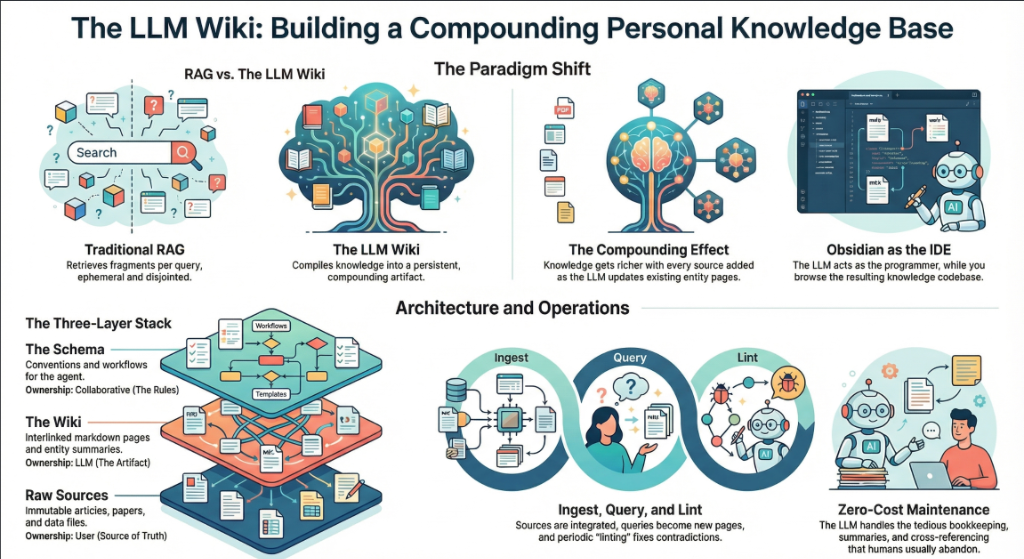
On April 3, 2026, Andrej Karpathy — co-founder of OpenAI, former AI lead at Tesla, and the person who coined “vibe coding” — posted a tweet titled “LLM Knowledge Bases” describing how he now uses LLMs to build personal knowledge wikis instead of just generating code. That tweet went massively viral. The next day, he followed up with something new: an “idea file” — a GitHub gist that lays out the complete architecture, philosophy, and tooling behind the concept. We covered the original tweet in our first article. This is the deep dive into the follow-up — every word, every tool, every implementation detail.
Get the latest on AI, LLMs & developer tools
New MCP servers, model updates, and guides like this one — delivered weekly.
🎬 Watch the Video Breakdown
Prefer reading? Keep scrolling for the full written guide with code examples.
1. The Viral Moment
The original tweet described Karpathy's shift from spending tokens on code to spending tokens on knowledge. He outlined a system where raw source documents (articles, papers, repos, datasets, images) get dropped into a raw/ directory, and an LLM incrementally “compiles” them into a structured wiki — a collection of interlinked .md files with summaries, backlinks, and concept articles.
LLM Knowledge Bases
— Andrej Karpathy (@karpathy) April 2, 2026
Something I'm finding very useful recently: using LLMs to build personal knowledge bases for various topics of research interest. In this way, a large fraction of my recent token throughput is going less into manipulating code, and more into manipulating…
The tweet exploded. Karpathy himself acknowledged it: “Wow, this tweet went very viral!” So he did something interesting — instead of just sharing the code or the app, he shared an idea file.
Wow, dieser Tweet ist absolut viral gegangen!
— Andrej Karpathy (@karpathy) 4. April 2026
Ich wollte eine möglicherweise leicht verbesserte Version des Tweets in einer “idea file” teilen. Das Konzept der idea file ist, dass es in dieser Ära von LLM-Agents weniger sinnvoll/notwendig ist, den spezifischen Code oder die App zu teilen; man teilt einfach die Idee, und dann…
Der Follow-up-Tweet verlinkt auf ein GitHub Gist mit dem Titel “LLM Wiki” — ein sorgfält
Read the Full Gist
Karpathy's complete idea file is available here: gist.github.com/karpathy/442a6bf555914893e9891c11519de94f. You can copy it directly and paste it to your LLM agent to get started.
2. Idea Files: A New Format for the Agent Era
Karpathy introduces a concept he calls an “idea file”. His exact words:
Karpathy's Definition
“The idea of the idea file is that in this era of LLM agents, there is less of a point/need of sharing the specific code/app, you just share the idea, then the other person's agent customizes & builds it for your specific needs.”
This is a subtle but profound shift. Traditionally, when a developer builds something useful, they share the implementation: a GitHub repo, a package on npm, a Docker image. The recipient clones it, configures it, and runs it. But in a world where everyone has access to an LLM agent (Claude Code, OpenAI Codex, OpenCode, Cursor, etc.), sharing the idea can be more useful than sharing the code.
Why? Because the idea is portable. The code is specific. Karpathy uses Obsidian on macOS with Claude Code. You might use VS Code on Linux with OpenAI Codex. A shared GitHub repo would need to be forked, adapted, and debugged. A shared idea file gets copy-pasted to your agent, and your agent builds a version customized to your exact setup.
Karpathy says the gist is “intentionally kept a little bit abstract/vague because there are so many directions to take this in.” That's not a bug — it's the design. The document's last line says it plainly: “The document's only job is to communicate the pattern. Your LLM can figure out the rest.”
He also mentions that the gist has a Discussion tab where people can “adjust the idea or contribute their own,” turning it into a collaborative idea space. This is a new kind of open source — not open code, but open ideas, designed to be interpreted and instantiated by AI agents.
How to Use the Idea File
Karpathy says you can “give this to your agent and it can build you your own LLM wiki and guide you on how to use it.” In practice, that means:
- Copy the gist content (the full
llm-wiki.mdfile) - Paste it into your LLM agent's context (Claude Code, Codex, OpenCode, or any agentic IDE)
- Tell the agent: “Set up an LLM Wiki based on this idea file for [your topic]”
- The agent will create the directory structure, write the schema file, and guide you through first ingestion
# In Claude Code, OpenCode oder einer beliebigen Agent-First IDE:
> Hier ist eine Idea-Datei von Karpathy über den Aufbau
> eines LLM Wiki. Ich möchte eines für [Machine Learning
> Forschung / Wettbewerbsanalyse / Buchnotizen / etc.] erstellen.
>
> [den vollständigen Gist-Inhalt einfügen]
>
> Bitte richte die Verzeichnisstruktur ein, erstelle die
>
> through ingesting my first source document.
3. The Core Idea: Wiki Beats RAG
The heart of the gist is a comparison between how most people use LLMs with documents today versus what Karpathy proposes. Let's break this down precisely.
The RAG Problem
Karpathy writes: “Most people's experience with LLMs and documents looks like RAG: you upload a collection of files, the LLM retrieves relevant chunks at query time, and generates an answer.”
RAG (Retrieval-Augmented Generation) is the dominant pattern for connecting LLMs to private data. Tools like NotebookLM, ChatGPT file uploads, and most enterprise AI tools work this way. You upload documents. When you ask a question, the system searches for relevant chunks, feeds them to the LLM, and generates an answer.
The problem, as Karpathy identifies it: “The LLM is rediscovering knowledge from scratch on every question. There's no accumulation.”
Ask a question that requires synthesizing five documents, and the RAG system has to find and piece together the relevant fragments every time. Ask the same question tomorrow, and it does the same work again. Nothing is built up. Nothing compounds.
The Wiki Solution
Karpathy's alternative: “Instead of just retrieving from raw documents at query time, the LLM incrementally builds and maintains a persistent wiki — a structured, interlinked collection of markdown files that sits between you and the raw sources.”
When you add a new source, the LLM doesn't just index it for later retrieval. It reads it, extracts key information, and integrates it into the existing wiki — updating entity pages, revising topic summaries, noting where new data contradicts old claims, strengthening or challenging the evolving synthesis.
The key line: “The knowledge is compiled once and then kept current, not re-derived on every query.”
| Dimension | Traditional RAG | LLM Wiki |
|---|---|---|
| When knowledge is processed | At query time (on every question) | At ingest time (once per source) |
| Cross-references | Discovered ad-hoc per query | Pre-built and maintained |
| Contradictions | Wird möglicherweise nicht bemerkt | Während der Ingestion markiert |
| Wissensakkumulation | Keine — beginnt bei jeder Abfrage von vorn | Wächst mit jeder Quelle und Abfrage |
| Ausgabeformat | Chat-Antworten (ephemer) | Persistente Markdown-Dateien (beständig) |
| Wer es pflegt | Das System (Blackbox) | Das LLM (transparent, editierbar) |
| Die Rolle des Menschen | Hochladen und abfragen | Kuratieren, explorieren und hinterfragen |
| Examples | NotebookLM, ChatGPT uploads | Karpathy's LLM Wiki pattern |
The Compounding Effect
Karpathy emphasizes this repeatedly: “The wiki is a persistent, compounding artifact.” The cross-references are already there. The contradictions have already been flagged. The synthesis already reflects everything you've read. Every source you add and every question you ask makes the wiki richer.
The Human-LLM Division of Labor
Karpathy's description of the workflow: “You never (or rarely) write the wiki yourself — the LLM writes and maintains all of it. You're in charge of sourcing, exploration, and asking the right questions. The LLM does all the grunt work — the summarizing, cross-referencing, filing, and bookkeeping.”
His daily setup: “I have the LLM agent open on one side and Obsidian open on the other. The LLM makes edits based on our conversation, and I browse the results in real time — following links, checking the graph view, reading the updated pages.”
Then the analogy that captures the whole system: “Obsidian is the IDE; the LLM is the programmer; the wiki is the codebase.”
4. The Three-Layer Architecture
Karpathy defines three distinct layers. Each has a clear owner and a clear purpose.
Layer 1: Raw Sources
Karpathy writes: “Your curated collection of source documents. Articles, papers, images, data files. These are immutable — the LLM reads from them but never modifies them. This is your source of truth.”
The raw/ directory is sacred. The LLM can read anything in it but must never write to it. This is critical because it means you always have the original sources to verify against. If the LLM makes a mistake in the wiki, you can trace back to the raw source and correct it.
raw/
articles/
2026-03-attention-is-all-you-need-revisited.md
2026-04-scaling-laws-update.md
papers/
transformer-architecture-v2.pdf
mixture-of-experts-survey.pdf
repos/
llama-3-readme.md
vllm-architecture-notes.md
data/
benchmark-results.csv
model-comparison.json
images/
transformer-diagram.png
scaling-curves.png
assets/
# Heruntergeladene Bilder aus geclippten Artikeln
Ebene 2: Das Wiki
Karpathy schreibt: “Ein Verzeichnis mit LLM-generierten Markdown-Dateien. Zusammenfassungen, Entitätsseiten, Konzeptseiten, Vergleiche, eine Übersicht, eine Synthese. Das LLM verwaltet diese Ebene vollständig. Es erstellt Seiten, aktualisiert sie bei neuen Quellen, pflegt Querverweise und hält alles konsistent. Du liest es; das LLM schreibt es.”
wiki/
index.md # Hauptkatalog aller Seiten
log.md # Chronologisches Aktivitätsprotokoll
overview.md # High-Level-Synthese
concepts/
attention-mechanism.md
mixture-of-experts.md
scaling-laws.md
tokenization.md
entities/
openai.md
anthropic.md
google-deepmind.md
sources/
summary-attention-revisited.md
summary-scaling-update.md
compar
gpt4-vs-claude-vs-gemini.md
rag-vs-finetuning.md
Die entscheidende Erkenntnis: Das Wiki steht zwischen dir und den Rohquellen. Du liest keine Rohfassungen von Papern, um Fragen zu beantworten — du liest das Wiki. Das Wiki ist vorverarbeitet, querverwiesen und synthetisiert. Es ist das, was ein Forschungsassistent erstellen würde, wenn er alles lesen und für dich organisieren würde.
Ebene 3: Das Schema
Karpathy schreibt: “Ein Dokument (z. B. CLAUDE.md für Claude Code oder AGENTS.md für Codex), das dem LLM mitteilt, wie das Wiki strukturiert ist, welche Konventionen gelten und welche Workflows beim Einlesen von Quellen, Beantworten von Fragen oder Pflegen des Wikis zu befolgen sind. Dies ist die zentrale Konfigurationsdatei — sie macht das LLM zu einem disziplinierten Wiki-Verwalter statt zu einem generischen Chatbot.”
Das Schema ist der wichtigste Teil. Ohne es ist das LLM nur ein Chatbot, der zufällig Zugriff auf Dateien hat. Mit ihm wird das LLM zu einem systematischen Wiki-Verwalter der über Sitzungen hinweg konsistenten Regeln folgt.
Karpathy fügt hinzu: “Du und das LLM entwickeln dies im Laufe der Zeit gemeinsam weiter, während ihr herausfindet, was für euren Bereich am besten funktioniert.” Das Schema ist nicht statisch. Du beginnst mit etwas Einfachem und verfeinerst es, während du lernst, welche Seitenstrukturen, Frontmatter-Felder und Workflows am besten funktionieren.
# LLM-Wiki-Schema
## Projektstruktur
- `raw/` — unveränderliche Quelldokumente. NIEMALS bearbeiten.
- `wiki/` — LLM-generiertes Wiki. Das gehört vollständig dir.
- `wiki/index.md` — Hauptkatalog. Bei jedem Ingest aktualisieren.
- `wiki/log.md` — Append-only Aktivitätsprotokoll.
## Seitenkonventionen
Jede Wiki-Seite MUSS ein YAML-Frontmatter haben:
```
---
title: Seitentitel
type: concept | entity | source-summary | comparison
sources: [Liste der referenzierten raw/ Dateien]
related: [Liste der verlinkten Wiki-Seiten]
created: YYYY-MM-DD
updated: YYYY-MM-DD
confidence: high | medium | low
---
```
## Ingest-Workflow
Wenn ich sage "ingest [Dateiname]":
1. Lies die Quelldatei in raw/
2. Besprich die wichtigsten Erkenntnisse mit mir
3. Erstelle/aktualisiere eine Zusammenfassungsseite in wiki/sources/
4. Aktualisiere wiki/index.md
5. Alle relevanten Konzept- und Entity-Seiten aktualisieren
6. Einen Eintrag an wiki/log.md anhängen
## Query-Workflow
Wenn ich eine Frage stelle:
1. wiki/index.md lesen, um relevante Seiten zu finden
2. Diese Seiten lesen
3. Eine Antwort mit [[wiki-link]]-Zitaten synthetisieren
4. Wenn die Antwort wertvoll ist, anbieten, sie als
neue Wiki-Seite zu speichern
## Lint-Workflow
Wenn ich "lint"
1. Check for contradictions between pages
2. Find orphan pages with no inbound links
3. List concepts mentioned but lacking own page
4. Check for stale claims superseded by newer sources
5. Suggest questions to investigate next
If you're using OpenAI Codex, the same schema goes into AGENTS.md instead. If you're using OpenCode, it goes in OPENCODE.md. The content is the same — only the filename changes based on which agent reads it.
Why the Schema Matters
Without a schema, every session with the LLM starts from zero. The LLM doesn't know your conventions, your page formats, or your workflows. You end up re-explaining everything. The schema is persistent memory — it carries knowledge across sessions and ensures consistency. It's what turns a generic LLM into your wiki maintainer.
5. Operations: Ingest, Query, Lint
Karpathy defines three core operations. Each one has a clear trigger, a clear process, and a clear output.
Operation 1: Ingest
Karpathy writes: “You drop a new source into the raw collection and tell the LLM to process it. An example flow: the LLM reads the source, discusses key takeaways with you, writes a summary page in the wiki, updates the index, updates relevant entity and concept pages across the wiki, and appends an entry to the log. A single source might touch 10-15 wiki pages.”
This is the most important operation. A single ingest doesn't just create one new page — it ripples across the entire wiki. If you ingest a paper about a new transformer variant, the LLM might:
- Create a new summary page for the paper
- Update the “Attention Mechanism” concept page with the new variant
- Update the “Scaling Laws” page if the paper contains new benchmarks
- Update the entity page for the paper's authors or their organization
- Update the comparison page if the paper benchmarks against known models
- Links von bestehenden Seiten hinzufügen, die nun auf den neuen Inhalt verweisen
- Den Index mit der neuen Seite aktualisieren
- Protokolliere den Ingest im Aktivitätsprotokoll
Karpathy fügt eine persönliche Präferenz hinzu: “Ich bevorzuge es, Quellen einzeln zu erfassen und involviert zu bleiben — ich lese die Zusammenfassungen, prüfe die Updates und leite das LLM an, worauf der Fokus liegen soll. Man kann jedoch auch viele Quellen gleichzeitig per Batch-Ingest mit weniger Aufsicht verarbeiten.”
# Du legst einen neuen Artikel in
> I just added a new article to raw/articles/
> 2026-04-mixture-of-experts-efficiency.md
> Please ingest it.
# The LLM reads it, then responds:
Key takeaways from this article:
1. MoE models achieve 4x throughput at same quality
2. Routing efficiency improved 23% over Switch Transformer
3. Contradicts our wiki claim that dense models are
always more efficient below 10B params
I will:
- Create wiki/sources/summary-moe-efficiency-2026.md
- Update wiki/concepts/mixture-of-experts.md
- Update wiki/concepts/scaling-laws.md (new benchmarks)
- Flag contradiction on wiki/concepts/dense-vs-sparse.md
- Update wiki/index.md
- Append to wiki/log.md
Shall I proceed?
Operation 2: Query
Karpathy writes: “You ask questions against the wiki. The LLM searches for relevant pages, reads them, and synthesizes an answer with citations. Answers can take different forms depending on the question — a markdown page, a comparison table, a slide deck (Marp), a chart (matplotlib), a canvas.”
But the most important insight about queries is this: “Good answers can be filed back into the wiki as new pages.” A comparison you asked for, an analysis, a connection you discovered — these are valuable and shouldn't disappear into chat history. “This way your explorations compound in the knowledge base just like ingested sources do.”
This is the compounding loop: sources get ingested into the wiki, queries generate new insights, and the best insights get filed back as wiki pages. The wiki grows not just from external sources, but from your own exploration.
> Compare the routing strategies in MoE models across
> our sources. Which approach has the best efficiency/
> quality tradeoff?
# LLM reads wiki/concepts/mixture-of-experts.md,
# wiki/sources/summary-moe-*.md, produces analysis
[LLM produces a detailed comparison with a table]
> This is great. File it as a wiki page.
# LLM erstellt wiki/comparisons/moe-routing-strategies.md
# Aktualisiert index.md, fügt Links von verwandten Seiten hinzu
Operation 3: Lint
Karpathy schreibt: “Bitten Sie das LLM regelmäßig um einen Health-Check des Wikis. Suchen Sie nach: Widersprüchen zwischen Seiten, veralteten Behauptungen, die durch neuere Quellen überholt wurden, verwaisten Seiten ohne eingehende Links, wichtigen erwähnten Konzepten, denen eine eigene Seite fehlt, fehlenden Querverweisen und Datenlücken, die durch eine Websuche gefüllt werden könnten.”
Er fügt hinzu: “Das LLM ist gut darin, neue Fragen zur Untersuchung und neue Quellen zur Suche vorzuschlagen. Das hält das Wiki gesund, während es wächst.”
> Lint das Wiki.
Wiki-Zustandsbericht (2026-04-04):
WIDERSPRÜCHE (2):
- concepts/dense-vs-sparse.md behauptet dense > sparse
unter 10B, aber sources/summary-moe-efficiency.md
zeigt das Gegenteil. Empfehlung: Mit Nuancen aktualisieren.
- entities/openai.md besagt, dass GPT-5 200B Parameter hat,
aber sources/summary-gpt5-leak.md gibt 300B an.
VERWAISTE SEITEN (3):
- concepts/tokenization.md (keine eingehenden Links)
- sources/summary-old-bert-paper.md (keine Referenzen)
- comparisons/old-gpu-benchmark.md (veraltet)
FEHLENDE SEITEN (4):
- "RLHF" 12-mal erwähnt, keine Konzeptseite
- "Constitutional AI" 8-mal erwähnt, keine Seite
- "KV Cache" in 5 Quellen referenziert, keine Seite
- "Speculative Decoding" 3-mal erwähnt, keine Seite
VORGESCHLAGENE UNTERSUCHUNGEN:
- Keine Quellen zur Inferenzoptimierung nach 2025
- Entity-Seite für Meta AI ist dünn (nur 1 Quelle)
- Die "Scaling Laws"-Seite wurde seit 3 Wochen nicht aktualisiert
6. Indexierung und Logging
Karpathy definiert zwei spezielle Dateien, die entscheidend dafür sind, wie das LLM im Wiki navigiert. Sie dienen unterschiedlichen Zwecken und beide sind wichtig.
index.md: Der Inhaltskatalog
Karpathy schreibt: “index.md ist inhaltlich orientiert. Es ist ein Katalog von allem im Wiki — jede Seite ist mit einem Link, einer einzeiligen Zusammenfassung und optionalen Metadaten wie Datum oder Quellenanzahl aufgeführt. Organisiert nach Kategorien (Entities, Konzepte, Quellen usw.). Das LLM aktualisiert sie bei jedem Ingest.”
Die wichtigste Erkenntnis über index.md ist, wie sie RAG ersetzt: “Bei der Beantwortung einer Anfrage liest das LLM zuerst den Index, um relevante Seiten zu finden, und vertieft sich dann in diese. Das funktioniert bei moderater Skalierung (~100 Quellen, ~Hunderte von Seiten) überraschend gut und vermeidet die Notwendigkeit einer Embedding-basierten RAG-Infrastruktur.”
Dies ist eine praktische Offenbarung. Die meisten Leute gehen davon aus, dass man Vektordatenbanken und Embedding-Pipelines für das Knowledge Retrieval benötigt. Karpathy sagt: Bei moderater Skalierung reicht eine gut gepflegte Indexdatei aus. Das LLM liest den Index (ein paar tausend Token), identifiziert relevante Seiten und liest diese direkt.
# Wiki-Index
## Konzepte
- [[attention-mechanism]] — Self-attention, Multi-Head
Attention und Varianten (12 Quellen)
- [[mixture-of-experts]] — Sparse MoE-Architekturen,
Routing-Strategien (8 Quellen)
- [[scaling-laws]] — Chinchilla-, Kaplan-Gesetze,
Rechenoptimales Training (15 Quellen)
- [[tokenization]] — BPE, SentencePiece, tiktoken
(3 Quellen)
## Entitäten
-
(20 sources)
- [[anthropic]] — Claude series, constitutional AI
(14 sources)
- [[google-deepmind]] — Gemini, PaLM, AlphaFold
(18 sources)
## Source Summaries
- [[summary-attention-revisited]] — 2026-03-15
- [[summary-moe-efficiency]] — 2026-04-01
- [[summary-scaling-update]] — 2026-04-02
## Comparisons
- [[moe-routing-strategies]] — Filed from query 2026-04-04
- [[rag-vs-finetuning]] — Tradeoffs and use cases
log.md: The Activity Timeline
Karpathy writes: “log.md is chronological. It's an append-only record of what happened and when — ingests, queries, lint passes.”
He includes a practical tip: “If each entry starts with a consistent prefix (e.g. ## [2026-04-02] ingest | Article Title), the log becomes parseable with simple unix tools — grep "^## [" log.md | tail -5 gives you the last 5 entries.”
# Activity Log
## [2026-04-04] ingest | MoE Efficiency Article
Source: raw/articles/2026-04-mixture-of-experts-efficiency.md
Pages created: sources/summary-moe-efficiency.md
Pages updated: concepts/mixture-of-experts.md,
concepts/scaling-laws.md, concepts/dense-vs-sparse.md
Notes: Contradicts dense-vs-sparse claim below 10B params.
Flagged for review.
## [2026-04-04] query | MoE-Routing-Vergleich
Frage: Vergleich von Routing-Strategien in MoE-Modellen
Gelesene Seiten: concepts/mixture-of-experts.md, 3 Quellenzusammenfassungen
Ausgabe: Abgelegt unter comparisons/moe-routing-strategies.md
## [2026-04-04] lint | Wöchentlicher Health Check
Gefundene Widersprüche: 2
Verwaiste Seiten: 3
Vorgeschlagene fehlende Seiten: 4
Vorgeschlagene Untersuchungen
## [2026-04-03] ingest | Scaling Laws Update
Source: raw/articles/2026-04-scaling-laws-update.md
Pages created: sources/summary-scaling-update.md
Pages updated: concepts/scaling-laws.md, entities/openai.md
The log also helps the LLM understand what's been done recently. When you start a new session, the LLM can read the last few log entries to understand the current state of the wiki.
7. The Tool Stack
Karpathy mentions several specific tools in the gist. Here's what each one does and how it fits into the workflow.
qmd: Local Search for Markdown
Karpathy writes: “qmd is a good option: it's a local search engine for markdown files with hybrid BM25/vector search and LLM re-ranking, all on-device. It has both a CLI (so the LLM can shell out to it) and an MCP server (so the LLM can use it as a native tool).”
qmd was built by Tobi Lutke, CEO of Shopify. It's designed exactly for the use case Karpathy describes: searching over a collection of markdown files. It combines three search strategies:
- BM25 full-text search — keyword matching (fast, precise)
- Vector semantic search — meaning-based matching (finds related concepts)
- LLM re-ranking — the LLM scores results for relevance (highest quality)
Everything runs locally via node-llama-cpp with GGUF models. No cloud API calls. No data leaves your machine.
# Install qmd globally
npm install -g @tobilu/qmd
# Add your wiki as a collection
qmd collection add ./wiki --name my-research
# Keyword search (BM25)
qmd search "mixture of experts routing"
# Semantic search (vector)
qmd vsearch "how do sparse models handle efficiency"
# Hybride Suche mit LLM-Re-Ranking (beste Qualität)
qmd query "Was sind die Trade-offs von Top-k vs. Expert-Choice-Routing"
# JSON-Ausgabe zum Weiterleiten an LLM-Agents
qmd query "Scaling Laws" --json
# Starte qmd als MCP-Server für Claude Code / etc.
qmd mcp
Karpathy merkt an, dass bei kleinem Umfang die index.md Datei für die Navigation ausreicht. qmd wird nützlich, wenn das Wiki über das hinaus — likely once you have hundreds of pages and the index itself is too large to read in one context window.
Obsidian Web Clipper
Karpathy writes: “Obsidian Web Clipper is a browser extension that converts web articles to markdown. Very useful for quickly getting sources into your raw collection.”
The Web Clipper is available for Chrome, Firefox, Safari, Edge, Brave, and Arc. When you clip an article, it:
- Converts the HTML to clean markdown
- Adds YAML frontmatter (author, date, source URL, tags)
- Preserves formatting, code blocks, and images
- Saves directly to your Obsidian vault (your
raw/directory)
It also supports templates — you can define different clipping formats for articles, recipes, academic papers, or any other content type. This makes ingestion consistent and predictable.
Downloading Images Locally
Karpathy gives a specific tip for images: “In Obsidian Settings → Files and links, set ‘Attachment folder path’ to a fixed directory (e.g. raw/assets/). Then in Settings → Hotkeys, search for ‘Download’ to find ‘Download attachments for current file’ and bind it to a hotkey (e.g. Ctrl+Shift+D).”
After clipping an article, you hit the hotkey and all images get downloaded to local disk. Why does this matter? Because it “lets the LLM view and reference images directly instead of relying on URLs that may break.”
He also notes a current limitation: “LLMs can't natively read markdown with inline images in one pass — the workaround is to have the LLM read the text first, then view some or all of the referenced images separately to gain additional context.”
Obsidian's Graph View
Karpathy writes: “Obsidian's graph view is the best way to see the shape of your wiki — what's connected to what, which pages are hubs, which are orphans.”
The graph view renders all your wiki pages as nodes and all [[wiki-links]] als Kanten. Hub-Seiten (wie Kernkonzepte mit vielen Verbindungen) erscheinen als große Knoten. Verwaiste Seiten (ohne Links) erscheinen isoliert. Dies gibt Ihnen ein sofortiges visuelles Gefühl dafür, wo Ihr Wissen dicht ist und wo Lücken bestehen.
Marp: Markdown-Präsentationen
Karpathy schreibt: “Marp ist ein Markdown-basiertes Format für Präsentationen. Obsidian hat ein Plugin dafür. Nützlich, um Präsentationen direkt aus Wiki-Inhalten zu generieren.”
Marp ermöglicht es Ihnen, Präsentationen in reinem Markdown zu schreiben. Sie trennen Folien mit --- (horizontale Trennlinien). Es unterstützt Themes, Bild-Syntax, mathematischen Formelsatz und Exporte nach HTML, PDF und PowerPoint.
---
marp: true
theme: default
---
# Mixture of Experts: Wichtigste Erkenntnisse
Zusammengestellt aus 8 Quellen im Forschungs-Wiki
---
## Routing-Strategien im Vergleich
| Strategie | Durchsatz | Qualität |
|----------|-----------|---------|
| Top-K | 2.1x | Baseline |
| Expert Choice | 3.4x | +2% |
| Hash | 4.0x | -1% |
---
## Zentrale Erkenntnis
Expert-Choice-Routing bietet den besten Qualitäts-/Effizienz-
Kompromiss für Modelle mit mehr als 10B Parametern.
Quelle: wiki/comparisons/moe-routing-strategies.md
Dataview: Fragen Sie Ihr Frontmatter ab
Karpathy schreibt: “Dataview ist ein Obsidian-Plugin, das Abfragen über das Frontmatter von Seiten ausführt. Wenn Ihr LLM YAML-Frontmatter zu Wiki-Seiten hinzufügt (Tags, Daten, Anzahl der Quellen), kann Dataview dynamische Tabellen und Listen generieren.”
Dataview behandelt Ihren Vault als Datenbank. Wenn Ihre Wiki-Seiten Frontmatter enthalten wie type: concept, sources: [file1, file2], confidence: high, dann ermöglicht Dataview die Abfrage mit einer SQL-ähnlichen Sprache:
# Alle Konzept-Seiten mit Anzahl der Quellen auflisten
```dataview
TABLE length(sources) AS "Quellen", confidence
FROM "wiki/concepts"
SORT length(sources) DESC
```
# Seiten finden, die in der letzten Woche aktualisiert wurden
```dataview
LIST
FROM "wiki"
WHERE updated >= date(today) - dur(7 days)
SORT updated DESC
```
# Seiten mit niedriger Konfidenz finden, die eine Überprüfung benötigen
```dataview
TABLE title, sources
FROM "wiki"
WHERE confidence = "low"
SORT file.name ASC
```
Git: Versionskontrolle für Wissen
Karpathy schreibt: “Das Wiki ist einfach ein Git-Repo aus Markdown-Dateien. Versionsverlauf, Branching und Kollaboration gibt es gratis dazu.”
Das ist unscheinbar, aber mächtig. Da das gesamte Wiki aus einfachem Markdown in einem Verzeichnis besteht, kannst du:
git lognutzen, um zu sehen, wie sich das Wiki im Laufe der Zeit entwickelt hatgit diffnutzen, um genau zu sehen, was sich bei jedem Ingest geändert hatgit revertnutzen, um eine fehlerhafte Kompilierung rückgängig zu machengit branchnutzen, um alternative Organisationsstrukturen zu erkundengit blamenutzen, um zurückzuverfolgen, wann eine bestimmte Behauptung hinzugefügt wurde- Nutze GitHub/GitLab für Team-Kollaboration mit Pull Requests
| Tool | Rolle im LLM-Wiki | Erforderlich? |
|---|---|---|
| Obsidian | IDE / Viewer zum Durchsuchen des Wikis | Empfohlen (jeder Markdown-Viewer funktioniert) |
| Obsidian Web Clipper | Ingestion: Web-Artikel als Markdown speichern | Empfohlen für Webquellen |
| qmd | Suchmaschine für große Wikis | Optional (index.md funktioniert bei geringem Umfang) |
| Marp | Output: Slide-Decks aus dem Wiki generieren | Optional |
| Dataview | Frontmatter für Dashboards abfragen | Optional |
| Git | Versionsverwaltung für das Wiki | Empfohlen |
| LLM-Agent | Wiki-Maintainer (Claude Code, Codex, etc.) | Erforderlich |
8. Use Cases Karpathy Lists
The gist lists five specific contexts where this pattern applies. Let's look at each one with implementation details.
Personal Knowledge Base
Karpathy writes: “Tracking your own goals, health, psychology, self-improvement — filing journal entries, articles, podcast notes, and building up a structured picture of yourself over time.”
Implementation: Create a personal wiki with sections for goals, health metrics, reading notes, and reflections. Ingest journal entries, articles you read, podcast transcripts. The LLM builds concept pages for recurring themes (“sleep quality,” “exercise routine,” “career goals”) and connects them across time. Ask questions like: “What patterns do I see in my energy levels over the last 3 months?”
Research
Karpathy writes: “Going deep on a topic over weeks or months — reading papers, articles, reports, and incrementally building a comprehensive wiki with an evolving thesis.”
This is Karpathy's primary use case. His research wiki has ~100 articles and ~400,000 words on a single ML research topic. The wiki builds an evolving thesis that gets refined with every new source.
Reading a Book
Karpathy writes: “Filing each chapter as you go, building out pages for characters, themes, plot threads, and how they connect. By the end you have a rich companion wiki.”
He uses a vivid example: “Think of fan wikis like Tolkien Gateway — thousands of interlinked pages covering characters, places, events, languages, built by a community of volunteers over years. You could build something like that personally as you read, with the LLM doing all the cross-referencing and maintenance.”
Imagine reading War and Peace. After each chapter, you ingest your notes. The LLM maintains character pages (tracking their development across chapters), theme pages (connecting recurring ideas), and a timeline page. By the end, you have a personal companion wiki that rivals a literary analysis.
Business / Team
Karpathy writes: “An internal wiki maintained by LLMs, fed by Slack threads, meeting transcripts, project documents, customer calls. Possibly with humans in the loop reviewing updates. The wiki stays current because the LLM does the maintenance that no one on the team wants to do.”
Dies ist die Enterprise-Version. Die Quellen sind intern: Slack-Exporte, Meeting-Aufzeichnungen (transkribiert), Projektdokumente, Kundenanruf-Protokolle, CRM-Daten. Das Wiki stellt Entscheidungsprotokolle, Projektzeitpläne, Kundenerkenntnisse und Teamwissen zusammen. Ein Human-in-the-Loop überprüft die Aktualisierungen, bevor sie Teil des Wikis werden.
Alles andere
Karpathy schreibt: “Wettbewerbsanalyse, Due Diligence, Reiseplanung, Kursnotizen, Hobby-Deep-Dives — alles, bei dem man über die Zeit Wissen ansammelt und es organisiert statt verstreut haben möchte.”
The pattern is universal: if you're collecting information from multiple sources over time and want it structured, an LLM Wiki applies. We covered detailed implementations for competitive intelligence, legal compliance, academic literature reviews, and more in our previous article.
9. Step-by-Step Implementation Guide
Here is how to build a working LLM Wiki from scratch, following Karpathy's architecture exactly.
Step 1: Set Up the Directory Structure
mkdir -p my-research/raw/articles
mkdir -p my-research/raw/papers
mkdir -p my-research/raw/repos
mkdir -p my-research/raw/assets
mkdir -p my-research/wiki/concepts
mkdir -p my-research/wiki/entities
mkdir -p my-research/wiki/sources
mkdir -p my-research/wiki/comparisons
touch my-research/wiki/index.md
touch my-research/wiki/log.md
touch my-research/wiki/overview.md
# Initialize git
cd my-research && git init
# Open in Obsidian as a vault
Step 2: Create the Schema File
Create a CLAUDE.md (for Claude Code), AGENTS.md (for Codex), or equivalent schema file at the root of your project. Use the example schema from Section 4 above as a starting point. Customize it for your domain.
Step 3: Configure Obsidian
- Install Obsidian and open
my-research/as a vault - Install Web Clipper browser extension
- Settings → Files and links → Set “Attachment folder path” to
raw/assets - Settings → Hotkeys → Bind “Download attachments for current file” to
Ctrl+Shift+D - Installiere das Marp Slides Plugin (optional, für Präsentationen)
- Installiere das Dataview Plugin (optional, für Frontmatter-Abfragen)
Schritt 4: Die erste Quelle einlesen
- Clippe einen Web-Artikel mit dem Web Clipper → speichern unter
raw/articles/ - Drücke
Ctrl+Shift+Dum Bilder lokal herunterzuladen - Öffne deinen LLM-Agenten (Claude Code, Codex, OpenCode, etc.)
- Sage ihm: “Ingest raw/articles
- Review the summary, guide emphasis, approve the wiki updates
- Check the wiki in Obsidian — browse the new pages, check the graph view
- Commit:
git add . && git commit -m “ingest: [article title]”
Step 5: Build Up Over Time
Repeat the ingest process for each new source. After 10-20 sources, start querying the wiki. After 50+, consider adding qmd for search. Run lint checks weekly.
The 10-Source Test
Start with just 10 sources on one topic. Ingest them all. Then ask the wiki a question that requires synthesizing multiple sources. If the structured wiki gives you an insight you wouldn't have gotten by reading the sources individually, the system is working. Scale from there.
Step 6: Evolve the Schema
As you use the wiki, you'll discover what works and what doesn't. Update the schema (CLAUDE.md / AGENTS.md) accordingly. Maybe you need a new page type. Maybe your frontmatter needs more fields. Maybe your ingest workflow should include a step you didn't anticipate. Karpathy says: “You and the LLM co-evolve this over time.”
10. The Memex Connection (1945)
Karpathy closes the gist with a historical connection that puts the whole idea in perspective:
Karpathy's Words
“The idea is related in spirit to Vannevar Bush's Memex (1945) — a personal, curated knowledge store with associative trails between documents. Bush's vision was closer to this than to what the web became: private, actively curated, with the connections between documents as valuable as the documents themselves. The part he couldn't solve was who does the maintenance. The LLM handles that.”
In 1945, Vannevar Bush — an MIT engineer who directed the US Office of Scientific Research and Development — published an article in The Atlantic called “As We May Think”. He described a hypothetical device called the Memex (memory + index): a desk-sized machine where an individual could store all their books, records, and communications on microfilm, search them rapidly, and create associative trails — verknüpfte Dokumentsequenzen mit persönlichen Annotationen.
Bushs entscheidende Erkenntnis war, dass der menschliche Geist durch Assoziation funktioniert, not alphabetical order. Hierarchical filing systems (like library catalogs) force you into rigid categories. The Memex would let you create your own paths through knowledge — linking a chemistry paper to an economics report to a historical essay, following your own logic.
Sein berühmtes Zitat: “Völlig neue Formen von Enzyklopädien werden entstehen, fertig bestückt mit einem Geflecht aus assoziativen Pfaden, die sie durchziehen.”
Der Memex inspirierte direkt:
- Douglas Engelbart — der Bushs Artikel 1945 las, “von der Idee infiziert wurde” und später die Computermaus sowie das Konzept des Personal Computing erfand
- Ted Nelson — der 1965 den Begriff “Hypertext” prägte, direkt inspiriert von den assoziativen Pfaden des Memex
- Tim Berners-Lee — dessen World Wide Web (1989) Hypertext auf globaler Ebene implementierte
Doch wie Karpathy feststellt, wurde das Web öffentlich und chaotisch statt privat und kuratiert. Bush stellte sich etwas Persönliches vor — Ihr Wissen, Ihre Verbindungen, Ihre Pfade. Das LLM Wiki kommt dieser ursprünglichen Vision näher. Es ist privat, aktiv kuratiert, und die Verbindungen zwischen den Dokumenten sind ebenso wertvoll wie die Dokumente selbst.
Das fehlende Puzzleteil, das Bush 1945 nicht lösen konnte: Wer übernimmt die Wartung? Das Erstellen assoziativer Pfade, das Aktualisieren von Verbindungen, das Konsistenthalten von allem — das ist mühsame, manuelle Arbeit. Menschen geben Wissenssysteme auf, weil der Wartungsaufwand schneller wächst als der Nutzen. Wie Karpathy schreibt: “LLMs langweilen sich nicht, vergessen nicht, einen Querverweis zu aktualisieren, und können 15 Dateien in einem Durchgang bearbeiten. Das Wiki bleibt gewartet, weil die Wartungskosten nahezu bei Null liegen.”
11. Community-Ideen aus dem Gist
Das GitHub Gist hat einen Discussion-Tab, den Karpathy ausdrücklich hervorhob: “Leute können die Idee anpassen oder ihre eigenen in der Discussion beisteuern, was cool ist.” Hier sind einige bemerkenswerte Beiträge aus der Community:
The .brain Folder Pattern
A developer shared a related pattern: a .brain folder at the root of a project containing markdown files (index.md, architecture.md, decisions.md, changelog.md, deployment.md) that acts as persistent memory across AI sessions. The core rule: “Read .brain before making changes. Update .brain after making changes. Never commit it to git.” This is a lighter-weight version of Karpathy's schema — project-specific rather than knowledge-base-specific.
Inter-Agent Communication via Gists
Ein anderer Mitwirkender beschrieb die Nutzung von GitHub gists als Kommunikationskanäle zwischen verschiedenen AI-Agents. Mitten in der Entwicklung pushen sie gists mit Diagrammen (als SVGs) und Kontext und geben diese dann zwischen verschiedenen AI-Frontends (Claude, Grok usw.) weiter. Dies erweitert Karpathys Konzept der Idea File — gists werden nicht nur zur Kommunikation zwischen Mensch und Agent, sondern zur Agent-zu-Agent-Kommunikation.
Die „Append-and-Review“-Notiz
Ein Community-Mitglied wies darauf hin, dass Karpathys früherer Blog-Post aus dem Jahr 2025, “The Append and karpathy.bearblog.dev), feels like it should be part of this pattern. That post described a simpler workflow: an append-only notes file that gets periodically reviewed and reorganized. The LLM Wiki is the evolved version — the LLM does the review and reorganization automatically.
Team Knowledge Sharing
One question from the community: “How can I share the knowledge base with my team? Currently we create a RAG and then an MCP server.” Since the wiki is just a git repo, the natural answer is: push it to a shared repository. Team members can browse it in Obsidian, and the LLM agent can be configured to accept updates from multiple contributors. The schema file defines the rules; Git handles collaboration.
12. What This Means
The “Idea File” as a New Open Source Format
Karpathy may have accidentally created a new format for sharing ideas in the AI era. Instead of sharing code (which is implementation-specific), you share a structured description of the pattern, designed to be interpreted by an LLM agent. The agent adapts it to the user's environment, tools, and preferences. This is open ideas rather than open source.
Why This Pattern Will Spread
Karpathy explains exactly why wikis maintained by LLMs succeed where human-maintained wikis fail: “The tedious part of maintaining a knowledge base is not the reading or the thinking — it's the bookkeeping. Updating cross-references, keeping summaries current, noting when new data contradicts old claims, maintaining consistency across dozens of pages. Humans abandon wikis because the maintenance burden grows faster than the value. LLMs don't get bored, don't forget to update a cross-reference, and can touch 15 files in one pass.”
From Karpathy's Tweet to Your Wiki
The gist ends with a deliberate call to action: “The right way to use this is to share it with your LLM agent and work together to instantiate a version that fits your needs. The document's only job is to communicate the pattern. Your LLM can figure out the rest.”
That's the whole point. Don't overthink the setup. Don't wait for someone to build the perfect tool. Copy the gist, paste it to your agent, and start with one topic and 10 sources. The LLM will figure out the directory structure, the page formats, the frontmatter schema. You provide the sources and the questions. The wiki builds itself.
The Takeaway
Karpathy's gist is not a blueprint — it's a seed. You give it to your LLM agent, and together you grow it into something specific to your domain. The wiki is a persistent, compounding artifact that gets richer with every source and every question. The LLM does all the bookkeeping. You do the thinking.
13. All Resources & Links
Every resource, tool, and reference mentioned in this article and in Karpathy's gist:
Karpathy's Posts
- Original tweet: “LLM Knowledge Bases” (Apr 3, 2026)
- Follow-up tweet: “Idea File” (Apr 4, 2026)
- GitHub Gist: LLM Wiki (the full idea file)
- Karpathy's Blog (bearblog)
Tools Mentioned
- qmd — Local markdown search engine by Tobi Lutke (BM25 + vector + LLM re-ranking)
- Obsidian — Markdown-based knowledge management app
- Obsidian Web Clipper — Browser extension for clipping web articles to markdown
- Marp — Markdown-basiertes Slide-Deck-Framework (Export nach HTML, PDF, PowerPoint)
- Dataview — Obsidian-Plugin zum Abfragen von Page-Frontmatter
- Tolkien Gateway — Beispiel für ein umfassendes, vernetztes Wiki
Konzepte & Geschichte
- “As We May Think” von Vannevar Bush (1945) — Der Artikel in The Atlantic, der das Memex beschrieb
- Memex (Wikipedia) — Geschichte und Einfluss von Bushs Konzept
- Google NotebookLM &
LLM Agent Platforms (for the schema file)
- Claude Code — uses
CLAUDE.mdfor project instructions - OpenAI Codex — uses
AGENTS.mdfor project instructions - OpenCode — uses
OPENCODE.mdfor project instructions - Cursor, Windsurf, etc. — each has its own schema file convention
Our Coverage
- Part 1: Karpathy's LLM Knowledge Bases — The Post-Code AI Workflow — Coverage of the original viral tweet
- Part 2: This article — Deep dive into the follow-up gist and idea file
Related Guides
- Part 1: Karpathy's LLM Knowledge Bases — The original tweet breakdown
- Vibe Coding in 2026: Complete Guide — Where Karpathy's AI journey started
- AGENTS.md Guide — Cross-tool schema files for AI agents
- Mastering Agent Skills — Fähigkeiten für die automatisierte Wiki-Kompilierung entwickeln
- Erstellen Sie Ihren eigenen MCP Server — Stellen Sie Ihr Wiki für AI-Assistenten via MCP bereit
- Agenten-Orchestrierung — Multi-Agenten-Setups für komplexe Wissens-Workflows
Get the AI Coding Briefing
One email a week: MCP servers, agent skills, rules and model news for Antigravity, Cursor, Claude Code and Copilot.