Get the latest on AI, LLMs & developer tools
New MCP servers, model updates, and guides like this one — delivered weekly.
What to Pick
Match the host to how your agent actually runs. If it answers requests and finishes in a few minutes, a serverless function on Vercel or Cloudflare is the cheapest and least work. If it must survive restarts, wait for people, or sleep for days, put the loop in a durable workflow: Vercel Workflows, Cloudflare Workflows, Inngest or Trigger.dev. If it is a plain worker that polls a queue, Railway, Render, Fly.io or Northflank give you a container for a few dollars a month. Modal is the pick for bursty Python and GPU jobs, and AgentCore Runtime or Google Agent Runtime make sense when your company already lives on AWS or Google Cloud.
This guide reads each vendor's own pricing and limits pages as of November 11, 2026. Where a vendor does not publish a number, such as a cold-start figure or a maximum run time, we say so instead of guessing. Cold-start numbers anywhere in this article are vendor-reported. For adjacent decisions, see our posts on VPS hosting for agents, agent sandboxes and agent frameworks.
Video: Peter Wielander of Vercel on the AI Engineer channel walks through building durable agents with the Workflow SDK and AI SDK. It is a talk about one vendor's approach, but the underlying ideas (steps, replay, resumable state) apply to every durable option below.
Quick Picks
| Need | Pick | Why |
|---|---|---|
| Best overall for a TypeScript team | Vercel (Functions + Workflows) | Functions run up to 800s GA, and Workflows pause for months with managed state. |
| Best for stateful per-user agents | Cloudflare Agents SDK + Durable Objects | Each agent is a Durable Object with local SQL storage, WebSockets and a scheduler. |
| Best budget always-on worker | Railway, Render or Fly.io | Small containers from a few dollars a month, billed per second or per minute. |
| Best for bursty Python and GPU work | Modal | Per-second billing, 24 hour maximum timeout, $30 monthly credits on Starter. |
| Best for AWS enterprises | AWS Bedrock AgentCore Runtime | Per-session microVMs, 8 hour sessions, IAM and OAuth inbound auth. |
| Best for Google Cloud shops | Google Agent Runtime (Agent Engine) | $0.085 per vCPU-hour, idle time between turns is not billed. |
| Best for LangGraph graphs | LangSmith Deployment | Managed Agent Server with threads, runs and UTC cron, from the Plus plan. |
| Best for BYOC and Kubernetes | Northflank | Free Sandbox tier, $0.01667 per vCPU-hour, bring your own cloud cluster. |
| Best durable execution, open model | Trigger.dev or Inngest | Retries, waits and schedules as a service; no run timeout on Trigger.dev. |
No single winner exists, because the platforms solve different problems. The rest of this post gives each one a full section, then prices one example job on all of them, lines up the documented limits, and ends with a decision table.
Master Comparison
Prices below come from each vendor's pricing or documentation page, read on November 11, 2026. “Not stated” means the pages we read did not give a number. None of the vendors publish a cold-start benchmark in a form that is comparable across platforms, so we discuss cold starts per vendor rather than in this table.
| Platform | Entry price (Nov 11, 2026) | Compute rate | Max run time (documented) | State / persistence | Scheduling |
|---|---|---|---|---|---|
| Vercel Functions + Workflows | Hobby $0, Pro $20/mo | Active CPU from $0.128/h, memory from $0.0106/GB-h | 300s Hobby; Pro 800s, 1800s beta. Workflows: no duration limit | Workflows managed state; Functions stateless | Vercel Schedules (cron), can start a workflow |
| Cloudflare Workers + Durable Objects + Agents SDK | Free; Paid from $5/mo | $0.30 per extra 1M requests, $0.02 per extra 1M CPU ms | HTTP: 5 min CPU time; cron/alarm: 15 min wall clock | Durable Objects with SQLite; Workflows up to 1 GB state per instance (Paid) | Cron Triggers, alarms, Agents SDK scheduler |
| Railway | Free $1 credit, Hobby $5, Pro $20 | $20/vCPU-mo, $10/GB-mo | Services run continuously; docs list no run cap | Volumes $0.15/GB-mo | Cron, min 5 minutes apart, UTC |
| Render | Hobby $0, Pro $25, Scale $499 (+ compute) | Worker from $7/mo (0.5 CPU, 512 MB) | Background workers run continuously; Workflows up to 24 h | Persistent disks $0.25/GB-mo; Postgres, Key Value | Cron Jobs; Workflows need cron to schedule |
| Fly.io | No monthly fee; no free tier for new orgs | shared-cpu-1x 256 MB $2.19/mo; per-second billing | Machines run until stopped; docs list no run cap | Volumes $0.15/GB-mo | No built-in cron on the pages we read |
| Modal | Starter $0 + $30 credits, Team $250 | $0.0000131/core-s, $0.00000222/GiB-s | Default 300s, max 24 h | Volumes $0.09/GiB-mo | Cron; 5 deployed crons on Starter |
| AWS Bedrock AgentCore Runtime | Pay as you go; up to $200 credits for new AWS customers | $0.0895/vCPU-h, $0.00945/GB-h (v1) | Sync 15 min; async 8 h on microVMs | Ephemeral session (1 GB); AgentCore Memory separate | None in Runtime; use EventBridge or similar |
| Google Agent Runtime (Agent Engine) | Pay as you go | $0.085/vCPU-h, $0.009/GiB-h | Request timeout not stated on the pages we read | Sessions and Memory Bank (billing from Sept 1, 2026) | None on the pages we read |
| LangSmith Deployment | Developer $0, Plus $39/seat | Runtime 0.0675 LSU/vCPU-h (1 LSU = $1) | Background runs; limit not stated | Threads, checkpoints on managed Postgres | Cron jobs (UTC) |
| Northflank | Sandbox free, PAYG from $0.01667/vCPU-h | $0.00833/GB-h memory | Jobs have a configurable max duration in seconds; services run continuously | Persistent disk $0.11657/GiB-mo | Cron jobs (five-field expression); per-job max duration is configurable |
| Inngest | Free $0, Pro from $99/mo | Per execution: 1M included on Pro | Run length up to 30 days Free, 90 days Pro | Memoized step results | Cron and event triggers |
| Trigger.dev | Free $0, Hobby $10, Pro $50 | Small 1x $0.0000338/s | No maximum duration | Checkpoint-restore of full process state | Schedules: 10 Free, 100 Hobby, 1,000+ Pro |
What Agent Hosting Needs
An agent differs from a normal web handler in three ways that matter for hosting. First, most of its wall-clock time is spent waiting on a model or a tool, so a platform that bills allocated memory for every second of that wait costs more than one that bills active CPU. Second, a single run can take many minutes or hours, which collides with the 10 to 60 second ceilings of older serverless platforms. Third, runs need memory: conversation state, tool results and the position in a plan, which has to survive a crash or a deploy.
That yields six comparison axes used throughout this article: price model (allocated versus active resources), maximum execution time, persistence and state, scheduling, scaling and concurrency, and cold starts. Webhooks are a seventh requirement most platforms meet by default, since each one can expose an HTTPS endpoint, so we only call it out where it differs. If your agent also needs to run untrusted code, that is a sandbox problem covered in our sandbox roundup and the OpenSandbox guide.
Vercel (Functions and Workflows)
Vercel is two products for agents. Vercel Functions run request handlers on Fluid compute, and Vercel Workflows run durable multi-step code. Functions have a default duration of 300 seconds on every plan. On Hobby that is also the maximum. Pro and Enterprise can go to 800 seconds generally available, with an extended 1,800 second maximum in beta that needs function-level configuration. Memory tops out at 2 GB on Hobby and 4 GB on Pro and Enterprise, and the docs say concurrency scales automatically to 30,000 on Hobby and Pro.
The billing model suits agents. Pro costs $20 per month with a $20 usage credit, and functions are billed on Fluid Active CPU (from $0.128 per hour), provisioned memory (from $0.0106 per GB-hour) and invocations (from $0.60 per million). Vercel states that waiting on I/O, such as calling an AI model or a database, does not count as active CPU time. Hobby includes 4 hours of Active CPU, 360 GB-hours of memory and 1M invocations per month. For a model-heavy agent, that is the main reason to prefer it over allocated-resource billing.
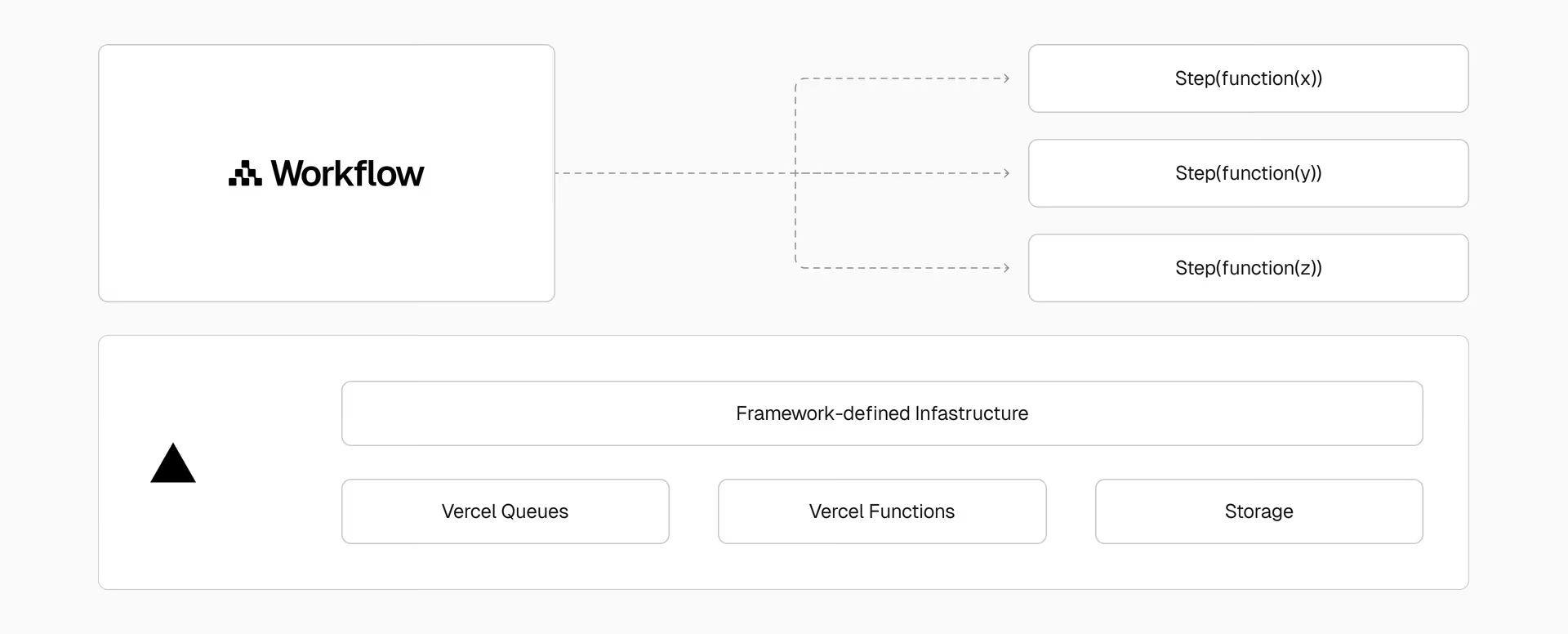
For work that outlives a function, Vercel Workflows builds on the open-source Workflow SDK. Code marked 'use workflow' is resumable and durable: it can pause for minutes or months, and survives deployments and crashes through deterministic replay. Vercel Functions execute the code, Vercel Queues dispatch it, and managed persistence stores state and event logs. The docs list a WorkflowAgent that runs an AI SDK agent loop inside a workflow, and eve, a framework where each session runs as a workflow. Workflows are priced at $20 per 1M events on Pro, $0.50 per GB of storage written and $0.50 per GB-month retained, with 50K events and 1 GB of writes included on Hobby.
// From Vercel's Workflows docs: a durable function
export async function aiContentWorkflow(topic: string) {
  'use workflow';

  const draft = await generateDraft(topic);
  const summary = await summarizeDraft(draft);

  return { draft, summary };
}
Strengths: active-CPU billing, tight Next.js integration, a durable layer in the same account, and Schedules that can start a workflow. Weaknesses: the 1,800 second maximum is beta, a 4.5 MB request and response body limit applies to non-streamed payloads, and per-run storage retention is billed separately. Python workflow support is beta. Best for: TypeScript teams that already deploy on Vercel and want agents next to their app. Vercel also sells the model gateway side; see our Vercel AI Gateway guide.
Cloudflare (Workers, Durable Objects, Agents SDK)
Cloudflare's Agents SDK is the most agent-specific hosting model on this list. Each agent runs as a Durable Object with its own persistent identity, local SQL storage, live connections and scheduled tasks. The docs name State, WebSockets, Scheduler and MCPClientManager as capabilities, plus harnesses (Pi, OpenCode and Think) that run the agent loop. Agents can be reached through chat, voice, email, Slack and webhooks.
The Agents SDK is now a runtime any agent framework can build on. Today we're opening up the Agents SDK primitives, with Flue as a first framework targeting Agents SDK, and rolling out agents in the dashboard.
— @Cloudflare June 17, 2026
The pricing is the lowest at small scale. Workers Free gives 100,000 requests per day with 10 ms of CPU per invocation. Workers Paid is $5 per month minimum, with 10 million requests and 30 million CPU milliseconds included, then $0.30 per extra million requests and $0.02 per extra million CPU ms. Duration is not charged. On Paid, CPU time per HTTP request is configurable up to 5 minutes (default 30 seconds), and Cron Triggers, Durable Object alarms and Queue consumers get 15 minutes of wall-clock time. Waiting on network calls does not count as CPU time.
State costs extra. Durable Objects on the Paid plan include 1M requests and 400,000 GB-s of duration per month, then $0.15 per million requests and $12.50 per million GB-s, with duration billed on 128 MB per object. SQLite storage is billed per row read and written and $0.20 per GB-month beyond 5 GB-month (SQLite billing started in January 2026). For durable multi-step jobs there is a separate Workflows product: on Paid, up to 10,000 steps by default (configurable to 25,000), 1 GB of persisted state per instance, a 365 day maximum sleep, and 50,000 concurrent instances per account.
Agents need more than just a container to scale. We're introducing @cloudflare/computer, an agent runtime that dynamically orchestrates between fast, efficient isolates and full Linux containers to give every agent a computer of its own.
— @Cloudflare August 3, 2026
On cold starts, Cloudflare's docs say its isolate model “eliminates the cold starts of the virtual machine model” and that an isolate can start around a hundred times faster than a Node process on a container (vendor-reported, no figure given). The limits page does enforce a 1 second startup limit. Weaknesses: 128 MB per isolate, a JavaScript and WebAssembly runtime rather than arbitrary Linux (the container runtime in the post below appears aimed at that gap), and Durable Object billing that is easy to underestimate. Best for: one stateful agent per user, chat and voice agents, and anything that benefits from WebSockets and live connections.
Railway
Railway is the simplest of the container hosts. You connect a repo or image, and it runs as a continuous service. Plans are Free ($1 of credit per month), Hobby ($5 per month with $5 of usage) and Pro ($20 per month with $20 of usage), plus a one-time $5 trial grant for new accounts. Usage is metered: $20 per vCPU per month, $10 per GB of RAM per month, $0.15 per GB of volume per month and $0.05 per GB of egress. Per-service maximums are 48 GB and 48 vCPU on Hobby and 1 TB and 1,000 vCPU on Pro, with up to 6 and 42 replicas respectively.
For scheduled agents, cron is configured in the service settings. Railway runs the start command on the schedule, expects it to exit, skips a run if the previous one is still active, requires at least 5 minutes between runs, evaluates in UTC, and says execution can vary by a few minutes. The docs say cron does not fit long-running processes or tasks needing runs more often than every 5 minutes, so a polling agent should be its own service rather than a cron job.
Strengths: very low friction and predictable per-resource pricing, with a $5 entry point. Weaknesses: we did not find a published cold-start figure, a documented maximum run time, or built-in durable execution, so retries and state are yours to build. Cron timing is approximate. Best for: an always-on agent worker or a Slack or Telegram bot where you want a container and a bill under $20. For a similar always-on pattern on a plain server, see our Hermes agent VPS guide.
Render
Render covers the full set of agent shapes: web services, private services, background workers, cron jobs, a managed Postgres and Key Value store, and persistent disks at $0.25 per GB per month. Workspace plans are Hobby ($0), Pro ($25 per month), Scale ($499) and Enterprise, each plus compute. Compute is per service and prorated to the second, including services that start and stop automatically such as cron jobs and workflows. Example instance prices: free (512 MB, less than 1 CPU), $7 per month (0.5 CPU, 512 MB), $25 (1 CPU, 2 GB), $85 (2 CPU, 4 GB). Horizontal autoscaling is listed from the Pro plan.
Two features matter for agents. Background Workers run continuously without receiving network traffic and typically poll a queue such as Render Key Value. Render Workflows is a newer orchestration engine for long-running tasks written as TypeScript or Python functions, with runs up to 24 hours, per-task timeouts and automatic retries. The docs list gaps: no native scheduling (use a cron job to trigger runs), flows cannot yet chain other tasks or flows, and runs cannot receive incoming connections. The page did not say whether Workflows is beta or generally available. Render also advertises Sandboxes for agents.
Strengths: predictable flat instance pricing, Postgres and Redis-compatible stores in the same dashboard, and a free tier for experiments. Weaknesses: fixed instance sizes cost more than per-resource billing at the low end, and Workflows scheduling needs an extra cron piece. Best for: teams that want a single platform with a queue worker, a database and cron in one place.
Fly.io
Fly.io runs your container as a Machine, a VM billed by the second while running. As of November 11, 2026, in the lowest-priced regions (Ashburn and Secaucus) a shared-cpu-1x with 256 MB is $2.19 per month, 512 MB is $3.69, 1 GB is $6.70, shared-cpu-2x with 2 GB is $13.39, and performance-1x with 2 GB is $33.00. Extra RAM costs $6.00 per GB per month. Stopped or suspended Machines pay only $0.15 per GB per month of root filesystem, and volumes cost $0.15 per GB per month. New organizations have no free tier, and personal organizations with a bill under $5 have it waived.
Scale-to-zero is a proxy feature. With auto_stop_machines set to "stop" or "suspend" and auto_start_machines = true, Fly Proxy starts a stopped Machine when a request arrives and stops excess Machines every few minutes. The docs warn that autostop and autostart only work on existing Machines and never create or destroy them, that a newly started Machine may not be recognized by every proxy node right away, and that the stop loop is rate limited. Fly does not give a start-time number on the page we read.
Strengths: the cheapest steady-state compute on this list, global regions, full VM semantics and volumes. Weaknesses: you assemble scheduling, queues and durability yourself, scale-to-zero relies on existing Machines, and there is no free tier. Best for: cost-conscious teams comfortable with Docker who want per-user or per-region agents on real VMs. If you would rather manage the box yourself, compare it with our VPS roundup.
Modal
Modal is a Python-first serverless platform that bills per second. Starter has no base fee and $30 of free monthly credits, 100 containers, 10 GPU concurrency, 200 deployed apps and 5 deployed crons. Team is $250 per month with $100 of credits, 5,000 containers, 50 GPU concurrency and unlimited crons. CPU is $0.0000131 per core-second (a core equals 2 vCPUs, minimum 0.125 cores), memory $0.00000222 per GiB-second, with GPUs from $0.000164 per second (T4) to $0.001972 (B300). Choosing a region costs 1.15 to 1.75 times base prices and non-preemptible execution costs 3 times.
Function timeouts default to 300 seconds and can be set between 1 second and 24 hours, with each retry starting a fresh timeout. On cold starts, Modal says containers boot in “about one second” before your global-scope code and modal.enter methods run (vendor-reported), and boot times can range from seconds to minutes depending on initialization. Levers: min_containers to avoid scale to zero, scaledown_window (default 60 seconds, 2 seconds to 20 minutes), and memory snapshots.
# Parameter names are taken from Modal's timeout and cold-start guides.
# Check the current SDK reference before copying.
@app.function(
    timeout=3600,            # 1 second to 24 hours, default 300
    min_containers=1,        # keep one container warm, no scale to zero
    scaledown_window=300,    # default 60s, range 2s to 20 minutes
)
def run_agent(task: str): ...
Strengths: excellent for bursty Python agents, evaluation fan-out and anything needing GPUs, with sandbox pricing published ($0.00003942 per core-second and $0.00000667 per GiB-second, non-preemptible). Weaknesses: Python-centric, the Starter cron cap is 5, and no built-in durable workflow primitive on the pages we read. Best for: research agents and batch pipelines. For GPU price comparisons beyond Modal, see our GPU cloud guide.
AWS Bedrock AgentCore Runtime
AgentCore Runtime hosts an agent or tool container with a dedicated microVM per session. Each session has isolated CPU, memory and filesystem, can persist up to 8 hours, is terminated after 15 minutes idle by default, and is then sanitized. You deploy a container image from ECR or a direct code package, and the SDK works with frameworks such as LangGraph, CrewAI and Strands Agents. Runtime supports HTTP, MCP and A2A protocols, streaming, WebSockets, and IAM (SigV4) or OAuth 2.0 inbound auth through AgentCore Identity.
Limits from the quotas page: synchronous request timeout 15 minutes, streaming and WebSocket connections 60 minutes, asynchronous jobs 8 hours on microVMs (and up to 14 days on the newer Instances compute type), 100 MB payloads, 2 vCPU and 8 GB maximum per session, 1 GB session storage, and 5,000 active session workloads in us-east-1 and us-west-2 (2,500 elsewhere, adjustable). Session state is ephemeral by design; durable context belongs in AgentCore Memory.
Pricing on the AgentCore page: platform v1 is $0.0895 per vCPU-hour and $0.00945 per GB-hour; v2 is $0.1276 and $0.0169 on consumption pricing (a committed baseline of $0.0997 and $0.0132 was listed as launching by October 2026), billed per second with a 1 second minimum. Browser and Code Interpreter list the same rates as v1. Gateway is $0.005 per 1,000 invocations, and observability is billed at CloudWatch rates. New AWS customers can get up to $200 in credits. AWS says V2 starts agents from a snapshot so cold starts are consistent regardless of concurrency or image size (vendor-reported), at the cost of several minutes to create or update a runtime and a 120 second health-check deadline.
# From the AgentCore docs: create a runtime on platform version V2
aws bedrock-agentcore-control create-agent-runtime \
  --agent-runtime-name "my-agent" \
  --role-arn "arn:aws:iam::111122223333:role/AgentExecutionRole" \
  --agent-runtime-artifact '{
    "containerConfiguration": {
      "containerUri": "111122223333.dkr.ecr.us-west-2.amazonaws.com/my-agent:latest"
    }
  }' \
  --network-configuration '{"networkMode": "PUBLIC"}' \
  --platform-version V2
Strengths: strongest per-session isolation and identity story, framework neutral, tight AWS integration. Weaknesses: no scheduler inside Runtime on the pages we read, so pair it with EventBridge or another trigger; the 2 vCPU session cap; and layered pricing across Runtime, Memory, Gateway and CloudWatch. Best for: AWS shops serving many end users who need isolated sessions. If you already trace agents on AWS, our LangSmith BYOC on AWS guide covers the observability side.
Google Vertex AI Agent Engine (Agent Runtime)
Google's managed runtime, now documented under Agent Runtime, deploys agents built with ADK, LangChain and LangGraph, LlamaIndex, A2A, AG2 or custom code. It offers Sessions for conversation state, Memory Bank for long-term memory, sandboxed code execution, Cloud Trace and Cloud Logging, IAM agent identity, bidirectional streaming and Private Service Connect. Enterprise controls include VPC Service Controls, CMEK (single-region endpoints only), data residency and HIPAA.
The live Google Cloud pricing page lists Agent Compute at $0.085 per vCPU-hour and Agent Memory at $0.009 per GiB-hour, with discounts for 1 and 3 year commitments ($0.0765 and $0.068 per vCPU-hour). Usage is rounded to the nearest second and, for Runtime, idle time spent waiting for the next prompt between turns is not billed. Sessions and Memory Bank add storage at $0.30 per GiB-month plus read and write operations charged in vCPU-hour equivalents, with billing for Sessions and Memory Bank starting September 1, 2026. Other rates ($0.0994 and $0.0105, or $0.0864 and $0.0090) appear in earlier material and third-party articles, so check the date on any number you find elsewhere.
On scaling, Google's optimization guide names min_instances (default 1) and container_concurrency (default 9, with multiples of 9 for async agents like ADK). Its own example (vendor-reported) shows 300 concurrent requests averaging about 4.7 seconds with one minimum instance versus about 0.4 seconds warm, dropping to about 1.4 seconds with ten. We did not find a documented maximum request duration on the pages we read, so confirm that before running hour-long jobs.
# Agent Runtime deployment parameters named in Google's scaling guide
min_instances=10          # default 1; warm instances absorb bursts
container_concurrency=36  # default 9; use multiples of 9 for async agents
Strengths: idle time is free, sessions and memory are built in, and governance features are strong. Weaknesses: limits and scheduling are less clearly documented than AWS's, and much of the pricing has changed recently. Best for: Google Cloud teams building Gemini-first agents who want sessions and memory without running a database.
LangGraph Platform / LangSmith Deployment
LangSmith Deployment (the product formerly branded LangGraph Platform) hosts the Agent Server, which models assistants for configuration, threads for state and runs for workloads. Deployment options are Cloud (LangChain manages it on AWS, Azure or GCP, from the Plus plan), self-hosted with a control plane on Enterprise, hybrid (managed control plane, your data plane), and a standalone Agent Server you run with Docker, Compose or Kubernetes using your own PostgreSQL and Redis.
Pricing on the LangChain pricing page: Developer $0 per seat with 5k base traces, Plus $39 per seat with 10k base traces and access to Agent Server. Plus includes one free Serverless (Small) Agent Server; additional servers are metered in LSUs at $1 each: runtime compute 0.0675 per vCPU-hour, runtime memory 0.0090 per GiB-hour, database compute 0.177 per vCPU-hour and database memory 0.025 per GiB-hour. Serverless servers scale to zero when idle, while Dedicated servers are always on. The page did not list a per-node-execution price.
For agents, the relevant primitives are background runs (create a run on a thread, poll with runs.get or block with runs.join) and cron jobs. Cron uses standard expressions evaluated in UTC; stateless crons create a new thread for each execution and delete it by default, while thread-bound crons send the same input to an existing thread. The docs warn that forgotten crons keep running and can generate LLM API charges. A maximum run duration was not stated on the pages we read.
Strengths: native threads, checkpoints, human-in-the-loop and cron for LangGraph code, with tracing in the same product. Weaknesses: it assumes LangGraph, per-seat plus metered pricing is harder to forecast, and Cloud needs Plus. Best for: teams already on LangGraph. Compare frameworks in our agent frameworks roundup.
Northflank
Northflank is a container platform that runs services, jobs, cron jobs and databases on its own cloud or in yours. The Sandbox plan is free with no card, up to $20 per month of resources, 2 services, 2 jobs, 1 database and 1 BYOC cluster (up to 12 vCPU and 48 GB). Pay as you go is usage-based with unlimited users. Rates on Northflank Cloud: CPU $0.01667 per vCPU-hour, memory $0.00833 per GB-hour, persistent disk $0.11657 per GiB per month, egress $0.06 per GB with ingress free. Example plans run from nf-compute-50 (0.5 vCPU, 1 GB) at $12 per month to nf-compute-800-1 (8 vCPU, 16 GB) at $192 per month.
GPUs are listed per hour, for example L4 at $0.80, A100 40 GB at $1.42, H100 at $2.74 and B200 at $5.87. BYOC is billed at $0.02083 per node vCPU-hour with memory, storage and network not billed by Northflank, plus $1.00 per GB of VRAM per month for GPUs, while your cloud provider bills the hardware itself. Jobs can be given a maximum run duration in seconds and a retry limit, and cron jobs take a five-field expression with a concurrency policy (Allow, Forbid or Replace). We did not find a published cold-start figure on the pricing page.
Strengths: BYOC, GPUs, jobs with configurable time limits, cron alongside services, and a real free tier for evaluation. Weaknesses: more infrastructure concepts than Railway, and no durable-execution layer built in. Best for: teams that need data in their own AWS, GCP or Azure account but do not want to run Kubernetes themselves.
Inngest and Trigger.dev (Durable Execution)
These two do not host your compute the same way the others do. They run the orchestration layer, and your code runs either on their workers (Trigger.dev) or on your own HTTP endpoints (Inngest), so they pair with any host above.
Inngest
Inngest splits a function into steps, saves each step's result, and replays the handler without repeating completed work. Failed steps retry, and waitForEvent pauses a run until a matching event arrives or a timeout passes. It calls your handler over HTTP, so it works on serverless platforms, and Connect supports persistent workers. Its docs advise keeping Durable Endpoints (which return an HTTP response) under 60 seconds and using durable workflows for longer work. Pricing as of Nov 11, 2026: Free at $0 with 50k executions per month, 5 concurrent steps and runs up to 30 days; Pro from $99 per month with 1M executions, 100 concurrent steps and runs up to 90 days. The page lists the Pro overage two ways ($50 per 1M in the comparison table versus a tiered per-execution rate in the FAQ), so confirm which applies before budgeting.
Trigger.dev
Trigger.dev runs tasks on its own worker pool with no maximum run duration. For long waits it uses CRIU checkpoint-restore to snapshot memory and process state, release compute, then restore the process later; on Cloud you are not charged while paused or waiting on subtasks, and waits under 60 seconds do not checkpoint. Plans: Free $0 ($5 credit, 20 concurrent runs, 10 schedules), Hobby $10 ($10 credit, 50 runs, 100 schedules), Pro $50 ($50 credit, 200+ runs, 1,000+ schedules). Each run costs $0.000025 plus compute: Small 1x (0.5 vCPU, 0.5 GB) is $0.0000338 per second, Medium 1x (1 vCPU, 2 GB) $0.000085, Large 2x (8 vCPU, 16 GB) $0.00068. Dev runs are not charged. The docs say the CLI works with Cloud and self-hosted instances; we did not confirm its license from the page we read.
Strengths: retries, waits and schedules without building them, and hosting-agnostic for Inngest. Weaknesses: an extra vendor in the critical path, and per-run pricing that is higher per compute-second than raw containers (see the next section). Best for: agents whose reliability matters more than the last dollar of compute. For adjacent pipeline tooling, see best data pipeline tools.
A 10-Minute Job Priced on Each Platform
To make the rate cards comparable we priced one illustrative job: an agent that runs for 10 minutes on 1 vCPU and 2 GB of memory, with no egress and no plan fee. This is our own arithmetic from the published rates, not a vendor benchmark. Billing models differ (allocated versus active resources, shared versus dedicated CPU), so treat it as an order-of-magnitude guide. Vercel and Cloudflare are excluded because they bill active CPU and requests, which depends on how much of the 10 minutes is waiting on a model.
| Platform | Compute for 10 min | How it was computed |
|---|---|---|
| Fly.io (shared-cpu-1x, 2 GB) | $0.0029 | $6.70 + $6.00 extra RAM per 720 hours; shared CPU, not a dedicated vCPU |
| Northflank (nf-compute-100-2) | $0.0056 | $0.03333/h flat plan, always billed while running |
| Render (1c-2g, $25/mo prorated to the second) | $0.0058 | Monthly plan price divided by 720 hours for illustration |
| Modal | $0.0066 | 0.5 core (= 1 vCPU) + 2 GiB at per-second rates |
| Railway | $0.0092 | vCPU + 2 GB at the per-minute rates |
| Google Agent Runtime | $0.0172 | $0.085 + 2 x $0.009 per hour |
| AWS AgentCore Runtime v1 | $0.0181 | $0.0895 + 2 x $0.00945 per hour |
| AWS AgentCore Runtime v2 (consumption) | $0.0269 | $0.1276 + 2 x $0.0169 per hour |
| Trigger.dev (Medium 1x) | $0.0510 | $0.000085/s x 600s + $0.000025 per run |
Raw container platforms and Modal land between a third of a cent and one cent for this job. The hyperscaler agent runtimes are roughly three to four times higher per hour, which buys session isolation, identity, memory services and governance. If your agent mostly waits on a model, Google bills only active resources and not idle time between turns, and Vercel and Cloudflare bill CPU rather than wall time, which can beat all of the above. Durable orchestrators such as Trigger.dev cost more per compute-second because you are paying for orchestration, not just CPU.
Limits Side by Side
The numbers that most often break agent deployments are maximum run time, memory per instance and concurrency. Values are from vendor docs on November 11, 2026.
| Platform | Maximum run time | Memory / CPU ceiling | Concurrency |
|---|---|---|---|
| Vercel | 800s GA, 1800s beta (Pro/Enterprise); Hobby 300s | 4 GB / 2 vCPU max memory (Pro) | 30,000 concurrency (Hobby, Pro) |
| Cloudflare Workers | 5 min CPU time per request (Paid); 128 MB per isolate | Durable Objects: 128 MB billed per object | Workflows: 50,000 concurrent instances (Paid) |
| Railway | No run cap on the pages we read | Hobby 48 GB / 48 vCPU, Pro 1 TB / 1,000 vCPU per service | Hobby 6 replicas, Pro 42 |
| Render | Workflows runs up to 24 h | Up to 12 CPU / 96 GB on Services & Workers | Horizontal autoscaling on Pro and above |
| Fly.io | No run cap on the pages we read | Performance presets to performance-2x 4 GB listed | Autostop/autostart acts on existing Machines only |
| Modal | 1 s to 24 h, default 300 s | Starter: 100 containers, 10 GPU concurrency | Team: 5,000 containers, 50 GPU concurrency |
| AgentCore Runtime | 15 min sync, 60 min streaming, 8 h async | 2 vCPU / 8 GB per session | 5,000 active sessions (us-east-1, us-west-2) |
| Google Agent Runtime | Not stated | Not stated | container_concurrency default 9, min_instances default 1 |
| Inngest | 30 days Free, 90 days Pro per run | n/a | 5 concurrent steps Free, 100 Pro |
| Trigger.dev | No maximum duration | Large 2x: 8 vCPU / 16 GB | 20 concurrent runs Free, 200+ Pro |
For tooling that agents call, such as browsers and retrieval, hosting is only part of the bill. See our posts on browser infrastructure and vector databases for agents.
How to Choose
| Situation | Look at | Reason |
|---|---|---|
| Webhook receiver that fans out to an LLM call, under a few minutes | Vercel Functions or Cloudflare Workers | Pay for active CPU, not for waiting on the model. |
| Agent that must survive deploys and wait days for approval | Vercel Workflows, Cloudflare Workflows, Inngest, Trigger.dev | State lives in the platform, not in your process. |
| One long-lived stateful agent per user or per chat | Cloudflare Agents SDK (Durable Objects) | Each agent has its own identity, SQL storage and connections. |
| Always-on queue worker polling Redis or Postgres | Railway, Render Background Worker, Fly.io, Northflank | Plain containers with the lowest steady-state price. |
| Heavy Python, GPUs or sandboxes on demand | Modal | Per-second billing and 24 h timeout. |
| Strict isolation per end-user session, AWS-native identity | AgentCore Runtime | Dedicated microVM per session and IAM or OAuth inbound auth. |
| Google Cloud estate, Gemini-first agents | Google Agent Runtime | Sessions and Memory Bank bundled, VPC Service Controls and CMEK supported. |
| LangGraph codebase with human-in-the-loop threads | LangSmith Deployment | Agent Server speaks threads, runs and cron natively. |
| Data residency or your own cluster | Northflank BYOC, LangSmith hybrid, or self-hosted Trigger.dev/Inngest | Compute stays in your cloud account. |
Before committing, run a three-part test on your own agent. First, replay a realistic trace and note how much of the wall clock is waiting versus computing, which decides whether active-CPU billing helps. Second, kill the process mid-run and see whether your state survives, which tells you whether you need a durable layer. Third, deploy twice in the middle of a long run to check that in-flight work is not dropped. Platforms with version-skew protection (Vercel Workflows lists Skew Protection) or snapshot-based runtimes handle this differently from plain containers.
A new version of the MCP spec landed, and it's fully stateless. Servers now run in a single Worker with no sticky sessions, open streams, or Durable Objects needed. Our Agents SDK was ready on day zero, in production now with @sentry and @linear.
— @CloudflareDev August 6, 2026
Hosting for MCP servers is changing too: a stateless MCP server can run in a single Worker, while stateful agents still want Durable Objects. If your agent exposes tools over MCP, check which transport and session model your host assumes. This is a vendor statement, not a neutral comparison.
How We Evaluated
We read each vendor's pricing page and documentation on November 11, 2026, preferring first-party quotas and limits pages over blog posts. Criteria: price model and entry cost, maximum documented execution time, persistence and state, scheduling, scaling limits and cold-start statements. We did not run load tests, so any latency or cold-start figure is vendor-reported, and we did not find an independent cross-platform cold-start benchmark. When a page did not state a value we wrote “not stated” rather than infer it. There is no paid placement, affiliate link or sponsorship in this ranking, and vendor order in this article is by category, not by quality. This article was drafted with AI assistance and edited against the cited pages.
Known gaps: we did not measure real cold starts, we could not confirm maximum run time for Railway, Fly.io, Google Agent Runtime, LangSmith Deployment or Northflank from the pages we read, and Render's Workflows status (beta or GA) was not stated. Treat those as questions to ask the vendor.
FAQ
What is the best platform to host an AI agent in 2026?
It depends on the shape of the agent. For request-driven agents on a TypeScript stack, Vercel Functions with Workflows is the simplest path. For one stateful agent per user, Cloudflare's Agents SDK on Durable Objects fits best. For an always-on worker, Railway, Render, Fly.io or Northflank are cheap and boring. For Python and GPU work, Modal. For AWS or Google Cloud estates, AgentCore Runtime or Google Agent Runtime respectively.
Can I run a long-running agent on a serverless platform?
Yes, but check the documented ceiling. As of Nov 11, 2026, Vercel Functions allow 800 seconds generally available (1,800 seconds in beta) on Pro and Enterprise, Cloudflare Workers allow up to 5 minutes of CPU time per HTTP request on the Paid plan, AgentCore Runtime allows async jobs up to 8 hours, and Modal allows timeouts up to 24 hours. Past those numbers, move the loop into a durable workflow (Vercel Workflows, Cloudflare Workflows, Inngest, Trigger.dev) so a restart resumes instead of starting over.
What is durable execution and do my agents need it?
Durable execution records the result of each step so a crash, timeout or redeploy resumes from the last completed step. Agents need it when a run makes several expensive model or tool calls, waits for a human, or sleeps for hours or days. Inngest, Trigger.dev, Vercel Workflows and Cloudflare Workflows all provide it. Short, idempotent, single-call agents usually do not need it.
How do cold starts compare across these platforms?
There is no neutral benchmark, so only vendor-reported statements exist. Cloudflare says isolates avoid the cold start of the virtual machine model. Modal says containers boot in about one second and offers min_containers and memory snapshots. AgentCore Runtime V2 restores from a snapshot to keep cold starts consistent. Google's docs show an example where cold requests averaged about 4.7 seconds versus about 0.4 seconds warm. Railway, Render, Fly.io and Northflank do not publish cold-start figures on the pages we read.
Which option is cheapest for an agent that runs a few times a day?
Per-second or scale-to-zero billing wins here: Vercel Hobby, Cloudflare Workers Free, Modal Starter ($30 monthly credits) and Trigger.dev Free ($5 credits) cost nothing at low volume. Fly.io and Render bill compute only while services run, and Railway charges for allocated resources, so a cron-style job is cheap on all three. Always-on containers are the expensive pattern for rare jobs.
Do I need a separate database for agent memory and state?
Often yes. Durable Objects, AgentCore session storage (1 GB, ephemeral), and Vertex Sessions cover conversation state, but long-term retrieval usually wants a real store. See our comparison of vector databases for agents, and treat platform state as working memory rather than your system of record.
Are these prices final?
No. Every number in this article was read from the vendor's pricing or docs page on Nov 11, 2026 and will drift. Several vendors also have pending changes: AgentCore Memory billing changes from Oct 6, 2026, and Google's Sessions, Memory Bank and Skill Registry billing starts Sept 1, 2026. Confirm on the vendor page before committing budget.
Which platforms can I self-host or run in my own cloud?
Northflank offers BYOC at $0.02083 per node vCPU-hour, LangSmith Deployment offers hybrid and self-hosted options on Enterprise plus a standalone Agent Server container, Vercel's Workflow SDK is open source and can run on other infrastructure through a World adapter, and Trigger.dev's CLI works against self-hosted instances. Railway, Render, Modal and Fly.io run on their own infrastructure only, based on the pages we read.
Sources
All pages accessed November 11, 2026.
Vendor documentation and pricing
- Vercel: Functions limits
- Vercel: pricing
- Vercel: Workflows
- Cloudflare: Workers limits
- Cloudflare: Workers pricing
- Cloudflare: Durable Objects pricing
- Cloudflare: Workflows limits
- Cloudflare: Agents SDK
- Cloudflare: How Workers works
- Railway: plans
- Railway: cron jobs
- Render: pricing
- Render: background workers
- Render: Workflows
- Fly.io: pricing
- Fly.io: autostop and autostart
- Modal: pricing
- Modal: timeouts
- Modal: cold start
- AWS: AgentCore pricing
- AWS: AgentCore Runtime, how it works
- AWS: AgentCore quotas
- Google Cloud: pricing (Agents section)
- Google Cloud: Agent Runtime overview
- Google Cloud: optimize and scale Agent Runtime
- LangChain: pricing
- LangSmith: deployments
- LangSmith: cron jobs
- LangSmith: background runs
- Northflank: pricing
- Northflank: run an image once or on a schedule
- Inngest: pricing
- Inngest: how functions are executed
- Trigger.dev: pricing
- Trigger.dev: how it works