
Get the latest on AI, LLMs & developer tools
New MCP servers, model updates, and guides like this one — delivered weekly.
What Kimi K3 launched—and the bottom-line verdict
Kimi K3 is worth a controlled API test for long-context, visual, and agentic work, but it is not yet a drop-in self-hosting choice. It launched on July 16, 2026 with 2.8 trillion parameters, native vision, a one-million-token context window, and access through Kimi's consumer products and API. The sober caveat is unusually clear: Kimi's own technical blog says overall performance still trails Claude Fable 5 and GPT-5.6 Sol.
This guide was researched only from official Kimi/Moonshot blog posts, current API documentation, official X posts, and Moonshot's GitHub repository. It distinguishes product availability from weight availability and vendor evaluation from independent proof.
K3 versus the previous generation: what changed and what stayed familiar
K3's headline change is scale: 2.8T total parameters, sparse expert activation, and a context window four times the 256K window listed for current K2.x models. It also makes vision native to the flagship model and adds KDA plus AttnRes to its core architecture. Kimi claims the combined architecture, training, and data changes deliver roughly 2.5× overall scaling efficiency versus K2; that is a vendor claim, not a directly transferable latency multiplier.
What stays familiar is the integration surface. The current K3 quickstart uses OpenAI-compatible Chat Completions, automatic context caching, tool calls, and structured output. Kimi Code remains the terminal-agent interface—select K3 with /model—and its MIT-licensed GitHub repository contains the CLI, not K3's model weights.
K3 architecture in practical developer terms
The official material names several techniques but does not yet publish the promised full technical report. The useful interpretation is therefore operational, without inventing internal mechanics.
| Part | What Kimi says | Practical implication |
|---|---|---|
| Kimi Delta Attention (KDA) | Kimi describes KDA as the attention foundation for scaling long sequences and claims up to 6.3× faster decoding at million-token context. | Treat the speed figure as a vendor architecture claim, not your expected API latency. Benchmark your own prompt lengths and cache patterns. |
| Attention Residuals (AttnRes) | AttnRes selectively retrieves representations across model depth; Kimi claims about 25% higher training efficiency for under 2% added cost. | This is mainly a training and information-flow change. It does not require a new request format. |
| Stable LatentMoE | A 2.8T-parameter mixture-of-experts model that activates 16 of 896 experts. | Only a sparse subset runs per token, but serving remains infrastructure-heavy; total parameter count still drives memory and distribution requirements. |
| MXFP4 / MXFP8 | Quantization-aware training uses MXFP4 weights and MXFP8 activations. | The formats aim to make a huge model more deployable, but Kimi still recommends a 64-plus-accelerator supernode. |

The launch thread packages the architecture claims most clearly: KDA at up to 6.3× faster million-token decoding and AttnRes at roughly 25% higher training efficiency with less than 2% added cost. These figures describe Kimi's measured architecture behavior; they do not promise the same end-to-end speed for your agent.
Introducing Kimi K3: Open Frontier Intelligence
— Kimi.ai (@Kimi_Moonshot) July 16, 2026
2.8 Trillion Parameters, 1 Million Context, Native Multimodal
Kimi Delta Attention enables up to 6.3x faster decoding in million-token contexts
Open Weights by July 27, 2026.
How 1M context and native vision affect agent workflows
A million-token window can keep large repositories, document collections, tool traces, or extended research sessions in one request envelope. It does not eliminate context design: irrelevant history still costs money, competes for attention, and can make behavior harder to debug. For repeated coding workloads, keep a stable repository or policy prefix so automatic caching has a chance to apply.
Native visual input makes screenshot-to-code, document-image, frontend, CAD, and visual verification loops plausible in one model. The API constraint matters: the quickstart says public image URLs are unsupported, so upload images and reference them with ms://, or send base64 data. K3 also supports structured output, partial mode, tool_choice, and dynamic tool loading—useful for agents with large tool catalogs.
For desktop workflows, our Kimi Work guide explains local files, browser automation, and multi-agent execution. Those product capabilities should not be confused with raw model behavior exposed through Chat Completions.
Official benchmark signals—and why to be cautious
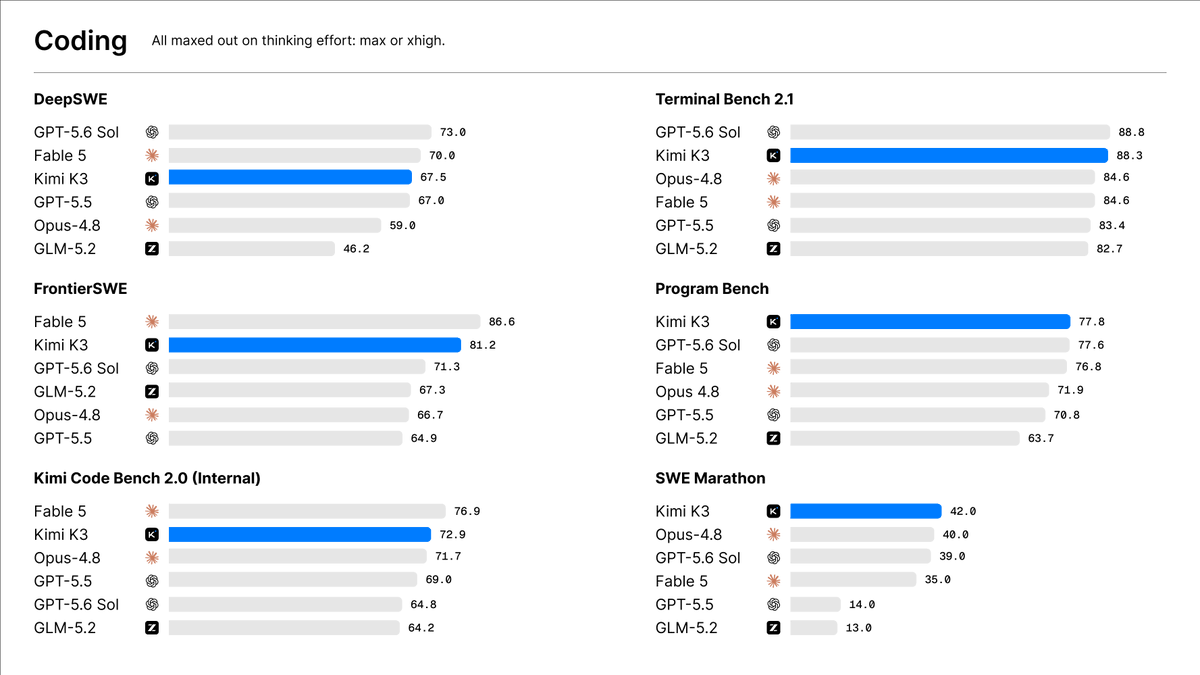
Every score below is vendor-reported. BrowseComp is a public benchmark run under Kimi's stated methodology; the other three are explicitly internal evaluations. Different context policies, agent harnesses, reasoning settings, judges, and competitor result sources prevent a clean model-only ranking.
| Benchmark | K3 score | Evidence type | Configuration | Caveat |
|---|---|---|---|---|
| BrowseComp | 90.4 | Public benchmark; vendor-run | K3 max, 1M context, no context management | Vendor-reported. The launch blog also discusses a 300K compaction setup elsewhere; harness, context policy, and cited competitor runs differ. |
| Online Exp Bench | 75.5 | INTERNAL; vendor-reported | K3 max; Kimi internal knowledge-work evaluation | Task set and full reproducibility materials are not public in the cited launch thread. |
| DECK-Bench | 73.5 | INTERNAL; vendor-reported | K3 max; Kimi internal knowledge-work evaluation | Useful as a product-development signal, not an independent comparison. |
| Finance-Bench | 62.6 | INTERNAL; vendor-reported | K3 max; Kimi internal knowledge-work evaluation | Do not infer production financial accuracy or suitability from this score. |
Coding benchmark comparison
General and visual agent comparison

Internal knowledge-work comparison

Kimi reports BrowseComp 90.4 with the full 1M context and no context management. That is a useful signal for retrieval-heavy browsing, but it does not prove lower latency, better tool reliability, or superior results under your own compaction policy. The official internal-benchmark post reports 75.5, 73.5, and 62.6; without public task sets and a reproducible harness, use those numbers to choose smoke tests, not to approve production.
For a comparison of how another vendor reports public evaluations and fallback behavior, see our Claude Fable 5 benchmark and prompting guide.
Availability, weights, and hardware reality as of July 20, 2026
K3 is available through Kimi.com, Kimi Work 3.1.0 or later on Windows and Apple-silicon Macs, Kimi Code, and the Kimi API. On July 19, Kimi temporarily paused new consumer subscriptions while adding capacity; existing subscribers were unaffected. That notice does not say the API was unavailable.
The weights are a separate status. Kimi announced full weights by July 27, 2026. As of July 20, the official sources do not present a downloadable K3 model repository, so the accurate wording is announced open weights, forthcoming. Do not read the Kimi Code repository as a weight release.
Self-hosting will be demanding even after release. Kimi recommends supernodes with at least 64 accelerators, citing the high-bandwidth communication needs of sparse expert inference. MXFP4 weights help memory efficiency, but a 2.8T model remains outside ordinary single-server deployment. Infrastructure teams should wait for exact artifacts, supported runtimes, memory requirements, and the promised vLLM KDA prefix-cache implementation before sizing a cluster.
| Topic | Earlier official wording | Current official status | How to act |
|---|---|---|---|
| Reasoning effort | Launch post: low/high would follow later | Current quickstart: low/high/max supported; max is default | Follow the newer API docs as of July 20, 2026. |
| Open status | Tech blog calls K3 open and announces open weights | Full weights promised by July 27; no official K3 download repository is presented yet | Describe K3 as announced open-weight/forthcoming, not already downloadable. |
Kimi K3 API and pricing
The API is OpenAI-compatible at https://api.moonshot.ai/v1 with model kimi-k3. Official pricing excludes applicable taxes.
| Item | Official price or limit | Planning note |
|---|---|---|
| Cache-hit input | $0.30 per 1M tokens | Automatic caching; an unchanged prefix creates an opportunity, not a guaranteed hit. |
| Cache-miss input | $3.00 per 1M tokens | Use this rate for conservative input-cost estimates. |
| Output | $15.00 per 1M tokens | K3 always reasons, so cap and observe completion usage. |
| Context window | 1,048,576 tokens | Input plus generated content must fit the model limits. |
Kimi claims its official API sees more than 90% cache hits on coding workloads. Treat that as a vendor-observed workload mix, not your budget assumption. At published rates, one million cache-miss input tokens plus 100,000 output tokens costs about $4.50 before tax; the same input with a cache hit would reduce that example to about $1.80.
Minimal Python OpenAI-SDK call
Install the SDK, export a real key in your shell, and run this copyable example. No sampling fields are included because K3 fixes them server-side.
python -m pip install openai
export MOONSHOT_API_KEY="replace-with-your-api-key"

python - <<'PY'
import os
from openai import OpenAI

client = OpenAI(
    api_key=os.environ["MOONSHOT_API_KEY"],
    base_url="https://api.moonshot.ai/v1",
)

response = client.chat.completions.create(
    model="kimi-k3",
    messages=[
        {"role": "user", "content": "Give me a three-step smoke test for a coding agent."}
    ],
    reasoning_effort="max",
    max_completion_tokens=2048,
)

print(response.choices[0].message.content)
PY
API gotchas and correct tool-loop history
| Gotcha | Do this | Why |
|---|---|---|
| Thinking history | Return the complete assistant message unchanged, including reasoning content, during multi-turn and tool-call loops. | Dropping it can make generation quality unstable. |
| Model switching | Start a fresh session when moving to K3. | Kimi warns against switching models mid-session because preserved thinking history matters. |
| Sampling | Omit temperature, top_p, n, and penalties. | They are fixed at 1.0, 0.95, 1, and zero penalties. |
| Completion budget | Set max_completion_tokens intentionally. | The default is 131,072 and the maximum is 1,048,576. |
| Vision | Send base64 data or an ms:// uploaded file reference. | Public image URLs are unsupported. |
| Caching | Keep the long request prefix byte-for-byte stable where practical. | Caching is automatic, but prefix changes reduce hit opportunity. |
| Web search | Do not make Kimi's official search tool a near-term production dependency. | The quickstart says it is being updated and is not recommended for production. |
| Agent boundaries | State permissions, stop conditions, and escalation rules explicitly. | Kimi documents excessive proactiveness as a limitation. |
The most important implementation detail is preserving the SDK message object rather than reconstructing only its visible text:
assistant_message = response.choices[0].message
messages.append(assistant_message)  # preserve reasoning_content + tool_calls

for call in assistant_message.tool_calls or []:
    result = run_tool(call.function.name, call.function.arguments)
    messages.append({
        "role": "tool",
        "tool_call_id": call.id,
        "content": result,
    })

response = client.chat.completions.create(
    model="kimi-k3",
    messages=messages,
    tools=tools,
    reasoning_effort="max",
)
This fragment omits application-specific validation and error handling, but shows the history rule correctly. Return one tool result for every matching call before asking K3 to continue.
Migration and adoption checklist
- Open a fresh evaluation session. Do not switch an existing model conversation to K3.
- Update the client configuration. Point the OpenAI SDK to Moonshot's base URL and use
kimi-k3. - Remove unsupported tuning fields. Omit fixed sampling parameters; choose
reasoning_effortdeliberately. - Audit message serialization. Confirm complete assistant messages survive storage, tool execution, retries, and replay.
- Cap completions and cost. Start well below the 131,072-token default and budget cache misses conservatively.
- Stabilize reusable prefixes. Separate stable repository, policy, and tool definitions from changing user content.
- Convert vision inputs. Replace public URLs with base64 or Moonshot uploads.
- Add behavioral boundaries. Specify allowed tools, writable paths, approval points, and when the agent must stop.
- Run workload-specific evals. Measure tool-call completion, factuality, latency, token usage, recovery, and human corrections against your incumbent model.
- Separate API adoption from self-hosting. Revisit cluster design only after official weights and runtime instructions are downloadable.
If your evaluation includes coding agents, the launch of another recent coding model offers a useful test-design contrast: our Grok 4.5 and Cursor launch analysis separates model quality, token efficiency, throughput, and price rather than collapsing them into one rank.
Use Kimi K3 if—or skip it for now if
Use or test K3 if
- Your agent needs unusually long repository, document, or tool history.
- You want one model for text, screenshots, documents, and visual iteration.
- You can preserve complete assistant reasoning history and enforce explicit action boundaries.
- The published API price is attractive even under a conservative cache-miss assumption.
Skip or wait if
- You need independently reproduced benchmark leadership.
- Your orchestration layer strips reasoning content or swaps models mid-session.
- You depend on public image URLs or Kimi's web-search tool in near-term production.
- You need downloadable weights today or have fewer than the recommended 64 accelerators for self-hosting.
- You need the strongest overall user experience; Kimi itself says K3 still trails Fable 5 and GPT-5.6 Sol.
Useful Kimi K3 FAQ
Is Kimi K3 available now?
Yes through Kimi.com, Kimi Work, Kimi Code, and the Kimi API. The full weights were announced for release by July 27, 2026 and were still forthcoming as of July 20.
Is Kimi K3 better than Claude Fable 5 or GPT-5.6 Sol?
Kimi's own tech blog says K3's overall performance still trails both. Vendor benchmark wins should not override that explicit product-level caveat or your own workload tests.
What is the Kimi K3 API model name?
Use kimi-k3 with the OpenAI-compatible Chat Completions endpoint at https://api.moonshot.ai/v1.
Does Kimi K3 always reason?
Yes. Current API documentation says reasoning is always enabled and reasoning_effort accepts low, high, or max, with max as the default.
Can a normal GPU server self-host Kimi K3?
The official deployment recommendation is a supernode with at least 64 accelerators. Until weights and deployment artifacts arrive, teams should treat self-hosting as a specialized infrastructure project.
All official sources
Sources were checked on July 20, 2026. This article uses first-party material only.
Technical and API
- Kimi K3 technical launch blog — architecture, availability, benchmarks, deployment, pricing, and limitations.
- Kimi K3 API quickstart — request format, reasoning effort, tool loops, vision, caching, and limits.
- Official K3 pricing — token rates, context, features, and tax caveat.
- Official model list and migration notices.
Official social
- Official K3 launch post — scale, context, multimodality, architecture claims, and weight date.
- Official architecture post — expert activation and scaling-efficiency claim.
- Official internal benchmark post.
- Official July 19 capacity notice.
GitHub
- MoonshotAI/kimi-code — MIT-licensed terminal agent; this is not a K3 weight repository.