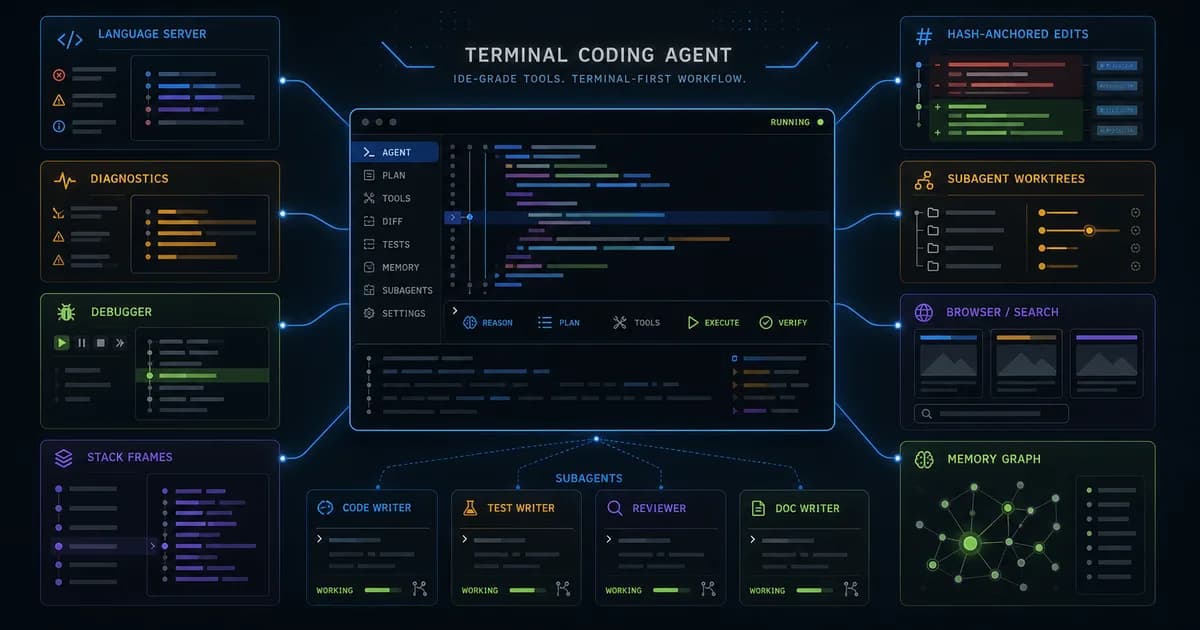
The short version: this is not a minimal chat CLI. It is a batteries-included agent harness forked from Pi, rebuilt around native tooling, Bun, TypeScript packages, Rust crates, and a large set of first-party tools designed to make model edits land more reliably.
Get the latest on AI, LLMs & developer tools
New MCP servers, model updates, and guides like this one — delivered weekly.
Editorial note
This article is based on the GitHub repo, README, docs, package metadata, npm metadata, release/tag information, source tree, current issues, and current PRs researched on June 3, 2026. Version wording is careful because release, npm, tag, and source metadata can briefly diverge in this fast-moving repo.
1. oh-my-pi in One Sentence
Oh My Pi is an MIT-licensed terminal coding agent with a TypeScript/Bun runtime, Rust native operations, model/provider routing, hashline edits, LSP/DAP, subagents, browser/web/GitHub tools, memory, and editor/SDK/RPC surfaces.
| Area | Detail | Why it matters |
|---|---|---|
| Repository | can1357/oh-my-pi | https://github.com/can1357/oh-my-pi |
| Primary language | TypeScript | Primary GitHub language at research time. |
| License | MIT | Check bundled or binary licenses separately where relevant. |
| Created | December 31, 2025 | Latest GitHub release checked: v15.8.0 on June 2, 2026; source/tag metadata was already moving toward v15.8.1. |
2. Why It Matters
Oh My Pi matters because it focuses on the harness problem rather than only model choice. The README argues that models perform dramatically better when the edit format, read/search defaults, LSP feedback, debugger access, and tool semantics match how coding actually works.
The project is also unusually broad. It does not stop at file read/write and shell. It includes LSP, DAP, persistent evaluation kernels, browser, web search, GitHub paths, conflict resolution, memory, preview/accept workflows, subagent fanout, and a native Rust core for expensive operations.
That breadth is both the reason to try it and the reason to test it carefully. The more surfaces an agent owns, the more provider compatibility, terminal behavior, OS behavior, tool permissions, and state management matter.
3. Architecture and Mental Model
Oh My Pi is a monorepo with TypeScript packages, Rust crates, Python support, docs, scripts, and a Bun-oriented CLI package. The `omp` binary is published as `@oh-my-pi/pi-coding-agent`, while Rust crates provide native operations for shell, AST, search, filesystem, image, and token-heavy tasks.
| Area | Detail | Why it matters |
|---|---|---|
| CLI package | `@oh-my-pi/pi-coding-agent` | Publishes the `omp` command and SDK/RPC/ACP surfaces. |
| Runtime packages | `packages/*` | Agent core, AI providers, TUI, native bindings, swarm extension, and related libraries. |
| Native layer | `crates/*` | Rust-backed operations for shell, AST, isolation, search, and performance-sensitive tools. |
| Edit model | Hashline/content-hash anchors | Aims to reduce stale and failed string-replacement patches. |
| IDE layer | LSP and DAP tools | Diagnostics, rename, references, code actions, breakpoints, stack, variables, and stepping. |
| Coordination | Subagents, IRC, task, memory | Parallel workers, typed results, inter-agent communication, and Hindsight memory. |
| External tools | Browser, web search, GitHub, MCP-like integration points | Optional/gated tools expand the agent beyond local files. |
4. Smallest End-to-End Setup
The commands below are copied from the repository documentation and checked against the current research snapshot. Treat them as a starting point, then read the linked README before installing into a production environment.
# macOS / Linux
curl -fsSL https://omp.sh/install | sh

# Bun install
bun install -g @oh-my-pi/pi-coding-agent

# Windows PowerShell
irm https://omp.sh/install.ps1 | iex

# Pinned versions with mise
mise use -g github:can1357/oh-my-pi
A small first task should prove the integration before you attach it to critical data or large workspaces.
# Shell completions
eval "$(omp completions zsh)"
eval "$(omp completions bash)"
omp completions fish > ~/.config/fish/completions/omp.fish

# Basic mental model
cd your-project
omp

# Then choose provider/model settings and enable powerful tools only when needed.
5. Technical Deep Dive
5.1 Hashline edits attack the failed-patch loop
Many coding agents fail not because the intended change is wrong, but because the edit format is fragile. The model repeats a stale line, whitespace differs, the file changed, or a replacement string appears twice.
Oh My Pi's README highlights hashline edits: the model references content-hash anchors instead of retyping every line. If anchors diverge, the patch can be rejected before corrupting the file. That is a strong harness-level idea.
Fragile edit:
  replace "exact old text" with "new text"

Hash-anchored edit:
  locate content anchor
  verify anchor freshness
  apply intended replacement
  reject if stale
5.2 LSP and DAP turn the terminal into an IDE surface
The README's phrase 'the IDE wired in' is literal. LSP tools let the agent use diagnostics, references, symbol navigation, renames, code actions, and workspace-aware operations. DAP tools let it drive debuggers such as lldb, debugpy, and language-specific adapters.
This is a different quality loop from ordinary shell-only agents. Instead of guessing why a rename broke imports, the agent can ask the language server. Instead of adding print statements forever, it can inspect stack frames and variables.
5.3 Subagents return structured work, not only prose
Oh My Pi describes first-class subagents that can fan out into isolated worktrees and return schema-validated objects. That matters because parallel work without structure often creates merge conflicts and vague summaries.
The repo also includes IRC-style communication between live agents and issue activity around subagent concurrency/auth storage. The direction is clear: parallel workers are a core feature, but the coordination plumbing is still evolving quickly.
5.4 Native tools reduce dependency on external shell binaries
The README emphasizes in-process search, glob, find, shell sessions, AST operations, and Rust-backed native components. This reduces dependency on whether a user's machine has the right combination of `rg`, bash, grep, find, or WSL behavior.
The tradeoff is packaging complexity. A Bun/TypeScript/Rust/Python stack is powerful, but it also means runtime versions, native bindings, terminal behavior, and OS-specific edge cases matter.
5.5 Provider routing is a moving target
Oh My Pi supports many providers and model roles. Recent issues and PRs show constant work around Anthropic effort tiers, Bedrock Mantle, MiniMax M3, OpenRouter/DeepSeek schema strictness, custom base URLs, and startup model caches.
That is normal for a serious multi-provider coding agent in 2026. It also means the best way to evaluate Oh My Pi is not only reading the feature list. Install it, choose one provider, run small tasks, and verify the exact provider/tool combo you plan to use.
6. Real-World Wrong vs Right Patterns
| Wrong | Right | Reason |
|---|---|---|
| Enable every powerful tool on day one. | Start with the default set, then enable browser, GitHub, memory, and discovery tools deliberately. | The README notes some tools are setting-gated/off by default. |
| Treat release, tag, npm, and package versions as always identical. | Check the exact source you installed when debugging. | Fast releases can temporarily diverge across channels. |
| Use it only like a chat box. | Lean on LSP, DAP, hashline edits, review, and subagents when the task calls for them. | The harness value is in the tools. |
| Assume terminal features behave identically everywhere. | Smoke-test your terminal, OS, clipboard, paste, image, and shell behavior. | Recent issues covered VTE scrollback, Windows image paste, and platform behavior. |
7. Common Mistakes and Current Issues
The issue tracker matters because these are young, fast-moving repos. The article uses issues as risk signals, not as proof that a project is unusable.
| Area | Detail | Why it matters |
|---|---|---|
| Version divergence | v15.8.0 was latest release/npm, while source/tag metadata was moving ahead. | Pin versions for repeatable reports. |
| Bun requirement | Package metadata requires Bun >= 1.3.14. | Do not assume a Node-only runtime path. |
| Provider schema churn | Issues cover DeepSeek/OpenRouter nullable schemas, MiniMax, Bedrock, and Anthropic effort tiers. | Provider adapters need active maintenance. |
| Terminal behavior | Recent issues include VTE flashing/scrollback and image paste behavior. | Test your actual terminal. |
| Subagent auth/storage | PRs cover swarm auth storage reuse and discovery. | Parallel worker plumbing is active. |
| Tool gates | Some built-in tools are disabled until configured. | Built-in does not always mean active. |
8. Performance, Scaling, and Cost Notes
Oh My Pi's performance thesis is that better tools improve model pass rate and reduce retry loops. Hashline edits, summarized reads, fast search, LSP feedback, and debugger access can save more time than a small token-speed improvement.
The runtime itself is broad: Bun for TypeScript, Rust native components, persistent evaluation kernels, and a TUI. That can be fast, but native packaging and terminal compatibility should be part of your evaluation.
Subagents can reduce wall-clock time for separable tasks. They can also multiply provider calls and coordination overhead. Use them for genuinely independent exploration, review, or implementation slices.
9. Who It Is For
| Use it if | Skip it if |
|---|---|
| You want a terminal coding agent with serious IDE-grade tools. | You want the smallest possible chat CLI. |
| You care about edit reliability, LSP diagnostics, debugger control, and structured subagents. | You cannot install Bun/native tooling in your environment. |
| You like fast-moving tools and can pin versions while debugging. | You need a slow enterprise release cadence. |
| You want one agent surface for files, shell, browser, web, GitHub, memory, and review. | Your policy forbids broad local automation tools. |
10. Community Signal
The repo's issue/PR velocity is high and very implementation-oriented. Recent work includes provider effort tiers, auto routing, thinking renderers, model caches, VTE fixes, schema normalization, and swarm auth behavior.
That speed is a good signal for users who want cutting-edge agent tooling. It is also a warning to pin versions, read changelogs, and expect occasional regressions around provider or terminal integrations.
The README is unusually opinionated: it treats tool design, edit formats, LSP, DAP, and native operations as the main differentiators. Whether you agree depends on whether your current agent fails through bad edits and weak tool feedback.
11. The Verdict: Is It Worth Using?
Our Take
Use Oh My Pi if you want a powerful terminal agent where the harness is the product: hashline edits, LSP/DAP, native search, subagents, browser/web/GitHub, and memory. Skip it if you need a minimal, conservative, provider-stable tool or cannot support Bun/native runtime assumptions.
12. The Bigger Picture
Oh My Pi is part of the next wave of coding agents: less chat wrapper, more programmable development environment. The agent is not just answering; it is reading, editing, debugging, searching, reviewing, delegating, and remembering.
The competitive frontier is tool semantics. Models will keep changing, but the agent that gives them reliable edit primitives, code intelligence, and bounded authority can outperform a stronger model trapped in a weak harness.
13. Frequently Asked Questions
Q: What is `omp`?
`omp` is the command-line entry for Oh My Pi, a terminal coding agent published through the `@oh-my-pi/pi-coding-agent` package.
Q: How is Oh My Pi different from Pi?
The README says it is a fork of Mario Zechner's Pi with many added batteries: provider routing, hashline edits, LSP/DAP, native tools, subagents, browser/search, memory, ACP, and more.
Q: Do I need Bun?
Yes, the README/package metadata treats Bun as a runtime requirement, with Bun global install as the recommended package path.
Q: What are hashline edits?
They are edits anchored by content hashes, designed to prevent stale or ambiguous string replacement from corrupting files.
Q: Can it run subagents?
Yes. The README describes first-class subagents that can run in isolated worktrees and return schema-validated results.
Q: Which tools are off by default?
The README says tools such as GitHub, image inspection, Mermaid rendering, checkpoint/rewind, tool discovery, and memory tools are setting-gated and must be enabled deliberately.
Q: Why might versions differ?
The project moves quickly, so GitHub Releases, npm, tags, and source package files can briefly show different versions. Pin and report the exact installed version.
14. Glossary
| Area | Detail | Why it matters |
|---|---|---|
| Hashline | Content-hash anchored edit format. | Designed to reduce failed and stale patches. |
| LSP | Language Server Protocol. | Diagnostics, references, rename, symbols, and code actions. |
| DAP | Debug Adapter Protocol. | Breakpoints, stepping, stack frames, variables. |
| ACP | Agent Client Protocol/editor-drivable surface. | Lets editors drive the agent. |
| Subagent | Parallel worker agent. | Can return structured results. |
| Hindsight | Memory system referenced by the README. | Retain/recall/reflect project facts. |
| VTE | Terminal widget stack used by some Linux terminals. | Relevant to recent scrollback/rendering issues. |
15. All Sources and Links
Primary Sources
Issues and PRs
Author Context
Internal Links
16. Source Attribution Table
| Area | Detail | Why it matters |
|---|---|---|
| README | Install paths, tool surface, feature claims, model/provider framing. | Primary source. |
| Package metadata | Bun requirement, npm package, version details. | Primary source. |
| Source tree | Monorepo packages, Rust crates, Python support, docs organization. | Architecture source. |
| Issues/PRs | Provider, terminal, subagent, and schema caveats. | Freshness signal. |
| Release/npm/tag data | Fast cadence and version divergence. | Version source. |
Get the Ultimate Antigravity Cheat Sheet
Join 5,000+ developers and get our exclusive PDF guide to mastering Gemini 3 shortcuts and agent workflows.
Related Guides
Humanizer Skill Guide
blader/humanizer: 29 AI-writing patterns, voice calibration, and a two-pass audit, all in one Claude Code skill.
Guides & FeaturesMastering Agent Skills
The open standard for portable AI agent expertise.
Guides & FeaturesAntigravity Workflows Guide
Create automation recipes with Turbo Mode and AgentKit 2.0.
Guides & FeaturesHow to Change Antigravity Themes
Customize themes, dark mode, icons, and color schemes.
Guides & FeaturesHow to Change Language
Switch Antigravity to Spanish, German, Japanese, and more.
Guides & FeaturesAntigravity Security Guide
Known vulnerabilities, safe settings, and hardening steps.