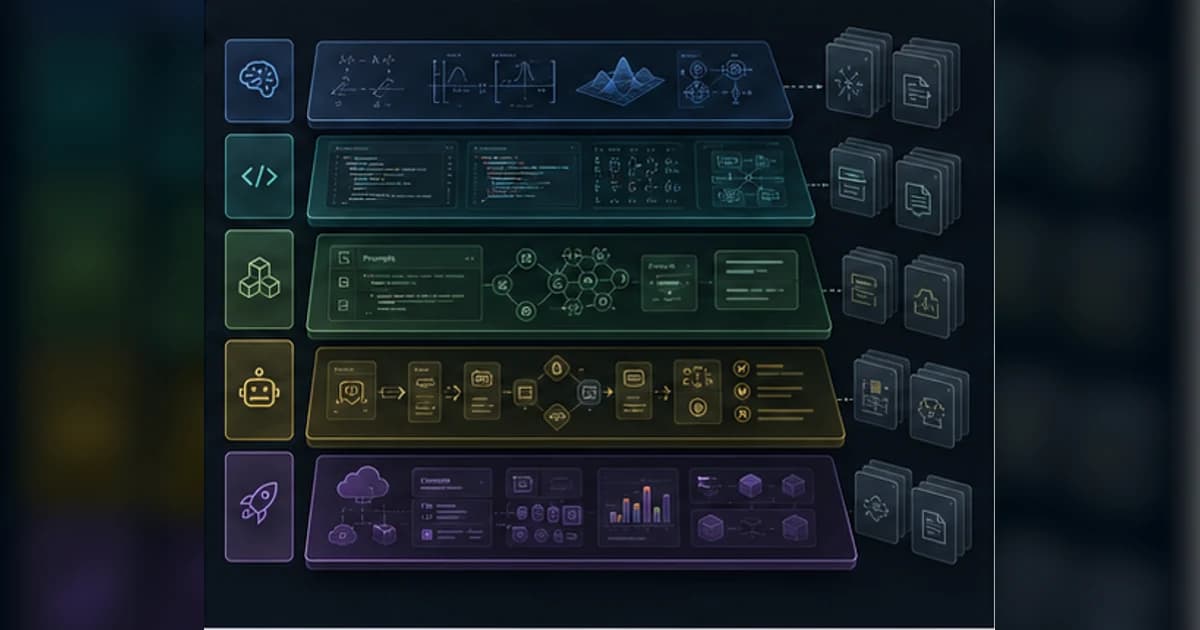
This repo is not a framework and not a weekend tutorial. It is a structured learning system: lesson folders, runnable code, docs, quizzes, generated website data, agent skills, prompts, scripts, and contribution rules for people who want to understand the stack below the API call.
Get the latest on AI, LLMs & developer tools
New MCP servers, model updates, and guides like this one — delivered weekly.
Editorial note
This article uses the GitHub repo, README, roadmap, requirements, scripts, site build files, issues, PRs, website, Reddit, X search, and third-party articles gathered on June 2, 2026. The README and website may show different lesson counts, so the article focuses on structure rather than volatile counts.
1. ai-engineering-from-scratch in One Sentence
AI Engineering From Scratch is an open-source AI curriculum repo where each lesson aims to teach the concept, implement it from scratch, compare it with production libraries, and ship a reusable artifact such as a prompt, skill, agent, or MCP server.
| Area | Detail | Why it matters |
|---|---|---|
| Repository | rohitg00/ai-engineering-from-scratch | https://github.com/rohitg00/ai-engineering-from-scratch |
| Primary language | Python | Primary GitHub language at research time. |
| License | MIT | Check bundled or binary licenses separately where relevant. |
| Created | March 18, 2026 | No GitHub releases found during research; main branch and website are actively updated. |
2. Why It Matters
The repo matters because many AI builders can call an API but cannot explain the math, model behavior, retrieval failure, agent loop, evaluation harness, or production tradeoff underneath that call.
The curriculum's premise is straightforward: build the smaller version yourself first, then use the framework. That pattern makes PyTorch, Transformers, LangGraph, MCP, and production RAG less magical.
The strongest audience is the working engineer who wants a long path rather than a playlist. It is especially relevant for teams trying to turn AI enthusiasm into durable internal capability.
3. Architecture and Mental Model
The repository is organized around phases and lessons. Each lesson follows a consistent shape with docs, code, quizzes, and outputs, while scripts audit lessons, build catalogs, install skills, and generate the public website.
| Area | Detail | Why it matters |
|---|---|---|
| Curriculum | `phases/<phase>/<lesson>/` | Lesson folders contain docs, runnable code, quiz JSON, and reusable outputs. |
| Roadmap | `ROADMAP.md` | Canonical phase structure, estimated time, and lesson coverage. |
| Website | `site/build.js`, website data | Builds the public reader experience from repo content. |
| Skill helpers | `.claude/skills/find-your-level`, `check-understanding` | Agent-assisted placement and phase quizzes. |
| Outputs | `phases/**/outputs/` | Prompts, skills, agents, and MCP-related artifacts produced by lessons. |
| Scripts | `scripts/build_catalog.py`, `install_skills.py`, `lesson_run.py`, `audit_lessons.py` | Catalog generation, skill install, code checks, and lesson invariant audits. |
| CI | `.github/workflows/curriculum.yml` | Automates audits and site/readme synchronization. |
| Contributor rules | `AGENTS.md`, `CONTRIBUTING.md`, `LESSON_TEMPLATE.md` | Keeps lesson format and AI-agent contributions disciplined. |
4. Smallest End-to-End Setup
The commands below are copied from the repository documentation and checked against the current research snapshot. Treat them as a starting point, then read the linked README before installing into a production environment.
git clone https://github.com/rohitg00/ai-engineering-from-scratch.git
cd ai-engineering-from-scratch

# Run a first lesson implementation
python phases/01-math-foundations/01-linear-algebra-intuition/code/vectors.py

# Install Python dependencies when needed
python -m pip install -r requirements.txt
A small first task should prove the integration before you attach it to critical data or large workspaces.
# Find your starting point inside a supported agent
/find-your-level

# Check a phase after studying
/check-understanding 3

# Inspect the generated catalog
python3 scripts/build_catalog.py --stdout

# Install lesson skills into a target skill directory
python3 scripts/install_skills.py <target-dir> --phase 14

# Validate lesson code without running heavy jobs
python3 scripts/lesson_run.py
5. Technical Deep Dive
5.1 The lesson loop is the product
The README describes a repeated pattern: problem, concept, build it, use it, ship it. That structure is more important than any one lesson count because it forces conceptual understanding before framework use.
For example, a lesson can implement a concept in plain Python, then compare it with a library, then export a prompt or skill that helps you use the concept later.
lesson/
  docs/en.md     # explanation
  code/          # runnable implementation
  quiz.json      # check understanding
  outputs/       # prompt, skill, agent, or MCP artifact
5.2 The curriculum climbs from foundations to agents
The phase structure starts with setup and math, then moves through ML, deep learning, vision, NLP, speech, transformers, generative AI, LLMs, multimodal systems, tools, agents, production, safety, and capstones.
That breadth makes it useful as a reference manual, but also intimidating. The `/find-your-level` skill is a practical answer: do not start at phase zero if your real gap is agent evaluation or production RAG.
5.3 Outputs make lessons reusable
A distinctive pattern is that lessons do not end with only knowledge. They produce artifacts: prompts, skills, agent templates, or MCP-related outputs. That means learning can feed back into your daily coding-agent workflow.
The current top-level output index should not be treated as the full story. The lesson-level outputs and install scripts are the practical discovery mechanism.
5.4 Agent engineering is a major spine
The repo's agent-focused phases cover agent loops, ReWOO, Reflexion, Tree of Thoughts, function calling, memory, LangGraph, AutoGen, CrewAI, benchmarks, observability, prompt-injection defense, verification gates, handoffs, and workbench scaffolding.
This is valuable because many agent tutorials skip the boring parts: state, evaluation, security, recovery, handoffs, and tool failure. A curriculum that connects those pieces is more useful than another hello-world agent.
5.5 Quality is still a moving target
The issue tracker shows normal growing pains for a fast-moving curriculum: quiz answer-position bias, rendering bugs, dataset path mismatches, Python/PyTorch compatibility, table formatting, diagram rendering, translation, and language coverage.
That does not make the repo weak. It means readers should verify lessons as they go and treat the repo as an active open-source curriculum rather than a polished textbook.
6. Real-World Wrong vs Right Patterns
| Wrong | Right | Reason |
|---|---|---|
| Treat it as a certificate course. | Treat it as a practical open-source learning path and reference manual. | The maintainer has explicitly pushed back on certificate positioning. |
| Skip foundations, then blame later lessons for being hard. | Use `/find-your-level` and follow dependencies for your gaps. | The curriculum is intentionally stacked. |
| Assume every language track has equal depth. | Check current lesson code for Python, TypeScript, Rust, or Julia before committing to a path. | Open issues discuss Python-heavy coverage. |
| Only read the docs. | Run the code, answer the quizzes, and use the generated outputs. | The repo is designed around build/use/ship practice. |
7. Common Mistakes and Current Issues
The issue tracker matters because these are young, fast-moving repos. The article uses issues as risk signals, not as proof that a project is unusable.
| Area | Detail | Why it matters |
|---|---|---|
| Quiz bias | Issue #240 reports answer-position bias still present on main. | Use quizzes as practice, not as formal assessment. |
| Diagram rendering | Issue #233 reports an unrendered Phase 16 communication diagram. | Some website/docs rendering can lag content updates. |
| Tables | Issue #193 reports messed-up tables. | Check raw markdown when website formatting looks wrong. |
| Python 3.14 | Issue #192 notes PyTorch CUDA wheel availability problems. | Use known-good Python versions for ML lessons. |
| Dataset paths | Issue #179 tracks a Rotten Tomatoes dataset path mismatch. | Expect occasional data-source drift. |
| Language coverage | Issue #168 tracks adding Rust implementations across the curriculum. | The repo is broad, but not every language track is complete. |
8. Performance, Scaling, and Cost Notes
Most early lessons are cheap to run. Later lessons involving PyTorch, Transformers, multimodal models, local inference, fine-tuning, or capstone systems can need more compute and API access.
The practical setup is to run lessons in small increments, pin a stable Python version, and avoid starting GPU-heavy or API-heavy lessons until you have read their docs and dependency expectations.
For teams, the repo's scripts and skills are useful for curriculum governance. You can assign phases, run audits, install selected skills, and keep a shared progression instead of telling everyone to browse hundreds of files.
9. Who It Is For
| Use it if | Skip it if |
|---|---|
| You can code and want to understand AI systems below the API layer. | You are a total programming beginner. |
| You want a long path from math to LLMs, agents, MCP, infra, and safety. | You want a short weekend tutorial. |
| You learn by implementing and shipping reusable artifacts. | You only want videos or high-level essays. |
| Your team needs an open-source AI upskilling spine. | You need accredited certification or formal grading. |
10. Community Signal
Web articles frame the repo as a large free AI engineering reference manual, often comparing it to a degree-style path. Some of those articles use stale lesson counts, so counts should be treated as moving metadata.
Reddit discussion is useful because it includes both excitement and skepticism: questions about AI-assisted authorship, beginner overwhelm, API costs, and whether advanced agent lessons handle reliability deeply enough.
The GitHub issue tracker shows a living curriculum: translation PRs, Rust-track requests, quiz bugs, rendering fixes, lesson wiring, and website improvements.
11. The Verdict: Is It Worth Using?
Our Take
Use AI Engineering From Scratch if you want a serious, hands-on path from fundamentals to AI systems engineering. Skip it if you need a polished certificate course, equal maturity across every language track, or a quick app-building recipe.
12. The Bigger Picture
This repo is part of a broader correction in AI education. After years of API-first demos, engineers increasingly need to understand data, math, model behavior, evaluation, agents, protocols, and production failure modes.
The most important habit it teaches is not any one algorithm. It is the pattern of building the small mechanism before trusting the big framework.
13. Frequently Asked Questions
Q: Is AI Engineering From Scratch a framework?
No. It is a curriculum and reference repo with lessons, code, quizzes, outputs, scripts, and a public website.
Q: Where should I start?
Use `/find-your-level` if you have an agent with the skills installed. Otherwise start where your prerequisites are weakest: math, ML, deep learning, LLMs, agents, or production.
Q: Do I need a GPU?
Not for all lessons. Early lessons are lightweight, while deep learning, local model, fine-tuning, and multimodal lessons may benefit from GPU or cloud compute.
Q: Does it provide certificates?
No. The repo is positioned as practical open-source learning, not an accredited certificate program.
Q: Are the lessons only Python?
Python is the dominant practical path, while the README also references TypeScript, Rust, and Julia. Check each lesson's code folder before assuming coverage.
Q: What are the built-in skills?
The top-level skills include `/find-your-level` for placement and `/check-understanding <phase>` for phase quizzes. Lesson outputs include more prompts and skills.
14. Glossary
| Area | Detail | Why it matters |
|---|---|---|
| From scratch | Implementing the core mechanism before using a framework. | The curriculum's core teaching style. |
| Lesson artifact | A prompt, skill, agent, or MCP-related output. | Something reusable after the lesson. |
| MCP | Model Context Protocol. | Used in later tool and agent phases. |
| RAG | Retrieval-augmented generation. | A major LLM engineering pattern. |
| Agent loop | Model, tool call, observation, and next-step control cycle. | Core agent engineering concept. |
| Catalog | Generated JSON view of phases, lessons, code, and outputs. | Built from repo files. |
| Capstone | A larger end-to-end project combining many lessons. | Late-stage proof of understanding. |
15. All Sources and Links
Primary Sources
Issues and PRs
Community and Web
Internal Links
16. Source Attribution Table
| Area | Detail | Why it matters |
|---|---|---|
| README and roadmap | Curriculum shape, setup, philosophy, phase structure. | Primary source. |
| Scripts and workflows | Catalog, lesson checks, skill installation, CI behavior. | Architecture source. |
| Issues and PRs | Quiz, rendering, dataset, Python, translation, and language-coverage caveats. | Freshness signal. |
| Website | Public reader experience and count drift. | Official web source. |
| Reddit and articles | Community excitement, skepticism, and third-party framing. | Secondary source. |
The weekly AI coding roundup
What shipped in AI and LLMs this week, and how to use it in your agent setup. No spam, unsubscribe anytime.
Related Guides
Humanizer Skill Guide
blader/humanizer: 29 AI-writing patterns, voice calibration, and a two-pass audit, all in one Claude Code skill.
Guides & FeaturesMastering Agent Skills
The open standard for portable AI agent expertise.
Guides & FeaturesAntigravity Workflows Guide
Create automation recipes with Turbo Mode and AgentKit 2.0.
Guides & FeaturesHow to Change Antigravity Themes
Customize themes, dark mode, icons, and color schemes.
Guides & FeaturesHow to Change Language
Switch Antigravity to Spanish, German, Japanese, and more.
Guides & FeaturesAntigravity Security Guide
Known vulnerabilities, safe settings, and hardening steps.