Get the latest on AI, LLMs & developer tools
New MCP servers, model updates, and guides like this one — delivered weekly.
An AI phone agent is three things stacked together: a phone number that can hand a live call to software, a model that listens and speaks fast enough to feel like a person, and a few tools that let it do something useful, such as book a slot. In 2026 you can buy all three as a hosted product or assemble them in an afternoon. This guide picks a path, then builds one end to end with real code, a real number, a booking tool, a cost model and the rules you need to know before you dial anyone.
The Short Answer
If you need a pilot this week, use Vapi or Retell. If you write code and want the shortest path, build on OpenAI Realtime with Twilio Media Streams, which is the path we build below. If you want to swap speech and language vendors, use LiveKit Agents or Pipecat with a Twilio SIP or WebSocket connection. On list prices from Nov 11, 2026, the DIY speech-to-speech route has a floor of roughly $0.028 to $0.061 per inbound minute (our arithmetic, details in the cost section), while the hosted platforms publish examples between $0.048 and $0.129 per minute. Outbound calls to consumers with an AI voice carry consent requirements under the FCC's 2024 ruling, so settle consent before you settle the model.
OpenAI Devs announced the Realtime API as production-ready and gpt-realtime, a speech-to-speech model, with SIP phone calling among the new capabilities.
— @OpenAIDevs Aug 28, 2025
Which Stack Should You Pick?
There are three realistic paths. They differ in who owns the audio pipeline and how much code you write. If you are still shopping for platforms, our voice AI agent platforms comparison ranks the hosted options, and LiveKit Agents vs Pipecat goes deep on path 2.
| Path | Tools | What you build | Phone number | Published cost per minute | Pick it when |
|---|---|---|---|---|---|
| 1. No-code platform | Vapi or Retell | A prompt, a voice and a webhook for your tools. Dashboard first, SDK optional. | Free Vapi number (inbound only), or import a Twilio, Telnyx or DIDWW number. Retell's pricing page offers Retell telephony or custom Twilio and Telnyx. | Vapi: $0.082 to $0.129 per minute in its pricing example. Retell: $0.11 per minute in its worked example, $0.07 to $0.31 range on its page. | You need a pilot this week, or the call flow changes weekly and non-engineers edit it. |
| 2. Open-source code | LiveKit Agents or Pipecat, with Twilio SIP or Media Streams | A Python (or Node) agent worker plus trunk and dispatch configuration. You pick the STT, LLM and TTS vendors. | A Twilio number pointed at a LiveKit SIP trunk, or at a TwiML Bin that opens a WebSocket to your Pipecat bot. | LiveKit Cloud estimate $0.0479 per minute at its default picks. Pipecat Cloud hosting from $0.01 per minute. Self-hosting: you pay for compute. | You want to swap models and vendors, own the pipeline, or run it in your own cloud. |
| 3. Speech-to-speech API | OpenAI Realtime + Twilio Media Streams (or OpenAI SIP) | A small server: one TwiML route, one WebSocket relay, your tool handlers. | A Twilio voice number whose webhook returns TwiML with a Stream, or a SIP trunk pointed at OpenAI. | Voice tokens floor $0.048 per minute on gpt-realtime-2.1 ($0.015 on mini) plus Twilio $0.0129 inbound. Our arithmetic from list prices. | You write code, want one vendor for the model, and want the shortest path between caller and model. |
Quick picks by goal:
| Goal | Pick | Why |
|---|---|---|
| Fastest to a working number, no code | Vapi or Retell | Vapi's quickstart creates an assistant, gives it a free US number and has you call it in minutes. Free Vapi numbers are inbound only; outbound needs an imported Twilio, Telnyx or DIDWW number. |
| Most control, open source | LiveKit Agents or Pipecat, with Twilio SIP | LiveKit models calls as SIP participants joined to rooms through trunks and dispatch rules. Pipecat ships a Twilio WebSocket guide for dial-in and dial-out. |
| Fewest moving parts for a developer | OpenAI Realtime + Twilio Media Streams | One WebSocket relay: Twilio sends mu-law audio, OpenAI answers with audio. The code below is about 200 lines, tools included. |
| No audio relay on your server | OpenAI Realtime SIP | Point a SIP trunk at OpenAI, accept the call from a webhook, and attach a WebSocket for tools and monitoring. |
| Lowest documented cost per minute | DIY on gpt-realtime-2.1-mini (floor $0.028 per inbound minute, our arithmetic) | Hosted platforms' own pages show $0.048 (LiveKit Cloud estimate) to $0.129 (Vapi example). The DIY floor leaves out context re-billing, so measure your own calls. |
How an AI Phone Call Works
A phone call reaches you as a telephone-network connection that a carrier like Twilio terminates. Software joins that connection in one of two ways. Over a WebSocket, Twilio forks the call audio to your server as base64 mu-law frames and plays back whatever audio you send. Over SIP, the carrier's trunk delivers the call to a SIP endpoint (OpenAI, LiveKit or a platform) that treats it as a session. Either way the model hears 8 kHz telephone audio, which is one reason speech-to-speech models that accept mu-law directly are convenient: nothing has to be transcoded.

The classic pipeline chains three services: speech-to-text, a language model, then text-to-speech. It lets you mix vendors, and our speech-to-text guide and text-to-speech guide cover the parts. A speech-to-speech model like gpt-realtime collapses the chain into one WebSocket, which is why path 3 is the shortest build. We build that one in detail and then show how the other two paths differ.
Build: OpenAI Realtime + Twilio Media Streams
The server below answers a Twilio call, speaks a disclosure, opens a bidirectional Media Stream and relays audio to OpenAI's Realtime API. It is Twilio's official Node tutorial plus the changes we need for a phone agent that books appointments. Every change is marked ADAPTED in a comment. You need Node 18 or newer (our assumption, not stated by the tutorial), an OpenAI API key with Realtime access, and a Twilio account.
A third-party walkthrough of the same architecture (Twilio plus OpenAI Realtime, using NestJS instead of Fastify). Not from OpenAI or Twilio.
Step 1: Create the project and install dependencies
mkdir ai-phone-agent && cd ai-phone-agent
npm init -y; npm pkg set type="module"
npm install fastify ws dotenv @fastify/formbody @fastify/websocket twilio
fastify serves the webhook and the WebSocket route, ws is the client for OpenAI, and twilio is only needed for the outbound and recording scripts later.
Step 2: Add your environment variables
OPENAI_API_KEY="sk-..."
# only needed for outbound calls and recording
TWILIO_ACCOUNT_SID="AC..."
TWILIO_API_KEY="SK..."
TWILIO_API_SECRET="..."
TWILIO_NUMBER="+1..."
PUBLIC_HOST="your-tunnel-host.example"   # no scheme, no trailing slash
Put these in a .env file and keep it out of version control. Only OPENAI_API_KEY is needed to take inbound calls.
Step 3: Write the server
Save this as index.js. Four parts matter: the /incoming-call route returns TwiML that starts a bidirectional stream, the session.update message sets mu-law audio and server-side voice activity detection, the media handlers pipe audio both ways, and the response.done handler runs your tools.
// index.js  (Fastify + ws). Based on Twilio's "Build an AI Voice Assistant with
// Twilio Voice, OpenAI's Realtime API, and Node.js" tutorial.
// ADAPTED: model name, tools, greeting, barge-in (clear), string concatenation
// instead of template literals, and the booking handlers are ours.
import Fastify from 'fastify';
import WebSocket from 'ws';
import dotenv from 'dotenv';
import fastifyFormBody from '@fastify/formbody';
import fastifyWs from '@fastify/websocket';

dotenv.config();
const { OPENAI_API_KEY } = process.env;
if (!OPENAI_API_KEY) {
    console.error('Missing OPENAI_API_KEY in .env');
    process.exit(1);
}

const MODEL = 'gpt-realtime-2.1';   // ADAPTED (the Twilio tutorial uses 'gpt-realtime')
const VOICE = 'alloy';
const PORT = process.env.PORT || 5050;
const SYSTEM_MESSAGE =
    'You are the phone assistant for Example Dental. Keep answers to one or two short sentences. ' +
    'You can check open appointment slots and book one. Always read back the date, time and name ' +
    'before you call book_appointment. If you are unsure, offer to have a human call back.';

// ADAPTED: toy in-memory calendar, replace with your real scheduling API
const SLOTS = {
    '2026-11-16': ['09:00', '10:30', '14:00'],
    '2026-11-17': ['11:00', '15:30'],
};
const bookings = [];

const TOOLS = [
    {
        type: 'function',
        name: 'check_availability',
        description: 'List open appointment times for a date (YYYY-MM-DD).',
        parameters: {
            type: 'object',
            properties: { date: { type: 'string', description: 'Date as YYYY-MM-DD' } },
            required: ['date'],
        },
    },
    {
        type: 'function',
        name: 'book_appointment',
        description: 'Book one open slot after the caller has confirmed date, time and name.',
        parameters: {
            type: 'object',
            properties: {
                date: { type: 'string', description: 'Date as YYYY-MM-DD' },
                time: { type: 'string', description: 'Time as HH:MM, 24-hour' },
                name: { type: 'string', description: 'Caller full name' },
            },
            required: ['date', 'time', 'name'],
        },
    },
];

function runTool(name, args) {
    if (name === 'check_availability') {
        return { date: args.date, open: SLOTS[args.date] || [] };
    }
    if (name === 'book_appointment') {
        const open = SLOTS[args.date] || [];
        if (!open.includes(args.time)) return { ok: false, error: 'That slot is not available.' };
        SLOTS[args.date] = open.filter((t) => t !== args.time);
        bookings.push({ date: args.date, time: args.time, name: args.name });
        return { ok: true, confirmation: 'BK-' + bookings.length };
    }
    return { ok: false, error: 'Unknown tool ' + name };
}

const LOG_EVENT_TYPES = ['error', 'response.done', 'input_audio_buffer.speech_started', 'session.updated'];

const fastify = Fastify();
fastify.register(fastifyFormBody);
fastify.register(fastifyWs);

fastify.get('/', async (request, reply) => {
    reply.send({ message: 'Twilio Media Stream Server is running!' });
});

// Twilio calls this when the number rings. TwiML: disclose, then open a bidirectional stream.
fastify.all('/incoming-call', async (request, reply) => {
    const twiml =
        '<?xml version="1.0" encoding="UTF-8"?>' +
        '<Response>' +
        '<Say>This call is handled by an AI assistant and may be recorded.</Say>' +   // ADAPTED
        '<Connect><Stream url="wss://' + request.headers.host + '/media-stream" /></Connect>' +
        '</Response>';
    reply.type('text/xml').send(twiml);
});

fastify.register(async (fastify) => {
    fastify.get('/media-stream', { websocket: true }, (connection, req) => {
        console.log('Twilio connected');
        let streamSid = null;
        let greeted = false;

        const openAiWs = new WebSocket('wss://api.openai.com/v1/realtime?model=' + MODEL, {
            headers: { Authorization: 'Bearer ' + OPENAI_API_KEY },
        });

        const sendSessionUpdate = () => {
            openAiWs.send(JSON.stringify({
                type: 'session.update',
                session: {
                    type: 'realtime',
                    model: MODEL,
                    output_modalities: ['audio'],
                    audio: {
                        input: { format: { type: 'audio/pcmu' }, turn_detection: { type: 'server_vad' } },
                        output: { format: { type: 'audio/pcmu' }, voice: VOICE },
                    },
                    instructions: SYSTEM_MESSAGE,
                    tools: TOOLS,            // ADAPTED
                    tool_choice: 'auto',     // ADAPTED
                },
            }));
        };

        openAiWs.on('open', () => setTimeout(sendSessionUpdate, 250));

        openAiWs.on('message', (data) => {
            try {
                const evt = JSON.parse(data);
                if (LOG_EVENT_TYPES.includes(evt.type)) console.log('OpenAI event:', evt.type);

                // ADAPTED: speak first, once, after the session config is applied
                if (evt.type === 'session.updated' && !greeted) {
                    greeted = true;
                    openAiWs.send(JSON.stringify({
                        type: 'response.create',
                        response: { instructions: 'Greet the caller in one sentence and ask how you can help.' },
                    }));
                }

                // model audio -> caller
                if (evt.type === 'response.output_audio.delta' && evt.delta) {
                    connection.send(JSON.stringify({
                        event: 'media',
                        streamSid: streamSid,
                        media: { payload: evt.delta },
                    }));
                }

                // ADAPTED barge-in: caller started talking, flush audio Twilio has buffered
                if (evt.type === 'input_audio_buffer.speech_started' && streamSid) {
                    connection.send(JSON.stringify({ event: 'clear', streamSid: streamSid }));
                }

                // ADAPTED function calling, following OpenAI's Realtime function-calling flow
                if (evt.type === 'response.done') {
                    const output = (evt.response && evt.response.output) || [];
                    for (const item of output) {
                        if (item.type !== 'function_call') continue;
                        const args = JSON.parse(item.arguments || '{}');
                        const result = runTool(item.name, args);
                        openAiWs.send(JSON.stringify({
                            type: 'conversation.item.create',
                            item: {
                                type: 'function_call_output',
                                call_id: item.call_id,
                                output: JSON.stringify(result),
                            },
                        }));
                        openAiWs.send(JSON.stringify({ type: 'response.create' }));
                    }
                }
            } catch (error) {
                console.error('Error processing OpenAI message:', error);
            }
        });

        // caller audio -> model
        connection.on('message', (message) => {
            try {
                const data = JSON.parse(message);
                if (data.event === 'start') {
                    streamSid = data.start.streamSid;
                    console.log('Stream started', streamSid);
                } else if (data.event === 'media') {
                    if (openAiWs.readyState === WebSocket.OPEN) {
                        openAiWs.send(JSON.stringify({ type: 'input_audio_buffer.append', audio: data.media.payload }));
                    }
                }
            } catch (error) {
                console.error('Error parsing Twilio message:', error);
            }
        });

        connection.on('close', () => {
            if (openAiWs.readyState === WebSocket.OPEN) openAiWs.close();
            console.log('Twilio disconnected');
        });
        openAiWs.on('error', (error) => console.error('OpenAI WebSocket error:', error));
    });
});

fastify.listen({ port: PORT, host: '0.0.0.0' }, (err) => {
    if (err) {
        console.error(err);
        process.exit(1);
    }
    console.log('Server is listening on port ' + PORT);
});
Two details worth knowing. First, audio/pcmu on both input and output means Twilio's mu-law frames go to OpenAI and back untouched, and the media.payload must be raw audio with no file header bytes; Twilio warns that header bytes make the stream play incorrectly. Second, a Twilio clear message empties all audio Twilio has buffered, which is how the agent stops talking when the caller interrupts. The base tutorial did not include barge-in, so the handler for input_audio_buffer.speech_started is our addition. It does not tell OpenAI how much audio the caller actually heard, so the model may believe it said more than the caller heard; OpenAI documents a truncate event for that, which we left out to keep the example short.
Step 4: Run it and expose it
node index.js
# in a second terminal, expose port 5050 with any tunnel, for example:
ngrok http 5050
The tunnel gives you a public https:// host. Twilio's webhook will call it, and the TwiML returns a wss:// URL built from the request's host header so the stream reaches the same server.
Phone Number Setup
- Buy a number. In the Twilio Console, buy a voice-capable local number. Twilio lists local numbers at $1.15 per month (Nov 11, 2026).
- Point the number at your server. Open the number, find the voice configuration section, and set A call comes in to a webhook with your tunnel URL plus
/incoming-call, method HTTP POST. - Call it. Dial the number from your phone. You should hear the disclosure, then the greeting, and the Node console should log
Stream startedand OpenAI events. - Re-paste the URL after tunnel restarts. Free tunnels usually rotate hostnames, so update the webhook each time.
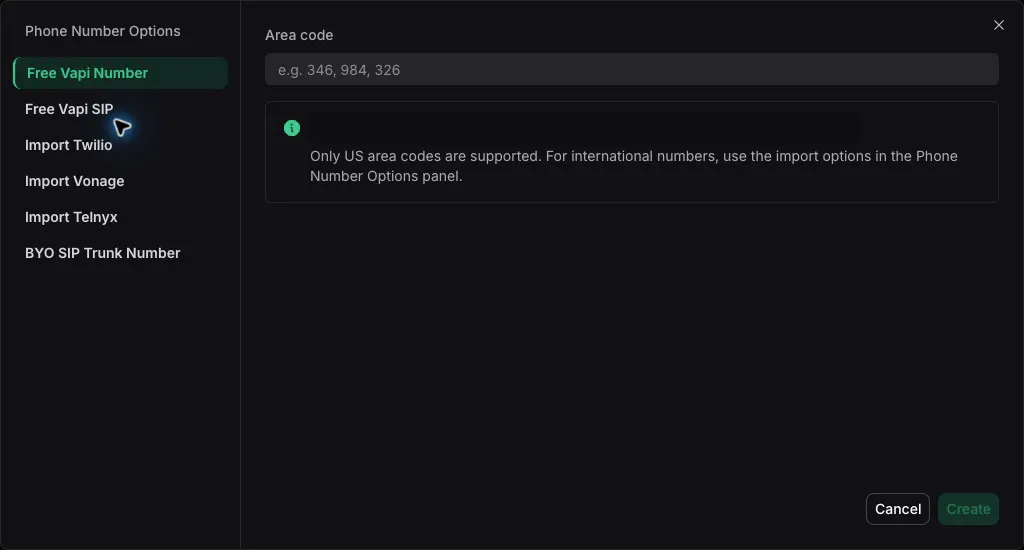
On a hosted platform this step is shorter. Vapi lets you create a free US number by picking an area code, though free numbers handle inbound calls only; for outbound you import a Twilio, Telnyx or DIDWW number.
The SIP alternative: no relay server
If you would rather not forward audio yourself, OpenAI accepts SIP calls directly. You point a provider's trunk (the docs use Twilio as an example) at OpenAI, receive a webhook when a call arrives, and accept it with an API call. Audio now flows between the carrier and OpenAI, and your code only handles tools and monitoring over a WebSocket attached to the call.
# 1) platform.openai.com > Project > Webhooks: create a webhook for incoming calls.
# 2) Point your SIP trunk at: sip:[email protected];transport=tls
#    (EU data residency: sip-eu.api.openai.com, India: sip-in.api.openai.com)
# 3) OpenAI POSTs a realtime.call.incoming event to your webhook with data.call_id.
# 4) Accept it (this is the curl from OpenAI's Realtime SIP guide):
curl -X POST "https://api.openai.com/v1/realtime/calls/$CALL_ID/accept" \
  -H "Authorization: Bearer $OPENAI_API_KEY" \
  -H "Content-Type: application/json" \
  -d '{
        "type": "realtime",
        "model": "gpt-realtime-2.1",
        "instructions": "You are Alex, a friendly concierge for Example Corp."
      }'
# 5) Attach to the live call for tools and monitoring:
#    wss://api.openai.com/v1/realtime?call_id=$CALL_ID
Function Calling: Booking an Appointment
A phone agent that only talks is a toy. The useful ones read a calendar, create a ticket or look up an order. With OpenAI Realtime you declare functions in the session, the model asks to call them mid-conversation, and you answer with the result. The server above already implements two tools, check_availability and book_appointment. The event flow looks like this:
// 1) You declare tools in session.update (see TOOLS above).
// 2) Caller: "Can I come in Monday the 16th?"  -> model emits, inside response.done:
{
  "type": "response.done",
  "response": {
    "output": [{
      "type": "function_call",
      "name": "check_availability",
      "call_id": "call_abc123",
      "arguments": "{\"date\":\"2026-11-16\"}"
    }]
  }
}
// 3) You run the tool and answer with a function_call_output item, then ask for a response:
{ "type": "conversation.item.create",
  "item": { "type": "function_call_output", "call_id": "call_abc123",
            "output": "{\"date\":\"2026-11-16\",\"open\":[\"09:00\",\"10:30\",\"14:00\"]}" } }
{ "type": "response.create" }
// 4) The model speaks the options to the caller.
// Shapes follow OpenAI's Realtime conversations guide; ids and values are illustrative.
Design rules that matter on a phone call: have the prompt require a read-back of date, time and name before the booking call, return short results the model can say out loud, return a plain error string when a slot is gone so the model can offer another one, and keep each tool fast, because the caller is listening to silence while it runs. For anything that moves money or changes records, add a confirmation step in your own code, not just in the prompt.
Hosted platforms use the same idea with a webhook. On Vapi, your server receives a tool call and must answer HTTP 200 with a results array keyed by toolCallId, putting the output in a flat string under result or a failure message under error; Vapi's docs say any non-200 status is ignored completely. On Retell, a custom function has a URL, method and parameters, with a timeout configurable from 1 to 600 seconds (default 120). For agents that need a wider tool surface, the MCP servers list shows what a model-side tool layer can reach.
Outbound Calls and Recording
Outbound uses the same server. Instead of waiting for a call, you ask Twilio to create one whose TwiML opens the stream. Run it only against numbers that have given consent (see the compliance section).
// dial.js  -  place an outbound call that opens the same media stream
// Based on Twilio's Create Call example (API key auth); ADAPTED to inline TwiML with a Stream.
// Run: node dial.js +15551234567
import 'dotenv/config';
import twilio from 'twilio';

const client = twilio(process.env.TWILIO_API_KEY, process.env.TWILIO_API_SECRET, {
    accountSid: process.env.TWILIO_ACCOUNT_SID,
});

const twiml =
    '<Response>' +
    '<Say>Hello, this is an automated assistant from Example Dental calling about your appointment. This call may be recorded.</Say>' +
    '<Connect><Stream url="wss://' + process.env.PUBLIC_HOST + '/media-stream" /></Connect>' +
    '</Response>';

const call = await client.calls.create({
    from: process.env.TWILIO_NUMBER,
    to: process.argv[2],
    twiml: twiml,
});
console.log('Call SID:', call.sid);
Twilio can also record a live call through the Recordings API. Dual-channel recording keeps the caller and the agent on separate channels, which makes quality review easier.
// record.js  -  start a dual-channel recording on a live call
// From Twilio's Recordings API docs (example SID and URL are placeholders).
const recording = await client
    .calls('CAXXXXXXXXXXXXXXXXXXXXXXXXXXXXXXXX')
    .recordings.create({
        recordingChannels: 'dual',
        recordingStatusCallback: 'https://myapp.com/recording-events',
        recordingStatusCallbackEvent: ['in-progress completed'],
    });
Twilio's own docs tell developers to comply with recording-consent laws and to seek legal counsel, so announce recording in the greeting and store the announcement in the audio. The sample's greeting already does this.
The Other Paths in Brief
Path 1: Vapi or Retell (no-code)
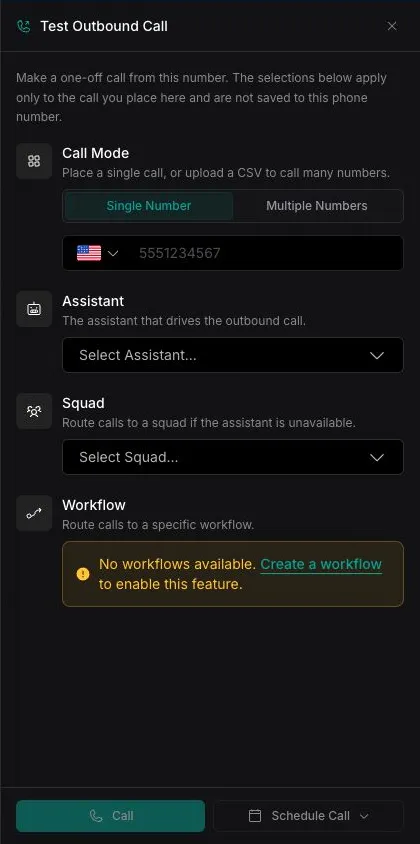
Both give you a dashboard to set the prompt, voice and tools, then attach a number. Vapi's quickstart also has a TypeScript SDK; the snippet below is its assistant-creation call, unchanged except for comments.
// Vapi: create an assistant (from Vapi's phone quickstart; bun add @vapi-ai/server-sdk)
import { VapiClient } from '@vapi-ai/server-sdk';

const vapi = new VapiClient({ token: process.env.VAPI_API_KEY! });

const assistant = await vapi.assistants.create({
  name: 'Customer Support Assistant',
  model: {
    provider: 'openai',
    model: 'gpt-6-luna',
    reasoningEffort: 'none',
    messages: [{ role: 'system', content: 'You are Alex, a customer service voice assistant for TechSolutions.' }]
  },
  voice: { provider: '11labs', voiceId: 'cgSgspJ2msm6clMCkdW9' },
  firstMessage: 'Hi there, this is Alex from TechSolutions customer support. How can I help you today?'
});

// Your tool server must answer HTTP 200 with this shape, even on failure:
// { "results": [ { "toolCallId": "<id from Vapi>", "result": "<flat string>" } ] }
// On failure use "error" instead of "result".
The trade-off is price transparency. Vapi bills a $0.05 per minute hosting fee plus the vendors you pick, and Retell's pricing page lists a $0.07 to $0.31 range. Neither page lists a latency measurement, so test your own call before you commit.
Path 2: LiveKit Agents or Pipecat
LiveKit's telephony docs describe callers joining a room as SIP participants through trunks and dispatch rules, with an agent worker in the room. Pipecat's Twilio guide uses a TwiML Bin that opens a WebSocket to your bot, run locally behind a tunnel or in Pipecat Cloud:
# Pipecat + Twilio dial-in, commands from Pipecat's Twilio WebSocket guide
ngrok http 7860          # expose the local bot server
uv sync                  # install dependencies
uv run bot.py -t twilio  # run the bot with the Twilio transport
Pick LiveKit when you want a media server and a first-class SIP stack in one product, and Pipecat when you want a Python pipeline with swappable services. The comparison article above covers the trade-offs.
Stream's quick start for phone calls on the OpenAI Realtime API, a second third-party take on path 3.
Latency Tips
We did not benchmark latency for this article, and the vendors we checked publish no end-to-end figure on the pages we fetched. These tips follow from how the pieces work, so treat them as practices to measure, not guaranteed gains.
- Skip the chain. A speech-to-speech model removes two network hops that a separate STT, LLM and TTS pipeline needs.
- Keep audio in mu-law end to end. The sample sets
audio/pcmuboth ways so nothing is resampled or re-encoded. - Interrupt cleanly. Send Twilio's
clearthe momentspeech_startedfires, or the caller hears stale audio. - Put the relay near the carrier and the model. Run it in a region close to your Twilio edge and OpenAI endpoint; use OpenAI's regional SIP hosts when data residency matters.
- Remove the relay when you can. OpenAI SIP lets the carrier talk to the model directly.
- Keep tools fast and prompts short. A slow database call is dead air. Cache what you can and move long lookups to a "let me check on that" line.
- Prompt for brevity. One or two short sentences per turn is both faster and cheaper, since output audio costs twice as much as input on gpt-realtime-2.1.
- Host the server on something with steady CPU. A tunnel to a laptop is for testing; for production use a small VPS or container. Our GPU cloud guide only matters if you self-host models.
Cost Per Minute
Phone cost has two layers: the carrier and the model. All rates below were read from vendor pages on Nov 11, 2026; recompute before you budget.
| Item | Rate | Source |
|---|---|---|
| Twilio inbound, local number | $0.0085 per min | Twilio voice pricing, US |
| Twilio outbound, US and Canada | $0.0140 per min | Twilio voice pricing, US |
| Twilio Media Streams | $0.0044 per min | Twilio voice pricing, intelligent services |
| Twilio local number rental | $1.15 per month | Twilio voice pricing, US |
| gpt-realtime-2.1 audio tokens | $32.00 in, $64.00 out per 1M | OpenAI API pricing |
| gpt-realtime-2.1-mini audio tokens | $10.00 in, $20.00 out per 1M | OpenAI API pricing |
| gpt-live-1 voice session | $0.05 per min, billed per second | OpenAI API pricing |
| User audio tokens | 1 token per 100 ms | OpenAI Realtime costs guide |
| Assistant audio tokens | 1 token per 50 ms | OpenAI Realtime costs guide |
Our model: take a one-minute call with 30 seconds of caller speech and 30 seconds of agent speech. Audio tokens are 1 per 100 ms from the user and 1 per 50 ms from the assistant, so that is 300 input and 600 output tokens. Add Twilio's voice rate plus $0.0044 for Media Streams. The last column assumes 1,000 minutes per month and one number at $1.15.
| Scenario | OpenAI audio per min | Twilio per min | Total per min | 1,000 min per month |
|---|---|---|---|---|
| gpt-realtime-2.1 + Twilio, inbound | 300 x $32 + 600 x $64, per 1M = $0.0480 | $0.0129 | $0.0609 | $62.05 |
| gpt-realtime-2.1 + Twilio, outbound | $0.0480 | $0.0184 | $0.0664 | $67.55 |
| gpt-realtime-2.1-mini + Twilio, inbound | 300 x $10 + 600 x $20, per 1M = $0.0150 | $0.0129 | $0.0279 | $29.05 |
| gpt-realtime-2.1-mini + Twilio, outbound | $0.0150 | $0.0184 | $0.0334 | $34.55 |
These are floors, for two reasons. If you count all 60 seconds of the caller's line as input, including silence, the gpt-realtime-2.1 figure rises from $0.0480 to $0.0576 ($0.0150 to $0.0180 on mini). And a model re-reads the conversation each time it answers, so long calls cost more than this arithmetic; OpenAI's cost guide covers cached input and context. Log the usage fields in response.done on real calls and replace our assumptions with your numbers. OpenAI also lists a separate GPT-Live voice product at $0.05 per minute billed per second, which is a different pricing model, with backend costs charged separately, so it is not directly comparable to token billing.
Published numbers for the hosted paths, from each vendor's pricing page:
| Platform | Published per minute | Breakdown shown |
|---|---|---|
| Vapi (pricing page example) | $0.082 to $0.129 per min | $0.05 hosting + Deepgram $0.0095 to $0.0099 + OpenAI $0.0077 to $0.0452 + ElevenLabs $0.0146 to $0.0238; Vapi telephony transport shown as $0 |
| Retell (worked example) | $0.11 per min | LLM $0.04 + Retell voice infra $0.055 + TTS $0.015 + telephony $0.00; page range $0.07 to $0.31 |
| LiveKit Cloud (calculator default) | $0.0479 per min | Agent session $0.0100, telephony $0.0100, LLM $0.0014, STT $0.0075, total $0.0479 (the remaining $0.0190 is TTS, our subtraction); the Build tier lists one free telephony number, Ship starts at $50 per month |
| Pipecat Cloud (hosting only) | from $0.01 per min | Agent hosting profiles at $0.01, $0.02 and $0.03 per min; STT, LLM, TTS and telephony billed separately |
The takeaway: the DIY route can undercut the hosted platforms on paper, but you pay in engineering time, monitoring and call-quality work. Hosted platforms bundle orchestration, dashboards and call logs. Choose by how much of that you would otherwise write.
Compliance Notes
This is not legal advice. It is a summary of public sources so you know which questions to ask a lawyer. Rules vary by country and state, and telemarketing, debt collection and healthcare add their own requirements.
| Situation | What the sources say | Practical step |
|---|---|---|
| Outbound call, AI voice, to a consumer | FCC 24-17 (Feb 2024): TCPA 'artificial or prerecorded voice' covers AI that generates human voices, so prior express consent of the called party is required unless an emergency or exemption applies. | Collect and store consent per number, honor opt-outs, and have counsel confirm your exemption, if any. |
| Recording the call | Twilio says recording requires complying with consent laws such as California's Invasion of Privacy Act and similar laws elsewhere, and recommends consulting legal counsel. | Announce recording at the start of the call and keep the announcement in the audio. |
| Inbound call to your number | The FCC ruling addresses calls you initiate. Recording and privacy rules still apply to inbound calls. | Treat recording notice and data retention as required, and ask counsel about your states. |
| Telling callers it is an AI | We did not research state AI-disclosure statutes for this article. | Disclose anyway in the greeting; it also sets caller expectations. |
The FCC ruling is narrow and important. In February 2024 the Commission confirmed that AI technologies that generate human voices count as an "artificial or prerecorded voice" under the Telephone Consumer Protection Act. The same ruling text recalls the rule that such messages must state at the start the identity of the business responsible for the call, which is another reason your outbound script should begin with who is calling. Consent, caller identity and opt-out handling belong in the design, not the cleanup.
Our practical defaults: disclose that the caller is an AI and that the call may be recorded in the first sentence, keep per-number consent records, honor "stop" immediately, avoid calling outside permitted hours (check your jurisdiction), keep transcripts only as long as you need them, and never let the agent claim to be human when asked. For structured browsing or data-collection agents that sit alongside a phone agent, our browser infrastructure guide covers the web side.
Troubleshooting
| Symptom | Likely cause | Fix |
|---|---|---|
| Caller hears static or garbled audio | Audio format mismatch, or file header bytes in the payload | Use audio/pcmu on both OpenAI directions and send raw mu-law 8000 Hz base64. Twilio warns that header bytes in media.payload make streams play incorrectly. |
| Caller hears nothing | streamSid still null, or WebSocket URL unreachable | Log the start event, confirm the wss:// host is your public tunnel, and that the TwiML Stream URL ends in /media-stream. |
| Agent talks over the caller | Buffered audio keeps playing after the caller starts speaking | On input_audio_buffer.speech_started send Twilio a clear message, as in the code above. |
| Tool never fires | Tool not in session.update, or function_call item ignored | Confirm tools are in the session config and that response.done is scanned for items of type function_call. |
| Call connects, then drops in seconds | OpenAI WebSocket error (key, model access, or rate limit) | Log the error event type from OpenAI; the tutorial's LOG_EVENT_TYPES list includes error. |
| Webhook never reaches your laptop | Tunnel restarted and the Twilio webhook points at the old URL | Re-paste the new tunnel URL into the number's A CALL COMES IN field after every restart (free tunnels rotate). |
If you are adding memory so the agent remembers returning callers, see our vector database guide; for a voice interface on your own coding agent rather than a phone line, see the Antigravity voice mode guide.
How We Evaluated
We read the vendor documentation and pricing pages named in the Sources list on Nov 11, 2026, and adapted the server code from Twilio's official Node tutorial and OpenAI's Realtime guides. We syntax-checked the code with Node but did not place a live call with it for this article, so treat the sample as a tested-for-syntax starting point and run a trial call before you trust it. Cost figures are arithmetic on list prices under stated assumptions, not invoices. We did not measure latency, accuracy or call quality, and where a vendor page did not publish a number we say so. Third-party videos are linked as walkthroughs, not as evidence for any claim in the text.
FAQ
What is the easiest way to build an AI phone agent in 2026?
Use a hosted platform. Vapi's quickstart creates an assistant, gives it a free US phone number and lets you call it within minutes, and Retell offers a similar dashboard flow. The trade-off is per-minute platform fees: Vapi's pricing example totals $0.082 to $0.129 per minute and Retell's worked example is $0.11 per minute (as of Nov 11, 2026). If you can write a small server, OpenAI Realtime with Twilio Media Streams is the shortest code path.
Can I use OpenAI's Realtime API directly with a phone number?
Yes, in two ways. Twilio Media Streams: your server answers the Twilio webhook with TwiML that opens a bidirectional WebSocket, then relays mu-law audio between Twilio and OpenAI. Or SIP: point a SIP trunk at sip:[email protected], receive a realtime.call.incoming webhook, accept the call with the call_id, and attach a WebSocket to monitor it and run tools. OpenAI's SIP guide names Twilio as an example trunking provider.
How much does an AI phone call cost per minute?
From list prices on Nov 11, 2026: Twilio charges $0.0085 per minute inbound or $0.0140 outbound on a US local number plus $0.0044 per minute for Media Streams, so $0.0129 inbound and $0.0184 outbound. Add OpenAI audio tokens: a minute with 30 seconds of caller speech and 30 seconds of agent speech is about 300 input and 600 output audio tokens, roughly $0.048 on gpt-realtime-2.1 and $0.015 on gpt-realtime-2.1-mini. That is a floor of about $0.061 or $0.028 per inbound minute. Real bills run higher because each response re-reads the conversation, so read the usage in response.done on your own calls.
Do I need a server to run an AI phone agent?
Only on the code-first paths. Vapi and Retell host the pipeline and call your webhook only for tools. With OpenAI Realtime and Twilio Media Streams you run a small WebSocket relay that needs a public URL (a tunnel is fine for testing, a VPS or container for production). With LiveKit or Pipecat you run an agent worker, or deploy it to their cloud offerings.
Is it legal to call people with an AI voice?
This is not legal advice. In its February 2024 declaratory ruling (FCC 24-17), the FCC confirmed that the TCPA's restrictions on an 'artificial or prerecorded voice' cover current AI technologies that generate human voices, so calls that use them require the prior express consent of the called party unless an emergency purpose or exemption applies. Get written consent records, honor opt-outs, and have a lawyer review any outbound campaign.
Do I have to tell callers the call is recorded or that they are speaking to an AI?
Recording consent depends on the laws where the parties are. Twilio's recording docs say you must comply with consent laws such as California's Invasion of Privacy Act and recommends consulting legal counsel. We did not research state AI-disclosure statutes for this article, but disclosing both facts in the first sentence of the call is the safe default and costs nothing.
How do I make the agent book appointments or look things up?
Declare functions as tools. On OpenAI Realtime, add them to session.tools, watch response.done for an output item of type function_call, run your code with its arguments, send back a function_call_output item with the same call_id, then send response.create so the model speaks the result. On Vapi your server returns HTTP 200 with a results array keyed by toolCallId. On Retell you configure a custom function with a URL, method, parameters and a timeout from 1 to 600 seconds.
How do I reduce latency on a phone agent?
Use a speech-to-speech model so audio does not hop through separate STT, LLM and TTS services, keep the audio in mu-law 8 kHz end to end so nothing is transcoded, host the relay near Twilio and OpenAI, send a clear message the moment the caller interrupts, keep tool calls fast and the prompt short, and keep stable instructions and tool definitions at the start of the prompt so cached input pricing applies. We did not benchmark latency ourselves, and no vendor figure in this article is a measurement of ours.
Should I choose LiveKit Agents or Pipecat?
Both are open source frameworks for real-time voice. LiveKit brings its own media server and a first-class SIP stack (trunks, dispatch rules, SIP participants) and sells a cloud to host the agent and the phone numbers. Pipecat is a Python pipeline framework with a Twilio WebSocket transport and Pipecat Cloud for hosting. Our comparison post covers the differences in depth.
How fresh are the prices and code in this guide?
Prices come from Twilio, OpenAI, Vapi, Retell, LiveKit and Pipecat pages fetched on Nov 11, 2026. The server code is adapted from Twilio's official Node tutorial and OpenAI's Realtime docs, and every change we made is marked ADAPTED. We syntax-checked the code but did not run it against a live phone number for this article, so test with a trial number before you rely on it.
Sources
All pages fetched Nov 11, 2026 unless noted.
- Twilio: Build an AI voice assistant with Twilio Voice, OpenAI's Realtime API and Node.js
- OpenAI: Realtime API with SIP
- OpenAI: Realtime conversations (function calling events) and Realtime costs
- OpenAI: API pricing (gpt-realtime-2.1, gpt-realtime-2.1-mini, gpt-live-1)
- Twilio: Voice pricing, United States
- Twilio: Media Streams and TwiML Stream
- Twilio: Call resource (create a call) and Recording resource
- FCC: confirms TCPA applies to AI technologies that generate human voices and FCC 24-17 declaratory ruling text
- Vapi: phone quickstart, custom tools and pricing
- Retell: custom functions and pricing
- LiveKit: telephony and pricing
- Pipecat: Twilio WebSocket telephony guide and Pipecat Cloud pricing
- OpenAI Devs on X: Realtime API out of beta, gpt-realtime and SIP (Aug 28, 2025)
- YouTube: Build an AI Phone Agent in 20 Minutes and Stream: OpenAI Realtime API quick start for AI phone calls (third-party walkthroughs)