Get the latest on AI, LLMs & developer tools
New MCP servers, model updates, and guides like this one — delivered weekly.
You want to build a voice agent that you control, not a drag-and-drop bot on someone else's platform, and two repos keep showing up: LiveKit Agents and Pipecat. They look similar from the outside. Both are Python-first, both wire a speech-to-text model, an LLM and a text-to-speech model together, and both ship a model that decides when the caller has finished talking. Under the hood they make opposite bets about where the agent lives.
The short version: pick LiveKit Agents if your agent will live in WebRTC rooms or on phone lines and you want one vendor for the server, the SDKs, SIP and hosting. Pick Pipecat if you want to assemble the media pipeline yourself, swap the transport without touching bot logic, and keep the option to run it anywhere. The rest of this page is the evidence, checked against live docs, GitHub and pricing pages on Nov 11, 2026.
LiveKit's own video on building a production voice agent with the Agents SDK. It comes from the vendor, so watch it for the build flow, not as a neutral comparison.
The Short Answer
- Best for phone and SIP-heavy agents: LiveKit Agents. Telephony, dispatch rules, DTMF and transfers sit inside the same platform as the agent.
- Best for custom media pipelines: Pipecat. Every step is a frame processor, so you can insert, branch and filter anywhere.
- Best for transport freedom: Pipecat. Daily, LiveKit, SmallWebRTC, WebSocket and WhatsApp transports share one bot.
- Best for one-vendor simplicity: LiveKit Agents plus LiveKit Cloud and LiveKit Inference.
- Best for Node.js or TypeScript teams: LiveKit Agents. Pipecat's server framework is Python.
- Best on license purity: a tie. Apache-2.0 for LiveKit Agents, BSD-2-Clause for Pipecat, both permissive.
If you are still choosing between a framework and a hosted platform, start with our roundup of the best voice AI agent platforms in 2026. If your goal is specifically outbound or inbound phone calls, the step-by-step is in how to build an AI phone calling agent.
Master Comparison Table
Every cell below comes from a page we fetched on Nov 11, 2026: the two GitHub repos, the vendor docs, and the LiveKit and Pipecat Cloud pricing pages. Where something is not documented, the cell says so instead of guessing.
| Feature | LiveKit Agents | Pipecat |
|---|---|---|
| GitHub repo | livekit/agents | pipecat-ai/pipecat |
| Stars (Nov 11, 2026) | 15,180 (4,119 forks) | 17,201 (3,093 forks) |
| License | Apache-2.0 | BSD-2-Clause |
| Latest release (checked Nov 11, 2026) | [email protected] (Nov 5, 2026) | v1.15.0 (Oct 29, 2026) |
| Maintainer | LiveKit | Daily and the community |
| Server languages | Python and Node.js | Python |
| Core idea | An agent is a participant that joins a WebRTC room | A pipeline of frame processors you assemble |
| Media transport | LiveKit rooms (WebRTC) and SIP | Pluggable: Daily, LiveKit, SmallWebRTC, WebSocket, FastAPI WebSocket, WhatsApp and more |
| Model access | Open-source plugins plus LiveKit Inference (one key, billed through LiveKit Cloud) | Provider services in the framework; docs say 150+ AI services, the pricing page says 80+ providers |
| Pipeline styles | Cascaded STT-LLM-TTS, turn-based realtime, full-duplex realtime | Cascaded pipelines and speech-to-speech services, as processors |
| Default turn handling | LiveKit turn detector model on top of VAD | Smart Turn v3 (LocalSmartTurnAnalyzerV3) on top of Silero VAD |
| Telephony | SIP trunks, dispatch rules, DTMF, transfers; LiveKit Phone Numbers on Cloud | Daily PSTN and SIP, plus WebSocket for Twilio, Telnyx, Plivo and Exotel |
| No-code starting point | Agent Builder in the Cloud dashboard | None found in the docs we fetched |
| Managed hosting | LiveKit Cloud (Build, Ship, Scale, Enterprise) | Pipecat Cloud by Daily (per-minute agent profiles) |
| Self-hosting | Agents framework and media server are open source | Framework is open source; self-hosted regions need Pipecat Enterprise |
| Cheapest paid entry | Ship from $50/month, 5,000 agent minutes included | agent-1x at $0.01 per active minute, no plan fee listed |
| Concurrency | 5 / 20 / up to 600 sessions by plan (Build / Ship / Scale) | Pricing page: unlimited; docs: pool of 50 per deployment in Daily regions unless raised |
Two numbers deserve context. Stars favor Pipecat (17,201 against 15,180), but the LiveKit server repo, which the agent framework builds on, has 22,149 stars and is on v1.13.11 (Oct 25, 2026), so the combined LiveKit footprint is larger than the agents repo suggests. And both projects are active: the GitHub API showed pushes on both repos on Nov 11, 2026. Stars are a popularity signal, not a quality benchmark.
Architecture: Rooms vs Pipelines
This is the real difference, and everything else follows from it.
LiveKit Agents: the agent is a room participant
LiveKit's docs describe the framework as adding Python or Node.js programs to a LiveKit room as realtime participants. A user connects from a web or mobile app over WebRTC, the agent joins the same room, and the agent talks to your backend over HTTP or WebSockets. Operationally, an agent server registers with the LiveKit server and boots a job subprocess for every dispatch, which is how it scales to many calls: one process pool, one subprocess per conversation, all coordinated by the LiveKit server.
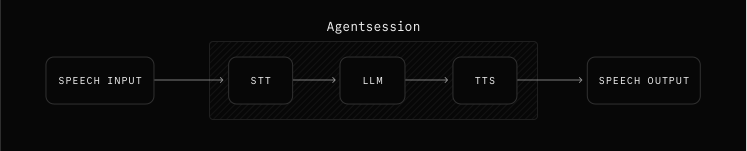
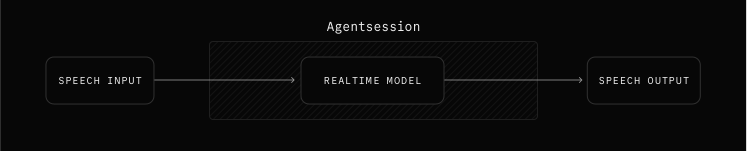
Inside a session, you pick one of three pipeline types according to LiveKit's pipeline docs: a cascaded STT, LLM and TTS pipeline; a turn-based realtime model such as the OpenAI Realtime API; or a full-duplex realtime model such as OpenAI GPT-Live, which listens and speaks at the same time. LiveKit's own guidance is that a cascaded pipeline is the right default for most production agents, because each stage can be swapped, logged and audited.
Pipecat: the agent is a pipeline of frames
Pipecat's unit is the frame. A Pipeline takes an ordered list of frame processors and connects them; frames are data containers (audio, text, images, control signals) that flow through. The docs split frames into SystemFrames, which are high priority and survive interruptions, and DataFrames and ControlFrames, which are queued and processed in order. That ordering guarantee is what makes interruption handling predictable: an InterruptionFrame is a system frame, so it can cut ahead of queued audio.
The transport is just another pair of processors, transport.input() and transport.output(). Pipecat's docs list transports for Daily, LiveKit, SmallWebRTC (direct peer-to-peer WebRTC with no cloud infrastructure), FastAPI WebSocket, a general WebSocket, WhatsApp voice calls, Media over QUIC, Vonage Video Connector and several avatar vendors including HeyGen, Tavus, LemonSlice and Beyond Presence. Because the transport is modular, the docs recommend P2P WebRTC for development and Daily for production with the same bot logic.

What the difference means in practice
With LiveKit, the room is the unit of scale and the unit of reconnection. Participants, tracks, data channels and SIP callers are all things the LiveKit server already knows how to route, so an agent joining a call to which a human, a supervisor or a second agent can also connect is the normal case, not an extension. With Pipecat, the pipeline is the unit of composition. You decide what happens between audio in and audio out, you can branch with ParallelPipelines and filters, and the room is whatever your chosen transport provides.
Neither design is better in the abstract. The room model removes decisions and gives you a platform; the pipeline model keeps the decisions and gives you a toolkit. If you need to bolt a custom processor in front of the LLM, such as a profanity filter, a context compactor or a second model judging the first, Pipecat's model makes that a one-line list change. If you need a supervisor to whisper to the agent or a human to take over mid-call, LiveKit's room model makes that a participant join.
LiveKit Agents in Detail
LiveKit Agents is an Apache-2.0 framework for realtime voice AI agents, created in October 2023 and at 15,180 stars on Nov 11, 2026. The latest release we saw was [email protected] on Nov 5, 2026, and that one release alone added a Responses API route through LiveKit Inference, plus new STT and TTS providers such as Zoom Scribe, Kalpa, Rime and Fish Audio.
What you get
- Python and Node.js SDKs. The quickstart ships the same agent in both languages, with starter templates for each.
- A CLI for the whole loop.
lk agent initscaffolds,lk agent devprints an Agent Console link where you can talk to the agent, andlk agent createdeploys. - Agent Builder. A no-code browser tool for prototyping and deploying voice agents. LiveKit says it is not as feature-rich as the full SDK, so treat it as a starting point.
- Multi-agent handoff and tasks. Agents can hand a session to another agent, and LiveKit documents task and task-group primitives for structured data collection.
- Behavioral testing. The quickstart points at behavioral tests and simulation scenarios for agent logic.
- Telephony inside the platform. SIP trunks, dispatch rules, SIP participants and phone numbers, covered below.
Weaknesses and trade-offs
- The framework is built around LiveKit rooms. If you want a different transport, you are working against the grain, and the docs we read do not describe one.
- Cloud usage is metered across several dimensions (agent minutes, WebRTC minutes, SIP, recordings, events), so the bill takes a calculator, not mental arithmetic.
- Concurrency is a plan limit on LiveKit Cloud: 5 on Build and 20 on Ship as of Nov 11, 2026. Production traffic pushes you toward Scale from $500 per month.
- The surface area is large. Agents, tasks, sessions, rooms, jobs, dispatch and inference are many concepts to learn before the first call goes live.
Best for: teams that want phone, web and mobile voice agents on one platform, want Node.js as an option, and would rather buy the infrastructure than assemble it.
Minimal agent (from the official quickstart)
# Install the CLI, sign in, scaffold, run (from the LiveKit quickstart)
brew install livekit-cli
lk cloud auth
lk agent init my-agent --template agent-starter-python
cd my-agent
lk agent dev        # prints an Agent Console link to talk to the agent
lk agent create     # deploy to LiveKit Cloud

# agent.py (trimmed from the quickstart appendix)
from dotenv import load_dotenv
from livekit import agents
from livekit.agents import AgentServer, AgentSession, Agent, inference, room_io, TurnHandlingOptions

load_dotenv(".env.local")

class Assistant(Agent):
    def __init__(self) -> None:
        super().__init__(instructions="You are a helpful voice AI assistant. Keep answers short.")

server = AgentServer()

@server.rtc_session(agent_name="my-agent")
async def my_agent(ctx: agents.JobContext):
    session = AgentSession(
        stt=inference.STT(model="assemblyai/universal-3-6-pro", language="en"),
        llm=inference.LLM(model="google/gemma-4-31b-it"),
        tts=inference.TTS(model="fishaudio/s2.1-pro", voice="fa4c9eb3dccc4806b382b40d61c6b10a"),
        turn_handling=TurnHandlingOptions(turn_detection=inference.TurnDetector()),
    )
    await session.start(room=ctx.room, agent=Assistant(), room_options=room_io.RoomOptions())
    await session.generate_reply(instructions="Greet the user and offer your assistance.")

if __name__ == "__main__":
    agents.cli.run_app(server)
This uses LiveKit Inference model strings, so no provider keys are needed during development; credits are included with the plan. Swap in a plugin instance, for example the OpenAI plugin via uv add "livekit-agents[openai]~=1.8", when you want your own keys.
Agent deployments are live on LiveKit Cloud. Your voice agent can have a staging deployment running next to production. Same image, same project, same secrets, different name.
— @livekit September 2, 2026
Pipecat in Detail
Pipecat describes itself as an open source framework for voice agents, multimodal apps and realtime AI, maintained by Daily and the community. It is BSD-2-Clause, was created in December 2023, and had 17,201 stars on Nov 11, 2026. The latest release we saw was v1.15.0 on Oct 29, 2026, which among other things added ClassifierUserTurnStopStrategy, a way to let a classifier decide whether the user's turn is complete.
What you get
- Frame-level control. You can see and change every frame between transport input and output.
- Many transports and services. The intro docs cite 150+ AI services; the Pipecat Cloud pricing page cites 80+ providers for LLM, STT and TTS. Both numbers are the vendor's own and count differently, so read them as a range.
- Client SDKs. JavaScript, React, React Native, iOS, Android and C++ clients connect users to your agent.
- A scaffolding CLI.
pipecat init quickstartscaffolds a starter project and also writes AGENTS.md and CLAUDE.md for coding agents. - Pipecat Cloud. Managed hosting by Daily, with
pipecat cloud deploy, secrets, regions and scaling controls. - Open turn detection. Smart Turn is a separate BSD-2-Clause repo with weights, data and training scripts.
Weaknesses and trade-offs
- The server framework is Python only. There is no documented Node.js equivalent in what we fetched.
- You own more decisions: which transport, which hosting, which noise filter. That is flexibility if you want it and homework if you do not.
- Its own docs state the WebSocket telephony route has no advanced call center features like transfers or reconnects, and that WebSocket is TCP-based, so it is less resilient to packet loss and jitter than WebRTC.
- On Pipecat Cloud each instance runs one active session at a time, so bigger agent profiles give one session more CPU and memory, not more sessions per instance.
Best for: teams that want to own the pipeline, run anywhere, and mix transports, and that are comfortable with Python.
Minimal bot (from the official quickstart)
# Install the CLI, scaffold, run, deploy (from the Pipecat quickstart)
uv tool install "pipecat-ai[cli]"
pipecat init quickstart
cd pipecat-quickstart
cp .env.example .env     # DEEPGRAM_API_KEY, OPENAI_API_KEY, CARTESIA_API_KEY
uv sync
uv run bot.py            # opens a local WebRTC client at http://localhost:7860/client
pipecat cloud auth login
pipecat cloud secrets set pipecat-quickstart-secrets --file .env
pipecat cloud deploy

# bot.py (trimmed from the quickstart repo)
stt = DeepgramSTTService(api_key=os.getenv("DEEPGRAM_API_KEY"))
tts = CartesiaTTSService(api_key=os.getenv("CARTESIA_API_KEY"),
    settings=CartesiaTTSService.Settings(voice="71a7ad14-091c-4e8e-a314-022ece01c121"))
llm = OpenAILLMService(api_key=os.getenv("OPENAI_API_KEY"),
    settings=OpenAILLMService.Settings(system_instruction="You are a friendly AI assistant."))

context = LLMContext()
user_aggregator, assistant_aggregator = LLMContextAggregatorPair(
    context, user_params=LLMUserAggregatorParams(vad_analyzer=SileroVADAnalyzer()))

pipeline = Pipeline([
    transport.input(),   # user audio in
    stt,
    user_aggregator,     # turn detection lives here
    llm,
    tts,
    transport.output(),  # bot audio out
    assistant_aggregator,
])
task = PipelineTask(pipeline, params=PipelineParams(enable_metrics=True))
The quickstart needs Python 3.11 or later, uv, and three keys (Deepgram for STT, OpenAI for the LLM, Cartesia for TTS). The first run takes about 20 seconds while models download.
A talk by Daily's Kwindla Hultman Kramer on the AI Engineer channel (published July 31, 2025, so some product details have moved on). It is a vendor talk; use it for the Pipecat mental model and how Daily positions Pipecat Cloud.
Pipecat v1.9.0 is out today, with support for Meta's new Muse Voice Transcribe model. Muse Voice Transcribe is a streaming speech-to-text model.
— @kwindla September 11, 2026
Providers and Models
Both frameworks are provider-neutral, and both keep up with new models fast. The difference is how you reach them.
LiveKit: plugins plus LiveKit Inference
LiveKit offers two paths. LiveKit Inference gives STT, LLM, TTS and realtime models from providers including OpenAI, Google, AssemblyAI, Deepgram, Cartesia and Inworld through one LiveKit Cloud account, with no extra plugin install. The open-source plugins connect directly to a wider set of providers with your own keys; for Python they are optional dependencies such as livekit-agents[openai]. Any OpenAI-compatible endpoint works by overriding base_url and api_key. You can mix both and change models during a session.
On realtime models, LiveKit's docs list OpenAI GPT Realtime and GPT-Live, Gemini Live and SpaceXAI Grok Voice through Inference, and LiveKit's Oct 15, 2026 post says all three pipeline styles now run on LiveKit Inference.
GPT-Live-1 @openaidevs is now supported in LiveKit Agents. It's full-duplex, so it listens and speaks at the same time instead of taking turns.
— @livekit September 10, 2026
Pipecat: provider services in the framework
Pipecat ships a service class per provider (for example DeepgramSTTService, CartesiaTTSService and OpenAILLMService in the quickstart), and you bring your own API keys. There is no framework-level inference reseller in the docs we read; Pipecat Cloud offers enterprise integrated billing by email. Its docs say you can swap one provider for another (Deepgram for Soniox, OpenAI for Anthropic, Cartesia for ElevenLabs) without changing the rest of the code, and an LLMSwitcher can change LLM providers mid-session.
If you are choosing the models themselves, our best speech-to-text APIs and best text-to-speech APIs roundups apply to both frameworks equally.
Practical takeaway: if you want one invoice and one key, LiveKit Inference is the only first-party option here. If you already have enterprise contracts with Deepgram, ElevenLabs or OpenAI, both frameworks use them equally well.
Turn Detection and VAD
Knowing when the caller has finished is the difference between an agent that feels natural and one that talks over people. Both frameworks combine a fast VAD with a model that reads the content of speech.
LiveKit
AgentSession uses LiveKit's turn detector together with VAD data to decide when the user is done; the docs describe the turn detector as audio and text models that detect end of turn from the meaning of speech. Other documented modes: rely on a realtime model's built-in server-side detection, VAD only (minimal latency, or a language the model does not cover), STT endpointing (for example AssemblyAI or Deepgram Flux), and manual control for push-to-talk. On top of the mode you can tune endpointing delay with min_delay and max_delay, dynamic endpointing (Python only), adaptive interruption handling that can tell backchanneling from a real interruption, and noise cancellation.
Pipecat
Pipecat decides turn start and turn end with pluggable user turn strategies. Turn start can use VAD, a transcription fallback, or a minimum word count. Turn end defaults to a turn detection model: the defaults are TurnAnalyzerUserTurnStopStrategy with LocalSmartTurnAnalyzerV3 and Silero VAD with stop_secs=0.2. Alternatives are a speech timeout after transcription, a turn-completeness check by an LLM or classifier, and custom strategies. Silero VAD runs locally on CPU with minimal overhead, and the docs say local VAD is 150 to 200 ms faster than a remote VAD service.
Smart Turn itself is an open, native-audio model. Its README says v3.2 supports 23 languages, comes in an 8 MB quantized CPU build and a 32 MB GPU build, and runs in as little as 10 ms on some CPUs and under 100 ms on most cloud instances. Those are the project's own figures. Pipecat's docs also report around 65 ms on a standard 1x Pipecat Cloud instance, which is Pipecat's own number as well.
Who is ahead?
We cannot call it. We found no independent benchmark that compares the two turn detectors on the same audio, and a fair one would need accented, noisy, telephone-band speech in each target language. Both approaches are credible, both are open for you to inspect (Smart Turn fully; LiveKit documents its model on the turns page), and both let you fall back to simpler modes. Record twenty real calls and replay them through each. That one afternoon will tell you more than any chart.
Telephony
If your agent answers or places phone calls, this section can decide the whole comparison. We cover the mechanics in depth in our phone calling agent guide.
LiveKit
LiveKit's docs describe SIP trunks, dispatch rules and SIP participants as parts of the platform, plus Connectors for WhatsApp Business and Twilio. Tested providers listed are Twilio, Telnyx, Exotel, Plivo, Wavix, Sinch, didlogic and DIDWW. Supported call features include DTMF, cold transfer using SIP REFER, warm transfer and SRTP, with Krisp noise cancellation available. The docs also say there is no SIP REGISTER support. On LiveKit Cloud you can buy US local and toll-free numbers through LiveKit Phone Numbers; for self-hosting, the SIP service is deployed separately.
Pipecat
Pipecat gives you three routes, per its telephony overview: WebSocket (Twilio, Telnyx, Plivo, Exotel), where the docs say to use WebSocket for telephony and WebRTC for clients; WebRTC through Daily with PSTN integration for dial-in and dial-out; and SIP, which the docs say gives full call control including transfers, forwarding and multi-party calls. You can run several providers in the same bot. The honest limit is the one Pipecat states itself: WebSocket telephony lacks transfers and reconnects.
Verdict on phones
For a simple inbound line on Twilio, either works and Pipecat's WebSocket route is quick. For real call-center behavior (transfers, DTMF menus, SIP interconnect, many numbers) the LiveKit stack is more self-contained, and Pipecat plus Daily SIP is the comparable path. Both stacks name Twilio, Telnyx, Plivo and Exotel, so check number availability with the carrier in your target country before you commit to either.
Voice agents get built three ways: cascaded (STT, LLM, TTS), turn-based speech-to-speech, and full-duplex, where the model listens and talks at the same time.
— @livekit October 15, 2026
Deployment and Hosting
LiveKit Cloud
You deploy with one CLI command (lk agent create, then lk agent deploy for updates). LiveKit Cloud builds the container from your Dockerfile, injects secrets, scales and load-balances up to your plan limits, and gives you a dashboard with session counts, error tracking, logs and log drains to Datadog, CloudWatch, Sentry or New Relic. Agent deployments are counted per plan (1, 2 and 4 on Build, Ship and Scale as of Nov 11, 2026), and LiveKit announced on Sep 2, 2026 that a staging deployment can run next to production with the same image and secrets. For other environments, the docs describe self-hosted deployments and Kubernetes compatibility.
Pipecat Cloud
pipecat cloud deploy creates a managed pool of instances for your agent, with secrets set through pipecat cloud secrets set. Each instance runs one session at a time. Controls include min-agents (warm instances, default 0, which cost money even when idle), max-agents (hard limit that returns HTTP 429 at capacity) and max-session-duration as a runaway-session safety net, plus a spend limit in the dashboard or CLI. Daily-hosted regions are us-west (Oregon), us-east (Virginia), eu-central (Frankfurt) and ap-south (Mumbai), on arm64. Self-hosted regions in your own Kubernetes cluster are part of Pipecat Enterprise. Secrets and image pull secrets are region-specific, so a multi-region setup repeats them per region.
Running it yourself
Either framework runs in your own containers on any VPS or Kubernetes cluster. For LiveKit that means running the LiveKit server (Apache-2.0, Go) alongside the agent workers, plus the SIP service if you want phones. For Pipecat that means your own container with a transport such as SmallWebRTC or WebSocket, or Daily as a hosted transport. If you want a box for this, see our best VPS for AI agents guide. Remember that voice agents are latency-sensitive: put the workers near your users and near your model providers.
Live Pricing
Prices below are from the vendors' pricing pages as of Nov 11, 2026. They exclude model costs (STT, LLM, TTS) unless stated, and vendors change them, so confirm on the source before budgeting.
| Item | LiveKit Cloud | Pipecat Cloud (Daily) |
|---|---|---|
| Plan fee | Build $0, Ship from $50/month, Scale from $500/month, Enterprise custom | No plan fee listed; pay per minute |
| Agent runtime | $0.01 per agent session minute after 1,000 (Build), 5,000 (Ship), 50,000 (Scale) included | agent-1x $0.01, agent-2x $0.02, agent-3x $0.03 per active minute |
| Warm capacity | Not priced separately on the page we read | Reserved (always-on) $0.0005 / $0.0010 / $0.0015 per minute by profile |
| Compute per session | Not published on the pricing page | agent-1x 0.5 vCPU and 1 GB; agent-2x 1 vCPU and 2 GB; agent-3x 1.5 vCPU and 3 GB |
| WebRTC transport | 5,000 / 150,000 / 1.5M minutes included, then $0.0005 (Ship) or $0.0004 (Scale) per minute | Daily WebRTC voice: the page shows $0.001 marked Free for 1:1 voice sessions on Pipecat Cloud; voice and video $0.004 per participant minute; WebSocket transport billed by your provider |
| Phone numbers and inbound | 1 free US local number, then $1.00/month; US local inbound minutes 50 / 100 / 1,000 included then $0.01/min; toll-free $2/month plus $0.02/min on Ship and up | Daily PSTN dial-in or dial-out $0.018/min (SIP included); Daily SIP $0.003 to $0.02/min; Twilio billed by Twilio |
| Third-party SIP | 1,000 / 5,000 / 50,000 minutes included, then $0.004 (Ship) or $0.003 (Scale) per minute | Covered in the SIP line above |
| Call transfer | Cold and warm transfer supported in docs; fee not itemized on the page we read | SIP REFER $0.20 per event; other transfers keep the call anchored to Daily and minutes keep accruing |
| Noise handling | Krisp noise cancellation in telephony docs; ai-coustics in the quickstart code | Krisp VIVA free for 0 to 10k active minutes per month, then $0.0015/min |
| Recording and observability | Recordings 1,000 / 5,000 / 50,000 minutes included then $0.005/min; events $0.00003 per entry | Audio $0.005/min, audio and video $0.01349/min, storage $0.003/min |
| Inference | LiveKit Inference credits: $2.50 (Build), $5 (Ship), $50 (Scale); bring your own keys also works | Bring your own provider; enterprise integrated billing by email |
| Compliance | SOC 2 Type II; HIPAA BAA on Scale and up; SSO on Enterprise | Enterprise: SSO, custom data residency, 24/7 support |
A worked example, with the caveats
LiveKit's own calculator for a phone call shows $0.0672 per minute all in: agent session $0.0100, telephony $0.0100, LLM $0.0014, STT $0.0058, TTS $0.0300 and observability $0.0100. That is LiveKit's example with its chosen models, so your number will move with your TTS choice most of all. For Pipecat, our arithmetic on listed rates: agent-1x active $0.01 plus Daily PSTN $0.018 comes to $0.028 per minute before LLM, STT, TTS, Krisp (free under 10k minutes) and recording. Those two figures are not apples to apples: LiveKit's includes observability and a US local inbound number, and Pipecat's excludes any model spend. Use them as a shape, not a verdict.
The pricing shapes differ more than the totals. LiveKit is plan-based: a free Build tier (no card, 1,000 free agent minutes monthly), then included minutes and concurrency that step up by plan. Pipecat Cloud is pure usage: no plan fee is listed, you pay per active minute plus any reserved capacity. Light and spiky usage tends to suit usage-based billing, steady high volume tends to suit plans with included minutes. Whichever you pick, GPU and model spend dominates at scale, so see our TTS pricing roundup, and if you self-host open models, our GPU cloud guide.
Benchmarks and Independent Data
We looked for neutral, reproducible comparisons of the two frameworks (latency, concurrency per core, interruption accuracy) and did not find any we could stand behind. What exists is vendor material:
- Pipecat Smart Turn (vendor-reported): 23 languages, as little as 10 ms on some CPUs, under 100 ms on most cloud instances, 8 MB CPU model.
- LiveKit docs (vendor-reported): conversations feel natural when end-to-end response latency stays under one second. Pipelines accumulate latency across stages but reduce it through streaming, while realtime models combine stages for a lower baseline.
- Pipecat STT claim: a Sep 11, 2026 post by Pipecat's maintainer says Meta's Muse Voice Transcribe has the lowest semantic word error rate of any model they tested, using their public open-source test suite. That is a claim about a speech model from the framework maintainer, not about either framework.
Your latency depends mostly on the model providers, the region and the network path, not on the framework loop. The right test is your own: same prompt, same models, same region, 50 calls each, measuring time from end of user speech to first bot audio. For the deeper view on picking models, read our voice platforms roundup.
Alternatives
If neither framework fits, three other routes are worth knowing. Prices are as of Nov 11, 2026, from the vendors' pages we fetched for our voice-platform roundup.
- Vapi (hosted platform). Pay-as-you-go with a $0.05 per minute hosting fee, models passed through at cost, $5 free credits and 4 concurrent calls on the free tier. You configure assistants instead of writing a framework. Best for: fast launches where you accept less control.
- Retell (hosted platform). Pay-as-you-go from $0.07 to $0.31 per minute on its pricing page, 20 concurrent calls included. Best for: teams that want a polished call-center product and per-minute budgeting.
- OpenAI Realtime API (model, not a framework). A speech-to-speech model API; gpt-realtime-2.1 audio is listed at $32 per 1M input tokens and $64 per 1M output tokens, with a mini variant at $10 and $20. You would still need transport, telephony and hosting, which is exactly what LiveKit and Pipecat supply, and both support it as a model.
If you are an engineer exploring voice for your own coding workflow instead, our Antigravity voice mode guide covers a different problem. And if a coding agent will write your voice agent for you, the Pipecat quickstart scaffolds AGENTS.md and CLAUDE.md files for it; see our best AI coding agents.
How to Choose
| If you need | Pick | Why |
|---|---|---|
| Phone-first agent with transfers, DTMF and dispatch rules | LiveKit Agents | SIP is a first-class feature of the same platform, and the docs list tested carriers. |
| You want one vendor for server, SDKs, SIP, agents and model access | LiveKit Agents | LiveKit Cloud and LiveKit Inference cover all of it behind one account. |
| You need Node.js or TypeScript on the agent side | LiveKit Agents | Both Python and Node.js SDKs are documented. Pipecat's server is Python. |
| You want to own the media graph and insert custom processors anywhere | Pipecat | Everything is a frame processor in an ordered pipeline you assemble. |
| You are on Twilio, Telnyx, Plivo or Exotel WebSockets and want it simple | Pipecat | Documented WebSocket integrations for all four, with serializers. |
| You want a transport you can swap without touching bot logic | Pipecat | Docs: swap P2P WebRTC for Daily or WebSocket without changing bot logic. It also has a LiveKit transport. |
| You want to stay out of a vendor's WebRTC network | Pipecat with SmallWebRTC or your own WebSocket | Direct peer-to-peer WebRTC needs no cloud infrastructure. |
| You want a no-code prototype to show a stakeholder | LiveKit Agents | Agent Builder runs in the browser with no code, though LiveKit says it has fewer features than the SDK. |
| You need multi-region hosting with fixed per-minute pricing and no plan fee | Pipecat Cloud | Four Daily-hosted regions and per-minute profiles; check the concurrency cap. |
| Heavy concurrent load with predictable plan limits | LiveKit Cloud | Concurrency is a published number per plan, up to 600 on Scale. |
A fast way to decide. Build the same two-minute demo in both. It takes less than an hour each with the quickstarts above. Then ask three questions. Which one made it easier to add a custom tool and a handoff? Which one made it easier to see what happened on a bad turn? Which one would your team be comfortable being paged for at 2 a.m.? Teams that answer “LiveKit” are usually buying the platform; teams that answer “Pipecat” are usually buying control.
Retrieval-heavy agents need a knowledge store as well; our vector database comparison covers that layer, and it is the same for both frameworks.
How We Evaluated
We read the official docs, repos and pricing pages for both frameworks and their clouds on Nov 11, 2026, queried the GitHub API for stars, forks, licenses and latest releases, and checked each vendor claim against its first-party source. We did not run our own latency benchmarks, so we report none as fact. We label figures as vendor-reported when the vendor is the only source. There is no paid placement, no affiliate link and no sponsorship in this comparison. Where a detail is not publicly documented, we say so rather than fill the gap. Both projects ship quickly (new releases landed within days of our check), so treat version numbers and prices as a snapshot.
FAQ
Is LiveKit Agents or Pipecat better for a voice agent?
Neither wins on every axis. LiveKit Agents is the better fit when your agent lives in WebRTC rooms or on phone lines, because the framework, the media server, SIP and hosting come from one vendor. Pipecat is the better fit when you want to assemble a pipeline of frame processors yourself and keep the transport swappable. Both are open source, both support cascaded STT, LLM and TTS pipelines, and both ship a default turn detection model, so the real decision is operational shape, not raw capability.
Are LiveKit Agents and Pipecat free to use?
The frameworks are. LiveKit Agents is Apache-2.0 and Pipecat is BSD-2-Clause. What costs money is hosting and the model providers. As of Nov 11, 2026, LiveKit Cloud has a $0 Build plan with 1,000 included agent minutes, then paid plans from $50 per month; Pipecat Cloud charges $0.01 per active minute on its smallest agent profile with no plan fee listed. You can also self-host both and pay only your infrastructure and your model providers.
Can I use Pipecat with LiveKit?
Yes. Pipecat's docs list a LiveKit transport described as WebRTC transport using LiveKit's real-time communication platform, next to the Daily, SmallWebRTC and WebSocket transports. That means a Pipecat pipeline can sit inside a LiveKit room. They are not mutually exclusive, although running both adds a layer you should have a reason for.
Which has better turn detection?
We found no neutral head-to-head benchmark, so we will not name a winner. Both default to a model on top of VAD: LiveKit uses its turn detector model (audio and text) and Pipecat uses its open-source Smart Turn v3 audio model. Pipecat's Smart Turn README lists 23 languages and CPU inference as fast as 10 ms on some CPUs, which is a vendor-reported figure. Test both on your own recordings, with your accents and phone audio, before you commit.
Which one is better for phone calls?
LiveKit has the more integrated phone story: SIP trunks, dispatch rules, DTMF, cold and warm transfers, and LiveKit Phone Numbers on LiveKit Cloud. Pipecat supports phone calls too, through Daily PSTN and SIP or through WebSocket links to Twilio, Telnyx, Plivo and Exotel, but its own docs say the WebSocket route has no advanced call center features such as transfers or reconnects. If transfers and SIP matter, LiveKit or Pipecat with Daily SIP are the realistic options.
Do I need LiveKit Cloud or Pipecat Cloud to use the frameworks?
No. LiveKit's docs say the framework and media server are open source and Kubernetes compatible, and describe deployments to your own environment. Pipecat's docs describe the hosting provider as either Pipecat Cloud or self-hosted, and you can also run the bot yourself with a transport such as SmallWebRTC. The managed clouds save you from running containers, scaling and regions yourself, and both bill per minute or per plan on top of your model costs.
How many concurrent calls can each cloud handle?
As of Nov 11, 2026, LiveKit's pricing page lists 5 concurrent agent sessions on Build, 20 on Ship, and up to 600 on Scale starting at 50. Pipecat Cloud's pricing page says unlimited concurrency, while its scaling docs say each deployment in a Daily-hosted region has a maximum pool of 50 unless you request an increase, and each instance runs one active session. Treat 50 as the practical default and ask for more if you need it.
What about Vapi, Retell or the OpenAI Realtime API instead?
Those are different layers. Vapi and Retell are hosted voice-agent platforms where you configure agents rather than write a framework; OpenAI Realtime is a speech-to-speech model API. They are faster to start and give you less control. Many LiveKit and Pipecat agents use the OpenAI Realtime or GPT-Live models as the brain, so the choice is often framework plus model, not framework versus model.
Can I switch from one framework to the other later?
Your prompts, tools and provider choices carry over, because both are Python-first and wrap the same STT, LLM and TTS vendors. The glue does not: LiveKit sessions, jobs and rooms do not map one to one to Pipecat pipelines, aggregators and transports. Keep business logic (tools, prompts, data access) in plain functions so the framework layer stays thin and the rewrite is a day or two, not weeks.
Sources
All fetched on Nov 11, 2026 unless noted.
- GitHub: livekit/agents (stars, license, releases)
- GitHub: pipecat-ai/pipecat (stars, license, releases)
- GitHub: livekit/livekit (media server)
- GitHub: pipecat-ai/smart-turn
- LiveKit docs: Voice AI quickstart
- LiveKit docs: Pipeline types
- LiveKit docs: Models overview
- LiveKit docs: Turns overview
- LiveKit docs: Agent deployment overview
- LiveKit pricing
- Pipecat docs: Introduction
- Pipecat docs: Quickstart
- Pipecat docs: Pipeline and frame processing
- Pipecat docs: Transports
- Pipecat docs: Speech input and turn detection
- Pipecat docs: Telephony overview
- Pipecat Cloud docs: Scaling
- Pipecat Cloud docs: Regions
- Pipecat Cloud pricing (Daily)
- Release notes: livekit-agents 1.8.11
- Release notes: Pipecat v1.15.0
- AI Engineer: Pipecat Cloud talk (published July 31, 2025)
- LiveKit: Build Production-Ready Voice AI Agents
- Vapi pricing, Retell pricing, OpenAI API pricing