Get the latest on AI, LLMs & developer tools
New MCP servers, model updates, and guides like this one — delivered weekly.
The Short Answer
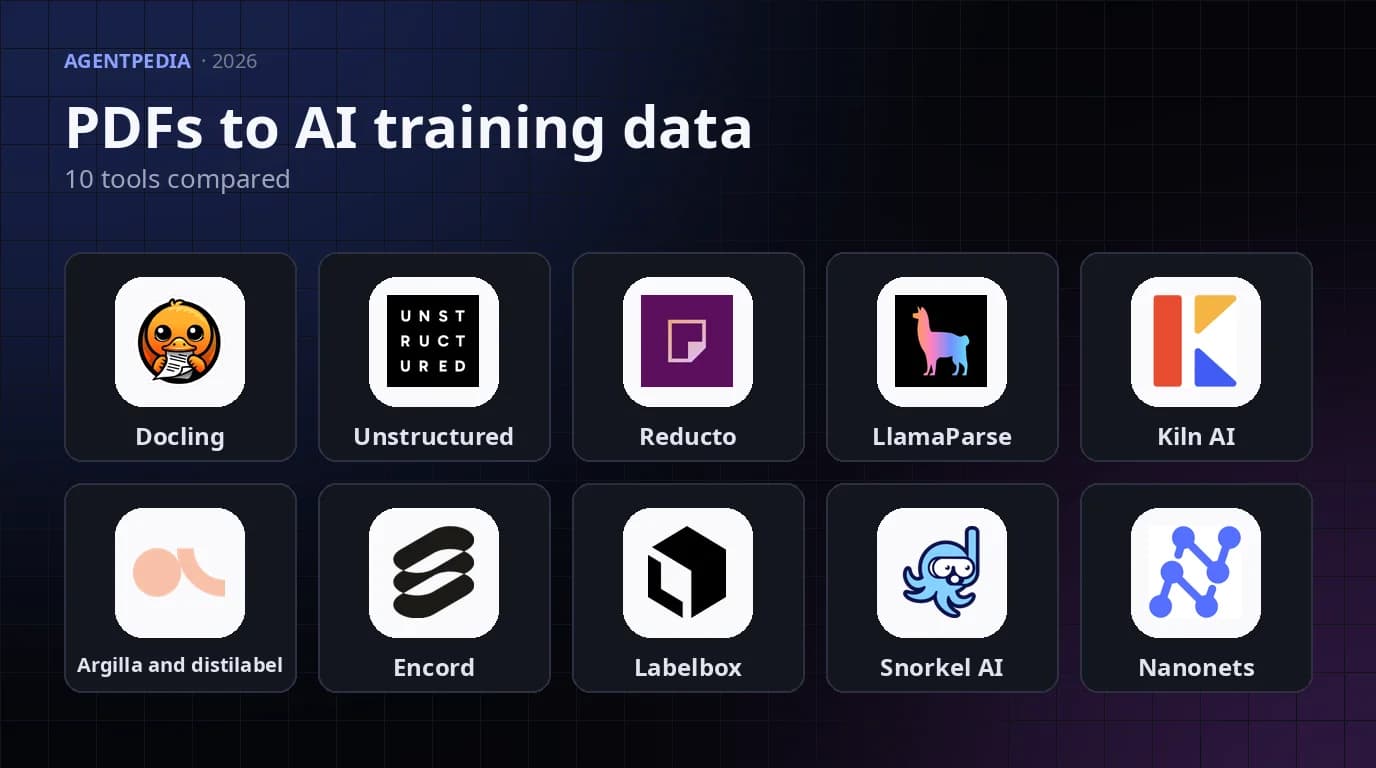
You have a folder of PDFs, contracts, manuals or reports, and you want a model that answers in their voice or knows their facts. The path is the same whatever tools you pick: parse the documents into clean text, chunk them, strip personal data, have a strong model write question and answer pairs from each chunk, filter hard, export JSONL, and test on documents the model never saw. For a free, private start, use Docling to parse and distilabel or Kiln to generate. For hard layouts on a hosted API, test Reducto and LlamaParse. For connectors across a whole company, look at Unstructured. For human review at scale, Argilla is free and Encord, Labelbox and Snorkel are sales-led.
This post is about training data, not retrieval. If you want to feed documents to an agent through RAG, read our OCR and document parsing roundup, which benchmarks parsers on accuracy and price. Here the parser is only stage one, and most of the effort, and most of the risk, sits in what comes after it.
Meta Developers walks through generating synthetic fine-tuning data. It is the same pattern as the worked example below: ingest documents, generate pairs, curate, export.
Quick Picks
| Need | Pick | Why |
|---|---|---|
| Best free parser for private documents | Docling | MIT licence, runs locally or air-gapped, exports Markdown and lossless JSON, and has a built-in chunker. |
| Best parse-to-chunks pipeline with connectors | Unstructured | Open-source library plus a hosted platform; $0.010 per page on the default strategy, $150 one-time credit. |
| Best accuracy for tables and forms, hosted | Reducto | r-1 at $10 per 1,000 pages, r-1 mini at $1 per 1,000; $150 free usage. |
| Best tiered parser for mixed difficulty | LlamaParse | Pay per tier from 1 to 25 credits a page; 10,000 free credits a month. |
| Best free workbench for synthetic data and fine-tuning | Kiln AI | Free desktop app plus an MIT Python library; fine-tunes on Fireworks, Together and Vertex. |
| Best open-source pipeline plus human review | Argilla and distilabel | Apache-2.0 tools for generating, judging and reviewing instruction and preference data. Check distilabel's maintenance note. |
| Best for expert-labelled enterprise data | Encord, Labelbox or Snorkel AI | Sales-led platforms and services. Their 2026 focus is physical AI, RL environments and frontier-lab data. |
The Seven-Stage Pipeline
Every working documents-to-training-data setup has the same seven stages. Tools differ in how many they cover. A parser covers one or two. A workbench like Kiln covers generation through fine-tuning. A labeling platform covers review. You will usually combine two or three. Once the stages are chosen, run them as a scheduled DAG; the orchestration tools comparison covers Airflow, Prefect and Dagster.
Stage 1. Parse
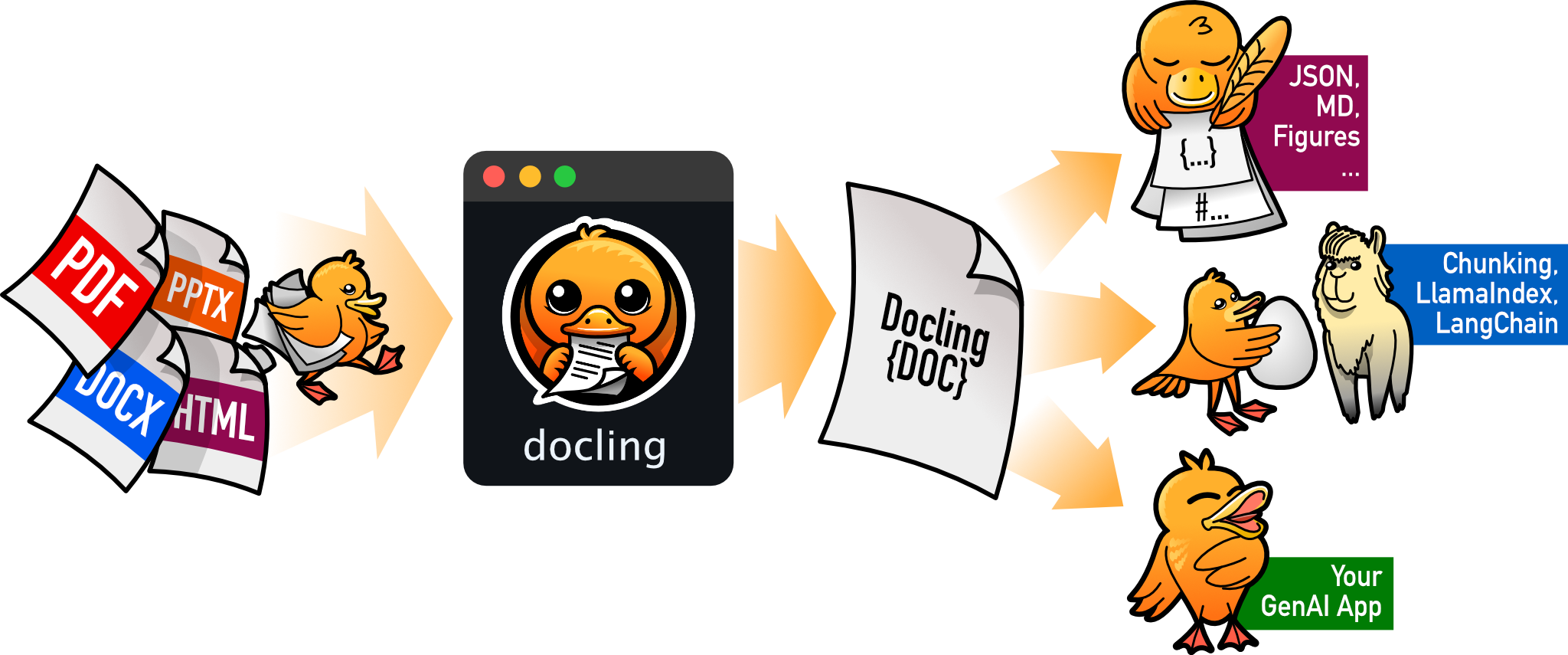
Turn PDFs, Word files, slides and scans into text that keeps structure: headings, reading order, tables, lists and captions. A bad parse poisons everything downstream, because a model will happily write confident questions about a table that was flattened into nonsense. Run two parsers on 50 of your worst pages and read the output side by side before you commit. Parsers in this guide: Docling, Unstructured, Reducto, LlamaParse, with Marker, MinerU and Mistral OCR as alternatives. A hosted option for this stage is Firecrawl AnyDoc, and page-level routing can cut parse cost, as shown in the LlamaIndex Parse Gateway guide.
Stage 2. Chunk
Split each document into passages the generator can read in one go. Split on structure, not on a fixed character count: keep a table with its caption and keep a section under its heading. Unstructured's chunk_by_title starts a new chunk at each title and documents a hard limit of 500 characters by default (max_characters), with a soft limit (new_after_n_chars) and a small-section merge (combine_text_under_n_chars). Docling's HybridChunker starts from the document hierarchy, splits only oversized chunks against your tokenizer, and merges undersized neighbours that share headings. For generation, chunks larger than retrieval chunks usually work better because the generator needs context to write a question that stands alone. That is a heuristic from practice, not a vendor claim, so test it.
Stage 3. Clean and redact
Remove headers, footers, page numbers, boilerplate legal text and repeated tables of contents. Then detect and redact personal data. Microsoft's Presidio is the common open-source choice (MIT licence; its repository now lives under the data-privacy-stack GitHub organization). Redact before generation, so the teacher model never sees real identifiers, and again after, because a model can reconstruct or hallucinate a name. Detectors miss things, so sample 100 outputs by hand.
# Presidio docs: text de-identification quickstart
# pip install presidio-analyzer presidio-anonymizer && python -m spacy download en_core_web_lg
from presidio_analyzer import AnalyzerEngine
from presidio_anonymizer import AnonymizerEngine

text = "My phone number is 212-555-5555"
analyzer = AnalyzerEngine()
results = analyzer.analyze(text=text, entities=["PHONE_NUMBER"], language="en")
anonymizer = AnonymizerEngine()
print(anonymizer.anonymize(text=text, analyzer_results=results))
Stage 4. Generate Q&A or instruction pairs
A strong “teacher” model reads each chunk and writes the examples a user might really send, with answers grounded in the chunk. Good prompts do four things: restrict the answer to the passage, ask for standalone questions (no “as mentioned above”), allow an empty result when the chunk has no facts, and vary question types (lookup, how-to, comparison, a refusal when the answer is not in the passage). Check the teacher model's terms: some providers restrict using outputs to train competing models. Tools that do this stage: distilabel, Kiln AI, and Meta's open-source Synthetic Data Kit. Our synthetic data generation roundup compares more of them.
Stage 5. Deduplicate and filter quality
Generators repeat themselves. Drop near-duplicate questions (MinHash with locality-sensitive hashing is the standard trick, and distilabel lists a minhash extra built on datasketch for exactly this), then judge each example. Common filters: an LLM-as-judge score for groundedness, a check that the answer's key facts appear in the source chunk, length bounds, and a language check. Meta's Synthetic Data Kit ships a curate command that uses Llama as the judge. Have a human read a random sample of the survivors. If more than a few in a hundred are wrong, fix the prompt, not the filter.
Stage 6. Format as JSONL
Most trainers expect one JSON object per line. OpenAI's supervised fine-tuning guide shows the messages layout with role and content fields and notes a file must have at least 10 lines. Hugging Face TRL documents the same conversational format, plus prompt-completion (prompt, completion) and preference data (prompt, chosen, rejected). Pick the format your trainer documents today and write a tiny validator that every line parses.
{"messages":[{"role":"user","content":"How many days do I have to report a workplace injury?"},{"role":"assistant","content":"Report it within 24 hours of the incident, according to section 4.2 of the handbook."}]}
{"messages":[{"role":"user","content":"Who approves travel above the standard limit?"},{"role":"assistant","content":"The department head approves it in writing before booking."}]}
Stage 7. Split and evaluate
Hold out a test set before you train, and split by source document. If two questions from the same page land on both sides, your score is inflated and you will not know it. Also keep a small set of hand-written questions that nobody generated. Compare the fine-tuned model against the base model with the same prompt on that set. For tooling, see our LLM observability and evaluation roundup. Once the data is ready, the fine-tuning platform comparison covers where to train it, and the on-device fine-tuning guide covers small models on your own hardware.
Worked Example: PDF to Train and Test JSONL
The script below chains the documented calls into one flow: Docling parses and chunks, Presidio redacts, an OpenAI-compatible model writes the pairs, MinHash removes near-duplicate questions, and the output is split by source document. Each library call follows the project's official docs (shown in the tool sections). The glue is ours. We did not run this exact script end to end for this article, so treat it as a template and test it on three documents first.
# Our assembly of the documented calls above. Not a vendor sample; adapt before use.
# pip install docling presidio-analyzer presidio-anonymizer openai datasketch
import json, random
from docling.document_converter import DocumentConverter
from docling.chunking import HybridChunker
from presidio_analyzer import AnalyzerEngine
from presidio_anonymizer import AnonymizerEngine
from openai import OpenAI            # any OpenAI-compatible endpoint works via base_url
from datasketch import MinHash, MinHashLSH

client = OpenAI()                    # set base_url= / api_key= for your provider
MODEL = "YOUR-TEACHER-MODEL"         # a strong model you are allowed to use for this
analyzer, anonymizer = AnalyzerEngine(), AnonymizerEngine()

PROMPT = """You write training examples from a source passage.
Use ONLY the passage. Write 3 question-answer pairs a user might really ask.
Answers must be fully supported by the passage and stand alone.
If the passage has no usable facts, return [].
Return JSON: [{"question": "...", "answer": "..."}]

Passage:
{passage}"""

def redact(text):
    found = analyzer.analyze(text=text, language="en")
    return anonymizer.anonymize(text=text, analyzer_results=found).text

def make_pairs(passage):
    resp = client.chat.completions.create(
        model=MODEL, temperature=0.3,
        messages=[{"role": "user", "content": PROMPT.format(passage=passage)}],
    )
    try:
        return json.loads(resp.choices[0].message.content)
    except json.JSONDecodeError:
        return []                    # count these; a high rate means a prompt problem

def shingles(s, n=5):
    w = s.lower().split()
    return {" ".join(w[i:i+n]) for i in range(max(1, len(w) - n + 1))}

# Stages 1-2: parse and chunk (one source document at a time, so we can split by document)
docs = {}
for path in ["contract_a.pdf", "handbook.pdf", "policy.pdf"]:
    doc = DocumentConverter().convert(source=path).document
    chunker = HybridChunker()
    docs[path] = [chunker.contextualize(chunk=c) for c in chunker.chunk(dl_doc=doc)]

# Stages 3-4: redact the chunk, then generate Q&A from the redacted text
rows = []
for path, chunks in docs.items():
    for passage in chunks:
        clean = redact(passage)
        for qa in make_pairs(clean):
            rows.append({"source": path, "passage": clean, **qa})

# Stage 5: near-duplicate filter (MinHash LSH), plus a redaction pass on the answers
lsh, kept = MinHashLSH(threshold=0.8, num_perm=128), []
for i, r in enumerate(rows):
    m = MinHash(num_perm=128)
    for sh in shingles(r["question"]): m.update(sh.encode())
    if not lsh.query(m):
        lsh.insert(str(i), m)
        r["answer"] = redact(r["answer"])
        kept.append(r)

# Stages 6-7: JSONL in chat format, split BY SOURCE DOCUMENT to avoid leakage
test_sources = {"policy.pdf"}        # hold out whole documents
with open("train.jsonl", "w") as tr, open("test.jsonl", "w") as te:
    for r in kept:
        line = {"messages": [
            {"role": "user", "content": r["question"]},
            {"role": "assistant", "content": r["answer"]},
        ]}
        (te if r["source"] in test_sources else tr).write(json.dumps(line) + "\n")
What this costs. Parsing is the cheap part (see the pricing table). The generation bill is tokens: your chunks in, your pairs out. A planning formula: input tokens = chunks x tokens per chunk; output tokens = chunks x pairs per chunk x tokens per pair. As an illustration only, 2,000 chunks of 800 tokens is 1.6 million input tokens, and 3 pairs of 120 tokens per chunk is 720,000 output tokens. Multiply by your model's per-million-token input and output prices (we do not quote a model price here because it changes often). Run 20 chunks first and extrapolate.
If you would rather not write glue code, two projects wrap parts of this flow. Meta's Synthetic Data Kit (MIT) is a CLI with four stages:
# Meta's synthetic-data-kit (MIT) command stages, per its README
synthetic-data-kit ingest   # parse PDF, HTML, DOCX, PPTX, YouTube transcripts
synthetic-data-kit create   # generate QA pairs, chain-of-thought examples or summaries
synthetic-data-kit curate   # LLM-as-judge filtering
synthetic-data-kit save-as  # export to your fine-tuning format
Kiln's desktop app does generation, review and fine-tuning in a UI. Both are covered below.
Master Comparison Table (as of Nov 26, 2026)
The tools sit at different stages, so the table lists the stage each one covers. Prices are the headline numbers on each vendor's own page. “Not published” means the vendor shows no price and sends you to sales.
| Tool | Stage | Pricing | Open source | Deployment | Standout |
|---|---|---|---|---|---|
 Docling | Parse, chunk | Free, open source (MIT); you pay for compute | Yes | Local or air-gapped | Layout, tables, reading order, HybridChunker, Markdown and lossless JSON export |
 Unstructured | Parse, chunk, connectors | $150 one-time credit; Team $0.01/page; strategies $0.002 to $0.030/page | Library yes (Apache-2.0); platform no | Hosted, dedicated, VPC (Business) | 40+ connectors, chunking inside the pipeline, audio and video |
 Reducto | Parse, extract, split | $150 free usage; r-1 $10 and r-1 mini $1 per 1,000 pages | No | Hosted; VPC and on-prem on Enterprise | Bounding box for every block, schema extraction, citations |
 LlamaParse | Parse, extract | 10,000 free credits/mo; $1.50 per 1,000 credits; Pro $500/mo | Parser no; LiteParse yes | Hosted | Four tiers from 1 to 25 credits per page, Cost-Optimizer |
 Kiln AI | Generate, fine-tune, eval | Free app and library; Kiln Pro features rate-limited on free | Library MIT; app source-available | Local-first, or hosted fine-tune providers | Synthetic data UI, 60+ fine-tunable models, eval builder |
 Argilla and distilabel | Generate, review | Free, Apache-2.0 | Yes | Docker, Hugging Face Hub, or your own | Pipelines for synthetic data and AI feedback; annotation UI for human review |
 Encord | Label, curate, evaluate | Starter, Team, Enterprise tiers; prices not published | No | Cloud; VPC and on-prem on Enterprise | Text and document annotation, RLHF preference ranking, data curation |
 Labelbox | Label, RL data | Not published; sales-led | No | Cloud | Horizon: data for RL, evals and supervised learning; managed labeling |
 Snorkel AI | Expert data service | Not published; sales-led | No | Service | Expert-written datasets, rubrics and environments for frontier and agentic AI |
 Nanonets | Extract (IDP) | Starter free with $50 credit; $0.02 to $0.30 per block run | Open OCR models separate | Cloud; private cloud on Enterprise | Business-document extraction agents; Nanonets-OCR2 open models |
1. Docling
What it is. Docling is an open-source document conversion toolkit that came out of IBM Research and is now hosted by the Linux Foundation's LF AI & Data (the README carries the badge). It is MIT licensed. As of Nov 26, 2026 the GitHub repository showed 71,086 stars and a last push that morning. It parses PDF, DOCX, PPTX, XLSX, HTML, images, audio and more, and exports Markdown, HTML, WebVTT, DocTags and lossless JSON from one unified DoclingDocument.
Who it is for. Teams with private or regulated documents, anyone who does not want a per-page bill, and developers who want chunking tied to the document structure rather than bolted on. The README lists local execution for sensitive data and air-gapped environments as a design goal.
Key features for training data. Page layout, reading order, table structure, code, formulas and image classification; several OCR engines and visual language models including GraniteDocling; a CLI, a Python API, an MCP server and a service called docling-serve; integrations with LangChain, LlamaIndex, CrewAI and Haystack. Two chunkers work directly on the document object: HierarchicalChunker and HybridChunker. The HybridChunker applies tokenization-aware refinements: it splits chunks only when they are oversized against your tokenizer, merges undersized successive chunks that share headings and captions (the merge_peers option, default on), and by default repeats table headers when a table spans several chunks. chunker.contextualize(chunk) returns the chunk text enriched with its headings, which is the text you want to give a generator.
pip install docling
# Python 3.10+ (Python 3.9 support was dropped in docling 2.70.0)

# One-line CLI conversion (from the Docling README)
docling https://arxiv.org/pdf/2206.01062
# Docling hybrid chunking example from the Docling docs
from docling.document_converter import DocumentConverter
from docling.chunking import HybridChunker

doc = DocumentConverter().convert(source="report.pdf").document
chunker = HybridChunker()
for chunk in chunker.chunk(dl_doc=doc):
    text_for_generation = chunker.contextualize(chunk=chunk)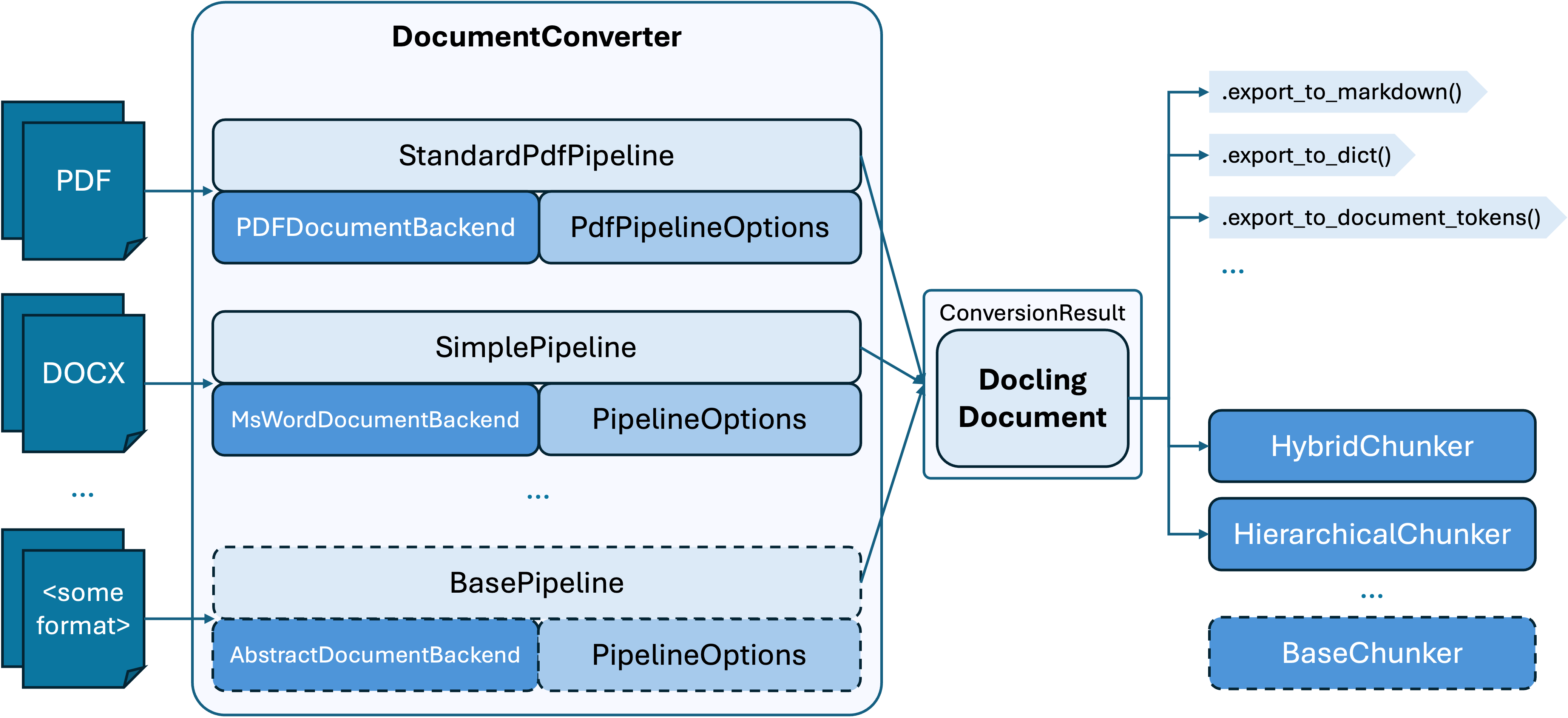
- No licence cost and no per-page fee; MIT licensed and very actively maintained.
- Runs on your own machine or in an air-gapped network, so sensitive documents never leave.
- Structure-aware chunkers and contextualized text suit generation prompts.
- Lossless JSON export keeps tables and provenance for later checks.
- You provide the compute; OCR and vision-model options need a GPU for good speed.
- No built-in Q&A generation, redaction or labeling; it is stage one and two only.
- Accuracy on your documents is yours to test; we found no neutral benchmark in the vendor pages we read.
- Requires Python 3.10 or newer.
Pricing. Free. Standout use case. A law firm or clinic that cannot upload documents to a third-party API and wants clean, chunked text with provenance. Skip it if you need a hosted API with a service-level agreement, or you have no one to run Python.
IBM Technology's overview of Docling. It frames the tool around RAG, but the parsing and chunking steps are the same for training data.
2. Unstructured
What it is. Unstructured is a hosted platform and an Apache-2.0 open-source library for turning documents, images, audio and video into LLM-ready elements, with connectors and chunking around the parser. The company announced a $40 million Series B in March 2024 (Menlo Ventures led; Business Wire reported total funding of $65 million).
Who it is for. Data and platform teams that need to pull documents out of SharePoint, S3, Google Drive, Confluence or Salesforce on a schedule and land structured output somewhere. Its pricing page lists 40+ connectors and 10+ vision-language models.
Pricing (pricing page, Nov 26, 2026). Personal: $150 in credit, one time, no card. Team: $0.01 per page, no free credit, balance from $50. Business: custom, with VPC, SSO and bring-your-own model keys. Document rates per page: Balanced (new default) $0.010, Best (new) $0.015, Fast (legacy) $0.002, Hi-Res (legacy) $0.020, VLM (legacy) $0.030. Audio is $0.015 per minute and video $0.045 per minute. The page says “Nothing is billed after the fact”: everything draws from a prepaid balance. Third-party pricing trackers (Flexprice, UsagePricing) report different, older numbers, including a flat $0.015 per page; we used the vendor's live page.
# Unstructured open-source library (docs: partitioning and chunking)
from unstructured.partition.auto import partition
from unstructured.chunking.title import chunk_by_title

elements = partition(filename="example-docs/pdf/layout-parser-paper-fast.pdf")
chunks = chunk_by_title(elements, max_characters=500)  # 500 is the documented default
- A real ingestion pipeline: connectors, scheduling and chunking, not just a parser.
- Open-source library under Apache-2.0 plus a hosted option.
- Prepaid balance makes spend easy to cap.
- Handles audio and video as well as documents.
- New and legacy strategy names sit side by side on the pricing page and are easy to mix up.
- Page prices are higher than the cheapest hosted parsers at the top strategy.
- The open-source library and the hosted strategies are separate things; check which one a tutorial is using.
- No Q&A generation or labeling; it ends at chunks.
Control Data Processing via MCP: build an MCP server with the Unstructured API to process documents, manage workflows, and prepare data for RAG through natural language commands.
— @UnstructuredIO March 13, 2025
Standout use case. Keeping a fine-tuning corpus fresh from five or six enterprise systems. Skip it if your documents are a one-off folder: Docling does that for free.
Official Unstructured product overview. Check it against the current pricing page: the product has changed since many older tutorials.
3. Reducto
What it is. Reducto is a hosted document API with Parse, Extract, Split, Classify and Edit endpoints. Its r-1 model reads each page in one pass and returns text, tables, figures, layout, reading order and formatting, with a bounding box for every block (Reducto docs). Reducto announced a $75 million Series B led by a16z in October 2025, bringing total funding to $108 million, per the company and Cooley.
Who it is for. Teams whose documents are financial statements, tax packets or contracts where one wrong table cell is expensive, and who would rather pay than tune a local pipeline.
Pricing (pricing page, Nov 26, 2026). Standard plan: pay as you go with $150 in free usage, then list rates per 1,000 pages: r-1 Parse $10, r-1 mini Parse $1, Extract $20, Deep Extract $40, Split $20, Classify $7.50, Edit $60. A 20% batch discount appears in the calculator for Parse and Extract. Growth and Enterprise are custom and add zero data retention, a business associate agreement, EU and AU endpoints, VPC and on-prem. The docs say Parse defaults to r-1 from Dec 7, 2026, and that r-1 requires the V3 API. There is a startup programme for companies under $15 million in funding, $3 million in revenue and 50 employees.
# Reducto Python SDK (docs: Python SDK overview)
# pip install reductoai   and   export REDUCTO_API_KEY="..."
from pathlib import Path
from reducto import Reducto

client = Reducto()
upload = client.upload(file=Path("invoice.pdf"))
result = client.parse.run(input=upload.file_id, settings={"model": "r-1"})
for chunk in result.result.chunks:
    print(chunk.content)
Models are becoming smarter, faster, and cheaper, but the OCR industry hasn't kept up. We're launching r-1 mini: the first model to offer truly premium parsing without the premium pricing. At $1/1000 pages, r-1 mini beats options that cost up to 25x as much.
— @aditabrm November 5, 2026
The $1 claim is vendor-reported. For training data, the practical point is arithmetic: at $1 per 1,000 pages, parsing 100,000 pages costs $100, which is small next to the generation and review bill. That makes it reasonable to parse everything with the cheaper model and re-parse only the pages that fail your checks with r-1 at $10 per 1,000.
- Bounding box for every block lets you trace each training example back to a page region.
- r-1 mini at $1 per 1,000 pages is the lowest rate on the vendor's own list.
- Extract and Split endpoints help when you want structured fields or per-document sections.
- Typed SDKs for Python, JavaScript and Go, plus an MCP server and CLI.
- Hosted only on the standard plan; private deployment needs Enterprise.
- Growth and Enterprise rates are not published.
- Accuracy claims are vendor-reported; test on your own pages.
- Default model changes on Dec 7, 2026 and r-1 needs the V3 API, so pin versions.
Standout use case. Turning thousands of scanned or table-heavy PDFs into grounded passages with page coordinates for later auditing. Skip it if your files are clean digital text, where a free parser is enough.
Reducto's own launch video for r-1. Vendor material: treat accuracy claims as claims.
4. LlamaParse
What it is. LlamaParse is the commercial parsing and extraction platform from LlamaIndex. You choose a tier per job. On Nov 18, 2026 LlamaIndex announced OCRia-1.5: the 4B model runs the Agentic tier at 10 credits a page and a new 2B model runs Cost-effective at 3 credits a page. The company raised a $19 million Series A in March 2025 led by Norwest, with total funding of $27.5 million.
Pricing (pricing page, Nov 26, 2026). Pay-as-you-go: $0 a month with 10,000 free credits each month, then $1.50 per 1,000 credits. Pro: $500 a month with 400,000 credits and $1.25 per 1,000 after that, plus a one-time bonus of 800,000 credits for business email domains. Enterprise: custom. Credits per page from the LlamaIndex announcements: Fast 1, Cost-effective 3, Agentic 10, and Agentic Plus 25 (cut from 45 on Nov 13 per the company's post; our OCR roundup records the same). At pay-as-you-go rates that is $0.0015, $0.0045, $0.015 and $0.0375 per page.
# LlamaParse (docs: getting started)
# pip install "llama-cloud>=2.8"   and   export LLAMA_CLOUD_API_KEY="..."
from llama_cloud import LlamaCloud

client = LlamaCloud()
file = client.files.create(file="./attention_is_all_you_need.pdf", purpose="parse")
result = client.parsing.parse(file_id=file.id, tier="agentic", version="latest", expand=["markdown"])
print(result.markdown.pages[0].markdown)
We've spent years building LlamaParse into the most accurate document parser for production AI. Today, we're open-sourcing a light-weight core of that tech as LiteParse.
— @llama_index March 19, 2026
- Tiers let you pay for difficulty only where it exists (1 to 25 credits a page).
- 10,000 free credits a month is enough to test every tier on real pages.
- LiteParse is an open-source local parser for simpler files, so easy documents cost nothing.
- Strong ecosystem if you already use LlamaIndex.
- Benchmark numbers (ParseBench-2) are the vendor's own benchmark.
- Credit maths takes a minute: cost per page depends on tier and layout add-ons.
- The OCRia-1.5 announcement does not say whether weights are public.
- Hosted only; no private deployment on the public plans.
Standout use case. A mixed corpus where 80% of pages are plain and 20% are tables and charts: send the easy ones to Fast or LiteParse and the hard ones to Agentic. Skip it if you need self-hosting of the paid models.
5. Kiln AI
What it is. Kiln is a free desktop app (macOS, Windows, Linux) and an MIT-licensed Python library for the whole loop: evals, prompts, synthetic data, fine-tuning, RAG and agents. One correction to common summaries: only the core library and REST server are MIT. The desktop app is source-available and free to use under a licence and EULA. The GitHub repository showed 5,296 stars on Nov 26, 2026.
What it does for documents. The README says you can drag and drop PDFs, images, video and audio to build a RAG, and the synthetic data feature “generates data for evals or fine-tuning in minutes”. Kiln's synthetic data docs describe an interactive UI with an optional guide that learns what good data looks like, plus quality templates such as jailbreak and bias tests. The docs page we read does not say that Kiln generates examples directly from your documents, so the safe pattern is: parse and chunk elsewhere, then use Kiln to generate, review, fine-tune and evaluate. Fine-tuning is zero-code across 60+ models on Fireworks, Together and Vertex, with serverless deployment, per the README. Datasets are plain JSON files that you own and can sync through Git.
Pricing (kiln.tech/pricing, Nov 26, 2026). The Individual tier is free: library, app, local datasets with Git sync, community support, and Kiln Pro features (AI Assistant, auto-generated evals, optimizer) at a standard, rate-limited level. Team and Enterprise add advanced limits, SSO and support; Team is “Request access” and Enterprise is custom, with no prices published. You also pay your model and fine-tuning providers directly.
# Kiln: free desktop app, or the MIT-licensed library
pip install kiln-ai
# App: download from https://kiln.tech/download, then follow the 5-minute quickstart
# Fine-tuning runs from the app on Fireworks, Together or Vertex (per the README)
- Free and local-first; bring your own keys or go offline with Ollama.
- Synthetic data, evals and fine-tuning share one dataset, which suits the generate-filter-train loop.
- Non-engineers can rate outputs and add examples through the GUI.
- Open JSON datasets and an MIT library mean little lock-in.
- No built-in parser for messy PDFs that matches a dedicated one; bring parsed text.
- Licence is mixed: MIT library, source-available app.
- Pro features are rate-limited on the free tier and Team pricing is not public.
- Fine-tuning runs on third-party providers, so their costs and terms apply.
Standout use case. A small team that wants to go from 200 reviewed examples to a fine-tuned small model and a regression suite in an afternoon. Skip it if you need a fully scripted, headless pipeline today; use distilabel or the library.
6. Argilla and distilabel
What they are. Two Apache-2.0 projects that fit together. distilabel is a Python framework for synthetic data and AI feedback: pipelines of steps and tasks that call an LLM, judge outputs and write datasets. Argilla is a collaboration tool for building high-quality datasets with human feedback. Hugging Face announced the Argilla acquisition in June 2024 (press reported about $10 million; that figure is not from a filing) and Argilla keeps its name. As of Nov 26, 2026: Argilla 5,215 stars, distilabel 3,470 stars, both last pushed on Nov 23.
Maintenance note you should read. The distilabel README begins with a notice that the original authors have moved on to other projects and that community members have joined as collaborators to maintain it, with the develop branch carrying the next release. That is not abandonment, but it is a change of ownership model. Pin your version and watch the commit history.
How they fit the pipeline. distilabel covers stages 4 and 5: it integrates Anthropic, OpenAI, vLLM, Ollama, Hugging Face Inference Endpoints, Mistral and others, has a minhash extra for duplicate detection, and a text-clustering extra for diversity checks. Argilla covers review: filters, AI-feedback suggestions, semantic search, task distribution across annotators, and import and export. You can deploy it free on the Hugging Face Hub or with Docker.
# distilabel README example (needs: pip install "distilabel[hf-inference-endpoints]" --upgrade)
from datasets import load_dataset
from distilabel.models import InferenceEndpointsLLM
from distilabel.pipeline import Pipeline
from distilabel.steps.tasks import TextGeneration

with Pipeline() as pipeline:
    TextGeneration(
        llm=InferenceEndpointsLLM(
            model_id="meta-llama/Meta-Llama-3.1-8B-Instruct",
            generation_kwargs={"temperature": 0.7, "max_new_tokens": 512},
        ),
    )

if __name__ == "__main__":
    dataset = load_dataset("distilabel-internal-testing/instructions", split="test")
    distiset = pipeline.run(dataset=dataset)
distiset.push_to_hub(repo_id="distilabel-example")- Free, Apache-2.0, and designed for pipelines you can rerun and version.
- Model-agnostic: hosted APIs, local vLLM or Ollama, or Inference Endpoints.
- Argilla gives subject-matter experts a real review UI at no licence cost.
- Many public datasets were built with distilabel, so there are worked examples.
- Code required; no managed service, so you run and secure it.
- distilabel is community-maintained after the original authors moved on.
- No parser; you bring Docling, Unstructured or similar for stages 1 and 2.
- Argilla's docs page we read does not state pricing beyond free self-hosting.
Standout use case. Generate 5,000 candidate examples with distilabel, have two experts review a 10% sample in Argilla, and export the approved set. Skip it if you want a no-code tool; Kiln is gentler.
7. Encord
What it is. Encord is a multimodal data platform for annotation, curation and model evaluation. It announced a $60 million Series C on Feb 26, 2026, led by Wellington Management, bringing total funding to about $110 million by the company's own count; third-party trackers show lower totals. Its 2026 messaging centres on physical AI (robots, drones, autonomous systems).
Relevance to document training data. Encord's generative AI page says it supports human evaluation, preference ranking and RLHF workflows, covers instruction fine-tuning datasets and RLHF preference pairs, and that text, HTML and structured document formats are supported in the same annotation editor. The page does not describe PDF-specific ingestion, so confirm in a trial that your PDFs render and annotate well.
Pricing (pricing page, Nov 26, 2026). Three tiers, no prices shown: Starter (individuals and small teams; image and video toolkit, self-serve), Team (adds data agents, analytics, model evaluation, onboarding) and Enterprise (multiple workspaces, SSO, SLA, VPC and on-prem). LLM evaluations and several specialised data types are listed as add-ons; check whether document annotation is included in your tier. Starter and Team have Get started buttons; Enterprise is Contact sales.
- Review, quality control, consensus workflows and analytics in one platform.
- Text, documents and RLHF preference ranking are in scope, per the vendor.
- Enterprise options include VPC and on-prem deployment.
- Well funded as of 2026, with a stated 300+ customer teams (vendor-reported).
- Prices are not published, and document and LLM modules are add-ons.
- Strategy emphasis is physical AI; document-to-Q&A is not its headline use case.
- No parser or generator: you still need stages 1 to 5 upstream.
- Competitor commentary says LLM workflows were not its original design focus; treat that as a claim to test in a pilot.
Standout use case. A regulated team that needs annotator performance dashboards and audit trails around expert review. Skip it if you are a small team with a few thousand examples: Argilla or Kiln is cheaper.
8. Labelbox
What it is. Labelbox started as a labeling platform and has moved toward AI training environments. In mid-October 2026 it announced a Series E of more than $100 million, led by Infinitum Partners (a16z, Wipro Ventures and B Capital also participated), including a credit facility. Valuation was not disclosed in the coverage we could read; outlets cited $1.25 billion and $1.3 billion. The company says it reached profitability in 2026 and grew more than fivefold year on year. Those figures are company-reported.
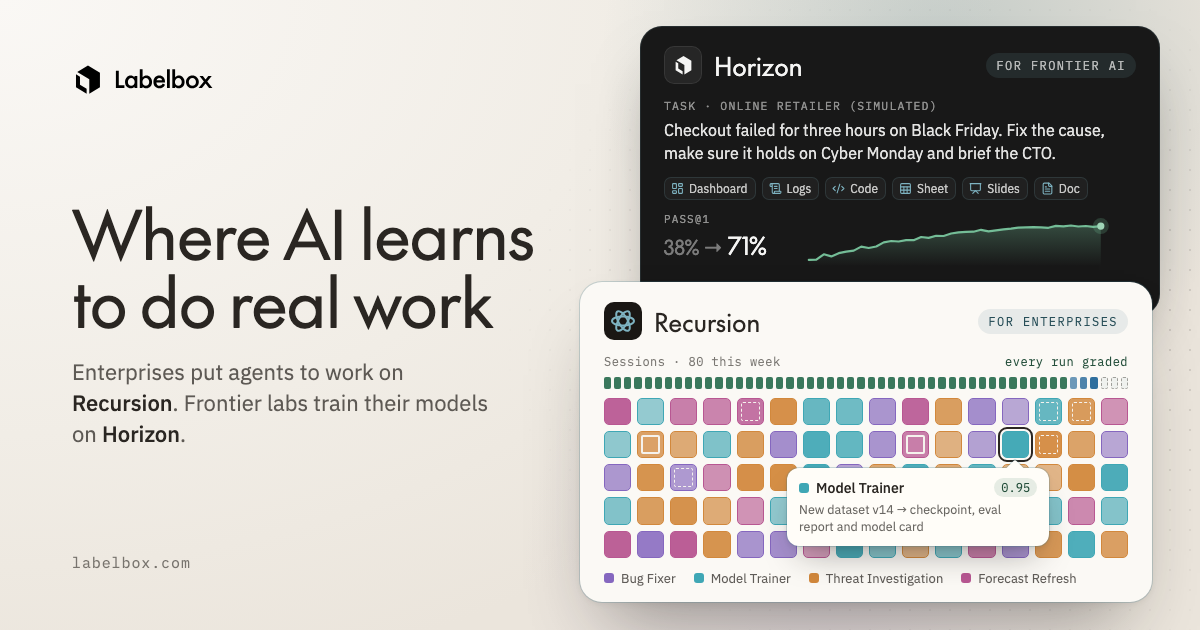
What it sells now. Its homepage leads with Recursion, an agent product for enterprises, and Horizon, for frontier AI. The docs describe Horizon as “data for reinforcement learning, evals and supervised learning”, with labeling projects, managed labeling, a data catalog, model evaluation and a Python SDK. The pages we read do not say whether Horizon handles PDFs or document Q&A specifically, and no pricing or unit costs are shown (the docs mention Labelbox units but give no rate on the pages we read). Ask for both before you plan around it.
- Managed labeling services and expert workforces for evaluation and supervised data.
- Catalog, project and model-evaluation tools plus a Python SDK.
- Strong 2026 funding and a stated 400+ customers (company-reported).
- Fits teams that treat training data as an ongoing operation.
- Public pages now emphasise RL environments and agents over document-to-Q&A.
- No published pricing; sales-led.
- PDF and document support is not documented on the pages we read.
- Overkill for a one-off fine-tune on a single document set.
Standout use case. Building and grading expert-written evaluation sets for a domain model. Skip it if you only need to convert documents to JSONL.
9. Snorkel AI
What it is. Snorkel began as programmatic labeling research and now sells expert-curated data, environments and rubrics for frontier and agentic AI. On Sept 22, 2026 it announced a $350 million Series E at a $3.5 billion valuation, co-led by Insight Partners and S32, with participation from Addition. The release also claims more than $375 million in annual recurring revenue, up more than 18x in under a year. The release spells it “ARRR” and does not define the metric, so treat the figure as company-reported.
I'm excited to announce @SnorkelAI's $350M Series E at $3.5B, led by @insightpartners and @S32_VC. We've grown 18x+ in the last 12 months since launching our Data-as-a-Service offering.
— @ajratner September 22, 2026
How you buy it. The release offers three routes, all conversations: AI data development services (talk to a data researcher), specialized agents (talk to a strategist), and a programme for expert contributors. No prices are published. Expert Data-as-a-Service launched in September 2025 per the same release.
- Delivers finished expert datasets, benchmarks and rubrics rather than tooling you must run.
- Heavy investment in expert workforces and evaluation research.
- Public leaderboards and benchmark grants add some transparency.
- Well capitalised as of Sept 2026.
- Sales-only, no public price list, and aimed at frontier labs and large enterprises.
- Not a self-serve way to turn your own PDFs into JSONL.
- Revenue and growth numbers are company-reported and the ARR metric is undefined.
- Minimum engagement size is not public.

Standout use case. A bank or lab that needs expert-written reasoning data in a specialised domain and has a budget for a service engagement. Skip it if you want tooling you can start on today for free.
10. Nanonets
What it is. Nanonets is a document AI company that built its name on invoice and form extraction. Its homepage now leads with AI agents for business processes (accounts payable, reconciliation, claims) and a second product called Trail, and claims use by 35% of the Fortune 500 (company-reported). It also publishes open OCR models: Nanonets-OCR2-3B, a vision-language model that converts document images to structured Markdown with tags for tables, equations, signatures and checkboxes. The model card on Hugging Face is the place to confirm the current licence; sources we saw disagree on it.
Pricing (pricing page, Nov 26, 2026). Starter: free with $50 in credits, then $100 a month buys 100 credits, up to 3 users. Growth: quote, up to 40% volume discount. Enterprise: custom, with SSO, HIPAA and SOC 2 compliance and private cloud. Usage is billed per block run: $0.02 for simple operations, $0.10 for standard AI, $0.30 for complex AI such as data extraction. The page gives no per-page price and says a typical invoice workflow runs 4 to 6 blocks. It does not mention training data or fine-tuning.
- Strong fit for pulling fields out of invoices, POs and similar business documents.
- Free Starter with $50 credits and no card.
- Open OCR models give a self-hosted route to Markdown from scans.
- Enterprise compliance and private-cloud options.
- The product is aimed at business-process automation, not building training sets.
- Block-based billing makes per-page cost hard to compare.
- Pricing page does not describe model training or data export for fine-tuning.
- Open-model licence status should be checked directly.
Standout use case. Extracting structured fields from a pile of invoices to build a classification or extraction dataset. Skip it if your corpus is manuals, reports or policies: a general parser fits better.
Also Considered
These did not get full sections because they are narrower, overlap a tool above, or were covered in depth in our parsing roundup.
- Marker (Datalab). Open-source PDF to Markdown and JSON, 41,085 GitHub stars on Nov 26, 2026, code under Apache-2.0. The README says model weights use a modified OpenRAIL-M licence and are free for research, personal use, and startups under $5M funding or revenue. Read it before shipping commercially.
- MinerU (OpenDataLab). Open-source PDF parser with 84,354 stars. Its licence is Apache 2.0 with extra conditions: a separate licence above 100 million monthly active users or $20 million in monthly revenue, a disclosure duty for online services built on it, and automatic termination if either condition is not met.
- Mistral OCR. Hosted OCR with a flat per-page price; our parsing roundup lists OCR 4.1 at $4 per 1,000 pages with a half-price Batch API.
- Google Document AI. Cloud processors for OCR, layout parsing with chunking and specialised forms; see our roundup for its per-1,000-page prices.
- Meta Synthetic Data Kit. MIT-licensed CLI (ingest, create, curate, save-as) that turns PDFs, HTML, DOCX, PPTX and YouTube transcripts into QA pairs and reasoning traces using an LLM backend such as vLLM. It had about 1.7k stars on the GitHub page we read.
- Datavolo. Mentioned for completeness: Snowflake announced on Nov 20, 2024 that it would acquire Datavolo (the Apache NiFi creators), and its 10-Q reports the acquisition closed on Nov 25, 2024 for about $170 million, mostly in stock. It is no longer an independent product.
For full parser benchmarks and prices, see the OCR and document parsing roundup. If your documents come from the web rather than files, the web scraping API roundup covers that front end, and the data pipeline tools roundup covers orchestration around the whole flow.
Pricing and Cost for 10,000 Pages (as of Nov 26, 2026)
Parsing 10,000 pages at list prices, with the arithmetic shown. Labeling platforms are left out because none publishes a price. This is parsing only: the model that writes your Q&A pairs, your review time, and the fine-tuning run are separate costs.
| Option | Free allowance | Cost for 10,000 pages | Note |
|---|---|---|---|
| Docling | $0 | $0 licence, plus your CPU or GPU time | Rises with OCR or VLM options |
| Unstructured (Fast, legacy) | $150 one-time credit | 10,000 x $0.002 = $20 | Text-only digital PDFs |
| Unstructured (Balanced, default) | Same $150 credit | 10,000 x $0.010 = $100 | Credit covers 15,000 pages |
| Unstructured (Best) | Same $150 credit | 10,000 x $0.015 = $150 | Credit covers exactly 10,000 pages |
| Reducto r-1 mini | $150 free usage | 10 x $1 = $10 | Credit covers 150,000 pages |
| Reducto r-1 | Same $150 | 10 x $10 = $100 | Credit covers 15,000 pages |
| LlamaParse Fast (1 credit) | 10,000 free credits/mo | 10,000 credits x $1.50/1,000 = $15 | Free tier covers 10,000 pages a month |
| LlamaParse Cost-effective (3 credits) | Same | 30,000 credits x $1.50/1,000 = $45 | Free tier covers about 3,333 pages a month |
| LlamaParse Agentic (10 credits) | Same | 100,000 credits x $1.50/1,000 = $150 | Free tier covers 1,000 pages a month |
| Mistral OCR 4.1 (for reference) | None listed | 10 x $4 = $40 | Price from our OCR roundup; Batch API is half price |
Two reading tips. First, the free allowances differ in kind: Reducto and Unstructured give a one-time dollar credit, while LlamaParse resets 10,000 credits every month. Second, LlamaParse's Pro plan at $500 a month includes 400,000 credits, which is 133,333 Cost-effective pages or 40,000 Agentic pages before overage; compare that against pay-as-you-go at $1.50 per 1,000 credits ($600 for 400,000). Pro also lowers the overage rate to $1.25.
Feature Matrix
| Tool | Parses PDFs | Chunking | Generates data | Human review | Fine-tune or eval | Self-host | Free tier |
|---|---|---|---|---|---|---|---|
| Docling | Yes | Yes | Yes | No | No | Self-host | Free |
| Unstructured | Yes | Yes | Partial | No | No | Self-host (library) | Credit |
| Reducto | Yes | Partial | Partial | No | No | Enterprise | Credit |
| LlamaParse | Yes | Partial | Partial | No | No | No | Credits |
| Kiln AI | Partial | No | Yes | Yes | Yes | Local-first | Free |
| Argilla and distilabel | No | No | Yes | Yes | Yes | Self-host | Free |
| Encord | No | No | No | Yes | Partial | Enterprise | No |
| Labelbox | No | No | No | Yes | Partial | No | No |
| Snorkel AI | No | No | No | Yes | Partial | No | No |
| Nanonets | Yes | No | No | No | No | Enterprise | Credit |
“Partial” means a capability exists but is limited or not documented for this use. Kiln's parsing is partial because it indexes documents for RAG but expects parsed text for training data; Reducto and LlamaParse chunking is partial because it is layout-aware chunking for retrieval, not a training-data splitter. Encord, Labelbox and Snorkel “Partial” under fine-tune or eval refers to evaluation and data services, not running training jobs.
Best for X
| Situation | Pick | Why |
|---|---|---|
| I have private PDFs and no budget | Docling, then distilabel or Kiln | Everything runs locally; you pay only for the model that writes the Q&A. |
| I need to ingest SharePoint, S3 or Confluence at scale | Unstructured | Its connectors and pipeline are the product; the parser is one step. |
| My documents are dense financial tables and forms | Reducto or LlamaParse Agentic | Both bill per page with a vision model; test both on 50 of your own pages. |
| I want one app that goes from data to fine-tune to eval | Kiln AI | Synthetic data, fine-tuning and evals share one dataset; pair it with a parser. |
| Experts must review every generated answer | Argilla (with distilabel upstream) | Free annotation UI with filters and AI suggestions; export back to JSONL. |
| I need a managed workforce and audit trail | Encord or Labelbox | Sales-led; ask for a pilot on a small, representative sample. |
| I want finished expert datasets, not tooling | Snorkel AI | A data service for frontier labs and enterprises; expect enterprise pricing. |
| My documents are invoices, POs and claims | Nanonets or Reducto Extract | Field extraction is a different job from training-data prep; pick on extraction accuracy. |
Common Mistakes and a Checklist
- Splitting by chunk instead of by document. This leaks test data into training and inflates your score.
- Trusting the parser blindly. Read 50 parsed pages, especially tables and scans, before generating anything. To test a parser against ground truth rather than eyeball it, use the approach in the ExtractBench guide.
- Letting the teacher invent answers. Require answers that are supported by the passage and check key facts against it.
- Skipping deduplication. Generators repeat the same question in many forms; near-duplicates teach the model to overfit.
- Redacting only once. Redact the source before generation and the answers after.
- Ignoring rights. Use documents you own or may use, keep source records, and check the teacher model's terms on training with its outputs.
- Fine-tuning when you need citations. If facts change or you must cite pages, use retrieval and fine-tune only for style and format.
- No baseline. Always compare against the base model with a good prompt on the same held-out set.
Checklist before you train:
- Parsed output reviewed on a sample of hard pages.
- Chunks keep headings and tables intact.
- PII redacted before and after generation, with a manual sample check.
- Generation prompt restricts answers to the passage and allows empty output.
- Near-duplicates removed; quality filter applied; random sample read by a human.
- JSONL validates against your trainer's format.
- Test set split by source document, plus a hand-written question set.
- Source and licence record kept for every document.
How We Evaluated
We read each vendor's live pricing page, documentation and GitHub repository on Nov 26, 2026, and checked funding and acquisition claims against company announcements, filings or multiple outlets, noting where only one source existed. Star counts and push dates come from the GitHub pages or API on the same day. We did not run a hands-on benchmark of these tools for this article and we did not run the worked example end to end; code snippets come from the official docs cited, apart from the labelled glue script. Vendor-reported figures (accuracy, customer counts, revenue) are labelled as such. There are no affiliate links in this ranking. Where a vendor's pages are silent (for example PDF handling at Labelbox, or document generation in Kiln), we say so instead of guessing. Facts about the products change quickly; check the linked pages before you buy.
FAQ
How do I turn a PDF into AI training data?
Parse the PDF into structured text (Markdown or JSON), split it into chunks that respect headings and tables, redact personal data, have a strong model write question and answer pairs or instruction examples from each chunk, filter out duplicates and weak examples, write the result as JSONL in your trainer's chat format, and hold out a test split by source document. The seven-stage section above walks through each step with code.
What format does fine-tuning data need to be in?
Most hosted and open-source trainers accept JSONL where each line is a conversation. OpenAI's supervised fine-tuning guide shows lines like {"messages": [...]} with role and content fields and requires at least 10 lines. Hugging Face TRL documents the same conversational shape plus prompt-completion and preference formats (prompt, chosen, rejected). Check your trainer's current docs before you export.
Which tool should I use to parse PDFs for training data?
For private data and zero licence cost, Docling. For a managed pipeline with many source connectors, Unstructured. For hard tables and forms on a hosted API, Reducto or LlamaParse. Marker and MinerU are open-source alternatives with licence conditions you must read. Our OCR and document parsing roundup compares parsers in more depth.
How many examples do I need?
There is no single sourced number. OpenAI's guide only sets a floor of 10 lines per file. In practice, quality, diversity and coverage matter more than count, so start with a few hundred well-filtered examples, evaluate on a held-out set, and add data where the model fails. That advice is our heuristic, not a vendor figure.
Can I train on documents I do not own?
Not safely by default. Training on third-party documents can raise copyright, contract and privacy questions that depend on your jurisdiction and the licence of the source. Use documents you own or have the right to use, keep a record of where each file came from, and ask a lawyer before using client or customer data. This is general information, not legal advice.
Should I fine-tune or use RAG?
RAG is usually better when facts change often and you need citations, because the model reads the current source at answer time. Fine-tuning is better for style, format, domain vocabulary and consistent behavior. Many teams do both. This post is about the fine-tuning side; the parsing step is shared, so see our OCR roundup and vector database guide for the retrieval side.
How do I avoid leaking test data into training?
Split by source document, not by chunk or by question. If two questions from the same page land on both sides of the split, your evaluation score is inflated. Deduplicate before splitting, and keep the test set out of every later prompt and filter you tune.
Do I need to redact personal data?
If the documents contain names, emails, phone numbers, account numbers or health data, yes, before generation and again on the generated answers. Microsoft's open-source Presidio (MIT, now under the data-privacy-stack GitHub organization) detects and anonymizes PII in text and has an example flow in its docs. Automated detectors miss things, so sample and review the output.
Is Argilla still maintained, and what about distilabel?
Hugging Face announced it was acquiring Argilla in June 2024 and Argilla continues as an open-source Apache-2.0 project, last pushed on Nov 23, 2026. The distilabel README now carries a notice that the original authors have moved on and community collaborators are maintaining it, with active work on the develop branch. Pin versions and check recent commits before building on it.
Why are Labelbox and Nanonets in a training-data comparison if they changed direction?
Both still matter to readers searching for them, but their 2026 positioning has moved. Labelbox's homepage now leads with Recursion agents and Horizon RL environments, and Nanonets leads with business-process AI agents. We cover what each page and its docs actually say today and flag where PDF-to-training-data support is not documented.
What does it cost to parse 10,000 pages?
At list prices on Nov 26, 2026: about $10 on Reducto r-1 mini, $15 on LlamaParse Fast, $20 on Unstructured Fast, $45 on LlamaParse Cost-effective, $100 on Reducto r-1 or Unstructured Balanced, and $150 on Unstructured Best or LlamaParse Agentic. Docling has no licence cost. The model that writes your Q&A pairs is a separate bill.
Sources
All pages were read on Nov 26, 2026 unless noted.
Pricing and product pages
- Reducto pricing, Python SDK overview, Parse r-1 and r-1 mini
- Unstructured pricing, chunking docs, partitioning docs
- LlamaIndex pricing, LlamaParse getting started, OCRia-1.5 announcement
- Kiln pricing, Kiln synthetic data docs
- Encord pricing, Encord generative AI page
- Labelbox, Horizon docs
- Snorkel Series E release
- Nanonets pricing, Nanonets-OCR2 research page
- Argilla docs, distilabel docs
GitHub
- docling-project/docling (MIT, 71,086 stars), chunking docs
- Kiln-AI/Kiln (5,296 stars), argilla-io/argilla (5,215), argilla-io/distilabel (3,470)
- datalab-to/marker (41,085), opendatalab/MinerU (84,354), meta-llama/synthetic-data-kit
- Presidio and its docs
Funding and acquisitions
- Reducto Series B and Cooley
- Unstructured Series B (Business Wire)
- Norwest on LlamaIndex
- Encord Series C
- Labelbox Series E (Pulse 2.0)
- Argilla joins Hugging Face
- Snowflake and Datavolo and the Snowflake 10-Q